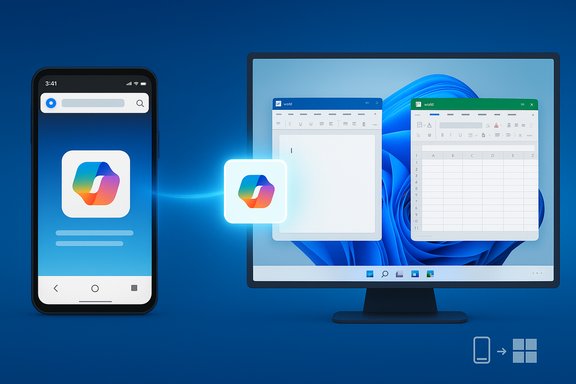
Microsoft’s latest Insider preview, delivered as Windows 11 Build 26220.7271 (KB5070307), expands the OS’s cross-device resume capabilities — allowing more Android phones and apps to hand off activities to a PC — while also introducing point-in-time restore, Fluid Dictation in Voice Typing, early testing of a Click‑to‑Do top bar, and an expanded Xbox Full Screen Experience across more Windows 11 devices.
Microsoft has been steadily building a continuity layer between Android phones and Windows PCs under the Phone Link/Link to Windows umbrella. What began as notification mirroring, SMS replying and photo transfer has gradually evolved into an activity‑handoff model — Cross‑Device Resume — that aims to let you pick up an app activity on your PC that you started on your phone. This is analogous to Apple’s Handoff, but implemented across Android and Windows with partnerships and a developer Continuity SDK. Microsoft’s official Insider announcement for KB5070307 confirms the rollout of several features — including the expanded Cross‑Device Resume scenarios, Click‑to‑Do testing, point‑in‑time restore, and voice‑typing improvements — and explicitly documents which experiences are being gradually rolled out to Insiders who opt in to the faster toggle.
KB5070307 shows Microsoft continuing to stitch mobile and desktop experiences closer together, prioritizing partner‑led scenarios that deliver visible productivity wins. The technical groundwork — the Continuity SDK, Link to Windows, and Phone Link plumbing — is in place, but the real test will be how quickly developers and OEMs adopt the model and how well IT administrators can govern the new cross‑device surfaces. Until then, users should enjoy the convenience where available and treat the feature as an opt‑in productivity booster rather than a universal one‑click solution.
Source: Windows Report Microsoft Expands Cross-Device Resume to More Android Phones & Apps With KB5070307
 Background
Microsoft has been steadily building a continuity layer between Android phones and Windows PCs under the Phone Link/Link to Windows umbrella. What began as notification mirroring, SMS replying and photo transfer has gradually evolved into an activity‑handoff model — Cross‑Device Resume — that aims to let you pick up an app activity on your PC that you started on your phone. This is analogous to Apple’s Handoff, but implemented across Android and Windows with partnerships and a developer Continuity SDK. Microsoft’s official Insider announcement for KB5070307 confirms the rollout of several features — including the expanded Cross‑Device Resume scenarios, Click‑to‑Do testing, point‑in‑time restore, and voice‑typing improvements — and explicitly documents which experiences are being gradually rolled out to Insiders who opt in to the faster toggle. What KB5070307 (Build 26220.7271) adds — quick summary
- Expanded Cross‑Device Resume support: resume browsing from vivo Browser to the PC’s default browser, and resume Microsoft 365 Copilot online files from Honor, Huawei, Oppo, Samsung and vivo phones to desktop Word/Excel/PowerPoint or the browser (offline phone‑stored files not yet supported).
- Click‑to‑Do top bar: Microsoft has started early testing of a lightweight command bar intended to speed common tasks.
- Point‑in‑time restore: a new recovery option for rolling the OS back to a previous known good state.
- Fluid Dictation in Voice Typing: on‑device small language models will clean up punctuation and filler words in near real‑time for supported devices.
- Xbox Full Screen Experience (FSE): broader availability across more Windows 11 devices, prioritizing controller‑first, distraction‑free gaming.
Cross‑Device Resume: what it is, and what changed in KB5070307
How Cross‑Device Resume works (under the hood)
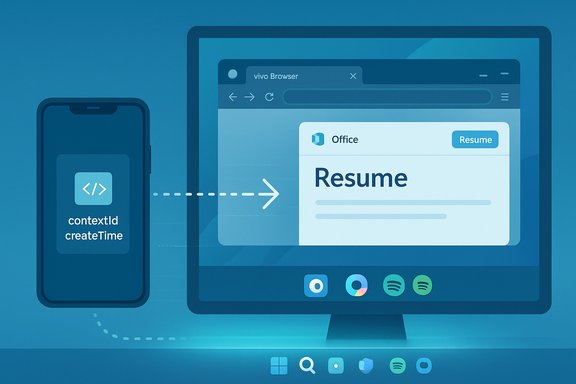
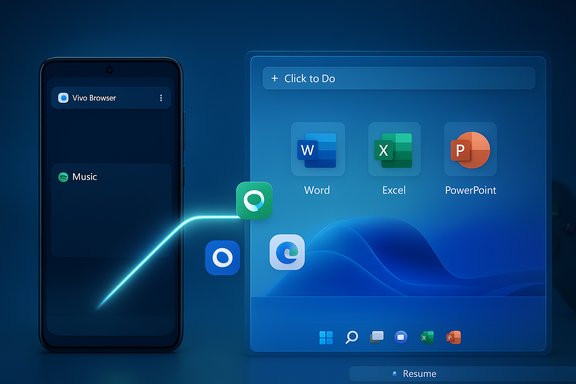
Cross‑Device Resume is implemented as a continuity handshake between an Android phone (running Link to Windows) and a Windows 11 PC (Phone Link components and a system service that surfaces “Resume” alerts). When a supported activity occurs on the phone — for example, playing music in Spotify, browsing in vivo Browser, or viewing an online M365 Copilot file — the phone can emit a small activity descriptor to Windows. Windows then maps that descriptor to a corresponding desktop handler:- If a native desktop app is installed (e.g., Spotify, Word, Excel, PowerPoint), Windows opens the native app to the matching activity/state.
- If no native handler exists, Windows opens the corresponding URL in the PC’s default browser as a fallback.
What KB5070307 actually expands
The most visible change in Build 26220.7271 is a broader partner set for resume scenarios. After Spotify was the first widely public example, KB5070307 adds:- vivo Browser → resume browsing activity to the PC’s default browser (vivo phones).
- M365 Copilot app → resume online Word/Excel/PowerPoint files from Honor, Huawei, Oppo, Samsung and vivo phones; desktop Office apps will open files if installed, otherwise the PC will fall back to the browser. (Note: offline files stored locally on the phone are not supported yet.
Developer and OEM constraints: why this won’t work for every app or phone
Limited Access & developer onboarding
The Continuity SDK requires partner onboarding: apps must meet scenario requirements, declare metadata, and obtain approval from Microsoft to interoperate with Link to Windows. That means developers can’t opt in unilaterally; they must apply for access and meet technical prerequisites (minimum Android SDKs and Link to Windows versions). Microsoft explicitly treats Cross‑Device Resume as a Limited Access Feature, which shapes which apps and vendors appear first.OEM dependency and Link to Windows versions
A number of resume experiences rely on tight OEM cooperation. Samsung, vivo, Honor, Huawei and Oppo have been named in rollout messaging because their Link to Windows integration (or preinstalled vendor clients) supports the necessary APIs and metadata flow. Phones running older Android releases or lacking an updated Link to Windows package will not support the new resume scenarios. Community testing and forums repeatedly show differences across OEMs and OS versions.iOS remains out of scope for now
The Continuity SDK documentation notes that iOS is not yet supported for integration. That’s an important practical limitation for users who maintain iPhone/Windows workflows — Apple’s Handoff remains a Mac/iOS feature set without equivalent Windows‑iPhone parity today.Click‑to‑Do, Fluid Dictation, and point‑in‑time restore — why they matter
Click‑to‑Do: a new micro‑command surface
The Click‑to‑Do top bar is an experimental, lightweight command bar intended to accelerate common tasks. Early testing suggests Microsoft is exploring a compact, quick-access surface for commands without launching full apps. Because this is in early testing and gated by device and market, the experience and availability will vary.Fluid Dictation: on‑device AI for better voice typing
Fluid Dictation brings on‑device small language models to voice typing on capable Windows devices (Copilot+ / NPU‑equipped machines). The feature automatically corrects punctuation, grammar and filler words as you dictate — an accessibility and productivity improvement for users who prefer voice input or rely on dictation for hands‑free workflows. Because processing is on device, Microsoft positions this as a faster and more private alternative to cloud transcription.Point‑in‑time restore: faster, safer recovery
Point‑in‑time restore adds a more granular rollback option to Windows Recovery flows, allowing admins and users to restore a device to a prior known good state, including apps, settings and user files. This is a meaningful step for IT resiliency and consumer troubleshooting because it reduces the friction of full reinstallation or long repair sequences. Enterprises should evaluate the strategy and how it integrates with existing backup and imaging workflows.Strengths: where Microsoft is getting this right
- Integrated continuity model — Mapping mobile activities to desktop handlers (native apps first, browser fallback second) preserves user workflows and delivers a predictable UX. This reduces friction for users who switch between phone and PC frequently.
- OEM partnerships accelerate practical availability — Working with device makers like Samsung, vivo, Honor and others yields deeper integrations that are harder to accomplish with a generic platform-only approach. That partnership model yields higher‑quality experiences on supported devices.
- Developer control and privacy — The Continuity SDK’s limited‑access model and on‑device dictation approach give Microsoft a gate to manage privacy, abuse, and quality before broad public exposure. Fluid Dictation’s on‑device model is a privacy plus when compared to always‑cloud transcription.
Risks and caveats: security, enterprise and user concerns
- Server‑gated rollout and inconsistent availability. Staged enabling means even Insiders with the right build may not see features; enterprises testing feature pipelines must account for unpredictability.
- Data flow and privacy surface expansion. Cross‑device resume increases the number of surfaces where activity metadata and context are transmitted. Enterprises handling regulated data should evaluate telemetry, encryption and retention of activity descriptors. Microsoft’s guidance and community testing indicate policy and MDM controls will need updates to manage exposure.
- Limited app coverage and developer access friction. The Continuity SDK’s limited access model means many apps won’t ever support resume unless their developers prioritize integration and secure approval. That can produce user confusion if expected apps don’t behave as advertised.
- Dependency on vendor implementations. OEM cooperation is essential; differences in Link to Windows packaging and Android vendor customizations mean behavior will be uneven across devices and regions. Community reports repeatedly highlight uneven behavior and intermittent disconnects caused by aggressive battery management on phones.
Enterprise implications and recommended governance
- Pilot in a controlled ring: select a small group of users to test Cross‑Device Resume and Click‑to‑Do scenarios before broader deployment. Capture feedback and logs to evaluate edge cases.
- Update MDM/Group Policy: review existing policies for Phone Link, Link to Windows, and any new controls Microsoft surfaces for Cross‑Device Resume. Implement blocking or allow‑lists for sensitive endpoints where necessary.
- Verify compliance: ensure activity metadata flows conform to your organization’s data handling and retention rules. For regulated industries, avoid exposing sensitive workloads to cross‑device handoff until validated.
- Educate users: provide short internal guidance explaining how Resume works, how to disable it, and what data types are not supported (for example, KB5070307 explicitly notes that offline, locally stored phone files are not supported in the M365 Copilot resume flow).
Practical guidance: enabling, disabling and troubleshooting Resume
- To check the feature: navigate to Start > Settings > Apps > Resume (or Settings > Bluetooth & devices > Mobile devices depending on build variations) and verify Cross‑Device Resume or “Instantly access your mobile devices” toggles. Community guides provide registry and Group Policy workarounds for admins who want to centrally control the feature.
- Troubleshooting checklist:
- Ensure Link to Windows on the phone and Phone Link on the PC are up to date.
- Sign in with the same Microsoft account on both endpoints where required.
- Exempt Link to Windows from aggressive battery optimizations.
- Use 5 GHz Wi‑Fi and keep both devices on the same local network to minimize latency for app streaming.
- If Resume doesn’t appear, confirm you’re enrolled in the Dev/Beta Insider channels and have the “get latest updates as they are available” toggle on — features are still server‑gated.
- If CrossDeviceResume.exe or similar system processes appear in Task Manager and cause concerns, Microsoft documentation and Q&A threads clarify these are part of Phone Link/Resume components and can be disabled by turning off Resume in Settings. Deleting system binaries is not recommended.
What users should expect next
Expect a measured, vendor‑partnered expansion of resume scenarios: additional OEMs and apps will join gradually, but full parity across all major apps and phones will take time because of the Continuity SDK’s limited access policy and the need for partner integration work. Microsoft is prioritizing scenarios that map well to desktop handlers (Office suite, music players, common browser flows) while limiting exposure for offline or sensitive local phone data. Third‑party reporting and community testbeds indicate the feature has matured from demo to practical testing, but the staged rollout, dependency on Link to Windows versions, and requirement for developer onboarding will keep adoption incremental.Verdict: incremental progress with real utility — but governance required
KB5070307 is an evolutionary rather than revolutionary update. The addition of vivo Browser and expanded M365 Copilot resume scenarios demonstrates Microsoft’s pragmatic approach: partner first, scale later. That gives early users real productivity wins — continuing an in‑progress document or picking up Spotify playback seamlessly — but it also introduces governance and privacy considerations that must be addressed before broad enterprise adoption.- For enthusiasts and early adopters, the experience is compelling: faster context switching, fewer transfers, and deeper integration between phone and PC.
- For IT and security teams, the update is a call to update policies, pilot carefully, and validate data flows before enabling wide usage.
Final recommendations
- If you’re an Insider and want to try the new Resume experiences, install KB5070307, opt into the faster Insider toggle if you want early access, and pair a supported phone with Link to Windows. Follow the troubleshooting steps above if resume alerts don’t appear.
- If you manage Windows devices in an organization, pilot the feature in a test ring, evaluate privacy implications, and prepare MDM controls to disable Resume where appropriate. Document workflows that might unintentionally expose sensitive content via cross‑device descriptors.
- Developers interested in integrating with Cross‑Device Resume should review the Continuity SDK and apply for Limited Access approval; expect Microsoft to require screenshots, manifest metadata, and a clear UX description as part of onboarding. iOS integrations are not supported today, which narrows cross‑platform parity.
KB5070307 shows Microsoft continuing to stitch mobile and desktop experiences closer together, prioritizing partner‑led scenarios that deliver visible productivity wins. The technical groundwork — the Continuity SDK, Link to Windows, and Phone Link plumbing — is in place, but the real test will be how quickly developers and OEMs adopt the model and how well IT administrators can govern the new cross‑device surfaces. Until then, users should enjoy the convenience where available and treat the feature as an opt‑in productivity booster rather than a universal one‑click solution.
Source: Windows Report Microsoft Expands Cross-Device Resume to More Android Phones & Apps With KB5070307