

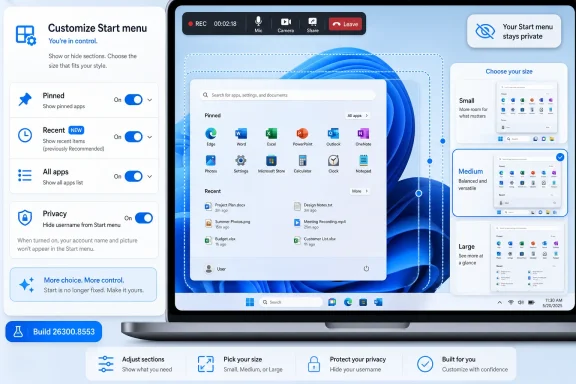
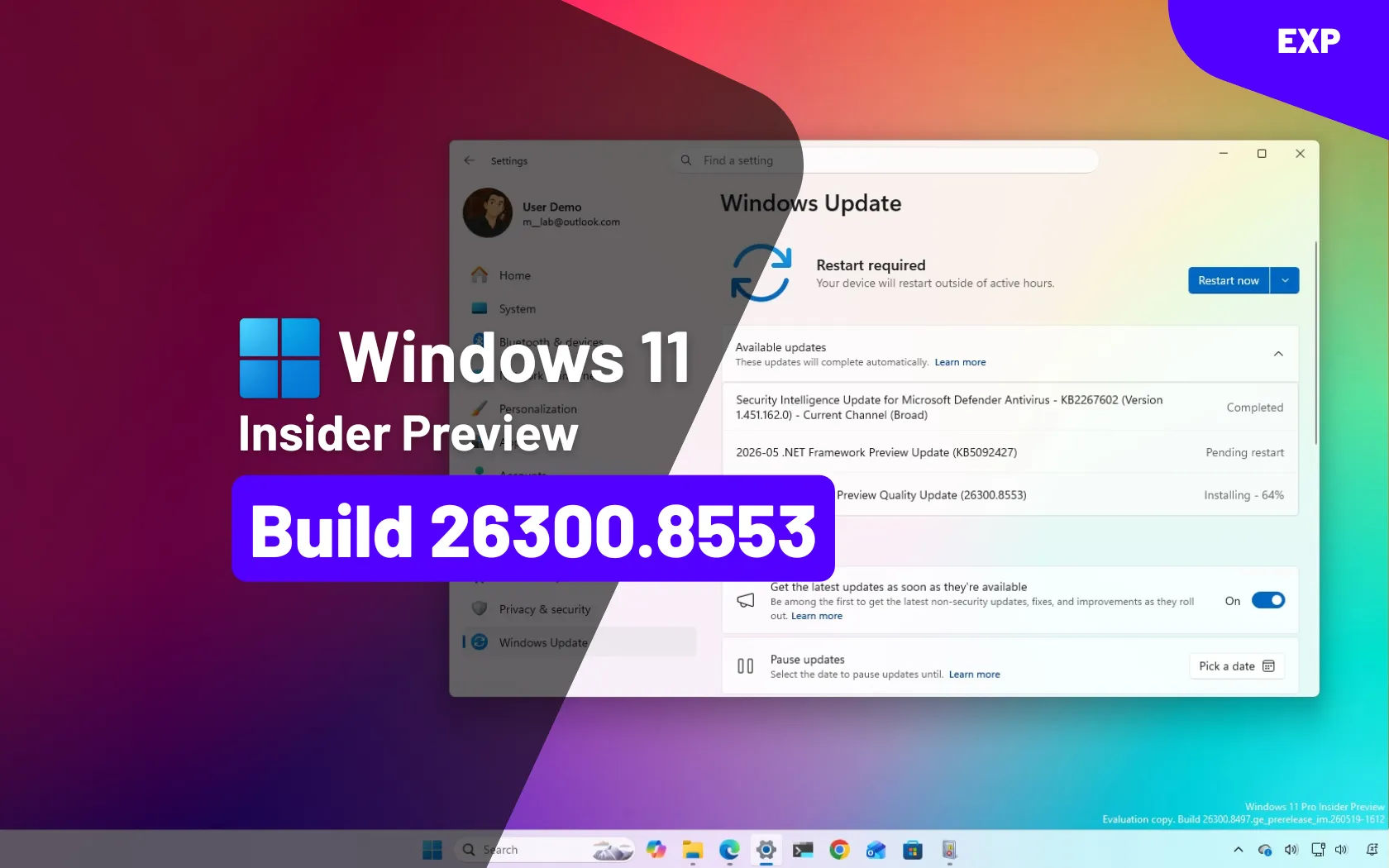
Microsoft released Windows 11 Insider Preview Build 26300.8553 on May 29, 2026, adding new Start menu customization controls in the Experimental channel, including section toggles, size presets, a renamed Recent area, and an option to hide the user name from the menu. The headline is not that Start suddenly became perfect. It is that Microsoft is finally treating one of Windows 11’s most controversial surfaces as something users should be allowed to shape. After nearly five years of telling people to accept the new Start menu on Microsoft’s terms, the company is now testing a version that admits the old complaints were not nostalgia so much as product feedback.
The Windows 11 Start menu has always carried more symbolic weight than its modest footprint suggests. It is the front door to the operating system, the place where Microsoft reveals how much it trusts users to make their own choices. In Windows 11’s original design, that trust was rationed.
The centered, simplified Start menu was meant to look modern, calm, and touch-friendly. It also removed much of the plasticity that made Windows feel like Windows. The Windows 10 Start menu could be stretched, rearranged, filled with tiles, stripped down, or turned into something approaching a personal dashboard. Windows 11 replaced that with a fixed panel, a grid of pinned apps, and a recommendations area that many users immediately tried to remove.
That is why Build 26300.8553 matters even though it is still a preview build. Microsoft is not merely adding a cosmetic toggle. It is acknowledging that Start is not a poster image for the design team; it is daily infrastructure. If the menu wastes space, exposes recent files during a screen share, buries installed apps, or insists on showing sections a user never asked for, the annoyance is repeated dozens of times a day.
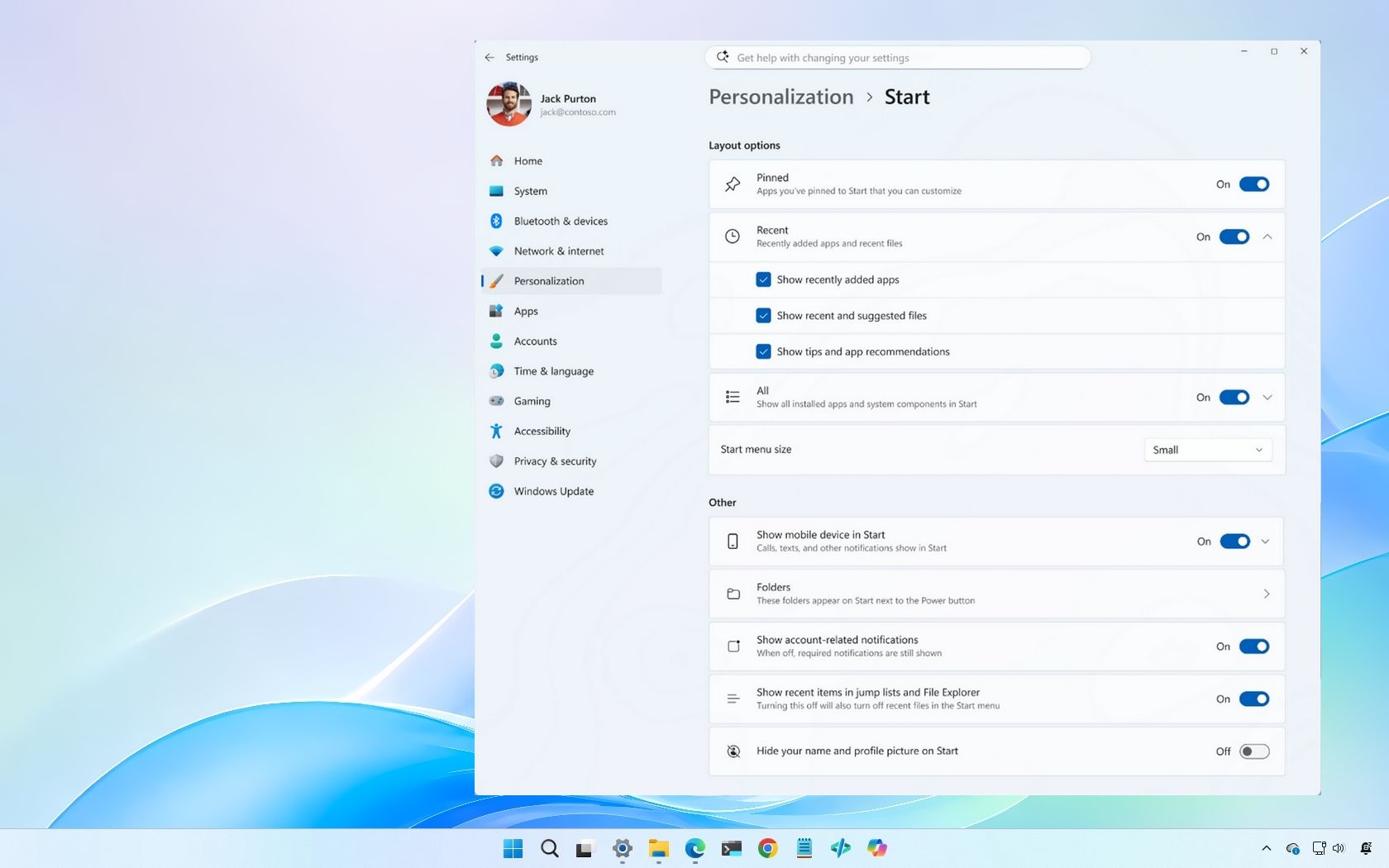
The new settings give users the ability to show or hide major parts of Start: pinned apps, the renamed Recent section, and the All apps list. That sounds obvious, almost embarrassingly so. But in Windows 11 terms, it is a philosophical reversal.
Renaming the area to “Recent” is a small but telling concession. It makes the feature sound less like a feed and more like a utility. A list of recently used items can be useful; a recommendation engine in the Start menu invites suspicion, especially in an era when operating systems increasingly blur the line between local productivity and promotional real estate.
The deeper change is that the section can be disabled as part of the modular Start layout. Users who want a launcher can have a launcher. Users who rely on recently opened documents can keep that workflow. Users who share screens, record tutorials, or simply dislike having file history visible every time they open Start can remove it.
This is the sort of customization Windows should have had from the beginning. It does not require a grand redesign or a new AI model. It requires the humility to accept that a Start menu is not the same thing for every user.
At first glance, this is ridiculous. A Start menu with no apps, no recent files, and no app list is not much of a Start menu. It is closer to a design experiment or a prank played on the shell team.
But the fact that Microsoft allows this is also encouraging. Good customization sometimes permits configurations that most people will never use. The alternative is the old Windows 11 logic: constrain everyone because a small number of choices might create a weird result.
Power users have lived for decades inside those weird results. They hide desktop icons, remove taskbar buttons, replace launchers, disable animations, script deployments, and customize machines into workflows that would look alien to a consumer-device designer. Windows became the default workhorse of personal computing partly because it tolerated those choices. A blank Start menu may be silly, but a system that allows silliness is often more powerful than one that permits only the approved layout.
This is a welcome improvement. One of the long-running complaints about the newer Start design is that it can feel simultaneously too large and too inefficient. A fixed panel that wastes vertical space is especially irritating on laptops, where every pixel is part of the working environment.
Still, presets are not the same as true resizing. Windows 10’s Start menu behaved more like a flexible object: grab an edge, drag, and decide how much room it should occupy. That model had its own messiness, especially with tiles, but it respected the user’s screen, app mix, and tolerance for density.
Microsoft’s new approach is safer. It is also more paternalistic. Small, large, and automatic modes are easier to test, easier to document, and less likely to break the visual rhythm of Windows 11. But they also preserve the sense that Start remains a curated component rather than a fully user-owned surface.
The practical question is whether most users will care. For many, a compact mode and a larger mode may be enough. For enthusiasts and administrators who remember what Windows customization used to feel like, the new sizing controls will look like progress wrapped in a guardrail.
Screen recording is no longer a niche behavior. Workers present desktops in video calls, teachers record lessons, creators make tutorials, and IT staff capture repro steps for support tickets. Displaying a full name or account label in a prominent system surface is often unnecessary exposure.
The toggle also reflects a broader truth about operating system design: privacy does not always mean encryption, sandboxing, or exploit mitigation. Sometimes it means giving people control over what is visible in ordinary moments. A username in Start is not a breach, but it can be an avoidable disclosure.
This is where Microsoft’s change feels mature. It does not overpromise. It simply removes one more piece of unwanted identity leakage from a UI that appears constantly in public, semi-public, and recorded contexts.
On the other hand, many users already launch apps through Search, taskbar pins, desktop shortcuts, PowerToys Run, package-manager commands, or third-party launchers. For them, All apps is not a necessity; it is a drawer they rarely open. Hiding it makes sense if the Start menu is being used as a focused launch pad rather than a full catalog.
The awkward part is discoverability. If a user hides All apps and later installs something new, they may need to rely on Windows Search or another route to find and pin it. That is not impossible, but it does expose the tension in Microsoft’s design: Start is being made modular before every workflow around it feels equally coherent.
For managed environments, the toggle could be useful. A kiosk-like or narrowly scoped desktop may benefit from hiding the full application list while leaving a small set of pinned apps visible. But that same flexibility will require administrators to think carefully about supportability. A hidden All apps list may reduce clutter for one user and create confusion for another.
When apps such as game clients, creative tools, messaging apps, and utilities are dumped into a generic “Other” category, the feature stops being organization and becomes decoration. A category system is only as good as its confidence. If too much ends up in the junk drawer, users learn to ignore the whole system.
This is one place where Microsoft’s AI ambitions could actually be useful if applied with restraint. Not every Windows feature needs a Copilot button, and not every workflow benefits from a chatbot. But local, privacy-conscious classification of installed apps is exactly the sort of mundane intelligence that could improve the shell without turning it into theater.
The better answer may be even simpler: let users move apps between categories. If Windows guesses wrong, the user should be able to correct it. The operating system does not need to be omniscient if it is editable.
This matters because Microsoft has increasingly trained users to treat search as the universal launcher. If Start becomes more modular and users hide All apps or reduce pinned items, search becomes even more important. The smoother the handoff, the more believable the new Start menu becomes.
Windows Search has improved over the years, but its reputation remains mixed for good reason. Local app and file search can feel inconsistent, web integration can feel intrusive, and the interface has long seemed more interested in being a portal than a precision tool. For IT pros, the issue is not merely aesthetics. Search behavior affects training, troubleshooting, and user confidence.
A customizable Start menu paired with a messy search experience is only half a solution. Microsoft can let users remove clutter from Start, but if the replacement path is an unpredictable search panel, the company has merely relocated the friction.
A clean interface can still be flexible. It can expose advanced options without overwhelming normal users. It can choose sensible defaults while allowing departures. Windows has historically done this better than many platforms, sometimes to a fault.
The early Windows 11 Start menu felt like a product of a company trying to impose coherence after years of sprawl. That instinct was understandable. But the execution landed hardest on the users most likely to notice: enthusiasts, administrators, developers, and people who build muscle memory around small efficiencies.
The new Start customization work suggests Microsoft has become more willing to separate the default experience from the permitted experience. That distinction is crucial. Most users will never turn off every Start section or obsess over app columns. But the ability to do so changes the relationship between the operating system and its most demanding users.
That caveat matters more with shell features than with many under-the-hood changes. The Start menu is highly visible, heavily localized, and tied to telemetry, policy, accessibility, app installation, search, identity, and enterprise customization. A feature that works for testers in May can still arrive later than expected, arrive differently, or be staged across markets and device classes.
Administrators should therefore treat the build as a signal, not a deployment plan. The signal is strong: Microsoft is investing in a more configurable Start menu. The exact policy controls, default states, rollout timing, and interaction with managed layouts remain the details to watch.
For enthusiasts, the calculus is different. Preview builds are where the fun is, but they are also where shell experiments can be rough. Anyone installing Experimental builds for Start menu customization should do so because they want to test, not because they need a stable daily driver.
A modular Start menu could help organizations build cleaner default experiences. A company might show pinned business apps, hide consumer-facing recent content, and reduce visual clutter for frontline workers. Schools, call centers, labs, and shared-device environments could all benefit from Start layouts that do less.
But flexibility without policy is just drift. If every user can create a different Start menu and the help desk has no reliable way to reason about what they are seeing, support gets harder. The ideal version of this feature gives users room while giving administrators a way to define baselines.
Microsoft has spent years nudging Windows management toward cloud policy, provisioning packages, and modern device management. Start customization needs to fit that world cleanly. Otherwise, what looks like empowerment on a personal PC can become another variable in the enterprise troubleshooting matrix.
That memory is powerful because Start is muscle memory. People do not evaluate it like a new app. They evaluate it in tiny bursts of irritation or satisfaction across thousands of interactions. A missing resize handle, an unwanted recommendation, or a poorly classified app becomes part of the emotional texture of the OS.
Windows 11 has made real gains since launch. The taskbar has recovered some lost functionality, Start has been revised, and the operating system as a whole has become more capable. But those repairs have also reinforced the criticism that Windows 11 shipped with avoidable regressions.
The new Start settings are therefore both progress and evidence. They show Microsoft responding to users. They also show that users were right to complain.
The modular Start menu does not abandon Windows 11’s design language. It does not restore Live Tiles, bring back the Windows 10 menu, or turn the shell into a free-for-all. It simply loosens the grip.
That restraint may be why the feature has a real chance. Microsoft does not have to admit that the original Start menu was wrong in every respect. It only has to accept that one fixed composition cannot serve hundreds of millions of users.
This is the healthier version of Windows evolution: keep the default polished, then let people diverge. It is not radical. It is the bargain Windows should never have forgotten.
 Microsoft Finally Lets Start Become a User Interface Again
The Windows 11 Start menu has always carried more symbolic weight than its modest footprint suggests. It is the front door to the operating system, the place where Microsoft reveals how much it trusts users to make their own choices. In Windows 11’s original design, that trust was rationed.The centered, simplified Start menu was meant to look modern, calm, and touch-friendly. It also removed much of the plasticity that made Windows feel like Windows. The Windows 10 Start menu could be stretched, rearranged, filled with tiles, stripped down, or turned into something approaching a personal dashboard. Windows 11 replaced that with a fixed panel, a grid of pinned apps, and a recommendations area that many users immediately tried to remove.
That is why Build 26300.8553 matters even though it is still a preview build. Microsoft is not merely adding a cosmetic toggle. It is acknowledging that Start is not a poster image for the design team; it is daily infrastructure. If the menu wastes space, exposes recent files during a screen share, buries installed apps, or insists on showing sections a user never asked for, the annoyance is repeated dozens of times a day.
The new settings give users the ability to show or hide major parts of Start: pinned apps, the renamed Recent section, and the All apps list. That sounds obvious, almost embarrassingly so. But in Windows 11 terms, it is a philosophical reversal.
The Recommendation Box Lost the Naming War
The old “Recommended” label was always doing too much work. It implied that Windows was making helpful suggestions, but the section often behaved more like a catchall for recent files, recently installed apps, and whatever Microsoft believed belonged in the user’s path. Many users did not see recommendation; they saw clutter.Renaming the area to “Recent” is a small but telling concession. It makes the feature sound less like a feed and more like a utility. A list of recently used items can be useful; a recommendation engine in the Start menu invites suspicion, especially in an era when operating systems increasingly blur the line between local productivity and promotional real estate.
The deeper change is that the section can be disabled as part of the modular Start layout. Users who want a launcher can have a launcher. Users who rely on recently opened documents can keep that workflow. Users who share screens, record tutorials, or simply dislike having file history visible every time they open Start can remove it.
This is the sort of customization Windows should have had from the beginning. It does not require a grand redesign or a new AI model. It requires the humility to accept that a Start menu is not the same thing for every user.
A Blank Start Menu Is Absurd, but the Absurdity Is the Point
One of the strangest details in the new preview is that Microsoft reportedly allows users to turn off every Start menu section. If all sections are disabled, Start displays a message saying the sections are off and points the user back to settings. If the Pinned section remains enabled but all pinned apps are removed, users can effectively create a blank Start menu.At first glance, this is ridiculous. A Start menu with no apps, no recent files, and no app list is not much of a Start menu. It is closer to a design experiment or a prank played on the shell team.
But the fact that Microsoft allows this is also encouraging. Good customization sometimes permits configurations that most people will never use. The alternative is the old Windows 11 logic: constrain everyone because a small number of choices might create a weird result.
Power users have lived for decades inside those weird results. They hide desktop icons, remove taskbar buttons, replace launchers, disable animations, script deployments, and customize machines into workflows that would look alien to a consumer-device designer. Windows became the default workhorse of personal computing partly because it tolerated those choices. A blank Start menu may be silly, but a system that allows silliness is often more powerful than one that permits only the approved layout.
Size Presets Are Better Than Nothing and Worse Than Resizing
The second big change is Start menu sizing. Build 26300.8553 introduces size options that let users switch between smaller and larger layouts. The larger view can show more pinned apps and app categories, while the smaller one tightens the menu into a more compact footprint.This is a welcome improvement. One of the long-running complaints about the newer Start design is that it can feel simultaneously too large and too inefficient. A fixed panel that wastes vertical space is especially irritating on laptops, where every pixel is part of the working environment.
Still, presets are not the same as true resizing. Windows 10’s Start menu behaved more like a flexible object: grab an edge, drag, and decide how much room it should occupy. That model had its own messiness, especially with tiles, but it respected the user’s screen, app mix, and tolerance for density.
Microsoft’s new approach is safer. It is also more paternalistic. Small, large, and automatic modes are easier to test, easier to document, and less likely to break the visual rhythm of Windows 11. But they also preserve the sense that Start remains a curated component rather than a fully user-owned surface.
The practical question is whether most users will care. For many, a compact mode and a larger mode may be enough. For enthusiasts and administrators who remember what Windows customization used to feel like, the new sizing controls will look like progress wrapped in a guardrail.
The Username Toggle Solves a Real but Narrow Problem
The option to hide the user name in Start will not change how most people use Windows. It will not speed up the shell, fix search, or make app discovery better. It is, however, the kind of privacy polish that should be normal in 2026.Screen recording is no longer a niche behavior. Workers present desktops in video calls, teachers record lessons, creators make tutorials, and IT staff capture repro steps for support tickets. Displaying a full name or account label in a prominent system surface is often unnecessary exposure.
The toggle also reflects a broader truth about operating system design: privacy does not always mean encryption, sandboxing, or exploit mitigation. Sometimes it means giving people control over what is visible in ordinary moments. A username in Start is not a breach, but it can be an avoidable disclosure.
This is where Microsoft’s change feels mature. It does not overpromise. It simply removes one more piece of unwanted identity leakage from a UI that appears constantly in public, semi-public, and recorded contexts.
The All Apps Toggle Is the Most Controversial Freedom
The ability to hide the All apps list is the change most likely to divide users. On one hand, All apps is the closest thing Start has to an inventory of installed software. Remove it, and Start becomes less of a complete launcher and more of a curated panel.On the other hand, many users already launch apps through Search, taskbar pins, desktop shortcuts, PowerToys Run, package-manager commands, or third-party launchers. For them, All apps is not a necessity; it is a drawer they rarely open. Hiding it makes sense if the Start menu is being used as a focused launch pad rather than a full catalog.
The awkward part is discoverability. If a user hides All apps and later installs something new, they may need to rely on Windows Search or another route to find and pin it. That is not impossible, but it does expose the tension in Microsoft’s design: Start is being made modular before every workflow around it feels equally coherent.
For managed environments, the toggle could be useful. A kiosk-like or narrowly scoped desktop may benefit from hiding the full application list while leaving a small set of pinned apps visible. But that same flexibility will require administrators to think carefully about supportability. A hidden All apps list may reduce clutter for one user and create confusion for another.
Categories Still Look Like a Good Idea Trapped in a Bad Filing Cabinet
The new Start menu’s category view remains one of the more frustrating parts of the design. In theory, grouping apps by category should reduce scanning and make large software collections easier to navigate. In practice, Windows often struggles to classify third-party desktop applications in a way that feels intelligent.When apps such as game clients, creative tools, messaging apps, and utilities are dumped into a generic “Other” category, the feature stops being organization and becomes decoration. A category system is only as good as its confidence. If too much ends up in the junk drawer, users learn to ignore the whole system.
This is one place where Microsoft’s AI ambitions could actually be useful if applied with restraint. Not every Windows feature needs a Copilot button, and not every workflow benefits from a chatbot. But local, privacy-conscious classification of installed apps is exactly the sort of mundane intelligence that could improve the shell without turning it into theater.
The better answer may be even simpler: let users move apps between categories. If Windows guesses wrong, the user should be able to correct it. The operating system does not need to be omniscient if it is editable.
Search Remains the Seam Microsoft Cannot Hide
The Start menu’s search behavior is still a sore point. Clicking into search can shift the user from Start into the separate Windows Search experience, creating the feeling of being pulled from one interface into another. It is not catastrophic, but it is inelegant.This matters because Microsoft has increasingly trained users to treat search as the universal launcher. If Start becomes more modular and users hide All apps or reduce pinned items, search becomes even more important. The smoother the handoff, the more believable the new Start menu becomes.
Windows Search has improved over the years, but its reputation remains mixed for good reason. Local app and file search can feel inconsistent, web integration can feel intrusive, and the interface has long seemed more interested in being a portal than a precision tool. For IT pros, the issue is not merely aesthetics. Search behavior affects training, troubleshooting, and user confidence.
A customizable Start menu paired with a messy search experience is only half a solution. Microsoft can let users remove clutter from Start, but if the replacement path is an unpredictable search panel, the company has merely relocated the friction.
This Is Microsoft Relearning the Difference Between Clean and Rigid
Windows 11’s original sin was not that it tried to be cleaner. Windows 10 had accumulated enough visual and conceptual baggage to justify a reset. The problem was that Microsoft too often confused clean design with fixed design.A clean interface can still be flexible. It can expose advanced options without overwhelming normal users. It can choose sensible defaults while allowing departures. Windows has historically done this better than many platforms, sometimes to a fault.
The early Windows 11 Start menu felt like a product of a company trying to impose coherence after years of sprawl. That instinct was understandable. But the execution landed hardest on the users most likely to notice: enthusiasts, administrators, developers, and people who build muscle memory around small efficiencies.
The new Start customization work suggests Microsoft has become more willing to separate the default experience from the permitted experience. That distinction is crucial. Most users will never turn off every Start section or obsess over app columns. But the ability to do so changes the relationship between the operating system and its most demanding users.
Preview Builds Are Promises Written in Pencil
It is important to keep the channel in view. Build 26300.8553 is an Insider Experimental build, not a guaranteed production release. Microsoft tests features, changes them, delays them, and sometimes removes them entirely before general availability.That caveat matters more with shell features than with many under-the-hood changes. The Start menu is highly visible, heavily localized, and tied to telemetry, policy, accessibility, app installation, search, identity, and enterprise customization. A feature that works for testers in May can still arrive later than expected, arrive differently, or be staged across markets and device classes.
Administrators should therefore treat the build as a signal, not a deployment plan. The signal is strong: Microsoft is investing in a more configurable Start menu. The exact policy controls, default states, rollout timing, and interaction with managed layouts remain the details to watch.
For enthusiasts, the calculus is different. Preview builds are where the fun is, but they are also where shell experiments can be rough. Anyone installing Experimental builds for Start menu customization should do so because they want to test, not because they need a stable daily driver.
Enterprise IT Will Care Less About Beauty Than Predictability
For corporate desktops, the Start menu is not an emotional object. It is a support surface. Every new customization option can be a benefit, a risk, or both depending on how Microsoft exposes it to management.A modular Start menu could help organizations build cleaner default experiences. A company might show pinned business apps, hide consumer-facing recent content, and reduce visual clutter for frontline workers. Schools, call centers, labs, and shared-device environments could all benefit from Start layouts that do less.
But flexibility without policy is just drift. If every user can create a different Start menu and the help desk has no reliable way to reason about what they are seeing, support gets harder. The ideal version of this feature gives users room while giving administrators a way to define baselines.
Microsoft has spent years nudging Windows management toward cloud policy, provisioning packages, and modern device management. Start customization needs to fit that world cleanly. Otherwise, what looks like empowerment on a personal PC can become another variable in the enterprise troubleshooting matrix.
The Real Competition Is Windows 10’s Memory
Microsoft is not only competing with macOS, ChromeOS, Linux desktops, or third-party launchers. In this case, it is competing with the remembered flexibility of its own previous operating system. Windows 10 may not have been elegant, but many users felt they could bend it.That memory is powerful because Start is muscle memory. People do not evaluate it like a new app. They evaluate it in tiny bursts of irritation or satisfaction across thousands of interactions. A missing resize handle, an unwanted recommendation, or a poorly classified app becomes part of the emotional texture of the OS.
Windows 11 has made real gains since launch. The taskbar has recovered some lost functionality, Start has been revised, and the operating system as a whole has become more capable. But those repairs have also reinforced the criticism that Windows 11 shipped with avoidable regressions.
The new Start settings are therefore both progress and evidence. They show Microsoft responding to users. They also show that users were right to complain.
The Most Interesting Part Is Microsoft’s New Willingness to Back Down
Large platform companies rarely say, “We were too restrictive.” They ship a new option and let the toggle speak for them. That is effectively what is happening here.The modular Start menu does not abandon Windows 11’s design language. It does not restore Live Tiles, bring back the Windows 10 menu, or turn the shell into a free-for-all. It simply loosens the grip.
That restraint may be why the feature has a real chance. Microsoft does not have to admit that the original Start menu was wrong in every respect. It only has to accept that one fixed composition cannot serve hundreds of millions of users.
This is the healthier version of Windows evolution: keep the default polished, then let people diverge. It is not radical. It is the bargain Windows should never have forgotten.
The New Start Menu Still Has to Earn Its Place on Real Desktops
The practical lessons from Build 26300.8553 are clear enough, even if the final release path is not. Microsoft is testing a Start menu that gives users more control over size, visibility, identity, and clutter. The remaining question is whether those controls will feel like a complete rethink or a partial patch over deeper shell problems.- Microsoft is testing Start menu section toggles that can show or hide Pinned, Recent, and All apps independently.
- The old Recommended area is being reframed as Recent, which better matches how many users understand the feature.
- Start menu sizing is improving, but preset sizes still fall short of the free resizing many Windows 10 users remember.
- The ability to hide the user name is a modest but useful privacy improvement for screen sharing and recording.
- Category view still needs better app classification or user-editable categories before it can become a dependable navigation model.
- Windows Search remains the weak seam if Microsoft expects users to rely on it when Start becomes more minimal.
References
- Primary source: Neowin
Published: 2026-06-01T01:20:11.602748

Windows 11 is getting new Start menu customizations, here is a closer look
Windows 11's Start menu is getting a bunch of long-requested features, which are already available for testing. Here is a closer look. www.neowin.net
- Related coverage: windowscentral.com
“A cleaner, more useful Start menu” — Windows 11 is getting 4 upgrades soon
Microsoft is finally fixing some of the biggest frustrations with the Windows 11 Start menu, including resizing and better customization controls. www.windowscentral.com
- Related coverage: notebookcheck.net

Windows 11 Insider Build 26300.8553 finally lets you customize the Start menu
Windows 11 Insider Preview Build 26300.8553 brings a modular Start menu with Small, Large, and Automatic size presets and new privacy tools to the Experimental channel. www.notebookcheck.net
- Official source: learn.microsoft.com

Windows 11 Insider Experimental Preview Build 26300.8553 - Windows Insider Program
Release notes for Windows 11 Insider Experimental Preview Build 26300.8553learn.microsoft.com - Related coverage: windowslatest.com

Tested: Windows 11's new Start menu lets you fully customize it, and it works surprisingly well
Windows 11’s new Start menu finally adds smaller layouts, removable sections, and deeper customization after years of user complaints. www.windowslatest.com
- Related coverage: fdaytalk.com

Windows 11 Finally Lets You Resize the Start Menu
Windows 11 build 26300.8553 adds a modular Start menu with section toggles, resize options, and profile hiding. See every change in the May 2026 Insider builds. www.fdaytalk.com
- Related coverage: pureinfotech.com
Windows 11 build 26300.8553 adds major Start menu upgrades and Search changes
Builds 26300.8553 and 26220.8544 for Windows 11 add Start menu resizing, smarter Search, taskbar fixes, and new loading animations. pureinfotech.com
- Official source: microsoft.com
Start Menu | Microsoft Windows
Get the most out of your Windows 11 experience with the Start menu. With the Start menu, you can save time, and find it faster with enhanced search. Find apps, settings, recommended files, and more.www.microsoft.com
- Related coverage: windowsforum.com

Windows 11 Start Menu Gets New Controls in Experimental Build 26300.8553
Microsoft made its latest Windows 11 Start menu personalization changes available to Insiders on May 29, 2026, through Experimental build 26300.8553, adding new size controls, section-level visibility toggles, a renamed “Recent” area, and privacy options for hiding account identity in Start. The... windowsforum.com
- Related coverage: techradar.com
