

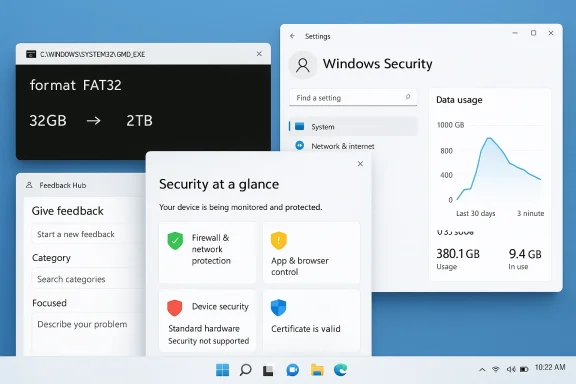
Microsoft’s latest Windows 11 Insider flights are more interesting than their headline count suggests. Build 26300.8170 in Dev and Build 26220.8165 in Beta may be twin releases, but they point to a broader direction: Windows is becoming more permissive where legacy limits used to be rigid, more transparent where status reporting used to be muddy, and more opinionated about how feedback gets collected. The standout change is FAT32 formatting support rising from 32GB to 2TB via the command line, a move that sounds niche until you remember how often removable media, recovery tools, and cross-platform workflows still rely on old file-system assumptions. Microsoft also fixed the absurdly inflated network data usage bug and continued its Secure Boot visibility work, while quietly evolving Feedback Hub into something more usable and more structured.
Windows Insider flights have long served as Microsoft’s public laboratory, but the current generation of Dev and Beta channels is less about isolated experiments and more about the company’s attempt to reshape how Windows itself evolves. That is why a build that appears small at first glance can still carry outsized significance. The Windows 11 preview program now revolves around gradual rollouts, feature toggles, and branch-specific behavior, so the real story is often not what ships to everyone immediately, but what Microsoft is trying to validate before broader release. Flight Hub explicitly notes that the Dev and Beta branches are now built on top of Windows 11, version 25H2, with Dev moving to the 26300 line and Beta to the 26220 line.
That branching matters because it tells us where Microsoft believes risk should live. Dev has become the more exploratory environment, while Beta stays closer to a stabilization track. The company has been increasingly comfortable releasing features to only a subset of Insiders on the same build, which means two machines running identical numbers may expose very different experiences depending on the rollout flag. This is not accidental complexity; it is a product strategy designed to let Microsoft ship faster while avoiding the kind of broad regressions that once haunted Windows servicing.
The timing also matters. Microsoft has already been signaling that Secure Boot certificate updates are a major platform priority, with support pages warning that certificates used by most Windows devices are set to expire starting in June 2026. That makes the new Secure Boot indicators in Windows Security feel less like decorative polish and more like part of a larger readiness campaign. In parallel, Windows 11’s servicing model has been gradually moving more logic into Settings, more status into the UI, and more feedback collection into a simplified pipeline.
Just as importantly, this week’s Dev and Beta releases show Microsoft continuing to treat the Insider rings as a place to test the mundane but consequential parts of Windows: storage navigation, network accounting, security transparency, and feedback submission. Those are not headline-grabbing categories, but they are the ones that determine whether Windows feels trustworthy on a daily basis. In other words, these builds are about operational confidence, not spectacle.
The FAT32 change is the clearest example of that philosophy. FAT32 is a legacy file system, but legacy does not mean irrelevant. It still shows up in boot media, compatibility scenarios, embedded workflows, and cross-platform storage tasks. By raising the command-line formatting ceiling to 2TB, Microsoft is effectively acknowledging that old tooling still needs to function in modern environments, even if the file system itself is an anachronism by contemporary standards. That kind of change is quietly practical and disproportionately useful to administrators and enthusiasts alike.
FAT32 has been constrained for years by tooling and convention more than by user demand. The old 32GB formatting limit was a Windows implementation choice, not a universal truth of the file system, and the new ceiling aligns more closely with what power users and technicians have often tried to do through third-party utilities. Microsoft is essentially saying that if you know what you are doing, Windows should no longer stand in your way as aggressively as before. That is a subtle but important shift in philosophy.
For enterprise and support teams, the bigger win is consistency. When recovery workflows, imaging systems, and deployment scripts behave predictably, there is less need to fall back to custom utilities or ad hoc workarounds. That matters in environments where standardization is the whole game. A small command-line change can shave minutes off a deployment task and eliminate confusion when staff are trying to follow documented procedures.
The broader implication is that Microsoft is not fully abandoning older storage models just because newer ones are better. Instead, it is making Windows more tolerant of legacy use cases. That is a very Windows 11 move: modernize the default, but keep the escape hatches open for the people who still need them. It is also a reminder that “obsolete” storage formats can remain operationally important long after their heyday has passed.
This kind of improvement matters because the Settings app has become the front door for more and more system tasks. If a page takes too long to load, or if it feels sticky when moving between large disks and volumes, users quickly infer that Windows itself is bloated. That may be unfair, but user perception is often shaped by tiny performance cues. Microsoft knows this, which is why these infrastructure-adjacent improvements are worth more than their modest changelog language suggests.
Microsoft also updated Settings > System > Storage so that users no longer get a UAC prompt immediately upon entering the page. Instead, the prompt appears only when they try to view temporary files. That is a better balance between safety and usability. It reduces the sense that Windows is shouting “permission denied” before the user has even done anything meaningful, while still preserving elevation when actually needed.
That is the kind of small UX correction that can shape how people feel about the OS as a whole. Windows has spent years trying to modernize its settings surfaces without losing the guardrails expected by enterprise and security-conscious users. This update suggests Microsoft is getting more comfortable with contextual elevation prompts rather than blanket interruptions.
Data usage pages are especially sensitive because they are supposed to tell users what is happening, not invent a different reality. When the numbers are wildly inflated, the page stops being a utility and becomes a source of confusion. For mobile users, tethered workflows, or anyone on constrained connections, that sort of bug can create unnecessary panic.
This is also one of those fixes that matters differently for consumer and enterprise audiences. Consumers may simply be annoyed by fake usage spikes. Enterprises, however, can face real support load if a diagnostic page is wrong. Helpdesk staff rely on these surfaces when guiding users remotely, and incorrect data can waste time or lead to incorrect remediation. That is why Microsoft’s decision to call out the fix is useful even if the bug itself seemed narrow.
In a broader sense, the bug fix reinforces a theme that is becoming more visible in Windows 11: the operating system is being judged less on flashy additions than on whether it can present truthful, timely, and understandable system state. That is a high bar, but it is the right one for a platform that sits at the center of work, security, and connectivity.
Secure Boot has always been one of those technologies people mostly notice when it breaks. By exposing clearer status indicators, Microsoft is trying to turn a background security mechanism into something visible enough to prompt action before there is a problem. That is a smart move. The best security warnings are the ones that arrive early enough to be useful but not so often that users ignore them.
This is where the new experience becomes strategically significant. Microsoft is not only surfacing a status readout; it is shaping user awareness around a platform transition that could otherwise remain invisible until something goes wrong. The June 2026 Secure Boot deadline has been on Microsoft’s support radar for months, and the company has repeatedly warned that most Windows devices will need updated certificates to avoid disruption. That makes the new UI part of a broader preventive effort, not just a cosmetic refresh.
The change also hints at a wider pattern in Windows 11: more security-critical information is being moved from specialist documentation into ordinary UI surfaces. That can be risky if the messaging is vague, but it is often better than forcing users to discover a major issue from a support article after the fact. In that sense, the Secure Boot badges are an example of security as interface, not just security as policy.
That is a bigger deal than it first appears. Microsoft is not merely changing an app; it is redesigning the system through which it learns what insiders think. If you want higher-quality feedback, you have to reduce the friction that keeps people from filing it in the first place. That means fewer steps, better categories, clearer surfaces, and less cognitive overhead.
The addition of compliment feedback is also worth noting. That gives Microsoft a way to identify what is working well, not just what is broken. Positive feedback can be strategically valuable because it helps distinguish a feature that is merely novel from one that is actually appreciated. It also encourages users to participate even when they are not filing a complaint, which can improve the texture of the feedback pool.
There is a deeper competitive implication here too. Windows has often been criticized for making users feel like they are reporting into a black box. A cleaner, more responsive Feedback Hub is Microsoft’s attempt to make the relationship feel more dialogic. That won’t solve every trust issue, but it does suggest the company understands that polished software is partly about how well it listens.
This matters because Insider users still sometimes think of Beta as “nearly stable Dev.” That is no longer quite accurate. Microsoft is willing to let Dev branch further, particularly when it wants to test UI changes, feedback workflows, and more aggressive feature rollouts. Beta still receives meaningful quality improvements, but it is increasingly the place for a more conservative experience.
For enterprises that track Insider behavior as part of evaluation or training, the divergence is even more important. The Dev branch can surface what Microsoft is trying, while Beta is a better signal for what may actually survive to broader release. In other words, Dev is the lab; Beta is the dress rehearsal.
That separation also helps explain why Microsoft is investing so much in feature toggles and gradual rollouts. The company wants to reduce the blast radius of bad ideas while keeping enough room to validate promising ones. It is not a glamorous model, but it is a sensible one for a product as sprawling and politically complicated as Windows.
None of that is flashy, and that is the point. Windows 11 still gets judged partly by headline features, but the platform’s long-term reputation will be shaped more by whether these small friction points keep disappearing. A modern OS must do more than look current; it must behave in ways that feel coherent, reliable, and respectful of the user’s time. These builds are clearly pushing in that direction.
That is especially relevant in an era when Microsoft is asking users to tolerate a lot more change elsewhere in the ecosystem. The company is continuing to evolve its Insider channels, its security posture, and its update strategy. In that context, small wins in usability become important trust-building assets. They tell users that the platform is not only changing, but paying attention.
It will also be worth watching whether these refinements stay tightly grouped with Dev/Beta servicing or begin to show up in adjacent branches as Microsoft continues to refine its channel model. The company has made it clear that gradual rollout is now part of the default Windows operating philosophy, which means features may arrive in stages even after the build lands. That is probably the right model for a platform with this much surface area, but it also means users need to pay closer attention than they used to.
Source: Neowin Microsoft brings Windows 11 FAT32 2TB support, fixes network data bug, with new builds
 Background
Windows Insider flights have long served as Microsoft’s public laboratory, but the current generation of Dev and Beta channels is less about isolated experiments and more about the company’s attempt to reshape how Windows itself evolves. That is why a build that appears small at first glance can still carry outsized significance. The Windows 11 preview program now revolves around gradual rollouts, feature toggles, and branch-specific behavior, so the real story is often not what ships to everyone immediately, but what Microsoft is trying to validate before broader release. Flight Hub explicitly notes that the Dev and Beta branches are now built on top of Windows 11, version 25H2, with Dev moving to the 26300 line and Beta to the 26220 line.That branching matters because it tells us where Microsoft believes risk should live. Dev has become the more exploratory environment, while Beta stays closer to a stabilization track. The company has been increasingly comfortable releasing features to only a subset of Insiders on the same build, which means two machines running identical numbers may expose very different experiences depending on the rollout flag. This is not accidental complexity; it is a product strategy designed to let Microsoft ship faster while avoiding the kind of broad regressions that once haunted Windows servicing.
The timing also matters. Microsoft has already been signaling that Secure Boot certificate updates are a major platform priority, with support pages warning that certificates used by most Windows devices are set to expire starting in June 2026. That makes the new Secure Boot indicators in Windows Security feel less like decorative polish and more like part of a larger readiness campaign. In parallel, Windows 11’s servicing model has been gradually moving more logic into Settings, more status into the UI, and more feedback collection into a simplified pipeline.
Just as importantly, this week’s Dev and Beta releases show Microsoft continuing to treat the Insider rings as a place to test the mundane but consequential parts of Windows: storage navigation, network accounting, security transparency, and feedback submission. Those are not headline-grabbing categories, but they are the ones that determine whether Windows feels trustworthy on a daily basis. In other words, these builds are about operational confidence, not spectacle.
The FAT32 change is the clearest example of that philosophy. FAT32 is a legacy file system, but legacy does not mean irrelevant. It still shows up in boot media, compatibility scenarios, embedded workflows, and cross-platform storage tasks. By raising the command-line formatting ceiling to 2TB, Microsoft is effectively acknowledging that old tooling still needs to function in modern environments, even if the file system itself is an anachronism by contemporary standards. That kind of change is quietly practical and disproportionately useful to administrators and enthusiasts alike.
The FAT32 Limit Finally Moves
The most eye-catching item in the new builds is the expansion of FAT32 formatting support from 32GB to 2TB via the command line. On paper, this sounds like an odd detail to celebrate in 2026. In practice, it is one of those changes that immediately tells you Microsoft is still willing to revisit historical constraints when they become more of a nuisance than a safeguard.FAT32 has been constrained for years by tooling and convention more than by user demand. The old 32GB formatting limit was a Windows implementation choice, not a universal truth of the file system, and the new ceiling aligns more closely with what power users and technicians have often tried to do through third-party utilities. Microsoft is essentially saying that if you know what you are doing, Windows should no longer stand in your way as aggressively as before. That is a subtle but important shift in philosophy.
Why this matters beyond hobbyists
For consumer users, the immediate effect may be limited. Most people will never consciously choose FAT32 for a modern internal drive, and most large-capacity removable storage is better served by exFAT or NTFS. But the change becomes relevant the moment someone needs a bootable USB, a recovery medium, a cross-device compatibility format, or a toolchain that specifically expects FAT32 semantics. In those situations, the old 32GB ceiling was more than inconvenient; it was a point where Windows’ built-in tools stopped matching real-world needs.For enterprise and support teams, the bigger win is consistency. When recovery workflows, imaging systems, and deployment scripts behave predictably, there is less need to fall back to custom utilities or ad hoc workarounds. That matters in environments where standardization is the whole game. A small command-line change can shave minutes off a deployment task and eliminate confusion when staff are trying to follow documented procedures.
The broader implication is that Microsoft is not fully abandoning older storage models just because newer ones are better. Instead, it is making Windows more tolerant of legacy use cases. That is a very Windows 11 move: modernize the default, but keep the escape hatches open for the people who still need them. It is also a reminder that “obsolete” storage formats can remain operationally important long after their heyday has passed.
Storage Navigation Gets Faster, Too
The FAT32 change is only part of the storage story. Microsoft also says it improved performance when navigating to storage details for large volumes in Settings > System > Storage > Advanced Storage Settings > Disks & Volumes. That may sound like a narrow fix, but it addresses a real frustration in modern Windows: even simple management pages can feel sluggish when they are trying to enumerate large or complex storage configurations.This kind of improvement matters because the Settings app has become the front door for more and more system tasks. If a page takes too long to load, or if it feels sticky when moving between large disks and volumes, users quickly infer that Windows itself is bloated. That may be unfair, but user perception is often shaped by tiny performance cues. Microsoft knows this, which is why these infrastructure-adjacent improvements are worth more than their modest changelog language suggests.
Less friction, more confidence
A faster storage UI benefits both consumers and admins. Consumers experience less waiting and fewer mysterious pauses when checking drive information. IT staff get a more responsive tool when troubleshooting systems with multiple partitions, external storage, or large archival volumes. The improvement also reinforces a broader Windows pattern: the company is trying to make Settings a credible replacement for the older control surfaces without making it feel like a downgrade.Microsoft also updated Settings > System > Storage so that users no longer get a UAC prompt immediately upon entering the page. Instead, the prompt appears only when they try to view temporary files. That is a better balance between safety and usability. It reduces the sense that Windows is shouting “permission denied” before the user has even done anything meaningful, while still preserving elevation when actually needed.
That is the kind of small UX correction that can shape how people feel about the OS as a whole. Windows has spent years trying to modernize its settings surfaces without losing the guardrails expected by enterprise and security-conscious users. This update suggests Microsoft is getting more comfortable with contextual elevation prompts rather than blanket interruptions.
Network Data Usage Gets a Reality Check
The network fix is much smaller in scope but arguably more embarrassing in nature. Microsoft says it fixed a bug that caused Settings > Network & Internet > Data Usage to show large, unrealistic values in recent Insider builds. This is the kind of issue that immediately undermines trust because it is not merely a cosmetic bug; it distorts an important metric people use to manage connectivity and device behavior.Data usage pages are especially sensitive because they are supposed to tell users what is happening, not invent a different reality. When the numbers are wildly inflated, the page stops being a utility and becomes a source of confusion. For mobile users, tethered workflows, or anyone on constrained connections, that sort of bug can create unnecessary panic.
Why status accuracy is not cosmetic
The deeper issue is that Windows often succeeds or fails on the credibility of its status surfaces. If the network pane lies, users start doubting other settings pages too. If a storage page is slow, they assume the disk is unhealthy. If a security page is vague, they assume the system is either broken or hiding something. Small UI inaccuracies can therefore have outsized trust consequences.This is also one of those fixes that matters differently for consumer and enterprise audiences. Consumers may simply be annoyed by fake usage spikes. Enterprises, however, can face real support load if a diagnostic page is wrong. Helpdesk staff rely on these surfaces when guiding users remotely, and incorrect data can waste time or lead to incorrect remediation. That is why Microsoft’s decision to call out the fix is useful even if the bug itself seemed narrow.
In a broader sense, the bug fix reinforces a theme that is becoming more visible in Windows 11: the operating system is being judged less on flashy additions than on whether it can present truthful, timely, and understandable system state. That is a high bar, but it is the right one for a platform that sits at the center of work, security, and connectivity.
Secure Boot Becomes More Visible
The Windows Security app is also gaining a refreshed Device security > Secure Boot experience with green, yellow, and red badges, plus text that reflects the device’s Secure Boot status and certificate condition. That is more than a visual overhaul. It is part of Microsoft’s ongoing effort to prepare Windows devices for the Secure Boot certificate rotation expected to begin affecting systems in June 2026.Secure Boot has always been one of those technologies people mostly notice when it breaks. By exposing clearer status indicators, Microsoft is trying to turn a background security mechanism into something visible enough to prompt action before there is a problem. That is a smart move. The best security warnings are the ones that arrive early enough to be useful but not so often that users ignore them.
Consumer versus enterprise behavior
Microsoft says the new Secure Boot experience is disabled by default on enterprise IT-managed devices and servers. That is an important distinction. Enterprises generally want centralized policy and controlled remediation, not a consumer-oriented badge system that might confuse users or conflict with local management processes. For consumers, though, the simplified visual language could be very helpful, especially if it makes certificate-related issues easier to understand before they turn into boot failures or support incidents.This is where the new experience becomes strategically significant. Microsoft is not only surfacing a status readout; it is shaping user awareness around a platform transition that could otherwise remain invisible until something goes wrong. The June 2026 Secure Boot deadline has been on Microsoft’s support radar for months, and the company has repeatedly warned that most Windows devices will need updated certificates to avoid disruption. That makes the new UI part of a broader preventive effort, not just a cosmetic refresh.
The change also hints at a wider pattern in Windows 11: more security-critical information is being moved from specialist documentation into ordinary UI surfaces. That can be risky if the messaging is vague, but it is often better than forcing users to discover a major issue from a support article after the fact. In that sense, the Secure Boot badges are an example of security as interface, not just security as policy.
Feedback Hub Is Becoming a Product Surface
Feedback Hub is receiving one of the most extensive design and workflow refinements in this flight. Microsoft says the submission process is now simplified around a single unified template with category search, navigation is cleaner, and the old Announcements page has been removed to focus more tightly on feedback activity. The app is also gaining a compliment feedback type, private/public visibility options, a more compact focused-feedback surface, and improved screenshot editing tools.That is a bigger deal than it first appears. Microsoft is not merely changing an app; it is redesigning the system through which it learns what insiders think. If you want higher-quality feedback, you have to reduce the friction that keeps people from filing it in the first place. That means fewer steps, better categories, clearer surfaces, and less cognitive overhead.
Why this redesign matters
Feedback tools are often treated as an afterthought, but Microsoft is now behaving as though the feedback loop itself is part of the product. That is a mature stance. A preview program only works when users can report problems quickly enough that their observations are still fresh, and when the feedback system does not punish them for trying. The new focused surface is especially interesting because it acknowledges that not every report deserves a full, heavyweight workflow.The addition of compliment feedback is also worth noting. That gives Microsoft a way to identify what is working well, not just what is broken. Positive feedback can be strategically valuable because it helps distinguish a feature that is merely novel from one that is actually appreciated. It also encourages users to participate even when they are not filing a complaint, which can improve the texture of the feedback pool.
There is a deeper competitive implication here too. Windows has often been criticized for making users feel like they are reporting into a black box. A cleaner, more responsive Feedback Hub is Microsoft’s attempt to make the relationship feel more dialogic. That won’t solve every trust issue, but it does suggest the company understands that polished software is partly about how well it listens.
Dev and Beta Are Diverging in Meaningful Ways
One of the most important strategic details in this week’s releases is that the Dev and Beta builds are identical in these changes, but they sit in channels that are no longer interchangeable in the way they once were. Microsoft’s recent Insider guidance makes clear that Dev and Beta now have distinct rhythms, with Dev serving as the more experimental branch and Beta functioning as a more stable stepping stone. The build numbers themselves reflect that split: 26300.8170 for Dev and 26220.8165 for Beta.This matters because Insider users still sometimes think of Beta as “nearly stable Dev.” That is no longer quite accurate. Microsoft is willing to let Dev branch further, particularly when it wants to test UI changes, feedback workflows, and more aggressive feature rollouts. Beta still receives meaningful quality improvements, but it is increasingly the place for a more conservative experience.
What this means for testers
For power users, the message is simple: channel choice now carries more strategic weight than it did a year ago. If you want to see the most ambitious experimentation, Dev is the place to be. If you care more about continuity and smaller changes, Beta is the safer lane. That split is good for Microsoft because it gives the company a better risk-management model, but it also means testers need to be more realistic about what kind of experience they are signing up for.For enterprises that track Insider behavior as part of evaluation or training, the divergence is even more important. The Dev branch can surface what Microsoft is trying, while Beta is a better signal for what may actually survive to broader release. In other words, Dev is the lab; Beta is the dress rehearsal.
That separation also helps explain why Microsoft is investing so much in feature toggles and gradual rollouts. The company wants to reduce the blast radius of bad ideas while keeping enough room to validate promising ones. It is not a glamorous model, but it is a sensible one for a product as sprawling and politically complicated as Windows.
What the Build Says About Windows 11’s Direction
Taken together, the changes in these builds point toward a version of Windows 11 that is trying to become less brittle and more administratively honest. The FAT32 change shows a willingness to relax legacy limitations. The storage navigation fix shows a focus on responsiveness. The data usage bug fix shows an insistence on truthful system state. The Secure Boot work shows Microsoft trying to make an abstract security transition visible enough to matter. And the Feedback Hub redesign shows the company trying to improve the quality of the information it receives from testers.None of that is flashy, and that is the point. Windows 11 still gets judged partly by headline features, but the platform’s long-term reputation will be shaped more by whether these small friction points keep disappearing. A modern OS must do more than look current; it must behave in ways that feel coherent, reliable, and respectful of the user’s time. These builds are clearly pushing in that direction.
The quiet importance of boring updates
There is a temptation to dismiss changes like FAT32 capacity expansion or network data corrections as housekeeping. But housekeeping is what keeps a house livable. If the underlying platform constantly surprises users with inaccurate data, unnecessary prompts, or stubborn legacy limits, trust erodes quickly. Microsoft appears to understand that the most successful Windows updates are often the ones that remove reasons to think about Windows at all.That is especially relevant in an era when Microsoft is asking users to tolerate a lot more change elsewhere in the ecosystem. The company is continuing to evolve its Insider channels, its security posture, and its update strategy. In that context, small wins in usability become important trust-building assets. They tell users that the platform is not only changing, but paying attention.
Strengths and Opportunities
Microsoft’s latest Insider flights show a company that is increasingly willing to make the unglamorous changes that actually improve daily use. That is a good sign for both enthusiasts and enterprise administrators, especially at a moment when Windows is juggling security transitions, servicing changes, and channel redefinition all at once.- Legacy flexibility: Raising FAT32 formatting support to 2TB via the command line makes Windows friendlier to recovery and compatibility workflows.
- Better storage UX: Faster navigation in large-volume storage settings reduces one of the more annoying bottlenecks in the modern Settings app.
- Fewer false alarms: Fixing the exaggerated network data usage bug restores confidence in a key diagnostic surface.
- Security visibility: The Secure Boot badge system helps users understand a transition that could otherwise remain invisible until it becomes a problem.
- Better feedback quality: The redesigned Feedback Hub should make it easier for Insiders to report issues quickly and clearly.
- Cleaner channel strategy: Dev and Beta now feel more purpose-built, which should help Microsoft test riskier ideas without destabilizing everything else.
- Enterprise readiness: The enterprise default-off behavior for the new Secure Boot experience shows Microsoft is still respecting managed-device realities.
Risks and Concerns
For all the strengths in this release, there are still real risks in how Microsoft is evolving Windows 11. The biggest one is that improvements can become inconsistent if rollout boundaries are unclear or if feature availability diverges too much between channels and devices.- Feature fragmentation: The same build can now expose different experiences to different users, which complicates troubleshooting and comparison.
- Legacy dependency risk: Expanding FAT32 support may encourage use in scenarios where more modern file systems would be safer or more appropriate.
- UI trust issues: The network data usage bug shows how quickly inaccurate status reporting can erode confidence.
- Security message overload: Secure Boot badges are useful only if the wording stays clear and actionable rather than cryptic.
- Feedback fatigue: A redesigned Feedback Hub helps only if it truly reduces friction and does not add new layers of complexity.
- Enterprise mismatch: Consumer-friendly status surfaces can create confusion if they bleed too far into managed environments.
- Channel confusion: As Dev and Beta diverge further, some users will inevitably misread what is preview, what is stable, and what is likely to ship.
Looking Ahead
The next question is not whether these changes are useful; they are. The question is how Microsoft packages them as they move from Insider validation toward broader release. The FAT32 expansion, Secure Boot visibility changes, and Feedback Hub redesign all have the feel of features that could matter more once they are exposed to a wider audience, but only if Microsoft keeps the messaging simple and the behavior consistent.It will also be worth watching whether these refinements stay tightly grouped with Dev/Beta servicing or begin to show up in adjacent branches as Microsoft continues to refine its channel model. The company has made it clear that gradual rollout is now part of the default Windows operating philosophy, which means features may arrive in stages even after the build lands. That is probably the right model for a platform with this much surface area, but it also means users need to pay closer attention than they used to.
- Whether FAT32’s new 2TB limit is exposed beyond command-line formatting and how broadly Microsoft documents it.
- Whether the Secure Boot status indicators gain clearer guidance ahead of the June 2026 certificate transition.
- Whether the Feedback Hub redesign increases the volume and quality of actionable Insider reports.
- Whether additional storage, network, or Settings responsiveness fixes continue to land in the same branch.
- Whether Beta remains conservative while Dev becomes even more exploratory over the next few flights.
Source: Neowin Microsoft brings Windows 11 FAT32 2TB support, fixes network data bug, with new builds
