

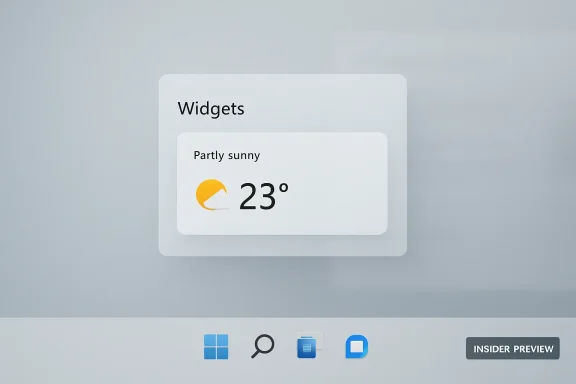
Microsoft confirmed on May 1, 2026, that Windows 11 Insider builds are changing Widgets so the board opens more quietly by default, with hover launch, taskbar badging, and the MSN-heavy feed pushed out of the user’s face. That is a small settings change with a much larger message behind it: Microsoft is admitting that parts of Windows 11 have behaved less like an operating system and more like a restless engagement surface. The company is not killing Widgets, nor is it abandoning feeds, AI prompts, or cloud-connected experiences. It is trying to prove that Windows can still be modern without constantly interrupting the person trying to use it.
For years, the most frustrating thing about Windows 11 Widgets was not that the feature existed. A panel for weather, calendar entries, traffic, stocks, sports scores, OneDrive memories, and lightweight app data is a reasonable idea. The problem was that Microsoft’s implementation kept confusing glanceable with grabbable.
The Widgets board was nominally about quick information, but the default experience often dragged users into an MSN-powered content stream. A taskbar weather icon became a trapdoor. A casual mouse movement could open a side panel; a badge could demand attention; a feed could turn a utilitarian desktop into a portal homepage with all the restraint of a supermarket checkout aisle.
That is why Microsoft’s wording matters. The company’s March Windows quality pledge said Widgets should be “helpful and relevant, not distracting or overwhelming.” Its May progress update went further by describing a push toward “calm” and “quieter” defaults. Corporate language is usually engineered to avoid blame, but this is still a meaningful admission: the default Windows experience has been too noisy.
The new behavior being tested in preview builds is straightforward. Widgets will open first to the user’s widgets rather than the Discover/MSN feed. The board will no longer open on hover by default. Taskbar badging is off by default. Alerts are being limited until the user has actually opened and engaged with the Widgets experience.
That last point is the hidden design principle. Microsoft is moving from attention first, consent later to something closer to intent first, attention later. It should not have taken until 2026 to arrive there, but Windows users will take the win.
The irritation was not merely aesthetic. Windows occupies a special place in computing because it is both a personal workspace and a managed enterprise platform. When the OS begins inserting consumer engagement mechanics into that workspace, it changes the emotional contract. The user no longer feels like the PC is waiting for instructions; the PC feels like it is pitching something.
That is why comparisons to Windows 7 gadgets or macOS widgets keep returning. The old Windows gadgets had their own security and architectural problems, and Apple’s widget model is hardly perfect, but both ideas are easier for users to understand: a widget is a compact object that shows information where the user puts it. Windows 11 Widgets, by contrast, often felt like a feed product wearing a widget costume.
Microsoft has not removed the feed. That distinction matters. Users who want the Discover feed can still enable it, and Microsoft’s broader consumer strategy still depends heavily on surfacing cloud services, media, search, shopping, AI, and account-linked experiences. But the default is the product’s moral center. Changing the default says Microsoft understands that shoving the feed forward was the wrong baseline.
The most generous interpretation is that Microsoft is re-separating two concepts it should never have fused so aggressively. Widgets are user-selected utilities. A news feed is an engagement product. They can coexist, but they should not pretend to be the same surface.
The Windows taskbar is one of the most heavily traversed strips of screen real estate in personal computing. Users move across it constantly, often without intending to click anything. Treating hover as a launch command on such a busy surface was always risky; doing it for a panel that contained attention-seeking content made it feel manipulative.
Power users learned to disable the behavior. That is not the same thing as good design. A setting that fixes a bad default is a pressure valve, not a defense.
Microsoft’s new default matters because it respects click intent. A click says the user wants to open something. A hover often says nothing more than the cursor passed through a neighborhood on the way to somewhere else. Operating systems should be conservative about interpreting accidental gestures as invitations.
The same logic applies to badges. A badge on a communication app may reflect a message from a human being. A badge on a widget surface can easily become a nudge from a content system. The more Windows borrows notification patterns from social apps, the more it risks making the desktop feel like yet another attention economy battlefield.
This is not simply nostalgia for Windows 10 or Windows 7. Windows 11 has improved in important ways since its 2021 debut. It is more polished than it was at launch, supports modern hardware security assumptions more coherently, and has received meaningful updates to window management, tabs in File Explorer, accessibility, and ARM performance. But those improvements have had to compete with a steady accumulation of irritants.
Recommended content in Start, account nudges, Edge prompts, OneDrive reminders, Copilot buttons, web results in local search, MSN feeds, lock screen widgets, and update interruptions all come from different product teams with defensible individual goals. The user experiences them as one thing: Windows interrupting them again.
That is the central Windows 11 trust problem. Microsoft can point to telemetry showing that a prompt increases adoption or that a feed increases engagement, but users judge the OS by the total load of interruptions. A single nudge may be harmless. A dozen nudges become a personality.
The Widgets change is important because it targets that personality. It does not add a marquee feature. It subtracts presumption.
That is the context in which the Widgets cleanup should be read. This is not an isolated mercy killing of a bad default. It is one proof point in a campaign to convince users that Microsoft has heard the criticism.
The company’s May update claims progress across several fronts. The Insider Program is being simplified into clearer Experimental and Beta channels. Windows Update is being adjusted toward fewer disruptions and more obvious restart choices. Copilot buttons are being removed or renamed in some inbox apps. File Explorer is getting architectural work aimed at hangs, launch speed, navigation, and visual polish. System performance work is targeting memory savings and perceived responsiveness.
A skeptic will notice that many of these improvements are still in preview, staged rollouts, or future promises. That skepticism is healthy. Windows users have lived through enough “we’re listening” cycles to know that the announcement is not the outcome.
But there is still a meaningful shift in what Microsoft is choosing to brag about. For much of the last two years, the Windows story was dominated by AI infusion, cloud integration, and new engagement surfaces. In spring 2026, Microsoft is talking about fewer interruptions, calmer defaults, better memory behavior, faster File Explorer, and giving users back controls they expected to have in the first place.
That may not be glamorous. It is exactly what the platform needs.
That is why this change is more interesting than it looks. Hiding the feed by default almost certainly reduces casual exposure to MSN content. Disabling badges by default reduces re-entry prompts. Killing hover launch removes accidental opens. In other words, Microsoft is deliberately reducing some forms of engagement in order to improve trust.
For Windows, that trade may be overdue. An operating system is not a social network, even if it contains social, news, search, and AI surfaces. Its highest-value function is to be dependable infrastructure. If the user comes to believe the OS is constantly trying to route them into Microsoft-owned funnels, every new feature becomes suspect.
This is especially true for IT administrators. Consumer annoyance becomes enterprise risk when unexplained surfaces generate help desk tickets, distract users, complicate standard images, or introduce content that organizations do not want on managed desktops. Many admins already disable Widgets through policy, not because weather is dangerous, but because unpredictable consumer content has no place on a locked-down work environment.
Microsoft’s calmer default does not eliminate the need for policy controls. It does, however, reduce the gap between the consumer default and the enterprise expectation. That is good product hygiene.
The larger business question remains unresolved. Microsoft can afford to make Widgets quieter. Can it make Search quieter? Can it make Start quieter? Can it make Edge prompts quieter? Can it resist turning every Windows surface into a Copilot acquisition channel when quarterly AI narratives demand visible integration?
That is where trust will be won or lost.
Microsoft has always had a more complicated job. Windows serves gamers, developers, school districts, hospitals, factories, governments, creators, consumers, and enterprises on an enormous range of hardware. It also carries decades of compatibility expectations and a business model that now stretches across Windows licensing, Microsoft 365, Azure, Bing, Edge, advertising, Store distribution, Xbox, and Copilot.
But complexity does not excuse bad defaults. If anything, Windows’ breadth makes calm defaults more important. A billion-user platform cannot assume that the most engagement-friendly behavior is the right behavior. The most successful default is often the one that disappears until needed.
The Windows 7 gadget nostalgia is similarly revealing. Those gadgets were hardly a golden age of secure extensible desktop computing. Microsoft eventually moved away from them for good reasons. Yet users remember the simplicity: put a clock, weather tile, CPU meter, or calendar on the desktop and let it sit there.
Windows 11 Widgets never fully satisfied that desire because the board was spatially and behaviorally different. It lived behind the taskbar, expanded into a panel, and mixed personal utilities with feed content. Rumors and experiments around desktop-pinnable widgets have persisted because users keep asking for the same basic thing: let information live where I choose, not where an engagement panel decides to appear.
Microsoft does not need to clone Apple or resurrect Windows 7 gadgets wholesale. It needs to recover the design discipline those comparisons imply.
Windows preview channels have often felt opaque. A feature might appear for one user and not another on the same build. Release notes could say something was rolling out gradually, controlled by server-side switches, geography, eligibility, or unknown flighting logic. That made it difficult for testers to know whether they were seeing a bug, an A/B test, or nothing at all.
If Microsoft wants feedback on whether Widgets are calmer, it needs testers to reliably receive the change and understand what has changed. A quieter default is a user-experience hypothesis. It cannot be validated well if the audience cannot tell whether the experiment is actually present.
The move away from controlled feature rollouts in Beta is therefore connected to the quality agenda. Microsoft is effectively admitting that predictability is part of testing. Insiders are not merely early recipients of feature confetti; they are a distributed QA and feedback community that needs clear contracts.
That matters because many of Windows 11’s rough edges were not catastrophic bugs. They were judgment calls. Hover launch was a judgment call. Feed-first Widgets was a judgment call. Copilot buttons scattered across apps were judgment calls. These are precisely the kinds of decisions where structured user feedback can matter if Microsoft is willing to hear “no.”
The Widgets change suggests that, at least in this case, the “no” got through.
The Widgets board still reflects Microsoft’s preferred architecture. The feed still exists. The taskbar entry still exists unless disabled. Lock screen widgets are still part of the broader plan, even if Microsoft says it will reduce the default lock screen set to Weather. The company is not converting Windows into a neutral shell where every cloud surface is optional from first boot.
That distinction matters because Microsoft has a history of reintroducing prompts after users dismiss them, relocating settings, or changing defaults after major updates. Trust requires more than one calmer release. It requires that choices stick.
A truly user-first Widgets model would make the first-run experience explicit. It would ask whether the user wants widgets, a news feed, both, or neither. It would separate utility widgets from content feeds at the architectural and visual level. It would allow third-party widgets to compete on equal footing without turning the board into another ad-supported discovery layer.
For managed PCs, Microsoft should keep every element controllable by policy. Organizations should not need registry archaeology or third-party scripts to remove consumer content from business desktops. Windows Pro and Enterprise should treat calm not as a preference but as a baseline.
Still, defaults are powerful. Most users never visit the relevant settings, and many do not know the settings exist. Making the less intrusive behavior the standard experience is a real improvement even if it falls short of maximal control.
That matters because AI has intensified the same design tensions that already made Widgets controversial. Microsoft wants Copilot to be visible enough to justify its strategic importance. Users want AI to be useful when requested and absent when not. Those are not automatically compatible goals.
The lesson from Widgets is that surfacing a feature everywhere does not make it feel essential. It can make it feel needy. Windows users are not rejecting AI categorically; many are rejecting the experience of AI being bolted onto every corner of the OS before the use case has earned the space.
A calmer Widgets board gives Microsoft a template. Lead with utility. Respect intent. Avoid accidental activation. Keep content and assistance distinct. Do not turn every quiet surface into an acquisition funnel.
If Copilot becomes an actually useful system assistant that can explain settings, troubleshoot errors, automate tedious workflows, and respect enterprise policy boundaries, users will find it. If it behaves like the MSN feed did — omnipresent, promotional, and hard to fully ignore — it will inherit the same resentment.
Microsoft’s challenge is not technical capability. It is restraint.
Microsoft’s renewed emphasis on craft is welcome because craft is where Windows 11 has most often stumbled. The OS has not lacked ambition. It has lacked confidence that useful features can wait for the user to ask.
There is a version of Windows that can reconcile cloud intelligence, AI assistance, live information, and local productivity. In that version, the weather is there when wanted, the news feed is opt-in, Copilot appears where it has a job, File Explorer feels fast, updates are predictable, and the taskbar belongs to the user again. The Widgets cleanup is not that future by itself, but it is a small sign that Microsoft has finally started measuring Windows quality not by how much it can surface, but by how much it can wisely leave alone.
Source: Neowin Microsoft admits Windows 11 widgets are 'distracting and overwhelming,' announces fixes
 Microsoft Finally Names the Thing Users Have Been Complaining About
For years, the most frustrating thing about Windows 11 Widgets was not that the feature existed. A panel for weather, calendar entries, traffic, stocks, sports scores, OneDrive memories, and lightweight app data is a reasonable idea. The problem was that Microsoft’s implementation kept confusing glanceable with grabbable.The Widgets board was nominally about quick information, but the default experience often dragged users into an MSN-powered content stream. A taskbar weather icon became a trapdoor. A casual mouse movement could open a side panel; a badge could demand attention; a feed could turn a utilitarian desktop into a portal homepage with all the restraint of a supermarket checkout aisle.
That is why Microsoft’s wording matters. The company’s March Windows quality pledge said Widgets should be “helpful and relevant, not distracting or overwhelming.” Its May progress update went further by describing a push toward “calm” and “quieter” defaults. Corporate language is usually engineered to avoid blame, but this is still a meaningful admission: the default Windows experience has been too noisy.
The new behavior being tested in preview builds is straightforward. Widgets will open first to the user’s widgets rather than the Discover/MSN feed. The board will no longer open on hover by default. Taskbar badging is off by default. Alerts are being limited until the user has actually opened and engaged with the Widgets experience.
That last point is the hidden design principle. Microsoft is moving from attention first, consent later to something closer to intent first, attention later. It should not have taken until 2026 to arrive there, but Windows users will take the win.
The Feed Was Never Just a Feed
The MSN feed became the villain because it was visible, persistent, and frequently low-quality. Users did not need a policy paper on platform incentives to understand what was happening. They clicked or hovered for weather and got a slab of algorithmic news, celebrity bait, financial chum, and promoted content occupying territory inside the operating system itself.The irritation was not merely aesthetic. Windows occupies a special place in computing because it is both a personal workspace and a managed enterprise platform. When the OS begins inserting consumer engagement mechanics into that workspace, it changes the emotional contract. The user no longer feels like the PC is waiting for instructions; the PC feels like it is pitching something.
That is why comparisons to Windows 7 gadgets or macOS widgets keep returning. The old Windows gadgets had their own security and architectural problems, and Apple’s widget model is hardly perfect, but both ideas are easier for users to understand: a widget is a compact object that shows information where the user puts it. Windows 11 Widgets, by contrast, often felt like a feed product wearing a widget costume.
Microsoft has not removed the feed. That distinction matters. Users who want the Discover feed can still enable it, and Microsoft’s broader consumer strategy still depends heavily on surfacing cloud services, media, search, shopping, AI, and account-linked experiences. But the default is the product’s moral center. Changing the default says Microsoft understands that shoving the feed forward was the wrong baseline.
The most generous interpretation is that Microsoft is re-separating two concepts it should never have fused so aggressively. Widgets are user-selected utilities. A news feed is an engagement product. They can coexist, but they should not pretend to be the same surface.
Hover-to-Open Was a Tiny Feature With Outsized Contempt Built In
Few Windows 11 behaviors better captured the platform’s recent misjudgments than opening Widgets on hover. In theory, it reduced friction. In practice, it punished ordinary mouse movement.The Windows taskbar is one of the most heavily traversed strips of screen real estate in personal computing. Users move across it constantly, often without intending to click anything. Treating hover as a launch command on such a busy surface was always risky; doing it for a panel that contained attention-seeking content made it feel manipulative.
Power users learned to disable the behavior. That is not the same thing as good design. A setting that fixes a bad default is a pressure valve, not a defense.
Microsoft’s new default matters because it respects click intent. A click says the user wants to open something. A hover often says nothing more than the cursor passed through a neighborhood on the way to somewhere else. Operating systems should be conservative about interpreting accidental gestures as invitations.
The same logic applies to badges. A badge on a communication app may reflect a message from a human being. A badge on a widget surface can easily become a nudge from a content system. The more Windows borrows notification patterns from social apps, the more it risks making the desktop feel like yet another attention economy battlefield.
Windows 11’s Real Problem Has Been the Feeling of Being Managed by the Product
The Widgets cleanup lands inside a broader Windows 11 course correction that Microsoft began describing publicly in March. The company promised work on performance, reliability, Windows Update behavior, File Explorer responsiveness, taskbar customization, reduced Copilot entry points, and a more intelligible Insider Program. Taken together, those commitments read like an answer to a complaint many users have had since Windows 11 launched: the OS has often seemed more interested in Microsoft’s roadmap than in the user’s workflow.This is not simply nostalgia for Windows 10 or Windows 7. Windows 11 has improved in important ways since its 2021 debut. It is more polished than it was at launch, supports modern hardware security assumptions more coherently, and has received meaningful updates to window management, tabs in File Explorer, accessibility, and ARM performance. But those improvements have had to compete with a steady accumulation of irritants.
Recommended content in Start, account nudges, Edge prompts, OneDrive reminders, Copilot buttons, web results in local search, MSN feeds, lock screen widgets, and update interruptions all come from different product teams with defensible individual goals. The user experiences them as one thing: Windows interrupting them again.
That is the central Windows 11 trust problem. Microsoft can point to telemetry showing that a prompt increases adoption or that a feed increases engagement, but users judge the OS by the total load of interruptions. A single nudge may be harmless. A dozen nudges become a personality.
The Widgets change is important because it targets that personality. It does not add a marquee feature. It subtracts presumption.
The March Quality Pledge Was a Reset Button Microsoft Had to Press
Microsoft’s March 20 “commitment to Windows quality” post was unusually direct by modern platform-company standards. Pavan Davuluri and the Windows team framed the year’s work around performance, reliability, and craft, promising more responsive core experiences, reduced resource usage, better File Explorer behavior, clearer Windows Update controls, and less noisy surfaces. The phrase that mattered most was not a feature name but a posture: Windows would become more thoughtful about where and how new capabilities appear.That is the context in which the Widgets cleanup should be read. This is not an isolated mercy killing of a bad default. It is one proof point in a campaign to convince users that Microsoft has heard the criticism.
The company’s May update claims progress across several fronts. The Insider Program is being simplified into clearer Experimental and Beta channels. Windows Update is being adjusted toward fewer disruptions and more obvious restart choices. Copilot buttons are being removed or renamed in some inbox apps. File Explorer is getting architectural work aimed at hangs, launch speed, navigation, and visual polish. System performance work is targeting memory savings and perceived responsiveness.
A skeptic will notice that many of these improvements are still in preview, staged rollouts, or future promises. That skepticism is healthy. Windows users have lived through enough “we’re listening” cycles to know that the announcement is not the outcome.
But there is still a meaningful shift in what Microsoft is choosing to brag about. For much of the last two years, the Windows story was dominated by AI infusion, cloud integration, and new engagement surfaces. In spring 2026, Microsoft is talking about fewer interruptions, calmer defaults, better memory behavior, faster File Explorer, and giving users back controls they expected to have in the first place.
That may not be glamorous. It is exactly what the platform needs.
Widgets Became a Test Case for Whether Microsoft Can Leave Money on the Table
The hard question is whether Microsoft can maintain restraint when restraint conflicts with measurable engagement. Feeds, badges, default placements, and notification prompts do not appear by accident. They are products of incentives. Somewhere inside the machine, teams measure clicks, impressions, retention, service adoption, account attachment, and monetizable attention.That is why this change is more interesting than it looks. Hiding the feed by default almost certainly reduces casual exposure to MSN content. Disabling badges by default reduces re-entry prompts. Killing hover launch removes accidental opens. In other words, Microsoft is deliberately reducing some forms of engagement in order to improve trust.
For Windows, that trade may be overdue. An operating system is not a social network, even if it contains social, news, search, and AI surfaces. Its highest-value function is to be dependable infrastructure. If the user comes to believe the OS is constantly trying to route them into Microsoft-owned funnels, every new feature becomes suspect.
This is especially true for IT administrators. Consumer annoyance becomes enterprise risk when unexplained surfaces generate help desk tickets, distract users, complicate standard images, or introduce content that organizations do not want on managed desktops. Many admins already disable Widgets through policy, not because weather is dangerous, but because unpredictable consumer content has no place on a locked-down work environment.
Microsoft’s calmer default does not eliminate the need for policy controls. It does, however, reduce the gap between the consumer default and the enterprise expectation. That is good product hygiene.
The larger business question remains unresolved. Microsoft can afford to make Widgets quieter. Can it make Search quieter? Can it make Start quieter? Can it make Edge prompts quieter? Can it resist turning every Windows surface into a Copilot acquisition channel when quarterly AI narratives demand visible integration?
That is where trust will be won or lost.
The Apple Comparison Hurts Because It Is About Discipline, Not Features
Windows users often invoke macOS widgets as a model, but the comparison is less about Apple having invented something magical and more about Apple’s willingness to keep the concept bounded. A desktop widget should be a small, predictable object. It should not behave like a news portal unless the user explicitly asks for a news portal.Microsoft has always had a more complicated job. Windows serves gamers, developers, school districts, hospitals, factories, governments, creators, consumers, and enterprises on an enormous range of hardware. It also carries decades of compatibility expectations and a business model that now stretches across Windows licensing, Microsoft 365, Azure, Bing, Edge, advertising, Store distribution, Xbox, and Copilot.
But complexity does not excuse bad defaults. If anything, Windows’ breadth makes calm defaults more important. A billion-user platform cannot assume that the most engagement-friendly behavior is the right behavior. The most successful default is often the one that disappears until needed.
The Windows 7 gadget nostalgia is similarly revealing. Those gadgets were hardly a golden age of secure extensible desktop computing. Microsoft eventually moved away from them for good reasons. Yet users remember the simplicity: put a clock, weather tile, CPU meter, or calendar on the desktop and let it sit there.
Windows 11 Widgets never fully satisfied that desire because the board was spatially and behaviorally different. It lived behind the taskbar, expanded into a panel, and mixed personal utilities with feed content. Rumors and experiments around desktop-pinnable widgets have persisted because users keep asking for the same basic thing: let information live where I choose, not where an engagement panel decides to appear.
Microsoft does not need to clone Apple or resurrect Windows 7 gadgets wholesale. It needs to recover the design discipline those comparisons imply.
The Insider Channel Is Now Where Microsoft Tests Humility
The timing of the Widgets cleanup also intersects with Microsoft’s overhaul of the Windows Insider Program. The company says it is moving toward two primary channels, Experimental and Beta, with clearer expectations, fewer controlled feature rollout mysteries in Beta, and feature flags in Experimental. For longtime Insiders, this is more than administrative cleanup.Windows preview channels have often felt opaque. A feature might appear for one user and not another on the same build. Release notes could say something was rolling out gradually, controlled by server-side switches, geography, eligibility, or unknown flighting logic. That made it difficult for testers to know whether they were seeing a bug, an A/B test, or nothing at all.
If Microsoft wants feedback on whether Widgets are calmer, it needs testers to reliably receive the change and understand what has changed. A quieter default is a user-experience hypothesis. It cannot be validated well if the audience cannot tell whether the experiment is actually present.
The move away from controlled feature rollouts in Beta is therefore connected to the quality agenda. Microsoft is effectively admitting that predictability is part of testing. Insiders are not merely early recipients of feature confetti; they are a distributed QA and feedback community that needs clear contracts.
That matters because many of Windows 11’s rough edges were not catastrophic bugs. They were judgment calls. Hover launch was a judgment call. Feed-first Widgets was a judgment call. Copilot buttons scattered across apps were judgment calls. These are precisely the kinds of decisions where structured user feedback can matter if Microsoft is willing to hear “no.”
The Widgets change suggests that, at least in this case, the “no” got through.
Calmer Defaults Are Not the Same as User Control
Microsoft’s phrase “quiet by default” is the right direction, but it should not be confused with full user control. A quiet default can still leave power concentrated in Microsoft’s hands if the user cannot deeply customize, remove, replace, or audit the experience.The Widgets board still reflects Microsoft’s preferred architecture. The feed still exists. The taskbar entry still exists unless disabled. Lock screen widgets are still part of the broader plan, even if Microsoft says it will reduce the default lock screen set to Weather. The company is not converting Windows into a neutral shell where every cloud surface is optional from first boot.
That distinction matters because Microsoft has a history of reintroducing prompts after users dismiss them, relocating settings, or changing defaults after major updates. Trust requires more than one calmer release. It requires that choices stick.
A truly user-first Widgets model would make the first-run experience explicit. It would ask whether the user wants widgets, a news feed, both, or neither. It would separate utility widgets from content feeds at the architectural and visual level. It would allow third-party widgets to compete on equal footing without turning the board into another ad-supported discovery layer.
For managed PCs, Microsoft should keep every element controllable by policy. Organizations should not need registry archaeology or third-party scripts to remove consumer content from business desktops. Windows Pro and Enterprise should treat calm not as a preference but as a baseline.
Still, defaults are powerful. Most users never visit the relevant settings, and many do not know the settings exist. Making the less intrusive behavior the standard experience is a real improvement even if it falls short of maximal control.
The AI Backdrop Makes This Cleanup More Than Cosmetic
Widgets are only one battlefield in Microsoft’s broader struggle to integrate AI without making Windows feel colonized by Copilot. The company’s March pledge specifically mentioned reducing unnecessary Copilot entry points in apps including Snipping Tool, Photos, Widgets, and Notepad. Its May update says the “Ask Copilot” button has been removed from Snipping Tool and Photos, while Notepad now uses a clearer “Writing Tools” label.That matters because AI has intensified the same design tensions that already made Widgets controversial. Microsoft wants Copilot to be visible enough to justify its strategic importance. Users want AI to be useful when requested and absent when not. Those are not automatically compatible goals.
The lesson from Widgets is that surfacing a feature everywhere does not make it feel essential. It can make it feel needy. Windows users are not rejecting AI categorically; many are rejecting the experience of AI being bolted onto every corner of the OS before the use case has earned the space.
A calmer Widgets board gives Microsoft a template. Lead with utility. Respect intent. Avoid accidental activation. Keep content and assistance distinct. Do not turn every quiet surface into an acquisition funnel.
If Copilot becomes an actually useful system assistant that can explain settings, troubleshoot errors, automate tedious workflows, and respect enterprise policy boundaries, users will find it. If it behaves like the MSN feed did — omnipresent, promotional, and hard to fully ignore — it will inherit the same resentment.
Microsoft’s challenge is not technical capability. It is restraint.
The Small Fix That Exposes the Big Windows Bargain
The practical takeaways from this Widgets cleanup are simple, but the implications are larger than the panel itself. Microsoft is testing whether Windows 11 can become less annoying without becoming less modern.- Windows 11 preview builds are making Widgets open to the user’s widget surface by default rather than leading with the Discover/MSN feed.
- The Widgets board will no longer open on taskbar hover by default, reducing accidental launches during ordinary mouse movement.
- Taskbar badges and some alerts are being disabled or limited by default, shifting attention-seeking behavior behind user intent.
- Microsoft is not removing the MSN feed, so users who want it can still opt in, and administrators will still need to manage policy where consumer content is inappropriate.
- The change is part of a broader 2026 Windows quality push focused on performance, reliability, calmer defaults, fewer unnecessary Copilot entry points, and more predictable Insider testing.
- The real test is whether Microsoft applies the same restraint to Start, Search, Edge, Copilot, lock screen content, and update prompts over time.
Windows 11 Is Better When It Stops Trying So Hard
The irony of the Widgets change is that it makes Windows 11 feel more modern by making it less aggressive. Good modern software does not need to leap out from the taskbar, flash badges for marginal content, or treat every idle glance as an engagement opportunity. It understands context.Microsoft’s renewed emphasis on craft is welcome because craft is where Windows 11 has most often stumbled. The OS has not lacked ambition. It has lacked confidence that useful features can wait for the user to ask.
There is a version of Windows that can reconcile cloud intelligence, AI assistance, live information, and local productivity. In that version, the weather is there when wanted, the news feed is opt-in, Copilot appears where it has a job, File Explorer feels fast, updates are predictable, and the taskbar belongs to the user again. The Widgets cleanup is not that future by itself, but it is a small sign that Microsoft has finally started measuring Windows quality not by how much it can surface, but by how much it can wisely leave alone.
Source: Neowin Microsoft admits Windows 11 widgets are 'distracting and overwhelming,' announces fixes
