

Microsoft began moving Canary testers on Windows 11 28000-series builds into the new Experimental (26H1) Channel on May 1, 2026, extending a Windows Insider overhaul that gives some testers feature flags inside Windows Update settings. The change sounds administrative, but it is really a new contract between Microsoft and its most committed unpaid QA department. After years of Controlled Feature Rollouts turning Insider testing into a lottery, Microsoft is trying to make experimentation feel less arbitrary without giving up its ability to meter risk.
That is the right instinct. It is also a revealing one. The Windows Insider Program has become less a preview lane for Windows than a telemetry instrument for a cloud-managed operating system, and the new Experimental channels make that bargain more explicit.
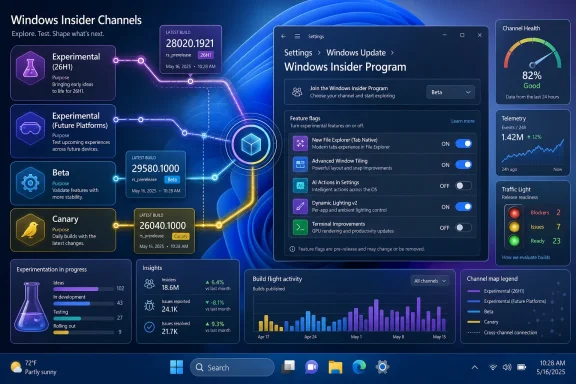
The latest move affects Canary testers running 28000-series builds, who are being transitioned to the new Experimental (26H1) Channel after installing build 28020.1921. Testers on 29500-series builds remain on course for a separate Experimental (Future Platforms) Channel, while Dev Channel users began moving to the regular Experimental Channel last week. Beta, meanwhile, is waiting for its own revised experience.
That naming matters because Microsoft is no longer merely sorting testers by appetite for instability. It is sorting them by the kind of uncertainty they are willing to accept. “Experimental” now describes a policy model as much as a build quality level: a place where features may appear behind switches, where rollouts can be studied, and where the boundary between operating system roadmap and lab bench is deliberately porous.
The old Insider taxonomy was easy enough to caricature. Canary was where things broke first, Dev was where enthusiasts lived, Beta was where cautious testers watched the future become plausible, and Release Preview was the waiting room before general availability. The new scheme is less romantic and more operational. It separates future Windows work into tracks that sound closer to internal engineering lanes than enthusiast communities.
That may be healthier. It may also be less fun. For many Insiders, the emotional bargain has always been early access in exchange for rough edges; Microsoft’s bargain is increasingly early participation in staged validation.
Controlled Feature Rollouts, or CFRs, were designed to protect Microsoft from itself. By releasing features to small groups first, the company can catch regressions, collect telemetry, and avoid detonating a half-baked change across millions of PCs. That is rational engineering at Windows scale. But it also turned Insider participation into a strange guessing game, where two machines on the same build could behave differently and no one outside Redmond could easily say why.
The feature flag model does not eliminate that complexity, but it gives users a visible handle. It changes the psychology of testing from “why don’t I have this?” to “do I want to try this?” That is a meaningful improvement for enthusiasts, IT pros, and journalists who need to reproduce behavior across devices.
It is also a subtle power shift. Microsoft still decides which flags exist, which users see them, and when a feature graduates or disappears. But by surfacing switches in Windows Update settings, the company is acknowledging that testers need agency if their feedback is going to be coherent.
That is a stronger guarantee than Beta users have had in years. It turns Beta back into something closer to a shared preview environment, where communities can discuss the same thing at the same time. For IT departments that watch Insider builds to anticipate user-facing changes, that predictability matters more than novelty.
The tradeoff is that Experimental now becomes the pressure valve. If Beta is where Microsoft reduces rollout ambiguity, Experimental is where it can concentrate it. The company can keep using controlled exposure, flighting, hidden capability, and feature switches without contaminating the more stable preview lane.
That makes the split more honest. Windows development has long needed a channel where Microsoft can say, in effect, “this may not ship, this may change, and your device may not match your neighbor’s.” The problem was that this fuzziness increasingly leaked into places where users expected a more consistent preview. Microsoft is now trying to put the fuzziness back in its box.
This is not just a busy Friday for the Windows Insider team. It is the new matrix becoming real. Windows preview testing is no longer a simple ladder from risky to stable; it is a branching map of build series, platform targets, and feature-delivery policies.
Microsoft says it is also committing to releasing ISOs alongside regularly scheduled builds across Beta and Experimental versions. That is a welcome concession to reality. Clean installs are not a luxury for serious testers; they are how sysadmins, developers, and power users separate upgrade weirdness from baseline operating system behavior.
The ISO commitment also suggests Microsoft has heard a recurring complaint from the community: if you want better bug reports, you need to give testers repeatable starting points. A build that can only be reached through an in-place upgrade path is harder to diagnose. A build that can be installed cleanly is a testable artifact.
The Widgets changes are the most philosophically interesting. Microsoft is turning off hover-to-open behavior by default, disabling taskbar badging by default, and limiting alerts until users engage with the Widgets board. That is a tacit admission that Windows 11’s taskbar-adjacent engagement machinery has often felt too eager.
Widgets has always been caught between usefulness and growth-hacking. It can be a glanceable surface for weather, calendar, and news, but it can also behave like a small attention economy bolted to the desktop. Making it quieter by default is the kind of change Windows users usually have to demand for years before it happens.
The redesigned Run dialog is smaller news, but it touches a different nerve. Run is one of those old Windows affordances that survives because professionals actually use it. Redesigning it through an optional toggle is a smart way to modernize without immediately breaking muscle memory.
In consumer Windows, app recommendations often feel like part of the broader monetization haze. In enterprise Windows, the tone changes. A Share surface used by employees is not just a convenience layer; it is part of workflow, data handling, and organizational trust.
Microsoft will argue that recommendations can help users discover relevant apps. That may be true. But any time recommendations enter a productivity surface, the company has to answer a harder question: recommended by whom, optimized for what, and governed how?
The fact that the setting can be turned off is important, but opt-out controls do not erase the concern. Windows has spent the past decade absorbing more cloud intelligence, more account awareness, and more contextual suggestion. Each individual insertion can be defended. The cumulative effect is a desktop that increasingly asks users to trust Microsoft’s judgment about what belongs in front of them.
Feedback Hub is the plumbing of the Insider Program. When it works poorly, the whole premise weakens. Testers cannot meaningfully participate if the tool for reporting defects is itself unreliable, unclear, or too restrictive to capture logs, screenshots, traces, and reproduction material.
The 500 MB upload limit is particularly relevant for modern Windows bugs. Graphics glitches, update failures, virtualization issues, AI feature problems, and app compatibility defects often require bulky diagnostic packages. A tiny upload ceiling pushes testers toward vague reports. A larger one increases the odds that an engineer can actually do something with the complaint.
This is the unglamorous side of the new Insider experience. Feature flags may get the attention, but better feedback collection is what makes the experiment credible.
Task Manager has always been the place where Windows makes invisible resources legible. CPU, memory, disk, network, GPU — each became a first-class user concern only after users could see what was consuming it. NPU visibility is the same move applied to the AI PC era.
The timing also fits the Experimental (26H1) label. Microsoft is not simply preparing another Windows feature update. It is preparing a Windows generation in which AI acceleration, local models, semantic indexing, and privacy-sensitive processing will need operating system-level accounting. If Windows is going to ask users to trust local AI features, it will need to show what is running and where.
That is why NPU columns in Task Manager are more than a checkbox for enthusiasts. They are part of a larger transparency requirement. AI features that cannot be observed will be treated as background magic, and background magic is exactly what administrators distrust.
This is what a hardware-aware Windows roadmap looks like. The operating system is no longer evolving only around shell features, app frameworks, and servicing cadence. It is evolving around silicon assumptions, security baselines, AI accelerators, driver models, and device categories that may need different incubation paths.
For years, Windows had to be everything to every PC. It still does, but Microsoft is now more willing to segment preview work by platform horizon. Future Platforms is not a consumer-friendly phrase, but it is an honest one. It says the work may be foundational, speculative, and not necessarily destined for the next mainstream update.
That may frustrate hobbyists who want every Insider lane to feel like a treasure hunt. But from an engineering perspective, it is sensible. The future of Windows will depend as much on what the OS can assume about hardware as what it can draw on screen.
That compromise is probably unavoidable. Windows runs on too many configurations, serves too many constituencies, and carries too much legacy weight for Microsoft to blast every preview feature to every tester on day one. The company needs telemetry gradients. It needs kill switches. It needs ways to test variants without creating a global support event.
But Microsoft also needs to stop treating confusion as an acceptable cost of experimentation. Insider communities can tolerate bugs; they are less patient with ambiguity. When users do not know whether a missing feature is a bug, a rollout delay, a regional restriction, a hardware gate, or an account-targeting decision, feedback quality collapses.
The new model is an attempt to distinguish instability from mystery. Instability is acceptable in preview software. Mystery is corrosive.
The people who benefit most from this redesign are the ones who test deliberately. They maintain spare machines, capture logs, compare build behavior, clean install ISOs, and file Feedback Hub reports with enough detail to be useful. For them, visible flags and predictable Beta availability are not trivia. They are the difference between anecdote and evidence.
Sysadmins also get a clearer signal. If Beta becomes more consistent, it can better serve as an early-warning system for changes likely to hit managed environments. If Experimental becomes more explicitly experimental, IT departments can watch it without mistaking it for a near-shipping promise.
The enthusiast downside is that some of the magic drains away. Insider channels once felt like secret doors into the future of Windows. Now they look more like controlled workstreams. That is less romantic, but probably more sustainable.
That puts more responsibility on Microsoft’s Windows Insider team. If the company is going to run a more complex channel model, it needs to communicate with unusual precision. Build numbers, channel names, rollout states, known issues, feature flags, and ISO availability all need to line up.
The early signs are mixed but promising. Microsoft’s willingness to publish a broader roadmap for the Insider experience and commit to regular ISO availability suggests it understands the criticism. The risk is that the channel names multiply faster than the clarity.
Windows users have long memories for branding churn. Rings became channels. Dev became something that sometimes looked like the future and sometimes looked like nowhere in particular. Canary arrived as a high-risk frontier. Now Experimental enters as both a new lane and a reclassification of old lanes. If Microsoft wants trust, the names must map to behavior.
That is why the old desire for a single, clean answer — “what is in the next Windows version?” — keeps getting harder to satisfy. Some features arrive through enablement packages, some through Store app updates, some through server-side switches, some through Copilot+ PC requirements, and some through Insider-only flags that may never graduate.
The new Experimental experience does not solve that fragmentation. It institutionalizes it. But institutionalizing a messy truth is better than pretending it does not exist.
For WindowsForum readers, the practical point is simple: build numbers still matter, but they are no longer enough. Channel policy, feature state, hardware class, account type, and rollout mechanism all shape what Windows actually is on a given machine. The operating system has become conditional.
Source: Thurrott.com New Windows Insider Experience Starts Rolling Out to Some Canary Testers
That is the right instinct. It is also a revealing one. The Windows Insider Program has become less a preview lane for Windows than a telemetry instrument for a cloud-managed operating system, and the new Experimental channels make that bargain more explicit.
 Microsoft Is Rewriting the Insider Map While Pretending It Is Just Moving Pins
The latest move affects Canary testers running 28000-series builds, who are being transitioned to the new Experimental (26H1) Channel after installing build 28020.1921. Testers on 29500-series builds remain on course for a separate Experimental (Future Platforms) Channel, while Dev Channel users began moving to the regular Experimental Channel last week. Beta, meanwhile, is waiting for its own revised experience.That naming matters because Microsoft is no longer merely sorting testers by appetite for instability. It is sorting them by the kind of uncertainty they are willing to accept. “Experimental” now describes a policy model as much as a build quality level: a place where features may appear behind switches, where rollouts can be studied, and where the boundary between operating system roadmap and lab bench is deliberately porous.
The old Insider taxonomy was easy enough to caricature. Canary was where things broke first, Dev was where enthusiasts lived, Beta was where cautious testers watched the future become plausible, and Release Preview was the waiting room before general availability. The new scheme is less romantic and more operational. It separates future Windows work into tracks that sound closer to internal engineering lanes than enthusiast communities.
That may be healthier. It may also be less fun. For many Insiders, the emotional bargain has always been early access in exchange for rough edges; Microsoft’s bargain is increasingly early participation in staged validation.
Feature Flags Are the New Insider Currency
The signature change in the Experimental Channel is the new Feature flags page under Settings > Windows Update > Windows Insider Program. For testers, this means certain new Windows features can be turned on or off from Settings rather than arriving silently through phased rollout machinery. On paper, this is a small quality-of-life improvement. In practice, it is Microsoft admitting that opacity has become one of the Insider Program’s biggest bugs.Controlled Feature Rollouts, or CFRs, were designed to protect Microsoft from itself. By releasing features to small groups first, the company can catch regressions, collect telemetry, and avoid detonating a half-baked change across millions of PCs. That is rational engineering at Windows scale. But it also turned Insider participation into a strange guessing game, where two machines on the same build could behave differently and no one outside Redmond could easily say why.
The feature flag model does not eliminate that complexity, but it gives users a visible handle. It changes the psychology of testing from “why don’t I have this?” to “do I want to try this?” That is a meaningful improvement for enthusiasts, IT pros, and journalists who need to reproduce behavior across devices.
It is also a subtle power shift. Microsoft still decides which flags exist, which users see them, and when a feature graduates or disappears. But by surfacing switches in Windows Update settings, the company is acknowledging that testers need agency if their feedback is going to be coherent.
Beta Gets Predictability, Experimental Gets the Chaos
The most interesting part of Microsoft’s April announcement was not the new Experimental name. It was the promise that the updated Beta Channel experience will end gradual feature rollouts using CFRs. Microsoft says Beta users may still see small variations inside a feature, but the feature itself should be present on the device.That is a stronger guarantee than Beta users have had in years. It turns Beta back into something closer to a shared preview environment, where communities can discuss the same thing at the same time. For IT departments that watch Insider builds to anticipate user-facing changes, that predictability matters more than novelty.
The tradeoff is that Experimental now becomes the pressure valve. If Beta is where Microsoft reduces rollout ambiguity, Experimental is where it can concentrate it. The company can keep using controlled exposure, flighting, hidden capability, and feature switches without contaminating the more stable preview lane.
That makes the split more honest. Windows development has long needed a channel where Microsoft can say, in effect, “this may not ship, this may change, and your device may not match your neighbor’s.” The problem was that this fuzziness increasingly leaked into places where users expected a more consistent preview. Microsoft is now trying to put the fuzziness back in its box.
The Four-Build Day Shows the New Machine in Motion
Microsoft’s May 1 release slate is a useful snapshot of the transition. The company pushed build 29580.1000 for Canary testers on the 29500 series, build 28020.1921 for Canary testers on the 28000 series moving into Experimental (26H1), build 26300.8346 for the new Experimental track that includes former Dev Channel users, and build 26220.8340 for Beta.This is not just a busy Friday for the Windows Insider team. It is the new matrix becoming real. Windows preview testing is no longer a simple ladder from risky to stable; it is a branching map of build series, platform targets, and feature-delivery policies.
Microsoft says it is also committing to releasing ISOs alongside regularly scheduled builds across Beta and Experimental versions. That is a welcome concession to reality. Clean installs are not a luxury for serious testers; they are how sysadmins, developers, and power users separate upgrade weirdness from baseline operating system behavior.
The ISO commitment also suggests Microsoft has heard a recurring complaint from the community: if you want better bug reports, you need to give testers repeatable starting points. A build that can only be reached through an in-place upgrade path is harder to diagnose. A build that can be installed cleanly is a testable artifact.
The Biggest Changes Are Hiding in the Former Dev Lane
Of the four builds, 26300.8346 carries the most visible feature work. It includes a quieter Widgets board, a redesigned Run dialog that can be enabled through Settings > System > Advanced, Windows Share changes for Microsoft Entra users, File Explorer thumbnail and OneDrive duplicate fixes, and Windows Magnifier improvements that allow exact zoom percentages and preset increments.The Widgets changes are the most philosophically interesting. Microsoft is turning off hover-to-open behavior by default, disabling taskbar badging by default, and limiting alerts until users engage with the Widgets board. That is a tacit admission that Windows 11’s taskbar-adjacent engagement machinery has often felt too eager.
Widgets has always been caught between usefulness and growth-hacking. It can be a glanceable surface for weather, calendar, and news, but it can also behave like a small attention economy bolted to the desktop. Making it quieter by default is the kind of change Windows users usually have to demand for years before it happens.
The redesigned Run dialog is smaller news, but it touches a different nerve. Run is one of those old Windows affordances that survives because professionals actually use it. Redesigning it through an optional toggle is a smart way to modernize without immediately breaking muscle memory.
Windows Share Keeps Testing the Line Between Help and Promotion
The Windows Share change deserves more scrutiny than it will probably get. Users signed in with a Microsoft Entra account may see promotional app recommendations in the Windows Share window, with an option to turn them off in Settings. That is a very 2026 Windows feature: potentially useful, centrally manageable in spirit, and just commercial enough to make administrators squint.In consumer Windows, app recommendations often feel like part of the broader monetization haze. In enterprise Windows, the tone changes. A Share surface used by employees is not just a convenience layer; it is part of workflow, data handling, and organizational trust.
Microsoft will argue that recommendations can help users discover relevant apps. That may be true. But any time recommendations enter a productivity surface, the company has to answer a harder question: recommended by whom, optimized for what, and governed how?
The fact that the setting can be turned off is important, but opt-out controls do not erase the concern. Windows has spent the past decade absorbing more cloud intelligence, more account awareness, and more contextual suggestion. Each individual insertion can be defended. The cumulative effect is a desktop that increasingly asks users to trust Microsoft’s judgment about what belongs in front of them.
Feedback Hub Gets the Least Glamorous but Most Necessary Upgrade
Both the 29580.1000 and 28020.1921 builds include an updated Feedback Hub with reliability and design improvements. Microsoft is also restoring the file upload limit for feedback submissions to 500 MB and promising refinements to design fit and finish, accessibility, and localization. This is not the kind of change that trends on social media, but it may matter more than another acrylic-coated dialog.Feedback Hub is the plumbing of the Insider Program. When it works poorly, the whole premise weakens. Testers cannot meaningfully participate if the tool for reporting defects is itself unreliable, unclear, or too restrictive to capture logs, screenshots, traces, and reproduction material.
The 500 MB upload limit is particularly relevant for modern Windows bugs. Graphics glitches, update failures, virtualization issues, AI feature problems, and app compatibility defects often require bulky diagnostic packages. A tiny upload ceiling pushes testers toward vague reports. A larger one increases the odds that an engineer can actually do something with the complaint.
This is the unglamorous side of the new Insider experience. Feature flags may get the attention, but better feedback collection is what makes the experiment credible.
Task Manager’s NPU Columns Point to the Real 26H1 Story
Build 28020.1921 also improves Task Manager with optional columns for NPU processes. That sounds minor until you remember where Windows is headed. Neural processing units are no longer exotic silicon for demo stages; they are becoming part of the baseline PC story Microsoft wants to tell around Copilot+ PCs, local AI workloads, and power-efficient inference.Task Manager has always been the place where Windows makes invisible resources legible. CPU, memory, disk, network, GPU — each became a first-class user concern only after users could see what was consuming it. NPU visibility is the same move applied to the AI PC era.
The timing also fits the Experimental (26H1) label. Microsoft is not simply preparing another Windows feature update. It is preparing a Windows generation in which AI acceleration, local models, semantic indexing, and privacy-sensitive processing will need operating system-level accounting. If Windows is going to ask users to trust local AI features, it will need to show what is running and where.
That is why NPU columns in Task Manager are more than a checkbox for enthusiasts. They are part of a larger transparency requirement. AI features that cannot be observed will be treated as background magic, and background magic is exactly what administrators distrust.
The Canary Split Suggests Windows Is Becoming More Hardware-Aware
The division between 28000-series and 29500-series Canary builds is one of the more revealing pieces of this transition. Microsoft is steering the former toward Experimental (26H1) and the latter toward Experimental (Future Platforms). That implies a clearer separation between near-term client work and platform exploration that may not map neatly to the next annual Windows release.This is what a hardware-aware Windows roadmap looks like. The operating system is no longer evolving only around shell features, app frameworks, and servicing cadence. It is evolving around silicon assumptions, security baselines, AI accelerators, driver models, and device categories that may need different incubation paths.
For years, Windows had to be everything to every PC. It still does, but Microsoft is now more willing to segment preview work by platform horizon. Future Platforms is not a consumer-friendly phrase, but it is an honest one. It says the work may be foundational, speculative, and not necessarily destined for the next mainstream update.
That may frustrate hobbyists who want every Insider lane to feel like a treasure hunt. But from an engineering perspective, it is sensible. The future of Windows will depend as much on what the OS can assume about hardware as what it can draw on screen.
Microsoft Is Trying to Fix the Insider Program Without Giving Up Control
There is a tension at the center of this redesign. Microsoft wants Insiders to feel more informed and empowered, but it does not want to surrender the rollout control that modern Windows development depends on. The result is a compromise: flags in Experimental, fewer feature-lottery dynamics in Beta, and continued controlled experimentation where the company believes it needs it.That compromise is probably unavoidable. Windows runs on too many configurations, serves too many constituencies, and carries too much legacy weight for Microsoft to blast every preview feature to every tester on day one. The company needs telemetry gradients. It needs kill switches. It needs ways to test variants without creating a global support event.
But Microsoft also needs to stop treating confusion as an acceptable cost of experimentation. Insider communities can tolerate bugs; they are less patient with ambiguity. When users do not know whether a missing feature is a bug, a rollout delay, a regional restriction, a hardware gate, or an account-targeting decision, feedback quality collapses.
The new model is an attempt to distinguish instability from mystery. Instability is acceptable in preview software. Mystery is corrosive.
The New Contract Rewards Serious Testers and Bores Everyone Else
For casual Insiders, the new structure may feel like bureaucracy. Experimental (26H1), Experimental (Future Platforms), updated Beta, feature flags, build series, ISO commitments — it is a lot of program mechanics for people who mostly want to see what the next Start menu looks like. But the Insider Program is no longer built primarily for casual curiosity.The people who benefit most from this redesign are the ones who test deliberately. They maintain spare machines, capture logs, compare build behavior, clean install ISOs, and file Feedback Hub reports with enough detail to be useful. For them, visible flags and predictable Beta availability are not trivia. They are the difference between anecdote and evidence.
Sysadmins also get a clearer signal. If Beta becomes more consistent, it can better serve as an early-warning system for changes likely to hit managed environments. If Experimental becomes more explicitly experimental, IT departments can watch it without mistaking it for a near-shipping promise.
The enthusiast downside is that some of the magic drains away. Insider channels once felt like secret doors into the future of Windows. Now they look more like controlled workstreams. That is less romantic, but probably more sustainable.
The Release Notes Are Becoming a Governance Document
One reason this transition matters is that Windows release notes increasingly do more than list features and fixes. They explain policy. They tell users which features are rolling out, which are controlled, which are gated, which are on by default, and which require settings changes. In the new Insider world, the release note is not just documentation; it is governance.That puts more responsibility on Microsoft’s Windows Insider team. If the company is going to run a more complex channel model, it needs to communicate with unusual precision. Build numbers, channel names, rollout states, known issues, feature flags, and ISO availability all need to line up.
The early signs are mixed but promising. Microsoft’s willingness to publish a broader roadmap for the Insider experience and commit to regular ISO availability suggests it understands the criticism. The risk is that the channel names multiply faster than the clarity.
Windows users have long memories for branding churn. Rings became channels. Dev became something that sometimes looked like the future and sometimes looked like nowhere in particular. Canary arrived as a high-risk frontier. Now Experimental enters as both a new lane and a reclassification of old lanes. If Microsoft wants trust, the names must map to behavior.
Windows 11’s Future Is Being Tested as a Service, Not a Product
The deeper story is that Windows 11 is not developed like the boxed operating systems many longtime users still imagine. It is a serviced platform with staged features, cloud-connected surfaces, account-specific behavior, and hardware-dependent capabilities. The Insider Program is being reshaped to match that reality.That is why the old desire for a single, clean answer — “what is in the next Windows version?” — keeps getting harder to satisfy. Some features arrive through enablement packages, some through Store app updates, some through server-side switches, some through Copilot+ PC requirements, and some through Insider-only flags that may never graduate.
The new Experimental experience does not solve that fragmentation. It institutionalizes it. But institutionalizing a messy truth is better than pretending it does not exist.
For WindowsForum readers, the practical point is simple: build numbers still matter, but they are no longer enough. Channel policy, feature state, hardware class, account type, and rollout mechanism all shape what Windows actually is on a given machine. The operating system has become conditional.
The 26H1 Flight Tells Testers Where the Real Work Begins
The concrete lesson from this rollout is not that Microsoft renamed another channel. It is that the company is finally giving its preview ecosystem a structure that matches how Windows is actually built and shipped.- Canary testers on 28000-series builds are moving into Experimental (26H1) with build 28020.1921.
- Canary testers on 29500-series builds are expected to move into Experimental (Future Platforms), with build 29580.1000 available in the meantime.
- Former Dev Channel testers in the regular Experimental Channel receive build 26300.8346, which contains the most visible feature changes in this release wave.
- Beta Channel testers receive build 26220.8340 now and are still waiting for the revised Beta experience that removes gradual CFR-based feature rollouts.
- Microsoft is committing to ISOs alongside regularly scheduled Beta and Experimental builds, which should make clean testing and reproducibility easier.
- The new Feature flags page is the most important symbolic change because it turns at least some hidden rollout behavior into something testers can see and control.
Source: Thurrott.com New Windows Insider Experience Starts Rolling Out to Some Canary Testers
