

Microsoft released four Windows 11 Insider builds on July 6, 2026, spanning the Beta and Experimental channels, with the Future Platforms branch sitting out the flight and the headline addition arriving as a new Cloud rebuild recovery option for Experimental testers. Thurrott.com flagged the unusual four-build day, and Microsoft’s Windows Insider blog framed it as another step in the program’s newly reorganized channel system. The important story is not the raw number of builds. It is that Microsoft is testing Windows recovery, account monetization, and channel complexity all at once.
For Windows enthusiasts, this is a familiar rhythm: a handful of build numbers, a few changelog bullets, and the implicit promise that some of today’s experiments may become tomorrow’s servicing reality. For IT pros, though, the release is more revealing. Microsoft is steadily moving Windows 11 toward a model where the operating system can repair itself from the cloud, identify the user’s commercial or subscription status more visibly, and blur the boundary between preview experimentation and production-adjacent servicing.
The July 6 flight covered Beta, Experimental, Beta for 26H1, and Experimental for 26H1, while Experimental for Future Platforms received no new build. That may sound like bookkeeping, but it reflects the more complicated Windows roadmap Microsoft has been building around enablement packages, staged feature delivery, and multiple future release trains.
The Insider Program used to be easier to explain. Canary was wild, Dev was early, Beta was safer, and Release Preview was nearly done. Microsoft’s newer naming and branch strategy makes the program more explicit about what it has quietly become: a product pipeline where features, servicing behavior, and platform assumptions are tested across overlapping slices of Windows.
That is why a day like this matters even if only one or two visible features stand out. A Beta build may be about reliability and polish. An Experimental build may carry a system-level recovery feature. A 26H1 branch may validate the same concept against a different release base. The point is not that every Insider should install every build; the point is that Microsoft is using Insiders as a distributed validation mesh.
For home testers, that means more chances to see half-finished ideas. For administrators, it means more signals to track. The Insider Program is no longer just where Microsoft previews the next Start menu tweak. It is where the company rehearses how Windows itself will be serviced, recovered, and commercially framed.
That distinction is the entire story. Reset this PC has always been useful, but it remains entangled with the health of the local installation and the recovery environment available on the machine. Cloud rebuild points toward a more modern assumption: if the local OS is suspect, Windows should be able to reconstruct itself from Microsoft’s cloud infrastructure and come back with the right driver set without USB media or a custom image.
This is not merely convenience for consumers who do not own a spare flash drive. It is a shift in Windows’ operational posture. A PC that cannot boot has historically been a local repair problem. Microsoft is testing a model where an unbootable PC becomes a network recovery problem, provided WinRE can connect to Ethernet or Wi-Fi and Windows Update can serve the correct payload.
That could reduce downtime for ordinary users and simplify support scripts for help desks. The old ritual of “download an ISO, create installation media, boot from USB, reinstall, then hunt for drivers” is exactly the kind of friction Microsoft wants to bury. If Cloud rebuild works reliably, it turns disaster recovery into something closer to a guided appliance reset.
But the word “if” matters. Recovery features are judged only when things are already broken. A flaky app can be restarted; a failed rebuild can leave a user stranded. Microsoft must prove that Cloud rebuild can handle bad networks, unusual storage drivers, BitLocker-protected devices, OEM customizations, and machines whose firmware behavior already made them hard to support.
For Microsoft, the attraction is obvious. Windows Update already understands targeting, compatibility holds, driver distribution, and release rings. If recovery can use the same infrastructure, Microsoft gains a centralized way to deliver a known-good OS image and the drivers needed to make the device usable again.
For PC makers, the tradeoff is more complicated. OEM recovery images once gave vendors a way to restore the device to a factory-defined state, complete with utilities, branding, and preloaded software. A Windows Update-based rebuild implies a cleaner, more Microsoft-controlled endpoint. That is likely good for users who hate bloatware, but it may be less appealing to vendors that see recovery as part of their device experience.
For administrators, the question is governance. A cloud-based reinstall sounds terrific until it intersects with compliance, data retention, device enrollment, and corporate provisioning. Microsoft says the preview involves confirming the target build, edition, and language before the rebuild begins, along with a data-loss warning. Enterprise IT will want more than a warning; it will want policy controls, auditability, and clarity about what happens after the machine returns to life.
Cloud rebuild therefore sits at the crossroads of consumer simplicity and enterprise control. The same feature that helps a family recover a broken laptop could become a support accelerant for small businesses. In a managed fleet, however, it must plug into Intune, Autopilot, Entra ID, BitLocker recovery, and whatever post-reinstall baseline the organization requires.
That language is doing a lot of work. On one level, this is a straightforward usability improvement. Users with Microsoft 365, OneDrive storage, Game Pass, or other account-linked entitlements benefit from knowing what they have. Windows has long scattered account, storage, sync, and subscription details across too many surfaces.
On another level, it is another reminder that Windows is now a storefront, dashboard, identity client, and operating system at the same time. The account flyout is not just telling you who is signed in. It is telling you what your relationship with Microsoft is worth, what benefits you are consuming, and what you might buy next.
That will irritate some WindowsForum readers, and not without reason. Enthusiasts have spent years watching Microsoft push Microsoft accounts deeper into setup, Settings, backup, Edge, OneDrive, and Copilot-adjacent experiences. A subscription badge in the account flyout is not the most aggressive example of that strategy, but it belongs to the same pattern.
The best version of this feature would be transparent and respectful. It would show useful account state without turning core shell UI into an upsell panel. The worst version would become another place where Windows nudges users toward services they did not ask about. Microsoft’s challenge is that many users no longer give it the benefit of the doubt on this front.
This is especially true in 2026, as Windows 11 evolves less through monolithic version upgrades and more through cumulative updates, enablement packages, Store-delivered components, and controlled feature rollouts. A build number no longer maps cleanly to a feature set every user will see. Two machines can appear to be on the same build while receiving different staged experiences.
That is frustrating for testers who want clear answers. It is even more frustrating for sysadmins who need to document behavior. “It depends on your channel, branch, rollout state, feature flag, region, account type, hardware, and policy” may be accurate, but it is not a satisfying deployment note.
Still, this is the operating model Microsoft has chosen. Windows is too large, too diverse, and too exposed to ship as a single big-bang release once a year. The Insider Program now exists to feed telemetry and feedback into a rolling release machine. The July 6 builds are one more glimpse of that machine doing its work.
Experimental is a revealing name. It gives Microsoft permission to say that features may change, disappear, or never ship. But it also creates a fog around intent. When a feature appears in Experimental, users are left to infer whether Microsoft is testing a speculative idea, preparing a near-term rollout, or simply collecting telemetry before a broader deployment.
Cloud rebuild feels more substantial than a throwaway experiment. Recovery is not a novelty surface; it is core OS plumbing. Microsoft would not preview it unless it saw strategic value in moving more recovery logic into the cloud-backed Windows Update ecosystem.
The account flyout, by contrast, is less technically deep but politically sensitive. It touches the ongoing argument over whether Windows is serving the user or steering the user. Microsoft can call it clarity, and in some cases it will be. Critics will call it another monetization surface, and in some cases they will be right.
Imagine a remote employee with a corrupted Windows installation. Today, support may walk that user through recovery options, ship a replacement device, or ask them to create installation media from another PC. A cloud rebuild path that restores Windows, pulls drivers from Windows Update, and then flows into Autopilot or another enrollment workflow could reduce that entire mess.
But enterprise recovery is never just reinstalling the OS. It is identity, encryption, certificates, VPN, endpoint detection, data protection, application deployment, and proof that the device returned to a compliant state. Cloud rebuild must be a beginning, not the whole story.
Microsoft’s recent direction makes the enterprise ambition plausible. Windows Autopilot, Intune, Entra ID, Windows Update for Business, and cloud-delivered security baselines already point toward a world where the physical PC is less precious than the identity and policy envelope around it. Cloud rebuild fits neatly into that worldview.
The danger is that Microsoft optimizes for the happy path. A feature that works beautifully on a Surface Laptop with a clean network connection may behave differently on a niche workstation, a factory floor device, or a remote system behind captive Wi-Fi. Recovery tools must succeed in ugly conditions, because ugly conditions are when people use them.
For Windows enthusiasts, this is a familiar rhythm: a handful of build numbers, a few changelog bullets, and the implicit promise that some of today’s experiments may become tomorrow’s servicing reality. For IT pros, though, the release is more revealing. Microsoft is steadily moving Windows 11 toward a model where the operating system can repair itself from the cloud, identify the user’s commercial or subscription status more visibly, and blur the boundary between preview experimentation and production-adjacent servicing.
 Microsoft’s Four-Build Day Shows the Insider Program Is Now a Pipeline, Not a Playground
The July 6 flight covered Beta, Experimental, Beta for 26H1, and Experimental for 26H1, while Experimental for Future Platforms received no new build. That may sound like bookkeeping, but it reflects the more complicated Windows roadmap Microsoft has been building around enablement packages, staged feature delivery, and multiple future release trains.The Insider Program used to be easier to explain. Canary was wild, Dev was early, Beta was safer, and Release Preview was nearly done. Microsoft’s newer naming and branch strategy makes the program more explicit about what it has quietly become: a product pipeline where features, servicing behavior, and platform assumptions are tested across overlapping slices of Windows.
That is why a day like this matters even if only one or two visible features stand out. A Beta build may be about reliability and polish. An Experimental build may carry a system-level recovery feature. A 26H1 branch may validate the same concept against a different release base. The point is not that every Insider should install every build; the point is that Microsoft is using Insiders as a distributed validation mesh.
For home testers, that means more chances to see half-finished ideas. For administrators, it means more signals to track. The Insider Program is no longer just where Microsoft previews the next Start menu tweak. It is where the company rehearses how Windows itself will be serviced, recovered, and commercially framed.
Cloud Rebuild Is the Real News Because It Changes the Failure Model
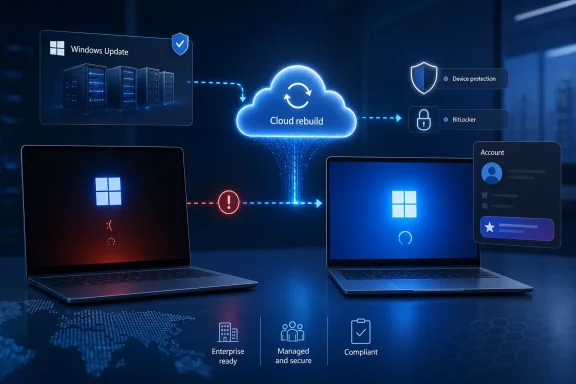
The most consequential feature in this release is Cloud rebuild, introduced for the Experimental channel. Microsoft describes it as a recovery option that restores a Windows 11 PC to a clean, known-good state by performing a full OS reinstall, even when Windows will not boot. Unlike Reset this PC, it downloads both the target Windows image and the device’s drivers from Windows Update.That distinction is the entire story. Reset this PC has always been useful, but it remains entangled with the health of the local installation and the recovery environment available on the machine. Cloud rebuild points toward a more modern assumption: if the local OS is suspect, Windows should be able to reconstruct itself from Microsoft’s cloud infrastructure and come back with the right driver set without USB media or a custom image.
This is not merely convenience for consumers who do not own a spare flash drive. It is a shift in Windows’ operational posture. A PC that cannot boot has historically been a local repair problem. Microsoft is testing a model where an unbootable PC becomes a network recovery problem, provided WinRE can connect to Ethernet or Wi-Fi and Windows Update can serve the correct payload.
That could reduce downtime for ordinary users and simplify support scripts for help desks. The old ritual of “download an ISO, create installation media, boot from USB, reinstall, then hunt for drivers” is exactly the kind of friction Microsoft wants to bury. If Cloud rebuild works reliably, it turns disaster recovery into something closer to a guided appliance reset.
But the word “if” matters. Recovery features are judged only when things are already broken. A flaky app can be restarted; a failed rebuild can leave a user stranded. Microsoft must prove that Cloud rebuild can handle bad networks, unusual storage drivers, BitLocker-protected devices, OEM customizations, and machines whose firmware behavior already made them hard to support.
Windows Update Is Becoming the Recovery Backbone
Cloud rebuild also expands the role of Windows Update. Traditionally, Windows Update has been the mechanism that changes a working system. In this model, it becomes the service that helps recreate a non-working system. That is a subtle but profound expansion of responsibility.For Microsoft, the attraction is obvious. Windows Update already understands targeting, compatibility holds, driver distribution, and release rings. If recovery can use the same infrastructure, Microsoft gains a centralized way to deliver a known-good OS image and the drivers needed to make the device usable again.
For PC makers, the tradeoff is more complicated. OEM recovery images once gave vendors a way to restore the device to a factory-defined state, complete with utilities, branding, and preloaded software. A Windows Update-based rebuild implies a cleaner, more Microsoft-controlled endpoint. That is likely good for users who hate bloatware, but it may be less appealing to vendors that see recovery as part of their device experience.
For administrators, the question is governance. A cloud-based reinstall sounds terrific until it intersects with compliance, data retention, device enrollment, and corporate provisioning. Microsoft says the preview involves confirming the target build, edition, and language before the rebuild begins, along with a data-loss warning. Enterprise IT will want more than a warning; it will want policy controls, auditability, and clarity about what happens after the machine returns to life.
Cloud rebuild therefore sits at the crossroads of consumer simplicity and enterprise control. The same feature that helps a family recover a broken laptop could become a support accelerant for small businesses. In a managed fleet, however, it must plug into Intune, Autopilot, Entra ID, BitLocker recovery, and whatever post-reinstall baseline the organization requires.
The Account Flyout Is Small UI With a Big Commercial Signal
The other notable Experimental change is a refreshed Windows 11 Account Control flyout with a clearer subscription badge. Microsoft says the design is meant to make account status instantly visible, helping users identify their plan, discover benefits, and explore upgrades.That language is doing a lot of work. On one level, this is a straightforward usability improvement. Users with Microsoft 365, OneDrive storage, Game Pass, or other account-linked entitlements benefit from knowing what they have. Windows has long scattered account, storage, sync, and subscription details across too many surfaces.
On another level, it is another reminder that Windows is now a storefront, dashboard, identity client, and operating system at the same time. The account flyout is not just telling you who is signed in. It is telling you what your relationship with Microsoft is worth, what benefits you are consuming, and what you might buy next.
That will irritate some WindowsForum readers, and not without reason. Enthusiasts have spent years watching Microsoft push Microsoft accounts deeper into setup, Settings, backup, Edge, OneDrive, and Copilot-adjacent experiences. A subscription badge in the account flyout is not the most aggressive example of that strategy, but it belongs to the same pattern.
The best version of this feature would be transparent and respectful. It would show useful account state without turning core shell UI into an upsell panel. The worst version would become another place where Windows nudges users toward services they did not ask about. Microsoft’s challenge is that many users no longer give it the benefit of the doubt on this front.
The Insider Changelog Is Quiet Because the Platform Work Is Loud
Paul Thurrott’s dry observation that there was “only one notable new feature” gets at a truth about modern Windows development. The visible changelog often feels thin because much of the work is happening below the level of user-facing novelty. Recovery, servicing, rollout controls, feature flags, driver delivery, and account infrastructure are not flashy, but they shape the daily experience of Windows far more than another coat of acrylic paint.This is especially true in 2026, as Windows 11 evolves less through monolithic version upgrades and more through cumulative updates, enablement packages, Store-delivered components, and controlled feature rollouts. A build number no longer maps cleanly to a feature set every user will see. Two machines can appear to be on the same build while receiving different staged experiences.
That is frustrating for testers who want clear answers. It is even more frustrating for sysadmins who need to document behavior. “It depends on your channel, branch, rollout state, feature flag, region, account type, hardware, and policy” may be accurate, but it is not a satisfying deployment note.
Still, this is the operating model Microsoft has chosen. Windows is too large, too diverse, and too exposed to ship as a single big-bang release once a year. The Insider Program now exists to feed telemetry and feedback into a rolling release machine. The July 6 builds are one more glimpse of that machine doing its work.
Beta Gets the Builds, Experimental Gets the Thesis
The Beta channel’s presence in this release matters because it shows Microsoft keeping the more stable test audience engaged, but the editorial gravity is clearly in Experimental. That is where Cloud rebuild and the account flyout are being tested, and that is where Microsoft is probing changes that could alter the long-term Windows experience.Experimental is a revealing name. It gives Microsoft permission to say that features may change, disappear, or never ship. But it also creates a fog around intent. When a feature appears in Experimental, users are left to infer whether Microsoft is testing a speculative idea, preparing a near-term rollout, or simply collecting telemetry before a broader deployment.
Cloud rebuild feels more substantial than a throwaway experiment. Recovery is not a novelty surface; it is core OS plumbing. Microsoft would not preview it unless it saw strategic value in moving more recovery logic into the cloud-backed Windows Update ecosystem.
The account flyout, by contrast, is less technically deep but politically sensitive. It touches the ongoing argument over whether Windows is serving the user or steering the user. Microsoft can call it clarity, and in some cases it will be. Critics will call it another monetization surface, and in some cases they will be right.
The Enterprise Angle Is Recovery, Not the Badge
For business readers, the subscription badge is mostly noise unless it starts appearing in managed environments in ways administrators cannot control. The real issue is Cloud rebuild. If Microsoft can make it policy-aware, auditable, and compatible with modern provisioning, it could become a powerful fleet recovery tool.Imagine a remote employee with a corrupted Windows installation. Today, support may walk that user through recovery options, ship a replacement device, or ask them to create installation media from another PC. A cloud rebuild path that restores Windows, pulls drivers from Windows Update, and then flows into Autopilot or another enrollment workflow could reduce that entire mess.
But enterprise recovery is never just reinstalling the OS. It is identity, encryption, certificates, VPN, endpoint detection, data protection, application deployment, and proof that the device returned to a compliant state. Cloud rebuild must be a beginning, not the whole story.
Microsoft’s recent direction makes the enterprise ambition plausible. Windows Autopilot, Intune, Entra ID, Windows Update for Business, and cloud-delivered security baselines already point toward a world where the physical PC is less precious than the identity and policy envelope around it. Cloud rebuild fits neatly into that worldview.
The danger is that Microsoft optimizes for the happy path. A feature that works beautifully on a Surface Laptop with a clean network connection may behave differently on a niche workstation, a factory floor device, or a remote system behind captive Wi-Fi. Recovery tools must succeed in ugly conditions, because ugly conditions are when people use them.
The July 6 Builds Reduce Windows to Three Hard Truths
The most useful way to read this release is not as a list of builds but as a statement of direction. Microsoft is telling Insiders that Windows 11’s future is more cloud-recoverable, more account-aware, and more dependent on staged delivery. That is progress in some ways and a warning in others.- Windows 11 testers in Beta and Experimental channels received new builds on July 6, 2026, while the Future Platforms branch did not receive a new flight.
- Cloud rebuild is the most important addition because it attempts a full OS reinstall from Windows Update, including the Windows image and device drivers, even when the installed OS will not boot.
- The refreshed Account Control flyout is less technically important but commercially revealing because it makes subscription status more visible inside Windows shell UI.
- The release reinforces that Insider build numbers are now only part of the story, since controlled rollouts and branch-specific testing can determine what a user actually sees.
- Enterprise value will depend on whether Cloud rebuild can integrate cleanly with management, encryption, provisioning, and compliance workflows rather than merely reinstalling Windows.
- Microsoft’s current Windows strategy is increasingly about resilience and services, not just desktop features.
References
- Primary source: thurrott.com
Published: Mon, 06 Jul 2026 22:48:05 GMT
Loading…
www.thurrott.com - Official source: blogs.windows.com
Loading…
blogs.windows.com - Related coverage: windowscentral.com
Loading…
www.windowscentral.com - Related coverage: techrepublic.com
Loading…
www.techrepublic.com - Related coverage: neowin.net
Loading…
www.neowin.net - Related coverage: arstechnica.com
New Windows 11 build makes mandatory Microsoft Account sign-in even more mandatory - Ars Technica
Bypassnro" is an easy MS Account workaround for Home and Pro Windows editions.arstechnica.com
- Official source: download.microsoft.com
- Official source: learn.microsoft.com
Windows 11 Insider Experimental Preview Build 26300.8687 - Windows Insider Program | Microsoft Learn
Release notes for Windows 11 Insider Experimental Preview Build 26300.8687learn.microsoft.com - Related coverage: elevenforum.com
Loading…
www.elevenforum.com - Related coverage: betanews.com
Loading…
betanews.com - Related coverage: windowsreport.com
Windows 11 Experimental Preview Adds Dedicated Taskbar Size Setting
Microsoft's latest Windows 11 Experimental Preview adds a Taskbar Size setting, improves File Explorer reliability, and fixes several bugs. windowsreport.com