

Microsoft is testing a Windows 11 “Low Latency Profile” in Insider builds that briefly drives CPU frequency to maximum for high-priority user actions such as launching apps, opening Start, and invoking menus, according to reporting published on May 7 and 8, 2026. The pitch is simple: Windows may not need to become dramatically lighter to feel dramatically faster. It may need to stop waiting politely for the processor to notice that the human has clicked something.
That is a small change with large symbolic weight. For years, Windows 11’s performance complaints have been less about benchmark collapse than about accumulated friction: the right-click menu that hesitates, the Start menu that arrives a beat late, the inbox app that opens as if it had to check with three committees first. Low Latency Profile looks like Microsoft admitting that responsiveness is not just a hardware problem or an app problem. It is an operating-system promise.
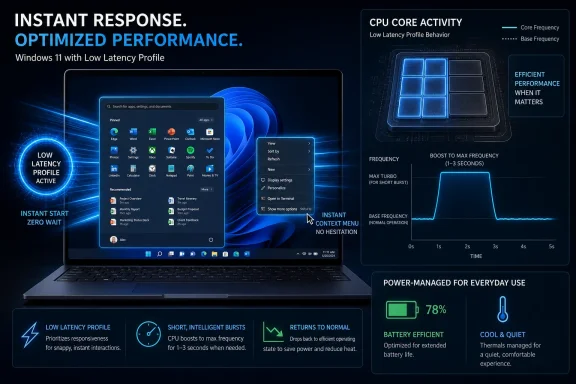
The reported mechanism behind Low Latency Profile is not exotic. When the user performs a task Windows considers important — opening Edge, launching Outlook, clicking Start, invoking a context menu — the OS briefly pushes the CPU to its maximum frequency for roughly one to three seconds. The processor does its burst of work, the interface appears sooner, and the system returns to its calmer power state.
That idea sounds almost too obvious, which is why it is interesting. Modern CPUs already boost, and Windows already schedules work across cores with elaborate priority rules. But “eventually fast” and “immediately responsive” are different user experiences. A processor that ramps up after the moment of annoyance has already occurred is not solving the part of performance people actually feel.
This is the difference between throughput and latency. Throughput is how much work a computer can complete over time. Latency is how long the machine makes you wait after you ask it to do something. Windows has historically been strong at the former, especially on powerful desktop hardware, while too often allowing the latter to be governed by a cocktail of scheduler behavior, power policy, app framework overhead, background activity, and whatever the shell happens to be doing that day.
Low Latency Profile appears to be Microsoft’s attempt to cut through that stack with a blunt but potentially effective rule: if the user just asked for something visible, spend power now and apologize later. It is a “race to idle” argument dressed as a Windows feature. Finish the burst quickly, then return to low power before the user has time to notice the machinery.
A 40 percent improvement in app launch time does not mean every Windows app will suddenly feel native, lean, and disciplined. It means some part of the delay may be dominated by short, latency-sensitive work that benefits from immediate CPU headroom. That is a meaningful distinction. If an app is slow because it waits on the network, initializes a bloated web runtime, scans a giant profile, or negotiates with a pile of extensions, a CPU burst will not perform magic.
But Windows often feels slow in places where “slow” means “late to react,” not “incapable of doing the job.” The Start menu is not a 3D render. A context menu is not a scientific simulation. If those surfaces feel sticky on modern hardware, the failure is not raw compute. It is coordination.
That is why Windows Latest’s deliberately constrained test is more revealing than any hero benchmark would be. Running Windows 11 in a virtualized environment with only two cores and 4GB of RAM is not how enthusiasts want to experience the OS, but it is a useful caricature of the machines Windows must still serve: low-cost laptops, under-provisioned office desktops, student systems, kiosk-class PCs, and corporate images weighted down by endpoint agents. In that scenario, enabling the hidden feature reportedly made apps appear almost instantly and caused Task Manager to show a brief CPU spike before settling back down.
That behavior is exactly what Microsoft should want if it can manage the trade-offs. Users do not resent the CPU working hard for two seconds when they click something. They resent the machine feeling unsure whether their click mattered.
That suspicion matters even when it is imprecise. Enthusiasts may exaggerate how fast Windows 7 or Windows 10 felt in hindsight, but they are usually reacting to something real: the sense that modern Windows performs more ceremony before doing ordinary work. It is not always slower in a benchmark. It is often more indirect.
The shell is where that indirectness becomes political. Nobody enjoys waiting on a right-click menu. Nobody wants Start to feel like a web app. Nobody wants File Explorer to act like it has wandered into a meeting before showing a folder. These are foundational interactions, and when they hesitate, the whole OS inherits the blame.
Low Latency Profile does not remove the underlying complexity. It does not make WinUI lighter, rewrite Explorer, simplify account integration, or stop Microsoft from placing more cloud services in the path of local interactions. But it does suggest that Microsoft is no longer treating perceived responsiveness as a cosmetic problem. That is the right instinct.
Performance work has two moral categories. One is optimization that removes unnecessary work. The other is optimization that throws resources at the work already there. Low Latency Profile belongs mostly to the second category. That does not make it illegitimate. Operating systems have always used caches, prefetching, priority boosts, speculative work, and power-state nudges to create the impression of immediacy.
The danger is that such techniques can become a tax on hardware progress. Instead of making the shell cheaper to run, the platform learns to spend more power at the moment the shell is noticed. On a plugged-in desktop, few people will care. On a thin-and-light laptop, a classroom cart, a fanless mini PC, or a fleet of devices with aging batteries, the calculus is more complicated.
Microsoft’s reported position is that the thermal and battery impact should be minimal because the boost window is so short. That is plausible, and in some cases a fast burst can be more efficient than a slow grind. But the details matter. A one-second boost every few minutes is harmless. A cascade of boosts across shell interactions, notifications, app launches, widgets, sync clients, and background-triggered UI surfaces could become more noticeable.
The other risk is fairness. If Windows learns which interactions deserve maximum frequency, somebody has to define “deserve.” Inbox apps may benefit first. Common third-party apps may benefit broadly. But power users will rightly ask whether Electron apps, legacy Win32 tools, UWP remnants, web apps installed as PWAs, and enterprise line-of-business applications all receive consistent treatment. The feature will be judged not by Microsoft’s chosen demos, but by the messy software people actually run.
Apple has long benefited from tight integration across hardware, operating system, frameworks, and app expectations. Android has its own mechanisms for anticipating interactive work and boosting performance around touch and UI events. Windows, by contrast, has to operate across a sprawling ecosystem: Intel and AMD, desktops and convertibles, gaming rigs and corporate laptops, old Win32 applications and modern web-wrapped clients, machines with aggressive OEM power tuning and machines with almost none.
That makes Microsoft’s job harder, but it also makes the payoff bigger. Windows is the general-purpose OS that most needs adaptive intelligence because it has the least uniform baseline. If Low Latency Profile can make a cheap laptop feel less cheap without requiring users to select a “High performance” power plan, that is not a gimmick. It is the OS doing its job.
The reported implementation also sounds more subtle than simply pinning the CPU at high clocks. A short, event-driven burst is very different from asking users to run permanently in a high-performance mode. The former is a latency intervention. The latter is a battery and fan-noise confession.
If Microsoft gets this right, the improvement will be most visible on the systems enthusiasts least like to review: budget machines with modest cooling, corporate devices running conservative power policies, and older PCs still expected to survive another procurement cycle. Flagship laptops already brute-force many of Windows 11’s pauses. The interesting test is whether the feature makes mediocre hardware feel less punished by the OS sitting on top of it.
That process is useful, but it also muddies expectations. Hidden features are not promises. They may be incomplete, region-limited, flighted by hardware class, dependent on other components, or intentionally disabled because the company is still measuring bad cases. Anyone forcing the feature on today should understand that they are not installing a finished performance mode. They are stepping into an experiment.
For IT administrators, the more important question is not whether a ViveTool command exists. It is how Microsoft intends to govern the feature when it ships. Will it be automatic and invisible? Will there be Group Policy or MDM controls? Will power plans influence it? Will OEM firmware and thermal policies override it? Will Microsoft document the events that trigger it, or will it remain a black box tuned through telemetry?
Enterprise Windows performance is never just about speed. It is about predictability. A feature that makes apps launch faster but introduces intermittent fan bursts, thermal spikes, battery variance, or odd behavior under virtualization will draw scrutiny from managed environments. Conversely, if it improves perceived responsiveness without changing administrative posture, it may become one of those rare Windows changes that users feel and IT departments do not have to explain.
Virtual desktop infrastructure adds another wrinkle. The Windows Latest test used a constrained virtual machine to show the upside, but real VDI and cloud PC environments have their own scheduling layers, host contention, and policy constraints. A guest OS asking for a burst does not guarantee the host will provide one in the same way a local CPU would. Microsoft will need to think carefully about how this feature behaves in Windows 365, Azure Virtual Desktop, Hyper-V, and third-party virtualization stacks.
That makes Start an ideal showcase for Low Latency Profile. It is invoked constantly, it is visible, and its delay is easy to perceive. A 70 percent reduction in menu latency, if it holds up in real-world use, would be more valuable than many larger improvements hidden in background tasks. Users forgive slow work when the work is obviously hard. They do not forgive a delayed menu.
The same applies to context menus. Windows 11’s modern right-click menu has been one of the operating system’s most quietly resented changes, partly because it altered muscle memory and partly because it made a basic interaction feel mediated. Microsoft has improved pieces of that experience over time, but the reputational damage remains. If Low Latency Profile makes those menus appear with less hesitation, it may soften one of Windows 11’s most persistent irritants.
Still, Microsoft should resist the temptation to treat speed as the only issue. The Windows 11 context menu debate was also about information architecture, extension compatibility, and the extra click required to reach the classic menu. Performance helps, but it does not settle every design argument. A fast inconvenience is still an inconvenience.
Low Latency Profile is credible because it attacks a daily annoyance rather than a marketing abstraction. It is not another AI surface. It is not another cloud upsell. It is not another redesigned panel that moves settings without resolving the old Control Panel split. It is a change aimed at the half-second gaps that define whether a system feels polished.
That matters because Microsoft’s biggest Windows challenge is not convincing users that Windows has features. It is convincing them that Windows respects their time. Every unnecessary notification, delayed menu, forced restart prompt, Edge nudge, account prompt, and sluggish shell transition spends down that trust. Performance work earns some of it back.
But trust will depend on restraint. If Microsoft pairs faster launches with more autostarting services, more promotional surfaces, and more background agents, users will experience the improvement as a subsidy for bloat. The company cannot boost its way out of every self-inflicted delay. Low Latency Profile should be one tool in a larger discipline of making Windows do less, sooner, and more predictably.
The danger is especially acute for apps built on heavy cross-platform frameworks. Users do not care that an app is portable, web-backed, or convenient for the development team. They care that clicking the icon produces a window without drama. If Windows becomes more aggressive about boosting interactive work, the relative embarrassment of apps that still launch slowly may become more visible, not less.
There is also a measurement lesson. Developers and IT teams should pay attention to first interaction, not just process start. An app that paints a window quickly but remains unusable for several seconds is not responsive in the way users mean it. If Low Latency Profile improves shell launch and app process creation, the remaining delays inside the app will stand out.
Microsoft’s own apps will be under the harshest spotlight. Edge and Outlook are reportedly among the beneficiaries, which makes sense because they are prominent and frequently launched. But it also invites a fair question: if Microsoft’s flagship apps need an OS-level shove to feel snappy, what does that say about the cost of modern Microsoft application architecture? The best answer would be both: optimize the apps and improve the scheduler.
A short boost should be manageable on many systems. Intel and AMD mobile processors are designed to spike and settle. OEMs already tune power limits, thermal envelopes, and fan curves around short bursts. On a well-designed laptop, a one- to three-second sprint may be lost in the noise of ordinary use.
But Windows hardware is not a single well-designed laptop. It is a continent. Some machines have generous cooling; others run hot under a browser tab. Some firmware configurations are sensible; others chase benchmark optics or battery claims. Some batteries are new; others have survived years of charge cycles. Low Latency Profile will land on all of that diversity.
Microsoft will need guardrails. The feature should respect battery saver modes, thermal pressure, accessibility needs, enterprise policies, and perhaps device class. It should also be transparent enough for diagnostics. If users see strange fan behavior or admins observe battery complaints after rollout, “Windows is faster now” will not be a sufficient explanation.
The best version of this feature is not one that always boosts. It is one that knows when not to.
Source: PCMag UK Microsoft Tests Windows Feature That Could Make App Startup Less of a Slog
That is a small change with large symbolic weight. For years, Windows 11’s performance complaints have been less about benchmark collapse than about accumulated friction: the right-click menu that hesitates, the Start menu that arrives a beat late, the inbox app that opens as if it had to check with three committees first. Low Latency Profile looks like Microsoft admitting that responsiveness is not just a hardware problem or an app problem. It is an operating-system promise.
 Microsoft Is Finally Treating Latency as a First-Class Windows Bug
The reported mechanism behind Low Latency Profile is not exotic. When the user performs a task Windows considers important — opening Edge, launching Outlook, clicking Start, invoking a context menu — the OS briefly pushes the CPU to its maximum frequency for roughly one to three seconds. The processor does its burst of work, the interface appears sooner, and the system returns to its calmer power state.That idea sounds almost too obvious, which is why it is interesting. Modern CPUs already boost, and Windows already schedules work across cores with elaborate priority rules. But “eventually fast” and “immediately responsive” are different user experiences. A processor that ramps up after the moment of annoyance has already occurred is not solving the part of performance people actually feel.
This is the difference between throughput and latency. Throughput is how much work a computer can complete over time. Latency is how long the machine makes you wait after you ask it to do something. Windows has historically been strong at the former, especially on powerful desktop hardware, while too often allowing the latter to be governed by a cocktail of scheduler behavior, power policy, app framework overhead, background activity, and whatever the shell happens to be doing that day.
Low Latency Profile appears to be Microsoft’s attempt to cut through that stack with a blunt but potentially effective rule: if the user just asked for something visible, spend power now and apologize later. It is a “race to idle” argument dressed as a Windows feature. Finish the burst quickly, then return to low power before the user has time to notice the machinery.
The Numbers Are Flashy, but the Feeling Is the Product
The early reported figures are attention-grabbing: up to 40 percent faster launch times for inbox apps such as Edge and Outlook, and up to 70 percent faster responsiveness for some menus and shell interfaces. Those numbers should be treated carefully because Microsoft has not publicly documented the feature, the test conditions are not standardized across the public reports, and hidden Insider features are not finished products. Still, they point to the right class of problem.A 40 percent improvement in app launch time does not mean every Windows app will suddenly feel native, lean, and disciplined. It means some part of the delay may be dominated by short, latency-sensitive work that benefits from immediate CPU headroom. That is a meaningful distinction. If an app is slow because it waits on the network, initializes a bloated web runtime, scans a giant profile, or negotiates with a pile of extensions, a CPU burst will not perform magic.
But Windows often feels slow in places where “slow” means “late to react,” not “incapable of doing the job.” The Start menu is not a 3D render. A context menu is not a scientific simulation. If those surfaces feel sticky on modern hardware, the failure is not raw compute. It is coordination.
That is why Windows Latest’s deliberately constrained test is more revealing than any hero benchmark would be. Running Windows 11 in a virtualized environment with only two cores and 4GB of RAM is not how enthusiasts want to experience the OS, but it is a useful caricature of the machines Windows must still serve: low-cost laptops, under-provisioned office desktops, student systems, kiosk-class PCs, and corporate images weighted down by endpoint agents. In that scenario, enabling the hidden feature reportedly made apps appear almost instantly and caused Task Manager to show a brief CPU spike before settling back down.
That behavior is exactly what Microsoft should want if it can manage the trade-offs. Users do not resent the CPU working hard for two seconds when they click something. They resent the machine feeling unsure whether their click mattered.
Windows 11’s Reputation Problem Was Built One Hesitation at a Time
Windows 11 has not suffered from a single catastrophic performance narrative. It has suffered from a thousand small ones. The redesigned shell arrived with new surfaces, new animations, a new Start menu, a reworked taskbar, a modernized context menu layered over a legacy one, and a steady expansion of cloud-connected and web-backed experiences. Each addition may be defensible in isolation. Together, they made many users suspicious that Windows had grown less direct.That suspicion matters even when it is imprecise. Enthusiasts may exaggerate how fast Windows 7 or Windows 10 felt in hindsight, but they are usually reacting to something real: the sense that modern Windows performs more ceremony before doing ordinary work. It is not always slower in a benchmark. It is often more indirect.
The shell is where that indirectness becomes political. Nobody enjoys waiting on a right-click menu. Nobody wants Start to feel like a web app. Nobody wants File Explorer to act like it has wandered into a meeting before showing a folder. These are foundational interactions, and when they hesitate, the whole OS inherits the blame.
Low Latency Profile does not remove the underlying complexity. It does not make WinUI lighter, rewrite Explorer, simplify account integration, or stop Microsoft from placing more cloud services in the path of local interactions. But it does suggest that Microsoft is no longer treating perceived responsiveness as a cosmetic problem. That is the right instinct.
A CPU Burst Is Not a Substitute for Cleaner Code
The obvious criticism is also the correct one: if Windows needs a burst mode to make menus and apps feel fast, perhaps the software stack is too heavy. There is truth in that. A smart scheduler can hide latency, but it cannot excuse waste forever.Performance work has two moral categories. One is optimization that removes unnecessary work. The other is optimization that throws resources at the work already there. Low Latency Profile belongs mostly to the second category. That does not make it illegitimate. Operating systems have always used caches, prefetching, priority boosts, speculative work, and power-state nudges to create the impression of immediacy.
The danger is that such techniques can become a tax on hardware progress. Instead of making the shell cheaper to run, the platform learns to spend more power at the moment the shell is noticed. On a plugged-in desktop, few people will care. On a thin-and-light laptop, a classroom cart, a fanless mini PC, or a fleet of devices with aging batteries, the calculus is more complicated.
Microsoft’s reported position is that the thermal and battery impact should be minimal because the boost window is so short. That is plausible, and in some cases a fast burst can be more efficient than a slow grind. But the details matter. A one-second boost every few minutes is harmless. A cascade of boosts across shell interactions, notifications, app launches, widgets, sync clients, and background-triggered UI surfaces could become more noticeable.
The other risk is fairness. If Windows learns which interactions deserve maximum frequency, somebody has to define “deserve.” Inbox apps may benefit first. Common third-party apps may benefit broadly. But power users will rightly ask whether Electron apps, legacy Win32 tools, UWP remnants, web apps installed as PWAs, and enterprise line-of-business applications all receive consistent treatment. The feature will be judged not by Microsoft’s chosen demos, but by the messy software people actually run.
The Best Case Is a Windows Version of Race-to-Idle Discipline
There is a generous reading of Low Latency Profile, and it is stronger than the cynical one. Modern chips are built for dynamic behavior. They do not simply run at one clock speed and stay there. They move across power states, boost opportunistically, and distribute work across performance and efficiency cores. A modern OS that fails to shape those transitions around human interaction is leaving responsiveness on the table.Apple has long benefited from tight integration across hardware, operating system, frameworks, and app expectations. Android has its own mechanisms for anticipating interactive work and boosting performance around touch and UI events. Windows, by contrast, has to operate across a sprawling ecosystem: Intel and AMD, desktops and convertibles, gaming rigs and corporate laptops, old Win32 applications and modern web-wrapped clients, machines with aggressive OEM power tuning and machines with almost none.
That makes Microsoft’s job harder, but it also makes the payoff bigger. Windows is the general-purpose OS that most needs adaptive intelligence because it has the least uniform baseline. If Low Latency Profile can make a cheap laptop feel less cheap without requiring users to select a “High performance” power plan, that is not a gimmick. It is the OS doing its job.
The reported implementation also sounds more subtle than simply pinning the CPU at high clocks. A short, event-driven burst is very different from asking users to run permanently in a high-performance mode. The former is a latency intervention. The latter is a battery and fan-noise confession.
If Microsoft gets this right, the improvement will be most visible on the systems enthusiasts least like to review: budget machines with modest cooling, corporate devices running conservative power policies, and older PCs still expected to survive another procurement cycle. Flagship laptops already brute-force many of Windows 11’s pauses. The interesting test is whether the feature makes mediocre hardware feel less punished by the OS sitting on top of it.
Insiders Are Testing More Than a Feature Flag
The feature reportedly exists in current Insider builds but is not broadly exposed as a polished setting. Enthusiasts have been enabling it through hidden feature IDs surfaced by the usual Windows-watcher ecosystem. That is typical of Microsoft’s modern development rhythm: features appear behind flags, activate for subsets of testers, generate telemetry and social-media archaeology, and eventually either graduate, mutate, or disappear.That process is useful, but it also muddies expectations. Hidden features are not promises. They may be incomplete, region-limited, flighted by hardware class, dependent on other components, or intentionally disabled because the company is still measuring bad cases. Anyone forcing the feature on today should understand that they are not installing a finished performance mode. They are stepping into an experiment.
For IT administrators, the more important question is not whether a ViveTool command exists. It is how Microsoft intends to govern the feature when it ships. Will it be automatic and invisible? Will there be Group Policy or MDM controls? Will power plans influence it? Will OEM firmware and thermal policies override it? Will Microsoft document the events that trigger it, or will it remain a black box tuned through telemetry?
Enterprise Windows performance is never just about speed. It is about predictability. A feature that makes apps launch faster but introduces intermittent fan bursts, thermal spikes, battery variance, or odd behavior under virtualization will draw scrutiny from managed environments. Conversely, if it improves perceived responsiveness without changing administrative posture, it may become one of those rare Windows changes that users feel and IT departments do not have to explain.
Virtual desktop infrastructure adds another wrinkle. The Windows Latest test used a constrained virtual machine to show the upside, but real VDI and cloud PC environments have their own scheduling layers, host contention, and policy constraints. A guest OS asking for a burst does not guarantee the host will provide one in the same way a local CPU would. Microsoft will need to think carefully about how this feature behaves in Windows 365, Azure Virtual Desktop, Hyper-V, and third-party virtualization stacks.
The Start Menu Is the Perfect Test Case Because Nobody Forgives It
Start is more than a launcher. It is the emotional front door of Windows. When Start feels fast, the OS feels grounded. When Start hesitates, even a powerful machine can feel cheap.That makes Start an ideal showcase for Low Latency Profile. It is invoked constantly, it is visible, and its delay is easy to perceive. A 70 percent reduction in menu latency, if it holds up in real-world use, would be more valuable than many larger improvements hidden in background tasks. Users forgive slow work when the work is obviously hard. They do not forgive a delayed menu.
The same applies to context menus. Windows 11’s modern right-click menu has been one of the operating system’s most quietly resented changes, partly because it altered muscle memory and partly because it made a basic interaction feel mediated. Microsoft has improved pieces of that experience over time, but the reputational damage remains. If Low Latency Profile makes those menus appear with less hesitation, it may soften one of Windows 11’s most persistent irritants.
Still, Microsoft should resist the temptation to treat speed as the only issue. The Windows 11 context menu debate was also about information architecture, extension compatibility, and the extra click required to reach the classic menu. Performance helps, but it does not settle every design argument. A fast inconvenience is still an inconvenience.
This Is Where Microsoft’s K2-Style Repair Campaign Gets Real
The broader context is Microsoft’s reported push to improve Windows 11 performance, reliability, and fit-and-finish after years of complaints that the OS has become heavier, noisier, and more distracted. Whether one treats “K2” as an internal campaign, a shorthand used by reporters, or a convenient label for a wider reset, the pressure behind it is obvious. Windows 11 needs fewer speeches about modernization and more moments where users can feel the machine respond better.Low Latency Profile is credible because it attacks a daily annoyance rather than a marketing abstraction. It is not another AI surface. It is not another cloud upsell. It is not another redesigned panel that moves settings without resolving the old Control Panel split. It is a change aimed at the half-second gaps that define whether a system feels polished.
That matters because Microsoft’s biggest Windows challenge is not convincing users that Windows has features. It is convincing them that Windows respects their time. Every unnecessary notification, delayed menu, forced restart prompt, Edge nudge, account prompt, and sluggish shell transition spends down that trust. Performance work earns some of it back.
But trust will depend on restraint. If Microsoft pairs faster launches with more autostarting services, more promotional surfaces, and more background agents, users will experience the improvement as a subsidy for bloat. The company cannot boost its way out of every self-inflicted delay. Low Latency Profile should be one tool in a larger discipline of making Windows do less, sooner, and more predictably.
Developers Should Read the Signal, Not Just the Scheduler
For developers, the lesson is not “Windows will make our apps faster.” It is that the platform is increasingly aware of interactive moments, and apps that align with those moments will benefit most. If an application’s startup path is bloated with synchronous initialization, blocking network calls, unnecessary UI-thread work, and framework cold-start cost, a CPU burst may make the pain shorter. It will not make the architecture good.The danger is especially acute for apps built on heavy cross-platform frameworks. Users do not care that an app is portable, web-backed, or convenient for the development team. They care that clicking the icon produces a window without drama. If Windows becomes more aggressive about boosting interactive work, the relative embarrassment of apps that still launch slowly may become more visible, not less.
There is also a measurement lesson. Developers and IT teams should pay attention to first interaction, not just process start. An app that paints a window quickly but remains unusable for several seconds is not responsive in the way users mean it. If Low Latency Profile improves shell launch and app process creation, the remaining delays inside the app will stand out.
Microsoft’s own apps will be under the harshest spotlight. Edge and Outlook are reportedly among the beneficiaries, which makes sense because they are prominent and frequently launched. But it also invites a fair question: if Microsoft’s flagship apps need an OS-level shove to feel snappy, what does that say about the cost of modern Microsoft application architecture? The best answer would be both: optimize the apps and improve the scheduler.
The Battery Question Will Decide Whether This Feels Clever or Crude
Power management is where this story could turn. Users want instant response, silent operation, long battery life, cool chassis temperatures, and cheap hardware. Physics does not grant all five without negotiation.A short boost should be manageable on many systems. Intel and AMD mobile processors are designed to spike and settle. OEMs already tune power limits, thermal envelopes, and fan curves around short bursts. On a well-designed laptop, a one- to three-second sprint may be lost in the noise of ordinary use.
But Windows hardware is not a single well-designed laptop. It is a continent. Some machines have generous cooling; others run hot under a browser tab. Some firmware configurations are sensible; others chase benchmark optics or battery claims. Some batteries are new; others have survived years of charge cycles. Low Latency Profile will land on all of that diversity.
Microsoft will need guardrails. The feature should respect battery saver modes, thermal pressure, accessibility needs, enterprise policies, and perhaps device class. It should also be transparent enough for diagnostics. If users see strange fan behavior or admins observe battery complaints after rollout, “Windows is faster now” will not be a sufficient explanation.
The best version of this feature is not one that always boosts. It is one that knows when not to.
The Hidden Performance Switch Reveals the Real Windows 11 Bargain
The practical picture is promising but unfinished. Low Latency Profile looks like a smart intervention for a real Windows weakness, but it remains an Insider-era feature whose final behavior, controls, and release timing are not yet public.- Microsoft is reportedly testing Low Latency Profile in Windows Insider builds rather than shipping it broadly to all Windows 11 users today.
- The feature appears to boost CPU frequency for roughly one to three seconds after high-priority user actions such as launching apps or opening shell menus.
- Early reporting points to gains of up to 40 percent for some app launches and up to 70 percent for certain menus, but those figures should be treated as preliminary rather than universal.
- Budget PCs, constrained virtual machines, and enterprise laptops may benefit more visibly than high-end desktops because latency hurts most when hardware headroom is limited.
- The feature will only be a win if Microsoft keeps battery, thermals, fan behavior, virtualization, and administrative control from becoming the next support burden.
- A CPU burst can make Windows feel faster, but it should complement cleaner shell and app engineering rather than replace it.
Source: PCMag UK Microsoft Tests Windows Feature That Could Make App Startup Less of a Slog
