

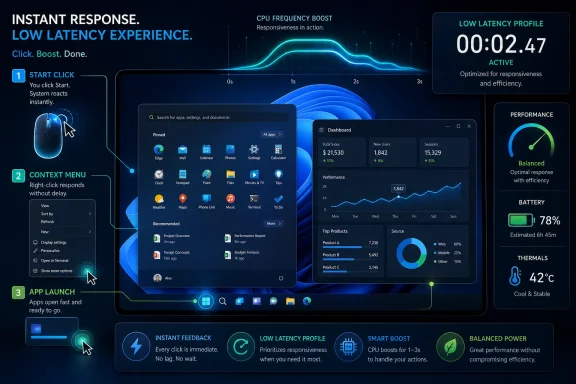
Microsoft is testing a Windows 11 “Low Latency Profile” in Insider builds in May 2026 that briefly drives CPU frequency higher when users launch apps, open Start, or trigger key interface actions. The idea is simple enough to sound overdue: stop waiting for the scheduler to notice that the user is impatient. If the feature survives testing, Windows may finally get better at the thing users judge most harshly and measure least scientifically — whether the PC feels fast. The stakes are bigger than a few benchmark-friendly launch times, because responsiveness has become one of Windows 11’s most visible credibility problems.
For decades, Windows performance has been discussed in the language of throughput: how many workloads can run, how well a CPU scales, how efficiently the system balances background tasks, and how much battery life can be preserved while doing it. Those things matter. But they are not the same as the split-second experience of clicking an icon and watching the machine hesitate.
The Low Latency Profile appears to target that hesitation directly. According to reporting around the Insider feature, Windows can briefly boost CPU frequency for roughly one to three seconds when the user initiates a high-priority action such as opening an app, Start menu, flyout, or context menu. That is not a revolution in raw computing power. It is a change in when Windows chooses to spend the power it already has.
That distinction matters because modern PCs are rarely slow in the old sense. Even inexpensive laptops have enough CPU performance to open a mail client or browser tab without drama. The irritation comes from the gap between available performance and delivered responsiveness — the moment when the machine has capacity, but the interface still feels like it is negotiating with itself.
Windows has long been excellent at being many things to many machines. It runs on gaming desktops, corporate fleets, fanless tablets, ruggedized field laptops, virtual desktops, and bargain-bin notebooks. The problem is that a platform optimized for breadth can become conservative in moments that demand aggression. The Low Latency Profile is Microsoft testing whether Windows should stop being polite when the user clearly wants something now.
But the broader claim is believable because it maps to a familiar truth about perceived performance. A computer that reacts immediately to input feels faster even if its total workload completion time barely changes. Users do not experience the operating system as a spreadsheet of CPU averages; they experience it as a sequence of tiny negotiations between intention and response.
That is why this feature could matter more than a conventional speed tweak buried in File Explorer or a memory optimization in a background service. If Windows becomes more decisive in the first second after input, the whole system can feel less gummy. The interface does not need to become magically lightweight; it needs to stop making the user wonder whether the click registered.
This is also why anecdotal tests on deliberately constrained systems are more interesting than they might first appear. A virtualized Windows 11 setup limited to a couple of cores and a small memory allotment is not representative of a premium laptop. But it is representative of the way many real users encounter Windows: with too many startup apps, too little headroom, and hardware that looked adequate on the shelf.
If Low Latency Profile helps there, it is not just a feature for benchmark charts. It is a feature for the family laptop, the school-issued device, the entry-level business notebook, and the aging desktop that is still expected to behave like a modern computer because Windows Update says it is current.
Microsoft knows this. Its recent public messaging around Windows quality has leaned heavily into responsiveness, reliability, and app interaction latency. The company has talked about improving system performance, File Explorer, app responsiveness, the Windows Subsystem for Linux, updates, drivers, and core experiences. That is corporate language, but the subtext is plain: Windows 11 needs to feel less encumbered.
The Low Latency Profile fits into that broader repair campaign. It does not replace deeper work on WinUI, shell architecture, driver behavior, or background task discipline. A CPU burst cannot make a poorly designed app elegant. It cannot erase every animation hitch, DPC latency spike, or storage bottleneck. But it can make the platform more forgiving in the moment users notice most.
There is a reason Apple’s platforms are often credited with feeling smooth even when the underlying hardware is not dramatically superior. The software stack is opinionated about foreground intent. When the user touches, clicks, opens, swipes, or invokes, the system tends to privilege that action aggressively. Windows, by contrast, often feels like it is balancing a committee.
That committee has advantages. Windows is open, extensible, backward-compatible, and deeply accommodating of hardware and software Microsoft does not control. But accommodation has a cost. The operating system can feel like it is waiting for consensus while the user is waiting for Outlook.
Phones have been playing this game for years. A mobile OS that did not respond aggressively to touch input would feel broken, even if it posted respectable sustained performance numbers. Desktop operating systems are not phones, but the human expectation has converged. When a $700 smartphone feels instant and a $1,200 laptop hesitates opening a menu, users do not care that the laptop is technically more powerful.
The reported Windows behavior is also short enough to be plausible as a net efficiency play rather than pure waste. If the processor races through the launch-critical work and returns quickly to a lower-power state, the energy penalty may be smaller than expected. In some cases, finishing work faster can be better than dragging through it at a lower clock.
That does not mean the feature is free. A one-to-three-second burst repeated across app launches, menus, widgets, search panes, and system flyouts could affect thermals, fan behavior, and battery life, especially on thin-and-light PCs with limited cooling. The difference between “snappy” and “annoyingly warm” is often an OEM tuning problem, not just a Windows problem.
This is where Microsoft’s challenge becomes more complicated than enabling a hidden flag. Windows must coordinate with Intel, AMD, Qualcomm, OEM firmware, power plans, Modern Standby behavior, and whatever security or management stack an enterprise has layered on top. A performance feature that delights on a plugged-in desktop can become controversial on a fanless tablet.
That matters for Windows 11 because many of the complaints about responsiveness are not purely CPU-frequency complaints. Some are tied to shell surfaces built on newer UI frameworks. Some stem from cloud-connected experiences that do not behave like local software. Some come from third-party startup utilities, antivirus hooks, graphics drivers, corporate endpoint agents, and OEM preload decisions. The CPU is often the visible suspect because Task Manager is easy to open, but it is not always the culprit.
Still, boosting at the moment of input can paper over a surprising amount of friction. Launch paths often include decompression, disk reads, framework initialization, process creation, window composition, and service calls. A short, decisive performance window can help several of those tasks complete before the user’s patience expires.
The real test will be consistency. Users will forgive a feature they never notice explicitly but feel everywhere. They will not forgive a system that is fast on Monday, laggy on Tuesday, and mysteriously hot on Wednesday. Windows already suffers from a reputation for variability; a responsiveness feature must reduce that variability, not add a new layer of it.
Enterprises will ask a different question: can this be managed? If Low Latency Profile becomes a shipping feature, IT departments will want to know whether it respects power policy, battery saver, thermal constraints, virtualization, accessibility tools, and security baselines. A fleet manager may like faster app launches, but not if help-desk tickets shift from “slow Start menu” to “fans spin every time users open Teams.”
On those machines, milliseconds become mood. A Start menu that opens without delay makes the PC feel newer. Outlook launching with less of a pause makes work feel less hostile. Context menus appearing promptly can change the rhythm of an entire day because the user stops bracing for friction.
This is where Microsoft is competing not only with macOS but with ChromeOS, iPadOS, Android tablets, and the general expectation that everyday computing should be immediate. Windows cannot merely be capable. It must be pleasant under constraint. Capability is what wins procurement checklists; responsiveness is what wins loyalty.
But cheap hardware is also where a burst strategy can be most fragile. Entry-level devices often have tight thermal limits and small batteries. If the feature is too aggressive, users may see more fan noise, worse battery life, or inconsistent performance after the chassis warms up. If it is too conservative, the promised responsiveness gains may disappear exactly where they are needed most.
The best version of this feature would be context-aware. It would know the difference between plugged-in and battery operation, between a cool system and a thermally saturated one, between a user opening Start and a background process creating noise. It would treat foreground intent as a priority signal, not a license to brute-force every hiccup.
That history makes skepticism rational. If Microsoft ships Low Latency Profile while also expanding background features that consume the recovered headroom, users will see the move as a shell game. The company cannot boost its way out of bloat forever. At some point, making Windows feel fast also means making Windows do less when the user did not ask for anything.
This is the tension at the center of modern Windows. Microsoft wants the operating system to be a platform for local apps, cloud services, AI experiences, ads, recommendations, cross-device syncing, security enforcement, developer workflows, gaming, and enterprise management. Users want the Start menu to open instantly. Both agendas live in the same memory space.
Low Latency Profile is interesting because it implicitly admits that foreground experience deserves special treatment. The user’s click is not just another event in the queue. It is the point of the machine. That is a philosophical shift as much as a scheduler tweak.
The danger is that Microsoft treats this as a compensating control rather than a design principle. A fast burst can make a heavy interface feel lighter, but it does not make the interface light. If Windows 11’s shell and inbox apps continue to grow more layered and web-connected, CPU bursts may become the operating-system equivalent of turning up the volume to drown out a rattle.
Still, the direction is clear enough to analyze. Microsoft is not merely shaving code paths; it is experimenting with a more assertive policy for user-triggered work. That policy will need to survive three groups with very different expectations.
Consumers will judge by feel. They will not care whether the improvement comes from CPU frequency, framework changes, caching, preloading, or scheduler hints. If the PC feels faster and battery life does not obviously suffer, the feature will be considered a win.
Enthusiasts will judge by transparency. They will want to know which builds include it, which feature IDs control it, how it interacts with power plans, and whether performance claims hold up outside Microsoft’s preferred scenarios. They will also test it in pathological environments because that is what enthusiasts do.
IT professionals will judge by predictability. They will ask whether the feature can be audited, disabled, configured, or governed through policy. They will also want assurance that “more responsive” does not mean “less stable,” particularly in environments where thermal behavior, battery life, and app compatibility matter more than shaving a second off a launch.
Microsoft’s rollout path will therefore matter almost as much as the technology. A quiet controlled rollout may reduce risk but leave users confused about why one machine feels better than another. A loud marketing push may backfire if real-world gains are uneven. Windows performance is not a place where Microsoft has unlimited benefit of the doubt.
Windows must support decades of applications, countless driver models, unpredictable OEM configurations, and enterprise agents that can intercept almost anything. Its backward compatibility is a competitive advantage and a performance liability. A scheduler hint that works cleanly on a first-party laptop may behave differently on a corporate image loaded with endpoint detection, VPN clients, device control software, and legacy shell extensions.
That is not an excuse. It is the job. Windows is valuable precisely because it runs where more controlled platforms do not. But Microsoft cannot borrow only the pleasant parts of Apple’s responsiveness model without confronting the sprawl that makes Windows feel inconsistent.
The better comparison may be less about Apple specifically and more about expectation. Users have learned from phones that input should have priority. They have learned from game consoles that constrained hardware can feel fluid when the software stack is disciplined. They have learned from browsers that even bloated workloads can feel responsive when scheduling is ruthless about foreground tasks.
Windows has the technical foundations to compete in that world. What it needs is the will to make responsiveness a first-class product requirement rather than an optimization pass after the feature list is complete.
A computer can be objectively powerful and subjectively irritating. Anyone who has clicked Start on a modern laptop and watched a blank or delayed panel appear understands the difference. The system is not failing in a catastrophic way. It is failing in a thousand tiny ways that make the machine feel less direct.
By focusing on the input-to-response interval, Microsoft is aiming at the emotional core of performance. This is the territory where users decide whether an OS feels polished or clumsy. It is also where small improvements can compound: a faster menu, a faster launch, a faster context action, a faster return to work.
That is why this feature deserves attention even before it ships broadly. It is not just another Insider curiosity. It is a sign that Microsoft may be shifting from optimizing Windows as a workload host to optimizing Windows as an interactive instrument. The former is necessary. The latter is what makes people stop complaining.
The concrete picture is already coming into focus.
Source: PCMag Microsoft Tests Windows Feature That Could Make App Startup Less of a Slog
 Microsoft Is Finally Optimizing for the Click, Not the Benchmark
For decades, Windows performance has been discussed in the language of throughput: how many workloads can run, how well a CPU scales, how efficiently the system balances background tasks, and how much battery life can be preserved while doing it. Those things matter. But they are not the same as the split-second experience of clicking an icon and watching the machine hesitate.The Low Latency Profile appears to target that hesitation directly. According to reporting around the Insider feature, Windows can briefly boost CPU frequency for roughly one to three seconds when the user initiates a high-priority action such as opening an app, Start menu, flyout, or context menu. That is not a revolution in raw computing power. It is a change in when Windows chooses to spend the power it already has.
That distinction matters because modern PCs are rarely slow in the old sense. Even inexpensive laptops have enough CPU performance to open a mail client or browser tab without drama. The irritation comes from the gap between available performance and delivered responsiveness — the moment when the machine has capacity, but the interface still feels like it is negotiating with itself.
Windows has long been excellent at being many things to many machines. It runs on gaming desktops, corporate fleets, fanless tablets, ruggedized field laptops, virtual desktops, and bargain-bin notebooks. The problem is that a platform optimized for breadth can become conservative in moments that demand aggression. The Low Latency Profile is Microsoft testing whether Windows should stop being polite when the user clearly wants something now.
The Best Performance Feature Is the One You Feel Before You Measure
The reported numbers are eye-catching: up to 40 percent faster launches for some inbox apps such as Edge and Outlook, and even larger improvements for select interface surfaces like Start and context menus. Those figures deserve caution. Insider features change, test conditions vary, and launch-time percentages can flatter small absolute improvements.But the broader claim is believable because it maps to a familiar truth about perceived performance. A computer that reacts immediately to input feels faster even if its total workload completion time barely changes. Users do not experience the operating system as a spreadsheet of CPU averages; they experience it as a sequence of tiny negotiations between intention and response.
That is why this feature could matter more than a conventional speed tweak buried in File Explorer or a memory optimization in a background service. If Windows becomes more decisive in the first second after input, the whole system can feel less gummy. The interface does not need to become magically lightweight; it needs to stop making the user wonder whether the click registered.
This is also why anecdotal tests on deliberately constrained systems are more interesting than they might first appear. A virtualized Windows 11 setup limited to a couple of cores and a small memory allotment is not representative of a premium laptop. But it is representative of the way many real users encounter Windows: with too many startup apps, too little headroom, and hardware that looked adequate on the shelf.
If Low Latency Profile helps there, it is not just a feature for benchmark charts. It is a feature for the family laptop, the school-issued device, the entry-level business notebook, and the aging desktop that is still expected to behave like a modern computer because Windows Update says it is current.
Windows Has Been Losing the “Feels Fast” Argument
The uncomfortable backdrop is that Windows 11 has spent years accumulating complaints about sluggishness in places where users expect instant response. Start menu delays, File Explorer pauses, Settings lag, context-menu weirdness, and inconsistent shell behavior have become part of the operating system’s reputation. Not every complaint is fair, and not every machine is clean, but the pattern is too persistent to dismiss as user imagination.Microsoft knows this. Its recent public messaging around Windows quality has leaned heavily into responsiveness, reliability, and app interaction latency. The company has talked about improving system performance, File Explorer, app responsiveness, the Windows Subsystem for Linux, updates, drivers, and core experiences. That is corporate language, but the subtext is plain: Windows 11 needs to feel less encumbered.
The Low Latency Profile fits into that broader repair campaign. It does not replace deeper work on WinUI, shell architecture, driver behavior, or background task discipline. A CPU burst cannot make a poorly designed app elegant. It cannot erase every animation hitch, DPC latency spike, or storage bottleneck. But it can make the platform more forgiving in the moment users notice most.
There is a reason Apple’s platforms are often credited with feeling smooth even when the underlying hardware is not dramatically superior. The software stack is opinionated about foreground intent. When the user touches, clicks, opens, swipes, or invokes, the system tends to privilege that action aggressively. Windows, by contrast, often feels like it is balancing a committee.
That committee has advantages. Windows is open, extensible, backward-compatible, and deeply accommodating of hardware and software Microsoft does not control. But accommodation has a cost. The operating system can feel like it is waiting for consensus while the user is waiting for Outlook.
Burst Performance Is Not a Cheat; It Is How Modern Devices Already Work
Some of the early reaction to Low Latency Profile treats it as a gimmick: just spike the CPU, claim a speed win, and hope nobody notices the battery cost. That criticism is too simple. Modern processors already live in a world of dynamic frequencies, boost windows, thermal envelopes, heterogeneous cores, firmware governors, and operating-system hints. The question is not whether the CPU should boost; it is whether the operating system understands the user’s intent well enough to boost at the right moment.Phones have been playing this game for years. A mobile OS that did not respond aggressively to touch input would feel broken, even if it posted respectable sustained performance numbers. Desktop operating systems are not phones, but the human expectation has converged. When a $700 smartphone feels instant and a $1,200 laptop hesitates opening a menu, users do not care that the laptop is technically more powerful.
The reported Windows behavior is also short enough to be plausible as a net efficiency play rather than pure waste. If the processor races through the launch-critical work and returns quickly to a lower-power state, the energy penalty may be smaller than expected. In some cases, finishing work faster can be better than dragging through it at a lower clock.
That does not mean the feature is free. A one-to-three-second burst repeated across app launches, menus, widgets, search panes, and system flyouts could affect thermals, fan behavior, and battery life, especially on thin-and-light PCs with limited cooling. The difference between “snappy” and “annoyingly warm” is often an OEM tuning problem, not just a Windows problem.
This is where Microsoft’s challenge becomes more complicated than enabling a hidden flag. Windows must coordinate with Intel, AMD, Qualcomm, OEM firmware, power plans, Modern Standby behavior, and whatever security or management stack an enterprise has layered on top. A performance feature that delights on a plugged-in desktop can become controversial on a fanless tablet.
The Scheduler Can Only Fix So Much
The Low Latency Profile should not be mistaken for a cure-all. If an app is slow because it performs expensive initialization, waits on network calls, loads too much web framework baggage, or blocks the UI thread, a CPU burst may only reduce the pain. It will not change the underlying architecture.That matters for Windows 11 because many of the complaints about responsiveness are not purely CPU-frequency complaints. Some are tied to shell surfaces built on newer UI frameworks. Some stem from cloud-connected experiences that do not behave like local software. Some come from third-party startup utilities, antivirus hooks, graphics drivers, corporate endpoint agents, and OEM preload decisions. The CPU is often the visible suspect because Task Manager is easy to open, but it is not always the culprit.
Still, boosting at the moment of input can paper over a surprising amount of friction. Launch paths often include decompression, disk reads, framework initialization, process creation, window composition, and service calls. A short, decisive performance window can help several of those tasks complete before the user’s patience expires.
The real test will be consistency. Users will forgive a feature they never notice explicitly but feel everywhere. They will not forgive a system that is fast on Monday, laggy on Tuesday, and mysteriously hot on Wednesday. Windows already suffers from a reputation for variability; a responsiveness feature must reduce that variability, not add a new layer of it.
Enterprises will ask a different question: can this be managed? If Low Latency Profile becomes a shipping feature, IT departments will want to know whether it respects power policy, battery saver, thermal constraints, virtualization, accessibility tools, and security baselines. A fleet manager may like faster app launches, but not if help-desk tickets shift from “slow Start menu” to “fans spin every time users open Teams.”
Budget PCs Stand to Gain the Most, but They Also Expose the Risk
The most compelling case for Low Latency Profile is not the high-end gaming tower or the workstation with a desktop-class CPU. Those machines have enough headroom that Windows sluggishness often feels less like insufficient power and more like software indiscipline. The real opportunity is the low-cost laptop: limited cores, modest cooling, slow storage, constrained RAM, and a user who expects it to behave because the box says Windows 11.On those machines, milliseconds become mood. A Start menu that opens without delay makes the PC feel newer. Outlook launching with less of a pause makes work feel less hostile. Context menus appearing promptly can change the rhythm of an entire day because the user stops bracing for friction.
This is where Microsoft is competing not only with macOS but with ChromeOS, iPadOS, Android tablets, and the general expectation that everyday computing should be immediate. Windows cannot merely be capable. It must be pleasant under constraint. Capability is what wins procurement checklists; responsiveness is what wins loyalty.
But cheap hardware is also where a burst strategy can be most fragile. Entry-level devices often have tight thermal limits and small batteries. If the feature is too aggressive, users may see more fan noise, worse battery life, or inconsistent performance after the chassis warms up. If it is too conservative, the promised responsiveness gains may disappear exactly where they are needed most.
The best version of this feature would be context-aware. It would know the difference between plugged-in and battery operation, between a cool system and a thermally saturated one, between a user opening Start and a background process creating noise. It would treat foreground intent as a priority signal, not a license to brute-force every hiccup.
Microsoft’s Real Problem Is Trust, Not Clock Speed
Windows users have heard many promises about performance. Some arrived as real improvements. Others were swallowed by the next wave of background services, AI hooks, web-powered shell surfaces, update mechanisms, telemetry, vendor utilities, and apps that treat startup as an opportunity to load half the internet.That history makes skepticism rational. If Microsoft ships Low Latency Profile while also expanding background features that consume the recovered headroom, users will see the move as a shell game. The company cannot boost its way out of bloat forever. At some point, making Windows feel fast also means making Windows do less when the user did not ask for anything.
This is the tension at the center of modern Windows. Microsoft wants the operating system to be a platform for local apps, cloud services, AI experiences, ads, recommendations, cross-device syncing, security enforcement, developer workflows, gaming, and enterprise management. Users want the Start menu to open instantly. Both agendas live in the same memory space.
Low Latency Profile is interesting because it implicitly admits that foreground experience deserves special treatment. The user’s click is not just another event in the queue. It is the point of the machine. That is a philosophical shift as much as a scheduler tweak.
The danger is that Microsoft treats this as a compensating control rather than a design principle. A fast burst can make a heavy interface feel lighter, but it does not make the interface light. If Windows 11’s shell and inbox apps continue to grow more layered and web-connected, CPU bursts may become the operating-system equivalent of turning up the volume to drown out a rattle.
Insiders Are Testing a Policy Decision Disguised as a Performance Feature
Because this is reportedly still in Insider testing, the usual caution applies. Hidden or experimental Windows features can change names, behavior, availability, or priority before release. They can also vanish. Microsoft routinely tests components that never reach general availability in the form enthusiasts first discover them.Still, the direction is clear enough to analyze. Microsoft is not merely shaving code paths; it is experimenting with a more assertive policy for user-triggered work. That policy will need to survive three groups with very different expectations.
Consumers will judge by feel. They will not care whether the improvement comes from CPU frequency, framework changes, caching, preloading, or scheduler hints. If the PC feels faster and battery life does not obviously suffer, the feature will be considered a win.
Enthusiasts will judge by transparency. They will want to know which builds include it, which feature IDs control it, how it interacts with power plans, and whether performance claims hold up outside Microsoft’s preferred scenarios. They will also test it in pathological environments because that is what enthusiasts do.
IT professionals will judge by predictability. They will ask whether the feature can be audited, disabled, configured, or governed through policy. They will also want assurance that “more responsive” does not mean “less stable,” particularly in environments where thermal behavior, battery life, and app compatibility matter more than shaving a second off a launch.
Microsoft’s rollout path will therefore matter almost as much as the technology. A quiet controlled rollout may reduce risk but leave users confused about why one machine feels better than another. A loud marketing push may backfire if real-world gains are uneven. Windows performance is not a place where Microsoft has unlimited benefit of the doubt.
The Mac Comparison Is Unavoidable, but Not Sufficient
Reports around Low Latency Profile naturally compare Windows with macOS, iOS, iPadOS, and Android, all of which have mechanisms for prioritizing user-facing work. That comparison is useful, but it can also oversimplify the problem. Apple controls hardware, software, frameworks, and many of the assumptions developers build around. Microsoft inherits the world.Windows must support decades of applications, countless driver models, unpredictable OEM configurations, and enterprise agents that can intercept almost anything. Its backward compatibility is a competitive advantage and a performance liability. A scheduler hint that works cleanly on a first-party laptop may behave differently on a corporate image loaded with endpoint detection, VPN clients, device control software, and legacy shell extensions.
That is not an excuse. It is the job. Windows is valuable precisely because it runs where more controlled platforms do not. But Microsoft cannot borrow only the pleasant parts of Apple’s responsiveness model without confronting the sprawl that makes Windows feel inconsistent.
The better comparison may be less about Apple specifically and more about expectation. Users have learned from phones that input should have priority. They have learned from game consoles that constrained hardware can feel fluid when the software stack is disciplined. They have learned from browsers that even bloated workloads can feel responsive when scheduling is ruthless about foreground tasks.
Windows has the technical foundations to compete in that world. What it needs is the will to make responsiveness a first-class product requirement rather than an optimization pass after the feature list is complete.
The Feature Is Small; the Admission Is Big
The most important thing about Low Latency Profile may be what it says about Microsoft’s diagnosis. The company appears to recognize that Windows 11’s problem is not only whether tasks complete quickly, but whether they begin quickly. That is the part users notice.A computer can be objectively powerful and subjectively irritating. Anyone who has clicked Start on a modern laptop and watched a blank or delayed panel appear understands the difference. The system is not failing in a catastrophic way. It is failing in a thousand tiny ways that make the machine feel less direct.
By focusing on the input-to-response interval, Microsoft is aiming at the emotional core of performance. This is the territory where users decide whether an OS feels polished or clumsy. It is also where small improvements can compound: a faster menu, a faster launch, a faster context action, a faster return to work.
That is why this feature deserves attention even before it ships broadly. It is not just another Insider curiosity. It is a sign that Microsoft may be shifting from optimizing Windows as a workload host to optimizing Windows as an interactive instrument. The former is necessary. The latter is what makes people stop complaining.
The Snappier Windows Microsoft Is Trying to Sell
If Low Latency Profile reaches mainstream Windows 11 builds, it will arrive as part of a larger argument Microsoft is trying to make in 2026: that Windows can become more reliable, more responsive, and less aggravating without requiring users to buy an entirely new class of PC. That argument is plausible, but it has to be proven in daily use.The concrete picture is already coming into focus.
- Microsoft is testing a Low Latency Profile that reportedly boosts CPU frequency for brief bursts when users perform foreground actions such as launching apps or opening key shell surfaces.
- Early reporting suggests some app launches and interface elements can become meaningfully faster, though the headline percentages should be treated as scenario-specific until broader testing is available.
- The biggest practical gains are likely on lower-power and budget systems, where short bursts of responsiveness can change the feel of the whole machine.
- Battery life, heat, fan noise, and enterprise manageability will determine whether the feature is welcomed as polish or criticized as a brute-force workaround.
- The feature will not fix heavy apps, poor UI architecture, bad drivers, or background bloat by itself, but it could make Windows better at honoring the user’s immediate intent.
- Microsoft’s larger challenge is to pair burst responsiveness with deeper simplification, because users will not reward faster clicks if the operating system keeps inventing new reasons to feel busy.
Source: PCMag Microsoft Tests Windows Feature That Could Make App Startup Less of a Slog
