

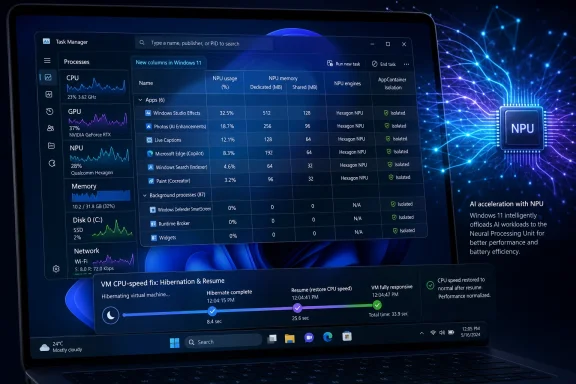
Microsoft released Windows 11 Insider Preview builds 28020.1921 for Experimental (26H1) and 29580.1000 for Experimental (Future Platforms) on May 1, 2026, with the 26H1 build adding Task Manager columns for NPU usage, NPU memory, NPU engines, and AppContainer isolation visibility in Windows. The headline looks small because Microsoft describes both builds as carrying only “a small set of general improvements,” but the Task Manager change is a tell. Windows is being rewired for AI PCs, and the humble system monitor is where Microsoft now has to prove that the silicon story is real. If Copilot+ PCs are going to become more than a marketing badge, users and admins need to see what the neural hardware is actually doing.
Task Manager has always been Windows’ blunt instrument of accountability. When an app stalls, a fan spins up, or a battery drops faster than expected, users do not open a white paper; they open Task Manager and look for the culprit. By adding optional NPU and NPU Engine columns across the Processes, Users, and Details pages, Microsoft is acknowledging that AI workloads need the same everyday visibility that CPU, memory, disk, GPU, and network activity already receive.
That matters because the neural processing unit has been sold as the quiet hero of the modern Windows laptop. It is supposed to accelerate local AI tasks, keep more processing on-device, reduce dependence on the cloud, and preserve battery life compared with pushing every inference job onto the CPU or GPU. Yet for many users, the NPU has been mostly invisible: a line item on a spec sheet, a requirement for certain features, and a promise that something smarter is happening under the surface.
Build 28020.1921 begins to close that gap. The new columns let users see not just whether a machine has an NPU, but which processes are touching it and how the work is being routed. The addition of NPU Dedicated Memory and NPU Shared Memory columns on the Details page is especially important, because memory pressure is where “efficient” AI can quickly become just another source of system drag.
The interesting bit is not that Task Manager gains a few columns. It is that Microsoft is turning AI acceleration into a resource category ordinary Windows users can inspect. Once something appears in Task Manager, it becomes part of the operating system’s public contract: if an app claims to be efficient, private, or hardware-accelerated, Windows can begin to show whether that claim survives contact with reality.
A fast NPU is not useful in the abstract. It is useful when software can schedule work onto it, when drivers expose reliable telemetry, when developers can target it without rewriting everything for each vendor stack, and when admins can understand what is happening on a fleet of devices. Task Manager is not the whole answer, but it is a visible admission that observability is part of the AI PC platform.
The new support for neural engines that are part of a GPU is also telling. Not every AI-capable workload will land on a discrete or standalone NPU, and not every machine will present its acceleration hardware in the same way. By showing neural engines on the Performance page, Microsoft is nudging Windows toward a more complete view of AI-related activity rather than pretending that “NPU” is a single uniform bucket.
That distinction will matter more as Windows stretches across traditional laptops, Copilot+ devices, workstation-class systems, and future hardware Microsoft is not yet naming. The more heterogeneous the PC becomes, the less useful old performance categories are on their own. CPU charts and GPU graphs still matter, but they no longer tell the whole story.
This is classic Windows engineering: an important security boundary made visible only after years of existing largely below the surface. AppContainer is not new, but exposing it in Task Manager makes the isolation state easier to verify at a glance. For power users and IT pros, that is a meaningful improvement, because the question is no longer merely whether Windows has sandboxing primitives, but whether a given process is actually using them.
The move also fits a broader pattern in Windows 11. Microsoft has been trying to modernize the security posture of the platform without making every security mechanism feel like a separate enterprise console. Showing AppContainer status inside Task Manager brings a developer and security concept into a tool that normal users already understand.
There is a catch, of course. A column is not a policy. Seeing that an app is or is not isolated does not tell you whether its permissions are appropriate, whether its brokered capabilities are overbroad, or whether it behaves responsibly. But visibility is where pressure begins, and Windows has long suffered when powerful platform features remained too hidden to influence user trust.
Performance telemetry has to be boringly correct. If a VM reports fantasy clock speeds after resume, the problem is not merely cosmetic; it erodes confidence in the tool people use to diagnose real performance issues. In a world where development environments, test labs, sandboxed workloads, and enterprise apps often run inside virtual machines, inaccurate counters waste time.
The fix also sits neatly beside the NPU additions. Microsoft is expanding Task Manager into new kinds of hardware reporting, but it still has to keep the old reporting honest. There is no point adding a neural accelerator column if the basics cannot be trusted after a sleep-state transition.
That is the quiet discipline Windows needs more often. Big platform bets are won or lost in small telemetry details because administrators build operational judgment from those details. When Task Manager lies, even accidentally, the platform feels less manageable.
Microsoft has been moving away from the old simplicity of Canary, Dev, Beta, and Release Preview as names that implied a rough distance from shipping code. The new scheme tries to describe what a build is for rather than merely how risky it is. Experimental can mean features intended for the current development stream, while Experimental (Future Platforms) can mean deeper platform work that may not map cleanly to a named Windows release.
That is a better model for Microsoft’s internal reality. Windows is no longer a single annual box of features marching toward one launch date. It is a set of feature waves, enablement packages, silicon dependencies, app updates, cloud-connected services, and platform changes moving at different speeds. The Insider Program has to reflect that mess somehow.
But clarity for Microsoft is not automatically clarity for Insiders. The average enthusiast can understand “Canary” as dangerous and “Beta” as closer to stable. “Experimental (Future Platforms)” is more accurate, but also more abstract. It says, in effect, that you are testing groundwork for something Microsoft may not be ready to name.
That distinction matters because Windows version numbers have trained people to expect visible change. A “22H2” or “24H2” label used to imply a broad release moment, even if enablement packages later blurred the line. With 26H1, Microsoft is using a version marker for platform enablement that may be crucial to hardware partners but unexciting to ordinary users.
Build 28020.1921 is therefore a strange artifact. It is a 26H1 build with a user-visible Task Manager improvement, but the underlying 26H1 story is still about platform support. That is not contradictory; it is how Windows now ships. The operating system is layered enough that a build can carry silicon plumbing, app-facing changes, and small UI improvements without fitting neatly into the old “feature update” mental model.
For Windows enthusiasts, that means the build number is becoming less useful as a proxy for what is new. You have to know the branch, the channel, the enablement state, and sometimes whether a feature is being rolled out gradually. This is more honest than the old model, but it is also more work.
The downside is that the naming risks sounding like corporate fog. “Experimental” is a mood, not a destination. “Future Platforms” is a direction, not a product. Users who install these builds need to know whether they are testing features, compatibility scaffolding, silicon support, or all of the above.
Microsoft is trying to solve that with better release notes, Flight Hub references, and a more consistent mapping between old and new channels. The May 1 build announcement also says the company is expanding the rollout of the new Insider experience improvements to Canary Channel 28000-series devices, which will begin moving to Experimental (26H1). That is a transition sentence only an Insider could love, but it signals the old nomenclature is being folded into the new one.
There is no painless way to do this. The Windows Insider Program serves hobbyists, driver testers, OEM partners, app developers, enterprise evaluators, and Microsoft’s own telemetry pipeline. A channel structure simple enough for casual users will always hide some truth; one accurate enough for platform development will always feel too complicated.
ISOs are how many serious testers do clean installs, lab refreshes, recovery scenarios, offline validation, and repeatable deployment experiments. A Windows Insider build that only arrives comfortably through Windows Update is less useful to people who need to reproduce bugs or test hardware from a known baseline. Expanding ISO availability makes the Insider Program more operationally credible.
This is also a small trust repair. Insiders have long tolerated ambiguity about which builds get ISOs and when. By committing to broader ISO support, Microsoft is acknowledging that preview software is not just something enthusiasts install on a spare laptop; it is a test substrate for people who need install media, rollback paths, and controlled environments.
That matters in the AI PC era because hardware variation is increasing. NPU behavior, GPU neural engines, memory sharing, power management, and driver maturity will differ across systems. If Microsoft wants useful feedback from the field, it needs testers who can reproduce conditions cleanly, not just click “Check for updates” and hope the resulting state is diagnosable.
The refreshed Run dialog is a small modernization of a very old Windows surface. It is also opt-in, living under Settings > System > Advanced, which tells you Microsoft knows the Run box has a conservative audience. People who use Win+R often do not want whimsy; they want muscle memory and speed.
The Feedback Hub update is more institutional. Reliability improvements, localization work, automatic translation of collections and official responses in top languages, restored 500 MB file uploads, and more accurate engagement counts all point to a feedback system Microsoft wants to make more usable during the Insider transition. If the channels are becoming more nuanced, the feedback machinery has to become less painful.
Widgets going quiet by default may be the most emotionally intelligent change of the set. Windows 11 has often confused “engagement” with “interruption,” especially on consumer-facing surfaces. Disabling open-on-hover and taskbar badging by default is a modest admission that users do not want the operating system tapping them on the shoulder all day.
That is the right direction for Windows 11, because the operating system’s biggest challenge is not a shortage of features. It is that Windows increasingly feels like a place where too many things happen to the user: account nudges, cloud hooks, AI features, Store updates, driver changes, feature rollouts, and notification surfaces that arrive with uneven predictability.
The best Windows improvements are often the ones that restore legibility. They make the machine easier to inspect, easier to reason about, and easier to bend back into the user’s intended shape. Task Manager’s NPU visibility belongs in that category.
It also gives Microsoft a way to make its AI argument less hand-wavy. If local AI acceleration is valuable, show it. If an app is using the NPU instead of burning CPU cycles, show it. If a GPU neural engine is participating in AI work, show it. The more Windows exposes, the less users have to take on faith.
OEMs will feel this too. AI PC marketing often leans on TOPS figures and branded silicon blocks, but users experience performance through responsiveness, thermals, and battery life. If Task Manager makes NPU utilization legible, reviewers and enterprise evaluators can begin comparing not just whether a device has an NPU, but whether Windows workloads actually use it well.
That could be uncomfortable in the short term. Early AI PC software stacks are uneven, and some impressive demos do not translate into sustained everyday value. But discomfort is useful. A visible performance counter creates pressure for better scheduling, better drivers, clearer app behavior, and fewer vague claims.
The same applies to AppContainer visibility. Developers who ship modern, sandboxed applications may benefit from users and admins being able to see that isolation state. Developers who do not may have to explain why. Transparency rarely changes software incentives overnight, but it changes the questions people ask.
When that happens, organizations will need ways to answer basic questions. Which workloads are using local acceleration? Are they consuming shared memory? Are they affecting battery life? Do they behave differently across hardware generations? Are sensitive workflows running in appropriate isolation contexts?
Task Manager alone will not satisfy enterprise reporting requirements. Admins will eventually need fleet-scale telemetry through management tools, performance counters, endpoint analytics, or security platforms. But Task Manager often previews what Microsoft considers a first-class resource, and that is why these columns matter.
If NPU usage becomes visible in Task Manager, it becomes easier to imagine it becoming visible elsewhere. That is the path CPU, memory, disk, GPU, and energy usage followed over time. Consumer visibility comes first; enterprise observability follows because unmanaged opacity does not scale.
That ambiguity could produce a new class of Windows anxiety. A mysterious CPU spike is annoying; a mysterious AI accelerator spike may feel more invasive because AI features are already entangled with privacy concerns. If Microsoft wants local AI to be trusted, the telemetry cannot merely be technical. It has to be understandable.
The same is true for memory reporting. NPU Dedicated Memory and NPU Shared Memory are useful concepts, but they may confuse users who do not know how AI accelerators allocate resources. Microsoft should resist the temptation to expose counters and call the job done. The next layer is explanation.
There is precedent here. Windows eventually made GPU, battery, startup impact, and efficiency information more understandable to non-specialists. NPU reporting will need the same treatment if it is going to serve more than benchmarkers and driver engineers.
That combination makes the release feel like plumbing, but Windows is mostly plumbing. The interfaces users remember are supported by scheduling decisions, driver models, security boundaries, installer media, telemetry, and feedback loops. When those pieces improve, the operating system becomes easier to trust.
For readers tracking what to install, the answer is simple: these are still Experimental builds, not production recommendations. For readers tracking where Windows is going, the answer is more interesting: Microsoft is beginning to expose AI hardware usage as a normal system resource rather than a mystical co-processor hidden behind Copilot branding.
That is the right instinct. Windows cannot sell the AI PC future solely through demos and acronyms. It has to make the future observable.
Source: Neowin New Windows 11 Experimental build brings Task Manager upgrades and other improvements
 Task Manager Becomes the AI PC’s Truth Serum
Task Manager has always been Windows’ blunt instrument of accountability. When an app stalls, a fan spins up, or a battery drops faster than expected, users do not open a white paper; they open Task Manager and look for the culprit. By adding optional NPU and NPU Engine columns across the Processes, Users, and Details pages, Microsoft is acknowledging that AI workloads need the same everyday visibility that CPU, memory, disk, GPU, and network activity already receive.That matters because the neural processing unit has been sold as the quiet hero of the modern Windows laptop. It is supposed to accelerate local AI tasks, keep more processing on-device, reduce dependence on the cloud, and preserve battery life compared with pushing every inference job onto the CPU or GPU. Yet for many users, the NPU has been mostly invisible: a line item on a spec sheet, a requirement for certain features, and a promise that something smarter is happening under the surface.
Build 28020.1921 begins to close that gap. The new columns let users see not just whether a machine has an NPU, but which processes are touching it and how the work is being routed. The addition of NPU Dedicated Memory and NPU Shared Memory columns on the Details page is especially important, because memory pressure is where “efficient” AI can quickly become just another source of system drag.
The interesting bit is not that Task Manager gains a few columns. It is that Microsoft is turning AI acceleration into a resource category ordinary Windows users can inspect. Once something appears in Task Manager, it becomes part of the operating system’s public contract: if an app claims to be efficient, private, or hardware-accelerated, Windows can begin to show whether that claim survives contact with reality.
The NPU Stops Being a Marketing Abstraction
For the past two years, the PC industry has treated the NPU as both a technical milestone and a sales device. AMD, Intel, Qualcomm, and Microsoft have all pushed the idea that local AI acceleration is the next natural hardware tier for Windows machines. That argument is not wrong, but it has often been incomplete, because the user experience has lagged behind the silicon roadmap.A fast NPU is not useful in the abstract. It is useful when software can schedule work onto it, when drivers expose reliable telemetry, when developers can target it without rewriting everything for each vendor stack, and when admins can understand what is happening on a fleet of devices. Task Manager is not the whole answer, but it is a visible admission that observability is part of the AI PC platform.
The new support for neural engines that are part of a GPU is also telling. Not every AI-capable workload will land on a discrete or standalone NPU, and not every machine will present its acceleration hardware in the same way. By showing neural engines on the Performance page, Microsoft is nudging Windows toward a more complete view of AI-related activity rather than pretending that “NPU” is a single uniform bucket.
That distinction will matter more as Windows stretches across traditional laptops, Copilot+ devices, workstation-class systems, and future hardware Microsoft is not yet naming. The more heterogeneous the PC becomes, the less useful old performance categories are on their own. CPU charts and GPU graphs still matter, but they no longer tell the whole story.
AppContainer Visibility Is a Small Column With a Security Subtext
The other Task Manager addition, a new optional Isolation column for Processes and Details, may sound less fashionable than NPU telemetry. It is arguably just as revealing. The column shows which apps are running in an AppContainer, Microsoft’s sandboxing model used to limit what an application can access.This is classic Windows engineering: an important security boundary made visible only after years of existing largely below the surface. AppContainer is not new, but exposing it in Task Manager makes the isolation state easier to verify at a glance. For power users and IT pros, that is a meaningful improvement, because the question is no longer merely whether Windows has sandboxing primitives, but whether a given process is actually using them.
The move also fits a broader pattern in Windows 11. Microsoft has been trying to modernize the security posture of the platform without making every security mechanism feel like a separate enterprise console. Showing AppContainer status inside Task Manager brings a developer and security concept into a tool that normal users already understand.
There is a catch, of course. A column is not a policy. Seeing that an app is or is not isolated does not tell you whether its permissions are appropriate, whether its brokered capabilities are overbroad, or whether it behaves responsibly. But visibility is where pressure begins, and Windows has long suffered when powerful platform features remained too hidden to influence user trust.
The VM CPU-Speed Fix Is Boring in the Way Admins Appreciate
Build 28020.1921 also fixes a Task Manager issue where CPU speed on the Performance page could display unrealistically high numbers for virtual machines after resuming from hibernation. This is the kind of bug that will not lead Microsoft’s consumer marketing, but it is exactly the kind of thing that irritates people who use Windows seriously.Performance telemetry has to be boringly correct. If a VM reports fantasy clock speeds after resume, the problem is not merely cosmetic; it erodes confidence in the tool people use to diagnose real performance issues. In a world where development environments, test labs, sandboxed workloads, and enterprise apps often run inside virtual machines, inaccurate counters waste time.
The fix also sits neatly beside the NPU additions. Microsoft is expanding Task Manager into new kinds of hardware reporting, but it still has to keep the old reporting honest. There is no point adding a neural accelerator column if the basics cannot be trusted after a sleep-state transition.
That is the quiet discipline Windows needs more often. Big platform bets are won or lost in small telemetry details because administrators build operational judgment from those details. When Task Manager lies, even accidentally, the platform feels less manageable.
Two Experimental Branches Reveal Microsoft’s New Insider Problem
The build numbers tell a second story. Build 28020.1921 belongs to Experimental (26H1), while build 29580.1000 belongs to Experimental (Future Platforms). That split is the modern Windows Insider Program in miniature: more transparent in theory, more complicated in practice.Microsoft has been moving away from the old simplicity of Canary, Dev, Beta, and Release Preview as names that implied a rough distance from shipping code. The new scheme tries to describe what a build is for rather than merely how risky it is. Experimental can mean features intended for the current development stream, while Experimental (Future Platforms) can mean deeper platform work that may not map cleanly to a named Windows release.
That is a better model for Microsoft’s internal reality. Windows is no longer a single annual box of features marching toward one launch date. It is a set of feature waves, enablement packages, silicon dependencies, app updates, cloud-connected services, and platform changes moving at different speeds. The Insider Program has to reflect that mess somehow.
But clarity for Microsoft is not automatically clarity for Insiders. The average enthusiast can understand “Canary” as dangerous and “Beta” as closer to stable. “Experimental (Future Platforms)” is more accurate, but also more abstract. It says, in effect, that you are testing groundwork for something Microsoft may not be ready to name.
26H1 Is Not the Feature Update Many People Want It to Be
The 26H1 label is especially easy to misread. Microsoft’s own framing has emphasized that Windows 11 version 26H1 is not a conventional feature update for 25H2, but a platform release tied to support for specific silicon. In plain English, that means users should not look at 26H1 and assume it represents the next big consumer-facing Windows release.That distinction matters because Windows version numbers have trained people to expect visible change. A “22H2” or “24H2” label used to imply a broad release moment, even if enablement packages later blurred the line. With 26H1, Microsoft is using a version marker for platform enablement that may be crucial to hardware partners but unexciting to ordinary users.
Build 28020.1921 is therefore a strange artifact. It is a 26H1 build with a user-visible Task Manager improvement, but the underlying 26H1 story is still about platform support. That is not contradictory; it is how Windows now ships. The operating system is layered enough that a build can carry silicon plumbing, app-facing changes, and small UI improvements without fitting neatly into the old “feature update” mental model.
For Windows enthusiasts, that means the build number is becoming less useful as a proxy for what is new. You have to know the branch, the channel, the enablement state, and sometimes whether a feature is being rolled out gradually. This is more honest than the old model, but it is also more work.
Microsoft Is Trading Channel Simplicity for Release Honesty
The upside of the new Insider arrangement is that it can reduce a particular kind of confusion: the assumption that every preview feature is on a direct road to the next public Windows release. Future Platforms builds give Microsoft a place to test foundation-level work without implying a near-term release vehicle. That is good for engineering and probably healthier for expectations.The downside is that the naming risks sounding like corporate fog. “Experimental” is a mood, not a destination. “Future Platforms” is a direction, not a product. Users who install these builds need to know whether they are testing features, compatibility scaffolding, silicon support, or all of the above.
Microsoft is trying to solve that with better release notes, Flight Hub references, and a more consistent mapping between old and new channels. The May 1 build announcement also says the company is expanding the rollout of the new Insider experience improvements to Canary Channel 28000-series devices, which will begin moving to Experimental (26H1). That is a transition sentence only an Insider could love, but it signals the old nomenclature is being folded into the new one.
There is no painless way to do this. The Windows Insider Program serves hobbyists, driver testers, OEM partners, app developers, enterprise evaluators, and Microsoft’s own telemetry pipeline. A channel structure simple enough for casual users will always hide some truth; one accurate enough for platform development will always feel too complicated.
The ISO Promise Is the Sleeper News for Serious Testers
The same May 1 announcement includes another item that may matter more to admins than any individual Task Manager column: Microsoft says it is committing to releasing ISOs alongside regularly scheduled builds across all versions of the Beta and Experimental channels. That is not glamorous, but it is practical.ISOs are how many serious testers do clean installs, lab refreshes, recovery scenarios, offline validation, and repeatable deployment experiments. A Windows Insider build that only arrives comfortably through Windows Update is less useful to people who need to reproduce bugs or test hardware from a known baseline. Expanding ISO availability makes the Insider Program more operationally credible.
This is also a small trust repair. Insiders have long tolerated ambiguity about which builds get ISOs and when. By committing to broader ISO support, Microsoft is acknowledging that preview software is not just something enthusiasts install on a spare laptop; it is a test substrate for people who need install media, rollback paths, and controlled environments.
That matters in the AI PC era because hardware variation is increasing. NPU behavior, GPU neural engines, memory sharing, power management, and driver maturity will differ across systems. If Microsoft wants useful feedback from the field, it needs testers who can reproduce conditions cleanly, not just click “Check for updates” and hope the resulting state is diagnosable.
The Other May 1 Changes Show Microsoft Still Wants to Sand Down Windows 11
The broader May 1 Insider drop also includes a refreshed Run dialog for the Experimental channel, an updated Feedback Hub app across Experimental branches, and quieter default behavior for Widgets in Experimental. These are not part of builds 28020.1921 and 29580.1000 in the same way the Task Manager notes are, but they form the backdrop for Microsoft’s current Windows 11 work.The refreshed Run dialog is a small modernization of a very old Windows surface. It is also opt-in, living under Settings > System > Advanced, which tells you Microsoft knows the Run box has a conservative audience. People who use Win+R often do not want whimsy; they want muscle memory and speed.
The Feedback Hub update is more institutional. Reliability improvements, localization work, automatic translation of collections and official responses in top languages, restored 500 MB file uploads, and more accurate engagement counts all point to a feedback system Microsoft wants to make more usable during the Insider transition. If the channels are becoming more nuanced, the feedback machinery has to become less painful.
Widgets going quiet by default may be the most emotionally intelligent change of the set. Windows 11 has often confused “engagement” with “interruption,” especially on consumer-facing surfaces. Disabling open-on-hover and taskbar badging by default is a modest admission that users do not want the operating system tapping them on the shoulder all day.
The Real Pattern Is Control, Not Novelty
Taken together, these changes are less about novelty than control. Task Manager gives users more control over understanding AI workloads. The Isolation column gives them more control over seeing sandbox status. ISOs give testers more control over installation and recovery. Quieter Widgets give users more control over attention.That is the right direction for Windows 11, because the operating system’s biggest challenge is not a shortage of features. It is that Windows increasingly feels like a place where too many things happen to the user: account nudges, cloud hooks, AI features, Store updates, driver changes, feature rollouts, and notification surfaces that arrive with uneven predictability.
The best Windows improvements are often the ones that restore legibility. They make the machine easier to inspect, easier to reason about, and easier to bend back into the user’s intended shape. Task Manager’s NPU visibility belongs in that category.
It also gives Microsoft a way to make its AI argument less hand-wavy. If local AI acceleration is valuable, show it. If an app is using the NPU instead of burning CPU cycles, show it. If a GPU neural engine is participating in AI work, show it. The more Windows exposes, the less users have to take on faith.
Developers and OEMs Just Got a New Accountability Surface
The NPU columns may start as a power-user feature, but they will quickly become a developer and OEM accountability surface. Once users can see whether an app is using AI hardware, app makers will be asked why their AI feature is hammering the CPU or GPU instead. Once memory usage is visible, claims about efficiency will face scrutiny.OEMs will feel this too. AI PC marketing often leans on TOPS figures and branded silicon blocks, but users experience performance through responsiveness, thermals, and battery life. If Task Manager makes NPU utilization legible, reviewers and enterprise evaluators can begin comparing not just whether a device has an NPU, but whether Windows workloads actually use it well.
That could be uncomfortable in the short term. Early AI PC software stacks are uneven, and some impressive demos do not translate into sustained everyday value. But discomfort is useful. A visible performance counter creates pressure for better scheduling, better drivers, clearer app behavior, and fewer vague claims.
The same applies to AppContainer visibility. Developers who ship modern, sandboxed applications may benefit from users and admins being able to see that isolation state. Developers who do not may have to explain why. Transparency rarely changes software incentives overnight, but it changes the questions people ask.
Enterprise IT Will Read This as an Operations Story
For enterprise IT, the build is less about enthusiasts gawking at new columns and more about future operations. AI workloads are coming to managed Windows fleets whether admins invite them or not. Some will be built into Windows, some into Microsoft 365, some into browsers, some into line-of-business apps, and some into third-party agents.When that happens, organizations will need ways to answer basic questions. Which workloads are using local acceleration? Are they consuming shared memory? Are they affecting battery life? Do they behave differently across hardware generations? Are sensitive workflows running in appropriate isolation contexts?
Task Manager alone will not satisfy enterprise reporting requirements. Admins will eventually need fleet-scale telemetry through management tools, performance counters, endpoint analytics, or security platforms. But Task Manager often previews what Microsoft considers a first-class resource, and that is why these columns matter.
If NPU usage becomes visible in Task Manager, it becomes easier to imagine it becoming visible elsewhere. That is the path CPU, memory, disk, GPU, and energy usage followed over time. Consumer visibility comes first; enterprise observability follows because unmanaged opacity does not scale.
The Risk Is Another Half-Visible Windows Feature
The danger is that Microsoft stops halfway. A few optional columns are useful, but they do not automatically explain what a workload is doing, whether it is well-optimized, or whether it is privacy-preserving. Users may see NPU activity without knowing whether it represents Recall indexing, image processing, transcription, app inference, or some background model task.That ambiguity could produce a new class of Windows anxiety. A mysterious CPU spike is annoying; a mysterious AI accelerator spike may feel more invasive because AI features are already entangled with privacy concerns. If Microsoft wants local AI to be trusted, the telemetry cannot merely be technical. It has to be understandable.
The same is true for memory reporting. NPU Dedicated Memory and NPU Shared Memory are useful concepts, but they may confuse users who do not know how AI accelerators allocate resources. Microsoft should resist the temptation to expose counters and call the job done. The next layer is explanation.
There is precedent here. Windows eventually made GPU, battery, startup impact, and efficiency information more understandable to non-specialists. NPU reporting will need the same treatment if it is going to serve more than benchmarkers and driver engineers.
The May 1 Builds Mark a Small Step Toward a Measurable AI Windows
The practical message of this release is narrower than the AI hype cycle and broader than a changelog. Build 28020.1921 adds useful Task Manager visibility for AI-era hardware, while build 29580.1000 keeps the Future Platforms branch moving with general improvements. Around them, Microsoft is continuing the Insider channel migration and promising broader ISO availability.That combination makes the release feel like plumbing, but Windows is mostly plumbing. The interfaces users remember are supported by scheduling decisions, driver models, security boundaries, installer media, telemetry, and feedback loops. When those pieces improve, the operating system becomes easier to trust.
For readers tracking what to install, the answer is simple: these are still Experimental builds, not production recommendations. For readers tracking where Windows is going, the answer is more interesting: Microsoft is beginning to expose AI hardware usage as a normal system resource rather than a mystical co-processor hidden behind Copilot branding.
That is the right instinct. Windows cannot sell the AI PC future solely through demos and acronyms. It has to make the future observable.
The Signal Hidden Inside Build 28020.1921
This release is worth remembering less for what it changes today than for what it normalizes. Microsoft is making NPU activity visible, treating GPU neural engines as part of the AI-performance picture, surfacing AppContainer isolation, and continuing to reorganize Insider testing around the messy reality of modern Windows development.- Windows 11 Insider Preview build 28020.1921 is the build with the notable Task Manager additions, while build 29580.1000 is described as carrying general improvements for the Future Platforms branch.
- Task Manager now gains optional NPU and NPU Engine columns on the Processes, Users, and Details pages for PCs that include an NPU.
- The Details page adds optional NPU Dedicated Memory and NPU Shared Memory columns, giving testers a clearer view of how AI workloads consume hardware resources.
- Neural engines that are part of a GPU can now appear on the Performance page, which broadens Windows’ view of AI-related system activity beyond standalone NPUs.
- The new optional Isolation column helps users see which apps are running inside an AppContainer, bringing a useful security boundary into a familiar diagnostic tool.
- Microsoft’s wider May 1 Insider announcement also matters because broader ISO availability makes Experimental and Beta builds more useful for repeatable testing.
Source: Neowin New Windows 11 Experimental build brings Task Manager upgrades and other improvements
