
 Background and overview
Microsoft has been embedding generative AI into Windows for multiple releases, but the move from conversational assistance to agentic behavior is a structural change. Unlike a passive assistant that returns suggestions, agents are designed to perform actions — clicking UI, typing text, opening and manipulating files, chaining services — in order to complete tasks for users without constant supervision.
To support this, Windows is introducing two platform primitives:
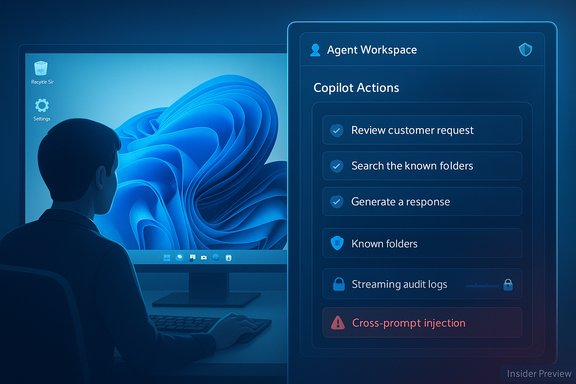
- Agent workspace — a contained runtime session where an agent runs under a separate account and can interact with apps and files in parallel with a human user.
- Agent accounts — low‑privilege Windows user accounts created specifically for agents so their activity is distinguishable from the real user and can be governed with ordinary Windows access controls.
Both primitives are currently available only in an early, opt‑in preview for Windows Insiders and are disabled by default. Turning on the Experimental agentic features setting is an administrative, device‑wide action; when enabled, Copilot and other agentic apps can request scoped access to a defined set of folders and will run in the agent workspace rather than directly inside the user's session.
Microsoft frames this as the start of a phased rollout: agents will be introduced gradually, capabilities will expand over time, and security controls will iterate alongside the feature. That staged approach is sensible — but the early preview already reveals the contours of a new threat model that security teams must understand.
What Microsoft shipped in the Insider preview
The recent Insider release and the companion support documentation set out several concrete technical controls and behaviors.
Key platform behaviors
- Opt‑in toggle — Experimental agentic features is exposed under Settings > System > AI components. The feature is off by default and can only be enabled by an administrator. Once enabled it applies to all users on the device.
- Agent workspace — Agents run in a separate Windows session (a contained desktop) that lets them interact with UIs in parallel to the primary user. Microsoft describes the workspace as more efficient than a full VM such as Windows Sandbox while providing runtime isolation.
- Separate agent accounts — Agents execute under distinct, non‑administrative Windows user accounts. This enables standard ACLs, policy application, and revocation without conflating agent actions with the human user's account.
- Scoped file access — By default, agents may request access only to a set of “known folders” in the user profile: Documents, Downloads, Desktop, Music, Pictures, and Videos. Broader access requires explicit user authorization.
- Action visibility and supervision — Agent actions should be observable and distinguishable from human actions; agents are expected to produce activity logs and present multi‑step plans that users can review and approve before execution.
- Security principles — Microsoft lists foundational principles such as least privilege, tamper‑evident audit logs, user authorization for data access, and auditing for agent actions.
- Known risks acknowledged — Microsoft calls out specific hazards, including hallucinations and a form of prompt‑injection risk it terms cross‑prompt injection (where malicious content embedded in UI or documents influences agent behavior).
These items provide a baseline for how agents will be constrained on day one of preview. They also give security teams leverage: the admin‑only toggle, separate accounts, and benign default scope are controls organizations can use to limit exposure.
Verified platform details and hardware context
Microsoft’s Copilot initiative sits alongside the Copilot+ hardware program: certain richer, low‑latency AI experiences are optimized for systems with on‑device NPUs. Official hardware guidance has repeatedly cited an NPU capability of roughly 40 TOPS (trillion operations per second) as the practical threshold for Copilot+ experiences. That hardware gating is separate from agentic features but will influence which devices deliver the most responsive local AI behavior.
Why Microsoft’s model matters (and what it gets right)
Microsoft’s design shows an awareness of how quickly agentic automation could become dangerous if poorly constrained. Several defensive design choices are notable and meaningful:
- Explicit opt‑in and admin control. Shipping the capability off by default and requiring an administrator to opt in is a strong safety baseline. It defeats accidental enablement and makes rollout a deliberate change for managed fleets.
- Account separation. Running agents as their own Windows accounts makes it possible to apply existing ACLs, policies, and monitoring pipelines to agent activity. This provides a familiar, enforceable boundary for IT.
- Scoped file access. Limiting the initial preview to known folders reduces the immediate blast radius for data exfiltration or accidental modification.
- Action transparency. The requirement that agents present step plans and produce logs aligns with principles of explainability and auditability that are necessary in enterprise environments.
- Phased rollout and continuous security posture. Microsoft’s messaging that agentic security is iterative — with future guardrails and policies planned — helps set expectations that the platform will continue to harden.
For users who want automation (power users and knowledge workers), this promises real productivity gains: photo batch processing, multi‑app workflows, and automated report assembly are precisely the sort of repetitive tasks agents can accelerate. For IT, the use of existing Windows primitives (accounts, ACLs, sessions) means the new functionality is, in principle, manageable within current tooling.
Novel security risks and attack surfaces
Even with a careful design, agentic features create new risks because agents act autonomously and can interact with local apps, files, and cloud connectors. The most serious or likely threats are:
- Cross‑prompt injection (XPIA) and UI‑level prompt tampering. If an agent relies on screen text, files, or documents as inputs, an attacker who can plant malicious content in those surfaces could override or redirect agent behavior. For example, a malicious document could embed instructions that an agent executes — leading to data exfiltration, lateral movement, or unexpected downloads.
- Impersonation and social engineering via agents. An attacker who convinces a user (or an admin) to enable agents for a specific task could leverage that trust to escalate privileges or perform actions the user would not manually perform.
- Malware leveraging agent accounts. If a local compromise can create or control an agent, the attacker gains a low‑privilege account with access to known folders and the ability to interact with UI elements. That still can be useful to an attacker for exfiltration or persistence.
- Supply chain and third‑party agent risks. Agents distributed by third parties, or plugins that extend agent behavior, could ship with excessive privileges. Without robust signing and a strong vetting/verifiability model, the agent ecosystem could become a new vector for malicious software.
- Side‑channel and runtime isolation weaknesses. Microsoft documents that agent workspaces run in separate Windows sessions, which is more lightweight than a VM. Community reporting suggests these sessions may be implemented using child RDP sessions or similar constructs. Any insufficiency in that isolation model could permit interactions across sessions, screen capture, or input injection that bypasses safeguards.
- Consent fatigue and accidental approvals. Requiring user approval for actions is necessary but brittle. Users confronted by many step confirmations may approve a plan without full review, negating intended protections.
- Logging and forensics gaps. Audit logs are only useful if they’re tamper‑evident, comprehensive, and fed into enterprise SIEMs. If agent logs are sparse, stored locally without export, or manipulable, forensic value is limited.
- Cloud connector compromise and OAuth abuse. Agents that stitch together cloud services will depend on OAuth and cloud API connectors. OAuth token theft or misconfiguration could allow agents to act on cloud data despite local workstation constraints.
- Legacy app compatibility and privilege creep. Many apps were not designed with an agent calling UI flow in mind. Agents that drive legacy UI via simulated input might trigger elevated dialogs, bypass user interaction models, or expose unexpected API paths.
These are not theoretical concerns — Microsoft explicitly calls out hallucination‑driven errors and cross‑prompt injection as risks, and the admitted “known issues” in the preview (for example, agent sessions preventing sleep and leaving behind Intune artifacts) show how integration complexities quickly surface in real deployments.
Enterprise implications and policy controls
For IT leaders, agentic features create a matrix of choices: block entirely, allow on controlled testbeds, or enable broadly with monitoring. Each approach has tradeoffs.
Short‑term options IT teams should consider
- Keep the toggle off on production devices. Until the feature set and enterprise controls mature, consider disabling experimental agentic features for corporate endpoints.
- Use admin gating and change control. If pilot deployments are needed, enable agentic features only via controlled change windows and limit which users or pilot groups can use them.
- Enforce code signing and application allowlists. Use Windows Defender Application Control (WDAC) or AppLocker to prevent unsigned or untrusted agent binaries from running in agent workspaces.
- Limit known folder access and redirect sensitive data. Where feasible, move sensitive files to directories inaccessible to agent accounts, or use NTFS ACLs to deny agent users access to particular paths.
- Integrate agent logs into SIEM. Ensure agent audit logs are forwarded to enterprise logging systems with tamper‑evident storage and retention policies for forensic readiness.
- Require conditional access and MFA for cloud connectors. Protect OAuth flows and cloud accounts used by agents with policy controls and strong authentication.
- Educate users about consent workflows. Train pilot users in how to review multi‑step agent plans and spot when an agent’s proposed actions are suspicious.
Longer‑term enterprise demands
- Policy APIs and MDM controls. Enterprises will need robust group policy/MDM settings to restrict, query, and remediate agent configurations at scale. Microsoft’s preview notes that these APIs are a work in progress; enterprise teams should track their availability.
- Attestation and revocation mechanisms. A marketplace or provisioning model for agents should support attestation and immediate revocation of compromised agents.
- Enterprise‑grade auditing and non‑repudiation. Logs must be cryptographically verifiable and resistant to tampering to be effective in investigations and compliance scenarios.
- Clear responsibility boundaries. Enterprises must decide whether agent behavior is considered a user action for compliance and legal purposes or the action of a separate software actor — a distinction with implications for data governance.
Practical recommendations for everyday users
- Do not enable Experimental agentic features on everyday machines unless you are comfortable with the security implications and understand the setting is administrative and device‑wide.
- Test in isolated environments. If you want to try Copilot Actions, use a test machine or virtualized environment where sensitive data is not present.
- Limit agent file access. When agents request permissions, grant only the specific folders needed for a task rather than broad access to your profile.
- Watch for unusual prompts or multi‑step plans. Review the list of actions an agent proposes. If anything looks unexpected, deny the request.
- Keep software and security tooling updated. Traditional endpoint protections, host intrusion detection, and timely patches remain key mitigations.
- Treat agent‑connected cloud tokens as sensitive. Use MFA on cloud accounts and periodically review authorized apps in your cloud account security settings.
Developer and platform recommendations
To mature the ecosystem safely, Microsoft and third‑party developers must deliver several capabilities:
- Standardized agent manifests and least‑privilege capability declarations. Agents should advertise exactly what resources they need and for how long, enabling automated policy decisions.
- Signed and attested agents with revocation lists. A robust signing and revocation framework reduces supply‑chain risk.
- Tamper‑evident distributed logs and open auditing APIs. Exposing logs to SIEMs and giving enterprises control over retention and export will be vital.
- Explainability and preflight plans by default. Agents should always present a human‑readable plan and require explicit user approval for multi‑step or high‑risk tasks.
- Runtime containment beyond sessions. Consider adding kernel‑level or hypervisor‑based isolation options for higher‑sensitivity scenarios.
- Defenses against cross‑prompt injection. Build input sanitization, provenance tracking, and content‑validation into agent pipelines to reduce the risk that untrusted UI content will change an agent’s instructions.
The tradeoff: productivity vs. control
Agentic automation promises a new productivity model: delegate the tedious, focus on strategic work. That promise is real and compelling. But it requires organizations and users to adopt new operational disciplines. Where prior security models focused on human intent and user consent, agentic computing forces us to treat autonomous software actors as first‑class principals with their own identities, permissions, and risk profiles.
Microsoft’s initial model gets several fundamentals right: off by default, explicit admin control, separate accounts, and scoped access. Those choices lower the baseline risk. But a number of gaps remain open during preview: the exact isolation mechanics of the agent workspace in production contexts, the maturity of enterprise management APIs, the quality and coverage of audit logs, and the ecosystem governance around third‑party agents.
If agents become common, defenders will need to extend zero‑trust principles to include them: continuous authentication and authorization, least privilege enforced by capability tokens, immutable logging, revocation capabilities, and strong supply‑chain controls.
Conclusion
Windows 11’s experimental agentic features and Copilot Actions represent a significant shift: AI is moving from suggestion to action, and Windows is evolving to treat software agents as distinct actors that must be controlled, authenticated, and audited. Microsoft’s preview design demonstrates thoughtful, defense‑in‑depth engineering — but it also surfaces brand‑new attack surfaces that security teams must understand.
The prudent path for most users and enterprises is caution: keep experimental agentic features disabled for production fleets, pilot on isolated testbeds, and demand robust policy, attestation, and auditing controls before broad adoption. For enthusiasts and pilot teams, the capability offers meaningful productivity upside; for defenders, it’s an urgent signal to expand identity, logging, and least‑privilege strategies to encompass autonomous agents.
As the platform matures, the most important technical and policy questions remain open: how durable and tamper‑evident will agent audit logs be, how fine‑grained will enterprise controls grow, and how well will the ecosystem prevent malicious or compromised agents from becoming new conduits for attack? Answers to those questions will determine whether agentic automation becomes a safe productivity multiplier — or a new class of systemic risk.
