

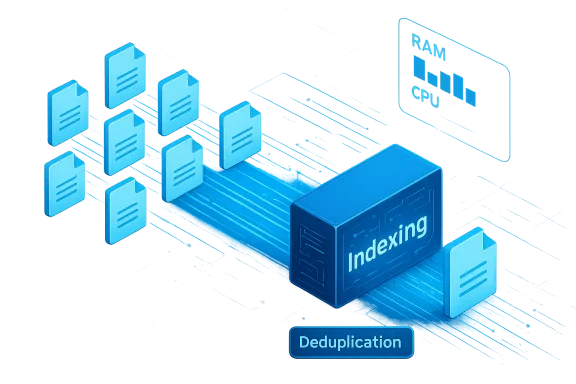
Microsoft’s quietly delivered change to File Explorer search in Windows 11 Insider Preview Build 26220.7523 removes redundant indexing runs — a small, pragmatic fix that reduces transient RAM and I/O spikes by ensuring identical paths are indexed only once.
File Explorer remains the primary user interface for file access on Windows, and its perceived responsiveness strongly influences how snappy a PC feels. For years, the underlying Windows Search indexer could end up performing the same indexing work multiple times: identical logical paths, reparse points and cloud placeholders could each trigger separate index operations, producing duplicated work that consumed CPU, disk I/O and memory. Microsoft’s Insider Preview notes for the 26220. stream explicitly describe an indexer-side optimization to eliminate duplicate file indexing operations*, meaning the indexer will now consolidate identical paths and avoid reprocessing the same physical file object more than once.
This update is being validated as a controlled experiment in the Dev and Beta channels and is rolled out behind staged toggles: Insiders who opt into early updates may see the behavior sooner while Microsoft collects telemetry and Feedback Hub reports to confirm stability and effectiveness before making it the default.
Source: igor´sLAB Windows 11 File Explorer Update, Microsoft stops duplicate indexing and reduces unnecessary RAM consumption | igor´sLAB
 Background
File Explorer remains the primary user interface for file access on Windows, and its perceived responsiveness strongly influences how snappy a PC feels. For years, the underlying Windows Search indexer could end up performing the same indexing work multiple times: identical logical paths, reparse points and cloud placeholders could each trigger separate index operations, producing duplicated work that consumed CPU, disk I/O and memory. Microsoft’s Insider Preview notes for the 26220. stream explicitly describe an indexer-side optimization to eliminate duplicate file indexing operations*, meaning the indexer will now consolidate identical paths and avoid reprocessing the same physical file object more than once.This update is being validated as a controlled experiment in the Dev and Beta channels and is rolled out behind staged toggles: Insiders who opt into early updates may see the behavior sooner while Microsoft collects telemetry and Feedback Hub reports to confirm stability and effectiveness before making it the default.
What changed (concise technical summary)
- The improvement is implemented inside the Windows Search indexer, not by adding a separate Explorer-only search engine. File Explorer continues to query the system index as before.
- The indexer now deduplicates work items: identical file targets reached via multiple logical paths are canonicalized or coalesced so that only a single indexing operation runs for that object. This reduces concurrent indexing threads, duplicate reads and associated memory allocations.
- The change aims to reduce transient peaks in RAM, CPU and disk I/O during background indexing and large or cross-drive searches, without changing the correctness or coverage of the index.
Why duplicate indexing happened
Duplicate indexing is not a mysterious bug so much as a byproduct of real-world filesystem complexity. Typical causes include:- Multiple logical paths (junctions, symbolic links, directory junctions and libraries) that expose the same physical file under different names, leading naive indexing logic to treat each path as distinct.
- Transient mounts and cloud placeholders (OneDrive placeholder behavior, external drives connecting/disconnecting) that cause repeated enqueue events to the indexer.
- Concurrent subsystem requests from backup agents, antivirus, shell extensions and third‑party filters that ask the indexer to update the same files at essentially the same time.
- Queue-coalescing gaps in the indexer where identical tasks are not recognized and merged, so they spawn multiple workers processing the same items.
Who benefits — and by how much
Not every system will notice a big difference. The change is most material for users and workloads where duplicate indexing used to be common:- Developers with multiple mounted drives, mirrored source trees, or heavy use of junctions and symlinks.
- Content creators who maintain large media libraries spread across several local and external drives.
- Power users and administrators with hybrid setups, network mounts and heavy OneDrive / cloud placeholder use.
- Systems with constrained RAM (older laptops, 4–8 GB machines) or slower disks (HDDs) where transient spikes cause responsiveness problems.
Technical analysis — how deduplication likely works
Microsoft’s one-line release note does not disclose implementation specifics, but standard engineering practices and community traces indicate likely approaches:- Canonicalization by file identifier (e.g., NTFS file ID) or path normalization to ensure multiple logical paths map to the same underlying object.
- A work-queue coalescing mechanism that looks for duplicate requests within a short time window and merges them into a single job.
- Defensive checks around cloud placeholders and transient mounts so flaky volumes don’t result in repeated re-enqueues.
- Rate-limiting or backoff strategies when multiple subsystems request indexing of the same targets simultaneously.
Rollout model and practical implications
Microsoft is using a toggle-on staged rollout for this optimization in the Insider channels: the feature is available as an experiment and will be progressively enabled based on telemetry and feedback. That means:- Some Insider devices will receive the change immediately.
- Others will get it later as Microsoft scales the test.
- Non-Insider production devices will not see it until the experiment completes and the feature is promoted to broader channels.
Testing and measurement: how to validate the improvement
Administrators and curious power users should not rely on subjective impressions alone. To quantify the change, use a controlled test plan:- Baseline capture
- Record Task Manager/Process Explorer snapshots of SearchIndexer.exe and Explorer.exe memory and CPU during a representative wide search or indexing window.
- Capture disk I/O and time-to-first-result metrics.
- Use Windows Performance Recorder (WPR) to collect trace data for in-depth analysis.
- Install/enable the Insider build (or use a device where the toggle is active).
- Repeat the identical search or indexing workload under similar system conditions.
- Compare traces
- Look for reduced duplicate NTFS reads for the same file ranges.
- Measure peak working set of indexing threads and the number of concurrent indexing jobs.
- Validate search completeness: ensure deduplication did not drop expected results (test symlinked paths, mounted volumes, and recently renamed files).
- Process Explorer / Task Manager for quick checks.
- WPR/WPA (Windows Performance Recorder / Analyzer) for trace-level confirmation.
- Feedback Hub to report any reproducible regressions.
Compatibility and risk assessment
While the optimization is low-risk by design, there are potential side-effects and caveats administrators should watch for:- Third-party filters, backup tools or shell extensions that relied on repeated indexing events for their change detection logic may behave differently after deduplication. Vendors should test their integrations.
- Edge cases with unusual reparse/redirect scenarios or complex provider stacks could reveal gaps in canonicalization. Validate symlink-heavy workflows.
- The net effect on perceived memory usage can be offset by other concurrent Explorer experiments: for example, preloading Explorer in the background reduces cold-start time but increases baseline RAM usage, potentially masking the indexer gains on a particular device. Consider the full set of enabled experiments when measuring.
- The release notes do not publish numeric guarantees; any claims of exact MB or percentage savings should be treated as unverified until Microsoft or independent tests publish reproducible numbers.
Why this matters beyond "saving a few megabytes"
It’s tempting to view a change that eliminates duplicate indexing as a tiny maintenance tweak, but it signals something larger:- It addresses a structural inefficiency rather than merely masking symptoms. Removing redundant work improves scalability as setups grow more complex (multiple drives, mirrored directories, cloud placeholders).
- It underscores that Microsoft is still performing operational maintenance on core OS plumbing even as it invests in higher-profile features like AI search and UI experiments. The balance between new features and technical debt reduction matters for long-term system health.
- For organizations managing constrained fleets, incremental wins that reduce background churn are meaningful. Reduced I/O spikes and smoother foreground responsiveness translate to fewer helpdesk calls and better productivity on older hardware.
Practical guidance for end users and IT teams
- Power users who notice search-related sluggishness should join the Insider program on a test device (Dev/Beta rings) to evaluate the deduplication experiment, following organizational policies. Measure using the steps above and report findings to Microsoft via Feedback Hub.
- Administrators managing production fleets should not rush to apply community workarounds; wait for the feature to land in supported channels and coordinate with vendors for compatibility testing, especially for backup/antivirus or custom IFilter implementations.
- If search issues persist after the dedupe rollout, perform targeted diagnostics: check for heavy shell extensions, third-party indexing agents, or aggressive cloud sync clients that might independently trigger indexing-like behavior.
- For reproducible evaluation in enterprise, create test plans that reflect real user workloads (large image libraries, multi-drive codebases, mixed local/cloud folders) and validate across representative hardware classes. ﹘ slower HDD systems will show the biggest gains, high-end NVMe desktops may be largely unaffected.
Critical perspective: strengths and limitations
Strengths- Smart, low-risk engineering: The deduplication approach targets a clear, measurable inefficiency with minimal compatibility surface. That makes it easy to validate and safe to roll out.
- Platform-wide benefit: Because the change is in the Windows Search indexer, any application that relies on that index benefits — not just Explorer.
- Pragmatic prioritization: Microsoft is addressing technical debt in a core component rather than only shipping visible UI features, which improves long-term platform robustness.
- No published quantitative guarantees: The release note is intentionally short; Microsoft does not provide precise memory or I/O savings figures for general consumption. Any specific MB/percentage claims must be validated by independent measurement.
- Potential vendor impact: Some third-party components might have implicitly relied on the prior behavior; deduplication could change their observed triggers and require vendor updates.
- Offset by other experiments: Simultaneous experiments like Explorer preloading change baseline memory use, complicating net impact measurement on any single machine. Administrators must consider the entire experiment set.
The bigger picture: what this signals about Windows engineering
This change is emblematic of a mature engineering approach: balance high-profile feature work with pragmatic maintenance that reduces technical debt. It shows Microsoft is willing to dig into decades-old plumbing when user experience and efficiency demand it. However, it also raises a simple question: why did duplicate indexing persist for so long? The answer is partly resource allocation — UI experiments and feature initiatives often attract more attention than low-level plumbing — and partly the difficulty of maintaining backward compatibility in a massive ecosystem. The deduplication effort is not a headline feature, but it is precisely the kind of maintenance that yields steady improvements for everyday work.Conclusion
The Windows 11 File Explorer update in Insider Preview Build 26220.7523 that eliminates duplicate indexing operations is a focused, practical optimization with tangible benefits for workloads that previously triggered redundant indexer work. It reduces transient RAM, CPU and disk I/O spikes by ensuring the indexer records and processes identical paths only once, and it does so inside the system indexer so all dependent components benefit. The rollout is experimental and staged, so administrators and power users should validate the change on representative hardware using WPR/WPA and Process Explorer traces before expecting uniform gains across all machines. While the update isn’t dramatic, it is important: it trims technical debt, improves scaling for complex storage setups and reflects a measured engineering posture that values platform health as much as new features.Source: igor´sLAB Windows 11 File Explorer Update, Microsoft stops duplicate indexing and reduces unnecessary RAM consumption | igor´sLAB
