

Microsoft has issued a matched preview package to both the Dev and Beta channels — delivered as Windows 11 Insider Preview Quality Update KB5067115 — and with it comes a small set of visible features (a taskbar “Ask Copilot” experience, a console‑style full‑screen Xbox experience on handheld PCs, Bluetooth LE shared audio testing, and additional Prism emulator improvements for Windows on Arm) plus a structural change: the Beta channel is being offered the same 25H2‑based update as Dev as a recommended install, opening a narrow window for channel switching and signaling a forthcoming divergence in what each channel will test.
Microsoft’s Insider release model has evolved from rings to channels and from monolithic feature updates to a servicing model that stages feature binaries and then flips them via small enablement packages. That architecture means the same cumulative package can be delivered across multiple channels while individual features are turned on or off through Controlled Feature Rollout (CFR) flags. The result is parity at the binary level while visibility and functionality are gated per device, account and telemetry signals. The build family that represents the 25H2 development track currently uses the 26220.xxxx series in Dev; Beta has been on 26120.xxxx for 24H2 — until now. What landed with KB5067115 is a compact, quality‑style preview that Microsoft and the ecosystem are referring to as a Preview Quality Update or Insider Preview Quality Update in the Windows Update UI and related announcements. This naming aligns with existing monthly “preview” updates (C/D week) terminology while signaling that these are near‑final, cumulative packages used for testing both fixes and staged features. Expect features to be opt‑in, hardware‑gated and rolled out gradually, not universally. Why this matters right now: by offering the exact same 25H2‑based package to Beta as a recommended install, Microsoft is letting Beta Insiders run 25H2 preview bits without forcing a full feature upgrade; that in turn gives people on Dev a short chance to migrate to Beta if they want to remain on the same 25H2 experience when Dev moves ahead to higher build numbers (and more experimental work). Once Dev jumps forward, switching back may require a clean install.
Keep these rules of thumb top of mind:
Source: Thurrott.com Dev and Beta Channels Get a New Preview Quality Update, Bigger Changes to Come
 Background / Overview
Microsoft’s Insider release model has evolved from rings to channels and from monolithic feature updates to a servicing model that stages feature binaries and then flips them via small enablement packages. That architecture means the same cumulative package can be delivered across multiple channels while individual features are turned on or off through Controlled Feature Rollout (CFR) flags. The result is parity at the binary level while visibility and functionality are gated per device, account and telemetry signals. The build family that represents the 25H2 development track currently uses the 26220.xxxx series in Dev; Beta has been on 26120.xxxx for 24H2 — until now. What landed with KB5067115 is a compact, quality‑style preview that Microsoft and the ecosystem are referring to as a Preview Quality Update or Insider Preview Quality Update in the Windows Update UI and related announcements. This naming aligns with existing monthly “preview” updates (C/D week) terminology while signaling that these are near‑final, cumulative packages used for testing both fixes and staged features. Expect features to be opt‑in, hardware‑gated and rolled out gradually, not universally. Why this matters right now: by offering the exact same 25H2‑based package to Beta as a recommended install, Microsoft is letting Beta Insiders run 25H2 preview bits without forcing a full feature upgrade; that in turn gives people on Dev a short chance to migrate to Beta if they want to remain on the same 25H2 experience when Dev moves ahead to higher build numbers (and more experimental work). Once Dev jumps forward, switching back may require a clean install.What KB5067115 actually brings (headline items)
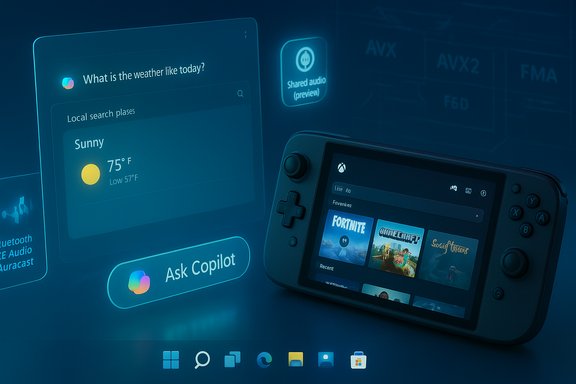
Microsoft’s published notes and community mirrors summarize the new, visible items in this rollup as:- Ask Copilot in the Taskbar — an opt‑in taskbar pill that surfaces Copilot chat plus Copilot Voice and Copilot Vision, blended with local search results in a single pane. Enablement is via Settings → Personalization → Taskbar → Ask Copilot.
- Full‑screen experience (FSE) for the Xbox PC app — a console‑style fullscreen mode for the Xbox app tailored to handheld Windows PCs (launched initially on the ASUS ROG Xbox Ally family, now previewing on MSI Claw models). The FSE toggle lives under Settings → Gaming → Full screen experience; users can set Xbox as their home app.
- Shared audio (preview) — a Bluetooth LE audio‑based shared broadcast experience (Auracast/LE Audio family) that lets one PC stream audio to multiple compatible headphones/receivers; the rollout is limited to Copilot+ PCs in preview. Quick Settings will expose a “Shared audio (preview)” tile to select and share to supported paired accessories.
- Prism improvements (Windows on Arm) — an update to Prism, the x64 emulator used on Arm PCs, that exposes additional virtual CPU features (AVX/AVX2, FMA, BMI, F16C etc. to emulated apps, enabling more x64 applications (and select 32‑bit titles via opt‑in) to run properly on Arm devices. This expands compatibility and is already being used by apps such as Adobe Premiere Pro in limited retail cases.
Dev → Beta: what changed and why it matters
Parallel builds, a recommended path, and a limited window
Historically the Dev channel is the experimental frontier and Beta is the “closer to ship” preview. By recommending the same 25H2 binary that Dev uses into the Beta channel, Microsoft temporarily reduces the binary divergence between the two channels. Practically:- Beta devices will see the fully‑shipped 25H2 code as a recommended preview update while still reporting as version 24H2 if the enablement package isn’t applied.
- Dev devices receive the same package but remain on the 25H2 flight number family (26220.xxxx).
- This opens a limited opportunity for Dev Insiders who want a more stable ride on 25H2 to switch to Beta without performing a clean OS reset later. Once Dev receives a higher build number that Beta doesn’t have, that free pass closes.
Why Microsoft is doing this
- It keeps testing broad: gating via CFR still lets Microsoft collect telemetry and feedback across a wide device pool while controlling rollout.
- It eases migration: users who prefer Beta’s stability can move without reinstalling.
- It allows Dev to pivot: once Beta is safely testing 25H2, Dev can move forward to longer‑lead work (rumored future version/26H1 testing tied to new Snapdragon X2‑based devices), freeing Dev for more experimental changes. Note that the exact name/number for future Dev testing was not confirmed by Microsoft and remains speculative in community commentary; treat such version rumors cautiously.
Deep dive: Ask Copilot in the Taskbar
What it does
The Ask Copilot taskbar experience is an opt‑in search/assistant pane that blends local search results (apps, files, settings) with Copilot responses, and exposes Copilot’s Voice and Vision inputs. It’s designed to be permissioned — Copilot won’t automatically sweep your personal content without explicit consent — and complements the existing Windows Search experience rather than replacing it. Microsoft surfaces the enablement toggle in Personalization → Taskbar.Benefits
- Fast access to Copilot chat/voice without opening the full Copilot app.
- On‑device operations for Copilot+ hardware may reduce latency and preserve some privacy properties (when local models or local pipelines are used).
- Combines OS‑level indexing with generative assistance — useful for contextual help like “find my latest presentation and summarize the key points.”
Risks and caveats
- Privacy and entitlement complexity: the UX mixes local hits with Copilot generative responses, which raises questions about where data flows (local NPU vs cloud) and which entitlements (Copilot+ device hardware and Microsoft 365 Copilot) matter.
- Feature gating: not all Insiders will see the same behavior; behavior can be toggled server‑side, making replication across devices (or for IT testing) non‑deterministic.
- Accessibility and discoverability: adding another entry point into Copilot increases surface area for users but also the support matrix for IT teams.
Deep dive: Full‑screen experience (FSE) for handheld PCs
What FSE is
FSE is a console‑style, lean Xbox PC app mode that turns the device into a gaming‑first environment: reduced background activity, streamlined input flow for controllers, and an Xbox‑centred “home” UX optimized for small, handheld Windows PCs. It debuted on the ASUS ROG Xbox Ally devices and is now previewing on MSI Claw handhelds with additional OEM rollouts planned. Toggle location: Settings → Gaming → Full screen experience.Strengths
- Provides a unified, gaming‑first experience that makes Windows handhelds feel more like dedicated gaming consoles.
- Optimizes foreground responsiveness by minimizing background tasks, which can be crucial on thermally constrained handheld hardware.
Concerns
- Compatibility and driver maturity remain concerns on third‑party handhelds; GPU and audio drivers must be updated to avoid regressions (Intel Arc driver updates already fixed issues on some Claw handhelds).
- FSE’s usefulness depends on OEM implementation (battery indicators, performance telemetry, controller mapping). Microsoft and OEMs will need to iterate on telemetry and feedback channels.
Deep dive: Shared audio (Bluetooth LE / Auracast preview)
The technology
The new shared audio preview uses Bluetooth LE Audio broadcast capabilities (the Auracast profile and LC3 codec family) to stream audio to multiple compatible receivers simultaneously. Auracast is already being adopted widely across phones and headphones; Microsoft is testing it in Windows with a UI flow in Quick Settings for selecting and broadcasting to paired devices. The preview is limited to Copilot+ PCs and supported headsets/accessories for now.Why this matters
- Shared audio solves a simple but persistent use case: two or more listeners can receive synchronized audio from a single host without a hardware splitter or clumsy pairing hacks.
- Auracast/LE Audio uses the LC3 codec for better efficiency and quality at lower power budgets, which is important on handheld and laptop devices.
Limitations and practical notes
- Adoption requires hardware that supports Bluetooth LE Audio / Auracast (both host and headphones).
- Microsoft’s preview restricts the feature to Copilot+ PCs — a gating choice that is not fully explained in the announcement and will leave many users unable to test the functionality unless their hardware is in the supported roster. The limitation appears entitlement‑ and hardware‑based rather than fundamental to the protocol. Treat that limitation as an operational gating decision by Microsoft.
Deep dive: Prism emulator improvements (Windows on Arm)
What changed
The Prism emulator now exposes additional x86/x64 CPU features in the emulated virtual CPU — notably AVX/AVX2, FMA, BMI and others — so that more modern x64 applications that rely on these extensions can run on Arm devices under emulation. Microsoft has rolled limited support into retail 24H2 for some apps (e.g., Adobe Premiere Pro 25) and is expanding availability across Insider channels with the updated Prism. For 32‑bit (x86) apps, Microsoft is offering an opt‑in path through emulation settings.Why it matters
- This is one of the most consequential runtime compatibility improvements for Windows on Arm to date: many creative and compute apps have CPU‑feature checks that previously blocked them; enabling those features in the virtual CPU removes artificial barriers and increases real‑world compatibility.
- It helps OEMs and ISVs validate Arm devices for a broader range of workloads, making Copilot+ and Snapdragon‑class hardware more viable for mainstream users.
Caveats
- Emulated extension support can mask performance differences; apps may run but with different performance characteristics on Arm silicon versus native x64 hardware.
- Some complex or hybrid apps that include 32‑bit components may still face detection or compatibility quirks; Microsoft’s approach is conservative and includes an opt‑in path for x86 apps to use the expanded features. Feedback through the Feedback Hub is encouraged for compatibility reports.
What Insiders and IT administrators should do now
- If you are on the Dev channel and want to stay testing only 25H2 features (and not follow Dev into future experimental builds), switch to Beta now while the recommended 25H2 update is available. After Dev jumps to a higher build number this window will close and switching back may require a clean install. Steps:
- Open Settings → Windows Update → Windows Insider Program.
- Choose your Insider settings → select Beta Channel.
- Check for updates and install KB5067115 if offered.
- For admins validating imaging and management: treat this as a staggered, CFR‑driven rollout. Test policies, EDR agents and identity flows on a representative hardware set (including Copilot+ devices), and validate recovery/rollback behavior because some preview packages include Servicing Stack Updates that complicate rollbacks.
- For users testing Prism and Arm compatibility: use non‑production devices or virtual labs, and collect CPU feature and app compatibility telemetry; the Feedback Hub is the canonical channel for compatibility reports.
- For anyone trying shared audio: validate device support (headphones and host), keep firmware and Bluetooth drivers up to date, and expect selective availability on Copilot+ PCs during the preview.
Critical analysis — strengths, risks, and what to watch
Strengths
- The update exemplifies Microsoft’s refined deployment model: binary parity with feature gating (CFR/enablement) lets the company test at scale while reducing install friction for Insiders.
- Small, high‑leverage features — Ask Copilot and Shared audio — address real user scenarios and nudge Windows toward more natural, multimodal interactions.
- Prism improvements are strategic: improving emulation compatibility is a direct way to increase the practical utility of Windows on Arm hardware without waiting for full native recompilation across the ecosystem. This has immediate benefits for creative and pro apps.
Risks and operational drawbacks
- Fragmentation of experience. CFR and device gating mean two users on identical OS builds can see very different experiences; that makes replication, testing and troubleshooting harder for IT and enthusiasts.
- Entitlement gating and hardware exclusivity. Shared audio being limited to Copilot+ PCs (and certain accessories) reduces test coverage and will frustrate Insiders on otherwise capable hardware. The logic behind Copilot+ exclusivity isn’t fully explained in Microsoft’s briefings; that remains a point to press Microsoft to clarify.
- Update reliability and known installation errors. Insider preview quality updates sometimes surface installation errors (0x800f081f / 0x800f0983) or regression reports in community forums; treat preview packages as testing payloads, not production updates. Administrators should pilot in a controlled ring first.
- Privacy and data flow clarity. Blending local indexing with Copilot generative results raises questions about data movement between local indices, on‑device models and cloud services. Microsoft states Ask Copilot is permissioned, but enterprises will want a clearer data‑flow and DLP position before broad adoption.
What to watch next
- Whether Microsoft removes the Copilot+ hardware gating for shared audio and Copilot‑centric features.
- When Dev moves to a higher build family (rumored 26H1 or platform work tied to Snapdragon X2), which will close the channel‑switching window.
- Additional telemetry and performance numbers for Prism’s expanded CPU feature support: will more emulated apps become reliably usable on mainstream Arm silicon, or will we see a subset of apps still blocked by hybrid dependencies?
Final thoughts and practical guidance
KB5067115 is a compact but consequential preview: it contains small usability improvements that matter (taskbar Copilot, shared audio), a platform enhancement that widens hardware compatibility (Prism), and — importantly — a programmatic shift in how Microsoft stages releases across Dev and Beta by temporarily offering the same 25H2 binary as a recommended update in Beta. For Insiders, this is a practical window to decide which channel fits your risk appetite; for admins and OEMs, it’s a reminder to validate drivers, agents and experience gating on representative Copilot+ hardware.Keep these rules of thumb top of mind:
- Treat preview quality updates as testing builds. Use spare devices or VMs for evaluation.
- If you need to stay on 25H2 and are in Dev, migrate to Beta now while the recommendation window is open.
- Document feature availability across devices in your fleet: CFR means visibility will vary by device, account and toggle state.
- Send compatibility data and user scenarios through Feedback Hub so Microsoft can widen the CFR rollout or surface fixes faster.
Source: Thurrott.com Dev and Beta Channels Get a New Preview Quality Update, Bigger Changes to Come
