

Microsoft’s latest Windows 11 Insider work restores the taskbar’s long-missing ability to sit on the right side of the screen while still supporting “Never combine” taskbar buttons and labels, a configuration newly highlighted in Paul Thurrott’s June 2, 2026 hands-on coverage. This is not merely a cosmetic tweak. It is Microsoft admitting, slowly and in public, that the Windows 11 taskbar rewrite shipped with too many opinionated omissions. The right-edge, never-combine taskbar is a small screenshot with a large message: the desktop still belongs to people who do real work on it.
For nearly five years, Windows 11’s taskbar has been the most obvious symbol of Microsoft’s modern Windows trade-off. The company wanted a cleaner, more coherent shell, one that looked less like a 1990s accumulation of affordances and more like a platform ready for touch, centered layouts, rounded corners, Widgets, Copilot, and whatever Microsoft decided the next ambient computing layer should be. But to get there, it removed behaviors that many long-time users considered fundamental.
The ability to move the taskbar to the top, left, or right was one of those casualties. So was the ability to ungroup windows and show labels at launch. The latter eventually returned in Windows 11’s production channel, but vertical placement remained conspicuously absent, forcing users into registry hacks, third-party shell replacements, or resignation.
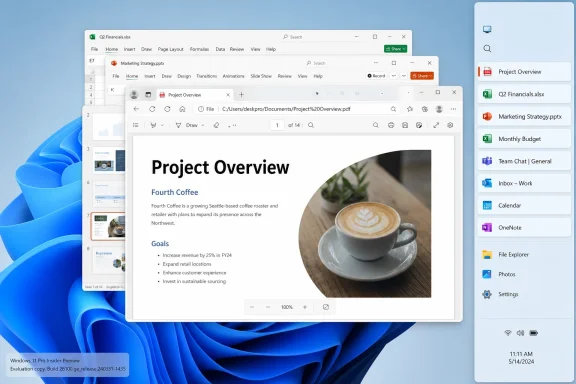
That context matters because “taskbar-right-never-combine” sounds like an image filename only enthusiasts could love. In reality, it captures a workflow Microsoft broke and is now attempting to reconstitute: a vertical taskbar on the right side of the display, with each window represented separately rather than collapsed into a single app icon. For users who live in dozens of documents, terminals, browser windows, Explorer windows, remote sessions, and admin tools, that is not nostalgia. It is information architecture.
Microsoft’s May 2026 Insider notes say the alternate taskbar position feature allows the taskbar to move to the bottom, top, left, or right, with most customization settings — including small taskbar buttons and never-combine icons — working across locations. Thurrott’s June 2 hands-on treatment gives the change a useful reality check: this is no longer just a line item in a changelog. It is something people can see, test, and judge against the muscle memory Windows 11 disrupted.
The original Windows 11 taskbar rewrite flattened that diversity into one preferred arrangement. Centered icons at the bottom looked good in screenshots and on new hardware. They also made Windows feel less cluttered to first-time users, which is a defensible design goal. But Microsoft paid for that simplicity by making expert workflows feel like edge cases.
Vertical taskbars are especially easy to dismiss if one thinks in laptop defaults. On a 16:9 or ultrawide monitor, horizontal pixels are abundant and vertical pixels are precious. A side-mounted taskbar can preserve document height while turning the taskbar into a readable stack of running windows. With labels enabled and combining disabled, it becomes a lightweight window manager rather than an icon strip.
That distinction is why the “right” part of this change matters. Left-side taskbars have their fans, but the right edge has a particular ergonomic logic for some users, especially those who keep Start, Search, or pinned launchers away from the document flow. It also matters for multi-monitor setups, remote desktops, and workflows built over years of repetition. When Microsoft removed the option, it did not merely change a default; it invalidated a set of learned spatial habits.
The anger was amplified because this was not an obscure experiment from a vanished era. Windows 10 supported taskbar relocation. Windows users had been trained for decades to expect the shell to adapt to them. Windows 11 arrived and told them the old bargain had expired.
A grouped browser icon might represent a documentation page, an admin console, a webmail tab, a ticketing system, and a vendor portal. A grouped Explorer icon might hide five different directories. A grouped Word or Excel icon may force the user to hover, preview, select, and mentally parse before acting. That sounds small until it happens hundreds of times per day.
Labels solve part of the problem by exposing document or window names directly. Never-combine behavior solves another part by preserving one visible target per window. Put the taskbar vertically, and the labels have room to breathe. Put it on the right side of a large display, and the taskbar stops competing with the work area’s vertical height.
This is why the new Insider implementation is more significant than simply restoring a check box. Windows 11 already brought back ungrouping and labels on the standard bottom taskbar. But the full old-school productivity pattern was incomplete without alternate placement. A horizontal taskbar with labels can become cramped quickly; a vertical taskbar with labels is the arrangement that makes the old behavior feel purposeful again.
There is a reason enthusiasts fixate on this. It is not because they hate modern design. It is because modern design too often mistakes reduced visual complexity for reduced user effort. Sometimes hiding information makes the interface look calmer while making the work harder.
That means IT departments should not treat the screenshot as a deployment plan. A feature in the Experimental channel can change, slip, or be withdrawn. Windows Insiders know this bargain well: today’s restoration can become tomorrow’s partial rollout, A/B test, staged enablement, or “we are continuing to evaluate feedback.”
Still, the direction is difficult to miss. Microsoft has spent 2026 talking more openly about making Windows feel personal and less hostile to user preference. The taskbar work sits alongside other shell and update-control changes meant to repair Windows 11’s reputation with the very audience that tends to influence upgrades: enthusiasts, admins, power users, and small-business troubleshooters.
That audience is not always numerically dominant, but it is culturally important. These are the people relatives ask before buying a PC. They are the admins who decide when to move fleets. They are the forum regulars who explain whether a change is merely annoying or operationally risky. Microsoft can ship Windows to hundreds of millions of machines without pleasing them, but it cannot easily rebuild trust while ignoring them.
The risk is that Microsoft treats this as a checked box rather than a renewed principle. Restoring taskbar placement is welcome. Restoring it in a way that remains visually odd, functionally incomplete, or buried behind Insider channel uncertainty would blunt the gain. The bar is not “can a screenshot be produced?” The bar is “can a user who relied on this for a decade stop thinking about it again?”
That explanation is plausible and still unsatisfying. Users generally do not care whether a feature vanished because a product manager disliked it or because a new shell architecture did not support it yet. The result is the same: the workflow is gone. Windows 11 asked users to accept the promise of a better foundation while living with a less capable daily interface.
The taskbar became a case study in how not to sequence modernization. Microsoft could have shipped the new shell only when the old shell’s major affordances were matched. It could have made alternate taskbar placement a known limitation with a public roadmap. It could have offered a compatibility mode for traditional taskbar behavior. Instead, it launched with a confident new default and left users to discover what had disappeared.
That mistake is still shaping reaction to the 2026 restoration. Many users are pleased, but the praise is tempered by the obvious question: why did this take so long? When a platform removes a mature feature, waits years, then reintroduces it as an improvement, the celebration comes with a residue of irritation.
Yet the architectural explanation also points to why this moment matters. If Microsoft has now done the deeper work required to support alternate positions, labels, smaller buttons, and alignment across orientations, then Windows 11’s shell may finally be catching up to its own ambitions. A modern taskbar does not have to mean a less flexible taskbar. It just took Microsoft too long to prove it.
In managed environments, small shell changes create disproportionate friction. A user who spends all day in line-of-business applications may not care about Widgets, Copilot, or new animations. But if their taskbar no longer shows windows the way they expect, help desks hear about it. Multiply that by departments, accessibility needs, remote-work setups, and specialized displays, and a “personalization” change becomes an adoption issue.
The same is true for admins and developers. A sysadmin with multiple RDP sessions, PowerShell windows, dashboards, and browser-based consoles benefits from persistent visual labels. A developer with terminals, editors, documentation, and test browsers open across monitors may prefer a side taskbar because it leaves code height intact. A financial analyst or dispatcher may depend on window titles being visible at a glance.
These users are not asking Windows to be exotic. They are asking it to preserve a dense, legible map of work. That is exactly the kind of thing a desktop operating system should be good at.
There is also an accessibility dimension that often gets buried under the word “customization.” Some users need larger targets, predictable placement, visible labels, or reduced hover dependence. Others need to arrange the shell around assistive software or display constraints. A rigid taskbar can be more than annoying; it can be excluding.
This is where skepticism is warranted. A movable taskbar is an act of deference to user preference. A Copilot-integrated taskbar is an act of platform strategy. Both can coexist, but they are not motivated by the same instinct. One says, “put your workspace where it belongs.” The other says, “Microsoft’s assistant belongs close to every workflow.”
If Microsoft wants the taskbar restoration to land well, it should avoid turning alternate taskbar positions into second-class layouts for its own new features. Users who move the taskbar to the right should not later discover that Copilot, Search, Widgets, or tray behavior works best only at the bottom. That would repeat the old error in a subtler form: the setting exists, but the real product design assumes you do what Microsoft prefers.
The taskbar is valuable because it is persistent. That is precisely why Microsoft wants to attach services to it, and precisely why users are sensitive about changes there. The lesson of the last five years is that the Windows shell cannot be treated as a billboard without cost. It is the operating surface of the operating system.
A genuinely mature Windows 11 taskbar would let Microsoft add new affordances without degrading old ones. That means Copilot should be optional, movable, and respectful of layout. It also means a vertical right-side taskbar should not feel like a compatibility afterthought.
The Windows community also kept the issue alive through third-party tools. Utilities such as StartAllBack, ExplorerPatcher, and commercial customization suites demonstrated that demand existed and that users were willing to modify the shell to get back what Windows removed. Microsoft does not necessarily like that ecosystem, but it should study it. Third-party shell replacements are market research with installers.
There is a lesson here for Windows enthusiasts, too. The most effective feedback is not merely loud; it is operational. It explains what broke, who depends on it, what workaround is being used, and why the default behavior fails. The restoration of alternate taskbar positions suggests that enough of that signal made its way back into the product process.
Still, users should not have to campaign for basic continuity every time Microsoft modernizes a component. Windows can evolve without making its most committed users feel like they are beta-testing the loss of their own habits.
This is especially important for a feature like vertical taskbar placement, where layout details decide usability. Are labels readable? Do icons align predictably? Does the system tray make sense? Do flyouts emerge from the correct edge? Does the Start menu feel anchored or improvised? Does the taskbar preserve enough width for titles without devouring the display?
Early hands-on impressions suggest Microsoft has done more than merely rotate the bar. The company is accounting for alignment, flyouts, animations, and button behavior across alternate positions. Recent Insider builds also include polish fixes and touch-swipe support for alternate placements, which indicates active iteration rather than a one-off concession.
But the test will come when the feature reaches broader channels and we see how it behaves across scaling settings, multi-monitor configurations, touch devices, virtual desktops, remote sessions, and enterprise policies. The Windows shell lives in the messy world. A feature that looks fine on one reference machine can still stumble when confronted with real desktops.
That is why Microsoft should resist overpackaging this as a triumphant return. The correct tone is humility. Users asked for a mature feature back. Microsoft is bringing it back. Now it has to make it boring.
 Microsoft’s Taskbar Retreat Is Finally Visible
For nearly five years, Windows 11’s taskbar has been the most obvious symbol of Microsoft’s modern Windows trade-off. The company wanted a cleaner, more coherent shell, one that looked less like a 1990s accumulation of affordances and more like a platform ready for touch, centered layouts, rounded corners, Widgets, Copilot, and whatever Microsoft decided the next ambient computing layer should be. But to get there, it removed behaviors that many long-time users considered fundamental.The ability to move the taskbar to the top, left, or right was one of those casualties. So was the ability to ungroup windows and show labels at launch. The latter eventually returned in Windows 11’s production channel, but vertical placement remained conspicuously absent, forcing users into registry hacks, third-party shell replacements, or resignation.
That context matters because “taskbar-right-never-combine” sounds like an image filename only enthusiasts could love. In reality, it captures a workflow Microsoft broke and is now attempting to reconstitute: a vertical taskbar on the right side of the display, with each window represented separately rather than collapsed into a single app icon. For users who live in dozens of documents, terminals, browser windows, Explorer windows, remote sessions, and admin tools, that is not nostalgia. It is information architecture.
Microsoft’s May 2026 Insider notes say the alternate taskbar position feature allows the taskbar to move to the bottom, top, left, or right, with most customization settings — including small taskbar buttons and never-combine icons — working across locations. Thurrott’s June 2 hands-on treatment gives the change a useful reality check: this is no longer just a line item in a changelog. It is something people can see, test, and judge against the muscle memory Windows 11 disrupted.
The Missing Right Edge Became a Proxy War Over Windows 11
The Windows 11 taskbar debate was never really about one edge of the screen. It was about whether Microsoft still understood that Windows is not a single-user experience. It is a consumer OS, a managed enterprise platform, a gaming launcher, a developer workstation, a kiosk shell, and a remote-admin cockpit, often on the same codebase and sometimes on the same machine.The original Windows 11 taskbar rewrite flattened that diversity into one preferred arrangement. Centered icons at the bottom looked good in screenshots and on new hardware. They also made Windows feel less cluttered to first-time users, which is a defensible design goal. But Microsoft paid for that simplicity by making expert workflows feel like edge cases.
Vertical taskbars are especially easy to dismiss if one thinks in laptop defaults. On a 16:9 or ultrawide monitor, horizontal pixels are abundant and vertical pixels are precious. A side-mounted taskbar can preserve document height while turning the taskbar into a readable stack of running windows. With labels enabled and combining disabled, it becomes a lightweight window manager rather than an icon strip.
That distinction is why the “right” part of this change matters. Left-side taskbars have their fans, but the right edge has a particular ergonomic logic for some users, especially those who keep Start, Search, or pinned launchers away from the document flow. It also matters for multi-monitor setups, remote desktops, and workflows built over years of repetition. When Microsoft removed the option, it did not merely change a default; it invalidated a set of learned spatial habits.
The anger was amplified because this was not an obscure experiment from a vanished era. Windows 10 supported taskbar relocation. Windows users had been trained for decades to expect the shell to adapt to them. Windows 11 arrived and told them the old bargain had expired.
“Never Combine” Is Really About Cognitive Load
“Never combine” is one of those settings whose name undersells its purpose. The issue is not that users dislike grouped icons in the abstract. Grouping is perfectly sensible for casual use, especially when the taskbar is a launcher more than a live map of work. But once a machine becomes a professional instrument, hiding window identity behind one app icon creates friction.A grouped browser icon might represent a documentation page, an admin console, a webmail tab, a ticketing system, and a vendor portal. A grouped Explorer icon might hide five different directories. A grouped Word or Excel icon may force the user to hover, preview, select, and mentally parse before acting. That sounds small until it happens hundreds of times per day.
Labels solve part of the problem by exposing document or window names directly. Never-combine behavior solves another part by preserving one visible target per window. Put the taskbar vertically, and the labels have room to breathe. Put it on the right side of a large display, and the taskbar stops competing with the work area’s vertical height.
This is why the new Insider implementation is more significant than simply restoring a check box. Windows 11 already brought back ungrouping and labels on the standard bottom taskbar. But the full old-school productivity pattern was incomplete without alternate placement. A horizontal taskbar with labels can become cramped quickly; a vertical taskbar with labels is the arrangement that makes the old behavior feel purposeful again.
There is a reason enthusiasts fixate on this. It is not because they hate modern design. It is because modern design too often mistakes reduced visual complexity for reduced user effort. Sometimes hiding information makes the interface look calmer while making the work harder.
The Insider Build Still Carries the Usual Caveats
This is still an Insider feature, and Microsoft is being appropriately cautious. The alternate-position taskbar is appearing in Experimental-channel builds, not as a broad production rollout. Microsoft’s own notes describe some related work as still in progress, including support for touch gestures, the Search box, and Ask Copilot in alternate taskbar locations. Auto-hidden and touch-optimized taskbar support is also not fully there yet in the initial test framing.That means IT departments should not treat the screenshot as a deployment plan. A feature in the Experimental channel can change, slip, or be withdrawn. Windows Insiders know this bargain well: today’s restoration can become tomorrow’s partial rollout, A/B test, staged enablement, or “we are continuing to evaluate feedback.”
Still, the direction is difficult to miss. Microsoft has spent 2026 talking more openly about making Windows feel personal and less hostile to user preference. The taskbar work sits alongside other shell and update-control changes meant to repair Windows 11’s reputation with the very audience that tends to influence upgrades: enthusiasts, admins, power users, and small-business troubleshooters.
That audience is not always numerically dominant, but it is culturally important. These are the people relatives ask before buying a PC. They are the admins who decide when to move fleets. They are the forum regulars who explain whether a change is merely annoying or operationally risky. Microsoft can ship Windows to hundreds of millions of machines without pleasing them, but it cannot easily rebuild trust while ignoring them.
The risk is that Microsoft treats this as a checked box rather than a renewed principle. Restoring taskbar placement is welcome. Restoring it in a way that remains visually odd, functionally incomplete, or buried behind Insider channel uncertainty would blunt the gain. The bar is not “can a screenshot be produced?” The bar is “can a user who relied on this for a decade stop thinking about it again?”
Windows 11’s Original Sin Was Rebuilding Too Much at Once
The taskbar controversy has always been partly architectural. Windows 11 did not merely reskin the Windows 10 taskbar. Microsoft rebuilt major shell components, which gave it room to modernize but also meant many mature behaviors had to be reimplemented rather than inherited. The company’s defenders have often argued that missing features were not necessarily ideological removals; they were casualties of a rewrite.That explanation is plausible and still unsatisfying. Users generally do not care whether a feature vanished because a product manager disliked it or because a new shell architecture did not support it yet. The result is the same: the workflow is gone. Windows 11 asked users to accept the promise of a better foundation while living with a less capable daily interface.
The taskbar became a case study in how not to sequence modernization. Microsoft could have shipped the new shell only when the old shell’s major affordances were matched. It could have made alternate taskbar placement a known limitation with a public roadmap. It could have offered a compatibility mode for traditional taskbar behavior. Instead, it launched with a confident new default and left users to discover what had disappeared.
That mistake is still shaping reaction to the 2026 restoration. Many users are pleased, but the praise is tempered by the obvious question: why did this take so long? When a platform removes a mature feature, waits years, then reintroduces it as an improvement, the celebration comes with a residue of irritation.
Yet the architectural explanation also points to why this moment matters. If Microsoft has now done the deeper work required to support alternate positions, labels, smaller buttons, and alignment across orientations, then Windows 11’s shell may finally be catching up to its own ambitions. A modern taskbar does not have to mean a less flexible taskbar. It just took Microsoft too long to prove it.
The Right-Side Taskbar Is a Power-User Feature With Enterprise Consequences
Enterprise IT may not standardize on right-side taskbars, but it should still care about this restoration. The issue is less the specific layout than the signal that Microsoft is willing to return productivity features that were lost in the Windows 11 transition. That affects upgrade sentiment, support burden, and the long tail of user resistance.In managed environments, small shell changes create disproportionate friction. A user who spends all day in line-of-business applications may not care about Widgets, Copilot, or new animations. But if their taskbar no longer shows windows the way they expect, help desks hear about it. Multiply that by departments, accessibility needs, remote-work setups, and specialized displays, and a “personalization” change becomes an adoption issue.
The same is true for admins and developers. A sysadmin with multiple RDP sessions, PowerShell windows, dashboards, and browser-based consoles benefits from persistent visual labels. A developer with terminals, editors, documentation, and test browsers open across monitors may prefer a side taskbar because it leaves code height intact. A financial analyst or dispatcher may depend on window titles being visible at a glance.
These users are not asking Windows to be exotic. They are asking it to preserve a dense, legible map of work. That is exactly the kind of thing a desktop operating system should be good at.
There is also an accessibility dimension that often gets buried under the word “customization.” Some users need larger targets, predictable placement, visible labels, or reduced hover dependence. Others need to arrange the shell around assistive software or display constraints. A rigid taskbar can be more than annoying; it can be excluding.
Microsoft Is Also Rebalancing the Taskbar Around Copilot
The timing is awkward because Microsoft is not merely restoring old taskbar behaviors. It is also preparing the taskbar for new AI entry points, including Ask Copilot experiences expected around the middle of 2026. That creates a tension Windows users know well: Microsoft gives back a traditional control while simultaneously reserving prime shell real estate for the next strategic layer.This is where skepticism is warranted. A movable taskbar is an act of deference to user preference. A Copilot-integrated taskbar is an act of platform strategy. Both can coexist, but they are not motivated by the same instinct. One says, “put your workspace where it belongs.” The other says, “Microsoft’s assistant belongs close to every workflow.”
If Microsoft wants the taskbar restoration to land well, it should avoid turning alternate taskbar positions into second-class layouts for its own new features. Users who move the taskbar to the right should not later discover that Copilot, Search, Widgets, or tray behavior works best only at the bottom. That would repeat the old error in a subtler form: the setting exists, but the real product design assumes you do what Microsoft prefers.
The taskbar is valuable because it is persistent. That is precisely why Microsoft wants to attach services to it, and precisely why users are sensitive about changes there. The lesson of the last five years is that the Windows shell cannot be treated as a billboard without cost. It is the operating surface of the operating system.
A genuinely mature Windows 11 taskbar would let Microsoft add new affordances without degrading old ones. That means Copilot should be optional, movable, and respectful of layout. It also means a vertical right-side taskbar should not feel like a compatibility afterthought.
Enthusiasts Won the Argument, But Not by Complaining Alone
It is tempting to frame this as Microsoft finally listening to complaints. That is partly true, but incomplete. The more interesting point is that the complaints were specific, durable, and tied to measurable workflows. “I don’t like change” is easy for a vendor to dismiss. “I cannot see my window titles, I cannot place the taskbar where my monitor layout requires it, and I now need extra clicks hundreds of times per day” is harder to wave away forever.The Windows community also kept the issue alive through third-party tools. Utilities such as StartAllBack, ExplorerPatcher, and commercial customization suites demonstrated that demand existed and that users were willing to modify the shell to get back what Windows removed. Microsoft does not necessarily like that ecosystem, but it should study it. Third-party shell replacements are market research with installers.
There is a lesson here for Windows enthusiasts, too. The most effective feedback is not merely loud; it is operational. It explains what broke, who depends on it, what workaround is being used, and why the default behavior fails. The restoration of alternate taskbar positions suggests that enough of that signal made its way back into the product process.
Still, users should not have to campaign for basic continuity every time Microsoft modernizes a component. Windows can evolve without making its most committed users feel like they are beta-testing the loss of their own habits.
The Screenshot Says More Than the Changelog
The Thurrott attachment matters because screenshots often make product truth more legible than release notes. A changelog can say that “most customization settings” work across locations. A screenshot of a right-side taskbar with never-combine behavior shows whether the promise resembles the thing users remember.This is especially important for a feature like vertical taskbar placement, where layout details decide usability. Are labels readable? Do icons align predictably? Does the system tray make sense? Do flyouts emerge from the correct edge? Does the Start menu feel anchored or improvised? Does the taskbar preserve enough width for titles without devouring the display?
Early hands-on impressions suggest Microsoft has done more than merely rotate the bar. The company is accounting for alignment, flyouts, animations, and button behavior across alternate positions. Recent Insider builds also include polish fixes and touch-swipe support for alternate placements, which indicates active iteration rather than a one-off concession.
But the test will come when the feature reaches broader channels and we see how it behaves across scaling settings, multi-monitor configurations, touch devices, virtual desktops, remote sessions, and enterprise policies. The Windows shell lives in the messy world. A feature that looks fine on one reference machine can still stumble when confronted with real desktops.
That is why Microsoft should resist overpackaging this as a triumphant return. The correct tone is humility. Users asked for a mature feature back. Microsoft is bringing it back. Now it has to make it boring.
A Small Rectangle of Pixels Reopens an Old Windows Promise
The most concrete reading of the current state is simple: Microsoft is testing alternate taskbar positions in Windows 11, including right-side placement, and the restored layout can work with never-combine taskbar buttons and labels. That combination matters because it recreates a workflow Windows 11 removed at launch and only partially restored later.- Windows 11’s new Insider taskbar work allows placement on the bottom, top, left, or right edges of the screen.
- The right-side taskbar can be used with never-combine behavior, giving each open window a separate labeled button.
- The feature is still in preview, so production PCs should not be planned around it until Microsoft ships it more broadly.
- The restoration is most valuable for power users, admins, developers, and multi-monitor workers who rely on visible window identity.
- Microsoft still needs to make newer taskbar experiences, including Search and Copilot, behave consistently in non-bottom layouts.
- The larger significance is not nostalgia; it is Microsoft rediscovering that Windows productivity depends on user-controlled spatial layouts.
The Desktop Wins When Microsoft Stops Confusing Fewer Options With Better Design
Windows 11’s right-side, never-combine taskbar is not going to sell a Copilot+ PC, headline a keynote, or change the economics of the Windows business. But it may do something more important for the people who actually live in Windows all day: make the operating system feel less like it is arguing with them. The best desktop features disappear into habit, and Microsoft’s job now is to restore this one so completely that it stops being news. If the company carries that principle forward — modernize the shell, but do not amputate the workflows — Windows 11 may yet become the upgrade Windows users wanted rather than the compromise they endured.References
- Primary source: thurrott.com
Published: 2026-06-02T20:10:15.839450
taskbar-right-never-combine - Thurrott.com
 www.thurrott.com
- Related coverage: androidauthority.com
How to ungroup icons on the taskbar in Windows 11
Want to ungroup the icons on your taskbar, but can't find the option in Windows 11? Here's how to ungroup icons on the taskbar in Windows 11.www.androidauthority.com - Related coverage: windowscentral.com
How to change the look and feel of Windows 11 | Windows Central
In this guide, I will show you the ways to change the look and feel of your Windows 11 computer, from changing the wallpaper and accent and system mode to configuring the Start menu, Taskbar, and more.www.windowscentral.com - Related coverage: notebookcheck.net
Microsoft brings back Windows 10 taskbar customizations to Windows 11 - Notebookcheck News
Microsoft is finally giving Windows 11 users more control over the taskbar again, including full screen-edge placement and a smaller, more compact mode. The update also improves how menus and window labels behave depending on the taskbar position. www.notebookcheck.net
- Related coverage: howtogeek.com
How to Ungroup Taskbar Icons on Windows 11
Let each app instance have its own icon on the taskbar thanks to this simple Windows customization trick. www.howtogeek.com
- Official source: blogs.windows.com
Improving Windows quality: Making Taskbar and Start more personal
In our commitment to Windows quality, we outlined our plans to deliver improvements in performance, reliability, and craft. We are also committed toblogs.windows.com
- Related coverage: allthings.how
How to Enable Never Combine Taskbar Buttons in Windows 11
A simple, quick, and effective guide to having separate taskbar buttons on Windows 11.allthings.how - Related coverage: xda-developers.com
Is the Windows 11 taskbar too hard to use? Here's how to stop combining icons and show labels
Want to quickly identify your apps on the Windows 11 taskbar? Here's how to enable taskbar ungrouping if you're running Microsoft's latest OS. www.xda-developers.com
- Related coverage: windowslatest.com
Windows 11's "Never Combine" taskbar icons feature is coming in the fall
Windows 11’s most controversial change is its taskbar. Microsoft redesigned the taskbar by locking it at the bottom of the screen. It still shows your pinned apps, running apps, open windows, and system. However, some Windows 11 taskbar features are limited. For example, it cannot be moved... www.windowslatest.com
- Related coverage: publichealth.wvu.edu
</rdf:Alt> </dc:title> <dc:description> <rdf:Alt> <rdf:li xml:lang="x-default"/> </rdf:Alt> </dc:description> <dc:creator> <rdf:Seq> <rdf:li>Klishis
</rdf:Alt> </dc:description> <dc:creator> <rdf:Seq> <rdf:li>Klishis, Michellepublichealth.wvu.edu
