

Microsoft’s latest Windows 11 Insider builds suggest a notable shift in how the company wants to present artificial intelligence inside the operating system: less branding, fewer obvious entry points, and a quieter, more utilitarian interface. The underlying AI features are not going away, but Copilot is increasingly being stripped from the face of built-in apps such as Notepad and, reportedly, Snipping Tool. That makes this less of a retreat from AI than a reset in how Microsoft expects people to encounter it. It is also a revealing sign that the company has heard some of the criticism around AI clutter, even if it remains committed to embedding machine assistance into core Windows experiences.
For most of the past two years, Microsoft has tried to make Copilot the central label for its consumer AI story across Windows, Microsoft 365, Edge, and a growing list of native apps. In Windows 11, that effort often took the form of persistent buttons, toolbar icons, and feature names that repeatedly surfaced the same brand in different contexts. The strategy was clear: if users saw Copilot everywhere, they would eventually treat it as a normal part of the Windows experience rather than an add-on.
That plan, however, created friction. Many Windows users did not object to AI features in principle, but they did object to the feeling that Microsoft was bolting AI into places where a simpler workflow had worked for years. Notepad is the clearest example. A lightweight text editor is now expected to handle writing assistance, summarization, formatting, tables, and even markup. That is a lot of ambition for a program many people still open to jot down a quick note or paste a snippet of text.
Microsoft’s own Insider blog shows how the company got here. In March 2025, it rolled out Notepad summarization, recent files, and AI access through the Copilot menu. By May 2025, Notepad gained write features and Snipping Tool picked up AI-powered enhancements such as perfect screenshot on Copilot+ PCs. Those updates were presented as productivity wins, but they also made Copilot branding more visible inside everyday tools. (blogs.windows.com)
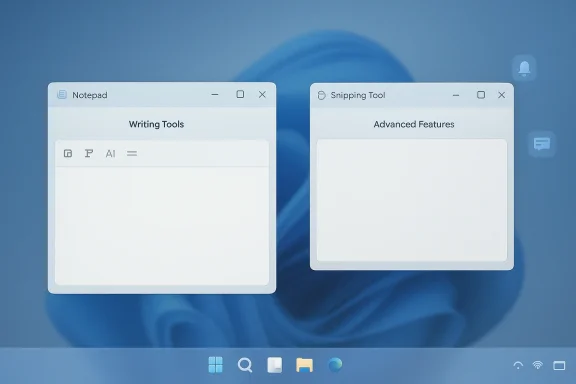
The current change appears to reverse that presentation without removing the underlying capabilities. Windows Latest reports that in Insider builds, Notepad’s familiar Copilot button has become a neutral “Writing Tools” entry, settings have shifted from “AI Features” to “Advanced Features,” and Snipping Tool has had its Copilot button removed from the interface. Microsoft has also publicly said it wants to reduce “unnecessary Copilot entry points,” beginning with apps like Snipping Tool, Photos, Widgets, and Notepad. (windowslatest.com)
That is a meaningful course correction. It suggests Microsoft is no longer convinced that more aggressive branding equals better adoption. Instead, the company seems to be testing a quieter model in which AI is present but less performative. For many Windows users, that may be exactly the right compromise.
That matters because labels shape perception. When a button says Copilot, users are reminded that a cloud-based assistant is watching the workflow. When the same functionality is framed as “Writing Tools,” the feature feels more like a native editor extension than a separate AI product. In practical terms, Microsoft has not changed the capability; it has changed the emotional temperature of the interface.
The functionality, according to reporting, remains intact. Users can still rewrite text, summarize content, and adjust tone or style. The important point is that Microsoft appears to be separating the experience of using AI from the act of advertising AI. That is a subtle but potentially important shift in product philosophy. (windowslatest.com)
A few practical consequences follow:
This is telling because Snipping Tool is one of Windows’ most utilitarian apps. People use it to grab a screenshot, annotate it, and move on. When Microsoft began layering AI-powered actions into that flow, it risked turning a fast utility into a mini AI launcher. For some users, that looked like progress; for others, it felt like friction. The removal of Copilot branding is an implicit admission that not every app benefits from the same level of AI surface area.
That distinction matters for enterprise users too. In business environments, capture tools are often used dozens of times a day for support, documentation, and troubleshooting. Fewer distractions usually mean fewer mistakes. If AI is available when needed but no longer competes for attention every time the app opens, the tool becomes easier to trust.
The broader lesson is that Microsoft may be learning what many software companies eventually learn: not every feature needs the most prominent possible placement. Some capabilities work better as optional enhancements than as front-and-center product identity.
The timing fits a broader correction in Windows messaging. On March 20, 2026, Pavan Davuluri, president of Windows and Devices, published a blog post about Windows quality and said Microsoft would reduce “unnecessary Copilot entry points” starting with apps such as Snipping Tool, Photos, Widgets, and Notepad, according to Windows Latest’s reporting. That is an unusually direct acknowledgment that the company may have overreached. (windowslatest.com)
Microsoft may also be reacting to branding fatigue. “Copilot” has become a sprawling label attached to multiple products and services, which can create confusion rather than clarity. If every app has a Copilot button, a Copilot menu, or a Copilot assistant, the brand risks becoming ambient noise. At some point, ubiquity turns into invisibility.
This may be particularly important for Windows itself, where trust and familiarity still matter. Users expect built-in tools to feel stable and restrained. If the interface starts to resemble a promotional dashboard, it undermines the quiet competence that made those tools appealing in the first place.
That transformation creates both opportunity and tension. On the one hand, a more capable Notepad reduces the need to jump to heavier apps for quick drafting, note cleanup, or light formatting. On the other, every added function increases the risk that Notepad loses the simplicity that made it universal. A utility stops being a utility once users have to study it.
There is also a subtle business angle. By moving common writing tasks into Notepad, Microsoft can make the app more valuable as a gateway to Microsoft 365 and Copilot subscriptions. The company’s earlier release notes tied certain AI features to Microsoft account sign-in and AI credits for Personal, Family, Enterprise, and Copilot Pro plans. That turns Notepad from a free accessory into a potential on-ramp for paid services. (blogs.windows.com)
The new “Writing Tools” label may therefore serve two purposes at once. It makes the interface friendlier, and it reduces the sense that users are being sold a branded AI product every time they type. That is a smarter position than blunt promotion, especially in a core Windows app.
For consumers, a less aggressive Copilot presence probably improves day-to-day usability. Many people want AI available as an option rather than a theme. If the tools are there when needed but do not dominate the interface, users are more likely to accept them as part of Windows rather than as a forced narrative. That is especially true for utility apps where speed is the main virtue.
At the same time, enterprises may still have questions about governance. If AI functions are present under less explicit labels, IT teams need clear controls to disable or manage them. Microsoft’s decision to consolidate the toggle under “Advanced Features” may help, but only if policy handling remains straightforward in managed environments. The more capable Notepad becomes, the more important it is for administrators to know exactly what can be turned off.
Consumers and enterprises also differ in how they interpret value. Consumers may welcome hidden power they can ignore. Enterprises may welcome hidden power only if it is auditable, documented, and policy-driven. The same interface choice can be seen as convenience in one context and opacity in another.
That is important because rivals are watching Windows closely. If Microsoft dials back the most conspicuous Copilot surfaces, other vendors may conclude that AI branding needs to be more restrained in consumer products. The shift could influence design language across text editors, screenshot tools, productivity suites, and even operating system-level assistants. When Microsoft changes course, the rest of the ecosystem tends to notice.
Microsoft may also be protecting Copilot by making it less annoying. Overexposure can damage a brand faster than underexposure can. If the Copilot label becomes associated with clutter rather than help, then a quieter implementation may preserve long-term credibility better than a louder one. This is a classic product positioning trade-off.
This is especially relevant in Windows 11, where the user already navigates a crowded interface of taskbar icons, widgets, settings, and app-specific controls. Every extra branded element adds cognitive load. By stripping Copilot from some surfaces, Microsoft reduces the number of decisions users have to make before accomplishing a basic task.
The irony is that Microsoft can improve the perception of AI by making AI less obvious. The feature remains available, but the user no longer feels that the app is trying to sell them a future. This is a reminder that design language can be as important as technical capability. People do not just evaluate what software does; they evaluate how it asks to do it.
The opportunity is larger than one rename or one removed button. If Microsoft uses this moment to refine how Copilot appears across Windows, it could create a cleaner baseline for future features. That would help both casual users and administrators who want predictability.
There is also a risk that Microsoft is only treating the symptom. If the underlying product mix remains too crowded, renaming the buttons will not fully solve the bigger issue of feature overload. Users may appreciate the softer labels, but they will still judge the app by whether it feels fast, coherent, and worth the extra complexity.
The bigger question is whether this change will affect Copilot itself. Microsoft still appears committed to the broader assistant experience, but the company may be learning that Copilot works better when it is invoked deliberately instead of constantly promoted. In the long run, that could make the brand healthier, not weaker. Sometimes the best way to preserve momentum is to stop shouting.
Source: hi-Tech.ua Microsoft rethinks its AI strategy in Windows 11: Copilot disappears from app interfaces
 Background
For most of the past two years, Microsoft has tried to make Copilot the central label for its consumer AI story across Windows, Microsoft 365, Edge, and a growing list of native apps. In Windows 11, that effort often took the form of persistent buttons, toolbar icons, and feature names that repeatedly surfaced the same brand in different contexts. The strategy was clear: if users saw Copilot everywhere, they would eventually treat it as a normal part of the Windows experience rather than an add-on.That plan, however, created friction. Many Windows users did not object to AI features in principle, but they did object to the feeling that Microsoft was bolting AI into places where a simpler workflow had worked for years. Notepad is the clearest example. A lightweight text editor is now expected to handle writing assistance, summarization, formatting, tables, and even markup. That is a lot of ambition for a program many people still open to jot down a quick note or paste a snippet of text.
Microsoft’s own Insider blog shows how the company got here. In March 2025, it rolled out Notepad summarization, recent files, and AI access through the Copilot menu. By May 2025, Notepad gained write features and Snipping Tool picked up AI-powered enhancements such as perfect screenshot on Copilot+ PCs. Those updates were presented as productivity wins, but they also made Copilot branding more visible inside everyday tools. (blogs.windows.com)
The current change appears to reverse that presentation without removing the underlying capabilities. Windows Latest reports that in Insider builds, Notepad’s familiar Copilot button has become a neutral “Writing Tools” entry, settings have shifted from “AI Features” to “Advanced Features,” and Snipping Tool has had its Copilot button removed from the interface. Microsoft has also publicly said it wants to reduce “unnecessary Copilot entry points,” beginning with apps like Snipping Tool, Photos, Widgets, and Notepad. (windowslatest.com)
That is a meaningful course correction. It suggests Microsoft is no longer convinced that more aggressive branding equals better adoption. Instead, the company seems to be testing a quieter model in which AI is present but less performative. For many Windows users, that may be exactly the right compromise.
What Changed in Notepad
The most visible adjustment is in Notepad, where the Copilot logo is being replaced by more generic language and icons. Windows Latest says Notepad version 11.2512.28.0 removes Copilot branding from the toolbar and settings while preserving the same AI-backed writing and summarization tools. The toolbar is now labeled “Writing Tools,” which is a much softer phrase than Copilot and does not scream AI at the user. (windowslatest.com)That matters because labels shape perception. When a button says Copilot, users are reminded that a cloud-based assistant is watching the workflow. When the same functionality is framed as “Writing Tools,” the feature feels more like a native editor extension than a separate AI product. In practical terms, Microsoft has not changed the capability; it has changed the emotional temperature of the interface.
Why the Rename Matters
The rename from “AI Features” to “Advanced Features” is even more interesting. That wording avoids a category that has become politically and culturally loaded in everyday software, especially in tools that were once valued for simplicity. It also makes the settings area feel more like a standard control panel and less like a marketing showcase. That may sound cosmetic, but interfaces are policy in software.The functionality, according to reporting, remains intact. Users can still rewrite text, summarize content, and adjust tone or style. The important point is that Microsoft appears to be separating the experience of using AI from the act of advertising AI. That is a subtle but potentially important shift in product philosophy. (windowslatest.com)
A few practical consequences follow:
- Users still get the same generative tools.
- The interface feels less cluttered.
- The brand becomes less dominant.
- AI is easier to disable in settings.
- The app feels more like Notepad again.
Snipping Tool’s Simpler Future
Snipping Tool appears to be undergoing a different kind of change. Instead of a rename, Windows Latest reports that Copilot integration has been removed entirely from the app’s visible interface in the latest Insider build. That is a sharper move than the Notepad rebrand because it suggests Microsoft thinks some AI entry points are no longer worth keeping in a tool whose primary job is quick screen capture. (windowslatest.com)This is telling because Snipping Tool is one of Windows’ most utilitarian apps. People use it to grab a screenshot, annotate it, and move on. When Microsoft began layering AI-powered actions into that flow, it risked turning a fast utility into a mini AI launcher. For some users, that looked like progress; for others, it felt like friction. The removal of Copilot branding is an implicit admission that not every app benefits from the same level of AI surface area.
Why Less AI Can Be Better
There is a product-design argument here that Microsoft seems increasingly willing to accept. A screenshot tool should be obvious, predictable, and fast. If a feature is valuable but not central, hiding it behind a less intrusive path can improve the overall experience. In that sense, removing visible Copilot cues from Snipping Tool may be less about retreat and more about respecting the app’s core purpose.That distinction matters for enterprise users too. In business environments, capture tools are often used dozens of times a day for support, documentation, and troubleshooting. Fewer distractions usually mean fewer mistakes. If AI is available when needed but no longer competes for attention every time the app opens, the tool becomes easier to trust.
The broader lesson is that Microsoft may be learning what many software companies eventually learn: not every feature needs the most prominent possible placement. Some capabilities work better as optional enhancements than as front-and-center product identity.
Key takeaways from the Snipping Tool shift
- The app’s core capture workflow stays intact.
- The visible Copilot brand becomes less prominent.
- AI functionality is either reduced or hidden more deeply.
- Microsoft seems to be optimizing for speed and clarity.
- The change aligns with a broader Windows usability reset.
Why Microsoft Is Pulling Back
Microsoft has not said it is abandoning AI in Windows 11. In fact, the company’s recent Insider cadence suggests the opposite: it continues to add AI-powered writing, summarization, visual search, and capture features. The change is about presentation, not strategy. Microsoft appears to have concluded that more Copilot branding is not always more persuasive.The timing fits a broader correction in Windows messaging. On March 20, 2026, Pavan Davuluri, president of Windows and Devices, published a blog post about Windows quality and said Microsoft would reduce “unnecessary Copilot entry points” starting with apps such as Snipping Tool, Photos, Widgets, and Notepad, according to Windows Latest’s reporting. That is an unusually direct acknowledgment that the company may have overreached. (windowslatest.com)
The Quality Problem
The phrase “Windows quality” is doing a lot of work here. When a company starts talking about quality in the same breath as AI simplification, it is usually responding to user feedback about clutter, inconsistency, or feature bloat. Microsoft’s own release notes show that recent Windows app updates have become more ambitious, not less, with AI features layered on top of formatting, tables, and other workflow additions. The issue is not whether these features exist; it is whether they coexist gracefully. (blogs.windows.com)Microsoft may also be reacting to branding fatigue. “Copilot” has become a sprawling label attached to multiple products and services, which can create confusion rather than clarity. If every app has a Copilot button, a Copilot menu, or a Copilot assistant, the brand risks becoming ambient noise. At some point, ubiquity turns into invisibility.
This may be particularly important for Windows itself, where trust and familiarity still matter. Users expect built-in tools to feel stable and restrained. If the interface starts to resemble a promotional dashboard, it undermines the quiet competence that made those tools appealing in the first place.
Notepad’s Evolving Identity
Notepad has become the clearest symbol of Microsoft’s AI ambitions inside Windows 11. Once a bare-bones text editor, it now includes formatting, spell check, tables, markdown support, and AI features such as summarize and write. Microsoft’s Insider notes show that this evolution has been incremental, but the final result is a much more capable app than many long-time users would have predicted. (blogs.windows.com)That transformation creates both opportunity and tension. On the one hand, a more capable Notepad reduces the need to jump to heavier apps for quick drafting, note cleanup, or light formatting. On the other, every added function increases the risk that Notepad loses the simplicity that made it universal. A utility stops being a utility once users have to study it.
Feature Creep and User Expectation
The biggest challenge is not technical but psychological. People still open Notepad expecting near-zero friction. When the app starts offering AI summaries, rewrite tools, tables, and future image handling, expectations change. Some users will welcome the upgrade; others will feel that Microsoft has turned a dependable scratchpad into a mini content studio.There is also a subtle business angle. By moving common writing tasks into Notepad, Microsoft can make the app more valuable as a gateway to Microsoft 365 and Copilot subscriptions. The company’s earlier release notes tied certain AI features to Microsoft account sign-in and AI credits for Personal, Family, Enterprise, and Copilot Pro plans. That turns Notepad from a free accessory into a potential on-ramp for paid services. (blogs.windows.com)
The new “Writing Tools” label may therefore serve two purposes at once. It makes the interface friendlier, and it reduces the sense that users are being sold a branded AI product every time they type. That is a smarter position than blunt promotion, especially in a core Windows app.
Notepad’s new identity in practice
- More capable than classic Notepad.
- More attractive to light productivity users.
- More dependent on Microsoft account integration for AI features.
- More likely to split opinion among longtime fans.
- More valuable as a platform for future AI experiments.
Enterprise and Consumer Impact
The consequences of this branding shift are not the same for every audience. Consumers mostly care about whether the app feels annoying, helpful, or easy to ignore. Enterprises care more about predictability, manageability, and whether a tool introduces unwanted workflow or compliance complexity. Microsoft’s quieter AI presentation may be helpful for both groups, but for different reasons.For consumers, a less aggressive Copilot presence probably improves day-to-day usability. Many people want AI available as an option rather than a theme. If the tools are there when needed but do not dominate the interface, users are more likely to accept them as part of Windows rather than as a forced narrative. That is especially true for utility apps where speed is the main virtue.
Enterprise considerations
In enterprise environments, administrators often prefer software changes that preserve familiar workflows and reduce support tickets. A renamed menu is easier to absorb than a redesigned interaction model, and a hidden AI feature is easier to standardize than a conspicuous assistant button. Microsoft’s move could therefore reduce confusion for organizations that have been cautious about AI adoption. Less visible branding can mean less visible resistance.At the same time, enterprises may still have questions about governance. If AI functions are present under less explicit labels, IT teams need clear controls to disable or manage them. Microsoft’s decision to consolidate the toggle under “Advanced Features” may help, but only if policy handling remains straightforward in managed environments. The more capable Notepad becomes, the more important it is for administrators to know exactly what can be turned off.
Consumers and enterprises also differ in how they interpret value. Consumers may welcome hidden power they can ignore. Enterprises may welcome hidden power only if it is auditable, documented, and policy-driven. The same interface choice can be seen as convenience in one context and opacity in another.
The Competitive Landscape
Microsoft’s move is also relevant beyond Windows itself. It reflects the pressure facing every software vendor that has rushed to brand ordinary features as AI-enhanced experiences. The market has entered a phase where simply adding AI is no longer impressive; the real differentiator is whether the AI feels useful, respectful, and out of the way.That is important because rivals are watching Windows closely. If Microsoft dials back the most conspicuous Copilot surfaces, other vendors may conclude that AI branding needs to be more restrained in consumer products. The shift could influence design language across text editors, screenshot tools, productivity suites, and even operating system-level assistants. When Microsoft changes course, the rest of the ecosystem tends to notice.
What this means for rivals
Competitors in productivity software now face a sharper test. They can no longer assume that users will tolerate AI simply because it is new. Instead, they have to show that the feature saves time without reshaping the product into something unfamiliar. That is particularly relevant for software that competes on simplicity, speed, or trust.Microsoft may also be protecting Copilot by making it less annoying. Overexposure can damage a brand faster than underexposure can. If the Copilot label becomes associated with clutter rather than help, then a quieter implementation may preserve long-term credibility better than a louder one. This is a classic product positioning trade-off.
Competitive implications at a glance
- AI branding is becoming less automatically persuasive.
- Utility apps must justify AI on workflow grounds.
- Hidden or optional AI may outperform visible AI.
- Brand saturation can create backlash.
- Microsoft is trying to keep Copilot useful without making it obnoxious.
User Experience and Product Design
The deeper story here is about UX discipline. Microsoft seems to be moving from “show AI everywhere” to “place AI where it helps and remove it where it distracts.” That sounds simple, but it is a major adjustment in a company that has spent much of the last cycle pushing Copilot as an omnipresent layer. The new approach recognizes that not every helpful feature deserves the same level of visual emphasis.This is especially relevant in Windows 11, where the user already navigates a crowded interface of taskbar icons, widgets, settings, and app-specific controls. Every extra branded element adds cognitive load. By stripping Copilot from some surfaces, Microsoft reduces the number of decisions users have to make before accomplishing a basic task.
The psychology of trust
There is also a trust component. Users often trust software more when it behaves predictably and announces less of itself. A quiet tool suggests restraint, and restraint suggests that the developer is more interested in helping than in grabbing attention. That is one reason why the Notepad rename may be more effective than a flashy AI badge.The irony is that Microsoft can improve the perception of AI by making AI less obvious. The feature remains available, but the user no longer feels that the app is trying to sell them a future. This is a reminder that design language can be as important as technical capability. People do not just evaluate what software does; they evaluate how it asks to do it.
Design lessons Microsoft seems to be learning
- Priority should follow use case, not branding goals.
- Utility apps should stay fast first and smart second.
- Optional controls should be easy to find but not intrusive.
- Visual restraint can increase feature acceptance.
- AI works best when it feels native, not theatrical.
Strengths and Opportunities
Microsoft’s recalibration has real upside if it is executed consistently. The company can keep the productivity benefits of AI while reducing user backlash, and it can do so without admitting the entire AI push was mistaken. Done well, this may make Windows 11 feel more polished, more trustworthy, and less like a demo platform.The opportunity is larger than one rename or one removed button. If Microsoft uses this moment to refine how Copilot appears across Windows, it could create a cleaner baseline for future features. That would help both casual users and administrators who want predictability.
- Less cluttered interfaces can improve everyday usability.
- Reduced Copilot branding may lower resistance to AI features.
- Better separation of function and marketing can strengthen trust.
- Clearer toggles improve user control over AI behavior.
- Softer branding may help Microsoft position AI as optional utility.
- Enterprise adoption could improve if management remains straightforward.
- Future features can be introduced with less backlash if the interface feels restrained.
Risks and Concerns
The danger is that Microsoft could end up confusing users rather than reassuring them. If AI features remain but their names keep changing, people may not know what is powered by AI, what is local, what requires a Microsoft account, or what can be disabled. That kind of ambiguity can be worse than an obvious Copilot button because it hides the trade-offs rather than explaining them.There is also a risk that Microsoft is only treating the symptom. If the underlying product mix remains too crowded, renaming the buttons will not fully solve the bigger issue of feature overload. Users may appreciate the softer labels, but they will still judge the app by whether it feels fast, coherent, and worth the extra complexity.
- Brand confusion could rise if labels keep changing.
- Hidden AI dependence may frustrate users who prefer transparency.
- Feature creep could still erode Notepad’s simplicity.
- Enterprise admins may need clearer policy controls.
- Overcorrection could make Microsoft look indecisive.
- Inconsistent rollouts may create version-to-version confusion.
- Perception risk remains if users think Microsoft is masking AI rather than improving it.
Looking Ahead
The next few Insider flights will show whether Microsoft is serious about broadening this quieter approach across more of Windows 11. If the company extends the same logic to Photos, Widgets, and other app surfaces, then this will look less like a one-off UI cleanup and more like a strategic reset. That would be a smart move if Microsoft wants AI to feel embedded rather than imposed.The bigger question is whether this change will affect Copilot itself. Microsoft still appears committed to the broader assistant experience, but the company may be learning that Copilot works better when it is invoked deliberately instead of constantly promoted. In the long run, that could make the brand healthier, not weaker. Sometimes the best way to preserve momentum is to stop shouting.
What to watch next
- Whether Photos and Widgets also lose Copilot entry points.
- Whether Notepad’s Writing Tools label becomes the permanent default.
- Whether Snipping Tool’s AI features return under a subtler design.
- Whether Microsoft changes the default on/off behavior for AI tools.
- Whether enterprise policy controls become clearer in future builds.
- Whether the company publishes a more explicit design rationale in a future Windows blog post.
Source: hi-Tech.ua Microsoft rethinks its AI strategy in Windows 11: Copilot disappears from app interfaces
Last edited:
