

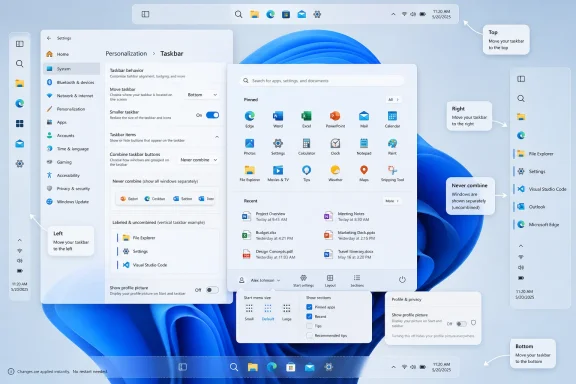
Microsoft began testing a Windows 11 taskbar and Start menu overhaul on May 15, 2026, in the Windows Insider Experimental channel, adding options to move the taskbar to the top, left, or right of the screen and to use a smaller taskbar layout. That is the factual fix; the larger story is Microsoft retreating from one of Windows 11’s most stubborn design bets. After years of telling users, in effect, that the new shell knew better than they did, Windows is rediscovering an old truth: the desktop is not a phone home screen, and efficiency often looks messy. The return of taskbar freedom is not nostalgia winning a culture war; it is Microsoft admitting that trust in Windows is built one small affordance at a time.
Windows 11 launched with a visual argument. The centered taskbar, simplified Start menu, rounded surfaces, and stripped-down context menus were all part of a project to make Windows feel less like an accreted 35-year-old utility belt and more like a modern consumer operating system. In screenshots, it worked.
On real desks, the story was more complicated. Windows users are not a single audience; they are gamers with ultrawide monitors, accountants with three displays, admins remoting into servers, developers with vertical panels, and laptop owners squeezing every pixel out of a 13-inch screen. For many of them, the taskbar was never decoration. It was muscle memory.
That is why the inability to move the Windows 11 taskbar landed so badly. Windows 10 and earlier versions let users drag or configure the taskbar to sit at the top or either side of the screen. Windows 11 did not merely hide that option; it rebuilt the shell in a way that made the old behavior absent. The effect was jarring because the removed feature was not exotic. It was one of those background freedoms that made Windows feel like Windows.
Microsoft’s new test build reverses that decision in plain terms. Users in the Experimental channel can choose bottom, top, left, or right taskbar positions through Settings. The company says flyouts, animations, tooltips, small taskbar mode, and “never combine” behavior should continue to work across those placements. That last detail matters because a movable taskbar without the surrounding behaviors would be a cosmetic concession, not a restoration of utility.
The vertical taskbar has always been a power-user feature because modern displays are wide. A taskbar on the left or right edge can preserve vertical space for documents, code, timelines, spreadsheets, browsers, and remote desktop sessions. On a 16:9 laptop panel, losing pixels at the bottom can feel more expensive than losing a strip along the side.
There is also a workflow argument. A vertical taskbar with labels and uncombined windows can serve as a compact window switcher, especially for people who keep many instances of the same app open. Microsoft’s own description of the new behavior emphasizes that vertical placement with labels makes each app window easier to identify at a glance. That is not a theme setting. That is information architecture.
The older Windows taskbar was not elegant by modern design standards, but it was astonishingly adaptable. It could be dragged, resized, crowded, labeled, auto-hidden, or turned into something that looked ugly but worked. Windows 11’s first version treated that adaptability as technical debt. Many users treated its removal as a breach of contract.
Windows 11 has often looked best on spacious, high-DPI hardware. On constrained screens, the same design language can feel padded to a fault. Touch-friendly spacing, centered layouts, and large visual targets are defensible in a hybrid operating system, but they become frustrating when the device is a clamshell laptop, the user has a mouse, and the work involves dense information.
A smaller taskbar acknowledges that the “one comfortable default” approach has limits. It gives Microsoft a way to preserve the mainstream Windows 11 look while letting users opt into a tighter shell. That is the correct compromise: do not make the default hostile to new users, but do not pretend expert users are wrong for wanting density.
This distinction matters for IT departments too. Admins rarely care whether an interface is pretty in isolation. They care whether users can find the same controls every day, whether screen sharing exposes unnecessary personal information, whether remote support becomes harder, and whether a new OS causes a wave of “where did my thing go?” tickets. A smaller and movable taskbar will not solve Windows 11’s enterprise adoption headaches by itself, but it removes one avoidable objection.
That is a quiet rebuke of Windows 11’s original Start menu. The design was simple, centered, and tidy, but it also treated different workflows as variations on one template. The “Recommended” area became a particular irritant because it occupied valuable space even for users who did not want Windows surfacing files or apps there.
Renaming “Recommended” to “Recent” is more than a copy edit. “Recommended” implies editorial judgment by the operating system. “Recent” describes a mechanical function the user can understand and evaluate. In an era when Windows is already under scrutiny for promoted content, AI integrations, account nudges, and cloud tie-ins, that semantic shift matters.
Microsoft has been learning, sometimes the hard way, that users react differently to software that helps them remember what they did and software that appears to decide what they should do next. The former feels like a tool. The latter feels like a sales surface. If the Start menu is going to surface files and apps, calling that behavior “Recent” is cleaner, more honest, and less irritating.
Windows has become increasingly account-aware over the last decade. Microsoft accounts, OneDrive integration, profile photos, Microsoft 365 hooks, Copilot surfaces, and cross-device features all make the PC feel less like a sealed local machine and more like a node in a cloud identity graph. That has benefits, but it also raises the cost of casual disclosure.
A toggle to hide identity elements does not transform Windows privacy. It does, however, show that Microsoft understands embarrassment and exposure as product problems, not just compliance issues. The best privacy features are often boring. They reduce the number of times a user has to remember to prepare the machine before someone else sees it.
The same principle applies to Start menu section controls. If users can turn off parts of Start they do not use, the menu becomes less like a feed and more like a launcher. Windows does not need every surface to be personalized in the algorithmic sense. Sometimes personalization means letting the user remove the thing.
That matters because Windows Insider features can change, stall, arrive gradually, or be pulled back. Microsoft’s recent Insider program changes are designed to make testing more transparent, including clearer channel identities and feature flags, but the basic rule remains: a feature in a preview build is not a contract with production users.
Even so, this test carries more weight than the average shell experiment. Microsoft has publicly framed taskbar and Start improvements as part of a broader quality push. The company is not merely trying a new animation or icon; it is addressing a highly visible regression that has followed Windows 11 since launch. Killing this work now would be more damaging than never testing it.
For WindowsForum readers, the practical advice is straightforward. Enthusiasts with spare hardware or disposable VMs can test the new behavior, but production systems should wait. The Experimental channel is where you go to evaluate Microsoft’s direction, not where you go to stabilize your daily workstation.
It was about cumulative friction. The taskbar lost behaviors. The Start menu became less flexible. Context menus required extra clicks. Default app controls changed. Microsoft pushed account sign-ins harder. Widgets mixed utility with content. AI features arrived before many users had asked for them. Each individual decision could be defended; together, they created the impression that Windows was becoming less deferential to its owner.
The movable taskbar became symbolic because it was so easy to explain. A user could do this before. A user could not do it now. The new version looked cleaner but did less. That is the kind of regression people remember.
Microsoft now appears to be correcting the symbol. The harder work is correcting the pattern. If Windows 11 becomes more configurable in the shell while continuing to add unwanted surfaces elsewhere, the goodwill will be short-lived. If, instead, the taskbar and Start changes mark a wider shift toward reversibility, density, and user control, this could be a meaningful turn.
The Windows 10-to-Windows 11 transition has been unusually entangled with hardware requirements, security baselines, app compatibility testing, and user retraining. Anything that makes Windows 11 feel less alien reduces resistance. That is especially true now that Windows 10 is past its mainstream comfort zone and organizations are weighing upgrade timelines, extended support costs, and device refresh cycles.
The Start menu controls may be more consequential in managed environments. A cleaner, less cluttered Start experience can reduce confusion for frontline workers, shared machines, kiosks, classrooms, and VDI deployments. If Microsoft exposes enough policy control, admins could shape Start into a predictable launcher rather than a semi-personalized panel.
There is also a support benefit. Many help desk scripts assume stable shell geography. Users who prefer a left-side taskbar, labels, or a compact layout are often the same users who notice when a migration breaks their flow. Giving those users sanctioned controls reduces the need for unsupported registry hacks, third-party shell replacements, or “just live with it” resentment.
That should sting inside Microsoft. When users install system-level shell modifications immediately after upgrading, they are voting against the default experience. They are also taking on fragility, because shell hooks can break after cumulative updates or Insider builds. The existence of a lively customization ecosystem is healthy; its necessity is an indictment.
By bringing back taskbar movement and Start menu controls natively, Microsoft can reclaim some of that territory. Native support is usually more reliable, more accessible, easier to manage, and less likely to break after an update. It also signals that user preferences do not have to live in an adversarial layer outside the operating system.
Still, Microsoft should not confuse “we restored some options” with “we made the third-party tools irrelevant.” Power users will always want more: richer Start layouts, deeper taskbar density controls, classic context menu behavior, advanced window management, and less cloud-connected furniture. The lesson is not that Microsoft must implement every tweak. The lesson is that removing familiar flexibility creates a market for someone else to give it back.
That engineering reality does not make the original removal wise. Operating systems are not judged only by what is cleanest to implement. They are judged by whether they preserve the affordances users build their work around. When an OS update removes a workflow and offers no equivalent, the user does not experience reduced complexity. The user experiences loss.
The better path would have been gradual modernization with compatibility for established behaviors. If a feature is too hard to rebuild by launch, say so and publish a roadmap. If telemetry shows it is used by a minority, treat that as a prioritization signal, not a moral verdict. Minority features can still be disproportionately important.
Microsoft now seems to be arriving at that position. The new taskbar work suggests the company has spent the engineering effort it once deferred. That is welcome, but it also raises the obvious question: if the feature was valuable enough to restore five years into the Windows 11 era, why was it acceptable to remove without a credible replacement in the first place?
The company’s challenge is that trust is not rebuilt by slogans. It is rebuilt when updates stop breaking workflows, when settings remain where users expect them, when performance improves on existing hardware, and when new features feel optional rather than imposed. The taskbar change fits that trust-building model because it gives control back instead of demanding attention.
But shipping quality is different from preview quality. The restored taskbar needs to behave correctly with multiple monitors, DPI scaling, tablet postures, auto-hide, remote sessions, accessibility tools, app badges, overflow, system tray flyouts, Copilot entry points, and notification areas. A half-working vertical taskbar would be worse than a delayed one because it would confirm the suspicion that Microsoft restored the checkbox without honoring the workflow.
The Start menu faces a similar test. If Microsoft lets users resize it but keeps pushing promotional content into it, the customization story will ring hollow. If section toggles are buried, reset after updates, or unavailable to admins, they will feel like decoration. The implementation has to be boringly dependable.
That is the right target. Nostalgia can identify what people miss, but it cannot be the whole product strategy. The old Windows shell had plenty of clutter, inconsistency, and odd historical baggage. The goal should not be to freeze Windows in 2015 or 2009. The goal should be to preserve the user agency that made those older versions feel adaptable.
In that sense, this is a more mature version of Windows 11’s original ambition. A modern desktop does not have to be rigid. A cleaner interface does not have to be less capable. A design system can support defaults for casual users and depth for experts without treating the latter as an embarrassment.
If Microsoft internalizes that, the taskbar fix could become a template. Make the default sane. Make advanced options discoverable but not intrusive. Let users turn off what they do not want. Avoid pretending that telemetry majorities define everyone’s needs. Above all, do not remove a long-standing capability unless the replacement is genuinely better.
Source: Digital Trends Microsoft is finally fixing the most annoying thing about Windows 11
 Microsoft’s Clean Slate Finally Meets the People Who Use It
Windows 11 launched with a visual argument. The centered taskbar, simplified Start menu, rounded surfaces, and stripped-down context menus were all part of a project to make Windows feel less like an accreted 35-year-old utility belt and more like a modern consumer operating system. In screenshots, it worked.On real desks, the story was more complicated. Windows users are not a single audience; they are gamers with ultrawide monitors, accountants with three displays, admins remoting into servers, developers with vertical panels, and laptop owners squeezing every pixel out of a 13-inch screen. For many of them, the taskbar was never decoration. It was muscle memory.
That is why the inability to move the Windows 11 taskbar landed so badly. Windows 10 and earlier versions let users drag or configure the taskbar to sit at the top or either side of the screen. Windows 11 did not merely hide that option; it rebuilt the shell in a way that made the old behavior absent. The effect was jarring because the removed feature was not exotic. It was one of those background freedoms that made Windows feel like Windows.
Microsoft’s new test build reverses that decision in plain terms. Users in the Experimental channel can choose bottom, top, left, or right taskbar positions through Settings. The company says flyouts, animations, tooltips, small taskbar mode, and “never combine” behavior should continue to work across those placements. That last detail matters because a movable taskbar without the surrounding behaviors would be a cosmetic concession, not a restoration of utility.
The Vertical Taskbar Was Never Just a Preference
It is easy to trivialize this as a niche complaint. Most people leave the taskbar at the bottom, and Microsoft has long had telemetry suggesting the bottom placement dominates. But interface decisions made solely by majority behavior tend to punish the users who rely most intensely on the product.The vertical taskbar has always been a power-user feature because modern displays are wide. A taskbar on the left or right edge can preserve vertical space for documents, code, timelines, spreadsheets, browsers, and remote desktop sessions. On a 16:9 laptop panel, losing pixels at the bottom can feel more expensive than losing a strip along the side.
There is also a workflow argument. A vertical taskbar with labels and uncombined windows can serve as a compact window switcher, especially for people who keep many instances of the same app open. Microsoft’s own description of the new behavior emphasizes that vertical placement with labels makes each app window easier to identify at a glance. That is not a theme setting. That is information architecture.
The older Windows taskbar was not elegant by modern design standards, but it was astonishingly adaptable. It could be dragged, resized, crowded, labeled, auto-hidden, or turned into something that looked ugly but worked. Windows 11’s first version treated that adaptability as technical debt. Many users treated its removal as a breach of contract.
The Smaller Taskbar Is a Bigger Signal Than It Looks
The new compact taskbar option may prove just as important as movement. Microsoft says the default taskbar remains unchanged, but the smaller mode reduces icon size and taskbar height to recover screen space, particularly on smaller devices. That is a modest sentence with an entire product philosophy buried inside it.Windows 11 has often looked best on spacious, high-DPI hardware. On constrained screens, the same design language can feel padded to a fault. Touch-friendly spacing, centered layouts, and large visual targets are defensible in a hybrid operating system, but they become frustrating when the device is a clamshell laptop, the user has a mouse, and the work involves dense information.
A smaller taskbar acknowledges that the “one comfortable default” approach has limits. It gives Microsoft a way to preserve the mainstream Windows 11 look while letting users opt into a tighter shell. That is the correct compromise: do not make the default hostile to new users, but do not pretend expert users are wrong for wanting density.
This distinction matters for IT departments too. Admins rarely care whether an interface is pretty in isolation. They care whether users can find the same controls every day, whether screen sharing exposes unnecessary personal information, whether remote support becomes harder, and whether a new OS causes a wave of “where did my thing go?” tickets. A smaller and movable taskbar will not solve Windows 11’s enterprise adoption headaches by itself, but it removes one avoidable objection.
Start Menu Customization Shows Microsoft Learning the Same Lesson Twice
The Start menu changes follow the same arc. Microsoft is testing a more adjustable Start experience, including size choices and controls over which sections appear. Users can reportedly create a minimal Start menu focused on pinned apps, preserve access to recent files, or keep a fuller all-in-one layout.That is a quiet rebuke of Windows 11’s original Start menu. The design was simple, centered, and tidy, but it also treated different workflows as variations on one template. The “Recommended” area became a particular irritant because it occupied valuable space even for users who did not want Windows surfacing files or apps there.
Renaming “Recommended” to “Recent” is more than a copy edit. “Recommended” implies editorial judgment by the operating system. “Recent” describes a mechanical function the user can understand and evaluate. In an era when Windows is already under scrutiny for promoted content, AI integrations, account nudges, and cloud tie-ins, that semantic shift matters.
Microsoft has been learning, sometimes the hard way, that users react differently to software that helps them remember what they did and software that appears to decide what they should do next. The former feels like a tool. The latter feels like a sales surface. If the Start menu is going to surface files and apps, calling that behavior “Recent” is cleaner, more honest, and less irritating.
The Privacy Tweaks Are Small Because the Problem Is Familiar
The ability to hide the user’s profile photo and account name from Start sounds minor until you picture the real contexts where Windows is used. People present from personal laptops. Consultants screen-share with clients. Teachers project their desktops. Admins record troubleshooting sessions. A visible account name is not usually a catastrophe, but it is one more bit of unnecessary exposure.Windows has become increasingly account-aware over the last decade. Microsoft accounts, OneDrive integration, profile photos, Microsoft 365 hooks, Copilot surfaces, and cross-device features all make the PC feel less like a sealed local machine and more like a node in a cloud identity graph. That has benefits, but it also raises the cost of casual disclosure.
A toggle to hide identity elements does not transform Windows privacy. It does, however, show that Microsoft understands embarrassment and exposure as product problems, not just compliance issues. The best privacy features are often boring. They reduce the number of times a user has to remember to prepare the machine before someone else sees it.
The same principle applies to Start menu section controls. If users can turn off parts of Start they do not use, the menu becomes less like a feed and more like a launcher. Windows does not need every surface to be personalized in the algorithmic sense. Sometimes personalization means letting the user remove the thing.
The Experimental Channel Makes This a Promise With an Asterisk
There is an important caveat: this is not a general release. The taskbar changes are in the Windows Insider Experimental channel, which exists precisely because Microsoft wants a place for earlier, less-settled feature testing. Experimental is not the same thing as “shipping next Patch Tuesday.”That matters because Windows Insider features can change, stall, arrive gradually, or be pulled back. Microsoft’s recent Insider program changes are designed to make testing more transparent, including clearer channel identities and feature flags, but the basic rule remains: a feature in a preview build is not a contract with production users.
Even so, this test carries more weight than the average shell experiment. Microsoft has publicly framed taskbar and Start improvements as part of a broader quality push. The company is not merely trying a new animation or icon; it is addressing a highly visible regression that has followed Windows 11 since launch. Killing this work now would be more damaging than never testing it.
For WindowsForum readers, the practical advice is straightforward. Enthusiasts with spare hardware or disposable VMs can test the new behavior, but production systems should wait. The Experimental channel is where you go to evaluate Microsoft’s direction, not where you go to stabilize your daily workstation.
Windows 11’s Real Problem Was Never Only Missing Features
The temptation is to declare victory: the taskbar moves again, therefore Microsoft listened, therefore Windows 11 is fixed. That is too neat. Windows 11’s troubled reputation among enthusiasts was never about one missing setting alone.It was about cumulative friction. The taskbar lost behaviors. The Start menu became less flexible. Context menus required extra clicks. Default app controls changed. Microsoft pushed account sign-ins harder. Widgets mixed utility with content. AI features arrived before many users had asked for them. Each individual decision could be defended; together, they created the impression that Windows was becoming less deferential to its owner.
The movable taskbar became symbolic because it was so easy to explain. A user could do this before. A user could not do it now. The new version looked cleaner but did less. That is the kind of regression people remember.
Microsoft now appears to be correcting the symbol. The harder work is correcting the pattern. If Windows 11 becomes more configurable in the shell while continuing to add unwanted surfaces elsewhere, the goodwill will be short-lived. If, instead, the taskbar and Start changes mark a wider shift toward reversibility, density, and user control, this could be a meaningful turn.
Enterprise IT Sees a Different Kind of Win
For enterprise administrators, taskbar placement itself may not be the headline. Many organizations standardize layouts, restrict personalization, or train users around defaults. But the return of options still matters because Windows migrations succeed or fail on perceived disruption.The Windows 10-to-Windows 11 transition has been unusually entangled with hardware requirements, security baselines, app compatibility testing, and user retraining. Anything that makes Windows 11 feel less alien reduces resistance. That is especially true now that Windows 10 is past its mainstream comfort zone and organizations are weighing upgrade timelines, extended support costs, and device refresh cycles.
The Start menu controls may be more consequential in managed environments. A cleaner, less cluttered Start experience can reduce confusion for frontline workers, shared machines, kiosks, classrooms, and VDI deployments. If Microsoft exposes enough policy control, admins could shape Start into a predictable launcher rather than a semi-personalized panel.
There is also a support benefit. Many help desk scripts assume stable shell geography. Users who prefer a left-side taskbar, labels, or a compact layout are often the same users who notice when a migration breaks their flow. Giving those users sanctioned controls reduces the need for unsupported registry hacks, third-party shell replacements, or “just live with it” resentment.
Third-Party Shell Tools Won Because Microsoft Left a Vacuum
One uncomfortable backdrop to this story is the popularity of third-party tools that restore or replace Windows shell behavior. Utilities such as Start11, StartAllBack, ExplorerPatcher, Windhawk mods, and others have thrived because Windows 11 removed or constrained choices people still wanted. These tools are not just customization toys; for some users, they are migration enablers.That should sting inside Microsoft. When users install system-level shell modifications immediately after upgrading, they are voting against the default experience. They are also taking on fragility, because shell hooks can break after cumulative updates or Insider builds. The existence of a lively customization ecosystem is healthy; its necessity is an indictment.
By bringing back taskbar movement and Start menu controls natively, Microsoft can reclaim some of that territory. Native support is usually more reliable, more accessible, easier to manage, and less likely to break after an update. It also signals that user preferences do not have to live in an adversarial layer outside the operating system.
Still, Microsoft should not confuse “we restored some options” with “we made the third-party tools irrelevant.” Power users will always want more: richer Start layouts, deeper taskbar density controls, classic context menu behavior, advanced window management, and less cloud-connected furniture. The lesson is not that Microsoft must implement every tweak. The lesson is that removing familiar flexibility creates a market for someone else to give it back.
The Design Team’s Original Trade-Off Was Understandable and Wrong
It is worth granting Microsoft the strongest version of its argument. Rebuilding the Windows shell is hard. Supporting four taskbar positions means more layout states, more animation paths, more flyout geometry, more accessibility testing, more localization issues, more multi-monitor edge cases, and more app assumptions to validate. The old Windows shell carried decades of complexity, and Windows 11 was partly an attempt to escape it.That engineering reality does not make the original removal wise. Operating systems are not judged only by what is cleanest to implement. They are judged by whether they preserve the affordances users build their work around. When an OS update removes a workflow and offers no equivalent, the user does not experience reduced complexity. The user experiences loss.
The better path would have been gradual modernization with compatibility for established behaviors. If a feature is too hard to rebuild by launch, say so and publish a roadmap. If telemetry shows it is used by a minority, treat that as a prioritization signal, not a moral verdict. Minority features can still be disproportionately important.
Microsoft now seems to be arriving at that position. The new taskbar work suggests the company has spent the engineering effort it once deferred. That is welcome, but it also raises the obvious question: if the feature was valuable enough to restore five years into the Windows 11 era, why was it acceptable to remove without a credible replacement in the first place?
The Windows Quality Push Has to Survive Shipping
Microsoft has been talking more openly this year about Windows quality, performance, reliability, and user trust. That is not accidental. Windows is under pressure from multiple directions: aging Windows 10 fleets, increasingly capable Macs, Chromebooks in education, cloud desktops, Linux among developers, and user fatigue with prompts, ads, and AI surfaces.The company’s challenge is that trust is not rebuilt by slogans. It is rebuilt when updates stop breaking workflows, when settings remain where users expect them, when performance improves on existing hardware, and when new features feel optional rather than imposed. The taskbar change fits that trust-building model because it gives control back instead of demanding attention.
But shipping quality is different from preview quality. The restored taskbar needs to behave correctly with multiple monitors, DPI scaling, tablet postures, auto-hide, remote sessions, accessibility tools, app badges, overflow, system tray flyouts, Copilot entry points, and notification areas. A half-working vertical taskbar would be worse than a delayed one because it would confirm the suspicion that Microsoft restored the checkbox without honoring the workflow.
The Start menu faces a similar test. If Microsoft lets users resize it but keeps pushing promotional content into it, the customization story will ring hollow. If section toggles are buried, reset after updates, or unavailable to admins, they will feel like decoration. The implementation has to be boringly dependable.
The Win for Users Is Control, Not Nostalgia
The most interesting thing about this update is that it is not a retreat to Windows 10. Windows 11’s taskbar and Start menu are not simply reverting to the old shell. Microsoft is trying to reintroduce flexibility inside the newer design system, with modern flyouts, animations, scaling, and Settings integration.That is the right target. Nostalgia can identify what people miss, but it cannot be the whole product strategy. The old Windows shell had plenty of clutter, inconsistency, and odd historical baggage. The goal should not be to freeze Windows in 2015 or 2009. The goal should be to preserve the user agency that made those older versions feel adaptable.
In that sense, this is a more mature version of Windows 11’s original ambition. A modern desktop does not have to be rigid. A cleaner interface does not have to be less capable. A design system can support defaults for casual users and depth for experts without treating the latter as an embarrassment.
If Microsoft internalizes that, the taskbar fix could become a template. Make the default sane. Make advanced options discoverable but not intrusive. Let users turn off what they do not want. Avoid pretending that telemetry majorities define everyone’s needs. Above all, do not remove a long-standing capability unless the replacement is genuinely better.
The Desktop Gets Its Levers Back
Microsoft’s latest Insider build does not magically resolve every grievance Windows 11 users have accumulated, but it does give the desktop back several controls that never should have disappeared.- The taskbar can now be tested at the bottom, top, left, or right of the screen in the Windows Insider Experimental channel.
- The smaller taskbar option is designed to recover screen space without changing the default experience for everyone else.
- The restored taskbar behavior is meant to work with related features such as labels, “never combine,” tooltips, flyouts, and animations.
- The Start menu is moving toward user-controlled layouts, including options to reduce or remove sections users do not want.
- The shift from “Recommended” to “Recent” suggests Microsoft understands that transparent labels matter when Windows surfaces files and apps.
- The privacy-oriented ability to hide profile identity from Start is small, but it fits a broader need for Windows to be less revealing during shared-screen work.
Source: Digital Trends Microsoft is finally fixing the most annoying thing about Windows 11