

Microsoft is testing hidden Windows 11 Search settings in Insider Experimental build 26300.8697 that let users disable Bing-powered web results and Microsoft Store app suggestions outside Europe, though the controls are not yet enabled by default or promised for general release. That makes this more than another checkbox in Settings. It is a small but telling admission that Windows Search has been asked to serve too many masters: the user, the operating system, Bing, the Store, and Microsoft’s growth targets. If the toggles survive testing, they could mark one of the more practical quality-of-life reversals in Windows 11’s long campaign to turn local computing into a cloud-adjacent surface.
For years, the complaint about Windows Search has been almost comically simple: when people search their PC, they often want to search their PC. They are looking for Device Manager, a half-remembered filename, a PowerShell shortcut, an installed utility, or the settings page that Microsoft moved again. Instead, Windows 11 has frequently mixed those local results with web suggestions, Bing cards, and Store app prompts that feel less like assistance than interruption.
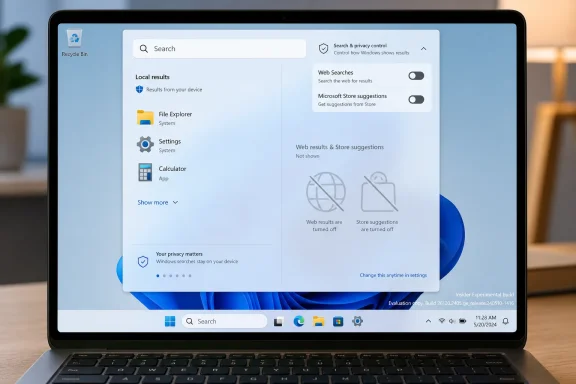
The newly spotted controls address that problem directly. In the current Insider Experimental build, the settings reportedly appear under Privacy and security, then Search, in a section for suggested search results. One toggle controls web searches, effectively suppressing Bing-powered web results. Another controls Microsoft Store suggestions, preventing Store apps from being injected into the search experience.
That distinction matters. A single “turn off web junk” switch would have been welcome, but separating web search from Store recommendations suggests Microsoft is thinking in terms of search providers rather than a single monolithic promotional layer. Users may want web suggestions but not Store apps, or they may want a strictly local launcher. The important point is that Microsoft appears to be testing a model where that preference belongs to the user rather than the product team.
There is a catch, and it is not a small one. The settings are hidden, require ViveTool feature IDs to expose, and are part of an Insider Experimental build tied to Windows 11 version 26H2. Microsoft’s own Insider language repeatedly warns that features in these builds may change, disappear, or never ship. In other words, this is not a rollout. It is a signal.
That portal has obvious value to Microsoft. Every web result pushed through Windows Search can reinforce Bing. Every Store suggestion can nudge users toward Microsoft’s distribution channel. Every default that opens in Edge, or privileges Microsoft’s services, compounds the company’s advantage across a billion-plus Windows installations. None of this requires a grand conspiracy; it is the ordinary gravitational pull of platform ownership.
But platform gravity becomes user-hostile when it ignores intent. A search box on the taskbar is not the same thing as a browser address bar. When a user types “disk cleanup,” “printer,” “cmd,” or the name of an installed app, Windows has enough context to know that local relevance should win. The problem is not that web search exists. The problem is that Microsoft made web search feel inescapable in a place where escape should have been the default.
The Store component is just as revealing. Microsoft Store suggestions can be useful when someone searches for software they do not have. But they become noise when they appear beside local tools, installed applications, and settings. On a managed machine, they can also become an administrative annoyance, especially in organizations that restrict app installation or distribute software through Intune, Configuration Manager, winget repositories, or internal portals.
The new toggles acknowledge a truth power users have been shouting for years: Windows Search is more useful when it is less ambitious. A good operating-system search tool should be fast, predictable, and boring. It should not require the user to mentally filter a blend of files, settings, ads, web snippets, and app-store inventory before clicking.
That matters because Windows has increasingly become a two-track product: one version for jurisdictions that force choice, and another for everyone else. In the EEA, Microsoft has had to loosen some of the operating system’s tightest service bindings. Outside the EEA, users have often remained stuck with workarounds, registry edits, policy settings, third-party tools, or resignation.
The new global testing suggests Microsoft may be reconsidering the cost of that split. Maintaining region-specific behavior is messy. It creates support complexity, user resentment, and embarrassing comparisons. When European users can turn off or redirect certain Microsoft-controlled experiences while users elsewhere cannot, the distinction starts to look less like legal compliance and more like a product confession.
There is a strategic reason to globalize these controls, too. Regulators outside Europe watch what companies concede inside Europe. Users do as well. Once Microsoft proves that Windows can function with less forced Bing and Store integration in one market, the argument that such integration is essential becomes harder to sustain elsewhere. The operating system clearly does not collapse when users get more choice.
Still, Microsoft is unlikely to describe this as retreat. Expect the language, if the feature ships, to emphasize personalization, control, and feedback from Windows Insiders. That would be true as far as it goes. But the deeper story is that regulatory pressure created a design vocabulary that ordinary users have wanted all along.
That hidden status should temper expectations. ViveTool discoveries are valuable because they show what Microsoft is building, but they are not commitments. Hidden features can be prototypes, abandoned branches, region-specific code, A/B-test scaffolding, or internal experiments that never receive a public announcement. The Windows enthusiast community is excellent at finding smoke, but smoke does not always become fire.
Even so, the build’s timing is notable. Windows 11 version 26H2 is beginning to take shape in public testing, and Microsoft has been making a visible effort to smooth some of Windows 11’s rougher edges. Recent preview work has touched search accuracy, update controls, taskbar behavior, Settings organization, and default-app flows. The company is not merely adding another AI panel or promotional surface here. It is revisiting the plumbing of daily use.
The revamped Privacy and security page is part of that broader pattern. Microsoft appears to be reorganizing settings into clearer categories, adding a header with quick access to Windows Security, and surfacing glanceable information about sensitive permissions such as location, camera, and microphone access. New entry points for passkeys and the custom dictionary also point toward a Settings app that is being reshaped around security, identity, and user data.
That makes the Search toggles feel less isolated. They fit into a larger question: can Windows 11 become more legible? Not merely prettier, not merely more cloud-connected, but more understandable to the person sitting in front of it. A Search settings page that plainly says “Web Searches” and “Microsoft Store” is the kind of directness Windows has too often avoided.
Enterprise IT has never lacked ways to restrict pieces of Windows Search. Group Policy, MDM configuration, registry settings, Windows edition differences, and network controls all play roles. But those controls are often scattered, inconsistently named, and poorly understood outside endpoint-management teams. A visible Settings toggle does not replace enterprise policy, but it can normalize the concept that web and Store content are optional layers, not inherent parts of search.
The practical question is how Microsoft will map these toggles to management controls if they ship. In a well-designed rollout, administrators would get clear policy equivalents for web results and Store suggestions, with deterministic behavior across editions. In a frustrating rollout, consumer Settings toggles would coexist with older policies, regional exceptions, and documentation gaps.
The Store toggle is especially relevant in managed environments. Many organizations allow the Store only in limited ways, block consumer Microsoft accounts, or deploy curated app catalogs. Search results that suggest Store apps can create user confusion and help-desk tickets: Why can I see this app if I am not allowed to install it? Why does Windows recommend something IT has not approved? Why does the Start menu surface consumer software on a business device?
Web search raises a different set of concerns. Some organizations care about browser defaults, search-provider compliance, data handling, and the boundary between local queries and cloud services. Even when no sensitive data is transmitted, the perception matters. Users typing internal project names, file fragments, or employee names into a search box may not expect the operating system to treat those terms as candidates for web lookup.
A clean local-search mode is therefore not just a power-user nicety. It is a governance feature. Microsoft would do well to present it that way, rather than hiding it behind the softer language of suggestions.
This is where Microsoft’s incentives may align with user demands. Windows 11 has spent much of its life fighting the perception that it is heavier than it needs to be. The operating system has improved since launch, but the reputation lingers: more animation, more service integration, more account nudges, more cloud hooks, more “recommended” content. Search is one of the places where that reputation becomes tactile.
A Start or taskbar search that instantly finds local apps and settings changes the emotional temperature of the OS. It makes Windows feel obedient. Conversely, a search box that pauses, shows web cards, misses local intent, or tries to sell the user an app makes Windows feel like a negotiation.
Microsoft has also been testing improvements to fuzzy matching in Windows Search, allowing the system to find apps even when users make typos or enter partial names. That is the right kind of intelligence: local, practical, and aligned with the user’s immediate goal. If Microsoft combines better local matching with an easy way to suppress web and Store noise, Search could become one of the most improved parts of Windows 11 rather than one of its recurring punchlines.
There is a lesson here for the company’s AI ambitions as well. Users do not reject intelligence in the operating system. They reject intelligence that feels like a detour. A search feature that understands “devmgmt,” “bluetooh,” or “notepd” is useful. A search feature that turns a local typo into a Bing opportunity is not.
The reported placement of the Search controls under Privacy and security is therefore interesting. Microsoft could have treated web and Store suggestions as personalization, Start menu behavior, or search configuration. Putting them near privacy implies a more serious framing: search suggestions are not merely cosmetic. They relate to data flow, service integration, and trust.
The new Privacy and security organization also suggests that Microsoft understands how sprawling Windows configuration has become. Users should not need tribal knowledge to find basic controls. They should not need to know whether a setting lives under Personalization, Apps, Privacy, Search permissions, Windows Update, or Accounts. The more Windows absorbs cloud services and security features, the more important Settings becomes as a map of what the OS is doing.
That said, Microsoft has a habit of hiding meaningful controls under polite abstractions. “Show suggested search results” sounds harmless. It does not immediately say “send me web results from Bing” or “show me Store app recommendations.” If the company wants credit for user choice, it should use language normal people understand. “Show web results in Windows Search” is clearer than “suggested search results.” “Show Microsoft Store app suggestions” is clearer still.
The test build appears to move in that direction with explicit Web Searches and Microsoft Store toggles. That is encouraging. The best settings are boring because they are honest.
The toggles in build 26300.8697 are hidden for a reason. They may be incomplete. They may break after the next cumulative update. They may conflict with older policies or produce confusing UI states. They may work perfectly today and disappear tomorrow. That is acceptable on a spare machine, a VM, or a sacrificial Insider box. It is not acceptable on the computer that runs payroll, production editing, CAD software, or a small business.
There is also little reason to rush if the goal is simply to reduce web results in stable Windows 11. Existing policy and registry approaches can already suppress parts of the web-search experience, though they are not as friendly as a Settings toggle. The new work is significant because it may make that choice visible and supported, not because it is the first conceivable way to reduce Bing noise.
For WindowsForum readers, the sensible posture is curiosity without recklessness. Watch the feature. Test it in a VM if you are already on the Experimental channel. Compare behavior with existing Group Policy and MDM controls. But do not mistake a hidden interface for a supported configuration.
The larger story will be told by what Microsoft does next. If the toggles move from hidden flags to the official Feature flags page, that is progress. If they appear in Dev or Beta builds with release notes, that is stronger evidence. If they gain policy documentation, localization, and stable behavior across regions, then we can start treating them as a real Windows feature rather than a discovered artifact.
The movable taskbar conversation is the clearest example. Users did not ask for a philosophical essay about taskbar purity; they asked to put the thing where their workflow needed it. Extended update pause controls tell a similar story. People want Windows Update to be reliable, but they also want the power to say “not now” without fighting the system. Search now joins that list.
This is not Microsoft becoming a radically open platform vendor. It is Microsoft discovering, again, that Windows is not an appliance. Windows is used by gamers, developers, schools, hospitals, governments, factories, hobbyists, kiosks, studios, and enterprises with decades of accumulated workflows. A design decision that looks clean in Redmond can become friction when multiplied across that diversity.
The company’s challenge is that every concession threatens a metric somewhere. Fewer Bing results may mean fewer Bing impressions. Fewer Store suggestions may mean fewer Store launches. Fewer default-service hooks may mean weaker ecosystem capture. But the counter-metric is harder to quantify and more important: trust. Users who believe Windows respects their intent are more likely to accept new features when they matter.
This is where Microsoft should be careful with Copilot-era Windows. The company wants the operating system to become a more active assistant, not merely a passive shell. That ambition will fail if the baseline experience feels extractive. Before users trust Windows to reason over context, they need to trust it to search the Start menu without trying to monetize the query.
 Microsoft Finally Puts a Switch Where Users Expected One
For years, the complaint about Windows Search has been almost comically simple: when people search their PC, they often want to search their PC. They are looking for Device Manager, a half-remembered filename, a PowerShell shortcut, an installed utility, or the settings page that Microsoft moved again. Instead, Windows 11 has frequently mixed those local results with web suggestions, Bing cards, and Store app prompts that feel less like assistance than interruption.The newly spotted controls address that problem directly. In the current Insider Experimental build, the settings reportedly appear under Privacy and security, then Search, in a section for suggested search results. One toggle controls web searches, effectively suppressing Bing-powered web results. Another controls Microsoft Store suggestions, preventing Store apps from being injected into the search experience.
That distinction matters. A single “turn off web junk” switch would have been welcome, but separating web search from Store recommendations suggests Microsoft is thinking in terms of search providers rather than a single monolithic promotional layer. Users may want web suggestions but not Store apps, or they may want a strictly local launcher. The important point is that Microsoft appears to be testing a model where that preference belongs to the user rather than the product team.
There is a catch, and it is not a small one. The settings are hidden, require ViveTool feature IDs to expose, and are part of an Insider Experimental build tied to Windows 11 version 26H2. Microsoft’s own Insider language repeatedly warns that features in these builds may change, disappear, or never ship. In other words, this is not a rollout. It is a signal.
Windows Search Became a Billboard Because Microsoft Could
The tension at the center of Windows Search is not technical so much as commercial. Microsoft knows how to build fast local search. Windows has had indexing, Start menu app search, file metadata, and administrative shortcuts for decades. The aggravation comes from the decision to make a local action behave like a portal.That portal has obvious value to Microsoft. Every web result pushed through Windows Search can reinforce Bing. Every Store suggestion can nudge users toward Microsoft’s distribution channel. Every default that opens in Edge, or privileges Microsoft’s services, compounds the company’s advantage across a billion-plus Windows installations. None of this requires a grand conspiracy; it is the ordinary gravitational pull of platform ownership.
But platform gravity becomes user-hostile when it ignores intent. A search box on the taskbar is not the same thing as a browser address bar. When a user types “disk cleanup,” “printer,” “cmd,” or the name of an installed app, Windows has enough context to know that local relevance should win. The problem is not that web search exists. The problem is that Microsoft made web search feel inescapable in a place where escape should have been the default.
The Store component is just as revealing. Microsoft Store suggestions can be useful when someone searches for software they do not have. But they become noise when they appear beside local tools, installed applications, and settings. On a managed machine, they can also become an administrative annoyance, especially in organizations that restrict app installation or distribute software through Intune, Configuration Manager, winget repositories, or internal portals.
The new toggles acknowledge a truth power users have been shouting for years: Windows Search is more useful when it is less ambitious. A good operating-system search tool should be fast, predictable, and boring. It should not require the user to mentally filter a blend of files, settings, ads, web snippets, and app-store inventory before clicking.
Europe Forced the First Crack in the Wall
The most important context is not the Insider build. It is the European Economic Area. Microsoft has already made Windows changes in Europe under the Digital Markets Act, including search-provider behavior, default-browser handling, and greater flexibility around certain Microsoft apps and services. Those changes were not born from a sudden internal conversion to minimalist design. They were compliance work.That matters because Windows has increasingly become a two-track product: one version for jurisdictions that force choice, and another for everyone else. In the EEA, Microsoft has had to loosen some of the operating system’s tightest service bindings. Outside the EEA, users have often remained stuck with workarounds, registry edits, policy settings, third-party tools, or resignation.
The new global testing suggests Microsoft may be reconsidering the cost of that split. Maintaining region-specific behavior is messy. It creates support complexity, user resentment, and embarrassing comparisons. When European users can turn off or redirect certain Microsoft-controlled experiences while users elsewhere cannot, the distinction starts to look less like legal compliance and more like a product confession.
There is a strategic reason to globalize these controls, too. Regulators outside Europe watch what companies concede inside Europe. Users do as well. Once Microsoft proves that Windows can function with less forced Bing and Store integration in one market, the argument that such integration is essential becomes harder to sustain elsewhere. The operating system clearly does not collapse when users get more choice.
Still, Microsoft is unlikely to describe this as retreat. Expect the language, if the feature ships, to emphasize personalization, control, and feedback from Windows Insiders. That would be true as far as it goes. But the deeper story is that regulatory pressure created a design vocabulary that ordinary users have wanted all along.
The Experimental Channel Is a Trial Balloon, Not a Promise
Windows 11 Insider Experimental build 26300.8697 is a curious place for such a feature to surface. The build itself is associated with version 26H2 and includes a variety of changes, including reliability fixes, File Explorer polish, Start menu improvements, virtualization fixes, and versioning updates. Microsoft also points Insiders toward a Feature flags page for officially exposed experiments, though the Search toggles discussed here are not yet available through that standard interface.That hidden status should temper expectations. ViveTool discoveries are valuable because they show what Microsoft is building, but they are not commitments. Hidden features can be prototypes, abandoned branches, region-specific code, A/B-test scaffolding, or internal experiments that never receive a public announcement. The Windows enthusiast community is excellent at finding smoke, but smoke does not always become fire.
Even so, the build’s timing is notable. Windows 11 version 26H2 is beginning to take shape in public testing, and Microsoft has been making a visible effort to smooth some of Windows 11’s rougher edges. Recent preview work has touched search accuracy, update controls, taskbar behavior, Settings organization, and default-app flows. The company is not merely adding another AI panel or promotional surface here. It is revisiting the plumbing of daily use.
The revamped Privacy and security page is part of that broader pattern. Microsoft appears to be reorganizing settings into clearer categories, adding a header with quick access to Windows Security, and surfacing glanceable information about sensitive permissions such as location, camera, and microphone access. New entry points for passkeys and the custom dictionary also point toward a Settings app that is being reshaped around security, identity, and user data.
That makes the Search toggles feel less isolated. They fit into a larger question: can Windows 11 become more legible? Not merely prettier, not merely more cloud-connected, but more understandable to the person sitting in front of it. A Search settings page that plainly says “Web Searches” and “Microsoft Store” is the kind of directness Windows has too often avoided.
Admins Will See Policy Debt Before They See Liberation
For home users, these toggles are about annoyance. For administrators, they are about consistency. A fleet of Windows PCs is harder to manage when consumer-facing surfaces behave unpredictably, expose unmanaged app suggestions, or route user intent through services that may not align with corporate policy.Enterprise IT has never lacked ways to restrict pieces of Windows Search. Group Policy, MDM configuration, registry settings, Windows edition differences, and network controls all play roles. But those controls are often scattered, inconsistently named, and poorly understood outside endpoint-management teams. A visible Settings toggle does not replace enterprise policy, but it can normalize the concept that web and Store content are optional layers, not inherent parts of search.
The practical question is how Microsoft will map these toggles to management controls if they ship. In a well-designed rollout, administrators would get clear policy equivalents for web results and Store suggestions, with deterministic behavior across editions. In a frustrating rollout, consumer Settings toggles would coexist with older policies, regional exceptions, and documentation gaps.
The Store toggle is especially relevant in managed environments. Many organizations allow the Store only in limited ways, block consumer Microsoft accounts, or deploy curated app catalogs. Search results that suggest Store apps can create user confusion and help-desk tickets: Why can I see this app if I am not allowed to install it? Why does Windows recommend something IT has not approved? Why does the Start menu surface consumer software on a business device?
Web search raises a different set of concerns. Some organizations care about browser defaults, search-provider compliance, data handling, and the boundary between local queries and cloud services. Even when no sensitive data is transmitted, the perception matters. Users typing internal project names, file fragments, or employee names into a search box may not expect the operating system to treat those terms as candidates for web lookup.
A clean local-search mode is therefore not just a power-user nicety. It is a governance feature. Microsoft would do well to present it that way, rather than hiding it behind the softer language of suggestions.
The Performance Argument May Be the One That Wins
Privacy and choice are the principled arguments against forced web results. Performance may be the argument that finally moves the product. Reports from early testers suggest that Windows Search feels faster and cleaner when Bing and Store results are removed, which is exactly what users would expect. Less network-dependent content, fewer panes to populate, and fewer competing result types should make a launcher feel more like a launcher.This is where Microsoft’s incentives may align with user demands. Windows 11 has spent much of its life fighting the perception that it is heavier than it needs to be. The operating system has improved since launch, but the reputation lingers: more animation, more service integration, more account nudges, more cloud hooks, more “recommended” content. Search is one of the places where that reputation becomes tactile.
A Start or taskbar search that instantly finds local apps and settings changes the emotional temperature of the OS. It makes Windows feel obedient. Conversely, a search box that pauses, shows web cards, misses local intent, or tries to sell the user an app makes Windows feel like a negotiation.
Microsoft has also been testing improvements to fuzzy matching in Windows Search, allowing the system to find apps even when users make typos or enter partial names. That is the right kind of intelligence: local, practical, and aligned with the user’s immediate goal. If Microsoft combines better local matching with an easy way to suppress web and Store noise, Search could become one of the most improved parts of Windows 11 rather than one of its recurring punchlines.
There is a lesson here for the company’s AI ambitions as well. Users do not reject intelligence in the operating system. They reject intelligence that feels like a detour. A search feature that understands “devmgmt,” “bluetooh,” or “notepd” is useful. A search feature that turns a local typo into a Bing opportunity is not.
The Settings App Becomes the New Antitrust Map
It is easy to treat Windows Settings as a mundane interface problem, but Settings is where Microsoft’s platform politics increasingly become visible. Default apps, privacy permissions, search providers, account requirements, update pauses, Store behavior, passkeys, Recall-style data controls, and security surfaces all converge there. Every toggle is a tiny settlement between user agency and Microsoft’s preferred defaults.The reported placement of the Search controls under Privacy and security is therefore interesting. Microsoft could have treated web and Store suggestions as personalization, Start menu behavior, or search configuration. Putting them near privacy implies a more serious framing: search suggestions are not merely cosmetic. They relate to data flow, service integration, and trust.
The new Privacy and security organization also suggests that Microsoft understands how sprawling Windows configuration has become. Users should not need tribal knowledge to find basic controls. They should not need to know whether a setting lives under Personalization, Apps, Privacy, Search permissions, Windows Update, or Accounts. The more Windows absorbs cloud services and security features, the more important Settings becomes as a map of what the OS is doing.
That said, Microsoft has a habit of hiding meaningful controls under polite abstractions. “Show suggested search results” sounds harmless. It does not immediately say “send me web results from Bing” or “show me Store app recommendations.” If the company wants credit for user choice, it should use language normal people understand. “Show web results in Windows Search” is clearer than “suggested search results.” “Show Microsoft Store app suggestions” is clearer still.
The test build appears to move in that direction with explicit Web Searches and Microsoft Store toggles. That is encouraging. The best settings are boring because they are honest.
Power Users Should Resist the ViveTool Temptation on Production PCs
The Windows enthusiast instinct is predictable: if a hidden flag exists, someone will enable it before lunch. ViveTool has become a standard part of the Insider ecosystem because Microsoft ships so many features behind controlled rollouts, region checks, and internal gates. For testers, that is part of the fun. For anyone relying on a PC to work, it is a bad bargain.The toggles in build 26300.8697 are hidden for a reason. They may be incomplete. They may break after the next cumulative update. They may conflict with older policies or produce confusing UI states. They may work perfectly today and disappear tomorrow. That is acceptable on a spare machine, a VM, or a sacrificial Insider box. It is not acceptable on the computer that runs payroll, production editing, CAD software, or a small business.
There is also little reason to rush if the goal is simply to reduce web results in stable Windows 11. Existing policy and registry approaches can already suppress parts of the web-search experience, though they are not as friendly as a Settings toggle. The new work is significant because it may make that choice visible and supported, not because it is the first conceivable way to reduce Bing noise.
For WindowsForum readers, the sensible posture is curiosity without recklessness. Watch the feature. Test it in a VM if you are already on the Experimental channel. Compare behavior with existing Group Policy and MDM controls. But do not mistake a hidden interface for a supported configuration.
The larger story will be told by what Microsoft does next. If the toggles move from hidden flags to the official Feature flags page, that is progress. If they appear in Dev or Beta builds with release notes, that is stronger evidence. If they gain policy documentation, localization, and stable behavior across regions, then we can start treating them as a real Windows feature rather than a discovered artifact.
Microsoft’s Pattern Is Shifting From Addition to Concession
The Bing and Store toggles arrive amid a broader set of Windows 11 changes that feel different from the operating system’s early trajectory. Windows 11 launched with a centered taskbar, stricter hardware requirements, reduced taskbar flexibility, Start menu changes, and a design language that often prioritized coherence over configurability. Microsoft then spent years slowly giving pieces back.The movable taskbar conversation is the clearest example. Users did not ask for a philosophical essay about taskbar purity; they asked to put the thing where their workflow needed it. Extended update pause controls tell a similar story. People want Windows Update to be reliable, but they also want the power to say “not now” without fighting the system. Search now joins that list.
This is not Microsoft becoming a radically open platform vendor. It is Microsoft discovering, again, that Windows is not an appliance. Windows is used by gamers, developers, schools, hospitals, governments, factories, hobbyists, kiosks, studios, and enterprises with decades of accumulated workflows. A design decision that looks clean in Redmond can become friction when multiplied across that diversity.
The company’s challenge is that every concession threatens a metric somewhere. Fewer Bing results may mean fewer Bing impressions. Fewer Store suggestions may mean fewer Store launches. Fewer default-service hooks may mean weaker ecosystem capture. But the counter-metric is harder to quantify and more important: trust. Users who believe Windows respects their intent are more likely to accept new features when they matter.
This is where Microsoft should be careful with Copilot-era Windows. The company wants the operating system to become a more active assistant, not merely a passive shell. That ambition will fail if the baseline experience feels extractive. Before users trust Windows to reason over context, they need to trust it to search the Start menu without trying to monetize the query.
The Search Box Is Small, but the Signal Is Large
The concrete implications of this test are narrow for now. The symbolic implications are much wider. Microsoft appears to be exploring whether a choice previously associated with European regulatory compliance can become a general Windows preference, and whether Search can be made cleaner without undermining the broader platform.- Windows 11 Insider Experimental build 26300.8697 contains hidden Search controls for disabling web results and Microsoft Store app suggestions, but they are not yet available to ordinary stable-channel users.
- The web-search toggle would let users keep Windows Search focused on local files, apps, and settings instead of mixing in Bing results.
- The Store toggle would reduce app-promotion noise and may be especially useful on managed or policy-restricted PCs.
- The feature’s EEA lineage matters because Microsoft has already shown that more open search and default-app behavior can work when regulators require it.
- ViveTool activation should be treated as test-lab behavior, not a production workaround.
- The feature will become truly important only if Microsoft documents it, exposes it normally, and provides matching controls for administrators.
References
- Primary source: gHacks
Published: Wed, 24 Jun 2026 11:21:35 GMT
Microsoft Tests Toggles to Disable Bing Web Results and Store Apps in Windows 11 Search - gHacks Tech News
Microsoft is testing new Windows 11 Search toggles that allow users to turn off Bing web results and Microsoft Store app suggestions.www.ghacks.net - Official source: learn.microsoft.com
Windows 11 Insider Experimental Preview Build 26300.8697 - Windows Insider Program | Microsoft Learn
Release notes for Windows 11 Insider Experimental Preview Build 26300.8697learn.microsoft.com - Related coverage: windowslatest.com
Tested: Microsoft just debloated Windows 11 Search without Bing, and it's crazy fast
Windows 11 build 26300.8697 hides a toggle to remove Bing from Search. We tested it hands-on: faster results, cleaner UI, local files first. www.windowslatest.com
- Related coverage: windowscentral.com
Microsoft will let users uninstall Edge, Bing, and disable ads on Windows 11 as it complies with the Digital Markets Act | Windows Central
Microsoft ensures Windows 11 is compliant with the Digital Markets Act in the European Economic Area.www.windowscentral.com - Related coverage: techrepublic.com
Windows 11 Search Could Get a Bing Results Toggle - TechRepublic
Microsoft is testing a Windows 11 Search toggle for Bing web results and Store suggestions, but the setting is not publicly available yet.www.techrepublic.com
- Related coverage: windowsforum.com
Windows 11 Insider Build 26300.8687: Explorer Tabs, Unified Updates, Better Search | Windows Forum
Microsoft released Windows 11 Insider Experimental Preview Build 26300.8687 on June 12, 2026, bringing a batch of gradual-rollout changes that include File...windowsforum.com
- Official source: blogs.windows.com
Updates to Windows for the Digital Markets Act
[UPDATE 8/28] The ability to uninstall the Microsoft Store in EEA is now rolling out to Windows 10 and 11 retail PCs.blogs.windows.com - Related coverage: allthings.how
Windows 11 Experimental channel feature flags and how to enable them
The full set of toggleable preview features in recent Insider builds, plus the exact way to switch them on or off.allthings.how - Related coverage: pcworld.com
Windows 11's 'Feature Flags' let Insiders skip the update lottery | PCWorld
Microsoft is adding Feature Flags to Windows 11, letting Insiders choose experimental features without needing ViVeTool.www.pcworld.com - Related coverage: techradar.com
Is Microsoft finally going to de-spam Windows 11 search? It looks that way — and I'm shocked that my most-wanted change could be incoming | TechRadar
Another crowd-pleasing move from Microsoft (hopefully)www.techradar.com - Official source: cdn-dynmedia-1.microsoft.com
- Related coverage: wiki.plecko.hr
