

Microsoft has begun testing a redesigned Windows 11 Start menu in Insider preview builds released in late May 2026, giving users section-level controls for Pinned apps, the renamed Recent area, and the All apps list, while also previewing a broader cleanup of legacy interface elements. The change matters because it attacks one of Windows 11’s original sins: Microsoft replaced a familiar, flexible launcher with a polished but opinionated surface that too often felt like it belonged to Redmond rather than to the person using the PC. This is not merely a cosmetic patch. It is Microsoft conceding, slowly and in preview form, that Windows 11’s design problem has always been as much about control as appearance.
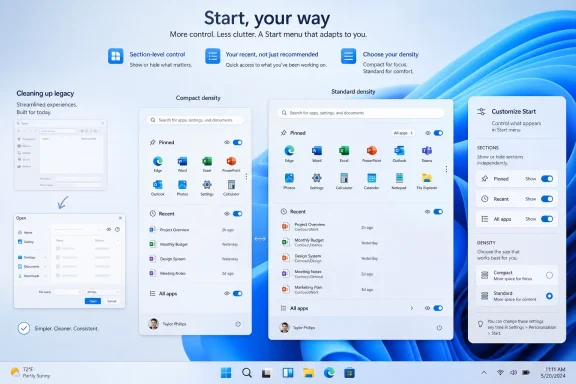
The Windows 11 Start menu has spent most of its life trying to be more than a Start menu. It has been a launcher, a document surface, a recommendation engine, a branding exercise, and occasionally a quiet argument with the user about how Windows should be used. The new preview design is significant because it reverses that posture: instead of forcing users into Microsoft’s preferred arrangement, it lets them remove entire sections.
That may sound mundane until you remember how central the Start menu is to Windows identity. It is the one UI element almost every user touches, from casual home users to sysadmins imaging hundreds of machines. When that surface feels cluttered or promotional, the whole operating system feels less trustworthy.
The freshly tested controls reportedly allow users to show or hide Pinned, Recent, and All apps independently. Microsoft has also renamed Recommended to Recent, a small wording change with a larger implication. “Recommended” suggested a system that wanted to push something at you; “Recent” suggests a system that is reflecting your activity back to you.
That distinction is not semantic nitpicking. Windows users have grown wary of anything that resembles promotion inside core OS surfaces. If Recent really behaves like a recent-files and recent-activity area rather than another vehicle for suggestions, Microsoft will have removed a major source of irritation without needing to admit that the old label was part of the problem.
Windows 11 has often mistaken visual spaciousness for usability. The operating system’s early design language emphasized breathing room, simplified surfaces, and centered alignment, but that came with a price: fewer controls visible at once, more clicks, and a launcher that could feel inflated even when doing very little. The compact option is Microsoft acknowledging that “modern” does not always mean “large.”
For desktop users, compactness is not nostalgia. It is efficiency. A Start menu that opens quickly, shows only what is needed, and gets out of the way is closer to how many people actually use Windows: as a working surface rather than a lifestyle dashboard.
The funny edge case — the possibility of turning off so many sections that the Start menu becomes nearly empty — is less a design failure than proof that Microsoft has finally moved the control boundary. Power users would rather be allowed to create a useless configuration than be protected from customization altogether. Windows has traditionally understood that bargain. Windows 11 sometimes forgot it.
Renaming Recommended to Recent will not solve everything by itself. If the renamed section still becomes a home for suggestions, promotions, or confusing cloud-first behavior, users will notice immediately. Microsoft has trained its most attentive customers to inspect these changes with suspicion.
But the section-level toggle changes the power dynamic. A user who dislikes Recent can remove it. A user who wants only pinned apps can build that. A user who wants the All apps list visible can keep it. The Start menu becomes a configurable launcher rather than a fixed editorial page.
That is the deeper win. Microsoft does not have to design the one true Start menu for every Windows user because such a thing does not exist. A gamer, a help desk technician, a software developer, a school administrator, and a family PC owner all approach Start differently. The old design asked them to converge. The new preview suggests Microsoft is finally willing to let them diverge.
That kind of inconsistency is not just aesthetic. It tells users that Windows is layered rather than coherent. For enthusiasts, those layers can be charming; for ordinary users, they are confusing; for enterprise IT, they are a reminder that every visual refresh may be sitting on top of older plumbing that still matters.
Microsoft’s apparent work to modernize more legacy dialogs is therefore more than a “surprise bonus.” The common file dialog, copy dialogs, progress windows, and other old interface pieces are the connective tissue of daily Windows use. They appear when users are opening files, moving data, installing software, and troubleshooting problems.
When those surfaces lag behind the rest of the OS, Windows 11 feels unfinished. Not broken, exactly, but unresolved. The design promise of Windows 11 was coherence; the lived experience has often been a guided tour through Microsoft’s design history.
That is why the common file dialog matters. It is one of the most frequently encountered Windows surfaces outside the Start menu and taskbar. Users see it when attaching a document, opening a project, saving an export, browsing network locations, or interacting with older desktop apps.
If Microsoft can modernize those dialogs without damaging compatibility, Windows 11 will feel less like a skin over old Windows and more like a single operating system. That is the kind of improvement that rarely sells a PC but changes how the PC feels every day. It is also the sort of work Microsoft should have prioritized earlier.
The company’s challenge is that Windows has to serve two masters. It must look contemporary enough to compete with macOS, ChromeOS, mobile operating systems, and modern web apps. But it must also preserve decades of compatibility that businesses rely on. Every legacy dialog is a reminder that Windows is not just a product; it is an ecosystem with archaeological depth.
Still, the timing is telling. Microsoft has been publicly positioning recent Windows work as a response to user complaints about Windows 11’s rough edges. The Start menu, the taskbar, File Explorer, dark mode gaps, legacy dialogs, and unwanted promotional surfaces have all become part of the same conversation: Windows 11 needs to feel less like a redesign imposed from above and more like a desktop operating system refined through use.
The new Experimental and Beta channel structure also changes the optics. Experimental is the place where Microsoft can test bolder ideas without promising immediate mainstream delivery. That gives the company room to try more flexible UI controls, but it also gives users reason to temper expectations.
For administrators, the phrase “in testing” should do a lot of work. A Start menu redesign can affect training materials, support scripts, kiosk setups, managed layouts, user documentation, and help desk calls. A good change still becomes an operational event when deployed across an organization.
The ability to hide a user’s name and profile picture could be especially useful in shared spaces, classrooms, demos, support calls, and screen recordings. Privacy in Windows is not only about telemetry or account settings. It is also about what the interface casually exposes when someone shares a screen.
Section-level controls could also make Windows 11 easier to standardize. A company might prefer a Start menu that shows pinned business apps and nothing else. A school might want to remove recent files from view. A developer workstation might benefit from a compact launcher that leaves more visual room for actual work.
But enterprise IT will want policy controls, documentation, and predictable deployment behavior. A feature that delights enthusiasts can frustrate administrators if it appears unpredictably, changes names mid-cycle, or lacks Group Policy and mobile device management support. Microsoft’s consumer-friendly flexibility needs an enterprise-grade management story.
That history is why the redesigned Start menu will be judged not only by what it can do on day one, but by what Microsoft does with it over time. If the company gives users toggles and respects them, this becomes a genuine course correction. If it uses the new structure to create different forms of recommendation later, the goodwill evaporates.
The renamed Recent section is the canary here. If Recent remains a clean, functional activity area, users may come to trust it. If it becomes Recommended by another name, the rename will look cynical.
Windows users are not opposed to intelligence in the OS. They are opposed to ambiguity about whose interests that intelligence serves. A launcher that helps you resume work is welcome. A launcher that advances Microsoft’s engagement goals is not.
Windows 11 tightened that bargain. The centered taskbar, simplified Start menu, reduced taskbar behaviors, and redesigned context menus all gave the OS a cleaner first impression. But they also removed or obscured habits that long-time users had built into muscle memory.
Some of those changes were defensible. Windows did need modernization. But Microsoft too often framed simplification as progress without accounting for the productivity cost paid by experienced users. The new Start menu controls suggest a healthier balance: modern appearance, optional density, user-directed layout.
That is what Windows 11 should have been from the start. Not Windows 10 with rounded corners, and not a locked-down appliance desktop, but a modern Windows that understands choice as a feature rather than a support burden.
The difference is that Windows occupies a special place. It is the default work environment for many people who did not choose it as an expression of taste. They use it because their job, school, game library, hardware, or application stack requires it. That makes unwanted interface ambition feel more intrusive.
A Start menu recommendation in that context is not the same as a recommendation in a media app. It lives in the operating system’s front door. It has a different level of authority, and users naturally apply a higher standard to it.
By allowing users to strip the Start menu down, Microsoft is implicitly admitting that restraint can be a feature. The best operating system interface is not always the one that surfaces the most. Sometimes it is the one that knows when to disappear.
Windows 11 feature delivery has become increasingly fluid. Moment updates, enablement packages, controlled rollouts, Insider channels, and server-side feature flags have made the old model of “this version contains this feature” less reliable for ordinary users. Two PCs on similar builds may not always show the same thing at the same time.
That makes communication critical. If Microsoft wants credit for giving users control, it needs to be clear about when the controls are available, which builds include them, and whether businesses can manage them. Otherwise the company risks turning a good design change into another scavenger hunt through Settings, release notes, and staged rollouts.
For enthusiasts, that uncertainty is familiar. For everyone else, it is exhausting. Windows should not require a release-note archaeology degree to understand why one PC has a feature and another does not.
Local account pressure remains a sore subject. Advertising-like prompts remain controversial. Telemetry concerns continue to shadow Microsoft’s messaging. Copilot integration raises its own questions about usefulness, placement, privacy, and enterprise control. Even when Microsoft makes a good change, users evaluate it against the whole OS experience.
The Start menu fix is therefore best understood as a proof point. It shows Microsoft can listen when the complaint is loud, durable, and easy to demonstrate. It does not yet prove the company has fully changed its instincts.
That distinction matters. A company can make tactical concessions while still pursuing a strategic direction users dislike. The question for Windows 11 in 2026 is whether Microsoft is making the desktop more user-controlled, or merely sanding down the sharpest edges of a still-pushy platform.
That is the right model for Windows. Defaults matter, but reversibility matters more. Microsoft can ship a friendly default for mainstream users while allowing enthusiasts, administrators, and minimalists to carve away the parts they dislike.
The legacy UI work points in the same direction. A more coherent Windows 11 should not mean a more restrictive Windows 11. If anything, consistency and choice should reinforce each other: modern surfaces, fewer jarring throwbacks, and enough switches to let different users build different desktops.
The danger is that Microsoft learns the wrong lesson. The success of this change will not come from the exact arrangement of Pinned, Recent, and All apps. It will come from the principle behind it: the desktop belongs first to the person using it.
 Microsoft Finally Lets the Start Menu Stop Performing for Microsoft
The Windows 11 Start menu has spent most of its life trying to be more than a Start menu. It has been a launcher, a document surface, a recommendation engine, a branding exercise, and occasionally a quiet argument with the user about how Windows should be used. The new preview design is significant because it reverses that posture: instead of forcing users into Microsoft’s preferred arrangement, it lets them remove entire sections.That may sound mundane until you remember how central the Start menu is to Windows identity. It is the one UI element almost every user touches, from casual home users to sysadmins imaging hundreds of machines. When that surface feels cluttered or promotional, the whole operating system feels less trustworthy.
The freshly tested controls reportedly allow users to show or hide Pinned, Recent, and All apps independently. Microsoft has also renamed Recommended to Recent, a small wording change with a larger implication. “Recommended” suggested a system that wanted to push something at you; “Recent” suggests a system that is reflecting your activity back to you.
That distinction is not semantic nitpicking. Windows users have grown wary of anything that resembles promotion inside core OS surfaces. If Recent really behaves like a recent-files and recent-activity area rather than another vehicle for suggestions, Microsoft will have removed a major source of irritation without needing to admit that the old label was part of the problem.
The Compact Menu Is a Bigger Concession Than It Looks
The ability to choose a compact Start menu may be the most revealing part of the change. Microsoft previously allowed smaller layouts under certain device conditions, but the point here is agency. A user on a large monitor may still want a small launcher, just as a laptop user may want a larger one.Windows 11 has often mistaken visual spaciousness for usability. The operating system’s early design language emphasized breathing room, simplified surfaces, and centered alignment, but that came with a price: fewer controls visible at once, more clicks, and a launcher that could feel inflated even when doing very little. The compact option is Microsoft acknowledging that “modern” does not always mean “large.”
For desktop users, compactness is not nostalgia. It is efficiency. A Start menu that opens quickly, shows only what is needed, and gets out of the way is closer to how many people actually use Windows: as a working surface rather than a lifestyle dashboard.
The funny edge case — the possibility of turning off so many sections that the Start menu becomes nearly empty — is less a design failure than proof that Microsoft has finally moved the control boundary. Power users would rather be allowed to create a useless configuration than be protected from customization altogether. Windows has traditionally understood that bargain. Windows 11 sometimes forgot it.
The Recommended Retreat Was Inevitable
The Recommended section has been unpopular not because recent documents are inherently bad, but because Microsoft blurred the line between helpful recall and unwanted nudging. Windows users can accept a machine remembering what they opened. They are much less tolerant of an operating system that seems to be auditioning apps, services, or cloud behaviors in a space they regard as personal.Renaming Recommended to Recent will not solve everything by itself. If the renamed section still becomes a home for suggestions, promotions, or confusing cloud-first behavior, users will notice immediately. Microsoft has trained its most attentive customers to inspect these changes with suspicion.
But the section-level toggle changes the power dynamic. A user who dislikes Recent can remove it. A user who wants only pinned apps can build that. A user who wants the All apps list visible can keep it. The Start menu becomes a configurable launcher rather than a fixed editorial page.
That is the deeper win. Microsoft does not have to design the one true Start menu for every Windows user because such a thing does not exist. A gamer, a help desk technician, a software developer, a school administrator, and a family PC owner all approach Start differently. The old design asked them to converge. The new preview suggests Microsoft is finally willing to let them diverge.
Windows 11’s Real Problem Was Never Just the Start Menu
The Start menu has been the symbol, but Windows 11’s larger problem has been inconsistency. The OS can look elegant in one moment and abruptly ancient in the next. A user might move from a Fluent-style Settings page into a legacy dialog that feels like it escaped from a previous decade.That kind of inconsistency is not just aesthetic. It tells users that Windows is layered rather than coherent. For enthusiasts, those layers can be charming; for ordinary users, they are confusing; for enterprise IT, they are a reminder that every visual refresh may be sitting on top of older plumbing that still matters.
Microsoft’s apparent work to modernize more legacy dialogs is therefore more than a “surprise bonus.” The common file dialog, copy dialogs, progress windows, and other old interface pieces are the connective tissue of daily Windows use. They appear when users are opening files, moving data, installing software, and troubleshooting problems.
When those surfaces lag behind the rest of the OS, Windows 11 feels unfinished. Not broken, exactly, but unresolved. The design promise of Windows 11 was coherence; the lived experience has often been a guided tour through Microsoft’s design history.
Legacy Dialogs Are Where the Polish Either Holds or Breaks
Modernizing legacy UI is hard because these old components are not museum pieces. They are used by countless applications, scripts, workflows, and enterprise tools. Change them too aggressively and something breaks. Leave them alone and the operating system keeps undercutting its own design language.That is why the common file dialog matters. It is one of the most frequently encountered Windows surfaces outside the Start menu and taskbar. Users see it when attaching a document, opening a project, saving an export, browsing network locations, or interacting with older desktop apps.
If Microsoft can modernize those dialogs without damaging compatibility, Windows 11 will feel less like a skin over old Windows and more like a single operating system. That is the kind of improvement that rarely sells a PC but changes how the PC feels every day. It is also the sort of work Microsoft should have prioritized earlier.
The company’s challenge is that Windows has to serve two masters. It must look contemporary enough to compete with macOS, ChromeOS, mobile operating systems, and modern web apps. But it must also preserve decades of compatibility that businesses rely on. Every legacy dialog is a reminder that Windows is not just a product; it is an ecosystem with archaeological depth.
The Insider Program Is Now the Courtroom for Windows Design
These changes are arriving through the Windows Insider pipeline, which means they are not guaranteed to ship exactly as seen. That caveat matters. Microsoft’s preview channels are where ideas are tested, delayed, reshaped, or occasionally abandoned.Still, the timing is telling. Microsoft has been publicly positioning recent Windows work as a response to user complaints about Windows 11’s rough edges. The Start menu, the taskbar, File Explorer, dark mode gaps, legacy dialogs, and unwanted promotional surfaces have all become part of the same conversation: Windows 11 needs to feel less like a redesign imposed from above and more like a desktop operating system refined through use.
The new Experimental and Beta channel structure also changes the optics. Experimental is the place where Microsoft can test bolder ideas without promising immediate mainstream delivery. That gives the company room to try more flexible UI controls, but it also gives users reason to temper expectations.
For administrators, the phrase “in testing” should do a lot of work. A Start menu redesign can affect training materials, support scripts, kiosk setups, managed layouts, user documentation, and help desk calls. A good change still becomes an operational event when deployed across an organization.
Enterprise IT Will Like the Direction and Fear the Rollout
For managed environments, Start menu customization is not a hobby. It is part of endpoint standardization. Organizations care about what users see on first login, which apps are promoted, whether cloud documents appear, how much personal information is displayed, and whether the interface creates support friction.The ability to hide a user’s name and profile picture could be especially useful in shared spaces, classrooms, demos, support calls, and screen recordings. Privacy in Windows is not only about telemetry or account settings. It is also about what the interface casually exposes when someone shares a screen.
Section-level controls could also make Windows 11 easier to standardize. A company might prefer a Start menu that shows pinned business apps and nothing else. A school might want to remove recent files from view. A developer workstation might benefit from a compact launcher that leaves more visual room for actual work.
But enterprise IT will want policy controls, documentation, and predictable deployment behavior. A feature that delights enthusiasts can frustrate administrators if it appears unpredictably, changes names mid-cycle, or lacks Group Policy and mobile device management support. Microsoft’s consumer-friendly flexibility needs an enterprise-grade management story.
The User Trust Issue Still Hangs Over the Desktop
The enthusiasm around the Start menu change is real, but it exists against a backdrop of user distrust. Windows 11 has repeatedly tested the patience of its audience with ads, account pressure, cloud prompts, Edge nudges, Copilot placement, and defaults that feel more strategic than user-centered.That history is why the redesigned Start menu will be judged not only by what it can do on day one, but by what Microsoft does with it over time. If the company gives users toggles and respects them, this becomes a genuine course correction. If it uses the new structure to create different forms of recommendation later, the goodwill evaporates.
The renamed Recent section is the canary here. If Recent remains a clean, functional activity area, users may come to trust it. If it becomes Recommended by another name, the rename will look cynical.
Windows users are not opposed to intelligence in the OS. They are opposed to ambiguity about whose interests that intelligence serves. A launcher that helps you resume work is welcome. A launcher that advances Microsoft’s engagement goals is not.
Microsoft Is Rediscovering the Old Windows Bargain
The old Windows bargain was simple: Microsoft provided the platform, and users made it theirs. You could pin things, remove things, resize things, script things, hack things, and complain loudly when Microsoft removed things. That flexibility was messy, but it was part of why Windows endured.Windows 11 tightened that bargain. The centered taskbar, simplified Start menu, reduced taskbar behaviors, and redesigned context menus all gave the OS a cleaner first impression. But they also removed or obscured habits that long-time users had built into muscle memory.
Some of those changes were defensible. Windows did need modernization. But Microsoft too often framed simplification as progress without accounting for the productivity cost paid by experienced users. The new Start menu controls suggest a healthier balance: modern appearance, optional density, user-directed layout.
That is what Windows 11 should have been from the start. Not Windows 10 with rounded corners, and not a locked-down appliance desktop, but a modern Windows that understands choice as a feature rather than a support burden.
The Small Toggle That Exposes the Big Strategy
The redesigned Start menu also fits into a larger industry pattern. Operating systems are becoming increasingly cloud-connected, account-aware, and recommendation-driven. Microsoft is hardly alone in trying to make the desktop more proactive.The difference is that Windows occupies a special place. It is the default work environment for many people who did not choose it as an expression of taste. They use it because their job, school, game library, hardware, or application stack requires it. That makes unwanted interface ambition feel more intrusive.
A Start menu recommendation in that context is not the same as a recommendation in a media app. It lives in the operating system’s front door. It has a different level of authority, and users naturally apply a higher standard to it.
By allowing users to strip the Start menu down, Microsoft is implicitly admitting that restraint can be a feature. The best operating system interface is not always the one that surfaces the most. Sometimes it is the one that knows when to disappear.
The Preview Caveat Is Where the Story Gets Complicated
Because this work is in preview, there are still obvious unknowns. Microsoft could change labels, remove options, adjust layouts, or limit availability before a general release. It could also stage the rollout gradually, leaving some users waiting long after the first public announcement.Windows 11 feature delivery has become increasingly fluid. Moment updates, enablement packages, controlled rollouts, Insider channels, and server-side feature flags have made the old model of “this version contains this feature” less reliable for ordinary users. Two PCs on similar builds may not always show the same thing at the same time.
That makes communication critical. If Microsoft wants credit for giving users control, it needs to be clear about when the controls are available, which builds include them, and whether businesses can manage them. Otherwise the company risks turning a good design change into another scavenger hunt through Settings, release notes, and staged rollouts.
For enthusiasts, that uncertainty is familiar. For everyone else, it is exhausting. Windows should not require a release-note archaeology degree to understand why one PC has a feature and another does not.
The Start Menu Fix Does Not Excuse the Remaining Irritations
It is tempting to treat the new Start menu as a redemption arc. That would be premature. Windows 11 still has unresolved pain points that cannot be solved by a more flexible launcher.Local account pressure remains a sore subject. Advertising-like prompts remain controversial. Telemetry concerns continue to shadow Microsoft’s messaging. Copilot integration raises its own questions about usefulness, placement, privacy, and enterprise control. Even when Microsoft makes a good change, users evaluate it against the whole OS experience.
The Start menu fix is therefore best understood as a proof point. It shows Microsoft can listen when the complaint is loud, durable, and easy to demonstrate. It does not yet prove the company has fully changed its instincts.
That distinction matters. A company can make tactical concessions while still pursuing a strategic direction users dislike. The question for Windows 11 in 2026 is whether Microsoft is making the desktop more user-controlled, or merely sanding down the sharpest edges of a still-pushy platform.
The New Start Menu Gives Windows 11 a Chance to Feel Owned Again
The concrete value of this preview is not that every user will build a minimalist Start menu. Most will not. The value is that users can make the menu match their tolerance for clutter, privacy exposure, and Microsoft-managed surfaces.That is the right model for Windows. Defaults matter, but reversibility matters more. Microsoft can ship a friendly default for mainstream users while allowing enthusiasts, administrators, and minimalists to carve away the parts they dislike.
The legacy UI work points in the same direction. A more coherent Windows 11 should not mean a more restrictive Windows 11. If anything, consistency and choice should reinforce each other: modern surfaces, fewer jarring throwbacks, and enough switches to let different users build different desktops.
The danger is that Microsoft learns the wrong lesson. The success of this change will not come from the exact arrangement of Pinned, Recent, and All apps. It will come from the principle behind it: the desktop belongs first to the person using it.
The Menu Is Finally Smaller Than the Argument Around It
The most important details are practical, not philosophical, and they will determine whether this preview becomes a real improvement or just another Insider curiosity.- Microsoft is testing section-level Start menu controls that let users independently hide or show major areas such as Pinned, Recent, and All apps.
- The old Recommended area has been renamed Recent, which suggests a shift away from recommendation language toward activity-based usefulness.
- A compact Start menu option gives users direct control over density instead of leaving the smaller layout only to automatic device-based behavior.
- The ability to hide account identity details in Start could help privacy-conscious users, presenters, classrooms, and shared-device environments.
- Microsoft’s parallel work on legacy dialogs matters because Windows 11’s polish breaks whenever old interface surfaces suddenly reappear.
- The feature remains in preview, so administrators and cautious users should wait for final rollout details before treating it as a deployed capability.
References
- Primary source: TechRadar
Published: Mon, 01 Jun 2026 10:21:48 GMT
Windows 11 is finally getting the Start menu changes we all wanted — and a surprise bonus | TechRadar
The new Start menu looks excellent, and Microsoft is tackling issues with rusty old parts of the Windows 11 interfacewww.techradar.com - Official source: learn.microsoft.com
Windows 11 Insider Experimental Preview Build 26300.8553 - Windows Insider Program | Microsoft Learn
Release notes for Windows 11 Insider Experimental Preview Build 26300.8553learn.microsoft.com - Related coverage: notebookcheck.net
Windows 11 Insider Build 26300.8553 finally lets you customize the Start menu - Notebookcheck News
Windows 11 Insider Preview Build 26300.8553 brings a modular Start menu with Small, Large, and Automatic size presets and new privacy tools to the Experimental channel. www.notebookcheck.net
- Official source: blogs.windows.com
Announcing Windows 11 Insider Preview Build 26220.7653 (Beta Channel)
Hello Windows Insiders, today we are releasing Windows 11 Insider Preview Build 26220.7653 (KB5074157) to the Beta Channel. Changes in Beta Channel builds and updates are documented in two buckets: new features, improvements, and fiblogs.windows.com - Related coverage: windowscentral.com
Windows Insider reboot begins: Here's what's new in the first-ever Experimental Preview build | Windows Central
The first Experimental Preview build lands as Microsoft reorganizes the Insider Program.www.windowscentral.com - Related coverage: windowslatest.com
Tested: Windows 11's new Start menu lets you fully customize it, and it works surprisingly well
Windows 11’s new Start menu finally adds smaller layouts, removable sections, and deeper customization after years of user complaints. www.windowslatest.com
- Related coverage: thurrott.com
Start Menu Improvements Are Available for Testing on the Experimental Channel
The various Start Menu improvements that Microsoft detailed earlier this month, alongside the new alternative taskbar positions, are now available for Insider testing.www.thurrott.com - Related coverage: dataconomy.com
Windows 11 update adds major Start menu customization options
Microsoft is testing updates for Windows 11 that will enhance customization options for the Start menu and taskbar, with rolloutsdataconomy.com - Related coverage: tomshardware.com
Microsoft simplifies Windows Insider program — fewer channels, and switching without wiping your device | Tom's Hardware
The company will also make it easier to ensure you get all of the latest features.www.tomshardware.com
