

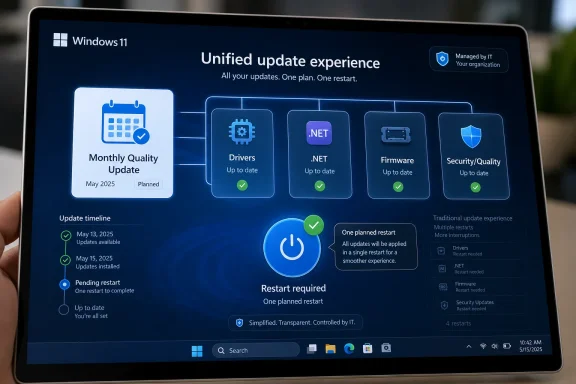
Microsoft announced in April 2026 that Windows 11 Insider builds are moving toward a unified update experience that coordinates driver, .NET, firmware, and monthly quality updates so many PCs can install them with one scheduled restart instead of several. The pitch is simple: Windows Update should stop behaving like four separate maintenance systems wearing the same trench coat. The stakes are larger than one fewer reboot prompt, because Microsoft is trying to rebuild trust in the most resented part of Windows at the same time it is asking users to accept more cloud services, more AI, and more background automation. If it works, this will be remembered less as a feature than as a tacit admission that Windows servicing became too fragmented for ordinary users and too noisy for IT departments.
For years, Windows Update has been defended in the language of security and reliability, and for good reason. The monthly cumulative update remains one of the basic rituals of modern computing: vulnerabilities are closed, regressions are fixed, and the platform moves forward whether the user is paying attention or not. But Microsoft’s old answer to update pain was often to explain why updates mattered, not to change how disruptive they felt.
The new unified update experience starts from a different premise. It accepts that a reboot is not just a technical requirement but an interruption with a cost. A restart during a workday can break concentration, delay a meeting, interrupt a game session, or complicate a maintenance window that an administrator has already negotiated with a business unit.
That is why the phrase “single monthly restart” matters. Microsoft is not promising that Windows will never need another reboot, and it is not claiming that every update category can always wait neatly for Patch Tuesday. It is instead trying to make the normal case less chaotic: one expected servicing moment, rather than a cumulative update today, a firmware update tomorrow, and a driver package lurking behind another restart prompt later in the week.
This is the kind of change that sounds modest until you remember how many Windows PCs live outside pristine lab conditions. A home laptop may be used intermittently and sleep for days. A developer workstation may be running virtual machines, containers, debuggers, and long-lived sessions. A managed corporate notebook may be subject to Windows Update for Business policies, Intune rings, driver deferrals, compliance deadlines, and firmware rules from the OEM. The reboot problem is not one problem; it is the point where all of those layers collide.
The mess came from everything orbiting that event. .NET updates could appear with their own servicing behavior. Driver updates could arrive through Windows Update, sometimes as optional packages and sometimes as part of a managed workflow. Firmware updates, especially on modern laptops, could add yet another reboot path, often with the added anxiety of watching a BIOS or UEFI progress screen instead of the familiar Windows spinner.
In theory, separating these update types makes sense. Drivers are not operating system fixes. Firmware is closer to hardware lifecycle management than ordinary Windows maintenance. .NET has its own ecosystem of applications and runtime dependencies. In practice, however, the user sees one thing: Windows is asking to restart again.
That perception matters because Windows Update is a trust interface. Users rarely read the update history before deciding whether Microsoft is being reasonable. They judge the system by whether it interrupts them, whether it explains itself, and whether the machine comes back healthy. If Windows asks for multiple restarts in a short span, even for technically distinct reasons, the distinction feels academic.
Microsoft’s unified model is an attempt to collapse that distinction at the experience layer. The updates may still be different underneath, and enterprise controls will still matter, but the system should increasingly coordinate them around the monthly quality update. The engineering challenge is not merely downloading packages at the same time. It is sequencing installation, dependency checks, driver staging, firmware handoff, and rollback safety in a way that does not turn one reboot into one larger failure domain.
Security emergencies can force out-of-band updates. Firmware fixes may have OEM-specific urgency, especially when they address device stability, battery behavior, Thunderbolt issues, or platform security vulnerabilities. Some drivers should not be bundled casually if they require validation against particular hardware fleets. And managed environments may deliberately separate updates to reduce blast radius.
That last point is crucial for IT pros. A single monthly restart sounds wonderful on a home PC, but a single coordinated servicing event can also become a bigger change bundle to test, stage, and troubleshoot. If a machine fails after the reboot, was it the cumulative update, the graphics driver, the Wi-Fi driver, the .NET package, or the firmware capsule? Consolidation reduces interruptions, but it can complicate attribution.
Microsoft’s answer will have to be transparency. The company has already been moving toward clearer update naming and better driver labels, including more information about the class of device a driver affects. That sounds like a small Settings-page nicety until you are trying to explain to a user why their audio device changed or why a fleet of laptops suddenly behaves differently on docking stations.
A unified update experience cannot become a black box. If Windows compresses multiple servicing actions into one restart, it needs to make the contents of that restart easier to inspect before and after the event. Fewer interruptions are valuable only if they do not come at the price of more mysterious failures.
Microsoft’s newer approach keeps standard shutdown and restart choices available even when updates are pending, while also presenting explicit update-and-power options. That is a subtle but meaningful reversal. It tells the user that Windows can recommend maintenance without hijacking every power decision.
This matters because forced ambiguity has been one of Windows Update’s worst habits. A user who wants to shut a laptop before boarding a flight should not have to gamble on whether the machine will spend the next several minutes installing updates. A gamer restarting to clear a driver issue does not necessarily want to enter a patch cycle. A sysadmin doing a quick reboot during troubleshooting may want to preserve the planned maintenance window, not accidentally consume it.
The old model optimized for update completion. The new model appears to concede that completion is not the only goal. Timing, consent, and predictability are also part of reliability.
That is a healthy shift, but it comes with a familiar Microsoft tension. The company still has to keep devices secure, and delaying updates indefinitely is not a serious platform strategy. The trick is to give users enough agency that they stop fighting the update system, while retaining enough policy pressure that machines do not drift into unsafe states. Better power-menu semantics are not a complete solution, but they are a rare example of Windows becoming less paternalistic in a place where users notice.
Pause controls are not just a consumer convenience. In managed environments, deferrals, rings, deadlines, and grace periods already form a patch-governance language of their own. The consumer-facing version of that idea is simpler: let me delay this without feeling like I am fighting the operating system.
The risk is that more flexible pausing can become more flexible neglect. Microsoft knows this, which is why the company’s update language increasingly couples control with security posture. The point is not to let users opt out of maintenance forever. The point is to make the timing less hostile so that users are less tempted to disable, block, or hack around Windows Update entirely.
This is one of the underrated truths of endpoint security. A system that users resent becomes a system users try to evade. If Windows Update becomes more predictable, users are more likely to leave it alone. That may do more for real-world patch compliance than another stern reminder about the importance of security updates.
A unified update cycle could reduce some of that operational drag. If driver, firmware, .NET, and quality updates are better aligned, IT teams can plan around a more coherent monthly rhythm. That could improve user messaging, reduce surprise prompts, and make compliance reporting easier to explain to management.
But administrators will also look at the consolidation with suspicion, because they are paid to imagine failure. A bad driver can be more disruptive than a delayed driver. A firmware issue can brick or destabilize a device in ways that an ordinary cumulative update usually does not. A .NET regression can break line-of-business applications that do not care how elegant the servicing model looks.
The question for enterprises is not whether one reboot is better than three. It is whether Microsoft gives them enough control over what participates in that one reboot. Driver approvals, firmware deployment policies, update rings, rollback tooling, reporting, and staged rollout controls will determine whether this feels like progress or merely repackaging.
Microsoft has spent years nudging organizations toward cloud-based update management, including Windows Update for Business, Intune, Autopatch, and related servicing controls. A unified update experience fits that strategy. It makes Windows servicing more cloud-orchestrated and less like a set of independent local events. For modern management shops, that may be welcome. For organizations with complex hardware fleets and conservative change processes, it will require careful validation.
This is especially important in the Windows 11 era. Microsoft has pushed hardware requirements, account integration, cloud features, ads in system surfaces, AI entry points, and a steady stream of design changes. Many of those moves have defenders, and some have real technical justification. But taken together, they create an environment in which users are more sensitive to anything that feels imposed.
A less disruptive update model is therefore more than a quality-of-life improvement. It is a credibility repair. It says Microsoft understands that the operating system must earn the right to be automatic.
That does not mean the company has solved the deeper servicing trade-offs. Windows runs across a vast hardware ecosystem, and that diversity is both its strength and its curse. Apple can coordinate macOS updates across a comparatively controlled set of devices. Microsoft has to account for OEM firmware stacks, third-party drivers, legacy applications, enterprise policies, and consumer machines that may go weeks without a clean maintenance opportunity.
The unified update model does not erase that complexity. It tries to hide less of it from the user by making the experience more coherent. That is the right direction, but coherence will be judged by outcomes, not announcements.
That testing matters more here than it would for a cosmetic Settings change. Update orchestration touches the plumbing of the operating system. It has to work across different hardware vendors, disk configurations, encryption states, driver models, sleep behaviors, update deferral policies, and recovery paths. The weirdness of the Windows ecosystem is not a side case; it is the main event.
Insiders provide telemetry and feedback, but they are not a perfect mirror of the general Windows base. Enthusiasts may tolerate rough edges that ordinary users would not. Managed enterprise devices may be underrepresented. Consumer laptops that spend most of their lives asleep, offline, or storage-constrained can expose problems that clean test machines miss.
That is why Microsoft’s gradual rollout language is appropriate. A unified update experience should arrive slowly, with clear rollback and diagnostic paths. The worst outcome would be a feature designed to reduce update frustration becoming another update frustration.
But hotpatching is not the same thing as universal rebootless Windows. Kernel updates, driver changes, firmware updates, and deep platform servicing can still require a restart. The unified update experience is more pragmatic. It does not pretend that every reboot can disappear. It tries to make the unavoidable ones less frequent and more predictable.
That distinction matters because expectations can outrun engineering reality. If users hear “single monthly restart” as “Windows will stop interrupting me,” disappointment is inevitable. If they hear it as “Windows will coordinate the normal update mess into a smaller number of planned interruptions,” the promise becomes more realistic.
In the near term, consolidation and hotpatching will likely coexist. Some devices and editions may get more rebootless servicing options, while the broader Windows population benefits from better bundling and clearer controls. Microsoft’s challenge is to explain those differences without turning Windows Update into a licensing and policy maze.
That is when users and administrators will discover whether unified servicing improves recovery or obscures it. If Windows can clearly show what was installed, what failed, what was rolled back, and what still requires attention, the system will earn trust. If it simply says an update failed and asks the user to try again, the old frustrations will return under a new name.
The same applies to performance. Microsoft has spent years trying to make Windows updates smaller, faster, and less CPU-intensive. A single monthly restart must not become a longer and more ominous monthly restart. Users will forgive one servicing event more readily than three, but only if that one event is reasonably predictable.
There is also a communications problem. “One restart” is clean language, but Windows needs to be explicit when exceptions apply. If an emergency security update arrives outside the normal cadence, Microsoft should say so plainly. If a firmware update cannot wait, the user should understand why. The more Windows explains, the less every exception will feel like a broken promise.
That is not a revolution, but it is a meaningful renegotiation of the Windows Update bargain. Users accept automatic maintenance because the alternative is an insecure, unreliable platform. Microsoft, in return, has to make that maintenance respectful of time and context. For too long, Windows treated the need to update as a trump card over the user’s immediate intent.
The new model suggests Microsoft understands that this bargain has limits. A secure PC that constantly interrupts its owner is not a good product. A manageable fleet that generates endless reboot complaints is not a quiet fleet. A transparent update system that explains what it is doing will beat a technically sophisticated one that behaves like a bureaucratic ambush.
The company still has to prove the execution. Windows Update history is full of good intentions, confusing policies, and edge cases that only appear after broad deployment. But the direction is sensible: fewer prompts, clearer choices, more coordination, and less pretending that all update pain can be solved by telling users security is important.
 Microsoft Is Finally Treating Reboots as a User-Experience Bug
For years, Windows Update has been defended in the language of security and reliability, and for good reason. The monthly cumulative update remains one of the basic rituals of modern computing: vulnerabilities are closed, regressions are fixed, and the platform moves forward whether the user is paying attention or not. But Microsoft’s old answer to update pain was often to explain why updates mattered, not to change how disruptive they felt.The new unified update experience starts from a different premise. It accepts that a reboot is not just a technical requirement but an interruption with a cost. A restart during a workday can break concentration, delay a meeting, interrupt a game session, or complicate a maintenance window that an administrator has already negotiated with a business unit.
That is why the phrase “single monthly restart” matters. Microsoft is not promising that Windows will never need another reboot, and it is not claiming that every update category can always wait neatly for Patch Tuesday. It is instead trying to make the normal case less chaotic: one expected servicing moment, rather than a cumulative update today, a firmware update tomorrow, and a driver package lurking behind another restart prompt later in the week.
This is the kind of change that sounds modest until you remember how many Windows PCs live outside pristine lab conditions. A home laptop may be used intermittently and sleep for days. A developer workstation may be running virtual machines, containers, debuggers, and long-lived sessions. A managed corporate notebook may be subject to Windows Update for Business policies, Intune rings, driver deferrals, compliance deadlines, and firmware rules from the OEM. The reboot problem is not one problem; it is the point where all of those layers collide.
The Monthly Patch Cycle Was Predictable, Everything Around It Was Not
Microsoft already has a predictable center of gravity for Windows servicing: the monthly quality update, commonly associated with Patch Tuesday. Those updates bundle security fixes and reliability improvements into a cumulative package, giving administrators and users a recurring calendar event around which to plan.The mess came from everything orbiting that event. .NET updates could appear with their own servicing behavior. Driver updates could arrive through Windows Update, sometimes as optional packages and sometimes as part of a managed workflow. Firmware updates, especially on modern laptops, could add yet another reboot path, often with the added anxiety of watching a BIOS or UEFI progress screen instead of the familiar Windows spinner.
In theory, separating these update types makes sense. Drivers are not operating system fixes. Firmware is closer to hardware lifecycle management than ordinary Windows maintenance. .NET has its own ecosystem of applications and runtime dependencies. In practice, however, the user sees one thing: Windows is asking to restart again.
That perception matters because Windows Update is a trust interface. Users rarely read the update history before deciding whether Microsoft is being reasonable. They judge the system by whether it interrupts them, whether it explains itself, and whether the machine comes back healthy. If Windows asks for multiple restarts in a short span, even for technically distinct reasons, the distinction feels academic.
Microsoft’s unified model is an attempt to collapse that distinction at the experience layer. The updates may still be different underneath, and enterprise controls will still matter, but the system should increasingly coordinate them around the monthly quality update. The engineering challenge is not merely downloading packages at the same time. It is sequencing installation, dependency checks, driver staging, firmware handoff, and rollback safety in a way that does not turn one reboot into one larger failure domain.
One Reboot Is a Promise, Not a Law of Physics
The most important word in Microsoft’s framing is “align.” Windows will coordinate driver, .NET, and firmware updates with the monthly quality update where possible. That phrase carries more weight than the marketing summary, because there will always be exceptions.Security emergencies can force out-of-band updates. Firmware fixes may have OEM-specific urgency, especially when they address device stability, battery behavior, Thunderbolt issues, or platform security vulnerabilities. Some drivers should not be bundled casually if they require validation against particular hardware fleets. And managed environments may deliberately separate updates to reduce blast radius.
That last point is crucial for IT pros. A single monthly restart sounds wonderful on a home PC, but a single coordinated servicing event can also become a bigger change bundle to test, stage, and troubleshoot. If a machine fails after the reboot, was it the cumulative update, the graphics driver, the Wi-Fi driver, the .NET package, or the firmware capsule? Consolidation reduces interruptions, but it can complicate attribution.
Microsoft’s answer will have to be transparency. The company has already been moving toward clearer update naming and better driver labels, including more information about the class of device a driver affects. That sounds like a small Settings-page nicety until you are trying to explain to a user why their audio device changed or why a fleet of laptops suddenly behaves differently on docking stations.
A unified update experience cannot become a black box. If Windows compresses multiple servicing actions into one restart, it needs to make the contents of that restart easier to inspect before and after the event. Fewer interruptions are valuable only if they do not come at the price of more mysterious failures.
The Power Menu Change May Be the More Human Fix
The reboot consolidation is the headline, but the more psychologically important change may be the separation of ordinary power actions from update actions. Windows users have long been trained to dread the moment when “Shut down” quietly becomes “Update and shut down,” or when a quick restart turns into a servicing session.Microsoft’s newer approach keeps standard shutdown and restart choices available even when updates are pending, while also presenting explicit update-and-power options. That is a subtle but meaningful reversal. It tells the user that Windows can recommend maintenance without hijacking every power decision.
This matters because forced ambiguity has been one of Windows Update’s worst habits. A user who wants to shut a laptop before boarding a flight should not have to gamble on whether the machine will spend the next several minutes installing updates. A gamer restarting to clear a driver issue does not necessarily want to enter a patch cycle. A sysadmin doing a quick reboot during troubleshooting may want to preserve the planned maintenance window, not accidentally consume it.
The old model optimized for update completion. The new model appears to concede that completion is not the only goal. Timing, consent, and predictability are also part of reliability.
That is a healthy shift, but it comes with a familiar Microsoft tension. The company still has to keep devices secure, and delaying updates indefinitely is not a serious platform strategy. The trick is to give users enough agency that they stop fighting the update system, while retaining enough policy pressure that machines do not drift into unsafe states. Better power-menu semantics are not a complete solution, but they are a rare example of Windows becoming less paternalistic in a place where users notice.
Pause Controls Are Microsoft’s Safety Valve
The broader update overhaul also includes more flexible pause controls. That matters because fewer reboots per month will not satisfy users if Windows still insists on servicing at exactly the wrong moment. A single interruption can be enough to sour the experience if it lands during a presentation, a deadline, or a remote troubleshooting session.Pause controls are not just a consumer convenience. In managed environments, deferrals, rings, deadlines, and grace periods already form a patch-governance language of their own. The consumer-facing version of that idea is simpler: let me delay this without feeling like I am fighting the operating system.
The risk is that more flexible pausing can become more flexible neglect. Microsoft knows this, which is why the company’s update language increasingly couples control with security posture. The point is not to let users opt out of maintenance forever. The point is to make the timing less hostile so that users are less tempted to disable, block, or hack around Windows Update entirely.
This is one of the underrated truths of endpoint security. A system that users resent becomes a system users try to evade. If Windows Update becomes more predictable, users are more likely to leave it alone. That may do more for real-world patch compliance than another stern reminder about the importance of security updates.
Enterprise IT Will Welcome the Quiet and Audit the Bundle
For administrators, the promise of fewer restarts has obvious appeal. Reboots are still among the most visible and politically sensitive parts of endpoint management. They generate help-desk tickets, disrupt users, and expose the gap between a policy that looks clean in Intune and a laptop that has been asleep in a backpack for four days.A unified update cycle could reduce some of that operational drag. If driver, firmware, .NET, and quality updates are better aligned, IT teams can plan around a more coherent monthly rhythm. That could improve user messaging, reduce surprise prompts, and make compliance reporting easier to explain to management.
But administrators will also look at the consolidation with suspicion, because they are paid to imagine failure. A bad driver can be more disruptive than a delayed driver. A firmware issue can brick or destabilize a device in ways that an ordinary cumulative update usually does not. A .NET regression can break line-of-business applications that do not care how elegant the servicing model looks.
The question for enterprises is not whether one reboot is better than three. It is whether Microsoft gives them enough control over what participates in that one reboot. Driver approvals, firmware deployment policies, update rings, rollback tooling, reporting, and staged rollout controls will determine whether this feels like progress or merely repackaging.
Microsoft has spent years nudging organizations toward cloud-based update management, including Windows Update for Business, Intune, Autopatch, and related servicing controls. A unified update experience fits that strategy. It makes Windows servicing more cloud-orchestrated and less like a set of independent local events. For modern management shops, that may be welcome. For organizations with complex hardware fleets and conservative change processes, it will require careful validation.
The Consumer Story Is About Annoyance, but the Platform Story Is About Trust
It is tempting to frame this as Microsoft finally fixing a nuisance. That is true, but incomplete. Windows Update is one of the places where Microsoft’s relationship with its users becomes concrete. No amount of Copilot branding can compensate for an operating system that chooses bad moments to interrupt people.This is especially important in the Windows 11 era. Microsoft has pushed hardware requirements, account integration, cloud features, ads in system surfaces, AI entry points, and a steady stream of design changes. Many of those moves have defenders, and some have real technical justification. But taken together, they create an environment in which users are more sensitive to anything that feels imposed.
A less disruptive update model is therefore more than a quality-of-life improvement. It is a credibility repair. It says Microsoft understands that the operating system must earn the right to be automatic.
That does not mean the company has solved the deeper servicing trade-offs. Windows runs across a vast hardware ecosystem, and that diversity is both its strength and its curse. Apple can coordinate macOS updates across a comparatively controlled set of devices. Microsoft has to account for OEM firmware stacks, third-party drivers, legacy applications, enterprise policies, and consumer machines that may go weeks without a clean maintenance opportunity.
The unified update model does not erase that complexity. It tries to hide less of it from the user by making the experience more coherent. That is the right direction, but coherence will be judged by outcomes, not announcements.
The Insider Channel Is Where Good Ideas Meet Weird PCs
The feature is still being tested through Windows Insider builds, which means caution is warranted. Insider announcements are not the same thing as broad release guarantees. Microsoft often tests user-interface changes, servicing behavior, and policy adjustments before altering the mainstream Windows population.That testing matters more here than it would for a cosmetic Settings change. Update orchestration touches the plumbing of the operating system. It has to work across different hardware vendors, disk configurations, encryption states, driver models, sleep behaviors, update deferral policies, and recovery paths. The weirdness of the Windows ecosystem is not a side case; it is the main event.
Insiders provide telemetry and feedback, but they are not a perfect mirror of the general Windows base. Enthusiasts may tolerate rough edges that ordinary users would not. Managed enterprise devices may be underrepresented. Consumer laptops that spend most of their lives asleep, offline, or storage-constrained can expose problems that clean test machines miss.
That is why Microsoft’s gradual rollout language is appropriate. A unified update experience should arrive slowly, with clear rollback and diagnostic paths. The worst outcome would be a feature designed to reduce update frustration becoming another update frustration.
Hotpatching Is the Shadow Hanging Over the Conversation
Any discussion of fewer reboots inevitably raises a bigger question: why reboot at all? Microsoft has already been working on hotpatching scenarios for Windows, particularly in enterprise and managed contexts, where some security updates can be applied without a restart during certain months. That work points toward a future in which the monthly reboot is reduced further or becomes less frequent for eligible systems.But hotpatching is not the same thing as universal rebootless Windows. Kernel updates, driver changes, firmware updates, and deep platform servicing can still require a restart. The unified update experience is more pragmatic. It does not pretend that every reboot can disappear. It tries to make the unavoidable ones less frequent and more predictable.
That distinction matters because expectations can outrun engineering reality. If users hear “single monthly restart” as “Windows will stop interrupting me,” disappointment is inevitable. If they hear it as “Windows will coordinate the normal update mess into a smaller number of planned interruptions,” the promise becomes more realistic.
In the near term, consolidation and hotpatching will likely coexist. Some devices and editions may get more rebootless servicing options, while the broader Windows population benefits from better bundling and clearer controls. Microsoft’s challenge is to explain those differences without turning Windows Update into a licensing and policy maze.
The Real Test Is the Bad Month
The success of this update model will not be measured during a quiet patch cycle. It will be measured during a bad month: a cumulative update with a known issue, a driver package that misbehaves on a popular laptop line, a firmware update that fails on low battery, or a .NET change that breaks an internal application.That is when users and administrators will discover whether unified servicing improves recovery or obscures it. If Windows can clearly show what was installed, what failed, what was rolled back, and what still requires attention, the system will earn trust. If it simply says an update failed and asks the user to try again, the old frustrations will return under a new name.
The same applies to performance. Microsoft has spent years trying to make Windows updates smaller, faster, and less CPU-intensive. A single monthly restart must not become a longer and more ominous monthly restart. Users will forgive one servicing event more readily than three, but only if that one event is reasonably predictable.
There is also a communications problem. “One restart” is clean language, but Windows needs to be explicit when exceptions apply. If an emergency security update arrives outside the normal cadence, Microsoft should say so plainly. If a firmware update cannot wait, the user should understand why. The more Windows explains, the less every exception will feel like a broken promise.
The Windows Update Bargain Is Being Renegotiated
Microsoft’s direction is unmistakable: Windows Update is becoming less of a background mechanism and more of a managed experience. The company is trying to coordinate update categories, clarify power options, improve pause behavior, label drivers more intelligibly, and align servicing with the monthly quality update wherever possible.That is not a revolution, but it is a meaningful renegotiation of the Windows Update bargain. Users accept automatic maintenance because the alternative is an insecure, unreliable platform. Microsoft, in return, has to make that maintenance respectful of time and context. For too long, Windows treated the need to update as a trump card over the user’s immediate intent.
The new model suggests Microsoft understands that this bargain has limits. A secure PC that constantly interrupts its owner is not a good product. A manageable fleet that generates endless reboot complaints is not a quiet fleet. A transparent update system that explains what it is doing will beat a technically sophisticated one that behaves like a bureaucratic ambush.
The company still has to prove the execution. Windows Update history is full of good intentions, confusing policies, and edge cases that only appear after broad deployment. But the direction is sensible: fewer prompts, clearer choices, more coordination, and less pretending that all update pain can be solved by telling users security is important.
The New Patch Rhythm Will Succeed Only If Microsoft Keeps the Receipts
The most concrete promise is not that Windows will become magically maintenance-free, but that normal monthly servicing should feel less scattered. If Microsoft wants users and admins to believe that, it will need to pair fewer restarts with better evidence about what happened during the one restart that remains.- Microsoft is testing a unified Windows Update experience that aligns driver, .NET, firmware, and monthly quality updates around a single restart where possible.
- The change is currently tied to Windows Insider testing and should be treated as a rollout in progress, not a universal guarantee for every Windows 11 PC today.
- Standard shutdown and restart options are becoming more distinct from update-and-power options, reducing the chance that a quick power action turns into an unwanted servicing session.
- Clearer driver labeling and update transparency will be essential because bundling multiple update types into one event can make troubleshooting harder.
- Enterprise administrators should welcome fewer user interruptions while still validating driver, firmware, and application compatibility through staged deployment rings.
- The real measure of success will be whether Windows can handle exceptions, failures, and emergency updates without making the new “single restart” promise feel misleading.
References
- Primary source: thewincentral.com
Published: 2026-06-14T09:39:07.412059
Loading…
thewincentral.com - Official source: blogs.windows.com

Your Windows update experience just got updated
Hey Windows Insiders, Today, we’re excited to share some improvements to the Windows Update experience that are now starting to roll out. These improvements are the direct result of your feedback. We are continually reading the feedback submittedblogs.windows.com - Official source: learn.microsoft.com

Driver Ship Room Release Cadence Windows - Windows drivers | Microsoft Learn
This article provides information about the operation schedule for Windows driver ship room. In order to provide the best experience for Windows users, there are certain times where aspects of publication operations are suspended.learn.microsoft.com - Related coverage: windowscentral.com

Windows Insiders get first crack at a less annoying Windows 11 update process | Windows Central
Microsoft is laying the groundwork to bundle driver, .NET, and firmware updates together so you only have to reboot your PC once a month.www.windowscentral.com - Related coverage: windowslatest.com
Loading…
www.windowslatest.com - Official source: techcommunity.microsoft.com
Loading…
techcommunity.microsoft.com
- Related coverage: pcgamer.com
