

Microsoft now lets Windows 11 Insiders access many newly announced experimental features through a built-in Feature flags page in Settings, under Windows Update and the Windows Insider Program, beginning with the 2026 Insider channel overhaul that moves Dev users into Experimental and reshapes Beta testing. The practical effect is simple: the old feature lottery is being replaced, at least partly, by a switchboard. That does not make preview builds safe, predictable, or suitable for production PCs. It does, however, mark a rare admission that the Windows Insider Program had become too opaque for the people Microsoft most needed to trust it.
For years, the absurdity of the Windows Insider Program was that joining it did not necessarily make you an insider. You could install the right build, read the right changelog, reboot at the right moment, and still not see the feature Microsoft had just announced. The reason was not user error; it was Microsoft’s Controlled Feature Rollout system, which turned even preview builds into a staggered A/B test.
That made sense from a telemetry perspective. If a new File Explorer change, taskbar behavior, or AI-powered shell integration caused crashes, Microsoft could contain the blast radius before a bad experiment reached every tester. But for enthusiasts, reviewers, and administrators trying to understand what was coming next, it created a strange contradiction: the Insider Program promised early access while frequently withholding the very things people joined to test.
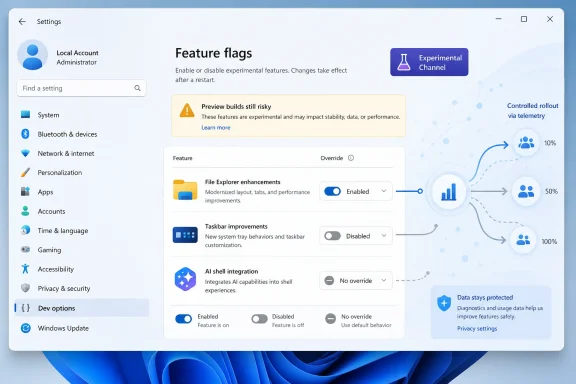
The new Feature flags page is Microsoft’s attempt to resolve that contradiction without abandoning staged experimentation entirely. Instead of forcing users to wait until a server-side rollout blesses their machine, Windows 11 can now expose toggles for officially announced experiments. The setting appears inside the Windows Insider Program area of Settings, where users in the new Experimental experience can enable, disable, or leave features under system control.
That last option matters. This is not Microsoft throwing open every internal Windows switch. It is a curated list of features the company is willing to document, name, and let testers manage. The distinction between “hidden in the build” and “available as a flag” will define how useful this system becomes.
Windows 11 complicated that bargain. Microsoft layered Canary, Dev, Beta, and Release Preview channels on top of gradual feature rollouts, servicing packages, enablement toggles, Store-delivered app updates, regional availability, and hardware gating. A feature could be in a build but not enabled, enabled for some users but not others, documented in one channel while appearing first in another, or present only after a Microsoft Store component updated separately.
For regular users, this was mostly background noise. For Windows watchers, it became a recurring source of confusion. For IT pros, it undercut one of the Insider Program’s most useful purposes: seeing upcoming changes early enough to evaluate policy impact, support implications, training needs, and user complaints before they reached production.
The real irritation was not that Microsoft staged rollouts. Every large platform vendor does. The irritation was that the company often described Insider builds as if they represented a shared preview experience when, in practice, two users on the same build could see meaningfully different operating systems.
Feature flags do not eliminate that complexity. They do give Microsoft a cleaner place to admit it.
ViveTool became the unofficial remote control for Windows experimentation. It let users enable feature IDs that Microsoft had not yet surfaced, sometimes weeks or months before broader rollout. It also became part of the rhythm of Windows coverage: a build drops, watchers inspect it, hidden IDs circulate, and the most adventurous users enable them before Microsoft is ready to discuss them.
That culture had obvious downsides. Hidden features can be unfinished, dependent on server-side services, missing strings, or broken in ways that generate misleading impressions. A half-wired interface discovered through reverse engineering is not the same thing as a public preview. It can make Microsoft look sloppy, but it can also make users overconfident about code that was never meant to be judged.
Still, the popularity of ViveTool exposed a demand Microsoft could not ignore. Enthusiasts were not merely trying to spoil surprises. They wanted agency. They wanted to test what the company was already talking about without waiting for a rollout algorithm to pick their PC.
The Feature flags page is Microsoft’s answer to that demand, but it is also a containment strategy. By providing an official path for announced experiments, Microsoft can reduce the incentive to use third-party tools for mainstream testing while preserving internal switches for work that remains too raw for public consumption.
That sounds obvious. It was not how Windows 11 previews often felt. Announcements regularly came with caveats about gradual rollout, limited availability, or specific subgroups of Insiders. In many cases, the changelog became less a description of the build than a menu of possibilities.
With Feature flags, Microsoft can keep the safety valve of “No override” while allowing more deliberate testers to opt in. A user who wants to stay closer to Microsoft’s rollout schedule can leave the system in charge. A reviewer trying to evaluate a feature can enable it. An administrator who sees a problematic experiment on a test device can disable it, at least where Microsoft exposes that control.
This is a healthier model because it separates two different goals. Microsoft still wants telemetry from staged deployment. Testers want reproducibility. The old model privileged Microsoft’s telemetry needs over the tester’s ability to compare notes. The new model, if implemented consistently, gives both sides something useful.
But the word “consistently” is doing heavy lifting. If only a handful of cosmetic features appear on the Feature flags page while more consequential shell, AI, security, and app changes remain hidden behind server-side logic, the page will become a decorative concession. If Microsoft uses it broadly for documented Insider features, it could become one of the most meaningful quality-of-life improvements the program has had in years.
Beta should be the channel where administrators can ask practical questions. Does this Start menu change confuse users? Does this File Explorer behavior alter support scripts or training materials? Does a new Windows Update surface affect help desk documentation? Does an accessibility change need policy review?
Those questions are hard to answer when the channel itself behaves like a lottery. If a sysadmin has to run multiple test machines or reach for ViveTool just to reproduce a documented Beta change, the channel is failing at its enterprise-adjacent role. Beta does not need to be boring, but it does need to be representative.
By ending Controlled Feature Rollout for announced Beta features, Microsoft is drawing a sharper line between experimentation and pre-release validation. Experimental is where users can opt into fresher ideas. Beta is where the company should show what it intends to ship soon. Release Preview remains the final dress rehearsal.
That structure is not revolutionary. It is what many users assumed the channels already meant. The fact that Microsoft needed a 2026 reset to make it true says something about how muddled the program had become.
Experimental builds are still preview builds. They can break apps, drivers, workflows, battery life, accessibility tools, gaming setups, virtualization stacks, and enterprise management assumptions. A feature that can be toggled on may still depend on services, app versions, cloud-side configuration, language availability, or hardware capabilities. A feature that can be toggled off may not fully undo every state change it introduced.
That is especially important as Windows becomes more entangled with AI features, Copilot integrations, semantic indexing, and cloud-backed experiences. A toggle in Settings may enable the client-side interface, but the real behavior may involve account entitlements, regional rules, model availability, privacy settings, and Microsoft 365 integration. The local switch is only one part of a larger system.
For enthusiasts, this is manageable if the test machine is disposable. For IT teams, it means Experimental belongs in labs, not broad pilot groups. Microsoft may have made early access easier, but easier access is not the same as lower risk.
The best reading of the new system is not “everyone should turn everything on.” It is “people who knowingly joined a preview program can finally choose to test the things Microsoft has publicly put on the table.”
The article that triggered this discussion makes the right caveat: if Microsoft has not officially announced a feature, users may still need a tool like ViveTool to expose it. That is not a loophole in the new system; it is the boundary of the new system. Feature flags are an official preview mechanism, not a universal spelunking tool.
This distinction will create a two-tier culture of Windows experimentation. Mainstream Insiders will use Settings to enable documented features. Hardcore watchers will continue hunting IDs for hidden work. The former will be safer and more reproducible. The latter will remain earlier, messier, and more likely to produce screenshots of things that change or disappear.
The healthier outcome would be for Microsoft to make the official tier interesting enough that most users do not feel compelled to chase the unofficial one. If the Feature flags page routinely lists the major items in each Experimental changelog, ViveTool becomes a specialist instrument again rather than a near-required companion for Windows previews.
That would be good for Microsoft, too. Feedback on officially exposed features is cleaner than feedback on half-enabled internal experiments. If the company wants better signal from the Insider community, it has to stop making users reverse-engineer the path to participation.
That simplicity is the point. Microsoft is moving a power-user ritual from GitHub utilities and command-line snippets into the operating system’s own configuration surface. It is the same philosophical move the company has made elsewhere when unofficial behavior becomes common enough to bless: first tolerate it, then formalize it, then define its limits.
The limits are visible in the options. “Enabled” says the user wants the experiment now. “Disabled” says the user does not want it on that machine. “No override” says Microsoft can decide when the feature lands through the normal rollout path. In a better-designed Insider Program, all three choices are valid.
That matters because not every tester has the same job. A journalist may need to turn a feature on immediately to document it. A developer may want to test compatibility against it. An administrator may want one machine with the feature enabled and another left on the default rollout path. A cautious enthusiast may want to disable something that causes instability without abandoning the entire build.
Feature flags turn the Insider Program from a single pipeline into something closer to a controlled lab. It is still Microsoft’s lab, but users finally get access to some of the switches.
Windows has always been harder. An operating system is not a single app with a relatively contained sandbox. A feature in Windows can touch the shell, kernel-adjacent services, device drivers, identity, networking, power management, app frameworks, enterprise policy, and accessibility infrastructure. The consequences of a bad experiment can be broader than a browser tab misbehaving.
That is why Microsoft’s implementation needs to be more conservative than a browser flags page. It cannot become a dumping ground for every internal feature ID. It has to be curated, documented, reversible where possible, and tied to release notes that explain what users should expect. Otherwise, it will simply move Insider confusion from social media threads into Settings.
The upside is that Windows badly needs a more transparent experimental surface. Too many modern Windows features ship as a fog of build numbers, enablement packages, Store app updates, regional gating, account requirements, and gradual rollout language. A Feature flags page gives Microsoft a place to say, plainly, “this is the experiment, here is its state, and here is what your device is doing.”
That kind of clarity would help everyone from hobbyists to enterprise test teams. The challenge is that clarity requires discipline from Microsoft’s release process, not just a new Settings page.
The more optimistic version is that Microsoft has recognized a structural problem. The Windows Insider Program had become too confusing at the same moment Windows itself was entering a more contentious phase. AI features, shell redesigns, advertising surfaces, account nudges, security defaults, and hardware requirements all need better testing and clearer communication, not less.
If Microsoft wants the Insider community to be useful, it has to make participation feel meaningful. Users who repeatedly install preview builds and do not receive documented features eventually stop giving relevant feedback. Users who resort to hidden toggles provide feedback Microsoft can more easily dismiss. Users who cannot reproduce each other’s environments waste time arguing over whether a feature exists.
A public Feature flags page attacks that problem directly. It makes the test state visible. It gives users a supported way to align their machines. It also creates accountability: if Microsoft says a feature is available for testing, users will expect to see it there.
That accountability may be uncomfortable for the Windows team. It is also overdue.
For enthusiasts, the right setup is a secondary PC, a spare SSD, a virtual machine where practical, or a device that is already outside your critical daily workflow. Keep backups. Expect regressions. Read the build notes before assuming a bug is unique to your system. Treat every enabled flag as a variable you may need to reverse when troubleshooting.
For administrators, the advice is stricter. Experimental should be a scouting channel, not a deployment ring. Beta is the more meaningful place to evaluate near-term changes, especially if Microsoft follows through on enabling announced Beta features by default. Release Preview remains the closest analog to production rehearsal.
There is also a documentation opportunity here. IT teams that track Windows changes internally should record which feature flags were enabled on test devices when evaluating behavior. “Windows 11 build X” will no longer be enough context if two machines on that build can differ by a half-dozen explicit toggles.
The toggle makes testing more deliberate. It also makes sloppy testing easier to spot.
Windows users have become sensitive to the gap between what Microsoft says is coming and what actually appears on their PCs. That sensitivity is not limited to preview builds. It shows up in debates over Copilot, Start menu changes, Settings migrations, taskbar behavior, update quality, default app prompts, and the slow replacement of legacy Control Panel surfaces.
The Insider Program should be where Microsoft narrows that gap. It should let the company show its work, gather feedback, and adjust before changes reach hundreds of millions of users. When the program itself becomes unpredictable, it weakens that feedback loop.
Feature flags are a small mechanism with larger symbolic value. They say Microsoft understands that serious testers need control. They acknowledge that a changelog without access is not enough. They also concede that the community’s unofficial tooling filled a real need.
Trust will not be restored by a page in Settings. It will be restored if Microsoft uses that page consistently, documents features clearly, listens to feedback before retail rollout, and resists the temptation to bury controversial changes behind vague rollout language.
The Windows Insider Program was at its best when it made users feel like participants rather than passengers, and Feature flags move Windows 11 a step back toward that older bargain. The next test is not whether enthusiasts can find the toggle; they will. The test is whether Microsoft can turn that toggle into a durable release discipline, one where experimental Windows features are early, risky, and imperfect, but no longer hidden behind a lottery pretending to be a preview.
Source: Windows Central https://www.windowscentral.com/micr...ss-experimental-features-early-on-windows-11/
 Microsoft Finally Puts the Experiment Back in Experimental
For years, the absurdity of the Windows Insider Program was that joining it did not necessarily make you an insider. You could install the right build, read the right changelog, reboot at the right moment, and still not see the feature Microsoft had just announced. The reason was not user error; it was Microsoft’s Controlled Feature Rollout system, which turned even preview builds into a staggered A/B test.That made sense from a telemetry perspective. If a new File Explorer change, taskbar behavior, or AI-powered shell integration caused crashes, Microsoft could contain the blast radius before a bad experiment reached every tester. But for enthusiasts, reviewers, and administrators trying to understand what was coming next, it created a strange contradiction: the Insider Program promised early access while frequently withholding the very things people joined to test.
The new Feature flags page is Microsoft’s attempt to resolve that contradiction without abandoning staged experimentation entirely. Instead of forcing users to wait until a server-side rollout blesses their machine, Windows 11 can now expose toggles for officially announced experiments. The setting appears inside the Windows Insider Program area of Settings, where users in the new Experimental experience can enable, disable, or leave features under system control.
That last option matters. This is not Microsoft throwing open every internal Windows switch. It is a curated list of features the company is willing to document, name, and let testers manage. The distinction between “hidden in the build” and “available as a flag” will define how useful this system becomes.
The Insider Program Had Become a Changelog Without a Guarantee
The Insider Program used to be easier to explain than it was to use: join a more aggressive ring, get newer code, accept more breakage. Windows 10’s old Fast and Slow ring model was crude, but the bargain was legible. If you took the risk, you usually got the goods.Windows 11 complicated that bargain. Microsoft layered Canary, Dev, Beta, and Release Preview channels on top of gradual feature rollouts, servicing packages, enablement toggles, Store-delivered app updates, regional availability, and hardware gating. A feature could be in a build but not enabled, enabled for some users but not others, documented in one channel while appearing first in another, or present only after a Microsoft Store component updated separately.
For regular users, this was mostly background noise. For Windows watchers, it became a recurring source of confusion. For IT pros, it undercut one of the Insider Program’s most useful purposes: seeing upcoming changes early enough to evaluate policy impact, support implications, training needs, and user complaints before they reached production.
The real irritation was not that Microsoft staged rollouts. Every large platform vendor does. The irritation was that the company often described Insider builds as if they represented a shared preview experience when, in practice, two users on the same build could see meaningfully different operating systems.
Feature flags do not eliminate that complexity. They do give Microsoft a cleaner place to admit it.
ViveTool Won Because Microsoft Left a Vacuum
The rise of ViveTool was never just about impatience. It was about Windows enthusiasts building a workaround for a preview program that had lost the thread of previewing. When Microsoft shipped dormant features inside public builds, the community naturally learned how to flip the bits.ViveTool became the unofficial remote control for Windows experimentation. It let users enable feature IDs that Microsoft had not yet surfaced, sometimes weeks or months before broader rollout. It also became part of the rhythm of Windows coverage: a build drops, watchers inspect it, hidden IDs circulate, and the most adventurous users enable them before Microsoft is ready to discuss them.
That culture had obvious downsides. Hidden features can be unfinished, dependent on server-side services, missing strings, or broken in ways that generate misleading impressions. A half-wired interface discovered through reverse engineering is not the same thing as a public preview. It can make Microsoft look sloppy, but it can also make users overconfident about code that was never meant to be judged.
Still, the popularity of ViveTool exposed a demand Microsoft could not ignore. Enthusiasts were not merely trying to spoil surprises. They wanted agency. They wanted to test what the company was already talking about without waiting for a rollout algorithm to pick their PC.
The Feature flags page is Microsoft’s answer to that demand, but it is also a containment strategy. By providing an official path for announced experiments, Microsoft can reduce the incentive to use third-party tools for mainstream testing while preserving internal switches for work that remains too raw for public consumption.
A Settings Toggle Is Also a New Contract
The important change is not the mechanics of clicking Settings, then Windows Update, then Windows Insider Program, then Advanced options, then Feature flags. That workflow will become muscle memory quickly enough. The important change is the implied contract: if Microsoft announces a feature for testing, testers should have a reasonable way to test it.That sounds obvious. It was not how Windows 11 previews often felt. Announcements regularly came with caveats about gradual rollout, limited availability, or specific subgroups of Insiders. In many cases, the changelog became less a description of the build than a menu of possibilities.
With Feature flags, Microsoft can keep the safety valve of “No override” while allowing more deliberate testers to opt in. A user who wants to stay closer to Microsoft’s rollout schedule can leave the system in charge. A reviewer trying to evaluate a feature can enable it. An administrator who sees a problematic experiment on a test device can disable it, at least where Microsoft exposes that control.
This is a healthier model because it separates two different goals. Microsoft still wants telemetry from staged deployment. Testers want reproducibility. The old model privileged Microsoft’s telemetry needs over the tester’s ability to compare notes. The new model, if implemented consistently, gives both sides something useful.
But the word “consistently” is doing heavy lifting. If only a handful of cosmetic features appear on the Feature flags page while more consequential shell, AI, security, and app changes remain hidden behind server-side logic, the page will become a decorative concession. If Microsoft uses it broadly for documented Insider features, it could become one of the most meaningful quality-of-life improvements the program has had in years.
Beta Becomes the Channel for People Who Actually Need to Plan
The other half of the overhaul is less flashy but arguably more important for IT professionals. Microsoft says the new Beta experience is being realigned around features expected to reach retail in the following weeks, with announced features enabled by default. That is a very different promise from “some people in Beta may see this if the rollout reaches them.”Beta should be the channel where administrators can ask practical questions. Does this Start menu change confuse users? Does this File Explorer behavior alter support scripts or training materials? Does a new Windows Update surface affect help desk documentation? Does an accessibility change need policy review?
Those questions are hard to answer when the channel itself behaves like a lottery. If a sysadmin has to run multiple test machines or reach for ViveTool just to reproduce a documented Beta change, the channel is failing at its enterprise-adjacent role. Beta does not need to be boring, but it does need to be representative.
By ending Controlled Feature Rollout for announced Beta features, Microsoft is drawing a sharper line between experimentation and pre-release validation. Experimental is where users can opt into fresher ideas. Beta is where the company should show what it intends to ship soon. Release Preview remains the final dress rehearsal.
That structure is not revolutionary. It is what many users assumed the channels already meant. The fact that Microsoft needed a 2026 reset to make it true says something about how muddled the program had become.
The New Experimental Channel Is Not a Daily Driver License
There is a risk that the Feature flags page will be misread as a safety feature. It is not. A visible toggle does not make an unfinished Windows feature stable, supported, or suitable for a primary work machine. If anything, it makes it easier for curious users to create unstable combinations that Microsoft’s default rollout might have avoided.Experimental builds are still preview builds. They can break apps, drivers, workflows, battery life, accessibility tools, gaming setups, virtualization stacks, and enterprise management assumptions. A feature that can be toggled on may still depend on services, app versions, cloud-side configuration, language availability, or hardware capabilities. A feature that can be toggled off may not fully undo every state change it introduced.
That is especially important as Windows becomes more entangled with AI features, Copilot integrations, semantic indexing, and cloud-backed experiences. A toggle in Settings may enable the client-side interface, but the real behavior may involve account entitlements, regional rules, model availability, privacy settings, and Microsoft 365 integration. The local switch is only one part of a larger system.
For enthusiasts, this is manageable if the test machine is disposable. For IT teams, it means Experimental belongs in labs, not broad pilot groups. Microsoft may have made early access easier, but easier access is not the same as lower risk.
The best reading of the new system is not “everyone should turn everything on.” It is “people who knowingly joined a preview program can finally choose to test the things Microsoft has publicly put on the table.”
The Death of the Feature Lottery Will Be Uneven
Microsoft is not abolishing hidden Windows work. Nor should it. Operating systems contain unfinished code all the time, and there are legitimate reasons to keep some features dormant, undocumented, or restricted to internal rings. The public Feature flags page is not a replacement for engineering discipline.The article that triggered this discussion makes the right caveat: if Microsoft has not officially announced a feature, users may still need a tool like ViveTool to expose it. That is not a loophole in the new system; it is the boundary of the new system. Feature flags are an official preview mechanism, not a universal spelunking tool.
This distinction will create a two-tier culture of Windows experimentation. Mainstream Insiders will use Settings to enable documented features. Hardcore watchers will continue hunting IDs for hidden work. The former will be safer and more reproducible. The latter will remain earlier, messier, and more likely to produce screenshots of things that change or disappear.
The healthier outcome would be for Microsoft to make the official tier interesting enough that most users do not feel compelled to chase the unofficial one. If the Feature flags page routinely lists the major items in each Experimental changelog, ViveTool becomes a specialist instrument again rather than a near-required companion for Windows previews.
That would be good for Microsoft, too. Feedback on officially exposed features is cleaner than feedback on half-enabled internal experiments. If the company wants better signal from the Insider community, it has to stop making users reverse-engineer the path to participation.
The Setting Itself Is Simple; the Policy Behind It Is the Product
The how-to is straightforward. On a supported Insider build, open Settings, go to Windows Update, enter the Windows Insider Program page, confirm the device is in the Experimental experience, open Advanced options, and use Feature flags to enable, disable, or leave eligible features under Microsoft’s control. Apply the change and restart when Windows asks.That simplicity is the point. Microsoft is moving a power-user ritual from GitHub utilities and command-line snippets into the operating system’s own configuration surface. It is the same philosophical move the company has made elsewhere when unofficial behavior becomes common enough to bless: first tolerate it, then formalize it, then define its limits.
The limits are visible in the options. “Enabled” says the user wants the experiment now. “Disabled” says the user does not want it on that machine. “No override” says Microsoft can decide when the feature lands through the normal rollout path. In a better-designed Insider Program, all three choices are valid.
That matters because not every tester has the same job. A journalist may need to turn a feature on immediately to document it. A developer may want to test compatibility against it. An administrator may want one machine with the feature enabled and another left on the default rollout path. A cautious enthusiast may want to disable something that causes instability without abandoning the entire build.
Feature flags turn the Insider Program from a single pipeline into something closer to a controlled lab. It is still Microsoft’s lab, but users finally get access to some of the switches.
Microsoft Is Borrowing a Browser Idea for an Operating System Problem
The comparison to browser flags is obvious and useful, but it only goes so far. Chrome, Edge, and other browsers have long exposed experimental flags for features that may affect performance, security, interface behavior, and compatibility. Users are warned that the settings are experimental, but the presence of a flag gives testers a known place to look.Windows has always been harder. An operating system is not a single app with a relatively contained sandbox. A feature in Windows can touch the shell, kernel-adjacent services, device drivers, identity, networking, power management, app frameworks, enterprise policy, and accessibility infrastructure. The consequences of a bad experiment can be broader than a browser tab misbehaving.
That is why Microsoft’s implementation needs to be more conservative than a browser flags page. It cannot become a dumping ground for every internal feature ID. It has to be curated, documented, reversible where possible, and tied to release notes that explain what users should expect. Otherwise, it will simply move Insider confusion from social media threads into Settings.
The upside is that Windows badly needs a more transparent experimental surface. Too many modern Windows features ship as a fog of build numbers, enablement packages, Store app updates, regional gating, account requirements, and gradual rollout language. A Feature flags page gives Microsoft a place to say, plainly, “this is the experiment, here is its state, and here is what your device is doing.”
That kind of clarity would help everyone from hobbyists to enterprise test teams. The challenge is that clarity requires discipline from Microsoft’s release process, not just a new Settings page.
The Real Test Is Whether Microsoft Can Keep the Page Honest
There is a cynical version of this story in which Feature flags exist mostly to calm enthusiasts while Microsoft continues to stage the most important changes invisibly. Windows users have seen enough half-finished control surfaces to be wary. A new page in Settings does not automatically mean a new culture of transparency.The more optimistic version is that Microsoft has recognized a structural problem. The Windows Insider Program had become too confusing at the same moment Windows itself was entering a more contentious phase. AI features, shell redesigns, advertising surfaces, account nudges, security defaults, and hardware requirements all need better testing and clearer communication, not less.
If Microsoft wants the Insider community to be useful, it has to make participation feel meaningful. Users who repeatedly install preview builds and do not receive documented features eventually stop giving relevant feedback. Users who resort to hidden toggles provide feedback Microsoft can more easily dismiss. Users who cannot reproduce each other’s environments waste time arguing over whether a feature exists.
A public Feature flags page attacks that problem directly. It makes the test state visible. It gives users a supported way to align their machines. It also creates accountability: if Microsoft says a feature is available for testing, users will expect to see it there.
That accountability may be uncomfortable for the Windows team. It is also overdue.
The Practical Advice Is Boring Because the Risk Is Real
Anyone tempted to join Experimental just for early feature access should start with an unromantic rule: do not do this on a machine you cannot afford to rebuild. The new setting lowers friction, not risk. Windows preview builds are still preview builds, and the most exciting features are often exciting precisely because they are unfinished.For enthusiasts, the right setup is a secondary PC, a spare SSD, a virtual machine where practical, or a device that is already outside your critical daily workflow. Keep backups. Expect regressions. Read the build notes before assuming a bug is unique to your system. Treat every enabled flag as a variable you may need to reverse when troubleshooting.
For administrators, the advice is stricter. Experimental should be a scouting channel, not a deployment ring. Beta is the more meaningful place to evaluate near-term changes, especially if Microsoft follows through on enabling announced Beta features by default. Release Preview remains the closest analog to production rehearsal.
There is also a documentation opportunity here. IT teams that track Windows changes internally should record which feature flags were enabled on test devices when evaluating behavior. “Windows 11 build X” will no longer be enough context if two machines on that build can differ by a half-dozen explicit toggles.
The toggle makes testing more deliberate. It also makes sloppy testing easier to spot.
The Windows Insider Reset Has a Trust Problem to Solve
Microsoft is framing the Insider changes as a simplification, and in channel terms that is fair. Moving Dev into Experimental and clarifying Beta’s purpose makes the program easier to explain. But simplification is only part of the story. The deeper issue is trust.Windows users have become sensitive to the gap between what Microsoft says is coming and what actually appears on their PCs. That sensitivity is not limited to preview builds. It shows up in debates over Copilot, Start menu changes, Settings migrations, taskbar behavior, update quality, default app prompts, and the slow replacement of legacy Control Panel surfaces.
The Insider Program should be where Microsoft narrows that gap. It should let the company show its work, gather feedback, and adjust before changes reach hundreds of millions of users. When the program itself becomes unpredictable, it weakens that feedback loop.
Feature flags are a small mechanism with larger symbolic value. They say Microsoft understands that serious testers need control. They acknowledge that a changelog without access is not enough. They also concede that the community’s unofficial tooling filled a real need.
Trust will not be restored by a page in Settings. It will be restored if Microsoft uses that page consistently, documents features clearly, listens to feedback before retail rollout, and resists the temptation to bury controversial changes behind vague rollout language.
The Switchboard Changes the Insider Bargain
The immediate lesson from the new Feature flags workflow is not that everyone should rush into Experimental. It is that Microsoft has changed what opting into early Windows testing can mean. The bargain is no longer simply “take this build and maybe get the feature.” It is moving toward “take this build and choose which announced experiments you are willing to run.”- Microsoft’s Feature flags page gives Windows 11 Insiders an official way to enable, disable, or defer some announced experimental features without relying on ViveTool.
- The new Experimental experience is the natural home for early feature testing, but it remains unsuitable for production machines and critical workflows.
- The revised Beta experience matters more for IT planning because Microsoft is positioning it around features expected to reach retail soon, with announced changes enabled by default.
- ViveTool is not obsolete, because unannounced and deeply hidden features may still require unofficial methods, but its role should shrink for mainstream Insider testing.
- The usefulness of Feature flags will depend less on the Settings UI than on whether Microsoft consistently exposes the features it announces in release notes.
The Windows Insider Program was at its best when it made users feel like participants rather than passengers, and Feature flags move Windows 11 a step back toward that older bargain. The next test is not whether enthusiasts can find the toggle; they will. The test is whether Microsoft can turn that toggle into a durable release discipline, one where experimental Windows features are early, risky, and imperfect, but no longer hidden behind a lottery pretending to be a preview.
Source: Windows Central https://www.windowscentral.com/micr...ss-experimental-features-early-on-windows-11/
