

Microsoft began testing Android-to-PC app continuity for Windows 11 Insiders on August 22, 2025, with Build 26200.5761 in the Dev Channel and a Spotify-first “Resume alert” that lets playback move from an Android phone to a Windows 11 PC. The feature is small in its first public form, but its implications are not. Microsoft is again trying to make Windows feel less like a standalone desktop operating system and more like the center of a mixed-device life.
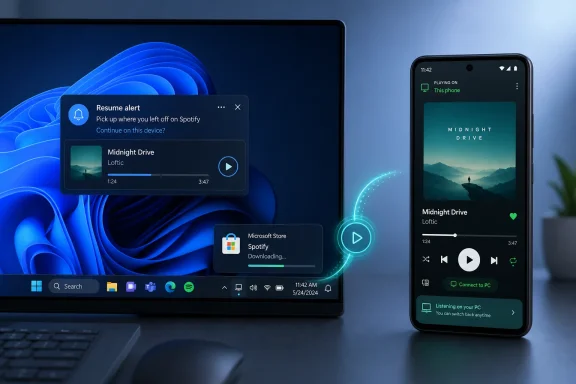
As detailed by Microsoft on the Windows Insider Blog and echoed by coverage from PCWorld, Windows Central, TechRadar, and others, the new capability lets a linked Android phone surface an active Spotify session on the Windows taskbar. Click the alert, and the desktop Spotify app opens to continue the same music or podcast. If Spotify is not installed, Windows can start a one-click Microsoft Store installation before handing the user into the app.
That sounds like a convenience feature, and at launch it mostly is. But the strategic point is larger: Microsoft is not trying to copy Apple’s Continuity feature inside a closed hardware club. It is trying to build a continuity layer for the far messier world most people actually inhabit — Android phones, Windows PCs, third-party apps, work accounts, Bluetooth oddities, and Store plumbing that has to behave itself under enterprise policy.
Apple made cross-device continuity feel ordinary years ago because Apple controls the phone, the laptop, the tablet, the watch, the account layer, much of the app distribution path, and enough of the developer culture to make the whole thing feel inevitable. Handoff, Universal Clipboard, AirDrop, iPhone mirroring, call relay, and message sync all work because Apple’s devices assume the user is living inside Apple’s perimeter.
Microsoft’s problem has always been different. Windows dominates the PC installed base, but Microsoft does not own the dominant phone platform. Windows Phone is gone, and the company’s modern mobile strategy is built around Android, Microsoft 365, Edge, OneDrive, Phone Link, and selective partnerships rather than a single end-to-end device stack.
That makes this Insider feature more interesting than a “Windows gets Apple Handoff” headline suggests. The technical bar is lower for Spotify than for, say, resuming a complex editing session in a creative app, but the product bar is arguably higher. Microsoft has to make continuity work across ecosystems that were not designed to be obedient to Windows.
The first implementation is intentionally narrow. Microsoft says Windows Insiders in the Dev and Beta Channels can begin resuming Android apps on a PC, starting with Spotify tracks and episodes. The user needs to connect the Android phone through Link to Windows, allow mobile device access in Windows settings, permit background activity for the phone-side app, and use the same Spotify account on phone and PC.
That is not magic. It is choreography. And in Windows, choreography is often the difference between a feature people rely on every day and a demo that disappears into Settings after one confusing notification.
That would not be true for every category. A messaging app raises privacy and notification questions. A banking app raises security questions. A productivity app raises document-state, identity, and file-location questions. A video app raises licensing, playback, and picture-in-picture behavior. Games raise a wholly different set of state synchronization and controller problems.
Microsoft’s first public build therefore tests the least controversial version of the idea: you were listening on your phone, now you are at your PC, and Windows offers to continue. The taskbar alert is the key UI decision. Microsoft could have buried this in Phone Link or pushed it through notifications alone, but placing it at the taskbar turns the PC itself into the landing zone.
That matters because the taskbar is Windows’ most valuable real estate. Microsoft has spent the Windows 11 era trying to make it calmer, more centered, and more predictable, even while layering in widgets, Copilot, Teams integrations, and other experiments. A phone-resume alert sitting there says this is not merely a Phone Link feature. It is an operating-system behavior.
There is also a Microsoft Store angle that should not be missed. If Spotify is not present, the alert can initiate installation from the Store. That converts a cross-device moment into app acquisition, which is exactly the kind of loop Microsoft has struggled to make credible in the Windows Store era. Done well, continuity could give users a reason to install native Windows apps rather than defaulting to browser tabs.
This is where Microsoft’s open-ecosystem advantage becomes a support burden. Apple can assume an iPhone, an Apple ID, and nearby Apple devices. Microsoft has to account for Android OEM settings that aggressively restrict background activity, vendor-specific battery savers, work profiles, privacy prompts, Store policies, regional differences, and users who may have multiple Microsoft accounts and a separate Spotify login.
The requirement to let Link to Windows run in the background is especially important. Android’s battery management can be hostile to persistent companion services, and some OEM skins are more aggressive than others. If the phone stops reporting activity, Windows cannot gracefully resume what it does not know exists.
For IT administrators, the feature also sits in a familiar gray zone. Consumer convenience can become enterprise ambiguity when personal Android devices are linked to managed PCs. Many organizations already have opinions about Phone Link, clipboard sync, notification mirroring, Bluetooth pairing, and Microsoft account sign-in. App continuity adds another reason to revisit those policies.
That does not mean enterprises should panic. In its current Spotify form, the feature is hardly a data-exfiltration engine. But the direction of travel is clear: Windows is gaining more awareness of what users are doing on their phones. The more app categories Microsoft brings into Resume, the more administrators will want policy knobs that distinguish harmless media continuation from sensitive work-state transfer.
That caveat is not boilerplate. It is the operating model for modern Windows development. Microsoft no longer treats every preview build as a simple conveyor belt to the next general release. Instead, it uses Insider channels to test UI, plumbing, telemetry, and user appetite in slices.
This makes the Android resume feature both real and provisional. It is real because Microsoft has documented it, shipped it to Insiders, and invited developers to integrate with Resume. It is provisional because the Spotify-only implementation could evolve substantially before it reaches stable Windows 11 builds, if it does at all.
The build’s other changes reinforce that this is not a single-feature drop. Microsoft is also testing improved battery iconography on the lock screen, new touch gestures for Click to Do on Copilot+ PCs, direct navigation links from the agent in Settings, simplified controls for Automatic Super Resolution on Snapdragon-powered Copilot+ PCs, Windows Share pinning, and new keyboard shortcuts for en dash and em dash insertion.
That mixture is classic 2020s Windows: a little AI, a little Arm, a little polish, a little accessibility-adjacent input work, a little Store and sharing refinement, and a handful of fixes. The headline belongs to Android continuity, but the build is really about making Windows feel more context-aware across devices and input modes.
For developers, this raises practical questions. What state should be resumable? How much context should be passed? Does the PC app need to be installed, or can the Store handle that gracefully? What happens when the phone app and PC app have different feature sets? How should identity work when users are signed into different accounts on different devices?
The answer will vary by app category. A podcast app can pass content ID and timestamp. A note-taking app may pass document ID, cursor position, and recent edits. A messaging app might pass a conversation thread but must avoid exposing sensitive content on a shared PC. A browser can pass a URL, but even that becomes complicated when profiles, workspaces, private browsing, and enterprise controls enter the frame.
Microsoft’s challenge is to make the developer story broad without making it vague. If Resume becomes just another Windows API that requires too much custom plumbing for too little user adoption, many developers will ignore it. If Microsoft can tie it to Store discovery, Phone Link adoption, Microsoft account identity, and a predictable taskbar surface, it has a better chance.
There is also a competitive incentive. Android developers already think across phone, tablet, Chromebook, web, and sometimes Windows. If Microsoft can offer a continuity surface that is easy enough to implement and visible enough to matter, Windows becomes a more attractive endpoint for Android-first services.
The Android resume feature pushes Phone Link from mirroring and access into continuation. Mirroring says, “Show me what is on my phone.” Continuation says, “Move this activity into the PC environment.” That is a more ambitious claim, because it asks the user to trust Windows as the next natural place for a mobile task.
It also makes Microsoft’s Android strategy look more coherent. The company does not need to beat Android. It needs Android to make Windows more useful. Every useful bridge between the two weakens the argument that a Windows PC and an Android phone are separate islands connected only by cloud services and USB cables.
Samsung users have often received the richest Phone Link integrations first, reflecting Microsoft’s long-running partnership with Samsung. But the broader opportunity is not limited to one OEM. If Resume is meant to work at the app layer, Microsoft can court developers and Android users beyond any single handset brand.
Still, there is a risk of fragmentation. If some features require certain OEMs, some require Store apps, some require Microsoft accounts, some require app-specific sign-in, and some require Insider toggles, users will not develop a stable mental model. Apple’s advantage is not just integration. It is predictability. Microsoft has to earn that the hard way.
That is powerful for Microsoft because the Microsoft Store has never fully solved Windows software distribution. Windows users still download installers from websites, use package managers, rely on bundled apps, open web apps, or avoid Store versions entirely. A continuity alert that installs the app only when it is useful creates a more purposeful Store moment.
But it also raises trust questions. Users will want to know when Windows is merely suggesting an app, when it is installing an app, and whether that behavior can be controlled. Microsoft’s recent history with Start menu recommendations, Edge prompts, and app promotions means it does not get unlimited benefit of the doubt.
The best version of Resume is user-initiated and contextually obvious. You were listening to Spotify, Windows noticed through a linked phone you already authorized, and you clicked a clear prompt. The worst version would feel like ambient cross-promotion, where Windows treats every mobile activity as a chance to nudge the user toward a desktop app or Store listing.
Microsoft’s wording suggests the company understands the need for restraint. The feature begins with a taskbar alert, not an automatic launch. It requires linking, permissions, and account continuity. That is the right posture for a feature that could become intrusive if overextended.
That makes Microsoft’s problem less elegant but more relevant to many users. A large share of Windows users carry Android phones. Many workplaces standardize on Windows PCs while allowing a mix of personal mobile devices. Families often mix iPads, Android handsets, Windows laptops, Chromebooks, and smart TVs. The real world is not a keynote slide.
If Microsoft can make continuity work across that chaos, it has a different kind of advantage. It can become the interoperability layer for people who did not buy into a single vendor’s stack. That has always been one of Windows’ strongest identities: not the purest platform, but the one that works with everything.
The difficulty is that interoperability rarely feels luxurious. It feels useful, then occasionally brittle, then useful again. Microsoft must decide whether it wants Resume to be a polished flagship experience or a pragmatic connector that improves slowly across apps and devices.
The Spotify launch suggests pragmatism. Start with media, use existing account state, put the prompt in the taskbar, route installation through the Store, and let developers opt in. It is not glamorous, but it is plausible.
That matters because Copilot+ PCs have needed more everyday value. Recall drew scrutiny and forced Microsoft into a security reset. AI features have often been easier to market than to make indispensable. But cross-device continuity is concrete. Users understand moving from phone to PC.
If Microsoft can connect AI-driven context with device continuity without making users feel surveilled, it could give Copilot-era Windows a more practical identity. Imagine Settings that knows you are trying to connect a device and sends you to the right page, or a Resume feature that offers only the next step that makes sense. That is a better story than “AI everywhere” pasted onto menus.
The danger is the same as always: context can become creepiness when transparency is poor. Windows users have long memories about telemetry, forced defaults, and unwanted suggestions. Microsoft needs the feature to feel like a tool the user controls, not a system that watches the phone and waits to intervene.
The Insider build’s known issues are a reminder that this future is still under construction. Microsoft flags problems with Recall in the European Economic Area, File Explorer’s Shared section, temporary files scanning in Settings, and Xbox controller Bluetooth bugchecks. These are preview-build realities, but they also show why continuity features must be tested cautiously before landing on production machines.
That can be good. It may reduce friction for hybrid workers, improve adoption of approved apps, and keep users from emailing themselves links or files. It may also make Windows feel less hostile to employees who live on Android phones. Not every cross-device flow is a compliance nightmare.
But administrators will need clear controls. Can Resume be disabled by policy? Can Phone Link be limited without breaking other approved experiences? Can personal and work profiles be kept separate? Can app categories be allowed or blocked? Will Store-based installation obey enterprise Store and app control policies?
Those questions become urgent only when the feature expands beyond Spotify. Media playback is low risk. Office documents, browser sessions, files opened in Copilot, messaging threads, and enterprise SaaS apps are different. The moment Windows offers to continue a work-relevant task from a personally owned phone, IT governance enters the chat.
Microsoft has a chance to get ahead of that tension. The company’s best enterprise features usually succeed when they are manageable before they are ubiquitous. Resume should not arrive broadly as a consumer delight first and an admin cleanup problem later.
Those limitations are not evidence of failure. They are evidence that Microsoft is starting with the minimum viable version of a bigger platform bet. The company has already spent years trying to make Phone Link normal. Resume is what happens when the bridge stops being only a mirror.
The natural next steps are not hard to imagine. Media apps are the easiest expansion. Browsers and reading apps are next. Productivity apps follow if state synchronization is trustworthy. Messaging and communications apps may come later, if privacy presentation and notification discipline are strong enough.
The broader question is whether developers will see enough benefit. Spotify support gives Microsoft a high-profile proof point, but one marquee app does not make a platform. The Resume API needs documentation, predictable behavior, and visible user adoption. Developers will not prioritize Windows continuity simply because Microsoft would like them to.
There is also a competitive dynamic with the web. Many “resume” scenarios already happen through cloud-backed web apps. If a user can open Spotify, Google Docs, Notion, Outlook, or Slack in a browser and continue from recent state, Windows has to add something better than a shortcut. The taskbar alert must save enough time to become a habit.
For decades, Windows was the place you went when you sat down at the PC. Cloud services softened that boundary. Phone Link poked holes in it. Resume starts to erase it, at least in one direction: a task that begins on Android can now ask Windows to become its next screen.
That is a profound shift in user expectation. Once people get used to continuity for music, they will expect it for articles, documents, calls, chats, maps, tickets, photos, and work items. The first time it fails for an app they care about, the absence will feel like a bug, not a missing feature.
That is how platform expectations are made. Not by one huge launch, but by small conveniences that teach users a new default. Apple did this inside its own ecosystem. Microsoft is trying to do it across a border it does not control.
If Microsoft can keep the prompts respectful, the permissions intelligible, the developer path simple, and the enterprise controls serious, Android app continuity could become one of those Windows features that feels minor right up until it feels missing on every PC that lacks it. The future of Windows is not just an AI assistant in the corner or a new chip badge on the box; it is the slow rebuilding of the PC as the most useful screen in a user’s messy, multi-device life.
As detailed by Microsoft on the Windows Insider Blog and echoed by coverage from PCWorld, Windows Central, TechRadar, and others, the new capability lets a linked Android phone surface an active Spotify session on the Windows taskbar. Click the alert, and the desktop Spotify app opens to continue the same music or podcast. If Spotify is not installed, Windows can start a one-click Microsoft Store installation before handing the user into the app.
That sounds like a convenience feature, and at launch it mostly is. But the strategic point is larger: Microsoft is not trying to copy Apple’s Continuity feature inside a closed hardware club. It is trying to build a continuity layer for the far messier world most people actually inhabit — Android phones, Windows PCs, third-party apps, work accounts, Bluetooth oddities, and Store plumbing that has to behave itself under enterprise policy.
 Microsoft’s Continuity Play Starts Where Apple’s Wall Ends
Apple made cross-device continuity feel ordinary years ago because Apple controls the phone, the laptop, the tablet, the watch, the account layer, much of the app distribution path, and enough of the developer culture to make the whole thing feel inevitable. Handoff, Universal Clipboard, AirDrop, iPhone mirroring, call relay, and message sync all work because Apple’s devices assume the user is living inside Apple’s perimeter.Microsoft’s problem has always been different. Windows dominates the PC installed base, but Microsoft does not own the dominant phone platform. Windows Phone is gone, and the company’s modern mobile strategy is built around Android, Microsoft 365, Edge, OneDrive, Phone Link, and selective partnerships rather than a single end-to-end device stack.
That makes this Insider feature more interesting than a “Windows gets Apple Handoff” headline suggests. The technical bar is lower for Spotify than for, say, resuming a complex editing session in a creative app, but the product bar is arguably higher. Microsoft has to make continuity work across ecosystems that were not designed to be obedient to Windows.
The first implementation is intentionally narrow. Microsoft says Windows Insiders in the Dev and Beta Channels can begin resuming Android apps on a PC, starting with Spotify tracks and episodes. The user needs to connect the Android phone through Link to Windows, allow mobile device access in Windows settings, permit background activity for the phone-side app, and use the same Spotify account on phone and PC.
That is not magic. It is choreography. And in Windows, choreography is often the difference between a feature people rely on every day and a demo that disappears into Settings after one confusing notification.
Spotify Is the Pilot Because Audio Forgives the Rough Edges
Spotify is a smart first app because audio continuity has a forgiving failure mode. If the handoff is delayed by a second, the user probably tolerates it. If a track resumes in the wrong place, Spotify already has its own cloud state and device model to smooth over the mistake. If the desktop app needs to be installed, the user understands why a music app belongs on a PC.That would not be true for every category. A messaging app raises privacy and notification questions. A banking app raises security questions. A productivity app raises document-state, identity, and file-location questions. A video app raises licensing, playback, and picture-in-picture behavior. Games raise a wholly different set of state synchronization and controller problems.
Microsoft’s first public build therefore tests the least controversial version of the idea: you were listening on your phone, now you are at your PC, and Windows offers to continue. The taskbar alert is the key UI decision. Microsoft could have buried this in Phone Link or pushed it through notifications alone, but placing it at the taskbar turns the PC itself into the landing zone.
That matters because the taskbar is Windows’ most valuable real estate. Microsoft has spent the Windows 11 era trying to make it calmer, more centered, and more predictable, even while layering in widgets, Copilot, Teams integrations, and other experiments. A phone-resume alert sitting there says this is not merely a Phone Link feature. It is an operating-system behavior.
There is also a Microsoft Store angle that should not be missed. If Spotify is not present, the alert can initiate installation from the Store. That converts a cross-device moment into app acquisition, which is exactly the kind of loop Microsoft has struggled to make credible in the Windows Store era. Done well, continuity could give users a reason to install native Windows apps rather than defaulting to browser tabs.
The Setup Flow Reveals the Real Product Boundary
The setup path is straightforward on paper: enable mobile device access under Bluetooth and devices, manage the linked Android phone, configure Link to Windows on the handset, allow background activity, and make sure Spotify uses the same account on both ends. For enthusiasts, that is a few minutes. For mainstream users, every additional permission prompt is a potential exit ramp.This is where Microsoft’s open-ecosystem advantage becomes a support burden. Apple can assume an iPhone, an Apple ID, and nearby Apple devices. Microsoft has to account for Android OEM settings that aggressively restrict background activity, vendor-specific battery savers, work profiles, privacy prompts, Store policies, regional differences, and users who may have multiple Microsoft accounts and a separate Spotify login.
The requirement to let Link to Windows run in the background is especially important. Android’s battery management can be hostile to persistent companion services, and some OEM skins are more aggressive than others. If the phone stops reporting activity, Windows cannot gracefully resume what it does not know exists.
For IT administrators, the feature also sits in a familiar gray zone. Consumer convenience can become enterprise ambiguity when personal Android devices are linked to managed PCs. Many organizations already have opinions about Phone Link, clipboard sync, notification mirroring, Bluetooth pairing, and Microsoft account sign-in. App continuity adds another reason to revisit those policies.
That does not mean enterprises should panic. In its current Spotify form, the feature is hardly a data-exfiltration engine. But the direction of travel is clear: Windows is gaining more awareness of what users are doing on their phones. The more app categories Microsoft brings into Resume, the more administrators will want policy knobs that distinguish harmless media continuation from sensitive work-state transfer.
The Insider Channel Is Doing Its Usual Double Duty
Build 26200.5761 is a Dev Channel release, and Microsoft’s language is careful. The company says features in these builds may change, be removed, or never ship outside Insider testing. It also says many features are controlled through gradual rollout, especially for users who enable the “get the latest updates as they are available” toggle.That caveat is not boilerplate. It is the operating model for modern Windows development. Microsoft no longer treats every preview build as a simple conveyor belt to the next general release. Instead, it uses Insider channels to test UI, plumbing, telemetry, and user appetite in slices.
This makes the Android resume feature both real and provisional. It is real because Microsoft has documented it, shipped it to Insiders, and invited developers to integrate with Resume. It is provisional because the Spotify-only implementation could evolve substantially before it reaches stable Windows 11 builds, if it does at all.
The build’s other changes reinforce that this is not a single-feature drop. Microsoft is also testing improved battery iconography on the lock screen, new touch gestures for Click to Do on Copilot+ PCs, direct navigation links from the agent in Settings, simplified controls for Automatic Super Resolution on Snapdragon-powered Copilot+ PCs, Windows Share pinning, and new keyboard shortcuts for en dash and em dash insertion.
That mixture is classic 2020s Windows: a little AI, a little Arm, a little polish, a little accessibility-adjacent input work, a little Store and sharing refinement, and a handful of fixes. The headline belongs to Android continuity, but the build is really about making Windows feel more context-aware across devices and input modes.
The Resume API Is the Part Developers Should Watch
The most consequential sentence in Microsoft’s announcement may be the one aimed at app developers. Microsoft is inviting developers to integrate with Resume so users can continue tasks from a phone app on a PC app. That is the difference between a Spotify trick and a platform feature.For developers, this raises practical questions. What state should be resumable? How much context should be passed? Does the PC app need to be installed, or can the Store handle that gracefully? What happens when the phone app and PC app have different feature sets? How should identity work when users are signed into different accounts on different devices?
The answer will vary by app category. A podcast app can pass content ID and timestamp. A note-taking app may pass document ID, cursor position, and recent edits. A messaging app might pass a conversation thread but must avoid exposing sensitive content on a shared PC. A browser can pass a URL, but even that becomes complicated when profiles, workspaces, private browsing, and enterprise controls enter the frame.
Microsoft’s challenge is to make the developer story broad without making it vague. If Resume becomes just another Windows API that requires too much custom plumbing for too little user adoption, many developers will ignore it. If Microsoft can tie it to Store discovery, Phone Link adoption, Microsoft account identity, and a predictable taskbar surface, it has a better chance.
There is also a competitive incentive. Android developers already think across phone, tablet, Chromebook, web, and sometimes Windows. If Microsoft can offer a continuity surface that is easy enough to implement and visible enough to matter, Windows becomes a more attractive endpoint for Android-first services.
Phone Link Is Becoming Windows’ Unofficial Mobile Layer
Phone Link began as a convenience bridge: messages, notifications, photos, calls, and eventually deeper integrations with select devices. It has steadily become Microsoft’s substitute for owning a phone OS. That is an awkward role, but Microsoft has played it with increasing confidence.The Android resume feature pushes Phone Link from mirroring and access into continuation. Mirroring says, “Show me what is on my phone.” Continuation says, “Move this activity into the PC environment.” That is a more ambitious claim, because it asks the user to trust Windows as the next natural place for a mobile task.
It also makes Microsoft’s Android strategy look more coherent. The company does not need to beat Android. It needs Android to make Windows more useful. Every useful bridge between the two weakens the argument that a Windows PC and an Android phone are separate islands connected only by cloud services and USB cables.
Samsung users have often received the richest Phone Link integrations first, reflecting Microsoft’s long-running partnership with Samsung. But the broader opportunity is not limited to one OEM. If Resume is meant to work at the app layer, Microsoft can court developers and Android users beyond any single handset brand.
Still, there is a risk of fragmentation. If some features require certain OEMs, some require Store apps, some require Microsoft accounts, some require app-specific sign-in, and some require Insider toggles, users will not develop a stable mental model. Apple’s advantage is not just integration. It is predictability. Microsoft has to earn that the hard way.
Windows Is Quietly Rewriting the Meaning of “Native”
The one-click Spotify installation flow is more than a convenience. It points to a subtle shift in what “native app” means on Windows. If a task starts on the phone and the PC can summon the right desktop app at the right moment, the user may stop caring whether the app was preinstalled, discovered, or deliberately searched for.That is powerful for Microsoft because the Microsoft Store has never fully solved Windows software distribution. Windows users still download installers from websites, use package managers, rely on bundled apps, open web apps, or avoid Store versions entirely. A continuity alert that installs the app only when it is useful creates a more purposeful Store moment.
But it also raises trust questions. Users will want to know when Windows is merely suggesting an app, when it is installing an app, and whether that behavior can be controlled. Microsoft’s recent history with Start menu recommendations, Edge prompts, and app promotions means it does not get unlimited benefit of the doubt.
The best version of Resume is user-initiated and contextually obvious. You were listening to Spotify, Windows noticed through a linked phone you already authorized, and you clicked a clear prompt. The worst version would feel like ambient cross-promotion, where Windows treats every mobile activity as a chance to nudge the user toward a desktop app or Store listing.
Microsoft’s wording suggests the company understands the need for restraint. The feature begins with a taskbar alert, not an automatic launch. It requires linking, permissions, and account continuity. That is the right posture for a feature that could become intrusive if overextended.
The Apple Comparison Helps, But It Also Misleads
It is tempting to frame this feature as Microsoft catching up to Apple. That comparison is fair at the surface level and misleading underneath. Apple solved continuity by building a private highway between Apple devices. Microsoft is trying to build useful junctions on public roads.That makes Microsoft’s problem less elegant but more relevant to many users. A large share of Windows users carry Android phones. Many workplaces standardize on Windows PCs while allowing a mix of personal mobile devices. Families often mix iPads, Android handsets, Windows laptops, Chromebooks, and smart TVs. The real world is not a keynote slide.
If Microsoft can make continuity work across that chaos, it has a different kind of advantage. It can become the interoperability layer for people who did not buy into a single vendor’s stack. That has always been one of Windows’ strongest identities: not the purest platform, but the one that works with everything.
The difficulty is that interoperability rarely feels luxurious. It feels useful, then occasionally brittle, then useful again. Microsoft must decide whether it wants Resume to be a polished flagship experience or a pragmatic connector that improves slowly across apps and devices.
The Spotify launch suggests pragmatism. Start with media, use existing account state, put the prompt in the taskbar, route installation through the Store, and let developers opt in. It is not glamorous, but it is plausible.
Copilot+ PCs Are the Other Story Hiding in the Build
The same build that brings Android resume also includes changes aimed at Copilot+ PCs: Click to Do touch invocation, Settings agent navigation, and Automatic Super Resolution improvements for Snapdragon-powered systems. Microsoft is not separating cross-device continuity from its AI PC push. It is bundling them into the same vision of Windows as a system that understands context.That matters because Copilot+ PCs have needed more everyday value. Recall drew scrutiny and forced Microsoft into a security reset. AI features have often been easier to market than to make indispensable. But cross-device continuity is concrete. Users understand moving from phone to PC.
If Microsoft can connect AI-driven context with device continuity without making users feel surveilled, it could give Copilot-era Windows a more practical identity. Imagine Settings that knows you are trying to connect a device and sends you to the right page, or a Resume feature that offers only the next step that makes sense. That is a better story than “AI everywhere” pasted onto menus.
The danger is the same as always: context can become creepiness when transparency is poor. Windows users have long memories about telemetry, forced defaults, and unwanted suggestions. Microsoft needs the feature to feel like a tool the user controls, not a system that watches the phone and waits to intervene.
The Insider build’s known issues are a reminder that this future is still under construction. Microsoft flags problems with Recall in the European Economic Area, File Explorer’s Shared section, temporary files scanning in Settings, and Xbox controller Bluetooth bugchecks. These are preview-build realities, but they also show why continuity features must be tested cautiously before landing on production machines.
Administrators Will Care Less About Spotify Than About Precedent
For home users, the near-term question is simple: does the Spotify alert appear, and does it work? For administrators, the more important question is what category of Windows behavior this creates. A PC that can resume phone activity is a PC participating in a personal device graph.That can be good. It may reduce friction for hybrid workers, improve adoption of approved apps, and keep users from emailing themselves links or files. It may also make Windows feel less hostile to employees who live on Android phones. Not every cross-device flow is a compliance nightmare.
But administrators will need clear controls. Can Resume be disabled by policy? Can Phone Link be limited without breaking other approved experiences? Can personal and work profiles be kept separate? Can app categories be allowed or blocked? Will Store-based installation obey enterprise Store and app control policies?
Those questions become urgent only when the feature expands beyond Spotify. Media playback is low risk. Office documents, browser sessions, files opened in Copilot, messaging threads, and enterprise SaaS apps are different. The moment Windows offers to continue a work-relevant task from a personally owned phone, IT governance enters the chat.
Microsoft has a chance to get ahead of that tension. The company’s best enterprise features usually succeed when they are manageable before they are ubiquitous. Resume should not arrive broadly as a consumer delight first and an admin cleanup problem later.
The Rough Edges Tell Us Where This Is Headed
The current implementation has obvious limitations. It starts with one app. It depends on a linked Android phone. It requires background activity permissions. It assumes the user is comfortable with Windows surfacing phone context. It uses Insider rollout mechanics that mean even eligible testers may not see it immediately.Those limitations are not evidence of failure. They are evidence that Microsoft is starting with the minimum viable version of a bigger platform bet. The company has already spent years trying to make Phone Link normal. Resume is what happens when the bridge stops being only a mirror.
The natural next steps are not hard to imagine. Media apps are the easiest expansion. Browsers and reading apps are next. Productivity apps follow if state synchronization is trustworthy. Messaging and communications apps may come later, if privacy presentation and notification discipline are strong enough.
The broader question is whether developers will see enough benefit. Spotify support gives Microsoft a high-profile proof point, but one marquee app does not make a platform. The Resume API needs documentation, predictable behavior, and visible user adoption. Developers will not prioritize Windows continuity simply because Microsoft would like them to.
There is also a competitive dynamic with the web. Many “resume” scenarios already happen through cloud-backed web apps. If a user can open Spotify, Google Docs, Notion, Outlook, or Slack in a browser and continue from recent state, Windows has to add something better than a shortcut. The taskbar alert must save enough time to become a habit.
The Small Alert That Could Redraw the PC’s Edges
This first Android resume build is not something most production users should chase. It is an Insider feature, under gradual rollout, and its first public use case is intentionally modest. But it is worth paying attention to because it changes where Windows begins and ends.For decades, Windows was the place you went when you sat down at the PC. Cloud services softened that boundary. Phone Link poked holes in it. Resume starts to erase it, at least in one direction: a task that begins on Android can now ask Windows to become its next screen.
That is a profound shift in user expectation. Once people get used to continuity for music, they will expect it for articles, documents, calls, chats, maps, tickets, photos, and work items. The first time it fails for an app they care about, the absence will feel like a bug, not a missing feature.
That is how platform expectations are made. Not by one huge launch, but by small conveniences that teach users a new default. Apple did this inside its own ecosystem. Microsoft is trying to do it across a border it does not control.
The Build’s Real Message Is Bigger Than Spotify
Microsoft’s Build 26200.5761 is easy to summarize as “Spotify can resume from Android to Windows,” but the more useful reading is this:- Microsoft is testing Android-to-Windows app continuity in Insider builds rather than shipping it broadly to stable Windows 11 users immediately.
- The first supported public scenario is Spotify playback, with a taskbar Resume alert and optional Microsoft Store installation if the desktop app is missing.
- The feature depends on Phone Link-style device access, background permission for Link to Windows on Android, and matching app account state.
- Microsoft is inviting developers to integrate with Resume, which is the difference between a one-app demo and a possible Windows platform capability.
- Administrators should treat the current feature as low-risk in practice but important in precedent, because future app categories could involve sensitive work state.
- The same build also continues Microsoft’s Copilot+ PC push, with changes to Click to Do, Settings agent navigation, Automatic Super Resolution, lock-screen battery icons, Windows Share, and input shortcuts.
If Microsoft can keep the prompts respectful, the permissions intelligible, the developer path simple, and the enterprise controls serious, Android app continuity could become one of those Windows features that feels minor right up until it feels missing on every PC that lacks it. The future of Windows is not just an AI assistant in the corner or a new chip badge on the box; it is the slow rebuilding of the PC as the most useful screen in a user’s messy, multi-device life.
References
- Primary source: The Eastleigh Voice
Published: 2026-07-06T11:10:13.556489
Loading…
eastleighvoice.co.ke - Official source: blogs.windows.com
Announcing Windows 11 Insider Preview Build 26200.5761 (Dev Channel)
Hello Windows Insiders, today we are releasing Windows 11 Insider Preview Build 26200.5761 (KB5064093) to the Dev Channel. Changes in Dev Channel builds and updates are documented in two buckets: new features, improblogs.windows.com - Related coverage: pcworld.com
Loading…
www.pcworld.com - Related coverage: pureinfotech.com
Loading…
pureinfotech.com - Related coverage: windowsreport.com
Loading…
windowsreport.com - Related coverage: windowsforum.com
Loading…
windowsforum.com
- Related coverage: windowscentral.com
Loading…
www.windowscentral.com - Related coverage: warp2search.net
Loading…
www.warp2search.net - Related coverage: techtimes.com
Loading…
www.techtimes.com - Related coverage: techradar.com
Loading…
www.techradar.com - Related coverage: androidcentral.com
Loading…
www.androidcentral.com