
Microsoft’s latest Windows 11 quality push, previewed in June 2026 and expected to broaden through July’s Patch Tuesday cadence, targets everyday annoyances including noisy widgets, update recovery, update pausing, display comfort, and Bluetooth reliability rather than trying to sell users on another headline feature.
That matters because Windows 11’s problem has rarely been a shortage of ideas. It has been the feeling that the operating system too often interrupts the person using it, advertises at them, or changes behavior without earning the disruption. The most interesting part of this update is not that Widgets are being improved; it is that Microsoft appears to be learning that restraint can be a feature.
Windows 11 Widgets were always a plausible idea trapped inside an irritating implementation. A glanceable pane for weather, calendar information, sports, traffic, watchlists, reminders, and lightweight news sounds useful on paper. In practice, many users came to experience it as one more surface where Microsoft could push MSN-style content into the desktop.
The widget board’s original sin was not that it existed. It was that it behaved like a feature with its own agenda. A user moved the mouse, a panel appeared, a red badge demanded attention, and what should have been ambient information became yet another little contest for focus.
That is why the reported “quieter widgets” shift is more significant than it first sounds. Microsoft is not merely sanding a rough edge; it is tacitly admitting that Windows 11’s default posture has been too loud. A calmer widget experience, fewer aggressive prompts, and more obvious control over what appears are small changes, but they attack a large source of desktop resentment.
The lesson should not stop with Widgets. Windows users have been saying for years that they want Windows to feel like an operating system again, not a concierge desk, billboard, news portal, and AI demo booth competing for the foreground.
But users do not experience those surfaces as distribution channels. They experience them as the place where work begins. When a weather glance turns into a news feed, or a system notification turns into a recommendation, the user’s trust in the interface erodes.
Widgets became a symbol of that erosion because they blurred the line between utility and engagement bait. The weather card was useful. The flood of algorithmic headlines beside it made the feature feel less like a dashboard and more like a sidebar from a web portal that had escaped into the OS.
A quieter Widgets board is therefore an act of product discipline. It says that a desktop feature can be useful without being hungry. If Microsoft follows through, Widgets may finally become the sort of thing users leave enabled because it saves time, not because they have not yet found the toggle to disable it.
Microsoft has spent years trying to make Windows Update more seamless, but seamlessness is not the same as confidence. A user who cannot easily recover from a bad update does not care how elegant the servicing stack is supposed to be. They care that the machine was working yesterday and is unreliable today.
A more visible rollback path is valuable because it changes the psychology of updates. If users believe they have a sane escape route, they are less likely to treat every cumulative update as a dice roll. That is especially important as Microsoft continues to layer security changes, driver servicing, firmware coordination, and feature enablement into the same general update rhythm.
For IT departments, rollback tooling is never a substitute for testing rings, deployment controls, backups, and known-issue monitoring. But for small businesses, enthusiasts, and unmanaged PCs, a clearer recovery path can be the difference between a temporary annoyance and a lost weekend.
The strategic point is simple: Microsoft cannot ask users to accept continuous change while making reversal feel obscure. Modern Windows needs to be updateable, but it also needs to be recoverable.
Windows has improved here over the years, but the cultural scar remains. Users still talk about Windows Update as though it might ambush them before a meeting, during a gaming session, or while a machine is doing unattended work. That reputation is sticky because it was earned across many versions and many badly timed restarts.
More granular pause controls can help Microsoft move from paternalism to partnership. The operating system still has to keep itself secure, especially in a threat environment where unpatched consumer PCs become part of everyone else’s problem. But there is a big difference between “you may not ignore updates forever” and “the computer will decide when your work is interruptible.”
For enterprises, the question is less whether users can click a pause button and more how the behavior fits into policy. Admins need predictable deferral, reporting, compliance state, and rollback visibility. Home users need language that makes clear what is being delayed, for how long, and with what tradeoff.
The best Windows Update experience is not one users never notice. It is one they understand well enough to trust.
Windows has long had Night Light, but display comfort is not a solved problem. Users may want stronger tinting, different color treatment, accessibility-oriented adjustments, or a visual environment that is less fatiguing without simply making everything orange after sunset. A more flexible overlay could be useful for people with light sensitivity, migraine triggers, or simply tired eyes.
This is where Microsoft’s operating-system role matters. Third-party utilities can and do fill gaps, but display behavior is foundational enough that built-in controls carry special weight. They travel with the machine, respect system settings, and are easier to explain to less technical users.
The accessibility angle should not be treated as a side note. Many of Windows’ best improvements over the last decade have come when Microsoft designed for edge cases and discovered that everyone benefits. A calmer screen is not glamorous, but neither is a reliable keyboard shortcut or a readable dialog box. These things matter because they accumulate.
That makes Bluetooth reliability a quality-of-life issue rather than a peripheral footnote. For hybrid workers, Bluetooth is the meeting stack. For students, it is the lecture stack. For gamers, it may be a controller, headset, keyboard, or mouse. For accessibility users, it can be part of the input path itself.
The challenge for Microsoft is that Bluetooth pain often comes from a messy supply chain. Windows has to mediate among radios, drivers, firmware, headphones, codecs, power management states, and decades of compatibility assumptions. Users, naturally, blame the PC in front of them.
That blame is not unfair. The operating system is the layer users can see, so the operating system owns the experience. Any improvement that makes Bluetooth more predictable is worth more than its changelog line suggests.
That idea cuts across the reported features. Quieter Widgets reduce distraction. Rollback reduces fear. Smarter pause controls reduce scheduling anxiety. Screen tint reduces physical strain. Bluetooth fixes reduce friction in the daily device ecosystem.
None of these is a moonshot. That is precisely why they matter. Windows 11 does not need another round of features that look impressive in a launch video but fail to improve the first 30 minutes of a workday. It needs dozens of small corrections that make the OS feel like it is on the user’s side.
This is also a useful contrast with Microsoft’s more aggressive AI positioning. Copilot and on-device AI features may become important, and some will be genuinely useful. But for many Windows users, the hierarchy of needs remains stubbornly practical: do not interrupt me, do not break my device, do not bury settings, do not make my accessories unreliable, and do not make me fight the interface.
If Microsoft wants users to care about the future of Windows, it must first make the present less annoying.
That model has advantages. It lets Microsoft gather telemetry and feedback before a wider rollout. It also gives curious users a way to try improvements without enrolling in the more volatile Windows Insider Program.
But optional previews are not risk-free. They are still updates. Anyone relying on a PC for production work should treat them with the same caution they would apply to any pre-release-adjacent servicing change. The irony is obvious: one of the features being discussed is better rollback, but the need for caution remains.
For WindowsForum readers, the sensible approach is familiar. Test optional updates on non-critical hardware first, watch for known issues, and avoid treating a quality-of-life update as an emergency unless it fixes a problem you actually have.
A quieter Widgets experience is useful if it reduces help-desk tickets and user complaints, but many organizations will continue disabling consumer-facing surfaces outright. A better pause model is helpful only if it aligns with compliance rules. Rollback improvements are meaningful only if they are observable, manageable, and compatible with existing recovery workflows.
The enterprise concern is not cynicism. It is scar tissue. Windows administrators have seen features arrive with consumer-friendly defaults, change across cumulative updates, and require new policy interpretation after the fact. They will want to know exactly which controls exist, how they map to Group Policy or MDM, and whether Microsoft’s defaults differ across Home, Pro, Enterprise, Education, managed, and unmanaged devices.
Still, the direction is encouraging. A Windows team focused on reliability, reversibility, and reduced distraction is working on the same problems IT pros complain about. The gap is that administrators need Microsoft to translate that product intent into documentation, controls, and predictable lifecycle behavior.
The best version of this update is not merely nicer for home users. It is quieter for enterprises because there are fewer surprises to suppress.
That is why a single update cannot redeem Widgets or Windows Update. Users will not suddenly trust the widget board because a badge is calmer. Admins will not declare update anxiety solved because rollback gets easier. The product has to behave better consistently.
This is where Microsoft faces the hardest design challenge in mature software. The company must improve Windows without constantly reminding users that Windows is being improved. Every new prompt, panel, badge, and onboarding card risks undermining the very calm Microsoft says it wants to create.
The operating system’s best behavior is often invisible. A Bluetooth headset reconnects. A display wakes properly. A patch installs at a tolerable time. A feed does not open unless summoned. A recovery option is available when needed and otherwise stays out of the way.
If Microsoft can make that boring reliability feel normal, Windows 11 will be in a healthier place than any flashy feature drop could make it.
If July’s broader rollout preserves that restraint, Windows 11 may take a modest but meaningful step toward becoming an operating system people do not have to tame before they can enjoy. The future of Windows will still include AI, cloud services, and Microsoft’s commercial ambitions, but the platform’s credibility will be rebuilt in quieter ways: fewer interruptions, safer updates, better recovery, more reliable hardware, and defaults that finally understand the desktop is where users go to get their own work done.
That matters because Windows 11’s problem has rarely been a shortage of ideas. It has been the feeling that the operating system too often interrupts the person using it, advertises at them, or changes behavior without earning the disruption. The most interesting part of this update is not that Widgets are being improved; it is that Microsoft appears to be learning that restraint can be a feature.
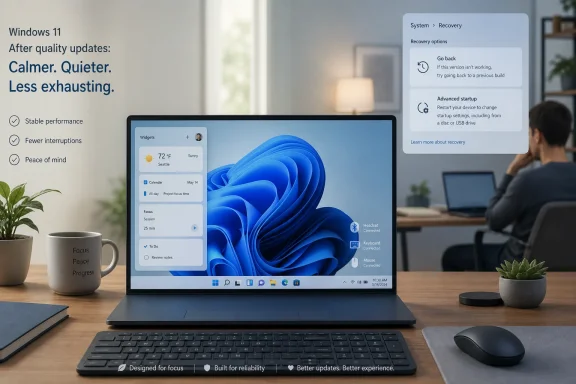 Microsoft Finally Discovers the Power of Doing Less
Windows 11 Widgets were always a plausible idea trapped inside an irritating implementation. A glanceable pane for weather, calendar information, sports, traffic, watchlists, reminders, and lightweight news sounds useful on paper. In practice, many users came to experience it as one more surface where Microsoft could push MSN-style content into the desktop.The widget board’s original sin was not that it existed. It was that it behaved like a feature with its own agenda. A user moved the mouse, a panel appeared, a red badge demanded attention, and what should have been ambient information became yet another little contest for focus.
That is why the reported “quieter widgets” shift is more significant than it first sounds. Microsoft is not merely sanding a rough edge; it is tacitly admitting that Windows 11’s default posture has been too loud. A calmer widget experience, fewer aggressive prompts, and more obvious control over what appears are small changes, but they attack a large source of desktop resentment.
The lesson should not stop with Widgets. Windows users have been saying for years that they want Windows to feel like an operating system again, not a concierge desk, billboard, news portal, and AI demo booth competing for the foreground.
The Desktop Is Not a Feed
Microsoft’s temptation is obvious. Windows sits on hundreds of millions of PCs, which makes every piece of desktop real estate strategically valuable. The Start menu, taskbar, lock screen, Settings app, search box, notification area, and Widgets pane are all possible distribution channels for Microsoft services.But users do not experience those surfaces as distribution channels. They experience them as the place where work begins. When a weather glance turns into a news feed, or a system notification turns into a recommendation, the user’s trust in the interface erodes.
Widgets became a symbol of that erosion because they blurred the line between utility and engagement bait. The weather card was useful. The flood of algorithmic headlines beside it made the feature feel less like a dashboard and more like a sidebar from a web portal that had escaped into the OS.
A quieter Widgets board is therefore an act of product discipline. It says that a desktop feature can be useful without being hungry. If Microsoft follows through, Widgets may finally become the sort of thing users leave enabled because it saves time, not because they have not yet found the toggle to disable it.
The Rollback Tool Speaks to a Deeper Trust Problem
The reported PC rollback improvement lands in a different emotional register. Widgets are about irritation; rollback is about fear. Every Windows administrator and sufficiently seasoned home user has lived through the moment when an update turns a working machine into a troubleshooting project.Microsoft has spent years trying to make Windows Update more seamless, but seamlessness is not the same as confidence. A user who cannot easily recover from a bad update does not care how elegant the servicing stack is supposed to be. They care that the machine was working yesterday and is unreliable today.
A more visible rollback path is valuable because it changes the psychology of updates. If users believe they have a sane escape route, they are less likely to treat every cumulative update as a dice roll. That is especially important as Microsoft continues to layer security changes, driver servicing, firmware coordination, and feature enablement into the same general update rhythm.
For IT departments, rollback tooling is never a substitute for testing rings, deployment controls, backups, and known-issue monitoring. But for small businesses, enthusiasts, and unmanaged PCs, a clearer recovery path can be the difference between a temporary annoyance and a lost weekend.
The strategic point is simple: Microsoft cannot ask users to accept continuous change while making reversal feel obscure. Modern Windows needs to be updateable, but it also needs to be recoverable.
Update Pausing Becomes a Governance Feature, Not a Convenience
Smarter update pausing sounds minor until one remembers how many Windows complaints are really complaints about timing. The update itself may be necessary. The forced reboot during the wrong hour is what people remember.Windows has improved here over the years, but the cultural scar remains. Users still talk about Windows Update as though it might ambush them before a meeting, during a gaming session, or while a machine is doing unattended work. That reputation is sticky because it was earned across many versions and many badly timed restarts.
More granular pause controls can help Microsoft move from paternalism to partnership. The operating system still has to keep itself secure, especially in a threat environment where unpatched consumer PCs become part of everyone else’s problem. But there is a big difference between “you may not ignore updates forever” and “the computer will decide when your work is interruptible.”
For enterprises, the question is less whether users can click a pause button and more how the behavior fits into policy. Admins need predictable deferral, reporting, compliance state, and rollback visibility. Home users need language that makes clear what is being delayed, for how long, and with what tradeoff.
The best Windows Update experience is not one users never notice. It is one they understand well enough to trust.
Screen Tint Is Small, Human, and Overdue
The reported blue-light or screen-tint addition belongs to a different category: humane computing. It will not sell PCs. It will not transform productivity metrics. It will, however, acknowledge that people stare at Windows displays for many hours in rooms, offices, bedrooms, classrooms, and late-night troubleshooting sessions where a harsh screen can feel physically punishing.Windows has long had Night Light, but display comfort is not a solved problem. Users may want stronger tinting, different color treatment, accessibility-oriented adjustments, or a visual environment that is less fatiguing without simply making everything orange after sunset. A more flexible overlay could be useful for people with light sensitivity, migraine triggers, or simply tired eyes.
This is where Microsoft’s operating-system role matters. Third-party utilities can and do fill gaps, but display behavior is foundational enough that built-in controls carry special weight. They travel with the machine, respect system settings, and are easier to explain to less technical users.
The accessibility angle should not be treated as a side note. Many of Windows’ best improvements over the last decade have come when Microsoft designed for edge cases and discovered that everyone benefits. A calmer screen is not glamorous, but neither is a reliable keyboard shortcut or a readable dialog box. These things matter because they accumulate.
Bluetooth Reliability Is the Sort of Boring Fix Windows Needs More Often
Bluetooth on Windows has improved, but its reputation still lags behind user expectations. Pairing can be fussy. Audio devices can behave differently across chipsets. Headsets may reconnect unpredictably, expose confusing profiles, or work perfectly on a phone and then turn awkward on a PC.That makes Bluetooth reliability a quality-of-life issue rather than a peripheral footnote. For hybrid workers, Bluetooth is the meeting stack. For students, it is the lecture stack. For gamers, it may be a controller, headset, keyboard, or mouse. For accessibility users, it can be part of the input path itself.
The challenge for Microsoft is that Bluetooth pain often comes from a messy supply chain. Windows has to mediate among radios, drivers, firmware, headphones, codecs, power management states, and decades of compatibility assumptions. Users, naturally, blame the PC in front of them.
That blame is not unfair. The operating system is the layer users can see, so the operating system owns the experience. Any improvement that makes Bluetooth more predictable is worth more than its changelog line suggests.
The Bigger Story Is Windows 11’s Attempt to Become Less Exhausting
The MakeUseOf framing rightly emphasizes the everyday annoyance of Widgets, but the broader pattern is more interesting. Microsoft appears to be assembling a cluster of changes around a single product idea: Windows 11 should feel less exhausting.That idea cuts across the reported features. Quieter Widgets reduce distraction. Rollback reduces fear. Smarter pause controls reduce scheduling anxiety. Screen tint reduces physical strain. Bluetooth fixes reduce friction in the daily device ecosystem.
None of these is a moonshot. That is precisely why they matter. Windows 11 does not need another round of features that look impressive in a launch video but fail to improve the first 30 minutes of a workday. It needs dozens of small corrections that make the OS feel like it is on the user’s side.
This is also a useful contrast with Microsoft’s more aggressive AI positioning. Copilot and on-device AI features may become important, and some will be genuinely useful. But for many Windows users, the hierarchy of needs remains stubbornly practical: do not interrupt me, do not break my device, do not bury settings, do not make my accessories unreliable, and do not make me fight the interface.
If Microsoft wants users to care about the future of Windows, it must first make the present less annoying.
Optional Previews Are Where Patience Meets Curiosity
The rollout mechanics matter. Optional Windows updates are where Microsoft often stages non-security improvements before broader release in the following month’s cumulative update cycle. Enthusiasts can go looking for them; most users will receive the changes later through the normal servicing path.That model has advantages. It lets Microsoft gather telemetry and feedback before a wider rollout. It also gives curious users a way to try improvements without enrolling in the more volatile Windows Insider Program.
But optional previews are not risk-free. They are still updates. Anyone relying on a PC for production work should treat them with the same caution they would apply to any pre-release-adjacent servicing change. The irony is obvious: one of the features being discussed is better rollback, but the need for caution remains.
For WindowsForum readers, the sensible approach is familiar. Test optional updates on non-critical hardware first, watch for known issues, and avoid treating a quality-of-life update as an emergency unless it fixes a problem you actually have.
Enterprise IT Will Like the Direction and Still Ask for Receipts
For managed environments, the “quieter Windows” story is welcome but incomplete. IT departments do not deploy vibes. They deploy builds, policies, baselines, and rollback plans.A quieter Widgets experience is useful if it reduces help-desk tickets and user complaints, but many organizations will continue disabling consumer-facing surfaces outright. A better pause model is helpful only if it aligns with compliance rules. Rollback improvements are meaningful only if they are observable, manageable, and compatible with existing recovery workflows.
The enterprise concern is not cynicism. It is scar tissue. Windows administrators have seen features arrive with consumer-friendly defaults, change across cumulative updates, and require new policy interpretation after the fact. They will want to know exactly which controls exist, how they map to Group Policy or MDM, and whether Microsoft’s defaults differ across Home, Pro, Enterprise, Education, managed, and unmanaged devices.
Still, the direction is encouraging. A Windows team focused on reliability, reversibility, and reduced distraction is working on the same problems IT pros complain about. The gap is that administrators need Microsoft to translate that product intent into documentation, controls, and predictable lifecycle behavior.
The best version of this update is not merely nicer for home users. It is quieter for enterprises because there are fewer surprises to suppress.
Microsoft’s Real Competition Is User Memory
Windows 11’s reputation problem is not only about Windows 11. It is about the accumulated memory of Windows behavior over many years: forced restarts, inconsistent settings, Start menu experiments, unwanted recommendations, driver weirdness, confusing defaults, and a persistent sense that Microsoft sometimes treats the desktop as rented space.That is why a single update cannot redeem Widgets or Windows Update. Users will not suddenly trust the widget board because a badge is calmer. Admins will not declare update anxiety solved because rollback gets easier. The product has to behave better consistently.
This is where Microsoft faces the hardest design challenge in mature software. The company must improve Windows without constantly reminding users that Windows is being improved. Every new prompt, panel, badge, and onboarding card risks undermining the very calm Microsoft says it wants to create.
The operating system’s best behavior is often invisible. A Bluetooth headset reconnects. A display wakes properly. A patch installs at a tolerable time. A feed does not open unless summoned. A recovery option is available when needed and otherwise stays out of the way.
If Microsoft can make that boring reliability feel normal, Windows 11 will be in a healthier place than any flashy feature drop could make it.
The June Fixes Draw a Map of Windows 11’s Real Repair Job
This update is not a revolution, and that is its strength. The concrete lesson is that Windows 11’s repair work now lives in the small spaces where users lose patience.- Widgets are reportedly being made quieter and more controllable, which addresses the feature’s biggest practical flaw rather than pretending users merely failed to appreciate it.
- The rollback work matters because Windows Update trust depends on recovery being understandable, not just on installation being automatic.
- Smarter pause controls are valuable because update timing is often the difference between responsible maintenance and user hostility.
- Screen-tint improvements show Microsoft paying attention to physical comfort and accessibility-adjacent needs that rarely make keynote slides.
- Bluetooth reliability fixes are the kind of unglamorous platform work that users notice only when it stops failing.
- Optional rollout timing means enthusiasts can test early, while cautious users and administrators should still wait for broader servicing maturity.
If July’s broader rollout preserves that restraint, Windows 11 may take a modest but meaningful step toward becoming an operating system people do not have to tame before they can enjoy. The future of Windows will still include AI, cloud services, and Microsoft’s commercial ambitions, but the platform’s credibility will be rebuilt in quieter ways: fewer interruptions, safer updates, better recovery, more reliable hardware, and defaults that finally understand the desktop is where users go to get their own work done.
References
- Primary source: MakeUseOf
Published: Mon, 22 Jun 2026 20:37:00 GMT
Loading…
www.makeuseof.com - Related coverage: techradar.com
Microsoft confirms Windows 11 26H2 is another boring update that does nothing — but here's why I'm happy about that | TechRadar
It's all about avoiding a repeat of the bug-fest that was 24H2www.techradar.com - Related coverage: pcworld.com
Windows 11’s June update makes PCs feel faster. Here's what's new | PCWorld
Windows 11 received a host of new features and improvements in June. Here are the five most exciting ones. Be sure to give them a go!www.pcworld.com - Related coverage: windowslatest.com
I tested Windows 11 June 2026 Updates: Here's everything new, improved, and fixed
Windows 11 June 2026 Patch Tuesday update brings Low Latency Profile, Shared Audio, Multi-App Camera, NPU tracking, and Secure Boot updates. www.windowslatest.com
- Related coverage: allthings.how
Windows 11 Build 26220.8680 quiets Widgets and adds Screen tint (Beta)
The Beta Channel flight trims Widgets memory use, calms taskbar alerts, and brings a new color overlay plus Magnifier and File Explorer fixes.allthings.how - Related coverage: windowscentral.com
Here are the 6 biggest features and improvements coming to Windows 11 in the June 2026 update on Tuesday | Windows Central
Microsoft's June 2026 Windows 11 update boosts responsiveness, adds Shared Audio, expands NPU metrics, and improves OOBE.www.windowscentral.com
- Related coverage: techspot.com
Loading…
www.techspot.com - Related coverage: digitaltrends.com
The Windows 11 June update makes your Start menu and Search feel much more snappier - Digital Trends
Windows 11's June update rolls out Low Latency Profile to all 24H2 and 25H2 users, a CPU boost technique that makes Start, Search, and Action Center feel noticeably faster.www.digitaltrends.com - Related coverage: tomshardware.com
Microsoft confirms Windows 11 26H1 will be for Arm devices only at launch — Snapdragon X2-powered devices officially shipping with 26H1 | Tom's Hardware
It's 24H2 all over again, but with the caveat that 26H1 will only support specific hardware for its entire lifecycle. Devices running 26H1 will not be able to upgrade to 26H2.www.tomshardware.com - Official source: blogs.windows.com
Loading…
blogs.windows.com