Microsoft’s June 9, 2026 cumulative update for Windows 11 version 24H2 and 25H2 makes the operating system’s new Low Latency Profile broadly available, giving supported PCs a short CPU boost when launching apps and opening core shell surfaces such as Start, Search, and Action Center. The change is not a benchmark miracle, and Microsoft has not packaged it as one. It is more interesting than that: an admission that Windows 11’s biggest performance problem has often been feel, not throughput.
That distinction matters. For years, Microsoft has asked users to accept a heavier, more animated, more web-connected shell while insisting that the platform underneath remained fast enough. Low Latency Profile is a small technical lever, but it lands inside a much larger argument about whether Windows 11 can become pleasant again without Microsoft ripping out the very architecture it spent the last decade assembling.
Most people do not experience operating-system performance as a synthetic score. They experience it as the half-second pause after pressing the Windows key, the stutter before Quick Settings appears, the delay between clicking an app icon and seeing the first usable window. Windows 11 has often been judged harshly in exactly those moments.
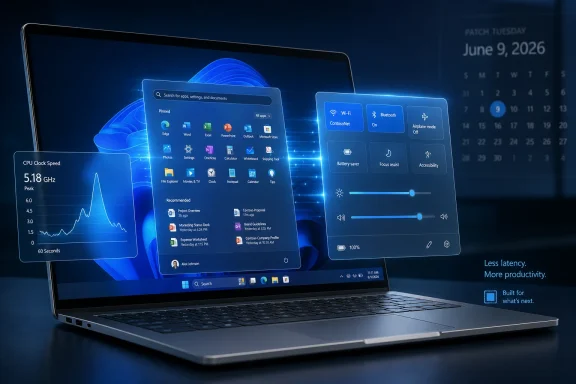
Low Latency Profile targets that psychological surface area. Rather than promising that every workload will run faster, it appears to raise CPU clocks briefly when Windows is about to render a visible shell interaction or launch an application. The processor does not stay pinned at maximum speed; it spikes, does the interactive work, and falls back.
That makes the feature less dramatic than the name suggests but more defensible than some of the early criticism implied. Modern operating systems already use power-management hints, scheduler priorities, and boost behavior to make foreground work feel immediate. Microsoft’s sin was not inventing a suspicious trick. It was letting Windows 11 feel as though it had forgotten one of the oldest lessons in desktop computing: latency beats raw power in the user’s hand.
The June Patch Tuesday release folds that work into the mainstream servicing channel. The update is identified as KB5094126, with OS builds 26100.8655 and 26200.8655 for Windows 11 24H2 and 25H2 respectively. That is important because this is no longer merely an Insider experiment or a Release Preview curiosity. It is now part of the Windows that ordinary users and managed fleets are expected to run.
The better way to understand it is as a responsiveness feature. Microsoft’s release language says the update accelerates app launch and core shell experiences including Start, Search, and Action Center. That phrasing is careful. It does not promise more frames per second in Cyberpunk 2077, shorter Blender renders, or faster Excel recalculation on a large workbook.
On a modern desktop processor already running on an aggressive power plan, the visible difference may be subtle or nonexistent. Many gaming desktops and high-end workstations already jump quickly from idle to boost clocks. For those machines, Windows has less headroom to recover from conservative power behavior.
The feature is more likely to matter on the class of PCs where Windows 11 has most often felt worse than its spec sheet: thin-and-light laptops, budget machines, older systems with large gaps between idle and boost frequency, and devices tuned heavily for battery life. These machines can feel slow not because they lack peak performance, but because they hesitate before using it.
That is why this change may generate wildly inconsistent user reports. One person may see Task Manager show a dramatic clock spike when opening Start and conclude that Windows has become visibly snappier. Another may enable the same update on a high-end desktop and wonder what the fuss was about. Both can be telling the truth.
That matters because Start is not just an app launcher. It is a trust surface. If the operating system hesitates at the moment the user asks for the most basic command layer, everything else feels suspect. The delay may be small, but it happens in a place where the user expects instant obedience.
Microsoft’s recent Windows 11 work suggests the company understands this belatedly. The Start menu is being revised again, the taskbar is slowly regaining lost flexibility, and Windows Update is gaining more controls aimed at reducing friction. Low Latency Profile belongs to that same family of repairs, even though it lives below the interface.
The interesting part is that Microsoft is not simply reversing Windows 11 back to Windows 10. It is trying to preserve the modern shell while making it feel less compromised. That is harder than reintroducing an old menu or exposing a missing setting. It requires changing the interaction between the shell, scheduler, power framework, app model, and rendering pipeline.
But the technical argument is weaker. Desktop operating systems have long treated foreground interactivity as special. They schedule UI threads differently, prioritize visible work, accelerate animations through the GPU, prefetch likely resources, and use power hints to avoid sluggish ramp-up. A short-lived CPU boost is not conceptually alien to Windows; it is another way to tell the hardware that the next few milliseconds matter.
The real question is whether Microsoft is using the technique to complement structural optimization or to avoid it. If Low Latency Profile becomes a fig leaf over an increasingly heavy shell, it will deserve every sarcastic comment it gets. If it is one piece of a broader campaign to reduce perceived latency, it is sensible engineering.
Windows users have reason to be skeptical because they have watched the shell become more layered over time. Search blends local and web results. Widgets and recommendations appear in places that once felt purely local. Settings pages have replaced older control panels unevenly. The path from click to pixels is not always as clean as it used to be.
Still, purity is not the only measure of success. If a brief power-management nudge makes common actions feel immediate without materially hurting battery life or thermals, most users will accept it. They may not admire the architecture, but they will appreciate the result.
That vacuum is not harmless. When Microsoft under-explains a performance change, the community supplies its own theory. Sometimes that produces useful testing. Sometimes it produces folklore.
The current workaround chatter centers on ViVeTool and feature ID 58989092. Some users report that enabling the ID manually can force the feature on after the update, while others may receive it through Microsoft’s gradual rollout system without touching anything. That is standard Windows behavior now, but it remains frustrating because two PCs with the same patch level may not behave identically on the same day.
For enthusiasts, that ambiguity is merely annoying. For IT administrators, it complicates validation. A fleet engineer wants to know whether a feature is present, enabled, controllable, measurable, and reversible. Microsoft’s consumer-facing gradual rollout model often answers those questions in a haze.
This is where Microsoft’s servicing strategy still collides with professional expectations. The company wants Windows to improve continuously. Admins want change windows, documentation, policy controls, and clear blast radiuses. Low Latency Profile is small enough that most organizations will not treat it as a deployment blocker, but it illustrates the same tension that surrounds much larger Windows changes.
But the details matter. If Start, Search, Action Center, File Explorer, and app launches all trigger transient boosts, a busy user could generate many small spikes during a normal session. On AC power, that is unlikely to matter. On a compact laptop running warm in a backpack-unfriendly chassis, the tradeoff is more interesting.
Microsoft has not provided enough public detail to let users evaluate that tradeoff precisely. We do not yet know how aggressively the profile varies by device class, power mode, processor vendor, battery state, thermal headroom, or OEM firmware. Windows power behavior is already a negotiation among Microsoft, silicon vendors, drivers, firmware, and manufacturer defaults.
That complexity is why anecdotes will dominate for a while. Some laptop users may report no battery impact at all. Others may notice more frequent fan spin or warmer bursts during ordinary navigation. Those reports will need careful interpretation because the June update includes more than just Low Latency Profile.
The practical advice is boring but sound: install the cumulative update for its security content, watch your own machine, and do not overgeneralize from someone else’s CPU graph. A clock spike visible in Task Manager is not by itself evidence of waste. It is evidence that Windows asked the processor to do something quickly.
Multi-app camera support fixes an absurdly persistent limitation. For years, Windows users have lived with the possibility that one conferencing app, browser tab, capture utility, or security tool could monopolize a camera stream. In a world of remote work, streaming, hybrid meetings, and AI-assisted video tools, that constraint felt increasingly archaic.
Shared Audio is similarly overdue, though more constrained by hardware reality. The idea of sending audio from one PC to two Bluetooth listening devices at the same time is easy to understand and genuinely useful. The catch is that Bluetooth LE Audio support depends on compatible PCs, radios, drivers, and accessories, so many users will read about the feature before they can actually use it.
Task Manager’s evolution also matters. Microsoft has been steadily turning it from a panic button into a more serious observability tool for ordinary users. As NPUs, heterogeneous CPU cores, and AI workloads become part of the Windows hardware story, users need built-in ways to see what their machines are doing.
Taken together, these additions reveal a different Windows 11 posture than the one that defined its launch. The 2021-era operating system often felt like a redesign that removed muscle memory before replacing it with new value. The 2026-era update cycle increasingly looks like Microsoft patching the social contract: fewer visible annoyances, more hardware transparency, and more focus on moments that make a PC feel responsive.
That model has benefits. Microsoft can slow a rollout if telemetry suggests trouble. It can compare behavior across populations. It can avoid lighting up every feature for every user on the same morning. For a billion-device ecosystem, that caution is rational.
But it also erodes the old confidence that an installed update equals a known state. Windows now behaves a little more like a cloud service, even when the feature in question is local shell responsiveness. That makes enthusiasts impatient and administrators wary.
ViVeTool has become the unofficial flashlight in that darkness. It lets users discover and activate staged Windows features before Microsoft flips the visible switch for everyone. That is exciting for hobbyists, but it is not a management strategy.
There is also a risk that feature-ID culture encourages people to treat undocumented toggles as ordinary settings. They are not. A hidden feature may be hidden because it is still rolling out safely, because Microsoft is measuring it, because it lacks a final control surface, or because it interacts badly with certain configurations. Enabling it manually is a choice to leave the supported path, even when the feature later becomes mainstream.
For WindowsForum readers, the distinction matters. Experimenting on a personal machine is part of the fun. Pushing the same tweak across production PCs because a forum post says it feels faster is how small conveniences become helpdesk tickets.
First, performance-affecting behavior can now arrive through ordinary monthly servicing without a prominent feature flag in the release notes. That is not new, but Low Latency Profile makes it visible because users can watch CPU clocks spike in real time. If helpdesks receive questions about fans, thermals, or “CPU maxing out when I open Start,” they need a concise explanation.
Second, gradual rollout means patch compliance and feature availability are not identical. Two machines can report the same KB installed while one has the new behavior and the other does not. That complicates user communications, pilot rings, and incident triage.
Third, Windows 11’s hardware-dependent features are multiplying. Shared Audio, NPU monitoring, camera pipeline improvements, and responsiveness tuning all depend on the messy reality of drivers and device capabilities. The operating system is becoming more adaptive, which means fleet standardization matters more, not less.
The good news is that Low Latency Profile is unlikely to break line-of-business applications. It is not changing file formats, authentication flows, kernel driver requirements, or browser policy. Its risk is subtler: confusing observations, inconsistent rollout, and unclear documentation.
That is manageable. Admins should treat it as another reason to maintain pilot groups that reflect the real fleet, including older laptops and lower-end hardware, not just pristine test benches. If the feature is most noticeable on constrained systems, those are the systems that should be represented in validation.
That is where performance perception becomes strategic. Many Windows 10 loyalists did not reject Windows 11 because it failed to run their apps. They rejected it because it changed familiar workflows, removed options, inserted new surfaces, and sometimes felt slower while doing ordinary things. The resentment was experiential.
A faster Start menu will not solve hardware compatibility complaints, account pressure, advertising-like surfaces, or the long-running fight over local control. But it chips away at one of the most damaging impressions: that Windows 11 is a prettier shell wrapped around slower interactions.
Microsoft appears to know this. The recent wave of changes is not glamorous in the way a new AI feature is glamorous, but it is arguably more important for daily trust. A better Start menu, more flexible taskbar behavior, camera sharing, Bluetooth audio improvements, Task Manager visibility, and shell responsiveness all speak to the same audience: people who use Windows all day and are tired of being told that annoyance is innovation.
That is a healthier direction. Windows does not need every monthly update to be a platform manifesto. Sometimes it needs to remove friction from the five things people do a hundred times a day.
The question is whether the hidden complexity buys users something worthwhile. When Windows Search is slower because it is trying to blend local files, settings, apps, cloud content, and web suggestions, users are entitled to ask whether the bargain is good. When Start takes longer because it is more dynamic, personalized, or visually layered, the same question applies.
Low Latency Profile can improve the symptom, but it cannot settle the argument. Microsoft still has to justify the shell it built. If the company wants Windows 11 to feel modern, connected, intelligent, and visually polished, it must also make those qualities feel instant.
That is a high bar, but it is the correct one. The desktop is unforgiving because its interactions are intimate. Users can tolerate a web page taking a beat to load. They are less forgiving when the operating system’s own command surface pauses.
The June update is therefore best understood as a correction in priorities. Microsoft is not just chasing benchmark wins; it is optimizing the boundary between intent and response. That boundary is where an operating system either disappears into the work or reminds you that it is in the way.
That distinction matters. For years, Microsoft has asked users to accept a heavier, more animated, more web-connected shell while insisting that the platform underneath remained fast enough. Low Latency Profile is a small technical lever, but it lands inside a much larger argument about whether Windows 11 can become pleasant again without Microsoft ripping out the very architecture it spent the last decade assembling.
Microsoft Finally Optimizes the Moment Users Actually Notice
Most people do not experience operating-system performance as a synthetic score. They experience it as the half-second pause after pressing the Windows key, the stutter before Quick Settings appears, the delay between clicking an app icon and seeing the first usable window. Windows 11 has often been judged harshly in exactly those moments.Low Latency Profile targets that psychological surface area. Rather than promising that every workload will run faster, it appears to raise CPU clocks briefly when Windows is about to render a visible shell interaction or launch an application. The processor does not stay pinned at maximum speed; it spikes, does the interactive work, and falls back.
That makes the feature less dramatic than the name suggests but more defensible than some of the early criticism implied. Modern operating systems already use power-management hints, scheduler priorities, and boost behavior to make foreground work feel immediate. Microsoft’s sin was not inventing a suspicious trick. It was letting Windows 11 feel as though it had forgotten one of the oldest lessons in desktop computing: latency beats raw power in the user’s hand.
The June Patch Tuesday release folds that work into the mainstream servicing channel. The update is identified as KB5094126, with OS builds 26100.8655 and 26200.8655 for Windows 11 24H2 and 25H2 respectively. That is important because this is no longer merely an Insider experiment or a Release Preview curiosity. It is now part of the Windows that ordinary users and managed fleets are expected to run.
The “Performance Boost” Is Real, but It Is Narrow
The phrase “big performance boost” invites trouble. It suggests a broad uplift across games, rendering, compiling, database work, or battery life. Low Latency Profile is not that kind of change.The better way to understand it is as a responsiveness feature. Microsoft’s release language says the update accelerates app launch and core shell experiences including Start, Search, and Action Center. That phrasing is careful. It does not promise more frames per second in Cyberpunk 2077, shorter Blender renders, or faster Excel recalculation on a large workbook.
On a modern desktop processor already running on an aggressive power plan, the visible difference may be subtle or nonexistent. Many gaming desktops and high-end workstations already jump quickly from idle to boost clocks. For those machines, Windows has less headroom to recover from conservative power behavior.
The feature is more likely to matter on the class of PCs where Windows 11 has most often felt worse than its spec sheet: thin-and-light laptops, budget machines, older systems with large gaps between idle and boost frequency, and devices tuned heavily for battery life. These machines can feel slow not because they lack peak performance, but because they hesitate before using it.
That is why this change may generate wildly inconsistent user reports. One person may see Task Manager show a dramatic clock spike when opening Start and conclude that Windows has become visibly snappier. Another may enable the same update on a high-end desktop and wonder what the fuss was about. Both can be telling the truth.
The Start Menu Became the Performance Benchmark Microsoft Could Not Ignore
Windows 11’s Start menu has carried more symbolic weight than any single component deserves. It was redesigned, centered, simplified, stripped of live tiles, tied more tightly to recommendations, and later subjected to years of incremental repair. Users complained not only about what it looked like but how it behaved.That matters because Start is not just an app launcher. It is a trust surface. If the operating system hesitates at the moment the user asks for the most basic command layer, everything else feels suspect. The delay may be small, but it happens in a place where the user expects instant obedience.
Microsoft’s recent Windows 11 work suggests the company understands this belatedly. The Start menu is being revised again, the taskbar is slowly regaining lost flexibility, and Windows Update is gaining more controls aimed at reducing friction. Low Latency Profile belongs to that same family of repairs, even though it lives below the interface.
The interesting part is that Microsoft is not simply reversing Windows 11 back to Windows 10. It is trying to preserve the modern shell while making it feel less compromised. That is harder than reintroducing an old menu or exposing a missing setting. It requires changing the interaction between the shell, scheduler, power framework, app model, and rendering pipeline.
A CPU Spike Is Not Cheating; It Is a Design Choice
The backlash to Low Latency Profile has been predictable. Critics argue that boosting CPU clocks to open Start or Search is a brute-force workaround for a bloated shell. There is some emotional truth in that complaint. Users do not want their operating system to need a sprint just to display a menu.But the technical argument is weaker. Desktop operating systems have long treated foreground interactivity as special. They schedule UI threads differently, prioritize visible work, accelerate animations through the GPU, prefetch likely resources, and use power hints to avoid sluggish ramp-up. A short-lived CPU boost is not conceptually alien to Windows; it is another way to tell the hardware that the next few milliseconds matter.
The real question is whether Microsoft is using the technique to complement structural optimization or to avoid it. If Low Latency Profile becomes a fig leaf over an increasingly heavy shell, it will deserve every sarcastic comment it gets. If it is one piece of a broader campaign to reduce perceived latency, it is sensible engineering.
Windows users have reason to be skeptical because they have watched the shell become more layered over time. Search blends local and web results. Widgets and recommendations appear in places that once felt purely local. Settings pages have replaced older control panels unevenly. The path from click to pixels is not always as clean as it used to be.
Still, purity is not the only measure of success. If a brief power-management nudge makes common actions feel immediate without materially hurting battery life or thermals, most users will accept it. They may not admire the architecture, but they will appreciate the result.
Microsoft’s Silence Leaves Enthusiasts Filling the Gaps
One of the oddities around this rollout is how little Microsoft has said about the mechanism. The public release notes describe the user-facing outcome but do not dwell on Low Latency Profile as a named feature. Enthusiasts have instead leaned on observed clock behavior, Insider build digging, and ViVeTool feature IDs to understand what changed.That vacuum is not harmless. When Microsoft under-explains a performance change, the community supplies its own theory. Sometimes that produces useful testing. Sometimes it produces folklore.
The current workaround chatter centers on ViVeTool and feature ID 58989092. Some users report that enabling the ID manually can force the feature on after the update, while others may receive it through Microsoft’s gradual rollout system without touching anything. That is standard Windows behavior now, but it remains frustrating because two PCs with the same patch level may not behave identically on the same day.
For enthusiasts, that ambiguity is merely annoying. For IT administrators, it complicates validation. A fleet engineer wants to know whether a feature is present, enabled, controllable, measurable, and reversible. Microsoft’s consumer-facing gradual rollout model often answers those questions in a haze.
This is where Microsoft’s servicing strategy still collides with professional expectations. The company wants Windows to improve continuously. Admins want change windows, documentation, policy controls, and clear blast radiuses. Low Latency Profile is small enough that most organizations will not treat it as a deployment blocker, but it illustrates the same tension that surrounds much larger Windows changes.
Battery Life Is the Unanswered Question
A feature that spikes CPU clocks will inevitably raise questions about power use. The reassuring interpretation is that very short bursts can be efficient: finish interactive work quickly, return to idle, and avoid dragging out a sluggish transition. In many cases, race to idle is a legitimate power strategy.But the details matter. If Start, Search, Action Center, File Explorer, and app launches all trigger transient boosts, a busy user could generate many small spikes during a normal session. On AC power, that is unlikely to matter. On a compact laptop running warm in a backpack-unfriendly chassis, the tradeoff is more interesting.
Microsoft has not provided enough public detail to let users evaluate that tradeoff precisely. We do not yet know how aggressively the profile varies by device class, power mode, processor vendor, battery state, thermal headroom, or OEM firmware. Windows power behavior is already a negotiation among Microsoft, silicon vendors, drivers, firmware, and manufacturer defaults.
That complexity is why anecdotes will dominate for a while. Some laptop users may report no battery impact at all. Others may notice more frequent fan spin or warmer bursts during ordinary navigation. Those reports will need careful interpretation because the June update includes more than just Low Latency Profile.
The practical advice is boring but sound: install the cumulative update for its security content, watch your own machine, and do not overgeneralize from someone else’s CPU graph. A clock spike visible in Task Manager is not by itself evidence of waste. It is evidence that Windows asked the processor to do something quickly.
The June Update Is Also a Usability Release in Disguise
Low Latency Profile is the attention-grabber, but the June 2026 Patch Tuesday payload is broader than a CPU hint. It also rolls in features that were tested in preview, including multi-app camera support, Shared Audio over Bluetooth LE Audio, and Task Manager improvements such as richer visibility into modern hardware.Multi-app camera support fixes an absurdly persistent limitation. For years, Windows users have lived with the possibility that one conferencing app, browser tab, capture utility, or security tool could monopolize a camera stream. In a world of remote work, streaming, hybrid meetings, and AI-assisted video tools, that constraint felt increasingly archaic.
Shared Audio is similarly overdue, though more constrained by hardware reality. The idea of sending audio from one PC to two Bluetooth listening devices at the same time is easy to understand and genuinely useful. The catch is that Bluetooth LE Audio support depends on compatible PCs, radios, drivers, and accessories, so many users will read about the feature before they can actually use it.
Task Manager’s evolution also matters. Microsoft has been steadily turning it from a panic button into a more serious observability tool for ordinary users. As NPUs, heterogeneous CPU cores, and AI workloads become part of the Windows hardware story, users need built-in ways to see what their machines are doing.
Taken together, these additions reveal a different Windows 11 posture than the one that defined its launch. The 2021-era operating system often felt like a redesign that removed muscle memory before replacing it with new value. The 2026-era update cycle increasingly looks like Microsoft patching the social contract: fewer visible annoyances, more hardware transparency, and more focus on moments that make a PC feel responsive.
The ViVeTool Era Shows How Windows Features Really Ship Now
The fact that many enthusiasts are discussing ViVeTool commands alongside a mainstream cumulative update says a great deal about modern Windows. Features are no longer simply present because the build number changed. They may be staged, hidden, A/B tested, regionally throttled, or controlled by server-side configuration.That model has benefits. Microsoft can slow a rollout if telemetry suggests trouble. It can compare behavior across populations. It can avoid lighting up every feature for every user on the same morning. For a billion-device ecosystem, that caution is rational.
But it also erodes the old confidence that an installed update equals a known state. Windows now behaves a little more like a cloud service, even when the feature in question is local shell responsiveness. That makes enthusiasts impatient and administrators wary.
ViVeTool has become the unofficial flashlight in that darkness. It lets users discover and activate staged Windows features before Microsoft flips the visible switch for everyone. That is exciting for hobbyists, but it is not a management strategy.
There is also a risk that feature-ID culture encourages people to treat undocumented toggles as ordinary settings. They are not. A hidden feature may be hidden because it is still rolling out safely, because Microsoft is measuring it, because it lacks a final control surface, or because it interacts badly with certain configurations. Enabling it manually is a choice to leave the supported path, even when the feature later becomes mainstream.
For WindowsForum readers, the distinction matters. Experimenting on a personal machine is part of the fun. Pushing the same tweak across production PCs because a forum post says it feels faster is how small conveniences become helpdesk tickets.
Where Enterprise IT Should Pay Attention
Most organizations will not build a special deployment plan around Low Latency Profile. KB5094126 is a cumulative security update, and the security side of Patch Tuesday will carry more operational weight than a responsiveness improvement. Still, enterprise IT should not ignore the broader pattern.First, performance-affecting behavior can now arrive through ordinary monthly servicing without a prominent feature flag in the release notes. That is not new, but Low Latency Profile makes it visible because users can watch CPU clocks spike in real time. If helpdesks receive questions about fans, thermals, or “CPU maxing out when I open Start,” they need a concise explanation.
Second, gradual rollout means patch compliance and feature availability are not identical. Two machines can report the same KB installed while one has the new behavior and the other does not. That complicates user communications, pilot rings, and incident triage.
Third, Windows 11’s hardware-dependent features are multiplying. Shared Audio, NPU monitoring, camera pipeline improvements, and responsiveness tuning all depend on the messy reality of drivers and device capabilities. The operating system is becoming more adaptive, which means fleet standardization matters more, not less.
The good news is that Low Latency Profile is unlikely to break line-of-business applications. It is not changing file formats, authentication flows, kernel driver requirements, or browser policy. Its risk is subtler: confusing observations, inconsistent rollout, and unclear documentation.
That is manageable. Admins should treat it as another reason to maintain pilot groups that reflect the real fleet, including older laptops and lower-end hardware, not just pristine test benches. If the feature is most noticeable on constrained systems, those are the systems that should be represented in validation.
Windows 11’s Real Competitor Is the Memory of Windows 10
The arrival of Low Latency Profile also lands in the shadow of Windows 10’s end of mainstream consumer security support in October 2025. By mid-2026, the migration argument is no longer theoretical for many users. Microsoft needs Windows 11 not merely to be supported, but to feel like the right destination.That is where performance perception becomes strategic. Many Windows 10 loyalists did not reject Windows 11 because it failed to run their apps. They rejected it because it changed familiar workflows, removed options, inserted new surfaces, and sometimes felt slower while doing ordinary things. The resentment was experiential.
A faster Start menu will not solve hardware compatibility complaints, account pressure, advertising-like surfaces, or the long-running fight over local control. But it chips away at one of the most damaging impressions: that Windows 11 is a prettier shell wrapped around slower interactions.
Microsoft appears to know this. The recent wave of changes is not glamorous in the way a new AI feature is glamorous, but it is arguably more important for daily trust. A better Start menu, more flexible taskbar behavior, camera sharing, Bluetooth audio improvements, Task Manager visibility, and shell responsiveness all speak to the same audience: people who use Windows all day and are tired of being told that annoyance is innovation.
That is a healthier direction. Windows does not need every monthly update to be a platform manifesto. Sometimes it needs to remove friction from the five things people do a hundred times a day.
The Snappier Shell Still Has to Earn Its Keep
There is a cynical reading of Low Latency Profile: Microsoft made Windows heavier, then used more CPU to hide the weight. That reading is not entirely unfair, but it is incomplete. Operating systems are always hiding complexity behind latency tricks, caches, prefetchers, compositors, schedulers, and device-specific heuristics.The question is whether the hidden complexity buys users something worthwhile. When Windows Search is slower because it is trying to blend local files, settings, apps, cloud content, and web suggestions, users are entitled to ask whether the bargain is good. When Start takes longer because it is more dynamic, personalized, or visually layered, the same question applies.
Low Latency Profile can improve the symptom, but it cannot settle the argument. Microsoft still has to justify the shell it built. If the company wants Windows 11 to feel modern, connected, intelligent, and visually polished, it must also make those qualities feel instant.
That is a high bar, but it is the correct one. The desktop is unforgiving because its interactions are intimate. Users can tolerate a web page taking a beat to load. They are less forgiving when the operating system’s own command surface pauses.
The June update is therefore best understood as a correction in priorities. Microsoft is not just chasing benchmark wins; it is optimizing the boundary between intent and response. That boundary is where an operating system either disappears into the work or reminds you that it is in the way.
The June Patch Turns Responsiveness Into a Servicing Promise
This update is worth installing primarily because it is a cumulative security release, but its most visible story is Microsoft’s attempt to make Windows 11 feel faster in the places users notice first. The practical reading is straightforward:- Windows 11 KB5094126 brings Low Latency Profile into the mainstream update channel for version 24H2 and 25H2 systems.
- The feature is aimed at app launches and core shell surfaces such as Start, Search, and Action Center, not broad workload acceleration.
- Users may see brief CPU clock spikes when opening shell elements, which appears to be expected behavior rather than a fault.
- The improvement will likely be most noticeable on laptops, older PCs, and systems with conservative power behavior.
- Feature availability may still vary because Microsoft uses gradual rollouts, and some enthusiasts may try to force-enable it with ViVeTool.
- The same update also advances practical Windows 11 quality-of-life work, including multi-app camera support, Shared Audio, and Task Manager improvements.
References
- Primary source: Neowin
Published: Thu, 11 Jun 2026 17:48:00 GMT
Loading…
www.neowin.net - Related coverage: pcgamer.com
Microsoft rolls out Windows Low Latency Profile, giving older PCs a bit more snap when opening the Start Menu and apps | PC Gamer
Every little helps, even if it really is very little.www.pcgamer.com - Related coverage: techradar.com
Windows 11's June update is here — these are the 3 most important features, including a huge move to make apps and menus load much faster | TechRadar
Low Latency Profile, shared audio, and a boost for searchwww.techradar.com - Related coverage: windowscentral.com
Here are the 6 biggest features and improvements coming to Windows 11 in the June 2026 update on Tuesday | Windows Central
Microsoft's June 2026 Windows 11 update boosts responsiveness, adds Shared Audio, expands NPU metrics, and improves OOBE.www.windowscentral.com - Related coverage: windowslatest.com
Windows 11's CPU performance boost released today, enable it using these steps
Learn how to check and enable Windows 11’s new Low Latency Profile (June 2026 update) to speed up your Start menu, Search, and Action Center.
www.windowslatest.com
- Related coverage: pcgamesn.com
Windows 11's new performance boosting Low Latency mode is now available, and here's what it does - PCGamesN
A new Low Latency Profile has been added to the latest Windows 11 update, providing a boost in performance for a range of apps and features.www.pcgamesn.com
- Related coverage: techtimes.com
Windows 11's June 2026 Update Lands June 9 With Shared Audio And NPU Monitoring: The 6 Features Worth Knowing
Microsoft is set to begin rolling out the June 2026 update for Windows 11 on Tuesday, June 9, and unlike a routine security patch, this one carries a handful of consumer features worth turning on.www.techtimes.com - Related coverage: pcworld.com
Windows' June update finally makes your sluggish PC feel snappier | PCWorld
KB5094126 brings Windows 11's Low Latency Profile to all 24H2 and 25H2 PCs. Here's what it does and how to verify it's running on your machine.www.pcworld.com - Related coverage: computerbase.de
Schnellere App-Starts: CPU-Boost für Windows 11 steht kurz vor allgemeinem Release
Der CPU-Boost im Rahmen der Low Latency Profile befindet sich bereits in der Release Preview von Windows 11.www.computerbase.de
- Related coverage: techspot.com
Windows can now share audio to two Bluetooth headphones at once, sort of
In a blog post, Microsoft explained that shared audio enables a PC's audio output to be transmitted simultaneously to two Bluetooth LE audio devices.
www.techspot.com
- Related coverage: windowsreport.com
Windows 11 KB5089573 Release Preview Brings Shared Audio, Multi-App Camera & More
Windows 11 KB5089573 improves performance, accessibility, and reliability with Shared Audio, Task Manager upgrades, USB fixes, and more.
windowsreport.com
- Related coverage: tomshardware.com
Microsoft staunchly defends its new 'Low Latency Profile' for Windows 11 after community backlash — says every other OS already boosts CPU speeds for quicker load times | Tom's Hardware
The quest to fix Windows 11 is a bumpy one.www.tomshardware.com - Official source: support.microsoft.com
Loading…
support.microsoft.com