

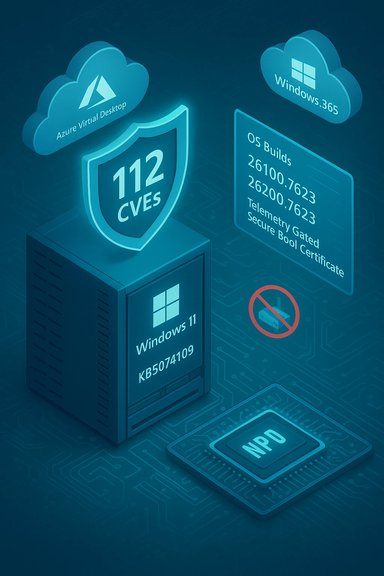
Microsoft’s January cumulative for Windows 11 landed as a heavy-duty security baseline and a mixed operational bag: KB5074109 patches more than a hundred vulnerabilities and fixes device-level problems — notably an NPU power-state bug and preparations for Secure Boot certificate rotation — but it also triggered at least one verified enterprise-impacting regression that can break Azure Virtual Desktop (AVD)/Windows 365 connections and prompted a separate known shutdown regression on 23H2 Enterprise/Iot devices. These shifts affect IT deployment plans, power‑users, and gamers in different ways and demand a careful, evidence‑driven rollout strategy.
KB5074109 is the January 13, 2026 cumulative update for Windows 11 versions 24H2 and 25H2 that advances affected systems to OS builds 26100.7623 (24H2) and 26200.7623 (25H2). Microsoft delivered the update as a combined Servicing Stack Update (SSU) + Latest Cumulative Update (LCU), which improves install reliability but complicates rollback because the SSU component persists after installation. The release focuses on security hardening, includes a set of non‑security quality fixes, and begins telemetry‑gated mechanics for an upcoming Secure Boot certificate rotation. Why this matters: the combined SSU+LCU packaging reduces certain installation failures for most endpoints, but it also means system administrators must treat rollback and offline image sequencing as planning requirements rather than afterthoughts. For managed fleets, the release is operationally heavy — it patches many attack surfaces while also touching low‑level firmware and driver chains where regressions are most likely to appear.
For most consumers, the security and battery benefits make KB5074109 worth installing after backing up. For enterprise and high‑value endpoints (AVD, gaming rigs, image infrastructures), prioritize careful, telemetry‑driven testing and be prepared to deploy Microsoft’s KIR or vendor driver hotfixes as immediate mitigations. Meanwhile, alternative platform movements — including the arrival of Samsung Internet for Windows and the steady momentum of Zorin OS — underscore that Windows users have more choices and continuity options than ever before; those options merit experimental pilots and compatibility checks in any migration or endpoint‑diversification strategy.
Source: StartupNews.fyi https://startupnews.fyi/2026/01/16/...vertelemetry=1&renderwebcomponents=1&wcseo=1]
 Background / Overview
KB5074109 is the January 13, 2026 cumulative update for Windows 11 versions 24H2 and 25H2 that advances affected systems to OS builds 26100.7623 (24H2) and 26200.7623 (25H2). Microsoft delivered the update as a combined Servicing Stack Update (SSU) + Latest Cumulative Update (LCU), which improves install reliability but complicates rollback because the SSU component persists after installation. The release focuses on security hardening, includes a set of non‑security quality fixes, and begins telemetry‑gated mechanics for an upcoming Secure Boot certificate rotation. Why this matters: the combined SSU+LCU packaging reduces certain installation failures for most endpoints, but it also means system administrators must treat rollback and offline image sequencing as planning requirements rather than afterthoughts. For managed fleets, the release is operationally heavy — it patches many attack surfaces while also touching low‑level firmware and driver chains where regressions are most likely to appear. What’s in KB5074109 — The Verifiable Highlights
- Security baseline: independent trackers and vendor briefs put January’s total at roughly 112–114 CVEs addressed (counts vary by method), including at least one issue observed exploited in the wild (a Desktop Window Manager information‑disclosure bug). This security footprint is the primary reason many organizations will prioritize installation.
- NPU (Neural Processing Unit) idle‑power fix: addresses devices where an on‑board NPU could remain powered while the host appears idle, causing measurable battery drain on some AI‑enabled laptops and handhelds. After installing KB5074109 and rebooting, affected devices should resume expected low‑power NPU behavior.
- Secure Boot certificate rollout prep: KB5074109 introduces device‑targeting metadata so Microsoft can phase replacement Secure Boot certificates to eligible devices only after devices demonstrate sufficient, successful update telemetry. This telemetry‑gated approach aims to reduce the risk of mass boot failures during certificate rotation expected in mid‑2026. Administrators should include firmware/UEFI validation in their pilot plans.
- Removal of legacy modem drivers: agrsm64.sys, agrsm.sys, smserl64.sys, and smserial.sys are removed from the in‑box image. Hardware that relies on these files will no longer function without vendor updates. Inventory legacy telephony and specialized equipment before broad rollout.
- WinSqlite3.dll refresh: updated to reduce false positives from some endpoint security products. This reduces noisy SOC alerts but does not change non‑Windows application copies of sqlite3.dll.
- WDS hardening and other fixes: Windows Deployment Services will stop supporting hands‑free deployment by default; KB5074109 also fixes specific WSL networking and RemoteApp scenarios. These changes require administrators to revisit imaging and deployment automations.
The Verified Problems — AVD Regression and Shutdown Failures
AVD / Windows 365 authentication regression (verified)
Within hours of the January rollout, administrators reported AVD and Cloud PC session failures when using the Windows App client: immediate authentication errors (for example, code 0x80080005) or blocked credential prompts. Microsoft classified this as a client‑side regression and published a Known Issue Rollback (KIR) mitigation intended for enterprise deployment so administrators can surgically revert the change that caused the regression while keeping the rest of the security baseline intact. For managed environments using AVD or Windows 365, the immediate operational advice is to inventory affected endpoints, pause broad rollouts to production rings until pilot validation completes, and prepare to deploy Microsoft’s KIR via Group Policy or Intune. Why KIR matters: removing the LCU wholesale is a blunt tool that strips essential security fixes; KIR gives IT teams a safer alternative by temporarily disabling the offending change only. Deploy KIR to targeted OUs, reboot, and validate connectivity before wider rollout.Shutdown/hibernation failures (verified, separate KB)
Separately, Microsoft confirmed a new issue affecting some Windows 11 23H2 devices with System Guard Secure Launch enabled, where systems fail to shut down or enter hibernation after installing the January security update (KB5073455 for 23H2). Affected devices instead restart when users attempt shutdown. Microsoft’s interim guidance is to shut down using the emergency commandshutdown /s /t 0 and to save work frequently; the company is working on a permanent fix. This issue affects Enterprise and IoT SKUs and is not the same regression as the AVD problem in KB5074109, though both arrived during January’s servicing window. Community Signals vs. Verified Issues — What’s Confirmed and What’s Anecdotal
Community telemetry and forum reports surfaced a broader set of symptoms after KB5074109’s rollout: black screens, transient display freezes, gaming FPS drops (notably on some NVIDIA configurations), and sporadic servicing errors during offline sequencing. These are credible early signals but remain heterogeneous and often hardware‑ and driver‑dependent.- Confirmed: AVD authentication failures (Microsoft acknowledged and provided KIR) and the 23H2 Secure Launch shutdown problem (Microsoft acknowledged for KB5073455).
- Plausible but unverified at scale: GPU black screens and gaming performance regressions. These reports are often remedied by vendor driver rollbacks or hotfixes, and their reproducibility varies across OEM firmware, GPU driver versions, and third‑party agents. Treat these as early‑warning signals and prioritize controlled pilot testing for gaming or GPU‑sensitive rigs.
- Unverified claims to flag: community-sourced specifics like exact FPS losses or universal black‑screen counts should be treated as anecdotal until vendors or Microsoft publish reproducible analysis. Administrators should collect msinfo32 and frame-time telemetry for vendor triage.
Practical Deployment and Remediation Playbook
The right operational posture depends on user roles and risk profiles. The following lists are concise, prioritized actions for administrators, power users, and gamers.For enterprise administrators (especially AVD/Cloud PC environments)
- Inventory endpoints:
- Detect KB5074109 installation via winver.exe or DISM:
DISM /online /get-packages | findstr 5074109. - Pause production rings:
- Halt broad deployment to critical rings until pilot validation completes.
- Prepare and be ready to deploy KIR:
- Download and test Microsoft’s Known Issue Rollback group policy/Intune artifact appropriate for your Windows version; deploy it to affected OUs and reboot devices.
- Provide fallbacks to users:
- Communicate temporary workarounds: the AVD web client or the classic Remote Desktop client can restore connectivity while KIR is staged.
- Validate firmware/UEFI interactions:
- Test Secure Boot certificate mechanics on representative firmware, especially for OEMs with unusual chains.
- Log and monitor:
- Collect event logs and application telemetry to assist vendor triage; share msinfo32 and frame-time dumps on gaming regressions.
For IT administrators (image teams, WDS operators)
- Use DISM sequencing for offline servicing and confirm SSU prerequisites.
- Rework WDS hands‑free workflows because hands‑free is disabled by default after KB5074109; follow Microsoft’s hardening guidance.
- If rollback capability is required for imaging, prefer full gold-image reprovisioning rather than relying on uninstalling the SSU component.
For consumers and home users
- Typical home users (no AVD, not a competitive gamer): install KB5074109 after a backup; the security benefits and NPU battery improvement generally outweigh the low probability of regressions.
- Gamers and high‑performance users: delay on primary rigs for 7–14 days while vendors validate drivers. If you must install immediately, update GPU drivers to the latest stable release and pilot on a secondary machine or image the drive for quick rollback. Collect benchmarks before/after installation to evaluate any performance drift.
Technical Verification — Key Facts Cross‑checked
- Release date and builds: KB5074109 was published January 13, 2026 and updates Windows 11 to OS Builds 26100.7623 (24H2) / 26200.7623 (25H2). (Verified against Microsoft’s KB release notes.
- CVE counts: independent security analysts report ~112–114 CVEs patched in January 2026 across Windows and related Microsoft components; counts vary by whether third‑party Chromium patches and cross‑component advisories are included. (Verified against CrowdStrike and other vendor summaries.
- KIR mitigation for AVD: Microsoft published a Known Issue Rollback artifact and Group Policy guidance to address the AVD credential/connection regression, and it is the recommended enterprise mitigation. (Verified against Microsoft KB and enterprise advisories.
- Shutdown/hibernation bug on 23H2: Microsoft confirmed that KB5073455 can prevent shutdown/hibernation on Enterprise/IoT devices with System Guard Secure Launch enabled; the recommended temporary workaround is using the
shutdown /s /t 0command. (Verified via Microsoft Release Health and contemporary reporting).
Risk Assessment — Strengths, Weaknesses, and Operational Tradeoffs
Strengths and notable wins
- Substantial security hardening: closing more than a hundred CVEs — including actively exploited bugs — reduces attack surface and is mission‑critical for internet‑facing and high‑privilege endpoints. The security footprint alone justifies prioritized deployment on high‑risk systems.
- NPU battery correction: meaningful quality improvement for AI‑accelerated laptops that directly reduces user pain (battery drain). This is an example of modern platform servicing accounting for new silicon features.
- Telemetry-gated Secure Boot certificate rollout: a cautious, staged approach to a potentially catastrophic firmware-level change is prudent and reduces blast radius during certificate updates. Administrators get time to validate firmware compatibility.
- Operational KIR mechanism: the Known Issue Rollback capability is a mature mechanism that lets managed estates surgically disable problematic changes while preserving the rest of the security baseline. This reduces the need for blunt uninstall/remove tactics.
Weaknesses and risks
- Client-side regressions with high impact: small client changes that touch SSO or authentication flows can cause wide outages (e.g., AVD regression). This underscores the testing limits of any single monthly cumulative and reinforces the need for representative pilot rings.
- Heterogeneous hardware interactions: GPU, firmware, and third‑party agents create a combinatorial testing problem. Community‑reported gaming and display regressions are likely to be a function of timing between driver stacks and OS updates, not a single universal bug. This makes regression triage slow in diverse fleets.
- Rollback friction for managed images: the combined SSU+LCU package persists SSU elements, and full rollback often requires image restore strategies rather than simple uninstall commands. Image teams must validate DISM sequencing and golden‑image plans.
- Legacy device impact: removing in‑box modem drivers will break old telephony hardware and devices in specialized environments. Organizations reliant on such equipment must inventory and plan vendor device replacements or exception policies.
The Other Headlines: Samsung Internet for Windows and Zorin OS Migration
While Windows servicing dominated the conversation, two other items in the news cycle matter to Windows users and those planning platform shifts.Samsung Internet browser on Windows — privacy and continuity focus
Samsung began rolling out a beta of its Samsung Internet browser to Windows PCs, bringing mobile‑first features and anti‑tracking capabilities to desktop users. The Windows beta supports:- Cross‑device sync (bookmarks, passwords, history) via Samsung Account.
- Smart anti‑tracking and a privacy dashboard.
- AI‑powered browsing assist features (summaries, translation) tied to Samsung’s Galaxy AI/One UI ecosystem.
- A Chromium base that supports extensions, dark mode, and extension ecosystem parity.
Zorin OS: the easiest Linux path for Windows switchers
Multiple outlets and Zorin’s own documentation highlight why Zorin OS is a popular migration target for Windows holdouts:- Familiar Windows‑style desktop layouts (one‑click switching), preinstalled user utilities, and a unified software store ease the transition for non‑technical users.
- Built‑in Bottles and compatibility tooling simplify running many Windows apps without resorting to manual Wine installations.
- One‑click OS upgrades and a “no forced restarts” update philosophy appeal to users frustrated with Windows update behavior.
Recommendations — A Concise Decision Matrix
- If you manage AVD/Windows 365 environments: Pause broad rollout; deploy KIR if authentication failures appear; use browser/classic RDP fallbacks while staging an evidence‑driven re‑rollout.
- If you operate imaging pipelines and WDS: Rework hands‑free flows and validate offline sequencing with DISM; plan for SSU persistence and golden‑image reprovisioning.
- If you’re a typical consumer without AVD reliance: Install KB5074109 after a backup; the security fixes and NPU power correction are net positive.
- If you’re a competitive gamer or use GPU‑sensitive workloads: Delay on primary rigs for a short pilot (7–14 days) and update GPU drivers alongside the OS patch; collect telemetry and escalate to vendors for hotfixes as needed.
- If you’re evaluating platform migration away from Windows: evaluate Zorin OS as a low‑friction candidate for older hardware and for users who prefer a Windows‑like experience with better control over updates. Pilot critical apps for compatibility using Bottles or web‑app versions before wide migration.
Conclusion
KB5074109 is a consequential January baseline: it delivers meaningful security coverage across a broad CVE set and fixes tangible, modern hardware issues like NPU idle power. Those are real operational wins. At the same time, a client‑side regression that disrupts Azure Virtual Desktop and a separate Secure Launch shutdown problem on 23H2 show how monthly baselines can compress risk for certain environments. The combination of SSU persistence, low‑level firmware touches, and community‑reported hardware interactions means prudent piloting, KIR readiness, and close vendor coordination are not optional — they are best practices.For most consumers, the security and battery benefits make KB5074109 worth installing after backing up. For enterprise and high‑value endpoints (AVD, gaming rigs, image infrastructures), prioritize careful, telemetry‑driven testing and be prepared to deploy Microsoft’s KIR or vendor driver hotfixes as immediate mitigations. Meanwhile, alternative platform movements — including the arrival of Samsung Internet for Windows and the steady momentum of Zorin OS — underscore that Windows users have more choices and continuity options than ever before; those options merit experimental pilots and compatibility checks in any migration or endpoint‑diversification strategy.
Source: StartupNews.fyi https://startupnews.fyi/2026/01/16/...vertelemetry=1&renderwebcomponents=1&wcseo=1]
