

Microsoft’s April 2026 Patch Tuesday update for Windows 11, KB5083769, is more than a routine security rollup for 25H2 and 24H2 users. It is also the point where Microsoft’s long-teased taskbar speed test finally broadens out beyond the early Insider and preview rings, giving ordinary users a one-click path to network diagnostics from the system tray. The twist, as many testers quickly noticed, is that the feature is not a fully native desktop utility at all: it still hands off to a Bing-hosted Ookla Speedtest experience in the browser. Even so, the move matters because it turns a previously hidden web shortcut into a discoverable Windows feature that sits exactly where users expect to check connectivity first.
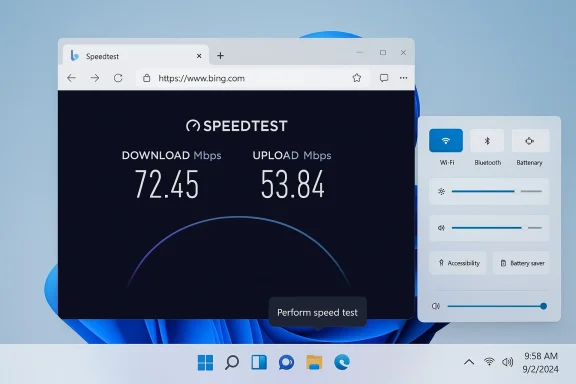
The timing tells the story. Microsoft began testing the idea in Insider builds in 2025, and by February 2026 the feature had reached Release Preview in build 26100.7918 / 26200.7918, where clicking the network icon or opening Wi‑Fi quick settings exposed a “Perform speed test” action. Tom’s Hardware described it as a shortcut that opens Bing and presents a simplified Ookla interface with latency, download, and upload metrics, which lines up with the practical behavior users reported in previews. That makes KB5083769 less of a brand-new invention and more of a broad servicing-stage rollout of a feature that had already been incubating for months.
The update itself applies to Windows 11 version 25H2 and 24H2, all editions, and Microsoft’s support page says it bundles the latest security fixes, improvements, and non-security changes from the previous month’s optional preview release. In other words, the speed test rides in through the ordinary monthly quality-update pipeline rather than a special app store push or a separately installed tool. That is important because it signals Microsoft wants this capability to be treated like part of the Windows experience, not as a bolt-on utility that lives outside servicing.
That framing also explains the slightly odd user experience. The button lives in the places where Windows users already troubleshoot network problems: the system tray, the Wi‑Fi panel, and cellular quick settings. But when activated, it still depends on the browser and Bing rather than a standalone shell component. This hybrid design is consistent with Microsoft’s broader recent approach to Windows feature delivery, where UI discoverability is improved even if some functionality remains web-backed or service-hosted.
There is a commercial logic behind the integration, too. Ookla’s Speedtest ecosystem already reaches deep into browsers and web SDKs, and Microsoft appears to be using that web-native model rather than reinventing diagnostic measurement from scratch. The result is a feature that feels native at the entry point, but outsourced at the execution layer. That may disappoint purists, but it also reduces maintenance burden and lets Microsoft ship the capability faster across a very large Windows installed base.
The browser handoff also keeps the experience consistent across devices and configurations. Whether a user is on Wi‑Fi, cellular, or a docked Ethernet setup, the result can be surfaced through a common web interface without Windows needing to embed a full test engine in the shell. That can lower development complexity, but it also means the feature remains dependent on internet reachability and browser behavior, which is a bit ironic for a network diagnostic tool.
The most visible consequence is psychological. Windows can now claim a built-in speed test, even though the heavy lifting still happens elsewhere. That distinction may sound academic, but users experience it as a native feature because the entry point is native and the action is where they already look for system controls. In UI terms, that is enough to change perception, even if the plumbing is still web-based.
That distinction will matter to power users. If you are diagnosing a flaky VPN tunnel, packet-loss issue, or service-level dispute, you still need tools that can run controlled tests over time and from known endpoints. Microsoft’s new shortcut makes the first step easier, but it does not replace serious instrumentation. That is a feature, not a bug, because not every Windows convenience needs to become a network engineering suite.
That approach is especially useful for a feature with modest technical differentiation. Most users already know what a speed test is, and the product does not need to be hidden behind a complex settings page or extra app installation. The real task is discoverability, and Windows quick settings is one of the best places to solve that problem. A shortcut placed in the right UI can be more valuable than a sophisticated tool hidden in the wrong one.
It is also a lower-risk way to add consumer-facing capability during a period when Microsoft is still balancing Windows 11 quality updates, feature rollouts, and enterprise servicing expectations. KB5083769 is a cumulative update, so bundling this kind of enhancement into the regular cadence keeps the rollout manageable and predictable. That predictability matters for the Windows release machinery as much as the feature itself.
There is also a subtle competitive benefit. By embedding a known third-party service into Windows, Microsoft can claim it is improving user outcomes without forcing the company to maintain a proprietary measurement service at scale. That is a pragmatic compromise, especially if the main objective is reducing support friction and making the OS feel more helpful in everyday situations.
The rollout also shows Microsoft’s continuing preference for controlled feature release rather than a single, dramatic product launch. That incremental style can be frustrating to enthusiasts who want every new thing immediately, but it reduces blast radius and gives Microsoft time to observe how real users interact with the feature. In Windows terms, boring rollout mechanics often produce the least surprising outcomes.
There is a historical echo here, too. Windows has long used web-backed shortcuts and integrated search experiences to connect local actions with online services. The new speed test is a modern version of that idea, except now it lives in quick settings and the taskbar rather than in older, more fragmented shell surfaces.
That said, the feature’s usefulness will depend on how gracefully it behaves when the network is truly degraded. If the browser fails to load or Bing is slow, the shortcut may feel less like a diagnostic aid and more like a detour. The irony is hard to miss: a tool meant to measure connectivity still depends on connectivity to appear.
Still, consumers tend to judge features by immediacy, not architecture. If it gets them a recognizable test with one click from the taskbar, many will accept the browser step without complaint. That is especially true on Windows laptops, where network troubleshooting is often a casual, repetitive activity rather than a formal support exercise.
At the same time, organizations with strict browser hardening or web filtering may see inconsistent behavior. If Bing is blocked, redirected, or governed by enterprise policy, the “built-in” experience could become partially unusable. That is a reminder that web-backed OS features inherit the strengths and weaknesses of the web environment they depend on.
There is also a governance question. Some enterprises prefer minimizing consumer-style web services inside core OS workflows because they complicate audits and user-experience standardization. Others will welcome the feature precisely because it reduces the number of external tools employees need to fetch during troubleshooting. As usual, the enterprise verdict will depend less on the feature’s existence than on how it fits local policy.
For Ookla, the partnership extends brand reach into one of the most visible consumer operating systems on the planet. Even if the implementation is just a web launch, that visibility is valuable because it embeds Speedtest into a workflow rather than a search result. The company does not need to own the shell to benefit from the shell’s discoverability.
The competitive pressure falls most heavily on Microsoft’s own ecosystem. If users learn to expect one-click diagnostics from Windows itself, that expectation can spill over into other categories: printer checks, VPN tests, Bluetooth troubleshooting, and device health shortcuts. Small conveniences tend to become baseline expectations once they are visible in the core UI. That is how little features become platform norms.
The other question is how much polish Microsoft and Ookla will continue to add over time. A better handoff, clearer labeling, and smoother browser behavior would all make the feature feel more integrated without requiring a rewrite of the underlying approach. If the rollout is successful, the experience could quietly become one of those small but sticky Windows conveniences that users forget was ever new.
Source: Neowin Windows 11 KB5083769 brings built-in internet speed test to all 25H2, 24H2 users
 Overview
The timing tells the story. Microsoft began testing the idea in Insider builds in 2025, and by February 2026 the feature had reached Release Preview in build 26100.7918 / 26200.7918, where clicking the network icon or opening Wi‑Fi quick settings exposed a “Perform speed test” action. Tom’s Hardware described it as a shortcut that opens Bing and presents a simplified Ookla interface with latency, download, and upload metrics, which lines up with the practical behavior users reported in previews. That makes KB5083769 less of a brand-new invention and more of a broad servicing-stage rollout of a feature that had already been incubating for months.The update itself applies to Windows 11 version 25H2 and 24H2, all editions, and Microsoft’s support page says it bundles the latest security fixes, improvements, and non-security changes from the previous month’s optional preview release. In other words, the speed test rides in through the ordinary monthly quality-update pipeline rather than a special app store push or a separately installed tool. That is important because it signals Microsoft wants this capability to be treated like part of the Windows experience, not as a bolt-on utility that lives outside servicing.
That framing also explains the slightly odd user experience. The button lives in the places where Windows users already troubleshoot network problems: the system tray, the Wi‑Fi panel, and cellular quick settings. But when activated, it still depends on the browser and Bing rather than a standalone shell component. This hybrid design is consistent with Microsoft’s broader recent approach to Windows feature delivery, where UI discoverability is improved even if some functionality remains web-backed or service-hosted.
There is a commercial logic behind the integration, too. Ookla’s Speedtest ecosystem already reaches deep into browsers and web SDKs, and Microsoft appears to be using that web-native model rather than reinventing diagnostic measurement from scratch. The result is a feature that feels native at the entry point, but outsourced at the execution layer. That may disappoint purists, but it also reduces maintenance burden and lets Microsoft ship the capability faster across a very large Windows installed base.
How the Feature Works
The core user flow is straightforward, and that is precisely why it has attracted so much attention. Right-click the network icon or open the network controls in quick settings, choose the speed test option, and Windows launches the browser to a Bing page that presents the test. The page reports the familiar trio of metrics: download, upload, and latency; preview coverage also referenced jitter, which is useful for gamers, voice calls, and remote-work diagnostics.The Practical Experience
For most users, the value is not that Microsoft invented a better benchmark. It is that the path from “something feels slow” to “let me check the connection” is shorter. That matters because friction is often the difference between troubleshooting and ignoring the problem, especially on laptops and tablets where people expect immediate feedback. Convenience is the feature here, not raw technical novelty.The browser handoff also keeps the experience consistent across devices and configurations. Whether a user is on Wi‑Fi, cellular, or a docked Ethernet setup, the result can be surfaced through a common web interface without Windows needing to embed a full test engine in the shell. That can lower development complexity, but it also means the feature remains dependent on internet reachability and browser behavior, which is a bit ironic for a network diagnostic tool.
The most visible consequence is psychological. Windows can now claim a built-in speed test, even though the heavy lifting still happens elsewhere. That distinction may sound academic, but users experience it as a native feature because the entry point is native and the action is where they already look for system controls. In UI terms, that is enough to change perception, even if the plumbing is still web-based.
What It Measures
The test is meant to provide a quick diagnostic snapshot, not a lab-grade certification. Latency and upload/download values are useful for consumer troubleshooting, ISP conversations, and immediate sanity checks after router changes or driver updates. They are not a substitute for enterprise monitoring, sustained traffic testing, or controlled network benchmarking under repeatable conditions.That distinction will matter to power users. If you are diagnosing a flaky VPN tunnel, packet-loss issue, or service-level dispute, you still need tools that can run controlled tests over time and from known endpoints. Microsoft’s new shortcut makes the first step easier, but it does not replace serious instrumentation. That is a feature, not a bug, because not every Windows convenience needs to become a network engineering suite.
Why Microsoft Chose This Route
Microsoft could have built a fully native speed test module into Windows 11, but there are obvious reasons it chose not to. A browser-based implementation can be updated independently, leverage existing Ookla infrastructure, and avoid the engineering burden of shipping and maintaining a standalone test stack inside the OS. It also lets Microsoft present a polished feature quickly while still retaining a partner ecosystem for the underlying measurement logic.Web First, Shell Second
The design reflects a broader trend in Windows: use the shell to surface actions, but use web services to deliver them. Microsoft has embraced this pattern repeatedly across settings, search, and consumer tools because it can iterate faster than a pure OS component. In this case, the browser becomes a delivery vehicle for something users perceive as operating-system integrated.That approach is especially useful for a feature with modest technical differentiation. Most users already know what a speed test is, and the product does not need to be hidden behind a complex settings page or extra app installation. The real task is discoverability, and Windows quick settings is one of the best places to solve that problem. A shortcut placed in the right UI can be more valuable than a sophisticated tool hidden in the wrong one.
It is also a lower-risk way to add consumer-facing capability during a period when Microsoft is still balancing Windows 11 quality updates, feature rollouts, and enterprise servicing expectations. KB5083769 is a cumulative update, so bundling this kind of enhancement into the regular cadence keeps the rollout manageable and predictable. That predictability matters for the Windows release machinery as much as the feature itself.
The Partnership Angle
The collaboration with Ookla is significant because it suggests Microsoft wants credibility, not just convenience. Speedtest by Ookla is a recognizable consumer brand, and Microsoft benefits from borrowing that trust rather than asking users to evaluate an unknown in-house benchmark. This is outsourcing with branding benefits: Microsoft gets the front door, while Ookla provides the engine.There is also a subtle competitive benefit. By embedding a known third-party service into Windows, Microsoft can claim it is improving user outcomes without forcing the company to maintain a proprietary measurement service at scale. That is a pragmatic compromise, especially if the main objective is reducing support friction and making the OS feel more helpful in everyday situations.
- It reduces engineering overhead for Microsoft.
- It gives users a familiar network-testing brand.
- It preserves the ability to update the experience web-side.
- It speeds distribution across 25H2 and 24H2.
- It keeps the feature visible inside core Windows UI.
How We Got Here
The speed test did not appear out of nowhere. Microsoft first began testing the concept in Insider channels in 2025, and the feature was already in the Release Preview branch earlier in 2026 before the April cumulative update broadened availability. That path is typical of Windows feature maturation now: build it in the Insider pipeline, validate the UI behavior, and then let servicing updates carry it to broader audiences.From Insider Curiosity to Broad Rollout
By the time KB5083769 arrived, the speed test was no longer a speculative feature story. It was an established part of Microsoft’s staged delivery system, waiting to be surfaced to more users. That matters because broad rollout is often where the real scrutiny begins: compatibility, local browser defaults, enterprise management policies, and user expectations all become part of the equation.The rollout also shows Microsoft’s continuing preference for controlled feature release rather than a single, dramatic product launch. That incremental style can be frustrating to enthusiasts who want every new thing immediately, but it reduces blast radius and gives Microsoft time to observe how real users interact with the feature. In Windows terms, boring rollout mechanics often produce the least surprising outcomes.
There is a historical echo here, too. Windows has long used web-backed shortcuts and integrated search experiences to connect local actions with online services. The new speed test is a modern version of that idea, except now it lives in quick settings and the taskbar rather than in older, more fragmented shell surfaces.
What This Means for Consumers
For home users, the win is obvious: fewer steps to confirm whether a broadband slowdown is local, ISP-related, or just a momentary Wi‑Fi problem. That can be especially useful when someone is on a call, trying to stream, or deciding whether to reboot the router. The feature is small, but it targets a task nearly everyone has had to do at some point.The Everyday Convenience Factor
The best consumer software often saves time in the exact moment frustration peaks. A buried browser search for “speed test” may not sound hard, but when your connection is unstable, every extra click feels like an obstacle. Windows now tries to eliminate that friction by putting the test at the point of failure, which is usually the right place for a diagnostic entry point.That said, the feature’s usefulness will depend on how gracefully it behaves when the network is truly degraded. If the browser fails to load or Bing is slow, the shortcut may feel less like a diagnostic aid and more like a detour. The irony is hard to miss: a tool meant to measure connectivity still depends on connectivity to appear.
Still, consumers tend to judge features by immediacy, not architecture. If it gets them a recognizable test with one click from the taskbar, many will accept the browser step without complaint. That is especially true on Windows laptops, where network troubleshooting is often a casual, repetitive activity rather than a formal support exercise.
What This Means for Enterprises
Enterprise reaction will likely be more measured. IT admins care less about whether a speed test exists and more about whether it is controllable, predictable, and compliant with policy. Because the result launches a browser page, the feature’s behavior can be influenced by browser defaults, web access restrictions, and managed security controls.Support Teams and Diagnostics
For help desks, the feature may still be useful as a first-level triage tool. A technician can ask an employee to open quick settings, run the speed test, and immediately provide a rough picture of whether bandwidth is the likely culprit. That does not replace telemetry, but it can reduce guesswork in remote support scenarios and help separate endpoint problems from network bottlenecks.At the same time, organizations with strict browser hardening or web filtering may see inconsistent behavior. If Bing is blocked, redirected, or governed by enterprise policy, the “built-in” experience could become partially unusable. That is a reminder that web-backed OS features inherit the strengths and weaknesses of the web environment they depend on.
There is also a governance question. Some enterprises prefer minimizing consumer-style web services inside core OS workflows because they complicate audits and user-experience standardization. Others will welcome the feature precisely because it reduces the number of external tools employees need to fetch during troubleshooting. As usual, the enterprise verdict will depend less on the feature’s existence than on how it fits local policy.
- Useful for first-pass help desk triage.
- Potentially constrained by browser and web-policy settings.
- Less valuable than managed network telemetry.
- Helpful for remote support conversations.
- May raise standardization questions in locked-down environments.
Competitive and Market Implications
The broader market signal is that Microsoft is still comfortable blending OS affordances with online service partnerships. That matters because rivals can see the same playbook: improve discoverability inside the shell, but let a web service or partner ecosystem do the heavy lifting behind the scenes. This can be a powerful model for shipping more features without bloating the operating system itself.A Small Feature With Strategic Meaning
On the surface, a speed test is a niche convenience. Strategically, it is another example of Microsoft turning everyday troubleshooting into a first-party experience, which reinforces the idea that Windows should be the place where users start diagnosing their PC, not just the platform they use to open other tools. That is a subtle but meaningful positioning move.For Ookla, the partnership extends brand reach into one of the most visible consumer operating systems on the planet. Even if the implementation is just a web launch, that visibility is valuable because it embeds Speedtest into a workflow rather than a search result. The company does not need to own the shell to benefit from the shell’s discoverability.
The competitive pressure falls most heavily on Microsoft’s own ecosystem. If users learn to expect one-click diagnostics from Windows itself, that expectation can spill over into other categories: printer checks, VPN tests, Bluetooth troubleshooting, and device health shortcuts. Small conveniences tend to become baseline expectations once they are visible in the core UI. That is how little features become platform norms.
Strengths and Opportunities
This rollout has real upside because it solves a common problem with very little user education required. It is a classic case of placing the right action in the right place, and that alone can materially improve the Windows experience.- Fast access from the taskbar and quick settings.
- Familiar branding through Ookla’s Speedtest.
- Low friction for everyday troubleshooting.
- Broader reach through a cumulative update.
- Useful metrics such as latency, download, and upload.
- Reduced support overhead for simple connection questions.
- Minimal learning curve for nontechnical users.
Risks and Concerns
The biggest concern is that the feature’s marketing may overstate how native it really is. Users may hear “built-in speed test” and expect a true Windows utility, then discover the browser handoff and feel misled.- Browser dependency can fail when connectivity is poor.
- Enterprise policies may block or alter the Bing page.
- Perception gap between “built-in” and “web-based.”
- Limited diagnostic depth for serious network problems.
- Potential user frustration if the page loads slowly.
- Inconsistent experience across browsers and environments.
- Possible confusion for users expecting offline diagnostics.
Looking Ahead
The key question is whether Microsoft stops here or turns this into a broader diagnostics pattern. A taskbar speed test is useful, but it is also a proof point: if users respond well, Microsoft may be encouraged to surface more lightweight troubleshooting actions in equally visible places. That would align with the company’s recent emphasis on making Windows feel more discoverable and less buried in settings.The other question is how much polish Microsoft and Ookla will continue to add over time. A better handoff, clearer labeling, and smoother browser behavior would all make the feature feel more integrated without requiring a rewrite of the underlying approach. If the rollout is successful, the experience could quietly become one of those small but sticky Windows conveniences that users forget was ever new.
- Better labeling could reduce confusion about the browser handoff.
- Improved handling in managed environments would help enterprises.
- More troubleshooting shortcuts could follow if adoption is strong.
- Edge cases like captive portals and blocked web access need attention.
- Microsoft may use the same pattern for other diagnostics.
Source: Neowin Windows 11 KB5083769 brings built-in internet speed test to all 25H2, 24H2 users
