

Microsoft’s May 12, 2026 Windows 11 cumulative update KB5089549 adds a new
The useful thing about Neowin’s catch is not simply that a new folder appeared under
Secure Boot depends on trust anchors stored in firmware. Those anchors tell the system which bootloaders, option ROMs, and early-start components are allowed to run before Windows itself is fully alive. The current problem is mundane but consequential: certificates from the Windows 8 era, issued in 2011, are reaching the end of their useful life in 2026.
That does not mean every unpatched PC will suddenly become a paperweight the moment the calendar turns. Microsoft has repeatedly framed the risk as a degraded security posture rather than an instant boot failure. But that distinction should not lull anyone into ignoring it. A system that can still start but can no longer receive future boot-level protections is exactly the kind of half-broken state enterprise IT hates most.
KB5089549’s new
The script names tell the story.
That sequencing is important. Microsoft is not merely throwing a switch that says “install new certs.” It is encouraging administrators to observe, classify, pilot, deploy, and verify. Secure Boot updates touch firmware variables and boot components, which means a bad assumption can become a BitLocker prompt, a boot loop, or an angry Monday morning.
The fact that Microsoft initially omitted the folder from release notes, then later acknowledged it, is classic Windows servicing theater. The actual change may be sound; the communication rhythm is still too often reactive. For home users, a surprise system folder looks suspicious. For administrators, an undocumented folder containing rollout scripts looks like a change-control incident waiting to happen.
The 2011 certificates were part of that original trust fabric. They were never meant to last forever, and Microsoft’s newer 2023 certificates are the replacement path. The transition involves several pieces of the Secure Boot chain, including the key exchange key, allowed signature database, and boot manager signing path.
That is why the certificate update is not the same as replacing an expired TLS certificate on a web server. Windows can service itself, but firmware is its own kingdom. OEM implementation differences, older BIOS revisions, virtualization platforms, BitLocker state, and deployment policy all influence how smooth the process will be.
Microsoft’s caution makes sense in that light. The company is using confidence data, staged rollout logic, and administrative tooling because it cannot assume every machine with Secure Boot enabled behaves like a Surface device fresh from a lab. The Windows ecosystem is a federation of firmware behaviors loosely held together by support matrices and hope.
That is why the update’s Secure Boot work sits awkwardly beside the usual Patch Tuesday business. The same KB may include normal security fixes, bug repairs, and quality changes, while also placing tools for a certificate rollout that administrators must understand on a longer timeline. A home user sees “restart required.” A domain admin sees the opening act of a firmware trust refresh.
The stakes are subtle. Microsoft has said systems without the new certificates may continue to boot and receive ordinary Windows updates. But they may not receive future Secure Boot and Boot Manager protections, including revocations and mitigations for newly discovered boot vulnerabilities. In practical terms, that creates a widening gap between “Windows is updated” and “the machine’s pre-OS trust chain is current.”
That gap is dangerous because it is easy to miss. A vulnerability scanner may say the OS is patched. Windows Update may show no pending cumulative update. Yet the device may still be behind on the trust material needed to protect the earliest part of startup.
That is reasonable engineering but poor user experience when it appears without enough context. Users have been trained to distrust unexpected reboots, especially when BitLocker is involved. Administrators have been trained to dread them because one additional reboot can disrupt maintenance windows, kiosk availability, lab devices, and remote workers on unreliable power.
The May update’s folder is Microsoft’s attempt to shift that experience from surprise to process. Instead of letting the rollout be a black box, the sample scripts give organizations a way to collect status and drive certificate deployment in phases. The presence of those scripts on disk is a tacit admission that this cannot be managed purely through optimistic release notes.
Still, sample automation is not the same as a finished enterprise product. Scripts must be reviewed, tested, adapted, signed if policy requires it, and deployed through a real management workflow. Microsoft can provide the scaffolding, but every organization still owns the risk of turning it on.
This is the recurring Windows servicing contradiction. Microsoft has built one of the most capable update systems in the industry, serving a staggeringly diverse hardware base. It has also trained many of its most experienced customers to wait, test, and verify before believing any cumulative update is truly safe for broad deployment.
For Secure Boot certificates, delay has a different cost profile. Skipping a troublesome cumulative update for a week is one thing. Drifting past a certificate transition window with unknown fleet status is another. The more Microsoft compresses the timeline, the more administrators need trustworthy telemetry rather than vibes.
That is why the reporting scripts may be the most important part of the new folder. Deployment gets the attention, but inventory wins the war. Before an administrator can fix Secure Boot posture, they need to know which devices are already updated, which are eligible, which are paused, and which are firmware exceptions.
But the consumer badge and the enterprise scripts reflect two very different realities. A home PC can usually follow Windows Update’s lead unless the OEM firmware path is broken. A managed fleet has policy layers, compliance requirements, maintenance windows, BitLocker recovery handling, imaging processes, virtual desktop pools, and old hardware that exists because some line-of-business app still needs it.
The most interesting divide is not technical literacy. It is accountability. When a home PC shows a warning, the owner can click through guidance and hope Windows Update resolves it. When 12,000 managed laptops show mixed Secure Boot status, the organization needs a defensible rollout plan.
That plan has to include firmware. Microsoft can update Windows components and provide certificate material, but firmware compatibility remains a gatekeeper. Older systems may need OEM updates before the Secure Boot transition can complete cleanly. Some platforms may be classified as temporarily paused or unsupported for automated rollout.
That does not mean cloud management is sidelined. Microsoft has been building Secure Boot status visibility into management experiences such as Windows Autopatch, and Intune remains a natural path for many organizations. But the inclusion of GPO-oriented automation acknowledges the actual terrain: hybrid estates, partially modernized management, and administrators who need something that works across inherited infrastructure.
This is the right compromise. Secure Boot certificate migration is too important to be locked behind a single management fashion. If a domain-joined fleet can be measured and remediated through Group Policy, more devices will reach the 2023 certificate path before the old trust chain becomes a liability.
The danger is that sample scripts can be mistaken for policy. Microsoft is giving admins a starting point, not absolution. Organizations still need to test on representative hardware, document exceptions, stage deployment, and monitor post-update signals.
That handoff has become more important, not less. Modern attacks increasingly look for places where defenders have limited visibility and where trust decisions are made before endpoint tools can intervene. Boot-level protections, revocation lists, and signed boot managers are not abstractions for security architects; they are part of the chain that determines whether Windows starts from a known-good base.
The Secure Boot certificate transition also intersects with Microsoft’s response to past boot manager vulnerabilities. Updating trust anchors is only one side of the process. Eventually, older vulnerable components must be distrusted, and that requires careful sequencing. If you revoke before systems can trust the replacement path, you create avoidable pain.
That is the entire drama of Secure Boot in one sentence: security wants old trust removed, operations wants every machine to survive the removal. KB5089549’s folder exists because both sides are right.
Yet the discovery of the folder by users and press before it was clearly described in release notes shows the company still underestimates how closely Windows changes are watched. A new directory under
This is especially true because Secure Boot is a security feature ordinary users barely understand but have been told is essential. When something named
The late release-note amendment helps, but it is not enough as a model. For a migration this sensitive, every visible filesystem change should be documented at launch. The audience is not only consumers; it is also the help desk, the security operations center, the endpoint engineering team, and the admin trying to explain why a baseline changed overnight.
The harder cases are the machines at the edge. Older but still supported PCs. Dormant laptops that check in once a quarter. Lab devices frozen for validation reasons. Virtual machines with Secure Boot enabled but odd platform behavior. Remote systems behind fragile VPN assumptions. Windows 10 machines moving toward extended support decisions. Custom images that were built before the new boot path was widely understood.
Those are the devices that turn a certificate deadline into an incident. Not because Secure Boot certificate updates are inherently reckless, but because unmanaged variance is where Windows projects go to die. The new scripts help, but only if someone uses them before the deadline becomes a scramble.
There is also an imaging angle. Organizations that refresh devices, rebuild machines, or maintain bootable media need to think beyond the currently installed OS. Secure Boot trust changes affect installation media and recovery paths as well. A fleet can be updated while its deployment process remains anchored in the past.
Secure Boot is not magic. It does not stop every attacker, and it has had its share of bypasses, implementation flaws, and operational headaches. But it remains one of the key mechanisms for protecting the pre-OS environment, and its value depends on the trust chain being maintainable.
The 2023 certificate migration gives Microsoft and the ecosystem room to keep signing, updating, and revoking boot components in response to future threats. Without that migration, Windows may keep running, but the boot security model becomes increasingly stale. In security terms, “still works” is not the same as “still defensible.”
That distinction is where Microsoft’s messaging should stay focused. The company does not need to frighten users into thinking their PCs will all fail to boot in June. It does need to make clear that systems missing the new certificates are opting out of future boot-layer hardening, whether their owners understand that or not.
For administrators, that means fleet visibility should come before broad action. Run status collection in a controlled way. Compare results against hardware models and firmware versions. Watch for BitLocker recovery behavior. Confirm which devices are high-confidence candidates and which require OEM attention.
For enthusiasts, the message is simpler. If Windows Security says the device is healthy, leave the machinery alone. If it shows a Secure Boot certificate warning, follow Microsoft’s guidance rather than improvising with firmware settings. Turning Secure Boot off to silence a warning is the kind of “fix” that defeats the entire point.
For Microsoft, the lesson should be sharper. If a cumulative update adds visible Secure Boot deployment assets to the Windows directory, that belongs in the release notes from minute one. Trust migrations require trust in the messenger.
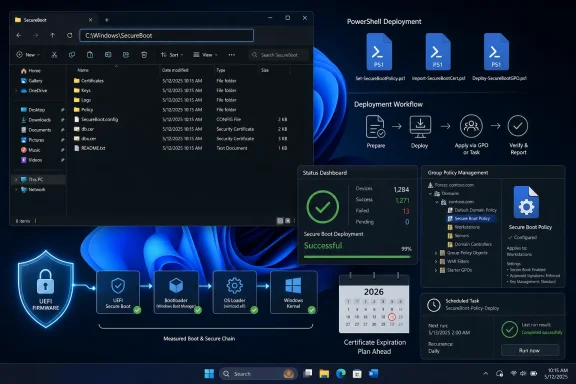
C:\Windows\SecureBoot folder on eligible PCs, packaging sample PowerShell automation for the Secure Boot certificate migration that organizations must complete before older 2011-era trust certificates begin expiring in June. The folder is not a random artifact, and it is not a cleanup mistake. It is Microsoft putting a late-stage operational toolkit directly onto Windows machines because the next phase of Secure Boot maintenance is no longer theoretical. The company is trying to turn a firmware-adjacent security migration into something ordinary Windows Update can survive.
 Microsoft Turns a Certificate Deadline Into a Windows Servicing Event
The useful thing about Neowin’s catch is not simply that a new folder appeared under C:\Windows. Windows has always accumulated strange-looking directories after updates, and most of them matter only to servicing engineers and the occasional forum sleuth. This one matters because it exposes how close Microsoft now is to the hard part of its Secure Boot certificate transition.Secure Boot depends on trust anchors stored in firmware. Those anchors tell the system which bootloaders, option ROMs, and early-start components are allowed to run before Windows itself is fully alive. The current problem is mundane but consequential: certificates from the Windows 8 era, issued in 2011, are reaching the end of their useful life in 2026.
That does not mean every unpatched PC will suddenly become a paperweight the moment the calendar turns. Microsoft has repeatedly framed the risk as a degraded security posture rather than an instant boot failure. But that distinction should not lull anyone into ignoring it. A system that can still start but can no longer receive future boot-level protections is exactly the kind of half-broken state enterprise IT hates most.
KB5089549’s new
SecureBoot directory is therefore more than housekeeping. It is a sign that Microsoft has moved from “please read the guidance” to “here are the scripts we expect administrators to use.” The operating system update is becoming the distribution vehicle for the playbook.The Folder Is Boring by Design, Which Is Why It Matters
The new folder reportedly lives underC:\Windows\SecureBoot on eligible devices, with an ExampleRolloutScripts directory containing PowerShell scripts for detection, reporting, Group Policy deployment, orchestration, scheduled-task setup, and rollout status checks. That is not glamorous engineering. It is the unglamorous machinery required to make a sensitive trust transition happen across mixed fleets of laptops, desktops, VMs, and domain-joined machines.The script names tell the story.
Detect-SecureBootCertUpdateStatus.ps1 collects device state. Aggregate-SecureBootData.ps1 turns that state into reporting. Deploy-GPO-SecureBootCollection.ps1 helps create Group Policy plumbing for collection. Start-SecureBootRolloutOrchestrator.ps1 points toward automated certificate deployment. Get-SecureBootRolloutStatus.ps1 gives admins a workstation-level view into progress.That sequencing is important. Microsoft is not merely throwing a switch that says “install new certs.” It is encouraging administrators to observe, classify, pilot, deploy, and verify. Secure Boot updates touch firmware variables and boot components, which means a bad assumption can become a BitLocker prompt, a boot loop, or an angry Monday morning.
The fact that Microsoft initially omitted the folder from release notes, then later acknowledged it, is classic Windows servicing theater. The actual change may be sound; the communication rhythm is still too often reactive. For home users, a surprise system folder looks suspicious. For administrators, an undocumented folder containing rollout scripts looks like a change-control incident waiting to happen.
Secure Boot’s 2011 Roots Are Finally Showing Their Age
Secure Boot arrived in the Windows 8 era as part of the broader UEFI transition. Its purpose was straightforward: stop untrusted code from inserting itself before the operating system can defend itself. Bootkits and pre-OS malware are nasty precisely because they operate below the layer where traditional endpoint security has the best visibility.The 2011 certificates were part of that original trust fabric. They were never meant to last forever, and Microsoft’s newer 2023 certificates are the replacement path. The transition involves several pieces of the Secure Boot chain, including the key exchange key, allowed signature database, and boot manager signing path.
That is why the certificate update is not the same as replacing an expired TLS certificate on a web server. Windows can service itself, but firmware is its own kingdom. OEM implementation differences, older BIOS revisions, virtualization platforms, BitLocker state, and deployment policy all influence how smooth the process will be.
Microsoft’s caution makes sense in that light. The company is using confidence data, staged rollout logic, and administrative tooling because it cannot assume every machine with Secure Boot enabled behaves like a Surface device fresh from a lab. The Windows ecosystem is a federation of firmware behaviors loosely held together by support matrices and hope.
The “Mandatory Update” Is Really a Trust Migration in Disguise
Patch Tuesday language often makes every cumulative update sound interchangeable: security fixes, quality improvements, servicing stack changes, known issues, repeat next month. KB5089549 is different because it participates in a time-bound infrastructure migration. It is not only patching Windows; it is preparing Windows to keep accepting future boot-level security changes.That is why the update’s Secure Boot work sits awkwardly beside the usual Patch Tuesday business. The same KB may include normal security fixes, bug repairs, and quality changes, while also placing tools for a certificate rollout that administrators must understand on a longer timeline. A home user sees “restart required.” A domain admin sees the opening act of a firmware trust refresh.
The stakes are subtle. Microsoft has said systems without the new certificates may continue to boot and receive ordinary Windows updates. But they may not receive future Secure Boot and Boot Manager protections, including revocations and mitigations for newly discovered boot vulnerabilities. In practical terms, that creates a widening gap between “Windows is updated” and “the machine’s pre-OS trust chain is current.”
That gap is dangerous because it is easy to miss. A vulnerability scanner may say the OS is patched. Windows Update may show no pending cumulative update. Yet the device may still be behind on the trust material needed to protect the earliest part of startup.
The Extra Restart Was a Warning Shot
Earlier Secure Boot certificate rollout stages already hinted at the operational friction. Some systems saw additional restarts as Windows applied certificate-related changes. Microsoft’s explanation was simple enough: one reboot handles the cumulative update, another handles the Secure Boot certificate work.That is reasonable engineering but poor user experience when it appears without enough context. Users have been trained to distrust unexpected reboots, especially when BitLocker is involved. Administrators have been trained to dread them because one additional reboot can disrupt maintenance windows, kiosk availability, lab devices, and remote workers on unreliable power.
The May update’s folder is Microsoft’s attempt to shift that experience from surprise to process. Instead of letting the rollout be a black box, the sample scripts give organizations a way to collect status and drive certificate deployment in phases. The presence of those scripts on disk is a tacit admission that this cannot be managed purely through optimistic release notes.
Still, sample automation is not the same as a finished enterprise product. Scripts must be reviewed, tested, adapted, signed if policy requires it, and deployed through a real management workflow. Microsoft can provide the scaffolding, but every organization still owns the risk of turning it on.
Installation Trouble Undercuts the Message
KB5089549 also arrived with reports of installation problems, including failures tied to update errors and storage conditions. That matters because Microsoft is asking users and administrators to trust the same servicing pipeline that sometimes struggles with its own delivery mechanics. A critical security migration feels less reassuring when the patch itself may fail before the migration even begins.This is the recurring Windows servicing contradiction. Microsoft has built one of the most capable update systems in the industry, serving a staggeringly diverse hardware base. It has also trained many of its most experienced customers to wait, test, and verify before believing any cumulative update is truly safe for broad deployment.
For Secure Boot certificates, delay has a different cost profile. Skipping a troublesome cumulative update for a week is one thing. Drifting past a certificate transition window with unknown fleet status is another. The more Microsoft compresses the timeline, the more administrators need trustworthy telemetry rather than vibes.
That is why the reporting scripts may be the most important part of the new folder. Deployment gets the attention, but inventory wins the war. Before an administrator can fix Secure Boot posture, they need to know which devices are already updated, which are eligible, which are paused, and which are firmware exceptions.
Home Users Get a Badge, Administrators Get a Project
Microsoft has also added Secure Boot certificate status indicators inside Windows Security for consumer and smaller-business scenarios. That is the right instinct. Most home users should not be reading event logs or running PowerShell to decide whether their PC’s boot trust chain is modern.But the consumer badge and the enterprise scripts reflect two very different realities. A home PC can usually follow Windows Update’s lead unless the OEM firmware path is broken. A managed fleet has policy layers, compliance requirements, maintenance windows, BitLocker recovery handling, imaging processes, virtual desktop pools, and old hardware that exists because some line-of-business app still needs it.
The most interesting divide is not technical literacy. It is accountability. When a home PC shows a warning, the owner can click through guidance and hope Windows Update resolves it. When 12,000 managed laptops show mixed Secure Boot status, the organization needs a defensible rollout plan.
That plan has to include firmware. Microsoft can update Windows components and provide certificate material, but firmware compatibility remains a gatekeeper. Older systems may need OEM updates before the Secure Boot transition can complete cleanly. Some platforms may be classified as temporarily paused or unsupported for automated rollout.
Group Policy Is Still the Language of Windows Reality
The presence of Group Policy deployment scripts is notable because it cuts through a decade of “modern management” marketing. Intune, Windows Autopatch, and cloud reporting are important, but many Windows environments still run on domain join, GPOs, and pragmatic PowerShell. Microsoft knows that if this migration is to reach the long tail, it cannot live only in cloud dashboards.That does not mean cloud management is sidelined. Microsoft has been building Secure Boot status visibility into management experiences such as Windows Autopatch, and Intune remains a natural path for many organizations. But the inclusion of GPO-oriented automation acknowledges the actual terrain: hybrid estates, partially modernized management, and administrators who need something that works across inherited infrastructure.
This is the right compromise. Secure Boot certificate migration is too important to be locked behind a single management fashion. If a domain-joined fleet can be measured and remediated through Group Policy, more devices will reach the 2023 certificate path before the old trust chain becomes a liability.
The danger is that sample scripts can be mistaken for policy. Microsoft is giving admins a starting point, not absolution. Organizations still need to test on representative hardware, document exceptions, stage deployment, and monitor post-update signals.
The Boot Layer Is Where Security Debt Gets Expensive
Most Windows security debt is visible. Unsupported OS versions, missing cumulative updates, old browsers, unsigned drivers, and weak identity policies all show up in familiar places. Secure Boot debt is less visible because it lives in the handoff between firmware and operating system.That handoff has become more important, not less. Modern attacks increasingly look for places where defenders have limited visibility and where trust decisions are made before endpoint tools can intervene. Boot-level protections, revocation lists, and signed boot managers are not abstractions for security architects; they are part of the chain that determines whether Windows starts from a known-good base.
The Secure Boot certificate transition also intersects with Microsoft’s response to past boot manager vulnerabilities. Updating trust anchors is only one side of the process. Eventually, older vulnerable components must be distrusted, and that requires careful sequencing. If you revoke before systems can trust the replacement path, you create avoidable pain.
That is the entire drama of Secure Boot in one sentence: security wants old trust removed, operations wants every machine to survive the removal. KB5089549’s folder exists because both sides are right.
Microsoft’s Communication Is Better Than It Was, But Still Too Patch-Note-Driven
Microsoft has published guidance, message center notices, support pages, playbooks, and status experiences around the Secure Boot certificate deadline. Compared with some past Windows servicing sagas, this is not a silent scramble. The company has been warning that 2011-era certificates are expiring and that updated 2023 certificates need to be in place.Yet the discovery of the folder by users and press before it was clearly described in release notes shows the company still underestimates how closely Windows changes are watched. A new directory under
C:\Windows after a cumulative update is exactly the sort of thing that triggers forum posts, Reddit threads, and security-product suspicion. If the change is benign and important, say so from the beginning.This is especially true because Secure Boot is a security feature ordinary users barely understand but have been told is essential. When something named
SecureBoot appears unexpectedly in the Windows directory, the range of possible interpretations includes malware, failed cleanup, OEM junk, and Microsoft servicing behavior. Only one of those is correct, and Microsoft should not make customers guess.The late release-note amendment helps, but it is not enough as a model. For a migration this sensitive, every visible filesystem change should be documented at launch. The audience is not only consumers; it is also the help desk, the security operations center, the endpoint engineering team, and the admin trying to explain why a baseline changed overnight.
The Real Risk Is the Machines Nobody Is Watching
The systems most likely to glide through this transition are the ones already well managed. Supported Windows 11 devices with current firmware, healthy Windows Update telemetry, and modern management are Microsoft’s easiest case. They will receive the certificates automatically or through well-understood policy paths.The harder cases are the machines at the edge. Older but still supported PCs. Dormant laptops that check in once a quarter. Lab devices frozen for validation reasons. Virtual machines with Secure Boot enabled but odd platform behavior. Remote systems behind fragile VPN assumptions. Windows 10 machines moving toward extended support decisions. Custom images that were built before the new boot path was widely understood.
Those are the devices that turn a certificate deadline into an incident. Not because Secure Boot certificate updates are inherently reckless, but because unmanaged variance is where Windows projects go to die. The new scripts help, but only if someone uses them before the deadline becomes a scramble.
There is also an imaging angle. Organizations that refresh devices, rebuild machines, or maintain bootable media need to think beyond the currently installed OS. Secure Boot trust changes affect installation media and recovery paths as well. A fleet can be updated while its deployment process remains anchored in the past.
The Security Benefit Is Real, Even If the Rollout Feels Messy
It is easy to be cynical about another Windows update that adds folders, scripts, restarts, and known issues. But the underlying security work is necessary. The alternative is pretending that 15-year-old trust roots can remain the foundation of modern Windows boot security indefinitely.Secure Boot is not magic. It does not stop every attacker, and it has had its share of bypasses, implementation flaws, and operational headaches. But it remains one of the key mechanisms for protecting the pre-OS environment, and its value depends on the trust chain being maintainable.
The 2023 certificate migration gives Microsoft and the ecosystem room to keep signing, updating, and revoking boot components in response to future threats. Without that migration, Windows may keep running, but the boot security model becomes increasingly stale. In security terms, “still works” is not the same as “still defensible.”
That distinction is where Microsoft’s messaging should stay focused. The company does not need to frighten users into thinking their PCs will all fail to boot in June. It does need to make clear that systems missing the new certificates are opting out of future boot-layer hardening, whether their owners understand that or not.
The New SecureBoot Folder Is a Small Clue With a Large Operational Message
The practical lesson from KB5089549 is not to delete the folder, hide the folder, or panic about the folder. It is to treat the folder as evidence that the Secure Boot migration has entered its operational phase. Microsoft is now placing the tools beside the problem.For administrators, that means fleet visibility should come before broad action. Run status collection in a controlled way. Compare results against hardware models and firmware versions. Watch for BitLocker recovery behavior. Confirm which devices are high-confidence candidates and which require OEM attention.
For enthusiasts, the message is simpler. If Windows Security says the device is healthy, leave the machinery alone. If it shows a Secure Boot certificate warning, follow Microsoft’s guidance rather than improvising with firmware settings. Turning Secure Boot off to silence a warning is the kind of “fix” that defeats the entire point.
For Microsoft, the lesson should be sharper. If a cumulative update adds visible Secure Boot deployment assets to the Windows directory, that belongs in the release notes from minute one. Trust migrations require trust in the messenger.
The Calendar Has Reached the Firmware Layer
This is the moment in the story where the abstract deadline becomes a checklist, and the checklist becomes someone’s maintenance window. The new folder is just one implementation detail, but it points to a broader truth: Windows security now depends on whether organizations can coordinate OS servicing, firmware readiness, certificate state, and user disruption without treating them as separate projects.- KB5089549 adds a
C:\Windows\SecureBootfolder on eligible Windows 11 devices to support the Secure Boot certificate transition. - The included sample PowerShell scripts are aimed at detection, reporting, Group Policy collection, orchestration, scheduled-task deployment, and rollout status monitoring.
- The migration replaces aging 2011-era Secure Boot trust material with newer 2023 certificates before expiration milestones in 2026.
- Devices that miss the transition may continue to boot and receive normal Windows updates, but they risk losing future boot-level security protections.
- Administrators should inventory first, pilot on representative hardware, verify firmware readiness, and watch for BitLocker or boot anomalies before broad rollout.
- Home users should treat the folder as expected behavior and rely on Windows Security status indicators rather than manually changing Secure Boot settings.
C:\Windows\SecureBoot is not the story of Microsoft adding another mysterious directory; it is the story of Windows reaching the point where a 15-year-old trust foundation has to be replaced in public, on real machines, with all the messiness that implies. If Microsoft gets this right, most users will remember only an extra folder, a status badge, or a reboot. If it gets it wrong, Secure Boot certificate management will become another cautionary tale about how the hardest part of Windows security is not inventing the protection, but carrying it safely across the installed base.References
- Primary source: Neowin
Published: Mon, 18 May 2026 08:49:09 GMT
KB5089549: Microsoft just made it easier to install the mandatory crucial Windows 11 updates - Neowin
KB5089549 introduces a new change that simplifies the update for the mandatory critical security update on Windows 11. www.neowin.net
- Related coverage: windowslatest.com
Microsoft confirms the new Secure Boot folder in Windows 11 isn't a bug, you don't need to delete it
New “SecureBoot” folder created by Windows 11 KB5089549 is expected behavior for Secure Boot certificates update and not a known issue. www.windowslatest.com
- Official source: learn.microsoft.com
Update Secure Boot Certificates for Windows Devices - Windows Client | Microsoft Learn
Update your Windows devices to maintain Secure Boot protection with 2023 certificates before they expire in June 2026.learn.microsoft.com - Related coverage: windowsforum.com
Why the C:\Windows\SecureBoot Folder Appeared (KB5089549) | Windows Forum
Microsoft has confirmed that the new C:\Windows\SecureBoot folder appearing after Windows 11’s May 2026 cumulative update, KB5089549, is expected behavior...windowsforum.com - Related coverage: notebookcheck.net
Microsoft sets 2026 deadline for Secure Boot certificate expiration - Notebookcheck News
Microsoft has issued new guidance warning that 2011 Secure Boot certificates begin expiring in June 2026. Windows updates are rolling out 2023 replacement certificates, with some PCs requiring OEM firmware updates. www.notebookcheck.net
- Related coverage: allthings.how
Windows 11 KB5083631 Extra Restart Explained (Secure Boot Certificate Update)
Why the April 2026 preview update can reboot twice on some PCs, plus the BitLocker recovery prompt to watch for.allthings.how
- Official source: support.microsoft.com
Secure Boot Certificate Updates for Azure Virtual Desktop | Microsoft Support
Secure Boot Certificate Updates for Azure Virtual Desktopsupport.microsoft.com - Related coverage: notebookcheck.org
Microsoft fija el 2026 como fecha límite para la expiración del certificado Secure Boot - NotebookCheck.org News
Microsoft ha publicado nuevas directrices advirtiendo de que los certificados Secure Boot de 2011 empiezan a caducar en junio de 2026. Las actualizaciones de Windows están desplegando certificados de sustitución de 2023, y algunos PC requieren actualizaciones de firmware OEM. www.notebookcheck.org
- Related coverage: pureinfotech.com
KB5089549 (build 26200.8457) for Windows 11 drops as part of the May 2026 update - Pureinfotech
KB5089549 Windows 11 (builds 26100.8457 and 26200.8457) adds Xbox mode, File Explorer upgrades, haptics, AI Taskbar monitoring, and key security fixes for 24H2 and 25H2. pureinfotech.com
- Official source: techcommunity.microsoft.com
Secure Boot playbook for certificates expiring in 2026
Explore tools and step-by-step guidance to help you proactively update your Secure Boot certificates. techcommunity.microsoft.com
- Related coverage: windowscentral.com
Microsoft warns Secure Boot certificates will expire in 2026 | Windows Central
After 15 years, the original Secure Boot certificates that keep your PC secure during boot are expiring. Here's what you need to know.www.windowscentral.com - Related coverage: tomshardware.com
Microsoft is refreshing Secure Boot certificates to plug security holes before they happen — if you bought a PC last year, you should be set | Tom's Hardware
Be sure to keep Windows 11 systems updated to get refreshed security certificates.www.tomshardware.com - Related coverage: techradar.com
Still using Windows 10? Microsoft is automatically replacing Secure Boot certificates on older PCs ahead of expiration, so you might want to update ASAP | TechRadar
Secure Boot certificate upgrades is bad news for Windows 10www.techradar.com - Related coverage: pcgamer.com
Secure Boot certificates used by anti-cheat software are set to expire in June but new ones are already in the mail | PC Gamer
You shouldn't have to worry about expired certificates if you keep your PC up-to-date.www.pcgamer.com - Related coverage: cisco.com
