

Microsoft confirmed in mid-May 2026 that Windows 11 cumulative update KB5089549 can fail during installation on version 24H2 and 25H2 PCs when the EFI System Partition has roughly 10 MB or less free space, producing error 0x800f0922 and rolling back the security update. The company has pushed a Known Issue Rollback for consumer and unmanaged business devices, with a restart often enough to let the fix take effect. For managed fleets, Microsoft is pointing administrators to Group Policy-based mitigation.
That is the operational story. The more uncomfortable story is that Windows Update has again turned a hidden implementation detail into a patching blocker, at exactly the moment Microsoft needs customers to trust the monthly security pipeline. A security update that cannot reliably install is not just a quality problem; it is a trust problem wearing a servicing error code.
KB5089549 is not a novelty update or a cosmetic tweak. It is the May 2026 cumulative security update for Windows 11 24H2 and 25H2, the kind of Patch Tuesday payload most users are trained to accept without debate and most administrators are expected to deploy under deadline. When that update fails, the machine does not merely miss a feature improvement; it remains behind on the month’s security baseline.
The reported failure path is especially familiar to anyone who has spent time staring at Windows servicing logs. The update downloads, begins applying, moves into the reboot phase, and then fails around the mid-30 percent mark. Windows displays the now-classic “Something didn’t go as planned. Undoing changes” message and rolls the device back to its previous state.
Microsoft’s explanation narrows the cause to low free space on the EFI System Partition, or ESP. That partition is normally hidden from users, created during installation, and used for boot-related files. It is not where users store photos, games, or Office documents, which makes the failure feel absurd from the outside: a modern operating system with hundreds of gigabytes free on the main drive can still fail a security update because a small hidden boot partition is nearly full.
That distinction matters because it changes who is likely to diagnose the problem. A typical Windows user can understand “your C: drive is full.” They cannot reasonably be expected to know whether an invisible EFI partition has enough breathing room for a servicing operation. Even many power users will only discover the real cause after checking CBS logs or reading Microsoft’s known-issue entry.
The result is the worst kind of update failure: one that is technically explainable but experientially opaque. Windows knows enough to roll back, and Microsoft knows enough to mitigate it, but the user sees only a failed security update and a cryptic hexadecimal code. The system survives, but confidence takes another hit.
That is good engineering in the narrow sense. It reduces friction, avoids making users hunt for an out-of-band installer, and lets Microsoft contain a bad servicing experience without waiting for the next Patch Tuesday. For a large consumer estate, invisible remediation is often the least painful option.
But KIR also illustrates the strange bargain Windows users now live with. The update system is complex enough that Microsoft needs a remote rollback mechanism for bad changes, yet opaque enough that users often do not know whether the fix has reached their device. “Restart and try again” is reasonable advice, but it is not a satisfying explanation when the thing failing is a mandatory security update.
For administrators, the story is more structured but not necessarily more pleasant. Enterprise-managed devices do not always receive the same automatic KIR behavior without policy deployment. IT teams may need to import and configure the appropriate Group Policy, restart affected systems, and then re-run update compliance checks across the fleet.
That is where a small EFI partition becomes a change-management event. A single user at home can reboot and retry. A business with thousands of endpoints has to identify failures, distinguish this issue from other 0x800f0922 causes, deploy the mitigation, confirm reboot completion, and verify patch state afterward. The patch is mandatory, but the failure recovery is still labor.
That invisibility is also the source of the present mess. Many Windows installations have relatively small EFI partitions, often created years earlier by OEM images, older Windows installers, multi-boot setups, or disk migration tools. Over time, firmware updates, boot managers, recovery components, and non-Microsoft files can accumulate there.
Microsoft’s threshold of roughly 10 MB free is a strikingly small number, but small numbers are exactly what matter in tiny partitions. A 100 MB or 260 MB partition can look generous when it is created and cramped years later after multiple platform changes. Users may upgrade Windows repeatedly, replace hardware drivers, add Linux, remove Linux, clone disks, and never once see the partition that ultimately decides whether a security update succeeds.
The broader lesson is that Windows servicing increasingly depends on parts of the system most users do not control and often cannot see. The main OS volume is only one piece of the patching puzzle. Boot files, recovery partitions, Secure Boot certificate updates, servicing stack assumptions, and OEM residue all sit underneath the friendly Windows Update interface.
That is not inherently wrong. Modern secure boot chains are complicated because modern endpoint security is complicated. But when the complexity leaks into Patch Tuesday as a failed install, the operating system has failed to absorb its own abstraction.
That creates a support problem. A user searching for 0x800f0922 may find years of advice, much of it irrelevant or risky. Some guidance will suggest running DISM and SFC. Some will suggest resetting Windows Update components. Some will point to partition resizing. Some will recommend in-place repair installs.
In this case, Microsoft’s known issue points specifically to limited ESP free space, especially at or below the 10 MB mark. That specificity is useful, but it arrives after the failure has already happened. A more resilient servicing system would detect the condition before the reboot phase, explain it clearly, and either remediate it safely or block the update with a plain-English message.
Instead, affected devices can appear to get partway through the update before failing during restart. That is the psychological trap of Windows Update failures: the user has already surrendered time, control, and a reboot window, only to be returned to the desktop with the same update still pending. The machine has done work, but the security state has not improved.
For IT professionals, the ambiguity is more than annoying. It complicates triage. When a deployment dashboard shows failed installs with the same broad error code, teams need to determine whether they are dealing with the confirmed ESP-space issue, a separate device-specific fault, a third-party security product conflict, or a servicing stack problem. Every hour spent classifying failures is an hour not spent closing exposure.
KB5089549 does not destroy that contract, but it does fray it. The failure appears bounded, and Microsoft has issued mitigation. Still, the optics are bad: a security update fails because a hidden partition lacks a few megabytes of space. That sounds like the kind of edge case an update readiness check should catch before asking the user to reboot.
The timing makes it more sensitive. Microsoft is pushing Windows toward a future of more integrated AI features, more cloud-connected configuration, and more hardware-rooted security. At the same time, users are being asked to accept stricter requirements around TPM, Secure Boot, virtualization-based security, and newer platform baselines. The company cannot make the trust argument in one breath and shrug off servicing fragility in the next.
Windows Update failures also land differently in 2026 than they did a decade ago. The threat environment is faster, exploit chains are more automated, and endpoint compromise is a business risk rather than an inconvenience. A failed cumulative update may be merely irritating at home, but in a regulated environment it can become an audit finding, an exception report, or a security operations headache.
That is why “just restart and try again” is both useful and inadequate. It may fix the individual device. It does not answer the larger question of why Windows still too often discovers environmental blockers after the update is already underway.
Any fix that begins with an elevated Command Prompt and a registry write is already outside the comfort zone of the audience most likely to be baffled by the failure. The registry remains powerful, but it is not where a consumer should have to go to receive a security patch. One mistyped command can create new problems, and many users have been trained for years not to edit the registry unless absolutely necessary.
The enterprise version is cleaner in principle because Group Policy gives administrators a supported way to apply mitigations at scale. But it still requires process: obtain the policy, import it, configure it, target it, reboot devices, and monitor compliance. That is acceptable for a known issue, but it is not cost-free.
This is the recurring burden of Windows servicing incidents. Microsoft absorbs some of the pain through cloud rollback and documentation, but customers absorb the operational tail. The bigger the fleet, the longer that tail becomes.
The better path would be preflight detection with a safe repair recommendation before the update commits to a reboot. If the ESP is too full, Windows should be able to say so directly. If Microsoft can safely alter padding behavior through KIR or registry policy, the update experience should be able to apply the same logic before failure rather than after it.
That history cannot be wished away. Windows is not iOS; it runs on a sprawling ecosystem of hardware and installation lineages. The same openness that lets enthusiasts dual-boot, image, repair, and customize machines also gives Microsoft a harder servicing problem than Apple or Google face on more controlled platforms.
Still, security updates deserve a higher bar. If the ESP is now a meaningful dependency for monthly servicing, Windows should treat it like one. That means reporting its health in a way administrators can inventory, warning before it becomes critical, and refusing to bury the explanation in logs after rollback.
There is precedent for this kind of evolution. Windows has gradually become more explicit about TPM, Secure Boot, virtualization support, and hardware compatibility. Microsoft is willing to surface platform requirements when it wants to enforce them. The EFI partition should not remain a secret until it blocks patching.
For WindowsForum readers, the practical lesson is immediate: check ESP free space on machines that repeatedly fail KB5089549, especially if the failure occurs during reboot around the 35 to 36 percent range. But the strategic lesson is broader: hidden partitions are now part of endpoint hygiene.
First comes detection. Admins need to identify devices failing KB5089549, correlate error codes, and separate confirmed ESP-space cases from unrelated failures. Then comes mitigation, which may involve Group Policy deployment, device restarts, and renewed update attempts. Finally comes reporting, because leadership and auditors usually care about whether security patches are installed, not why a hidden boot partition made the process annoying.
This is where cumulative updates become a double-edged sword. A cumulative model simplifies baseline management because the latest update includes previous fixes. But it also means a single installation blocker can prevent a device from receiving the entire month’s bundle. The all-in-one package is elegant until it does not install.
Organizations with mature rings will fare better. Pilot groups should catch failures before broad deployment, and endpoint management tools should reveal devices stuck behind the May baseline. Smaller businesses without dedicated patch engineering may simply discover the issue when users complain about repeated update attempts.
The most security-conscious organizations may go further and inventory EFI partition sizing across their Windows 11 estate. That sounds excessive until the next boot-adjacent servicing requirement appears. Once a hidden partition has blocked one security update, it becomes reasonable to ask where else the fleet carries silent technical debt.
But from the user’s perspective, the experience remains poor. Windows tried to update, failed, rolled back, and now asks for trust again. The fix may be invisible, which is operationally convenient but emotionally unsatisfying.
The average user does not distinguish between a bug in the update payload, a servicing stack edge case, a driver conflict, and a hidden partition capacity issue. They see Windows failing to update. If that has happened before on the same machine, it becomes part of a pattern, even when the technical causes differ.
This is the reputational danger Microsoft faces. Each individual update incident can be explained. Taken together, they feed the story that Windows Update remains unpredictable. For a platform built around mandatory cumulative security updates, that perception is corrosive.
Microsoft has spent years trying to make updates quieter, faster, and less disruptive. The company has improved many parts of the experience. But incidents like KB5089549 remind users that reliability is judged at the point of failure, not by the average case.
A preflight model would check the conditions needed for installation before the reboot phase. If the ESP does not have enough usable space, Windows Update should say so plainly before it commits the user to downtime. If the condition can be mitigated automatically, it should do that first. If it cannot, it should give administrators a clear signal they can query at scale.
This is not just about user friendliness. Late failure wastes time and increases risk. A machine that spends 20 minutes installing and rolling back is still unpatched afterward. In some cases, the user may delay the next attempt because they do not want to lose more time, turning a temporary servicing fault into a longer security gap.
Microsoft’s servicing stack already performs checks. The issue is whether those checks are understandable, early enough, and exposed to the right tools. A log entry in CBS is useful for technicians; it is not a user experience.
The company should also consider whether historical ESP sizes remain adequate for modern Windows 11 servicing and Secure Boot maintenance. If the platform’s needs have grown, Microsoft needs a supported path for assessing and remediating old layouts. Leaving that work to forum posts, third-party partition tools, and heroic administrators is not a strategy.
That is the operational story. The more uncomfortable story is that Windows Update has again turned a hidden implementation detail into a patching blocker, at exactly the moment Microsoft needs customers to trust the monthly security pipeline. A security update that cannot reliably install is not just a quality problem; it is a trust problem wearing a servicing error code.
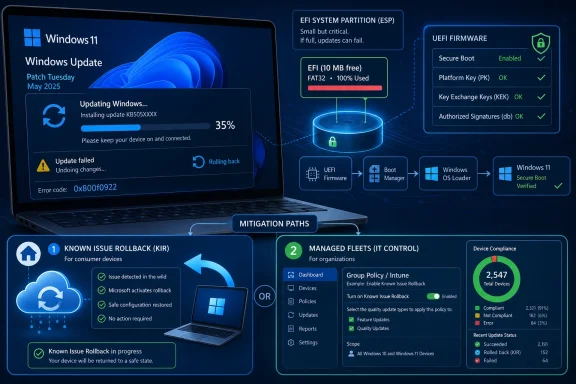 The Failure Is Small, but the Blast Radius Is Not
KB5089549 is not a novelty update or a cosmetic tweak. It is the May 2026 cumulative security update for Windows 11 24H2 and 25H2, the kind of Patch Tuesday payload most users are trained to accept without debate and most administrators are expected to deploy under deadline. When that update fails, the machine does not merely miss a feature improvement; it remains behind on the month’s security baseline.The reported failure path is especially familiar to anyone who has spent time staring at Windows servicing logs. The update downloads, begins applying, moves into the reboot phase, and then fails around the mid-30 percent mark. Windows displays the now-classic “Something didn’t go as planned. Undoing changes” message and rolls the device back to its previous state.
Microsoft’s explanation narrows the cause to low free space on the EFI System Partition, or ESP. That partition is normally hidden from users, created during installation, and used for boot-related files. It is not where users store photos, games, or Office documents, which makes the failure feel absurd from the outside: a modern operating system with hundreds of gigabytes free on the main drive can still fail a security update because a small hidden boot partition is nearly full.
That distinction matters because it changes who is likely to diagnose the problem. A typical Windows user can understand “your C: drive is full.” They cannot reasonably be expected to know whether an invisible EFI partition has enough breathing room for a servicing operation. Even many power users will only discover the real cause after checking CBS logs or reading Microsoft’s known-issue entry.
The result is the worst kind of update failure: one that is technically explainable but experientially opaque. Windows knows enough to roll back, and Microsoft knows enough to mitigate it, but the user sees only a failed security update and a cryptic hexadecimal code. The system survives, but confidence takes another hit.
Microsoft’s Rollback Fix Treats the Symptom, Not the Anxiety
Known Issue Rollback has become one of Microsoft’s more important quiet repair mechanisms. Instead of forcing every affected user to install a new package, Microsoft can disable or revert a problematic change through cloud-delivered configuration for consumer and unmanaged business devices. In this case, the company says the mitigation has already propagated automatically, with a reboot helping the fix apply more quickly.That is good engineering in the narrow sense. It reduces friction, avoids making users hunt for an out-of-band installer, and lets Microsoft contain a bad servicing experience without waiting for the next Patch Tuesday. For a large consumer estate, invisible remediation is often the least painful option.
But KIR also illustrates the strange bargain Windows users now live with. The update system is complex enough that Microsoft needs a remote rollback mechanism for bad changes, yet opaque enough that users often do not know whether the fix has reached their device. “Restart and try again” is reasonable advice, but it is not a satisfying explanation when the thing failing is a mandatory security update.
For administrators, the story is more structured but not necessarily more pleasant. Enterprise-managed devices do not always receive the same automatic KIR behavior without policy deployment. IT teams may need to import and configure the appropriate Group Policy, restart affected systems, and then re-run update compliance checks across the fleet.
That is where a small EFI partition becomes a change-management event. A single user at home can reboot and retry. A business with thousands of endpoints has to identify failures, distinguish this issue from other 0x800f0922 causes, deploy the mitigation, confirm reboot completion, and verify patch state afterward. The patch is mandatory, but the failure recovery is still labor.
The EFI Partition Has Become a Hidden Debt Collector
The ESP was never meant to be a place ordinary users think about. It exists so firmware and the operating system can coordinate boot files in the UEFI era. Windows hides it for good reasons: deleting or altering files there can make a machine unbootable.That invisibility is also the source of the present mess. Many Windows installations have relatively small EFI partitions, often created years earlier by OEM images, older Windows installers, multi-boot setups, or disk migration tools. Over time, firmware updates, boot managers, recovery components, and non-Microsoft files can accumulate there.
Microsoft’s threshold of roughly 10 MB free is a strikingly small number, but small numbers are exactly what matter in tiny partitions. A 100 MB or 260 MB partition can look generous when it is created and cramped years later after multiple platform changes. Users may upgrade Windows repeatedly, replace hardware drivers, add Linux, remove Linux, clone disks, and never once see the partition that ultimately decides whether a security update succeeds.
The broader lesson is that Windows servicing increasingly depends on parts of the system most users do not control and often cannot see. The main OS volume is only one piece of the patching puzzle. Boot files, recovery partitions, Secure Boot certificate updates, servicing stack assumptions, and OEM residue all sit underneath the friendly Windows Update interface.
That is not inherently wrong. Modern secure boot chains are complicated because modern endpoint security is complicated. But when the complexity leaks into Patch Tuesday as a failed install, the operating system has failed to absorb its own abstraction.
Error 0x800f0922 Is a Familiar Mask for Too Many Problems
Part of the frustration here is that 0x800f0922 is not a clean, single-purpose diagnosis. Windows users have seen it in connection with system reserved partition problems, .NET installation failures, VPN-related update issues, and other servicing breakdowns over the years. It is less a diagnosis than a doorway into a longer investigation.That creates a support problem. A user searching for 0x800f0922 may find years of advice, much of it irrelevant or risky. Some guidance will suggest running DISM and SFC. Some will suggest resetting Windows Update components. Some will point to partition resizing. Some will recommend in-place repair installs.
In this case, Microsoft’s known issue points specifically to limited ESP free space, especially at or below the 10 MB mark. That specificity is useful, but it arrives after the failure has already happened. A more resilient servicing system would detect the condition before the reboot phase, explain it clearly, and either remediate it safely or block the update with a plain-English message.
Instead, affected devices can appear to get partway through the update before failing during restart. That is the psychological trap of Windows Update failures: the user has already surrendered time, control, and a reboot window, only to be returned to the desktop with the same update still pending. The machine has done work, but the security state has not improved.
For IT professionals, the ambiguity is more than annoying. It complicates triage. When a deployment dashboard shows failed installs with the same broad error code, teams need to determine whether they are dealing with the confirmed ESP-space issue, a separate device-specific fault, a third-party security product conflict, or a servicing stack problem. Every hour spent classifying failures is an hour not spent closing exposure.
Patch Tuesday’s Social Contract Is Wearing Thin
Patch Tuesday rests on a social contract. Microsoft ships cumulative updates on a predictable cadence, users tolerate disruption, and administrators build deployment rings around the expectation that the updates are necessary and broadly installable. The bargain works only if the patching mechanism is more reliable than the threats it is meant to mitigate.KB5089549 does not destroy that contract, but it does fray it. The failure appears bounded, and Microsoft has issued mitigation. Still, the optics are bad: a security update fails because a hidden partition lacks a few megabytes of space. That sounds like the kind of edge case an update readiness check should catch before asking the user to reboot.
The timing makes it more sensitive. Microsoft is pushing Windows toward a future of more integrated AI features, more cloud-connected configuration, and more hardware-rooted security. At the same time, users are being asked to accept stricter requirements around TPM, Secure Boot, virtualization-based security, and newer platform baselines. The company cannot make the trust argument in one breath and shrug off servicing fragility in the next.
Windows Update failures also land differently in 2026 than they did a decade ago. The threat environment is faster, exploit chains are more automated, and endpoint compromise is a business risk rather than an inconvenience. A failed cumulative update may be merely irritating at home, but in a regulated environment it can become an audit finding, an exception report, or a security operations headache.
That is why “just restart and try again” is both useful and inadequate. It may fix the individual device. It does not answer the larger question of why Windows still too often discovers environmental blockers after the update is already underway.
The Registry Workaround Shows How Awkward the Plumbing Can Get
Microsoft’s additional workaround involves setting a registry value under the boot file servicing configuration to adjust ESP padding behavior, followed by a reboot and another update attempt. For technically confident users and administrators, that is a manageable procedure. For ordinary users, it is a warning sign.Any fix that begins with an elevated Command Prompt and a registry write is already outside the comfort zone of the audience most likely to be baffled by the failure. The registry remains powerful, but it is not where a consumer should have to go to receive a security patch. One mistyped command can create new problems, and many users have been trained for years not to edit the registry unless absolutely necessary.
The enterprise version is cleaner in principle because Group Policy gives administrators a supported way to apply mitigations at scale. But it still requires process: obtain the policy, import it, configure it, target it, reboot devices, and monitor compliance. That is acceptable for a known issue, but it is not cost-free.
This is the recurring burden of Windows servicing incidents. Microsoft absorbs some of the pain through cloud rollback and documentation, but customers absorb the operational tail. The bigger the fleet, the longer that tail becomes.
The better path would be preflight detection with a safe repair recommendation before the update commits to a reboot. If the ESP is too full, Windows should be able to say so directly. If Microsoft can safely alter padding behavior through KIR or registry policy, the update experience should be able to apply the same logic before failure rather than after it.
Security Updates Cannot Depend on Hidden Free Space Mysticism
The uncomfortable question is whether Windows setup and servicing have been too tolerant of undersized support partitions for too long. Microsoft has spent years improving the reliability of cumulative updates, reducing fragmentation, and consolidating servicing behavior. But the installed base carries history with it: OEM layouts, old defaults, cloned disks, recovery partitions, multi-boot experiments, and years of accumulated boot artifacts.That history cannot be wished away. Windows is not iOS; it runs on a sprawling ecosystem of hardware and installation lineages. The same openness that lets enthusiasts dual-boot, image, repair, and customize machines also gives Microsoft a harder servicing problem than Apple or Google face on more controlled platforms.
Still, security updates deserve a higher bar. If the ESP is now a meaningful dependency for monthly servicing, Windows should treat it like one. That means reporting its health in a way administrators can inventory, warning before it becomes critical, and refusing to bury the explanation in logs after rollback.
There is precedent for this kind of evolution. Windows has gradually become more explicit about TPM, Secure Boot, virtualization support, and hardware compatibility. Microsoft is willing to surface platform requirements when it wants to enforce them. The EFI partition should not remain a secret until it blocks patching.
For WindowsForum readers, the practical lesson is immediate: check ESP free space on machines that repeatedly fail KB5089549, especially if the failure occurs during reboot around the 35 to 36 percent range. But the strategic lesson is broader: hidden partitions are now part of endpoint hygiene.
Administrators Will Treat This as Another Compliance Exception
In managed environments, the question is not simply whether Microsoft has a workaround. The question is how quickly the workaround can be operationalized without creating more risk than it removes. Patch deployment is a pipeline, and any unexpected failure forces administrators to branch that pipeline.First comes detection. Admins need to identify devices failing KB5089549, correlate error codes, and separate confirmed ESP-space cases from unrelated failures. Then comes mitigation, which may involve Group Policy deployment, device restarts, and renewed update attempts. Finally comes reporting, because leadership and auditors usually care about whether security patches are installed, not why a hidden boot partition made the process annoying.
This is where cumulative updates become a double-edged sword. A cumulative model simplifies baseline management because the latest update includes previous fixes. But it also means a single installation blocker can prevent a device from receiving the entire month’s bundle. The all-in-one package is elegant until it does not install.
Organizations with mature rings will fare better. Pilot groups should catch failures before broad deployment, and endpoint management tools should reveal devices stuck behind the May baseline. Smaller businesses without dedicated patch engineering may simply discover the issue when users complain about repeated update attempts.
The most security-conscious organizations may go further and inventory EFI partition sizing across their Windows 11 estate. That sounds excessive until the next boot-adjacent servicing requirement appears. Once a hidden partition has blocked one security update, it becomes reasonable to ask where else the fleet carries silent technical debt.
Consumer Users Are Left With the Least Context
Home users have the simpler workaround but the worse explanation. Microsoft says the KIR mitigation has propagated automatically to consumer and non-managed business devices, and restarting may help it apply. That means many users will not need to touch the registry or resize anything.But from the user’s perspective, the experience remains poor. Windows tried to update, failed, rolled back, and now asks for trust again. The fix may be invisible, which is operationally convenient but emotionally unsatisfying.
The average user does not distinguish between a bug in the update payload, a servicing stack edge case, a driver conflict, and a hidden partition capacity issue. They see Windows failing to update. If that has happened before on the same machine, it becomes part of a pattern, even when the technical causes differ.
This is the reputational danger Microsoft faces. Each individual update incident can be explained. Taken together, they feed the story that Windows Update remains unpredictable. For a platform built around mandatory cumulative security updates, that perception is corrosive.
Microsoft has spent years trying to make updates quieter, faster, and less disruptive. The company has improved many parts of the experience. But incidents like KB5089549 remind users that reliability is judged at the point of failure, not by the average case.
The Windows Servicing Machine Needs Better Preflight Checks
The right criticism is not that Microsoft made a mistake in a complex ecosystem. Every operating system vendor ships bad updates sometimes. The sharper criticism is that Windows still too often fails late, cryptically, and reactively.A preflight model would check the conditions needed for installation before the reboot phase. If the ESP does not have enough usable space, Windows Update should say so plainly before it commits the user to downtime. If the condition can be mitigated automatically, it should do that first. If it cannot, it should give administrators a clear signal they can query at scale.
This is not just about user friendliness. Late failure wastes time and increases risk. A machine that spends 20 minutes installing and rolling back is still unpatched afterward. In some cases, the user may delay the next attempt because they do not want to lose more time, turning a temporary servicing fault into a longer security gap.
Microsoft’s servicing stack already performs checks. The issue is whether those checks are understandable, early enough, and exposed to the right tools. A log entry in CBS is useful for technicians; it is not a user experience.
The company should also consider whether historical ESP sizes remain adequate for modern Windows 11 servicing and Secure Boot maintenance. If the platform’s needs have grown, Microsoft needs a supported path for assessing and remediating old layouts. Leaving that work to forum posts, third-party partition tools, and heroic administrators is not a strategy.
A Few Megabytes Now Carry Patch Tuesday’s Reputation
The concrete advice is not complicated, but the incident should change how power users and administrators think about Windows health. The ESP is not just boot plumbing anymore; it is a potential servicing dependency. KB5089549 has made that visible.- Devices failing KB5089549 with error 0x800f0922 should be restarted and retried first, because Microsoft’s Known Issue Rollback may already have reached consumer and unmanaged business systems.
- Failures during the reboot phase around 35 to 36 percent are consistent with Microsoft’s confirmed low-ESP-space issue, especially when CBS logs indicate insufficient free space for boot file servicing.
- Enterprise administrators should use Microsoft’s managed-device mitigation path rather than improvising registry changes across fleets without policy control.
- Repeated failures should prompt administrators to inventory EFI System Partition free space, particularly on older, cloned, OEM-imaged, or multi-boot systems.
- Users should be cautious about manually resizing or modifying the EFI partition, because mistakes in that hidden partition can affect bootability.
- The broader risk is not this single bug but the recurring pattern of hidden Windows servicing assumptions becoming visible only after updates fail.
References
- Primary source: TechRepublic
Published: Tue, 19 May 2026 16:51:47 GMT
Microsoft Confirms Windows Update Bug Blocking Security Fixes
Microsoft confirmed that KB5089549 can fail with error 0x800f0922 on Windows 11 devices with low EFI partition space, and shared workarounds are available.www.techrepublic.com
- Related coverage: windowslatest.com
Microsoft confirms Windows 11 KB5089549 issues due to low storage, says it's rolling out an emergency patch to fix install errors
Microsoft confirmed that it's aware of an issue where Windows 11 KB5089549 fails to install due to errors such as 0x800f0922. www.windowslatest.com
- Related coverage: windowsnews.ai
KB5089549 stuck at 35% install on Windows 11 due to EFI partition under 10MB free - Windows News
KB5089549, the May 2026 Windows 11 update, fails at 35% if your EFI partition has less than 10MB free. Microsoft confirmed the bug and offers a Known Issue...windowsnews.ai - Related coverage: windowsforum.com
KB5089549 Update Fails on Windows 11 24H2/25H2: EFI Space Error 0x800f0922 | Windows Forum
Microsoft confirmed on May 15, 2026, that Windows 11 security update KB5089549 can fail to install on version 24H2 and 25H2 systems when the EFI System...windowsforum.com - Related coverage: ginjfo.com
Windows 11 : la mise à jour KB5089549 échoue, Microsoft confirme le bug - GinjFo
Microsoft confirme un bug avec la mise à jour de sécurité Windows 11 KB5089549 de mai 2026. Sur certains PC, l’installation échoue.www.ginjfo.com - Related coverage: windowscentral.com
Windows 11’s May update is causing install failures and slow internet — here’s what we know | Windows Central
Some users are hitting install failures and internet slowdowns after the May 2026 Patch Tuesday update.www.windowscentral.com
- Related coverage: tweakpc.de
Windows-11-Update KB5089549 scheitert bei 35 Prozent und Microsoft bestätigt EFI-Problem
Microsoft bestätigt ein neues Problem mit dem Windows-11-Sicherheitsupdate KB5089549. Viele Nutzer berichten, dass die Installation zunächst normal startet, beim Neustart jedoch bei rund 35 bis 36 Prozent scheitert.www.tweakpc.de - Related coverage: windowsreport.com
Windows 11 KB5089549 Reportedly Fails to Install for Some Users
Some Windows 11 users say KB5089549 fails during installation and triggers an automatic rollback after Patch Tuesday. windowsreport.com
- Official source: support.microsoft.com
- Related coverage: tomshardware.com
Microsoft patches Windows 10 issue that accidentally blocked extended security updates from installing — latest update should finally fix all the issues for ESU-eligible devices | Tom's Hardware
Install this update if you want ESU to work properly on your aging Windows 10 computerwww.tomshardware.com - Related coverage: tbs.tech

