
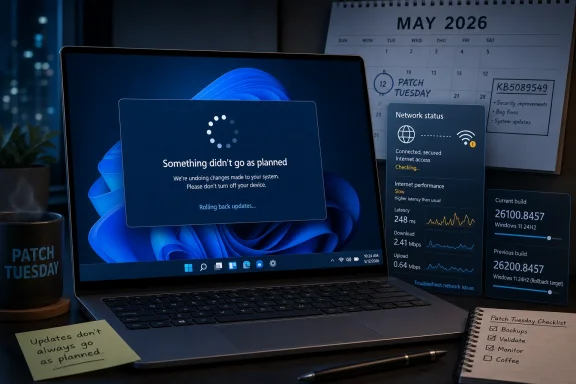
The uncomfortable part is that KB5089549 appears to sit right at the intersection of two Windows realities. Microsoft is trying to make updates faster, more consolidated, and more predictable. Users, meanwhile, are still staring at “Something didn’t go as planned” screens, failed reboot phases, rollback messages, and post-update symptoms that are hard to separate from drivers, firmware, security software, or simple bad luck.
 Microsoft Ships a Routine Patch Into an Unroutine Trust Problem
On paper, KB5089549 is exactly the sort of update Windows users are supposed to accept without drama. It is the May 2026 Patch Tuesday cumulative update for Windows 11 24H2 and 25H2, not an optional experiment or an Insider build detour. It contains the usual security payload, plus fixes and improvements Microsoft had already staged through the previous optional preview cycle.
That ordinary packaging is precisely why complaints about failed installation land with more force than they might otherwise. Patch Tuesday is not a hobbyist channel. It is the monthly baseline for consumers, managed fleets, help desks, compliance dashboards, and anyone who treats Windows security updates as a non-negotiable obligation rather than a lifestyle choice.
The reported failure mode is familiar: Windows Update downloads the package, begins the install, reboots, then reverses itself with a message along the lines of “Something didn’t go as planned. No need to worry — undoing changes. Please keep your computer on.” In the best version of that story, the machine comes back usable. In the worst version, the user is left with a machine that is technically recovered but no closer to being patched.
That distinction matters. A rollback is better than a brick, but it is not a success. For a home user, it is wasted time and anxiety. For an administrator, it is a compliance gap with an unknown root cause and a support ticket attached.
The Known-Issues Page Says Nothing, Which Is Not the Same as Nothing Happening
As of May 13, Microsoft’s Windows release health information for Windows 11 versions 24H2 and 25H2 lists no active known issues for the current releases. That is useful, but it should not be overread. “No active known issues” is not a declaration that every attempted installation succeeded; it is a statement about what Microsoft has validated, scoped, and chosen to publish.
This is where Windows update coverage often goes wrong. Community reports are not automatically proof of a broad defect, but Microsoft silence is not automatically proof of user error. The space between those two positions is where most early update trouble lives.
The reports around KB5089549 are still anecdotal. Reddit threads, Microsoft community posts, and comment sections are noisy instruments. They overrepresent people with problems, underrepresent successful installs, and frequently mix unrelated symptoms into a single narrative because the update is the most visible recent change.
Still, Windows servicing history gives users a reason to pay attention before Microsoft posts a formal advisory. Known issues often begin as scattered reports, then become patterns, then become release-health entries only once Microsoft can reproduce or correlate them. That lag is not necessarily negligence; it is the cost of confirming a bug across the vast hardware and software sprawl Windows supports.
The Failure Message Is Reassuring Until It Becomes a Loop
The rollback message itself is designed to calm users, and in one narrow sense it deserves credit. Windows has become much better at undoing failed servicing operations than it was in the era when a botched update could strand a machine in recovery or leave users spelunking through boot media.
But a safe rollback can still become a trap. If Windows Update keeps offering the same cumulative update and the system keeps failing in the same place, the user is not restored to normal; they are placed in a monthly update loop. The machine remains behind on security fixes, the user loses confidence in reboot prompts, and each retry consumes time without producing better evidence.
That is particularly aggravating with cumulative updates because there is no simple way to skip only the offending component. The cumulative model was meant to reduce fragmentation and simplify support. In practice, when a cumulative update fails, it can also collapse many separate fixes into one indivisible failure.
The reports of repeated failure on some systems, including attempts through the standalone Microsoft Update Catalog package, point toward that kind of frustration. If both Windows Update and manual installation fail, users naturally suspect the package. Administrators, however, know the package is only one actor in a much larger play: component store health, pending operations, servicing stack behavior, disk state, firmware, boot configuration, third-party security tools, and driver packages can all turn a nominally standard update into a local failure.
Windows Update Is Now a Driver, Firmware, and Security Boundary Problem
The timing is awkward because Microsoft has been emphasizing improvements to Windows Update, including better handling around driver updates. That is not a side issue. The modern Windows update experience is no longer just an operating system file replacement mechanism; it is a broker between Microsoft, OEMs, hardware vendors, firmware states, and security requirements that increasingly live below the OS.
That evolution makes monthly patching more powerful, but also harder to reason about. A user sees “KB5089549” because that is the label Windows surfaces. Underneath, the system may also be juggling servicing stack logic, Secure Boot-related changes, driver metadata, firmware-delivered assumptions, and hardware-specific branches that most users will never see.
This is one reason installation failures can cluster around certain devices without becoming universal. Two machines may both say they are installing KB5089549, but their actual update path can diverge based on edition, build, previous patch level, OEM image history, recovery partition state, enabled security features, and vendor drivers.
It also complicates blame. A failed cumulative update might expose a Microsoft bug. It might expose a stale driver. It might expose a broken component store. It might expose an OEM customization that worked until the update touched a part of the system that had not been stressed in months. From the user’s chair, that nuance feels academic, because the thing that changed was Windows Update.
The Slow-Internet Reports Are the Thinnest Part of the Story
The more dramatic claim around KB5089549 is that it may be slowing internet access on some systems. That deserves caution. Unlike installation failures, which produce relatively concrete signals, network degradation after an update is notoriously hard to attribute.
A user may be right that performance changed immediately after installing a patch. That does not automatically mean the patch introduced a general networking bug. VPN clients, endpoint security filters, Wi-Fi drivers, DNS settings, router behavior, ISP congestion, browser updates, and power-management changes can all masquerade as “the update broke my internet.”
At the moment, the slow-internet claim appears much less corroborated than the installation-failure reports. That does not mean affected users are imagining it. It means the public evidence is not yet strong enough to treat the network symptom as a known KB5089549 defect rather than a reported post-update condition.
The practical advice follows from that uncertainty. If a system became slow immediately after KB5089549, users should test broadly before uninstalling or blocking updates: compare wired and wireless connections, check another device on the same network, test with VPN disabled, inspect network adapter drivers, and look for security suite updates that landed at the same time. The update may be involved, but it should not be presumed guilty before the obvious layers are separated.
The May Patch Arrives After a Messy Spring for Servicing
KB5089549 does not arrive in a vacuum. Recent Windows update cycles have included installation oddities, paused preview updates, and cases where Microsoft had to clarify that extra restarts or strange update behavior were expected under specific servicing conditions. That matters because users do not experience updates as isolated KB numbers; they experience them as a rolling relationship with trust.
If a March preview fails for some users, an April cumulative update causes headaches for others, and a May Patch Tuesday update appears to stall or roll back on another subset of machines, the details may differ but the emotional result is the same. Users start to treat every reboot as a wager.
Microsoft’s problem is not simply that bugs exist. Bugs are inevitable at Windows scale. The problem is that the Windows update interface often compresses complex servicing reality into a small set of vague messages that do not help users distinguish between a transient installation hiccup, a local corruption issue, a known compatibility block, and a package-level regression.
That opacity feeds speculation. When users see the same friendly rollback message three times, they do not feel reassured. They feel managed.
Enterprise IT Will Care Less About the Reddit Thread Than the Failure Pattern
For managed environments, the key question is not whether every complaint is valid. It is whether the reports suggest a pattern worth delaying broad deployment, tightening rings, or increasing telemetry review. The answer, for cautious administrators, is probably yes — not because KB5089549 is proven bad, but because Patch Tuesday discipline exists precisely to absorb this kind of ambiguity.
Well-run Windows fleets should not be throwing a fresh cumulative update at every device on day one. Rings, deferrals, pilot groups, and staged deployment exist because early failures are often discovered at the edges: a particular laptop generation, a security product version, a VPN driver, a niche language pack, a line-of-business dependency, or an old OEM image that has survived too many in-place upgrades.
The lack of a Microsoft known-issue entry means there may be no official reason to pause. It does not mean administrators should ignore their own telemetry. If installation failures spike after KB5089549 in a pilot ring, that local signal is more important than the absence of a public advisory.
This is also where the cumulative model creates operational pressure. Skipping a Patch Tuesday update is not a neutral act when it contains security fixes. But forcing a failing update repeatedly is also not responsible. The administrator’s job is to narrow the affected population, preserve security coverage where installs succeed, and avoid turning an unknown issue into a fleet-wide outage.
Home Users Need Triage, Not Rituals
For individual users, the temptation is to perform the usual Windows update rituals: reboot again, run the troubleshooter, clear caches, run DISM and SFC, download the standalone installer, and hope the machine gives in. Some of those steps can help. Others merely create the comforting impression of action.
The first useful move is to confirm the basics. A user should check the exact Windows version, build number, and update history entry. KB5089549 applies to Windows 11 24H2 and 25H2 systems, while Windows 11 23H2 and Windows 10 are on different May 2026 packages. Confusing those details leads to bad troubleshooting and worse forum advice.
The second useful move is restraint. If the machine rolls back cleanly and remains usable, repeatedly hammering the same update may not be wise. A short pause can be reasonable while watching for Microsoft acknowledgement, new reports, or an out-of-band fix. That is especially true if the device is not exposed to unusual risk and the user is not trying to meet enterprise compliance requirements.
The third useful move is documentation. Error codes, CBS logs, setup logs, failure percentages, device model, security software, and whether the Microsoft Update Catalog installer also fails are the details that turn a complaint into a useful report. “It broke my PC” is emotionally true but diagnostically weak. “It fails during the reboot phase at the same percentage on Windows 11 25H2 build X with the standalone MSU as well” is the kind of report that can become a pattern.
Microsoft’s Messaging Still Treats Update Failure as an Edge Case
The strange thing about Windows Update is that Microsoft has improved the machinery while leaving much of the human-facing experience underdeveloped. Updates are smaller than they used to be in many cases. Rollbacks are safer. Servicing stacks are more resilient. Enterprise controls are more mature. Yet the user-facing message when something goes wrong remains frustratingly generic.
“Something didn’t go as planned” is friendly, but it is not informative. It does not tell the user whether the system lacks disk space, hit a driver block, failed a boot operation, encountered component store corruption, or tripped over a known issue Microsoft is already investigating. The message reduces panic, but it also withholds agency.
There are reasons for that. Too much technical detail can confuse nontechnical users, and error specificity can be difficult when failures cascade across multiple servicing phases. But Windows 11 increasingly presents itself as a modern, intelligent platform. Its update failure messages still feel like they were designed for an era when the best consumer support strategy was to say as little as possible.
That gap matters more as Windows becomes more security-sensitive. Secure Boot, TPM validation, virtualization-based security, kernel protections, driver controls, and firmware interactions all raise the value of patching while also increasing the number of places patching can go wrong. Users need clearer explanations, not merely softer wording.
The Real Risk Is Update Fatigue, Not One Bad KB
Even if KB5089549 turns out to affect only a small number of systems, the broader risk is cumulative update fatigue. Users who have been trained to install security updates promptly are now also trained to search the KB number before rebooting. That is not healthy for the Windows ecosystem.
Security depends on timely adoption. Timely adoption depends on trust. Trust depends not on perfection, but on predictability and transparency. When updates fail without explanation, or when symptoms appear before Microsoft has any public status to point to, the burden shifts onto users and administrators to investigate the thing the platform was supposed to handle.
This is where Microsoft’s “no known issues” posture can unintentionally backfire. It is accurate in a narrow release-health sense, but it can read as dismissive when users are actively reporting failures. Microsoft does not need to validate every Reddit thread, but it could do more to communicate when it is monitoring emerging reports that have not yet become confirmed known issues.
A middle state would help. Something like “investigating reports of installation failures on a limited number of devices” would not be an admission of a widespread defect. It would be a recognition that the feedback loop exists. For a platform as large as Windows, that kind of acknowledgement is not weakness; it is operational maturity.
The KB5089549 Lesson Fits in Five Practical Moves
The practical story around KB5089549 is less sensational than the headline version and more useful than pretending nothing is happening. The update is real, the complaints are real, and the scope is still uncertain. That is exactly the scenario where Windows users should be careful without becoming superstitious.
- Users who installed KB5089549 successfully should not uninstall it merely because others are reporting problems.
- Users seeing repeated rollback messages should stop retrying blindly and capture the exact error details, build number, device model, and whether the standalone installer fails too.
- Users reporting slow internet after the update should test VPNs, security tools, Wi-Fi drivers, DNS behavior, and other devices on the same network before blaming the cumulative update outright.
- Administrators should watch pilot-ring telemetry for elevated install failures and resist broad conclusions until they can correlate failures by hardware, driver, image, or security stack.
- Microsoft should treat early community reports as a visibility problem as much as a code problem, because vague rollback messaging turns small failures into large trust issues.
The important thing is not to turn every Patch Tuesday into a panic ritual. It is to recognize that Windows servicing now sits at the center of security, hardware enablement, firmware policy, and user confidence. When that system stumbles, even for a minority of machines, the explanation has to be better than “try again later.”
Microsoft may yet determine that KB5089549’s reported failures are isolated, configuration-specific, or caused by third-party interactions rather than a defect in the update itself. But Windows users have learned to judge Patch Tuesday not only by what the release notes promise, but by what happens after the reboot. If Microsoft wants the next generation of Windows updating to feel invisible, resilient, and trustworthy, it must close the gap between the polished servicing story it tells and the opaque failure screens users still see when the monthly patch does not go as planned.
