
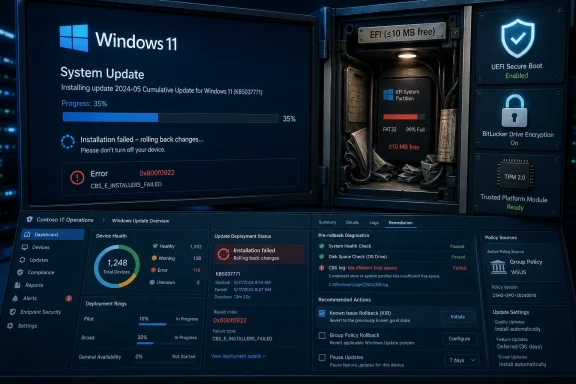
 Microsoft’s May Patch Tuesday Runs Into the Smallest Room in the House
KB5089549 landed as the May 12, 2026 cumulative security update for Windows 11 version 24H2 and 25H2, moving systems to OS builds 26100.8457 and 26200.8457. Like most cumulative updates, it was meant to be routine: security fixes, servicing stack work, quality improvements, and fixes carried forward from earlier preview updates. It also addressed a separate boot manager servicing problem that could send some machines into BitLocker recovery after April’s updates.
That context matters because KB5089549 is not a frivolous feature drop users can casually ignore. It is part of the monthly security cadence, distributed through Windows Update, Windows Update for Business, Microsoft Update Catalog, and WSUS. In other words, it is exactly the kind of update most organizations want to deploy quickly, predictably, and with as little human intervention as possible.
Instead, some systems appear to install the update normally, reboot, reach roughly 35–36 percent completion, and then roll back with the familiar “Something didn’t go as planned. Undoing changes.” message. Windows Update then reports 0x800f0922, one of those catch-all codes that has spent years frustrating administrators because it can point to several different servicing failures.
This time, Microsoft’s own documentation narrows the culprit: insufficient free space on the EFI System Partition, especially when the ESP has 10 MB or less available. CBS logs may show “SpaceCheck: Insufficient free space,” “ServicingBootFiles failed. Error = 0x70,” or references to third-party and OEM files outside Microsoft boot directories. That is a more actionable diagnosis than the error code, but it also reveals how much complexity is hiding under the modern Windows boot process.
The EFI Partition Was Never Supposed to Be News
The EFI System Partition is a small, usually hidden partition used by UEFI-based systems to store bootloaders and related startup files. On a typical Windows machine, users do not assign it a drive letter, open it in File Explorer, or think about it during monthly patching. It is infrastructure, and infrastructure is supposed to be boring.
The problem is that “small and hidden” does not mean “static.” OEM utilities, firmware update mechanisms, boot managers, recovery environments, dual-boot configurations, and security tooling can all leave artifacts in or near boot-related storage. Over years of updates, hardware lifecycle changes, and vendor add-ons, a partition that looked adequate at imaging time can become a cramped closet full of files nobody wants to touch.
Microsoft’s 10 MB threshold is striking because it is not much space in 2026 terms. It is less than a handful of smartphone photos and effectively invisible on a modern SSD. Yet if that last sliver of hidden boot partition space is gone, a security update can fail at reboot and leave the machine exactly where IT least wants it: not updated, not clearly broken, but stuck in a repeatable servicing failure.
This is the part consumers experience as a mysterious Windows Update error and IT departments experience as a fleet hygiene problem. The machine may still boot. The user may still work. But the endpoint is now out of compliance, and the failure will recur until the underlying condition is mitigated or Microsoft’s workaround reaches the device.
Secure Boot Maintenance Is Making the Boot Path More Active
KB5089549 also sits in the shadow of Microsoft’s broader Secure Boot certificate work. Microsoft has been warning that Secure Boot certificates used by most Windows devices begin expiring in June 2026, and the company is rolling out mechanisms to prepare eligible systems for updated certificates. This update includes additional targeting data for Secure Boot certificate deployment and adds a SecureBoot folder under C:\Windows on eligible devices with scripts intended for enterprise rollout scenarios.
That does not mean the new SecureBoot folder is the same thing as the ESP failure. Microsoft has presented it as expected behavior, not as the known issue. But the timing is impossible to ignore: Windows updates are increasingly touching the boot trust chain, and the boot trust chain depends on resources that many organizations have historically treated as “set once and forget.”
The boot manager fix inside KB5089549 is also part of the same broader picture. April’s update cycle created conditions where some systems could enter BitLocker recovery after boot file updates on machines with certain TPM validation settings, including invalid PCR7 configurations. May’s update was supposed to improve startup reliability and reduce that pain.
That makes the irony sharper. An update meant partly to make boot servicing safer is itself failing on some systems because the boot servicing area lacks enough room. This is not a contradiction so much as a sign of where Windows is heading: boot security, recovery, TPM state, BitLocker behavior, and update reliability are now tightly coupled.
Known Issue Rollback Is Useful, but It Is Not a Time Machine
Microsoft says affected consumer devices and non-managed business devices can receive mitigation through Known Issue Rollback, the Windows mechanism designed to disable problematic non-security changes without requiring users to uninstall an entire update. A restart may help the mitigation apply more quickly. For enterprise-managed devices, Microsoft provides a special Group Policy package that administrators can install and configure to temporarily disable the change causing the installation failure.
That is the right kind of mitigation for a servicing regression. It is also a reminder that KIR is not magic. Managed environments still need policy deployment, targeting, restart coordination, and reporting. If a device is offline, outside VPN reach, unhealthy in other ways, or governed by slow change-control processes, the presence of a rollback mechanism does not guarantee instant recovery.
Microsoft also documents a registry-based workaround involving an ESP padding setting under the boot file servicing control path. The company quite properly warns that registry edits can cause serious system problems if performed incorrectly. That is not boilerplate in this case; the affected area is adjacent to the boot process, and careless manipulation of boot partitions or servicing behavior can turn an update failure into a recovery event.
For many organizations, the safest near-term answer will be to use Microsoft’s KIR guidance rather than improvising partition surgery across production machines. But that does not eliminate the need to inspect why the ESP is nearly full. A rollback can get this month’s patch moving again; it does not necessarily make the hidden partition healthy for next month’s boot-related change.
The Enterprise Risk Is Compliance Drift, Not Just Failed Installs
For home users, the failure is annoying and opaque. For enterprises, it creates a measurable patch compliance problem. Security teams see missing KB5089549. Help desks see repeated reboot failures. Endpoint teams see 0x800f0922. The root cause sits in a partition most standard asset inventories do not report in a useful way.
That is the kind of gap that turns into operational drag. A device can appear normal in user-facing terms while remaining unable to apply a mandatory security update. If enough machines in a fleet share the same OEM image, disk layout, firmware tooling, or historical upgrade path, the issue can cluster in ways that are not obvious until deployment rings begin failing.
The especially awkward part is that the machines most likely to hit hidden-partition edge cases may be the least pleasant to remediate. Older devices, heavily customized OEM builds, systems that have been upgraded across multiple Windows generations, and endpoints with vendor recovery tooling are all plausible candidates for cramped boot partitions. Those are also the machines where automated changes to partition layout deserve extra caution.
Administrators should resist the temptation to treat all 0x800f0922 failures as identical. The code has a history, and it can be triggered by component store corruption, .NET servicing problems, reserved partition issues, VPN or network failures in older scenarios, and other causes. With KB5089549, Microsoft has identified one confirmed path: low ESP free space. The logs matter because they distinguish this issue from the usual Windows Update fog.
Microsoft’s Servicing Model Keeps Asking for More Trust
Windows Update has become less negotiable over time, especially for security releases. That is defensible in a threat environment where unpatched endpoints are liabilities not only for their owners but for everyone connected to them. But mandatory servicing also raises the standard for predictability.
KB5089549 shows the bargain becoming more demanding. Users and administrators are asked to accept frequent cumulative updates that modify not just userland files but the machinery of boot, recovery, certificate trust, and device health assessment. In return, Microsoft has to make the preflight checks sharper and the failure explanations clearer before systems hit the reboot phase.
A failure at 35–36 percent is particularly irritating because it consumes time and user confidence. The machine has already downloaded the update, staged it, rebooted, attempted installation, failed, rolled back, and returned to Windows. By the time the user sees the error, the system has already spent the downtime. A better servicing experience would identify insufficient ESP space before the reboot and present a specific remediation path.
This is where Microsoft’s telemetry-driven rollout model helps but does not fully solve the problem. Known Issue Rollback can stop a bad change from propagating, and release health documentation can be updated quickly. But the endpoint still experiences the failure first. For IT departments, that means rings, pilot groups, and telemetry dashboards remain essential even when an update is “just” Patch Tuesday.
The Hidden Partition Becomes a Fleet Health Metric
The practical lesson from KB5089549 is that ESP free space belongs in endpoint health reporting. That may sound absurd to anyone who remembers when boot partitions were rarely discussed outside deployment imaging. But the evidence keeps pointing in the same direction: the boot path is now an actively serviced security boundary.
Organizations already inventory disk encryption state, Secure Boot status, TPM readiness, OS build, and update compliance. ESP capacity and free space now deserve similar attention, especially before broad deployment of boot-related security updates. The same is true for unusual files left by OEM tooling or third-party boot components.
This does not mean administrators should rush to resize every EFI partition. Partition operations at scale carry their own risk, and Microsoft’s immediate mitigation is aimed at the servicing change rather than instructing everyone to rebuild disk layouts. But it does mean IT should know which systems are close to the edge before the next update discovers them the hard way.
It also argues for cleaner OEM practices. Vendors that store unnecessary debris in the ESP, leave behind oversized boot assets, or use fragile layouts are effectively borrowing space from future servicing operations. That debt may sit unnoticed for years, and then a Microsoft update collects it in the middle of a reboot.
The May 2026 Patch Leaves a Checklist Written in Boot Files
KB5089549 is not a reason to panic, and it is not a reason to abandon Windows Update. It is a reason to treat a failed security update as a signal about the machine’s boot environment rather than as a random servicing tantrum. The immediate fixes matter, but the longer-term lesson is about visibility.
- Systems failing KB5089549 with 0x800f0922 should be checked for CBS log entries that specifically mention insufficient EFI System Partition space or failed boot file servicing.
- Devices with 10 MB or less free on the EFI System Partition are in the risk zone Microsoft identified for this known issue.
- Consumer and non-managed business devices may receive Microsoft’s Known Issue Rollback mitigation automatically, while managed enterprise devices may need the dedicated Group Policy package and a restart.
- Administrators should avoid blind partition edits or registry changes unless they have tested the procedure and have recovery plans for affected hardware.
- Fleet reporting should begin treating EFI System Partition free space as a practical servicing-readiness metric, especially for older systems and OEM-heavy images.
- KB5089549 also fixes a separate BitLocker recovery problem from April’s update cycle, so simply blocking the update indefinitely trades one boot-related risk for another.
The uncomfortable lesson of KB5089549 is that Windows security maintenance has moved deeper into places ordinary users never see and many administrators only inspect when something breaks. Microsoft will likely ship a more permanent fix, and the immediate rollback path should reduce the blast radius, but the direction of travel is clear: as Windows leans harder on Secure Boot, TPM validation, BitLocker, and certificate rotation, the health of the boot environment becomes part of the monthly patch story. The next servicing failure may not be caused by the ESP, but it will almost certainly reward the teams that stopped treating hidden partitions as hidden responsibilities.
