

Microsoft confirmed that Windows 11 security update KB5089549, released May 12, 2026, can fail during reboot on Windows 11 version 24H2 and 25H2 devices with cramped EFI System Partitions, typically rolling back around 35–36 percent with error 0x800f0922. The bug is narrow, but the lesson is broad. Windows servicing now depends on hidden boot plumbing that many users never inspect and many deployment images still undersize. A security update failing because a tiny partition has 10MB or less free is not just a patching hiccup; it is a reminder that modern Windows is only as resilient as its least visible dependency.
KB5089549 is not an optional feature experiment or a preview update that adventurous users knowingly installed. It is the May 2026 cumulative security update for Windows 11 24H2 and 25H2, moving those branches to OS builds 26100.8457 and 26200.8457. That makes the failure more consequential than the usual “wait for next month” irritation.
The symptom pattern is now familiar: Windows Update downloads and begins installing the package, the machine restarts, progress reaches roughly the mid-30s, and then Windows reverses course. The user sees a message along the lines of “Something didn’t go as planned. Undoing changes.” Windows Update then reports 0x800f0922, a code that has carried different meanings in different servicing failures over the years.
This time, Microsoft’s explanation is unusually concrete. The affected devices have limited free space on the EFI System Partition, particularly when that partition has 10MB or less available. CBS logs may include entries such as “SpaceCheck: Insufficient free space,” “ServicingBootFiles failed,” and references to third-party or OEM files outside Microsoft’s boot directories.
That specificity matters. It means this is not, at least in Microsoft’s own diagnosis, a general corruption panic, a bad download, or a mysterious cloud-side update outage. It is a boot-file servicing operation running out of room in a place Windows users are trained not to touch.
But hidden does not mean static. Windows updates can service boot files, update boot manager components, and coordinate with Secure Boot and BitLocker behavior. KB5089549 itself includes boot manager servicing work and Secure Boot-related changes, including Microsoft’s broader push around certificate updates before Secure Boot certificates begin expiring in June 2026.
That context turns the EFI partition from a passive boot shelf into an active servicing target. If the shelf is too small, too cluttered by OEM utilities, or polluted by third-party boot files, the update stack can hit a wall even when the main Windows volume has hundreds of gigabytes free. To the average user, that feels absurd: “I have space on C:, why can’t Windows update?” To the servicing stack, the answer is simple: the space it needs is not on C:.
This is the kind of failure that exposes the age of a Windows installation. Freshly installed machines built from current media may have cleaner partition layouts. Older devices, cloned disks, upgraded Windows 10 systems, dual-boot experiments, vendor recovery tooling, and years of firmware utilities can leave the ESP tighter and messier than Microsoft’s update assumptions allow.
Here, the useful evidence is not merely the code. It is the timing during reboot, the rollback around 35–36 percent, and the CBS log entries pointing at ESP free space. Those clues separate this issue from a routine component-store failure and from unrelated update trouble that happens to share the same numeric code.
That distinction is important for administrators because remediation has risk. Expanding or modifying system partitions is not the same as clearing browser cache. Assigning a drive letter to the EFI partition and deleting files by instinct can render a system unbootable. Registry changes affecting boot-file servicing behavior deserve more caution than the average “try this command” forum fix.
Microsoft’s workaround reflects that tension. For consumer and unmanaged business devices, the company says Known Issue Rollback has been used to mitigate the problem automatically, and a restart may help the mitigation apply sooner. For managed devices, administrators may need to deploy a specific Group Policy package. For systems still failing, Microsoft documents a registry setting that reduces ESP padding during servicing, followed by a reboot and another update attempt.
But KIR is not a cure for every class of defect. It is a rollback mechanism for a known bad change, not a disk-layout repair technician. If a device’s EFI partition is genuinely starved for space, the underlying fragility remains even if this month’s update finds a narrower path through it.
In enterprises, KIR is also less automatic by design. Managed devices are managed because organizations want control over policy, deployment timing, and change validation. That means IT departments must obtain and configure the appropriate Group Policy for the affected Windows versions. Microsoft is avoiding the sin of silently changing managed fleets, but the price is more work for administrators already juggling rings, deferrals, compliance dashboards, and help desk noise.
The result is a split reality. Home users may be told to restart and try again. Enterprise admins need to treat the issue as a deployment exception with inventory, policy, and follow-up validation. The same bug wears two different operational faces.
It is also the sort of fix that should make cautious administrators pause. The registry key lives under a boot servicing path, and the command must be run elevated. A typo, an overbroad script, or a poorly tested mass deployment could turn a targeted workaround into a new incident.
The right operational posture is boring and deliberate. Confirm the failure signature. Check logs. Validate ESP free space. Apply the least invasive mitigation first. Use the registry workaround only where KIR and a retry do not solve the problem, and document which machines received it.
That may sound overly conservative for a single Windows Update error, but boot infrastructure is unforgiving. A failed application patch wastes time. A damaged boot path can strand a device before remote management tools even load.
For enthusiasts, that residue may be self-inflicted. A Linux install tried and removed, a boot manager experiment, a disk clone from a smaller drive, or years of partition manipulation can all produce a system that works perfectly until a servicing operation needs a little extra space. For businesses, the source may be golden images or deployment practices that made sense years ago when ESP space pressure was lower.
This is where Microsoft’s problem becomes everyone’s problem. The Windows ecosystem prized flexibility for decades, and flexibility leaves artifacts. A partition that “works” at boot can still be unhealthy as a servicing target.
The uncomfortable conclusion is that update readiness is no longer just about OS build, disk capacity, and reboot windows. It includes the quality of the machine’s partition layout and the cleanliness of hidden boot storage. That is not a message consumers want to hear, but it is one IT departments should have internalized by now.
Secure Boot is not a decorative checkbox. It is part of the trust chain that helps ensure the system starts with expected, signed components. BitLocker, TPM measurements, boot manager updates, and Secure Boot state can all intersect in ways that make boot servicing more delicate than a normal file replacement.
Microsoft also says KB5089549 fixes a BitLocker recovery issue that could appear after the April 2026 security update on systems with certain TPM validation settings. In other words, this update is both a security patch and a repair vehicle for boot-chain reliability. That makes installation failures especially awkward: the update meant to stabilize part of the boot story can be blocked by another part of the boot story.
For security-minded readers, the lesson is not to skip the update. It is to understand that the pre-OS environment is now part of the patch surface. Ignoring the ESP because it is hidden is like ignoring firmware because Windows Update has a friendly Settings page.
That is not entirely unfair. Microsoft owns the servicing experience, and Windows Update is the part of the system making the demand. If Windows needs more ESP space, it should detect that condition earlier, explain it better, and avoid the theatrical rollback at reboot whenever possible.
The Settings app has improved enormously since the Windows 10 era, but update failure messaging still tends to compress complex causes into generic error codes. The right message here would be closer to: “This update needs more free space in the EFI System Partition, not on your main drive.” That would not solve the problem, but it would reduce the pointless cycle of clearing Downloads, uninstalling apps, and rerunning troubleshooters.
For nontechnical users, the current failure mode is especially perverse. The hidden partition is hidden for safety, but when it breaks servicing, the user receives an error that pushes them toward the internet, where unsafe advice is abundant. Microsoft cannot make boot partition surgery consumer-friendly overnight, but it can make diagnosis less cryptic.
Patch compliance dashboards should therefore be paired with disk layout intelligence. Organizations that already collect partition data through endpoint management or scripts can identify devices with dangerously low ESP space and prioritize remediation. Those that do not should consider adding that check, at least for Windows 11 24H2 and 25H2 fleets and for machines upgraded in place over multiple OS generations.
The risk is not evenly distributed. Older hardware, cloned images, devices with OEM-heavy boot partitions, dual-boot workstations, and machines with a long upgrade history deserve extra attention. So do executive laptops and remote devices where an update rollback can turn into a support escalation at the worst possible time.
There is also a change-management lesson. If an organization deploys the KIR Group Policy, it should track that deployment as a temporary mitigation, not a permanent state. Microsoft says a future Windows update will include a resolution. When that arrives, admins will need to understand which workaround states remain in the environment and whether any cleanup is required.
That concentration is usually a strength. Fewer choices mean fewer permanently unpatched systems. The downside is that when a cumulative update fails, the user does not merely miss one minor fix. They miss the whole month’s security payload and any reliability repairs bundled with it.
The hidden infrastructure burden has grown alongside that model. Servicing stacks must update themselves, boot components must be maintained, and security features increasingly depend on firmware-era assumptions. A 100MB or similarly small ESP may have been adequate for a simpler era. It looks less generous when Secure Boot maintenance, OEM additions, and modern boot servicing collide.
Microsoft can and should make future updates more tolerant. But OEMs, IT departments, and power users also need to stop treating ancient partition layouts as harmless just because they still boot. A machine that can start Windows is not necessarily a machine that can service Windows cleanly.
The industry has spent years moving security lower in the stack. Secure Boot, TPM-backed measurements, BitLocker integration, virtualization-based security, and firmware coordination all make the system harder to compromise when they work properly. They also make maintenance more dependent on parts of the machine most users never see.
That is the trade. Better boot security means boot servicing matters more. More capable cumulative updates mean failed cumulative updates hurt more. Cleaner automation means hidden assumptions become operational risks when they are wrong.
Windows 11’s May 2026 update failure is therefore less a freak accident than a stress test. It found machines where the boot partition was too cramped for the servicing model Microsoft is now running. The error code is temporary; the lesson is durable.
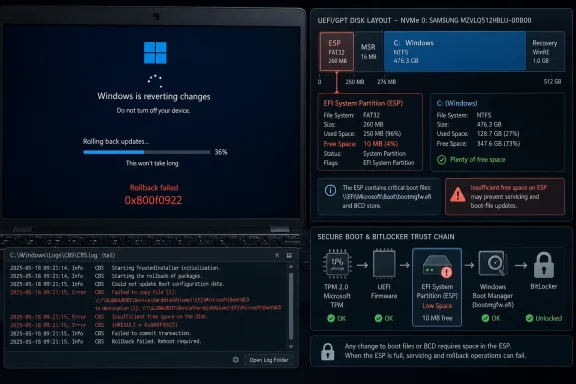 Microsoft’s May Patch Tuesday Runs Into the Smallest Room on the Disk
KB5089549 is not an optional feature experiment or a preview update that adventurous users knowingly installed. It is the May 2026 cumulative security update for Windows 11 24H2 and 25H2, moving those branches to OS builds 26100.8457 and 26200.8457. That makes the failure more consequential than the usual “wait for next month” irritation.The symptom pattern is now familiar: Windows Update downloads and begins installing the package, the machine restarts, progress reaches roughly the mid-30s, and then Windows reverses course. The user sees a message along the lines of “Something didn’t go as planned. Undoing changes.” Windows Update then reports 0x800f0922, a code that has carried different meanings in different servicing failures over the years.
This time, Microsoft’s explanation is unusually concrete. The affected devices have limited free space on the EFI System Partition, particularly when that partition has 10MB or less available. CBS logs may include entries such as “SpaceCheck: Insufficient free space,” “ServicingBootFiles failed,” and references to third-party or OEM files outside Microsoft’s boot directories.
That specificity matters. It means this is not, at least in Microsoft’s own diagnosis, a general corruption panic, a bad download, or a mysterious cloud-side update outage. It is a boot-file servicing operation running out of room in a place Windows users are trained not to touch.
The EFI Partition Has Become a Patch Management Dependency
The EFI System Partition is easy to ignore precisely because it usually does its job. On UEFI-based Windows systems, it houses boot-critical files that let firmware find and start the operating system. It is normally hidden from File Explorer, rarely assigned a drive letter, and treated by many users as one of those arcane pieces of disk layout best left alone.But hidden does not mean static. Windows updates can service boot files, update boot manager components, and coordinate with Secure Boot and BitLocker behavior. KB5089549 itself includes boot manager servicing work and Secure Boot-related changes, including Microsoft’s broader push around certificate updates before Secure Boot certificates begin expiring in June 2026.
That context turns the EFI partition from a passive boot shelf into an active servicing target. If the shelf is too small, too cluttered by OEM utilities, or polluted by third-party boot files, the update stack can hit a wall even when the main Windows volume has hundreds of gigabytes free. To the average user, that feels absurd: “I have space on C:, why can’t Windows update?” To the servicing stack, the answer is simple: the space it needs is not on C:.
This is the kind of failure that exposes the age of a Windows installation. Freshly installed machines built from current media may have cleaner partition layouts. Older devices, cloned disks, upgraded Windows 10 systems, dual-boot experiments, vendor recovery tooling, and years of firmware utilities can leave the ESP tighter and messier than Microsoft’s update assumptions allow.
Error 0x800f0922 Is the Smoke, Not the Fire
The danger with Windows Update errors is that the error code often becomes the story. Search for 0x800f0922 and users will find years of advice involving VPNs, .NET Framework features, component store repair, System Reserved partitions, and generic DISM or SFC rituals. Some of that advice may be useful in other circumstances, but it can distract from the specific May 2026 failure pattern.Here, the useful evidence is not merely the code. It is the timing during reboot, the rollback around 35–36 percent, and the CBS log entries pointing at ESP free space. Those clues separate this issue from a routine component-store failure and from unrelated update trouble that happens to share the same numeric code.
That distinction is important for administrators because remediation has risk. Expanding or modifying system partitions is not the same as clearing browser cache. Assigning a drive letter to the EFI partition and deleting files by instinct can render a system unbootable. Registry changes affecting boot-file servicing behavior deserve more caution than the average “try this command” forum fix.
Microsoft’s workaround reflects that tension. For consumer and unmanaged business devices, the company says Known Issue Rollback has been used to mitigate the problem automatically, and a restart may help the mitigation apply sooner. For managed devices, administrators may need to deploy a specific Group Policy package. For systems still failing, Microsoft documents a registry setting that reduces ESP padding during servicing, followed by a reboot and another update attempt.
Known Issue Rollback Is a Safety Net, Not a Strategy
Known Issue Rollback has become one of Microsoft’s quieter successes in modern Windows servicing. It lets Microsoft disable a problematic non-security change without requiring every affected user to uninstall a cumulative update. For consumer machines and unmanaged business PCs, that can feel almost magical: restart, try again, and the bad path may be avoided.But KIR is not a cure for every class of defect. It is a rollback mechanism for a known bad change, not a disk-layout repair technician. If a device’s EFI partition is genuinely starved for space, the underlying fragility remains even if this month’s update finds a narrower path through it.
In enterprises, KIR is also less automatic by design. Managed devices are managed because organizations want control over policy, deployment timing, and change validation. That means IT departments must obtain and configure the appropriate Group Policy for the affected Windows versions. Microsoft is avoiding the sin of silently changing managed fleets, but the price is more work for administrators already juggling rings, deferrals, compliance dashboards, and help desk noise.
The result is a split reality. Home users may be told to restart and try again. Enterprise admins need to treat the issue as a deployment exception with inventory, policy, and follow-up validation. The same bug wears two different operational faces.
The Registry Workaround Is a Scalpel, Not a Hammer
Microsoft’s registry workaround changes an ESP servicing setting, reducing the reserved padding Windows uses inside the EFI partition during boot-file servicing. In plain English, it gives the update process less self-imposed breathing room so it can complete on cramped partitions. That may be exactly the right tactical move for a machine stuck in a rollback loop.It is also the sort of fix that should make cautious administrators pause. The registry key lives under a boot servicing path, and the command must be run elevated. A typo, an overbroad script, or a poorly tested mass deployment could turn a targeted workaround into a new incident.
The right operational posture is boring and deliberate. Confirm the failure signature. Check logs. Validate ESP free space. Apply the least invasive mitigation first. Use the registry workaround only where KIR and a retry do not solve the problem, and document which machines received it.
That may sound overly conservative for a single Windows Update error, but boot infrastructure is unforgiving. A failed application patch wastes time. A damaged boot path can strand a device before remote management tools even load.
OEM Files and Old Images Are the Ghosts in the Machine
One of the most interesting details in Microsoft’s description is the log language about third-party or OEM files outside Microsoft’s boot directories. That phrase points to a familiar reality in PC ecosystems: Windows may own the operating system experience, but the boot environment is often a shared neighborhood. OEM diagnostics, firmware tools, recovery components, encryption products, and past dual-boot experiments can all leave residue.For enthusiasts, that residue may be self-inflicted. A Linux install tried and removed, a boot manager experiment, a disk clone from a smaller drive, or years of partition manipulation can all produce a system that works perfectly until a servicing operation needs a little extra space. For businesses, the source may be golden images or deployment practices that made sense years ago when ESP space pressure was lower.
This is where Microsoft’s problem becomes everyone’s problem. The Windows ecosystem prized flexibility for decades, and flexibility leaves artifacts. A partition that “works” at boot can still be unhealthy as a servicing target.
The uncomfortable conclusion is that update readiness is no longer just about OS build, disk capacity, and reboot windows. It includes the quality of the machine’s partition layout and the cleanliness of hidden boot storage. That is not a message consumers want to hear, but it is one IT departments should have internalized by now.
Secure Boot Raises the Stakes for a Hidden Partition
KB5089549 arrives in a year when Microsoft is already trying to move the Windows fleet through Secure Boot certificate maintenance. The update’s release notes include Secure Boot-related changes and point administrators toward preparation before certificate expiration starts in June 2026. That does not mean the certificate work alone caused this failure, but it does place the EFI partition under a brighter light.Secure Boot is not a decorative checkbox. It is part of the trust chain that helps ensure the system starts with expected, signed components. BitLocker, TPM measurements, boot manager updates, and Secure Boot state can all intersect in ways that make boot servicing more delicate than a normal file replacement.
Microsoft also says KB5089549 fixes a BitLocker recovery issue that could appear after the April 2026 security update on systems with certain TPM validation settings. In other words, this update is both a security patch and a repair vehicle for boot-chain reliability. That makes installation failures especially awkward: the update meant to stabilize part of the boot story can be blocked by another part of the boot story.
For security-minded readers, the lesson is not to skip the update. It is to understand that the pre-OS environment is now part of the patch surface. Ignoring the ESP because it is hidden is like ignoring firmware because Windows Update has a friendly Settings page.
The User Experience Still Makes Windows Look Guilty
Microsoft’s documentation may be precise, but the user-facing experience remains blunt. A machine fails during restart, undoes changes, and presents a hexadecimal error that most people cannot interpret. The actual problem may be a tiny hidden partition stuffed with files the user never created, but the blame lands on Windows Update.That is not entirely unfair. Microsoft owns the servicing experience, and Windows Update is the part of the system making the demand. If Windows needs more ESP space, it should detect that condition earlier, explain it better, and avoid the theatrical rollback at reboot whenever possible.
The Settings app has improved enormously since the Windows 10 era, but update failure messaging still tends to compress complex causes into generic error codes. The right message here would be closer to: “This update needs more free space in the EFI System Partition, not on your main drive.” That would not solve the problem, but it would reduce the pointless cycle of clearing Downloads, uninstalling apps, and rerunning troubleshooters.
For nontechnical users, the current failure mode is especially perverse. The hidden partition is hidden for safety, but when it breaks servicing, the user receives an error that pushes them toward the internet, where unsafe advice is abundant. Microsoft cannot make boot partition surgery consumer-friendly overnight, but it can make diagnosis less cryptic.
Enterprise IT Should Treat This as an Inventory Problem
For administrators, the immediate job is to get KB5089549 installed. The larger job is to find out how many devices are close to the same cliff. A fleet with a handful of failures today may have a broader population of machines with marginal ESP free space that will fail on a future boot servicing update.Patch compliance dashboards should therefore be paired with disk layout intelligence. Organizations that already collect partition data through endpoint management or scripts can identify devices with dangerously low ESP space and prioritize remediation. Those that do not should consider adding that check, at least for Windows 11 24H2 and 25H2 fleets and for machines upgraded in place over multiple OS generations.
The risk is not evenly distributed. Older hardware, cloned images, devices with OEM-heavy boot partitions, dual-boot workstations, and machines with a long upgrade history deserve extra attention. So do executive laptops and remote devices where an update rollback can turn into a support escalation at the worst possible time.
There is also a change-management lesson. If an organization deploys the KIR Group Policy, it should track that deployment as a temporary mitigation, not a permanent state. Microsoft says a future Windows update will include a resolution. When that arrives, admins will need to understand which workaround states remain in the environment and whether any cleanup is required.
Microsoft’s Patch Cadence Is Outgrowing Old Partition Assumptions
The May 2026 incident fits a broader pattern: Windows servicing is doing more in each cumulative update than many users appreciate. Security fixes, servicing stack changes, boot manager updates, AI component packages, daylight saving time adjustments, Secure Boot preparation, and quality fixes all travel through the same monthly machinery. The cumulative model simplifies patch selection, but it also concentrates failure.That concentration is usually a strength. Fewer choices mean fewer permanently unpatched systems. The downside is that when a cumulative update fails, the user does not merely miss one minor fix. They miss the whole month’s security payload and any reliability repairs bundled with it.
The hidden infrastructure burden has grown alongside that model. Servicing stacks must update themselves, boot components must be maintained, and security features increasingly depend on firmware-era assumptions. A 100MB or similarly small ESP may have been adequate for a simpler era. It looks less generous when Secure Boot maintenance, OEM additions, and modern boot servicing collide.
Microsoft can and should make future updates more tolerant. But OEMs, IT departments, and power users also need to stop treating ancient partition layouts as harmless just because they still boot. A machine that can start Windows is not necessarily a machine that can service Windows cleanly.
The Fix Is Coming, but the Warning Has Already Arrived
Microsoft says a permanent resolution is in progress and will be included in a future Windows update. That is the correct path; the burden should not remain on users to understand ESP padding, CBS logs, and Group Policy rollbacks. But the permanent fix will not erase the architectural warning.The industry has spent years moving security lower in the stack. Secure Boot, TPM-backed measurements, BitLocker integration, virtualization-based security, and firmware coordination all make the system harder to compromise when they work properly. They also make maintenance more dependent on parts of the machine most users never see.
That is the trade. Better boot security means boot servicing matters more. More capable cumulative updates mean failed cumulative updates hurt more. Cleaner automation means hidden assumptions become operational risks when they are wrong.
Windows 11’s May 2026 update failure is therefore less a freak accident than a stress test. It found machines where the boot partition was too cramped for the servicing model Microsoft is now running. The error code is temporary; the lesson is durable.
The Practical Reading of KB5089549 Is Smaller Than the Panic and Bigger Than the Bug
For users and administrators trying to decide how much attention this deserves, the right answer sits between alarmism and indifference. This is not evidence that every Windows 11 machine is about to stop updating. It is also not a harmless annoyance if the affected systems remain without the May security update.- KB5089549 affects Windows 11 versions 24H2 and 25H2 and was released on May 12, 2026, as a cumulative security update.
- The known failure pattern is a rollback during the reboot phase at about 35–36 percent with error 0x800f0922.
- Microsoft says the issue is tied to limited free space on the EFI System Partition, especially when 10MB or less is available.
- Consumer and unmanaged business devices may receive Microsoft’s Known Issue Rollback mitigation automatically, with a restart helping it apply sooner.
- Managed devices may require administrators to deploy the special Group Policy mitigation before retrying the update.
- Systems that still fail should be handled carefully, because Microsoft’s registry workaround touches boot servicing behavior and should not be treated like a generic cleanup command.
References
- Primary source: gHacks
Published: Thu, 21 May 2026 08:47:34 GMT
Microsoft Confirms Windows 11 May Update KB5089549 Fails With Error 0x800f0922 on Devices With Limited EFI Partition Space - gHacks Tech News
Microsoft has confirmed that KB5089549 fails on Windows 11 PCs with limited EFI System Partition space, and has shipped a mitigation alongside a manual registry workaround.www.ghacks.net - Related coverage: windowscentral.com
Microsoft confirms Windows 11’s May 2026 update is failing to install with error 0x800f0922 and outlines a mitigation for affected PCs | Windows Central
Windows 11 May 2026 update fails on some PCs, but Microsoft has already shipped a workaround, and it's working on a permanent fix.www.windowscentral.com - Related coverage: windows.gadgethacks.com
Windows 11 May 2026 Update Fails for Some PCs: What the EFI Partition Error Means << Windows Tips :: Gadget Hacks
The May 2026 Patch Tuesday update is failing to install on a subset of Windows 11 machines, stalling mid-reboot at roughly 35–36% completion and rolling... windows.gadgethacks.com
- Related coverage: windowsforum.com
KB5089549 Update Fails on Windows 11 24H2/25H2: EFI Space Error 0x800f0922 | Windows Forum
Microsoft confirmed on May 15, 2026, that Windows 11 security update KB5089549 can fail to install on version 24H2 and 25H2 systems when the EFI System...windowsforum.com - Related coverage: windowslatest.com
Microsoft confirms Windows 11 KB5089549 issues due to low storage, says it's rolling out an emergency patch to fix install errors
Microsoft confirmed that it's aware of an issue where Windows 11 KB5089549 fails to install due to errors such as 0x800f0922. www.windowslatest.com
- Official source: support.microsoft.com
May 12, 2026—KB5089549 (OS Builds 26200.8457 and 26100.8457) - Microsoft Support
 support.microsoft.com
- Related coverage: techrepublic.com
Microsoft Confirms Windows Update Bug Blocking Security Fixes
Microsoft confirmed that KB5089549 can fail with error 0x800f0922 on Windows 11 devices with low EFI partition space, and shared workarounds are available.www.techrepublic.com
- Related coverage: windowsnews.ai
KB5089549 stuck at 35% install on Windows 11 due to EFI partition under 10MB free - Windows News
KB5089549, the May 2026 Windows 11 update, fails at 35% if your EFI partition has less than 10MB free. Microsoft confirmed the bug and offers a Known Issue...windowsnews.ai - Related coverage: windowspower.de
Fehler 0x800f0922: KB5089549 installiert nicht – EFI-Partition voll beheben
Fehler 0x800f0922 bei KB5089549? Update bricht bei 35 % ab – wir zeigen 3 Lösungen für die volle EFI-Partition. Getestet auf Windows 11 24H2/25H2, Mai 2026www.windowspower.de - Related coverage: cryptika.com
- Related coverage: anavem.com
KB5089549: May 2026 Security Update – Windows 11 (2026)
KB5089549 patches critical CVEs and improves stability on Windows 11 24H2/25H2. Updates builds to 26100.8457 and 26200.8457. Installation details included.www.anavem.com - Official source: techcommunity.microsoft.com

