
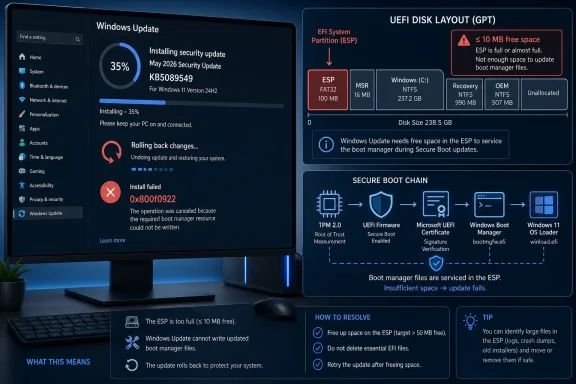
 A Security Update Trips Over the Smallest Partition on the Disk
KB5089549 is not a feature experiment masquerading as a patch. It is the May 2026 cumulative security update for Windows 11 24H2 and 25H2, bringing the OS to builds 26100.8457 and 26200.8457 respectively, with security fixes, servicing-stack improvements, and changes tied to Secure Boot and boot-manager servicing. In ordinary Patch Tuesday terms, this is the update administrators would rather install than debate.
The problem is that some devices cannot get through the reboot phase. Windows Update can download the package, stage the update, begin the install, and look as though it is progressing normally. Then, at roughly the 35–36 percent mark, the process fails, Windows rolls back the changes, and users are greeted by the familiar non-apology: “Something didn’t go as planned. Undoing changes.”
The visible error code is 0x800f0922, a code Windows veterans have seen in several update contexts over the years. Here, Microsoft’s explanation is more specific than the generic error suggests. The update is failing on systems where the EFI System Partition, or ESP, has limited free space — especially when 10 MB or less remains available.
That makes this less a story about a botched download and more a story about the hidden geography of a Windows PC. The ESP is not the big C: drive where users delete videos and uninstall games to make room. It is the small FAT-formatted partition used by UEFI firmware and Windows boot components, often created years ago by an OEM image, an installer default, or a disk-migration tool.
The EFI Partition Was Never Supposed to Be a User Problem
The EFI System Partition sits below the level at which most people understand their PC. It stores boot loaders, firmware-accessible files, and other components required to start the operating system. If Windows is a city, the ESP is not the apartment building, the shopping district, or the subway map; it is the locked service corridor behind the electrical room.
For years, that obscurity was part of the bargain. Users did not manage the ESP because Windows, PC makers, and firmware vendors were supposed to size and maintain it well enough that it stayed out of sight. But modern Windows servicing has become more interested in the boot chain, and the boot chain has become more crowded.
Secure Boot certificate updates, boot-manager fixes, BitLocker interactions, OEM files, diagnostics, recovery tooling, and third-party boot artifacts can all compete for space in a partition that may have been provisioned with yesterday’s assumptions. Microsoft’s own known-issue text points to log entries indicating insufficient ESP space and notes that third-party or OEM files outside Microsoft boot directories may be consuming room.
That is the uncomfortable detail. The system can have hundreds of gigabytes free on the main Windows volume and still fail because a tiny boot partition has crossed an invisible threshold. From the user’s perspective, this feels absurd. From the servicing stack’s perspective, it is brutally logical: the files needed for boot servicing have nowhere safe to go.
Microsoft’s Fix Is Really Two Fixes, and One Is Safer Than the Other
Microsoft’s first mitigation is Known Issue Rollback, the mechanism the company uses to disable specific non-security changes that cause regressions without requiring every affected machine to uninstall the entire update. For consumer devices and unmanaged business PCs, Microsoft says the KIR mitigation has already propagated automatically, though a restart may help it apply faster.
That is the path most people should prefer. KIR is boring by design, and boring is exactly what you want when the affected component lives near the boot process. It lets Microsoft back away from the problematic behavior while leaving the broader security update model intact.
The second workaround is a registry modification that changes an ESP-related setting before retrying the update. Microsoft documents a command that adds an
EspPaddingPercentvalue under
HKLM\SYSTEM\CurrentControlSet\Control\Bfsvc, setting it to zero, followed by a reboot and another installation attempt. This is a legitimate Microsoft-published workaround, but that does not make it casual maintenance.
The registry path is for administrators, advanced users, and support desks that understand the risk tradeoff. Editing the registry incorrectly can break Windows in ways that are far worse than a failed cumulative update. More importantly, using a registry tweak to squeeze an update through a cramped ESP does not answer the larger question of why the partition is cramped in the first place.
The Boot Chain Is Becoming a Monthly Servicing Surface
The timing matters because KB5089549 is not merely touching icons, taskbar behavior, or app reliability. Microsoft’s release notes tie the update to Secure Boot certificate preparation and boot-manager servicing, including improvements intended to prevent devices from entering BitLocker recovery after boot-file updates. This update is doing work in precisely the area where free-space problems can become operationally ugly.
That is the paradox of Windows security in 2026. The platform needs more aggressive servicing of the boot environment because firmware trust, Secure Boot, TPM measurements, BitLocker, and certificate lifecycles are now central to endpoint security. But the more Microsoft services that layer, the more it depends on partitioning decisions made by OEMs, old deployment images, and IT teams that may not have revisited disk layouts in years.
Microsoft has also been warning that Secure Boot certificates used by most Windows devices begin expiring starting in June 2026. That does not mean every PC suddenly stops booting next month, but it does mean the Windows ecosystem is entering a period where boot trust maintenance is not optional background noise. The May update’s Secure Boot folder and automation guidance for organizations are part of that bigger maintenance push.
Seen through that lens, the ESP failure is not an isolated nuisance. It is a preview of what happens when security architecture matures faster than fleet hygiene. The industry has spent years telling users that firmware security, measured boot, and encrypted storage matter. Now the bill for maintaining those layers is showing up in the smallest partition on the drive.
Home Users See an Error; IT Sees a Fleet-Scale Unknown
For home users, the advice is relatively simple: do not panic, do not start deleting random files from hidden partitions, restart the PC, and let Microsoft’s rollback mitigation do its work if it applies. If the update continues to fail, the registry workaround exists, but it is not a rite of passage. It is a support action.
For administrators, the issue is more irritating because it introduces a variable that many asset inventories do not track well. IT teams can report OS version, patch level, TPM state, BitLocker status, disk size, and free space on C:. They may not have a neat dashboard showing ESP size, ESP free space, and non-Microsoft boot-file consumption across every endpoint.
That gap matters. A fleet with 500 GB SSDs can still contain hundreds of machines with tiny or cluttered EFI partitions. Some may have been upgraded from older Windows installations. Some may have passed through disk-cloning tools. Some may carry OEM leftovers. Some may have dual-boot residue or security-agent artifacts that nobody remembers installing.
The operational risk is not that KB5089549 bricks every affected PC. Microsoft’s described failure mode is rollback, not permanent boot failure. The risk is that a security update becomes a recurring retry loop, users lose time, help desks get vague tickets, and machines remain behind until the KIR or future fix reaches them.
This Is Why “Just Install the Patch” Keeps Getting Harder
Security professionals are right to push fast patching. Attackers do not wait for change-control meetings, and cumulative updates often close vulnerabilities that are difficult for end users to evaluate on their own. The default posture should still be to install security updates promptly.
But Windows has complicated that moral clarity by making updates larger in scope and more entangled with platform infrastructure. A monthly cumulative update can now include security fixes, preview-release quality changes, AI component updates for eligible systems, servicing-stack changes, Secure Boot preparation, and boot-manager repairs. The result is administratively efficient, but diagnostically messy.
When something fails, the user sees one update and one error code. Underneath, there may be several distinct operations, each with its own assumptions. In this case, the symptom appears during reboot servicing, and the telltale evidence lives in CBS logs pointing at ESP space checks and boot-file servicing.
This is why Microsoft’s move toward more transparent known-issue documentation matters. The company’s acknowledgement gives support teams something concrete to search for: the percentage range, the error code, the ESP threshold, and the specific log lines. Without that, 0x800f0922 would send many users into the usual swamp of generic Windows Update advice.
The Registry Workaround Should Not Become the Folk Remedy
The most dangerous phase of any Windows update incident is the gap between “Microsoft has documented a workaround” and “users understand whether they should use it.” The registry command circulating around this issue is real, but it is not a magic spell for every failed KB5089549 installation. Error 0x800f0922 can appear in other contexts, and not every failure at reboot is necessarily caused by ESP free space.
That distinction matters because the ESP is not a junk drawer. Manually mounting it, deleting files, resizing partitions, or copying boot files based on forum snippets can turn a recoverable update failure into a startup repair session. Even experienced administrators tend to treat boot partitions with caution because a small mistake can strand a machine before Windows loads.
Microsoft’s KIR path is therefore the better first-line mitigation where available. It is centralized, reversible, and targeted at the specific problematic change. For enterprise-managed devices, the Group Policy route is more appropriate than having technicians touch individual machines one by one.
The registry workaround has a place, especially for controlled remediation or a stubborn standalone system. But it should not become the community’s default copy-paste answer to every May update complaint. The first job is to confirm that the failure matches Microsoft’s known issue; the second is to choose the least invasive fix.
OEMs and Deployment Teams Own Part of This Mess
Microsoft is the name on the update, so Microsoft gets the headline. Fair enough. It shipped the change, acknowledged the failure, and now has to ship the durable fix.
But the root condition — a cramped ESP — often predates this update by years. OEMs decide partition layouts on factory images. IT teams preserve or modify those layouts during deployment. Migration utilities clone them from old disks to new ones. Dual-boot experiments, recovery tools, firmware utilities, and vendor software can all leave traces.
The Windows ecosystem has long tolerated that variability because the ESP was quiet most of the time. If the machine booted, everyone moved on. Now that the boot environment is part of a live security maintenance story, that old tolerance looks less sustainable.
Microsoft could respond by making servicing more graceful when ESP space is tight, and it says a future resolution is in progress. But OEMs and administrators should also treat ESP sizing as part of endpoint readiness, not an installer footnote. A partition that was “good enough” for Windows 10-era boot files may not be good enough for a Windows 11 fleet moving through Secure Boot certificate renewal and recurring boot-manager servicing.
The Failed Install Is Annoying; the Signal Is Useful
There is a charitable way to read this incident: the update generally fails and rolls back rather than leaving affected PCs unbootable. That is not nothing. A clean rollback with a visible error code is preferable to a black screen, a BitLocker recovery surprise, or a firmware-level mystery.
There is also a less charitable reading: Windows still too often exposes users to failures they cannot reasonably diagnose. A normal person cannot infer “EFI System Partition has 10 MB or less free” from “Something didn’t go as planned.” Even many power users will first assume corrupted Windows Update cache, a bad download, or a Microsoft server issue.
The useful signal is in the logs and Microsoft’s known-issue entry.
SpaceCheck: Insufficient free space,
ServicingBootFiles failed. Error = 0x70, and references to third-party or OEM files outside Microsoft boot directories are the clues that turn a generic update failure into a specific remediation path. That specificity is the difference between support and superstition.
For WindowsForum readers, the practical lesson is to resist the urge to solve the wrong problem. Clearing SoftwareDistribution, running SFC, or hammering DISM repair commands may not help if the real bottleneck is the ESP. The failure is happening where Windows services boot files, not where your Downloads folder lives.
The May Patch Exposes the Maintenance Debt Hiding Under Secure Boot
The concrete facts are narrow, but the implications are broader. KB5089549 is a security update, the affected versions are Windows 11 24H2 and 25H2, and Microsoft says Windows Server editions are not affected by this specific known issue. The trigger is limited free space on the EFI System Partition, especially at or below the 10 MB mark.
The broader story is that Windows security now depends on components many users and even some administrators rarely inspect. Secure Boot, BitLocker, TPM validation, boot-manager servicing, and certificate rotation are not abstract enterprise checkboxes. They are active parts of the monthly servicing machine.
Here is the practical shape of the problem:
- Windows 11 users seeing KB5089549 fail around 35–36 percent with error 0x800f0922 should suspect the EFI System Partition before assuming a general Windows Update outage.
- Consumer and unmanaged business devices may receive Microsoft’s Known Issue Rollback mitigation automatically, and restarting the PC can help that mitigation apply.
- Enterprise administrators should use the matching KIR Group Policy rather than improvising local fixes across a managed fleet.
- The registry workaround Microsoft published is real, but it belongs in careful hands and should not be treated as a universal fix for every update failure.
- IT teams should begin tracking EFI System Partition sizing and free space as part of Windows 11 readiness, especially ahead of Secure Boot certificate maintenance.
- Users should avoid manually deleting files from hidden boot partitions unless they have a verified recovery plan and know exactly what they are changing.
The May update failure will likely fade once Microsoft ships its permanent fix, but the underlying pressure will not. Windows is moving more of its security trust into boot-time components, and that means the forgotten partitions, OEM leftovers, and deployment shortcuts of the last decade are becoming part of the patching story. The next phase of Windows administration will not just be about whether a machine has enough free space; it will be about whether the invisible scaffolding under the operating system is healthy enough to keep being secured.
