

Microsoft confirmed on May 15, 2026, that Windows 11’s May security update KB5089549 can fail during installation on versions 24H2 and 25H2 when the EFI System Partition has too little free space, and it is mitigating the problem through Known Issue Rollback. That dry summary hides a more interesting Windows story: the update mechanism is now good enough to repair some mistakes from the cloud, but still brittle enough to be derailed by a hidden boot partition most users never knew existed. KB5089549 is not merely another Patch Tuesday stumble; it is a reminder that Windows servicing now depends on assumptions laid down years earlier by OEM imaging tools, firmware updaters, and dual-boot experiments. The fix may arrive quietly, but the lesson should not.
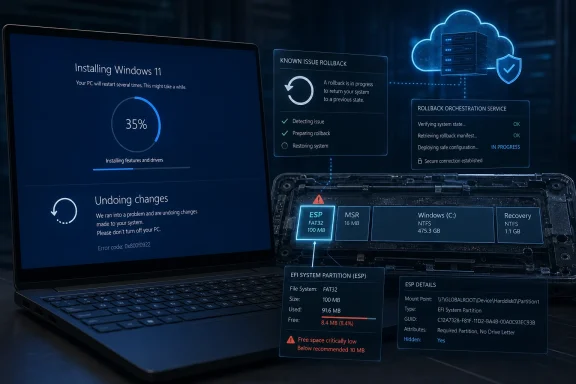
The visible symptom is familiar enough to anyone who has watched a cumulative update go bad. Windows downloads the patch, begins the installation, reboots, shows the spinning progress screen, and then stalls around the mid-30-percent mark before backing out with the line every administrator has learned to dread: “Something didn’t go as planned. Undoing changes.”
What is different this time is the precision of the failure. Microsoft’s release health documentation says the May 2026 security update can fail with 0x800f0922 on devices whose EFI System Partition, or ESP, has limited free space, especially when 10 MB or less remains. Reports have also surfaced of related Windows Update errors such as 0x80240069 and 0x80240031, but the heart of Microsoft’s confirmed issue is the servicing operation that touches boot files.
That matters because the ESP is not an ordinary storage location. It is the small FAT-formatted partition UEFI firmware uses to find boot loaders and related files before Windows itself is fully alive. Microsoft hides it from File Explorer for good reason: casual users should not be poking around the part of the disk that decides whether the machine starts.
But hidden does not mean static. OEM firmware tools can leave files there. Multi-boot setups can add their own directories. Recovery utilities, Linux installations, and vendor update agents may all consume space on a partition that many Windows systems still treat as if it were a tiny, boring boot shelf.
That is why the common home-user instinct — delete temporary files, empty the Recycle Bin, run Storage Sense — may do nothing. The failure lives in a place Windows deliberately conceals. Microsoft’s own logs point to “SpaceCheck” failures and boot file servicing problems, not a shortage of ordinary user-facing disk capacity.
For IT pros, this is where the incident becomes less mysterious and more annoying. Many fleets contain machines imaged across multiple hardware generations, inherited from OEM defaults, upgraded from Windows 10, enrolled in BitLocker, patched through firmware cycles, and occasionally rebuilt by technicians under pressure. The ESP may be 100 MB on one device, 260 MB on another, and cluttered by vendor leftovers on a third.
Microsoft’s servicing stack has to operate across all of them. When it needs room to stage or update boot-related files, it encounters the cumulative history of every partitioning decision made before the device reached the user’s desk. KB5089549 did not invent that fragility; it exposed it.
This is the part of modern Windows servicing that deserves some credit. A decade ago, a bad cumulative update often meant uninstalling the whole thing, hiding it, waiting for a replacement, or improvising workarounds from forum posts and enterprise scripts. KIR gives Microsoft a more surgical option: roll back the specific change that triggered the regression while keeping the security payload in place.
But KIR also creates a strange trust bargain. The fix is not necessarily something users see arrive as a normal update with a clear install button and a reassuring success message. It may be delivered as service-side metadata that changes how Windows behaves the next time it tries the same update path.
That is better than leaving millions of machines to fail repeatedly. It is also opaque. If your PC is in the affected cohort, Microsoft’s practical advice amounts to waiting, rebooting, and trying again unless you are prepared to change a registry setting or deploy the enterprise policy package.
That is a reasonable emergency workaround, but it is not the kind of instruction most home users should casually execute. Editing the registry to alter boot-servicing behavior is not the same as toggling a Start menu preference. If it goes wrong, the downside is not an ugly desktop; it is a machine that may require recovery media, BitLocker keys, or hands-on repair.
The better consumer path is to let KIR arrive, reboot, and retry Windows Update. For managed environments, the better path is to test the KIR Group Policy package and deploy it through normal channels. The worst path is a wave of users mounting the ESP, deleting unfamiliar OEM folders, and discovering that “freeing space” on a boot partition can have consequences.
Still, the workaround is revealing. It shows that Windows servicing is not failing because the update is maliciously large or because users did something obviously reckless. It is failing because the platform’s safety margins collided with real-world partition entropy.
When an optional preview update breaks something, the blast radius is smaller and skewed toward early adopters. When a Patch Tuesday security update breaks during reboot, the blast radius includes ordinary laptops, home desktops, office fleets, and devices whose owners know only that Windows demanded a restart and then appeared to panic.
The May update also arrived with a helpful fix: it addresses a BitLocker recovery issue that could occur after boot files were updated on systems with certain TPM validation settings, including invalid PCR7 configurations. That makes the situation more ironic. An update meant partly to improve the boot-update experience ran into a separate boot-partition servicing problem.
This is the Windows servicing paradox in miniature. The same cumulative package can contain important fixes, security protections, and a regression that prevents installation on a subset of machines. Users do not experience that nuance. They experience a progress screen, a rollback, and an error code that sends them searching.
The confirmed threshold is especially useful. Devices with 10 MB or less free on the ESP are the danger zone for this issue. That is a concrete condition that can be checked, reported, and folded into endpoint health monitoring before the next servicing cycle discovers it the hard way.
The nuance is that administrators should not respond by blindly resizing or cleaning partitions across a fleet without testing. The ESP contains boot-critical data, and OEM directories may or may not be disposable depending on the vendor’s firmware update process. Some machines will be safe to remediate with a scripted procedure; others may need vendor-specific handling.
The best enterprise response is boring and disciplined. Identify affected hardware models, inspect ESP free space, test Microsoft’s KIR policy, verify recovery keys are escrowed, and avoid conflating every 0x800f0922 failure with this particular bug. The error code has a long history and multiple causes; the timing and log entries matter.
If the update has already failed once, that alone does not mean the PC is damaged. Windows rolling back a failed update is exactly the recovery path it is supposed to take. The anxiety comes from repetition: Windows tries again, fails again, and turns a patch into a loop.
The danger is that search results for 0x800f0922 will produce years of advice for unrelated update failures. Some of it is harmless, like running standard servicing checks. Some of it is irrelevant. Some of it can make matters worse if it encourages users to tamper with boot partitions without understanding what is stored there.
If a system cannot boot after an attempted update, the situation changes. That is no longer a routine Windows Update nuisance; it is a recovery problem. Users should have BitLocker recovery keys available, avoid repeated hard power-offs unless necessary, and use Windows recovery options or professional support rather than experimenting blindly with EFI files.
There is also a harsher reading: Windows Update still ships into an ecosystem where small hidden partitions can break mandatory security servicing in 2026. The company can patch around the immediate issue, but it cannot fully erase the complexity of decades of PC hardware variation, OEM tooling, and upgrade history.
Both readings are true. Microsoft’s cloud-controlled rollback system is a real improvement, and the EFI partition failure is a real indictment of how fragile “it just updates” can be when boot infrastructure is involved. Windows has become better at recovering from update mistakes, but not necessarily better at explaining them to users.
The communication gap is familiar. Error 0x800f0922 does not say “your hidden EFI partition may have less than 10 MB free.” It says, effectively, “the update failed.” The human-readable explanation arrives later through release health notes, news reports, and community troubleshooting.
That dependency graph is only getting denser. Microsoft is pushing Windows further toward hardware-rooted security, stronger update enforcement, and AI-era platform features that assume modern firmware and clean servicing baselines. Those goals are defensible, especially in a hostile security environment. They also make the old PC ecosystem’s messier corners harder to ignore.
KB5089549 is therefore not a freak accident. It is a predictable failure mode for an operating system trying to impose contemporary servicing expectations on machines with varied histories. The update did not fail because the desktop was low on space; it failed because the boot path was.
This distinction matters for Windows enthusiasts, because it changes what responsible maintenance looks like. The old checklist was free disk space, drivers, backups, and maybe BIOS updates. The new checklist includes hidden partitions, recovery readiness, BitLocker escrow, firmware cruft, and whether Microsoft has issued a KIR for the thing that broke overnight.
Source: Windows Latest Microsoft confirms Windows 11 KB5089549 issues due to low storage, says it's rolling out an emergency patch to fix install errors
 The Failure Happens Before Windows Can Pretend It Is Simple
The visible symptom is familiar enough to anyone who has watched a cumulative update go bad. Windows downloads the patch, begins the installation, reboots, shows the spinning progress screen, and then stalls around the mid-30-percent mark before backing out with the line every administrator has learned to dread: “Something didn’t go as planned. Undoing changes.”What is different this time is the precision of the failure. Microsoft’s release health documentation says the May 2026 security update can fail with 0x800f0922 on devices whose EFI System Partition, or ESP, has limited free space, especially when 10 MB or less remains. Reports have also surfaced of related Windows Update errors such as 0x80240069 and 0x80240031, but the heart of Microsoft’s confirmed issue is the servicing operation that touches boot files.
That matters because the ESP is not an ordinary storage location. It is the small FAT-formatted partition UEFI firmware uses to find boot loaders and related files before Windows itself is fully alive. Microsoft hides it from File Explorer for good reason: casual users should not be poking around the part of the disk that decides whether the machine starts.
But hidden does not mean static. OEM firmware tools can leave files there. Multi-boot setups can add their own directories. Recovery utilities, Linux installations, and vendor update agents may all consume space on a partition that many Windows systems still treat as if it were a tiny, boring boot shelf.
Patch Tuesday Met the Ghosts of Old Partition Layouts
The phrase “low storage” usually makes users think of C: drives stuffed with games, videos, ISO files, and years of downloads. KB5089549’s confirmed problem is more awkward because a PC may have hundreds of gigabytes free and still fail the update if its ESP is cramped.That is why the common home-user instinct — delete temporary files, empty the Recycle Bin, run Storage Sense — may do nothing. The failure lives in a place Windows deliberately conceals. Microsoft’s own logs point to “SpaceCheck” failures and boot file servicing problems, not a shortage of ordinary user-facing disk capacity.
For IT pros, this is where the incident becomes less mysterious and more annoying. Many fleets contain machines imaged across multiple hardware generations, inherited from OEM defaults, upgraded from Windows 10, enrolled in BitLocker, patched through firmware cycles, and occasionally rebuilt by technicians under pressure. The ESP may be 100 MB on one device, 260 MB on another, and cluttered by vendor leftovers on a third.
Microsoft’s servicing stack has to operate across all of them. When it needs room to stage or update boot-related files, it encounters the cumulative history of every partitioning decision made before the device reached the user’s desk. KB5089549 did not invent that fragility; it exposed it.
Known Issue Rollback Is a Clever Escape Hatch, Not a Time Machine
Microsoft says the issue is being mitigated with Known Issue Rollback, the company’s mechanism for disabling a problematic non-security change while leaving the rest of a cumulative update intact. For consumer and non-managed business devices, the mitigation is supposed to propagate automatically. Restarting the device can help it apply faster.This is the part of modern Windows servicing that deserves some credit. A decade ago, a bad cumulative update often meant uninstalling the whole thing, hiding it, waiting for a replacement, or improvising workarounds from forum posts and enterprise scripts. KIR gives Microsoft a more surgical option: roll back the specific change that triggered the regression while keeping the security payload in place.
But KIR also creates a strange trust bargain. The fix is not necessarily something users see arrive as a normal update with a clear install button and a reassuring success message. It may be delivered as service-side metadata that changes how Windows behaves the next time it tries the same update path.
That is better than leaving millions of machines to fail repeatedly. It is also opaque. If your PC is in the affected cohort, Microsoft’s practical advice amounts to waiting, rebooting, and trying again unless you are prepared to change a registry setting or deploy the enterprise policy package.
The Registry Workaround Says the Quiet Part Out Loud
Microsoft’s documented workaround allows installation by changing an ESP padding registry value under the boot file servicing component. In plain English, Windows was reserving or enforcing a margin of space in the EFI partition, and Microsoft is telling affected users or administrators how to relax that behavior so the update can proceed.That is a reasonable emergency workaround, but it is not the kind of instruction most home users should casually execute. Editing the registry to alter boot-servicing behavior is not the same as toggling a Start menu preference. If it goes wrong, the downside is not an ugly desktop; it is a machine that may require recovery media, BitLocker keys, or hands-on repair.
The better consumer path is to let KIR arrive, reboot, and retry Windows Update. For managed environments, the better path is to test the KIR Group Policy package and deploy it through normal channels. The worst path is a wave of users mounting the ESP, deleting unfamiliar OEM folders, and discovering that “freeing space” on a boot partition can have consequences.
Still, the workaround is revealing. It shows that Windows servicing is not failing because the update is maliciously large or because users did something obviously reckless. It is failing because the platform’s safety margins collided with real-world partition entropy.
Mandatory Updates Change the Burden of Proof
KB5089549 is a security update, which means most Windows 11 systems are expected to take it. That is the right default for a world of actively exploited vulnerabilities, ransomware crews, and consumer machines that will never be manually maintained. But mandatory updates also mean Microsoft owns more of the operational risk.When an optional preview update breaks something, the blast radius is smaller and skewed toward early adopters. When a Patch Tuesday security update breaks during reboot, the blast radius includes ordinary laptops, home desktops, office fleets, and devices whose owners know only that Windows demanded a restart and then appeared to panic.
The May update also arrived with a helpful fix: it addresses a BitLocker recovery issue that could occur after boot files were updated on systems with certain TPM validation settings, including invalid PCR7 configurations. That makes the situation more ironic. An update meant partly to improve the boot-update experience ran into a separate boot-partition servicing problem.
This is the Windows servicing paradox in miniature. The same cumulative package can contain important fixes, security protections, and a regression that prevents installation on a subset of machines. Users do not experience that nuance. They experience a progress screen, a rollback, and an error code that sends them searching.
Enterprise IT Will Read This as a Fleet Hygiene Problem
For administrators, the lesson is not to panic about KB5089549. It is to stop treating the EFI System Partition as invisible simply because Windows hides it. The ESP is part of the machine’s serviceability profile, and it deserves periodic attention in the same way firmware levels, recovery partitions, BitLocker status, and driver baselines do.The confirmed threshold is especially useful. Devices with 10 MB or less free on the ESP are the danger zone for this issue. That is a concrete condition that can be checked, reported, and folded into endpoint health monitoring before the next servicing cycle discovers it the hard way.
The nuance is that administrators should not respond by blindly resizing or cleaning partitions across a fleet without testing. The ESP contains boot-critical data, and OEM directories may or may not be disposable depending on the vendor’s firmware update process. Some machines will be safe to remediate with a scripted procedure; others may need vendor-specific handling.
The best enterprise response is boring and disciplined. Identify affected hardware models, inspect ESP free space, test Microsoft’s KIR policy, verify recovery keys are escrowed, and avoid conflating every 0x800f0922 failure with this particular bug. The error code has a long history and multiple causes; the timing and log entries matter.
Home Users Need Less Heroics and More Patience
For home users, the right advice is almost disappointingly simple: reboot, check Windows Update again, and avoid dramatic partition surgery unless there is no other path. Microsoft says the mitigation has already propagated to consumer and non-managed business devices, but service-side fixes are not always instantaneous from the user’s point of view.If the update has already failed once, that alone does not mean the PC is damaged. Windows rolling back a failed update is exactly the recovery path it is supposed to take. The anxiety comes from repetition: Windows tries again, fails again, and turns a patch into a loop.
The danger is that search results for 0x800f0922 will produce years of advice for unrelated update failures. Some of it is harmless, like running standard servicing checks. Some of it is irrelevant. Some of it can make matters worse if it encourages users to tamper with boot partitions without understanding what is stored there.
If a system cannot boot after an attempted update, the situation changes. That is no longer a routine Windows Update nuisance; it is a recovery problem. Users should have BitLocker recovery keys available, avoid repeated hard power-offs unless necessary, and use Windows recovery options or professional support rather than experimenting blindly with EFI files.
The Server-Side Fix Shows Microsoft’s Power and Its Blind Spot
There is a generous reading of this incident: Microsoft found the problem, documented it quickly, and used KIR to reduce the need for users to uninstall a security update. That is a much more mature response than pretending nothing is wrong until the next cumulative update.There is also a harsher reading: Windows Update still ships into an ecosystem where small hidden partitions can break mandatory security servicing in 2026. The company can patch around the immediate issue, but it cannot fully erase the complexity of decades of PC hardware variation, OEM tooling, and upgrade history.
Both readings are true. Microsoft’s cloud-controlled rollback system is a real improvement, and the EFI partition failure is a real indictment of how fragile “it just updates” can be when boot infrastructure is involved. Windows has become better at recovering from update mistakes, but not necessarily better at explaining them to users.
The communication gap is familiar. Error 0x800f0922 does not say “your hidden EFI partition may have less than 10 MB free.” It says, effectively, “the update failed.” The human-readable explanation arrives later through release health notes, news reports, and community troubleshooting.
The May Patch Carries a Warning for the Next Windows Era
The larger Windows story is that more of the operating system’s important behavior now lives below the waterline. Secure Boot, TPM measurements, BitLocker validation, recovery partitions, EFI boot files, staged servicing operations, and cloud-delivered rollback metadata all shape whether a monthly update succeeds. Users see a progress ring; administrators see a dependency graph.That dependency graph is only getting denser. Microsoft is pushing Windows further toward hardware-rooted security, stronger update enforcement, and AI-era platform features that assume modern firmware and clean servicing baselines. Those goals are defensible, especially in a hostile security environment. They also make the old PC ecosystem’s messier corners harder to ignore.
KB5089549 is therefore not a freak accident. It is a predictable failure mode for an operating system trying to impose contemporary servicing expectations on machines with varied histories. The update did not fail because the desktop was low on space; it failed because the boot path was.
This distinction matters for Windows enthusiasts, because it changes what responsible maintenance looks like. The old checklist was free disk space, drivers, backups, and maybe BIOS updates. The new checklist includes hidden partitions, recovery readiness, BitLocker escrow, firmware cruft, and whether Microsoft has issued a KIR for the thing that broke overnight.
The Practical Read Before the Next Reboot
The immediate drama around KB5089549 should fade as Microsoft’s rollback mitigation reaches affected machines, but the incident leaves behind several practical lessons. This is one of those Windows problems where the confirmed cause is narrow, while the operational implications are broad.- KB5089549 was released for Windows 11 versions 24H2 and 25H2 as the May 2026 security update, with OS builds 26100.8457 and 26200.8457.
- Microsoft has confirmed that some installation failures occur when the EFI System Partition has limited free space, especially at or below roughly 10 MB free.
- The most recognizable failure pattern is a reboot-phase rollback around 35–36 percent with error 0x800f0922 and the “Something didn’t go as planned” message.
- Microsoft is mitigating the issue through Known Issue Rollback for consumer and non-managed business devices, while enterprise-managed devices may need the special Group Policy package.
- Users should avoid manual EFI partition cleanup unless they understand the boot impact, have recovery media, and have secured any BitLocker recovery keys.
- Administrators should treat ESP free space as a measurable fleet-health signal rather than an obscure implementation detail.
Source: Windows Latest Microsoft confirms Windows 11 KB5089549 issues due to low storage, says it's rolling out an emergency patch to fix install errors
