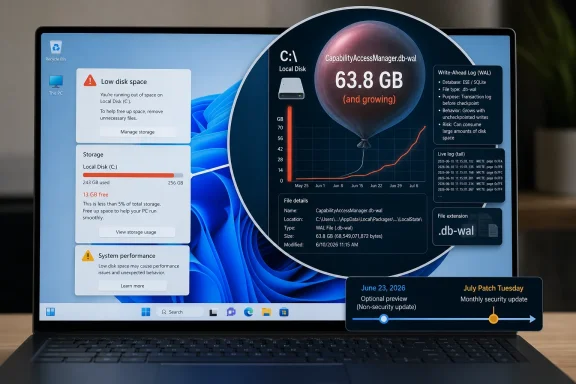
Microsoft acknowledged on June 29, 2026, that Windows 11’s KB5095093 preview update improves disk usage for the CapabilityAccessManager.db-wal file, after user reports showed the hidden database log swelling from megabytes into tens, hundreds, and in some cases roughly 500GB. The bug is not glamorous, but it is the kind of Windows failure that users remember: invisible, slow-moving, and discovered only when something else breaks. As Club386, Windows Latest, TechRadar, Reddit users, and Microsoft’s own update notes now make clear, this is a storage leak hiding inside a privacy-permission service. The larger story is not merely that Windows 11 wasted disk space; it is that modern Windows has become so layered that even a tiny background ledger can become a system-wide trust problem.
Capability Access Manager is one of those Windows services most users never meet by name. Its job is ordinary but important: track and manage app access to sensitive capabilities such as the camera, microphone, location, and other permission-controlled resources. On Windows, that work is handled by the Capability Access Manager service, often referred to by its service name, camsvc.
The problematic file is
That is not what affected Windows 11 systems have been seeing. Windows Latest reported finding the file at 89GB on one affected machine, while user reports cited by Club386 and circulating on Reddit describe systems where the file consumed around 200GB or even more than 500GB. Microsoft’s official wording is far more restrained, saying only that KB5095093 “improves disk space usage” for the file.
That understatement is classic Microsoft servicing language. The company does not need to write “we accidentally let a privacy-permission database log eat half a terabyte” for users to understand what happened. If a file designed to support app-permission bookkeeping grows large enough to crowd out games, virtual machines, backups, and Windows Update itself, the bug has crossed from housekeeping nuisance into platform embarrassment.
That makes the failure feel like theft. A user can delete downloads, uninstall games, empty the Recycle Bin, clear browser caches, and still see storage missing because the offender is sitting in a protected system location. Disk usage tools such as WizTree or TreeSize can expose it, but those are not normal consumer troubleshooting steps.
Club386’s recommended first check is sensible: open Settings, go to Storage, then System & reserved, and look at System storage. If that bucket is consuming hundreds of gigabytes, the Capability Access Manager log becomes a prime suspect. Windows Latest also published a command-line method using
The deeper criticism is that Windows still struggles to explain itself when its own components misbehave. Storage Sense can recommend cleanup actions, but it does not provide a clean “this system database log is abnormal” warning. Settings can show the symptom, not the cause. The operating system knows enough to consume the space, but not enough to narrate the failure to the person paying for the SSD.
That sentence is doing a lot of work. It confirms the affected component, it confirms Microsoft has made a change, and it avoids saying how the bug happened, how many systems were affected, whether the file will be automatically reduced after patching, or whether users with already-bloated logs need additional cleanup. For administrators, those missing details are not pedantry. They determine whether this is a monitor-and-wait problem or a remediation task.
The update is also a preview release, not the ordinary monthly security update. Preview updates are often production-quality in Microsoft’s terminology, but many organizations deliberately avoid them unless they need a specific fix. That creates the familiar Windows servicing dilemma: install early to reclaim disk space, or wait for the next broader security release and tolerate the bloat a bit longer.
Club386 says the fix is expected to reach regular non-Insider users starting July 14, which lines up with Microsoft’s cadence for Patch Tuesday. For home users who are not critically low on space, waiting for the standard cumulative update is the safer path. For users whose C: drive is nearly full, the preview update may be tempting, but it comes with the usual caveat that optional previews can carry their own rough edges.
That is why the Club386 commentary about sticking with Windows 10 will resonate with some readers, even if it oversimplifies the tradeoff. Windows 10 has its own long history of regressions, bad patches, and odd storage behavior. Nostalgia is not a security strategy. But perception matters, and Windows 11 has not yet escaped the feeling that its churn is often more visible than its benefits.
This bug also arrives in an era when Microsoft is asking users to accept more background intelligence. Windows 11 now carries Copilot integration, AI component updates, Widgets changes, Start menu experiments, recovery features, and ongoing servicing-stack adjustments. Many of those changes have real engineering value. But the more the platform does behind the scenes, the more important it becomes for Microsoft to prove that invisible work is disciplined.
A runaway permission log is almost a metaphor for the problem. Windows is collecting and maintaining state so that privacy controls can function. The user is not supposed to think about it. When that maintenance layer fails, the user suddenly pays for abstraction with storage capacity.
The practical risk is cascading failure. Low disk space can break application updates, Windows cumulative updates, log collection, browser profiles, Teams caches, and endpoint protection workflows. Users experience it as a slow machine or a failed update, not as a Capability Access Manager issue. Help desks may burn hours on generic cleanup before finding the real file.
Administrators should also resist the urge to build aggressive deletion scripts without testing. Microsoft’s acknowledgment suggests the fix is in the update path, and the file is part of a live service. Manually deleting or renaming database files under ProgramData can work in some reports, especially when Windows recreates the log, but that does not make it a fleet-safe first response. At minimum, teams should stop the relevant service, test on sacrificial devices, verify permission history behavior, and document rollback steps.
The cleaner enterprise response is inventory first. Query free disk space, inspect the CapabilityAccessManager folder on affected Windows 11 versions, and correlate abnormal file growth with build numbers. Then decide whether KB5095093 or the July cumulative update belongs in an accelerated deployment ring.
The safer diagnostic path is read-only. Check Storage settings. Use a trusted disk-usage tool. Use an elevated Command Prompt to list the size of the Capability Access Manager files rather than modifying them. If the WAL file is only a few megabytes, this is not your storage problem. If it is dozens or hundreds of gigabytes, you have evidence.
From there, the decision depends on urgency. If the system has enough free space to function, waiting for Microsoft’s fix is the least adventurous approach. If the device is effectively unusable, backing up important data before attempting any workaround is non-negotiable. A user reclaiming 300GB by deleting a broken log file will feel triumphant right up until an unrelated permission or database corruption problem appears.
This is also where Microsoft could help by publishing a specific remediation note. The release note confirms an improvement, but users need to know whether installing the update shrinks an already-inflated WAL file or merely prevents future growth. Those are different outcomes. A fix that stops the leak but leaves a 200GB puddle still requires cleanup.
The better critique is that Windows servicing still communicates like a vendor changelog rather than a user-facing risk system. “Improves disk space usage” is accurate enough for a release note, but not sufficient for a bug that can consume hundreds of gigabytes. Microsoft knows how to write more explicit advisories when security is involved. Storage integrity and system drive exhaustion deserve a clearer middle tier of communication.
There is precedent for this kind of transparency. Microsoft’s known-issue pages sometimes describe symptoms, affected platforms, mitigations, and resolution status with useful specificity. The Capability Access Manager issue would benefit from that treatment: affected versions, expected file size, detection guidance, whether the fix reclaims space, and whether manual deletion is supported.
Without that, the information vacuum gets filled by Reddit threads, utility screenshots, and third-party writeups. Those communities are valuable, and in this case they appear to have helped surface the issue. But an operating-system vendor should not rely on crowdsourced archaeology to explain why a protected system folder has eaten someone’s SSD.
 A Privacy Ledger Became a Storage Sinkhole
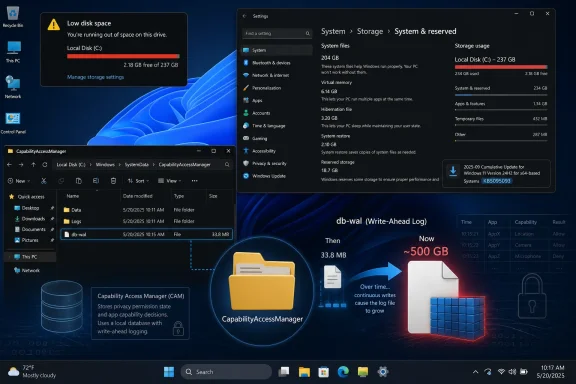
Capability Access Manager is one of those Windows services most users never meet by name. Its job is ordinary but important: track and manage app access to sensitive capabilities such as the camera, microphone, location, and other permission-controlled resources. On Windows, that work is handled by the Capability Access Manager service, often referred to by its service name, camsvc.The problematic file is
CapabilityAccessManager.db-wal, stored under C:\ProgramData\Microsoft\Windows\CapabilityAccessManager. The suffix matters. A WAL file is a write-ahead log, a common database mechanism used to record changes before they are committed into the main database. In normal operation, this sort of file should be boringly small and periodically consolidated.That is not what affected Windows 11 systems have been seeing. Windows Latest reported finding the file at 89GB on one affected machine, while user reports cited by Club386 and circulating on Reddit describe systems where the file consumed around 200GB or even more than 500GB. Microsoft’s official wording is far more restrained, saying only that KB5095093 “improves disk space usage” for the file.
That understatement is classic Microsoft servicing language. The company does not need to write “we accidentally let a privacy-permission database log eat half a terabyte” for users to understand what happened. If a file designed to support app-permission bookkeeping grows large enough to crowd out games, virtual machines, backups, and Windows Update itself, the bug has crossed from housekeeping nuisance into platform embarrassment.
The Bug Was Quiet Because Windows Hid It in Plain Sight
The reason this issue is so irritating is not simply its size. It is the way Windows presents the loss. Most users do not browse ProgramData looking for database logs, and most do not know that a WAL file exists at all. They see a shrinking C: drive, a warning from Storage Sense, or a mysteriously obese “System & reserved” category in Settings.That makes the failure feel like theft. A user can delete downloads, uninstall games, empty the Recycle Bin, clear browser caches, and still see storage missing because the offender is sitting in a protected system location. Disk usage tools such as WizTree or TreeSize can expose it, but those are not normal consumer troubleshooting steps.
Club386’s recommended first check is sensible: open Settings, go to Storage, then System & reserved, and look at System storage. If that bucket is consuming hundreds of gigabytes, the Capability Access Manager log becomes a prime suspect. Windows Latest also published a command-line method using
robocopy in list mode to inspect the relevant folder without copying the file, which is a safer diagnostic path than poking blindly through protected directories.The deeper criticism is that Windows still struggles to explain itself when its own components misbehave. Storage Sense can recommend cleanup actions, but it does not provide a clean “this system database log is abnormal” warning. Settings can show the symptom, not the cause. The operating system knows enough to consume the space, but not enough to narrate the failure to the person paying for the SSD.
Microsoft Fixed the File, But Its Language Shrunk the Incident
KB5095093 was released as a June 23, 2026 preview cumulative update for Windows 11 versions 24H2 and 25H2, with OS builds 26100.8737 and 26200.8737. Microsoft later updated the release notes on June 29 to add the storage fix. The relevant line appears under Storage: “This update improves disk space usage for the CapabilityAccessManager.db-wal file.”That sentence is doing a lot of work. It confirms the affected component, it confirms Microsoft has made a change, and it avoids saying how the bug happened, how many systems were affected, whether the file will be automatically reduced after patching, or whether users with already-bloated logs need additional cleanup. For administrators, those missing details are not pedantry. They determine whether this is a monitor-and-wait problem or a remediation task.
The update is also a preview release, not the ordinary monthly security update. Preview updates are often production-quality in Microsoft’s terminology, but many organizations deliberately avoid them unless they need a specific fix. That creates the familiar Windows servicing dilemma: install early to reclaim disk space, or wait for the next broader security release and tolerate the bloat a bit longer.
Club386 says the fix is expected to reach regular non-Insider users starting July 14, which lines up with Microsoft’s cadence for Patch Tuesday. For home users who are not critically low on space, waiting for the standard cumulative update is the safer path. For users whose C: drive is nearly full, the preview update may be tempting, but it comes with the usual caveat that optional previews can carry their own rough edges.
The Real Damage Is to the Update Trust Bank
A storage bug is less frightening than a remote-code execution flaw and less dramatic than a blue screen loop. But it hits a different nerve. Windows users have spent years being told that the operating system is moving toward continuous improvement, smarter telemetry, better update reliability, and more self-healing behavior. Then a background database log quietly grows until a 1TB SSD starts behaving like a 512GB drive.That is why the Club386 commentary about sticking with Windows 10 will resonate with some readers, even if it oversimplifies the tradeoff. Windows 10 has its own long history of regressions, bad patches, and odd storage behavior. Nostalgia is not a security strategy. But perception matters, and Windows 11 has not yet escaped the feeling that its churn is often more visible than its benefits.
This bug also arrives in an era when Microsoft is asking users to accept more background intelligence. Windows 11 now carries Copilot integration, AI component updates, Widgets changes, Start menu experiments, recovery features, and ongoing servicing-stack adjustments. Many of those changes have real engineering value. But the more the platform does behind the scenes, the more important it becomes for Microsoft to prove that invisible work is disciplined.
A runaway permission log is almost a metaphor for the problem. Windows is collecting and maintaining state so that privacy controls can function. The user is not supposed to think about it. When that maintenance layer fails, the user suddenly pays for abstraction with storage capacity.
Administrators Should Treat This as a Fleet Hygiene Problem
For IT departments, the question is not whether one enthusiast on Reddit found a 200GB file. It is whether the same pattern exists across managed Windows 11 fleets, especially on devices with smaller SSDs. A 512GB business laptop can absorb a 20GB anomaly. A 128GB or 256GB device may not. Kiosk systems, shared workstations, VDI images, and field laptops with limited free space are more vulnerable to operational impact.The practical risk is cascading failure. Low disk space can break application updates, Windows cumulative updates, log collection, browser profiles, Teams caches, and endpoint protection workflows. Users experience it as a slow machine or a failed update, not as a Capability Access Manager issue. Help desks may burn hours on generic cleanup before finding the real file.
Administrators should also resist the urge to build aggressive deletion scripts without testing. Microsoft’s acknowledgment suggests the fix is in the update path, and the file is part of a live service. Manually deleting or renaming database files under ProgramData can work in some reports, especially when Windows recreates the log, but that does not make it a fleet-safe first response. At minimum, teams should stop the relevant service, test on sacrificial devices, verify permission history behavior, and document rollback steps.
The cleaner enterprise response is inventory first. Query free disk space, inspect the CapabilityAccessManager folder on affected Windows 11 versions, and correlate abnormal file growth with build numbers. Then decide whether KB5095093 or the July cumulative update belongs in an accelerated deployment ring.
The Workaround Temptation Is Understandable but Risky
The internet has already produced the usual mix of workaround advice: boot into Safe Mode, stop services, take ownership, rename the WAL file, delete it, or let Windows rebuild the database. Some of that advice may be effective on individual machines. Some of it may be incomplete. The danger is that storage pressure makes users impatient, and impatient users will happily run commands they only half understand.The safer diagnostic path is read-only. Check Storage settings. Use a trusted disk-usage tool. Use an elevated Command Prompt to list the size of the Capability Access Manager files rather than modifying them. If the WAL file is only a few megabytes, this is not your storage problem. If it is dozens or hundreds of gigabytes, you have evidence.
From there, the decision depends on urgency. If the system has enough free space to function, waiting for Microsoft’s fix is the least adventurous approach. If the device is effectively unusable, backing up important data before attempting any workaround is non-negotiable. A user reclaiming 300GB by deleting a broken log file will feel triumphant right up until an unrelated permission or database corruption problem appears.
This is also where Microsoft could help by publishing a specific remediation note. The release note confirms an improvement, but users need to know whether installing the update shrinks an already-inflated WAL file or merely prevents future growth. Those are different outcomes. A fix that stops the leak but leaves a 200GB puddle still requires cleanup.
Windows 11’s Servicing Model Needs Better Explanations, Not Fewer Updates
It is tempting to turn every Windows 11 bug into a referendum on whether Microsoft updates too often. That is the wrong target. Operating systems need regular updates because hardware changes, attackers adapt, and software ecosystems mutate. A frozen Windows would not be a reliable Windows; it would be an increasingly vulnerable one.The better critique is that Windows servicing still communicates like a vendor changelog rather than a user-facing risk system. “Improves disk space usage” is accurate enough for a release note, but not sufficient for a bug that can consume hundreds of gigabytes. Microsoft knows how to write more explicit advisories when security is involved. Storage integrity and system drive exhaustion deserve a clearer middle tier of communication.
There is precedent for this kind of transparency. Microsoft’s known-issue pages sometimes describe symptoms, affected platforms, mitigations, and resolution status with useful specificity. The Capability Access Manager issue would benefit from that treatment: affected versions, expected file size, detection guidance, whether the fix reclaims space, and whether manual deletion is supported.
Without that, the information vacuum gets filled by Reddit threads, utility screenshots, and third-party writeups. Those communities are valuable, and in this case they appear to have helped surface the issue. But an operating-system vendor should not rely on crowdsourced archaeology to explain why a protected system folder has eaten someone’s SSD.
The Small File That Turned Into a Windows 11 Confidence Test
The immediate fix is narrow, but the lesson is broader: hidden system state needs visible accountability. Users should not need forensic tools to learn why Windows itself is consuming implausible amounts of storage. Administrators should not need to reverse-engineer database logs from scattered reports before deciding whether to accelerate a cumulative update.- Microsoft added the CapabilityAccessManager.db-wal storage fix to KB5095093, the June 23, 2026 preview cumulative update for Windows 11 versions 24H2 and 25H2.
- The file is tied to the Capability Access Manager service, which manages and records app access to privacy-sensitive capabilities such as camera, microphone, and location.
- Reports from Windows Latest, Club386, Reddit users, and other outlets describe the WAL file growing from a few megabytes into tens or hundreds of gigabytes, with some claims reaching roughly 500GB.
- Users can suspect the issue when Settings shows unusually large System storage under Storage > System & reserved, but confirming it requires inspecting the Capability Access Manager folder or using a disk-usage tool.
- Most users should prefer Microsoft’s update path over manual deletion unless the machine is critically low on space and important data has been backed up.
- IT teams should inventory affected Windows 11 devices, watch low-capacity SSDs closely, and test the fix in deployment rings before broad rollout.
References
- Primary source: Club386
Published: Mon, 06 Jul 2026 14:59:40 GMT
Microsoft just confirmed that this Windows 11 bug is hoarding up to 500GB of your storage | Club386
Windows 11's Capability Access Manager service is eating hundreds of gigabytes of your storage capacity over time, although not everyone is affected. www.club386.com
- Related coverage: techradar.com
Keep running low on storage and don't know why? Mysterious Windows 11 file that ate tons of drive space is fixed in latest update | TechRadar
Latest update finally fixes a 'notorious culprit for system bloat'www.techradar.com - Related coverage: windowslatest.com
Microsoft admits a Windows 11 bug is eating up to 500GB of storage, verify if you are affected
Microsoft admits a Windows 11 bug is silently eating up to 500GB of your storage, fix coming July 14, 2026. www.windowslatest.com
- Related coverage: computerbase.de
Microsoft bestätigt Bug: Windows 11 kann fehlerbedingt um bis zu 500 GB anwachsen - ComputerBase
Microsoft hat einen Fehler in Windows 11 bestätigt, durch den auf der Systempartition bis zu mehrere hundert Gigabyte belegt werden können.www.computerbase.de
- Official source: techcommunity.microsoft.com
- Related coverage: windowsforum.com
Windows 11 KB5095093 Fixes Runaway CapabilityAccessManager.db-wal Disk Use | Windows Forum
Microsoft’s June 23, 2026 optional Windows 11 preview update, KB5095093, includes a fix for runaway disk usage tied to CapabilityAccessManager.db-wal, a...windowsforum.com
- Official source: learn.microsoft.com
capabilityaccessmanager.db-wal is taking up way too much space - Microsoft Q&A
I understand it's advisable to disable the capabilityaccessmanager service, but can the db-wal file be disabled safely? Will it be re-created after restart?learn.microsoft.com - Related coverage: techgenyz.com
Microsoft Confirms Windows 11 Bug That Can Consume Up to 500GB of Storage, Fix Arrives This Month
Microsoft has addressed a Windows 11 bug where the CapabilityAccessManager.db-wal file can consume up to 500GB of storage. Here's what's confirmed and the fix techgenyz.com
- Official source: microsofters.com
Windows 11 corrige un fallo que devoraba espacio en disco | Microsofters
Microsoft corrige en KB5095093 un fallo de Capability Access Manager que podía hacer crecer un archivo oculto hasta ocupar decenas de GB. microsofters.com