

The latest Windows 11 keyboard settings controversy is a small UI bug with a big symbolism problem: it lands in a part of the operating system that already frustrates users, it distorts a control that should be simple, and it follows months of Microsoft shuffling keyboard-related options between Control Panel and Settings. In other words, this is not just a cosmetic glitch. It sits at the intersection of product design, accessibility, localization, and the company’s ongoing attempt to modernize Settings without breaking trust. Microsoft has already acknowledged adjacent issues in the same area, which makes this bug feel less like an isolated oddity and more like evidence of a UI that is still being actively reworked.
Windows has been moving for years from the old Control Panel model to the newer Settings app, but the transition has never been entirely smooth. Keyboard behavior is one of those deceptively simple areas where users expect a fast, predictable experience and instead often find a patchwork of legacy controls, renamed options, and duplicated paths. Microsoft’s own recent updates show that keyboard settings have been actively migrated, with character repeat delay and rate moving into Settings under Accessibility > Keyboard in some builds, while earlier builds still exposed keyboard-related controls under Bluetooth & devices > Keyboard.
That migration matters because keyboard repeat delay is not a niche preference. It affects basic text entry, accessibility, and the feel of the entire operating system. Microsoft’s documentation on FilterKeys explains that Windows has long provided controls for repeat behavior and repeated keystroke handling, underscoring that this is core input functionality rather than an obscure settings page. When controls in this area are mislabeled, reversed, or visually broken, the user experience failure is broader than the defect itself suggests.
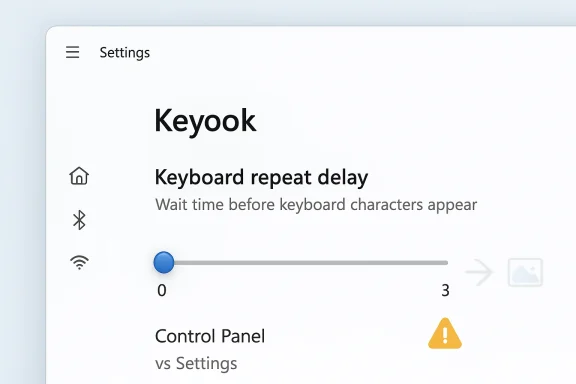
The GIGAZINE report describes a problem on Windows 11 Pro version 25H2, build 26200.8039, after the March 2026 monthly update. The article says the slider on the keyboard settings screen is not rendering correctly, and that the visible label is misleading enough to make the option effectively incomprehensible. Microsoft’s own recent release notes show build 26200.8037 in the March 10, 2026 cumulative update and 26200.8106 in the Release Preview Channel shortly afterward, which helps place the bug squarely in the current release cycle rather than in an ancient edge case.
There is also a history here of Microsoft dealing with precisely this family of input-setting bugs. In January 2026, a Windows Insider release note explicitly called out a fix for reversed keyboard character repeat delay labels in Settings > Bluetooth & Devices > Keyboard. A separate Insider note from January 16 said the keyboard character repeat delay was “backwards from how it was set in the backend.” That is a crucial clue: it indicates the UI plumbing in this area has already been unstable, and the current bug appears to be part of the same subsystem, not a totally unrelated defect.
The Feedback Hub angle also fits Microsoft’s own support guidance. Microsoft says users can launch Feedback Hub with Windows key + F, capture a screenshot, attach diagnostics, and submit problem reports directly from the app. That matches the reporting flow described in the GIGAZINE piece, which is useful because it shows how Microsoft expects users to route product issues when UI behavior becomes hard to interpret.
The user-facing symptom is more than cosmetic. The report says the mouse can effectively select only 0 or 3, while the keyboard arrow keys can reach 0, 1, 2, and 3. That means the control behaves differently depending on input method, which is a classic sign of a broken accessibility or rendering layer. A control that presents only partial state through one input path while fully supporting another is exactly the sort of thing that confuses users, support staff, and diagnostic tools alike.
That kind of ambiguity is especially painful for less technical users. A good settings surface should answer three questions immediately: what does this do, how do I change it, and what will happen if I move it? Here, the user gets a broken slider, a misleading description, and a value mapping that does not match the mouse behavior. That is not merely poor polish; it is interface debt made visible.
A defect like this is the kind that can survive longer than it should because it is technically “working” under some circumstances. If advanced users can still adjust the value with the arrow keys, automated testing may miss the fact that mouse interaction is broken, and support teams may see the issue as cosmetic. But for normal users, a slider that appears broken is functionally broken, even if the underlying setting still changes.
There is also a pattern of rapid iteration. January and February 2026 builds show Microsoft fixing reversed labels in one build and then refining related behavior in later release preview and cumulative updates. That suggests the team is still settling the interaction between backend values and front-end presentation. When a settings screen is in motion, every tiny defect becomes more visible because the product is no longer visually or semantically stable.
The March 2026 update cycle shows the same build family moving through security updates, hotpatches, and release preview refinements. That churn is normal for Windows in 2026, but it increases the odds that a niche UI regression will appear in one channel and not another. For users, that can feel random; for Microsoft, it is usually the cost of shipping continuous innovation across multiple channels at once.
That overlap makes the redesign harder than it looks. If Microsoft is trying to unify old Control Panel knobs with newer Settings pages, it has to preserve existing semantics, localization, and assistive-technology compatibility. A broken slider in that context is not just a rendering flaw; it is a sign that a very old behavioral contract may have been reimplemented without enough end-to-end validation.
The second-order harm is productivity loss. A setting like keyboard repeat delay is not flashy, but it directly affects how fast people can type, how often characters repeat, and whether repetitive input feels comfortable. If a user must fight the UI just to understand a basic typing preference, the operating system is wasting attention on the wrong layer of the experience.
This is where Windows 11 often draws criticism. The OS can look elegant in screenshots while still making common tasks feel unnecessarily procedural. The keyboard settings bug fits that critique because it is not about missing power, but about missing clarity. A modern interface that cannot present a simple slider reliably is not modern in any meaningful sense.
For enterprise users, the effect is more practical. Keyboard settings matter in call centers, assistive setups, kiosk devices, remote desktops, and environments where repeat-delay tuning affects workflow consistency. If support desks have to explain that one input method works and another does not, the cost becomes operational rather than merely aesthetic.
The process matters because it turns anecdotal frustration into structured telemetry. A complaint that stays on social media is easy to ignore; a report that includes screenshots, categories, and attachments can be triaged. Microsoft even documents the ability to save a local copy of the diagnostics and attachments, reinforcing that this is intended as a formal feedback loop rather than a casual support chat.
The article’s note that a local account can still submit feedback is also important. It means Microsoft is not limiting issue reporting to fully signed-in consumer accounts, which broadens the pool of people who can report visual defects. That is useful in enterprise contexts where device management policies and identity restrictions can complicate ordinary app usage.
The keyboard settings issue is a micro-version of that broader narrative. A feature can be technically present yet still feel unfinished if its labels are muddy, its elements are clipped, and its interaction model changes depending on input method. That disconnect is precisely what users mean when they say Windows 11 feels frustrating: it is not always a lack of features, but a lack of coherence.
This is also why legacy features often look simple but are expensive to modernize. A keyboard repeat slider seems trivial until you account for localization, accessibility, input device differences, and old configuration schemas. Windows 11’s current bug is a reminder that even the smallest UI element can expose the seams in a multi-decade operating system.
For rival platforms, Windows’ pain point is an opportunity. A stable, intuitive settings model becomes a differentiator when users are exhausted by broken or confusing controls. Microsoft knows this, which is why it keeps refining Settings. The problem is that each refinement also creates a fresh chance for a regression to sneak into the release train.
The larger takeaway is that Windows 11’s UI problems are increasingly about coherence, not just missing features. Users do not want the system to be clever behind the scenes if the front end is confusing, broken, or inconsistent. Microsoft’s challenge is to make Settings feel finished even while it continues to evolve under the hood.
Source: GIGAZINE The Windows 11 UI is truly awful; sliders that should be there have disappeared, leaving only '0' and '3' as selectable options, and the item names are incomprehensible.
 Background
Windows has been moving for years from the old Control Panel model to the newer Settings app, but the transition has never been entirely smooth. Keyboard behavior is one of those deceptively simple areas where users expect a fast, predictable experience and instead often find a patchwork of legacy controls, renamed options, and duplicated paths. Microsoft’s own recent updates show that keyboard settings have been actively migrated, with character repeat delay and rate moving into Settings under Accessibility > Keyboard in some builds, while earlier builds still exposed keyboard-related controls under Bluetooth & devices > Keyboard.That migration matters because keyboard repeat delay is not a niche preference. It affects basic text entry, accessibility, and the feel of the entire operating system. Microsoft’s documentation on FilterKeys explains that Windows has long provided controls for repeat behavior and repeated keystroke handling, underscoring that this is core input functionality rather than an obscure settings page. When controls in this area are mislabeled, reversed, or visually broken, the user experience failure is broader than the defect itself suggests.
The GIGAZINE report describes a problem on Windows 11 Pro version 25H2, build 26200.8039, after the March 2026 monthly update. The article says the slider on the keyboard settings screen is not rendering correctly, and that the visible label is misleading enough to make the option effectively incomprehensible. Microsoft’s own recent release notes show build 26200.8037 in the March 10, 2026 cumulative update and 26200.8106 in the Release Preview Channel shortly afterward, which helps place the bug squarely in the current release cycle rather than in an ancient edge case.
There is also a history here of Microsoft dealing with precisely this family of input-setting bugs. In January 2026, a Windows Insider release note explicitly called out a fix for reversed keyboard character repeat delay labels in Settings > Bluetooth & Devices > Keyboard. A separate Insider note from January 16 said the keyboard character repeat delay was “backwards from how it was set in the backend.” That is a crucial clue: it indicates the UI plumbing in this area has already been unstable, and the current bug appears to be part of the same subsystem, not a totally unrelated defect.
The Feedback Hub angle also fits Microsoft’s own support guidance. Microsoft says users can launch Feedback Hub with Windows key + F, capture a screenshot, attach diagnostics, and submit problem reports directly from the app. That matches the reporting flow described in the GIGAZINE piece, which is useful because it shows how Microsoft expects users to route product issues when UI behavior becomes hard to interpret.
What Exactly Broke
At the center of the report is the “Wait time before keyboard characters appear” setting, which is supposed to control how long you must hold a key down before repeated characters start appearing. In normal operation, this should be represented by a straightforward slider with a few discrete repeat-delay levels. Instead, the article says the slider track is missing, the label text is awkward, and the only visible interaction target is a circle that can be moved in ways that do not visually reflect the state change.The user-facing symptom is more than cosmetic. The report says the mouse can effectively select only 0 or 3, while the keyboard arrow keys can reach 0, 1, 2, and 3. That means the control behaves differently depending on input method, which is a classic sign of a broken accessibility or rendering layer. A control that presents only partial state through one input path while fully supporting another is exactly the sort of thing that confuses users, support staff, and diagnostic tools alike.
Why the label matters
The naming problem is a separate issue, but an important one. The phrase “Wait time before keyboard characters appear” is semantically awkward enough to obscure what the setting is actually doing, and the report notes that this has been a longstanding issue since the Windows 10 era. In practice, a vague label turns a minor UI glitch into an unnecessary decoding exercise. If the control is already visually unstable, a bad label removes the last remaining hint that the feature is about keyboard repeat delay.That kind of ambiguity is especially painful for less technical users. A good settings surface should answer three questions immediately: what does this do, how do I change it, and what will happen if I move it? Here, the user gets a broken slider, a misleading description, and a value mapping that does not match the mouse behavior. That is not merely poor polish; it is interface debt made visible.
The 0-to-3 problem
The article’s detail that the control exposes four levels through the keyboard but only two apparent values with the mouse is telling. It suggests the back-end setting may still be intact while the slider’s visual state or hit-testing is corrupted. In other words, the operating system might still know the true state even when the screen refuses to show it correctly. That distinction matters because it points to a rendering or layout defect rather than a total functional collapse.A defect like this is the kind that can survive longer than it should because it is technically “working” under some circumstances. If advanced users can still adjust the value with the arrow keys, automated testing may miss the fact that mouse interaction is broken, and support teams may see the issue as cosmetic. But for normal users, a slider that appears broken is functionally broken, even if the underlying setting still changes.
- Mouse interaction appears to expose only a subset of the available states.
- Keyboard interaction still reaches the full range of settings.
- The visible slider track is reportedly missing or collapsed.
- The label text is confusing and not user-friendly.
- The control likely suffers from a UI rendering or layout regression rather than a data-loss bug.
Why This Is Happening Now
The timing is hard to ignore. Microsoft has spent the past several Windows 11 releases moving keyboard-related settings into newer areas of the Settings app. In late 2025, release notes said keyboard character repeat and cursor blink rate settings were becoming easier to find under Settings > Accessibility, and by December 2025 Microsoft stated the keyboard character repeat delay and rate had moved from Control Panel into Settings. That kind of relocation is a major UI change even when done carefully, and it creates room for regressions whenever the old path and new path coexist.There is also a pattern of rapid iteration. January and February 2026 builds show Microsoft fixing reversed labels in one build and then refining related behavior in later release preview and cumulative updates. That suggests the team is still settling the interaction between backend values and front-end presentation. When a settings screen is in motion, every tiny defect becomes more visible because the product is no longer visually or semantically stable.
The release cadence problem
Modern Windows is updated monthly, and sometimes more often through preview channels. That is generally good for security and feature velocity, but it also means Settings pages can be caught between development branches, gradual rollouts, and backend schema changes. A control that looks correct in one build may become scrambled in the next if layout assumptions or localization strings shift underneath it.The March 2026 update cycle shows the same build family moving through security updates, hotpatches, and release preview refinements. That churn is normal for Windows in 2026, but it increases the odds that a niche UI regression will appear in one channel and not another. For users, that can feel random; for Microsoft, it is usually the cost of shipping continuous innovation across multiple channels at once.
Accessibility and legacy overlap
Keyboard repeat delay is not just an ergonomic preference. Microsoft’s documentation around FilterKeys and related keyboard behaviors shows that repeat timing, accidental repetition, and hold thresholds have long been part of Windows accessibility and input stability. That means the feature sits at the boundary between legacy input settings and modern accessibility design, which is exactly where Windows historically carries technical debt.That overlap makes the redesign harder than it looks. If Microsoft is trying to unify old Control Panel knobs with newer Settings pages, it has to preserve existing semantics, localization, and assistive-technology compatibility. A broken slider in that context is not just a rendering flaw; it is a sign that a very old behavioral contract may have been reimplemented without enough end-to-end validation.
The User Experience Cost
The immediate harm is obvious: people lose confidence in what they are seeing. If a slider claims to set a keyboard delay but visually behaves like a broken stub, users are forced to guess whether the system is responding at all. That uncertainty is especially damaging in a settings screen, where the entire purpose is to make the machine’s behavior legible and controllable.The second-order harm is productivity loss. A setting like keyboard repeat delay is not flashy, but it directly affects how fast people can type, how often characters repeat, and whether repetitive input feels comfortable. If a user must fight the UI just to understand a basic typing preference, the operating system is wasting attention on the wrong layer of the experience.
Why simple controls should be non-negotiable
There is a reason sliders are used for repeat timing: they are supposed to translate an abstract delay into an intuitive range. When that mapping breaks, the user is left with hidden values like 0 through 3, which is a classic case of machine logic leaking into human workflow. A well-designed settings panel should hide that complexity unless the user deliberately asks for it.This is where Windows 11 often draws criticism. The OS can look elegant in screenshots while still making common tasks feel unnecessarily procedural. The keyboard settings bug fits that critique because it is not about missing power, but about missing clarity. A modern interface that cannot present a simple slider reliably is not modern in any meaningful sense.
- Users must decode the setting instead of adjusting it naturally.
- Mouse and keyboard interactions produce different impressions of the same control.
- The interface loses trust even if the backend value still changes.
- A confusing label makes the issue harder to report and reproduce.
- The bug discourages users from exploring related accessibility settings.
Consumer impact vs enterprise impact
For consumers, the main consequence is annoyance and confusion. Most home users will not file a detailed bug report; they will simply conclude that Windows 11 is clumsy and move on. That is unfortunate, because small interface failures accumulate into the kind of brand perception problem that no marketing campaign can fully erase.For enterprise users, the effect is more practical. Keyboard settings matter in call centers, assistive setups, kiosk devices, remote desktops, and environments where repeat-delay tuning affects workflow consistency. If support desks have to explain that one input method works and another does not, the cost becomes operational rather than merely aesthetic.
Microsoft’s Reporting Path Is Part of the Story
One reason the GIGAZINE report is useful is that it walks through the Feedback Hub process in detail. Microsoft’s support documentation confirms that users can open Feedback Hub with Windows key + F, capture a screenshot automatically, and submit diagnostics with the report. That is exactly the kind of built-in path Microsoft wants users to use when a defect appears in the native UI.The process matters because it turns anecdotal frustration into structured telemetry. A complaint that stays on social media is easy to ignore; a report that includes screenshots, categories, and attachments can be triaged. Microsoft even documents the ability to save a local copy of the diagnostics and attachments, reinforcing that this is intended as a formal feedback loop rather than a casual support chat.
Why structured feedback still matters
Modern Windows is too complex to fix from screenshots alone, but screenshots are often the starting point for identifying layout regressions, string errors, and accessibility mismatches. A small UI issue like this one can be hard to reproduce unless the exact build, update level, and language settings are known. That is why the Feedback Hub flow is not just bureaucracy; it is part of the engineering pipeline.The article’s note that a local account can still submit feedback is also important. It means Microsoft is not limiting issue reporting to fully signed-in consumer accounts, which broadens the pool of people who can report visual defects. That is useful in enterprise contexts where device management policies and identity restrictions can complicate ordinary app usage.
What this says about Microsoft’s quality process
The existence of a formal feedback mechanism does not excuse the bug, but it does explain how Microsoft expects these problems to be surfaced. The challenge is whether the company can convert feedback into timely fixes before the issue becomes part of the system’s reputation. In this case, the fact that adjacent keyboard-label problems were already fixed or noted in Insider and preview channels suggests Microsoft is aware of the area, even if this particular rendering bug slipped through.- Feedback Hub can automatically attach a screenshot from the problem screen.
- The report can include diagnostics and attachments.
- The issue can be categorized as a productivity problem or display problem.
- Microsoft can use the metadata to correlate the bug with a specific build.
- The built-in reporting path is only useful if the bug reaches the right team quickly.
A Bigger Pattern in Windows 11
This story lands because it feels familiar. Windows 11 has repeatedly been criticized for introducing visual refinements that sometimes come with inconsistent controls, relocated settings, and too much reliance on backend behavior that users never see. Microsoft’s own release notes show frequent adjustments to Settings layout, from other-user dialogs to mobile device management and keyboard controls, which gives the impression of a product still in active architectural transition.The keyboard settings issue is a micro-version of that broader narrative. A feature can be technically present yet still feel unfinished if its labels are muddy, its elements are clipped, and its interaction model changes depending on input method. That disconnect is precisely what users mean when they say Windows 11 feels frustrating: it is not always a lack of features, but a lack of coherence.
The Control Panel legacy
Windows’ long legacy is both a strength and a burden. The company is trying to retire old surfaces without alienating users who depend on them, and keyboard timing controls are a perfect example of why that is difficult. When a control migrates from one system to another, every string, slider, and backend value must be preserved faithfully or the transition starts generating confusion.This is also why legacy features often look simple but are expensive to modernize. A keyboard repeat slider seems trivial until you account for localization, accessibility, input device differences, and old configuration schemas. Windows 11’s current bug is a reminder that even the smallest UI element can expose the seams in a multi-decade operating system.
Competitor comparison
Apple and Google are not free of interface bugs, but they often benefit from tighter hardware-software integration or fewer legacy paths in the equivalent settings areas. Windows, by contrast, must support a huge range of hardware and years of historical behavior. That breadth is a competitive advantage in enterprise and enthusiast markets, but it also makes interface regression more likely and more visible.For rival platforms, Windows’ pain point is an opportunity. A stable, intuitive settings model becomes a differentiator when users are exhausted by broken or confusing controls. Microsoft knows this, which is why it keeps refining Settings. The problem is that each refinement also creates a fresh chance for a regression to sneak into the release train.
Strengths and Opportunities
Despite the embarrassment, there is a constructive side to this bug: it exposes exactly where Microsoft should focus its polish work. The company already has a formal reporting path, a modern Settings framework, and active release channels that can surface issues before they reach all users. If Microsoft responds quickly, this can become a demonstration of responsiveness rather than just another complaint about Windows UI quality.- Microsoft has a built-in Feedback Hub pipeline for structured bug reports.
- The keyboard setting is already in an actively maintained area of Settings.
- Insider and preview channels can catch related regressions before broad release.
- The defect appears localized enough to be fixable without redesigning the feature.
- The underlying repeat-delay values likely still function, limiting data-loss risk.
- The issue creates a strong case for better accessibility and layout testing.
- Microsoft can use this as a forcing function to improve label clarity across Settings.
Opportunity for better accessibility design
This is a chance to simplify the language around keyboard repeat timing. If Microsoft aligns the label, slider behavior, and accessibility documentation, it can remove years of accumulated ambiguity. A setting that is clear to screen readers, mouse users, and keyboard users alike is not just better design; it is better engineering.Opportunity for stronger validation
The bug also argues for more cross-input validation. If mouse dragging, keyboard nudging, and visual state rendering are all tested independently, a mismatch like this should be easier to catch. The opportunity is not only to fix the slider, but to build a QA pattern that prevents similar defects from recurring elsewhere in Settings.Risks and Concerns
The biggest risk is not that the slider is broken; it is that broken-but-functional UI becomes normalized. When users see a control that half-works, they stop expecting Microsoft to deliver a fully coherent Settings experience. Over time, that erodes trust in the platform more than a single dramatic crash ever could.- Users may assume the bug is their fault and stop changing the setting.
- Accessibility users may be disproportionately affected by misleading labels.
- Support teams may waste time reproducing an issue that depends on input method.
- The defect may survive if automated tests focus on backend values only.
- Confusion around the label could spread to help forums and local support desks.
- Frequent Settings migrations can multiply these kinds of regressions.
- If the bug exists in multiple language packs, localization quality could take a hit.
Risk of fragmented behavior
The mouse-versus-keyboard discrepancy is particularly concerning because it suggests fragmented interaction logic. Windows should never require users to learn that one input path is more truthful than another. That kind of inconsistency is the sort of thing that makes people distrust not just the control, but the entire app surface around it.Risk of reputational damage
Windows 11 already faces criticism for visual inconsistency and rough edges in Settings. A broken keyboard slider is a small bug, but it reinforces a much larger narrative: that Microsoft sometimes prioritizes appearance over operational clarity. For enthusiasts, that story is annoying; for mainstream users, it is memorable.Looking Ahead
The most likely outcome is a fix in a future cumulative update or release preview build, especially because Microsoft has already been touching this exact area in recent Insider notes. The more interesting question is whether the correction will be purely cosmetic or whether Microsoft will also clean up the label and input behavior so that the setting finally reads well to humans. If the company does both, it can turn a frustrating bug into an example of useful iteration.The larger takeaway is that Windows 11’s UI problems are increasingly about coherence, not just missing features. Users do not want the system to be clever behind the scenes if the front end is confusing, broken, or inconsistent. Microsoft’s challenge is to make Settings feel finished even while it continues to evolve under the hood.
- Watch for a fix in the next 25H2 cumulative update or Release Preview build.
- Monitor whether Microsoft changes the label from the current awkward wording.
- Check whether the bug appears only after the March 2026 update line.
- See if the same control behaves differently in other languages or editions.
- Look for follow-up release notes mentioning keyboard settings or input regressions.
Source: GIGAZINE The Windows 11 UI is truly awful; sliders that should be there have disappeared, leaving only '0' and '3' as selectable options, and the item names are incomprehensible.
