

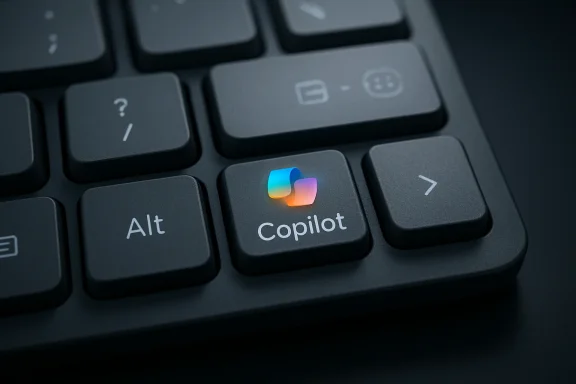
Microsoft’s Copilot key is not formally mandatory on Windows 11 keyboards today, but Microsoft has reportedly told HardForum that it expects the dedicated AI key to become required “over time,” after showing a demo layout that places it near the arrow cluster and right Alt key. That is a small hardware change with a large strategic shadow. The key is not really about one extra button; it is about Microsoft trying to turn AI from an app into a fixture of the PC itself.
The backlash was predictable because keyboards are intimate equipment. Users tolerate a lot of software churn, but they do not like a vendor reaching into muscle memory, especially when the replacement appears to privilege a cloud assistant over long-standing keys such as Menu or right Ctrl. Microsoft’s problem is that it wants Copilot to feel as native as Start, while much of its audience still sees it as optional, unfinished, or unwanted.
The Copilot key is best understood as a branding decision disguised as an input decision. Microsoft has spent the last several years trying to make Copilot a layer across Windows, Edge, Microsoft 365, Bing, GitHub, Teams, and Azure. A dedicated key takes that abstraction and gives it a permanent physical address.
That matters because the PC keyboard has historically changed slowly. The Windows key succeeded not because everyone loved it on day one, but because Microsoft had enough leverage over OEMs, software conventions, and user expectations to make it normal. Once enough keyboards shipped with it, developers and users adapted around it.
The Copilot key is Microsoft attempting the same move in a much less settled market. The Start menu was already a central organizing metaphor for Windows when the Windows key arrived. Copilot, by contrast, is still a moving target: sometimes a sidebar, sometimes an app, sometimes a web wrapper, sometimes an enterprise assistant, sometimes a consumer chatbot, and sometimes a subscription upsell.
That instability is why the reported “over time” language lands so awkwardly. Microsoft is signaling confidence in the destination before users have agreed on the journey. It is trying to reserve real estate for a category that may be foundational, but is not yet as behaviorally essential as copy, paste, search, or task switching.
That is why the HardForum reaction focused less on AI in the abstract and more on layout. The demo placement, between the arrow-key cluster and right Alt, is exactly the kind of zone where keyboard makers already make compromises. Depending on the laptop or desktop layout, that region may hold Menu, right Ctrl, a second Windows key, a compact-navigation key, or a vendor-specific function.
For many casual users, losing the Menu key may seem like trivia. For keyboard-heavy users, accessibility users, remote desktop users, and people who live inside context menus, it is not trivia. The Menu key is one of those quiet pieces of Windows heritage that rarely appears in marketing but still does useful work.
Right Ctrl is even more sensitive. Developers, gamers, terminal users, accessibility-tool users, keyboard-layout enthusiasts, and people who rely on international input methods may all have workflows that assume a symmetric modifier layout. Removing or moving it for an assistant key feels less like innovation than enclosure.
Samsung eventually softened its stance after users pushed back and sought ways to remap or disable the Bixby button. The lesson was not that dedicated assistant keys can never work. It was that a hardware shortcut becomes hostile when it is more valuable to the vendor’s strategy than to the user’s daily routine.
Microsoft is in a different position from Samsung because Windows is not one phone line. It is a platform with thousands of device designs, commercial images, regulatory regions, language layouts, and management policies. That makes a mandatory or semi-mandatory Copilot key more complicated than a button on a Galaxy handset.
It also makes the symbolism stronger. If every new Windows laptop increasingly arrives with a Copilot logo where a familiar key used to be, users will read that as a statement about Microsoft’s priorities. The message is not “here is a shortcut if you want it.” The message is “this is what the PC is for now.”
That does not mean every beige-box keyboard on Earth is about to be outlawed. The PC ecosystem is too varied for that. External keyboards, enthusiast boards, regional layouts, accessibility hardware, industrial devices, and legacy deployments all complicate any clean mandate.
But Microsoft does not need an absolute mandate to change the market. If the Copilot key becomes expected for new Windows 11 laptops, AI PCs, or certain OEM certification tiers, the effect will be similar for mainstream buyers. Most people buy the keyboard that comes attached to the laptop.
The ambiguity is therefore strategically useful. Microsoft can avoid saying “required” in the present tense while still telling partners which direction the wind is blowing. OEMs, whose margins are thin and whose Windows relationship matters, are unlikely to ignore that signal.
That is powerful marketing. Walk into a store, see a key with the Copilot icon, and the device tells a simple story before the salesperson says a word. This is the Windows PC that does AI. This is the laptop aligned with Microsoft’s future.
The trouble is that a badge can age badly. The history of PC hardware is littered with buttons and stickers for services that later changed, faded, or disappeared. Dedicated web keys, media portal keys, OEM support keys, Office keys, and assistant buttons all had their moments. Some became useful; many became clutter.
Copilot may not be another abandoned convenience button. Microsoft is spending too much money and reorganizing too much product strategy around AI for that easy dismissal. But the more important Copilot becomes to Microsoft, the more users will demand that the key serve them rather than merely advertise the platform.
Microsoft has already moved in that direction in Windows settings and support material, though the exact behavior has varied by build, device, firmware, and app model. That variability is part of the problem. A remapping feature that works only under certain packaging rules, or only on certain devices, or only after a cumulative update, is not the same as a trustworthy platform guarantee.
Enterprise IT will want more than a settings toggle. Admins need policy controls, imaging predictability, documentation, and the ability to prevent a consumer assistant workflow from colliding with compliance requirements. If Copilot opens the wrong experience for the wrong user in the wrong tenant, the hardware shortcut becomes a support ticket generator.
Enthusiasts will want still more. They will want scan-code clarity, firmware transparency, PowerToys support, AutoHotkey compatibility, Linux behavior that is not bizarre, and keyboards that do not sacrifice useful keys in the name of a logo. Microsoft does not have to satisfy every keyboard purist, but it should recognize that this audience often identifies the sharp edges before mainstream users hit them.
That is a clever compatibility trick, but it also makes the whole thing feel improvised. Instead of creating a clean, universally understood input primitive, Microsoft and OEMs appear to have routed a major new branding initiative through a legacy corner of keyboard behavior. For users trying to remap the key, that can produce weird interactions with modifier combinations and tools that expect ordinary key events.
There is a metaphor here that Microsoft probably did not intend. Copilot is being sold as the future of computing, but the hardware route to it may depend on a ghost from the IBM-era function-key range. The future, as usual on Windows, arrives by tunneling through the past.
That is not necessarily bad engineering. Windows compatibility is full of such compromises, and many of them are the reason old software and hardware still work. But when Microsoft wants the industry to accept a new physical standard, the implementation needs to feel less like a workaround and more like a contract.
A hardware key that launches an unavailable, unmanaged, or partially configured assistant is a poor experience. A hardware key that opens a consumer-facing AI workflow on a corporate device is worse. Even if Microsoft routes commercial users to enterprise-appropriate Copilot experiences, IT departments will still want proof, control, and auditability.
The other enterprise concern is training. Help desks already deal with accidental key presses, strange shortcuts, language input issues, and laptop layouts that differ across vendors. Add a new AI key with behavior that changes across Windows releases, and the support matrix gets bigger.
This is why Microsoft’s “over time” signal should come with an equally strong management story. If the key becomes standard, its governance must be standard too. Anything less will turn a marketing win into another line item in every Windows deployment checklist.
But the stronger objection is about permanence. Users have seen Microsoft promote features as the future before, only to rename them, reposition them, remove them, or let them decay. Cortana was once treated as a central Windows feature. Live Tiles were once the future of Start. The People bar, Timeline, News and Interests, Widgets, and assorted Edge integrations all arrived with varying degrees of insistence.
A dedicated key raises the stakes because hardware outlives hype cycles. A laptop bought in 2026 may remain in service into 2030 or beyond. If Copilot changes names, changes business models, changes privacy posture, or becomes less central to Windows, the key remains as a fossil of one strategic moment.
That does not mean Microsoft should never change the keyboard. It means hardware changes require a higher burden of proof than taskbar icons. A key should earn its place by being broadly useful, stable, and respectful of alternatives.
That does not mean OEM designers are thrilled. Laptop keyboards are already space-constrained, and every regional layout multiplies the difficulty. Adding a required key does not create new physical space; it displaces something. On compact machines, the cost is almost always paid by punctuation, modifiers, navigation keys, or spacing.
Desktop keyboards have more room, but the enthusiast market is less forgiving. Mechanical keyboard users care deeply about layout, programmability, firmware, and keycap standards. For that audience, a mandatory Copilot key may be treated not as a feature but as a defect to be remapped, replaced, or avoided.
The likely outcome is uneven adoption. Mainstream laptops will normalize the key fastest. External keyboards will split between Microsoft-aligned productivity models and enthusiast designs that either omit the key or make it fully programmable. Enterprise fleets will care less about the logo than about whether the behavior can be centrally controlled.
But the inverse is also true. If pressing the key mostly opens a branded chat window, or a web-powered assistant that feels disconnected from the local machine, users will resent the placement. A hardware shortcut magnifies disappointment because it promises immediacy and integration.
The key’s success therefore depends less on the keyboard than on Copilot itself. Microsoft must make the invoked experience fast, local where appropriate, privacy-aware, administratively manageable, and contextually competent. A slow assistant behind a prominent key is worse than a slow assistant behind an icon.
There is also a trust dimension. Users need to know what happens when they press the key, what data is available to the assistant, which account context is active, and whether the behavior differs between personal and work profiles. The more Copilot spans Windows, Microsoft 365, Edge, and the web, the more important that clarity becomes.
For Windows users and IT teams, the signal is clear:
Source: Let's Data Science Microsoft signals Copilot key may become required
The backlash was predictable because keyboards are intimate equipment. Users tolerate a lot of software churn, but they do not like a vendor reaching into muscle memory, especially when the replacement appears to privilege a cloud assistant over long-standing keys such as Menu or right Ctrl. Microsoft’s problem is that it wants Copilot to feel as native as Start, while much of its audience still sees it as optional, unfinished, or unwanted.
 Microsoft Wants AI to Become a Place, Not Just a Product
The Copilot key is best understood as a branding decision disguised as an input decision. Microsoft has spent the last several years trying to make Copilot a layer across Windows, Edge, Microsoft 365, Bing, GitHub, Teams, and Azure. A dedicated key takes that abstraction and gives it a permanent physical address.That matters because the PC keyboard has historically changed slowly. The Windows key succeeded not because everyone loved it on day one, but because Microsoft had enough leverage over OEMs, software conventions, and user expectations to make it normal. Once enough keyboards shipped with it, developers and users adapted around it.
The Copilot key is Microsoft attempting the same move in a much less settled market. The Start menu was already a central organizing metaphor for Windows when the Windows key arrived. Copilot, by contrast, is still a moving target: sometimes a sidebar, sometimes an app, sometimes a web wrapper, sometimes an enterprise assistant, sometimes a consumer chatbot, and sometimes a subscription upsell.
That instability is why the reported “over time” language lands so awkwardly. Microsoft is signaling confidence in the destination before users have agreed on the journey. It is trying to reserve real estate for a category that may be foundational, but is not yet as behaviorally essential as copy, paste, search, or task switching.
The Keyboard Is Where Vendor Ambition Meets User Muscle Memory
A keyboard is not just another peripheral. It is a map of habits, shortcuts, accessibility workflows, games, development environments, remote sessions, virtual machines, and decades of accumulated assumptions. Moving or replacing a key can be more disruptive than changing a default app because the break happens below conscious thought.That is why the HardForum reaction focused less on AI in the abstract and more on layout. The demo placement, between the arrow-key cluster and right Alt, is exactly the kind of zone where keyboard makers already make compromises. Depending on the laptop or desktop layout, that region may hold Menu, right Ctrl, a second Windows key, a compact-navigation key, or a vendor-specific function.
For many casual users, losing the Menu key may seem like trivia. For keyboard-heavy users, accessibility users, remote desktop users, and people who live inside context menus, it is not trivia. The Menu key is one of those quiet pieces of Windows heritage that rarely appears in marketing but still does useful work.
Right Ctrl is even more sensitive. Developers, gamers, terminal users, accessibility-tool users, keyboard-layout enthusiasts, and people who rely on international input methods may all have workflows that assume a symmetric modifier layout. Removing or moving it for an assistant key feels less like innovation than enclosure.
The Bixby Key Is the Warning Microsoft Should Not Ignore
The comparison to Samsung’s Bixby key is not just a cheap shot. It captures a pattern in consumer technology: a company believes an assistant is central enough to deserve hardware priority, users disagree, and the key becomes a symbol of corporate overreach rather than convenience.Samsung eventually softened its stance after users pushed back and sought ways to remap or disable the Bixby button. The lesson was not that dedicated assistant keys can never work. It was that a hardware shortcut becomes hostile when it is more valuable to the vendor’s strategy than to the user’s daily routine.
Microsoft is in a different position from Samsung because Windows is not one phone line. It is a platform with thousands of device designs, commercial images, regulatory regions, language layouts, and management policies. That makes a mandatory or semi-mandatory Copilot key more complicated than a button on a Galaxy handset.
It also makes the symbolism stronger. If every new Windows laptop increasingly arrives with a Copilot logo where a familiar key used to be, users will read that as a statement about Microsoft’s priorities. The message is not “here is a shortcut if you want it.” The message is “this is what the PC is for now.”
“Not Mandatory Now” Is Doing a Lot of Work
The important phrase in the reported Microsoft response is not merely “required.” It is “not mandatory now.” That phrasing leaves room for the familiar Microsoft playbook: introduce a capability, encourage OEM adoption, make it part of premium branding, fold it into certification expectations, and eventually treat it as standard equipment.That does not mean every beige-box keyboard on Earth is about to be outlawed. The PC ecosystem is too varied for that. External keyboards, enthusiast boards, regional layouts, accessibility hardware, industrial devices, and legacy deployments all complicate any clean mandate.
But Microsoft does not need an absolute mandate to change the market. If the Copilot key becomes expected for new Windows 11 laptops, AI PCs, or certain OEM certification tiers, the effect will be similar for mainstream buyers. Most people buy the keyboard that comes attached to the laptop.
The ambiguity is therefore strategically useful. Microsoft can avoid saying “required” in the present tense while still telling partners which direction the wind is blowing. OEMs, whose margins are thin and whose Windows relationship matters, are unlikely to ignore that signal.
Copilot+ PCs Made the Key Feel Like a Badge
The Copilot key arrived alongside Microsoft’s wider AI PC push, including the Copilot+ PC branding that tied new Windows experiences to neural processing hardware. That pairing matters because it turns a key into a badge. It is not just a launcher; it is a visible sign that the machine belongs to the new AI generation.That is powerful marketing. Walk into a store, see a key with the Copilot icon, and the device tells a simple story before the salesperson says a word. This is the Windows PC that does AI. This is the laptop aligned with Microsoft’s future.
The trouble is that a badge can age badly. The history of PC hardware is littered with buttons and stickers for services that later changed, faded, or disappeared. Dedicated web keys, media portal keys, OEM support keys, Office keys, and assistant buttons all had their moments. Some became useful; many became clutter.
Copilot may not be another abandoned convenience button. Microsoft is spending too much money and reorganizing too much product strategy around AI for that easy dismissal. But the more important Copilot becomes to Microsoft, the more users will demand that the key serve them rather than merely advertise the platform.
Reprogrammability Is the Pressure Valve Microsoft Needs
The cleanest way for Microsoft to avoid a hardware culture war is obvious: make the key remappable, manageable, and boring. If a user can turn it into Menu, right Ctrl, Search, a chosen app, or nothing at all, much of the fury drains away. The key becomes an option with a default, not a decree.Microsoft has already moved in that direction in Windows settings and support material, though the exact behavior has varied by build, device, firmware, and app model. That variability is part of the problem. A remapping feature that works only under certain packaging rules, or only on certain devices, or only after a cumulative update, is not the same as a trustworthy platform guarantee.
Enterprise IT will want more than a settings toggle. Admins need policy controls, imaging predictability, documentation, and the ability to prevent a consumer assistant workflow from colliding with compliance requirements. If Copilot opens the wrong experience for the wrong user in the wrong tenant, the hardware shortcut becomes a support ticket generator.
Enthusiasts will want still more. They will want scan-code clarity, firmware transparency, PowerToys support, AutoHotkey compatibility, Linux behavior that is not bizarre, and keyboards that do not sacrifice useful keys in the name of a logo. Microsoft does not have to satisfy every keyboard purist, but it should recognize that this audience often identifies the sharp edges before mainstream users hit them.
The F23 Hack Explains Why This Feels Improvised
One of the stranger details around the Copilot key is that, on many implementations, it has not behaved like a wholly new magical key at all. Reporting and user analysis have described it as relying on a shortcut involving Windows, Shift, and F23, an obscure function-key code far outside modern mainstream keyboard layouts.That is a clever compatibility trick, but it also makes the whole thing feel improvised. Instead of creating a clean, universally understood input primitive, Microsoft and OEMs appear to have routed a major new branding initiative through a legacy corner of keyboard behavior. For users trying to remap the key, that can produce weird interactions with modifier combinations and tools that expect ordinary key events.
There is a metaphor here that Microsoft probably did not intend. Copilot is being sold as the future of computing, but the hardware route to it may depend on a ghost from the IBM-era function-key range. The future, as usual on Windows, arrives by tunneling through the past.
That is not necessarily bad engineering. Windows compatibility is full of such compromises, and many of them are the reason old software and hardware still work. But when Microsoft wants the industry to accept a new physical standard, the implementation needs to feel less like a workaround and more like a contract.
Enterprise IT Sees Another Default to Govern
For sysadmins, the Copilot key is not primarily an aesthetic issue. It is another default behavior to inventory, document, secure, explain, and possibly disable. That is especially true in organizations where Copilot availability differs by license, tenant policy, region, data boundary, or job role.A hardware key that launches an unavailable, unmanaged, or partially configured assistant is a poor experience. A hardware key that opens a consumer-facing AI workflow on a corporate device is worse. Even if Microsoft routes commercial users to enterprise-appropriate Copilot experiences, IT departments will still want proof, control, and auditability.
The other enterprise concern is training. Help desks already deal with accidental key presses, strange shortcuts, language input issues, and laptop layouts that differ across vendors. Add a new AI key with behavior that changes across Windows releases, and the support matrix gets bigger.
This is why Microsoft’s “over time” signal should come with an equally strong management story. If the key becomes standard, its governance must be standard too. Anything less will turn a marketing win into another line item in every Windows deployment checklist.
Users Are Not Rejecting AI So Much as Rejecting Premature Permanence
It is tempting to frame the backlash as anti-AI sentiment. Some of it is. There are plenty of Windows users who dislike Copilot, distrust Microsoft’s AI ambitions, or object to cloud-connected assistants being woven into the OS.But the stronger objection is about permanence. Users have seen Microsoft promote features as the future before, only to rename them, reposition them, remove them, or let them decay. Cortana was once treated as a central Windows feature. Live Tiles were once the future of Start. The People bar, Timeline, News and Interests, Widgets, and assorted Edge integrations all arrived with varying degrees of insistence.
A dedicated key raises the stakes because hardware outlives hype cycles. A laptop bought in 2026 may remain in service into 2030 or beyond. If Copilot changes names, changes business models, changes privacy posture, or becomes less central to Windows, the key remains as a fossil of one strategic moment.
That does not mean Microsoft should never change the keyboard. It means hardware changes require a higher burden of proof than taskbar icons. A key should earn its place by being broadly useful, stable, and respectful of alternatives.
OEMs Will Follow the Incentives, Not the Forum Threads
PC makers are not neutral observers here. If Microsoft positions the Copilot key as part of the modern Windows device identity, OEMs will align quickly, especially on consumer and premium productivity laptops. They want to be on the right side of Microsoft’s marketing, certification, and retail messaging.That does not mean OEM designers are thrilled. Laptop keyboards are already space-constrained, and every regional layout multiplies the difficulty. Adding a required key does not create new physical space; it displaces something. On compact machines, the cost is almost always paid by punctuation, modifiers, navigation keys, or spacing.
Desktop keyboards have more room, but the enthusiast market is less forgiving. Mechanical keyboard users care deeply about layout, programmability, firmware, and keycap standards. For that audience, a mandatory Copilot key may be treated not as a feature but as a defect to be remapped, replaced, or avoided.
The likely outcome is uneven adoption. Mainstream laptops will normalize the key fastest. External keyboards will split between Microsoft-aligned productivity models and enthusiast designs that either omit the key or make it fully programmable. Enterprise fleets will care less about the logo than about whether the behavior can be centrally controlled.
The Real Test Is Whether Copilot Becomes Worth the Key
Microsoft’s bet can still work. If Copilot becomes a genuinely useful control surface for Windows—one that can change settings reliably, summarize local and cloud work securely, automate workflows, and respect organizational boundaries—then a dedicated key may come to feel natural. The fastest path to acceptance is utility.But the inverse is also true. If pressing the key mostly opens a branded chat window, or a web-powered assistant that feels disconnected from the local machine, users will resent the placement. A hardware shortcut magnifies disappointment because it promises immediacy and integration.
The key’s success therefore depends less on the keyboard than on Copilot itself. Microsoft must make the invoked experience fast, local where appropriate, privacy-aware, administratively manageable, and contextually competent. A slow assistant behind a prominent key is worse than a slow assistant behind an icon.
There is also a trust dimension. Users need to know what happens when they press the key, what data is available to the assistant, which account context is active, and whether the behavior differs between personal and work profiles. The more Copilot spans Windows, Microsoft 365, Edge, and the web, the more important that clarity becomes.
The Copilot Key Is a Small Button Carrying a Platform Bet
The practical conclusions are less dramatic than the reaction, but more important than Microsoft’s marketing. This is not the end of user choice, and it is not merely a harmless shortcut. It is a platform owner using hardware convention to steer software behavior.For Windows users and IT teams, the signal is clear:
- Microsoft has not made the Copilot key universally mandatory today, but the company’s reported language points toward eventual standardization across Windows 11 hardware.
- The controversy is driven as much by lost layout flexibility as by skepticism toward AI itself.
- Remapping and policy controls will determine whether the key feels like a convenience or an imposition.
- OEM adoption will likely move faster on mainstream laptops than on enthusiast desktop keyboards.
- Copilot must become more reliable, integrated, and governable if Microsoft wants users to see the key as useful rather than promotional.
- The safest design principle is that a dedicated AI key should remain user-configurable even if it becomes common.
Source: Let's Data Science Microsoft signals Copilot key may become required
