

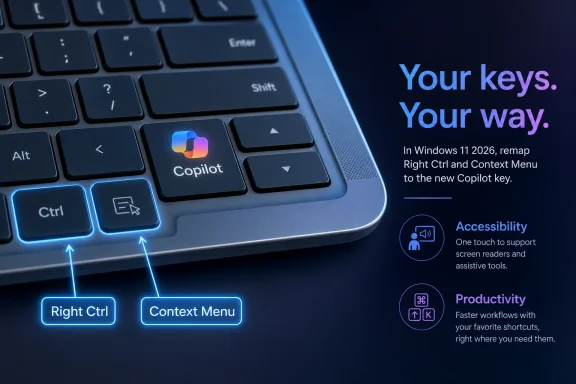
Microsoft has confirmed that a Windows 11 update arriving later in 2026 will let users remap the dedicated Copilot key on newer PCs so it behaves as either the Context Menu key or the Right Ctrl key. That sounds like a small concession, but it is really an admission that Microsoft’s most visible AI-era hardware change collided with decades of keyboard muscle memory. The Copilot key was designed as a statement of intent; the remapping option is a statement of retreat. Windows users are not rejecting AI outright so much as rejecting the idea that AI deserves to displace basic input controls without asking.
When Microsoft introduced the Copilot key in early 2024, it framed the change as the biggest alteration to the Windows keyboard in roughly three decades. That was not marketing modesty. On many new laptops, the key appeared in territory once occupied by the right-side Control key or the old Context Menu key, both of which have niche but real constituencies.
The problem is that keyboards are not launchers in the way a Start menu or taskbar button is a launcher. They are physical maps of habit. For power users, programmers, accessibility users, multilingual typists, gamers, editors, and anyone who has built years of muscle memory around a specific layout, a key is not merely a symbol printed on plastic.
That is why this change landed differently from another taskbar icon or bundled app. Microsoft was not just adding Copilot to Windows; it was putting Copilot into the user’s hand and asking hardware makers to make room for it. In the abstract, that is an elegant way to make AI feel native. In practice, it meant some users lost a key they actually used in exchange for a key they might never press.
The new support language from Microsoft is unusually plain about the consequence. Customers who relied on Right Ctrl or the Context Menu key for shortcuts or assistive technologies experienced workflow problems. That sentence matters because it reframes the Copilot key from a branding exercise into an input-compatibility issue.
The company was trying to do for AI what the Windows key once did for the Start menu: turn software into a physical gesture. The Windows key made sense because Windows itself was the environment. Pressing it summoned the operating system’s primary navigation layer.
The Copilot key was more speculative. It assumed that AI assistance would become central enough to deserve a permanent hardware affordance. That may still prove true for some users, especially as local AI features, Copilot+ PCs, and app-integrated assistants evolve. But in 2024 and 2025, the user experience often felt less like a new computing paradigm and more like a dedicated button for opening a still-changing app.
The mismatch was especially stark because Copilot’s role in Windows has itself been unstable. Microsoft moved Copilot through different forms: sidebar, app, taskbar presence, web-powered assistant, and broader AI brand. The hardware key, meanwhile, was fixed in plastic. The software strategy was fluid; the keyboard decision was not.
The Context Menu key is even easier to underestimate. It never had the cultural status of Ctrl, Alt, or the Windows key, but it served a clear role: opening the right-click menu from the keyboard. For accessibility users and screen reader workflows, that kind of key can matter. It provides a predictable keyboard route to commands that many users reach with a mouse.
Windows also has keyboard alternatives for context menus, including Shift+F10 in many places, but substitutes are not always equivalent. Assistive technology depends on repeatable patterns. Enterprise training depends on repeatable patterns. Muscle memory depends on repeatable patterns. A workaround is not the same as leaving the layout intact.
This is why Microsoft’s coming option is not merely cosmetic. Restoring the Copilot key as Context Menu or Right Ctrl acknowledges that a modern operating system has to respect old affordances precisely because so many people built serious work on them.
That distinction is important. Opening another app with the Copilot key still treats the key as an AI-era application button. Mapping it back to Right Ctrl treats it as part of the keyboard. For many frustrated users, that is the difference between a novelty and a fix.
PC makers have sometimes offered their own keyboard utilities with remapping options, but vendor-specific tools are a poor substitute for an operating-system-level setting. They vary by brand, model, driver stack, and update cadence. A Windows-native option gives the change a better chance of surviving reinstallations, updates, and hardware differences.
It also sends a signal to OEMs. If Windows itself now needs a setting to reverse the practical effect of the Copilot key, then the industry should be cautious about treating that key as untouchable. A dedicated AI key may remain part of Microsoft’s preferred PC branding, but it can no longer be sold as frictionless.
That matters because modifier keys are special. Remapping a launcher to another launcher is relatively easy. Remapping a key so it behaves like a true modifier in every application, game, remote session, accessibility tool, and low-level input scenario is harder. If the remap happens too high in the software stack, some applications will not see what the user expects.
For enthusiasts, that turned the Copilot key into a puzzle. For ordinary users, it turned the key into a dead zone. For IT departments, it became one more exception to document when provisioning new laptops.
Microsoft’s native approach should not be romanticized before it ships. The quality of the implementation will matter. It needs to work before sign-in where appropriate, behave consistently across keyboard layouts, survive updates, and play nicely with accessibility tools. But even as a promise, it is better than telling users to stitch together a fix with utilities.
The Copilot key became one of the clearest examples because it moved from software persuasion to hardware enforcement. You could ignore an app. You could unpin an icon. But a key on a laptop keyboard is always there, looking back at you.
The reversal does not mean Microsoft is abandoning Copilot. It means the company is rediscovering a truth Windows once understood better than almost any platform: the PC is valuable because it is configurable. The same machine can be a gaming rig, a corporate endpoint, a development workstation, a school laptop, a lab instrument, or an accessibility device. The more Windows behaves as though there is one ideal workflow, the less Windows-like it becomes.
A remap setting is therefore philosophically bigger than it looks. It says Copilot can be present without being mandatory at the level of muscle memory. That is the balance Microsoft should have struck from the beginning.
Keyboard accessibility is not a decorative feature. For users who cannot or prefer not to use a mouse, the keyboard is the interface. Removing or repurposing a key with established accessibility value can create real friction, especially when the replacement launches a service that may not be relevant to the task at hand.
There is also a trust issue. Accessibility users often build highly personalized workflows because defaults do not fit everyone. When a new PC changes the layout and the operating system does not provide a simple way back, the burden shifts from the vendor to the user. That is backwards.
Microsoft has done serious work on accessibility across Windows, Office, Xbox, and developer tooling. The Copilot key controversy sits awkwardly against that record. The coming remap option is a practical correction, but it is also a reminder that accessibility has to be part of hardware enthusiasm before the keycaps are printed.
That “something else” varied. In some cases, users lost the Context Menu key. In others, they lost Right Ctrl. Some layouts were already cramped, especially on compact notebooks, so the AI key intensified trade-offs that manufacturers had been making for years. The difference was that the displaced key now carried a political meaning: it had been replaced by Microsoft’s AI strategy.
OEM utilities could soften the problem, but they could not solve the platform message. A Lenovo-specific or Dell-specific remap is not the same as Windows saying, “This is your keyboard; choose what the key does.” The new Windows setting should make the experience less fragmented.
Still, Microsoft’s concession does not absolve hardware makers. Laptop keyboard layouts have become a quiet battlefield of half-height arrows, compressed function rows, missing keys, and brand-specific oddities. The Copilot key did not create that problem, but it exposed how little slack remains. When every key is contested, adding a new mandatory-feeling one is never neutral.
The Copilot key was the physical embodiment of that overreach. It assumed the assistant was important enough to deserve privileged placement before Microsoft had convinced many users that pressing the key would reliably improve their day. For some people, it did. For many others, it launched something they had not asked for.
This is not the first time Microsoft has pushed ahead of user sentiment. The company has a long history of trying to steer Windows users toward new interaction models, from Live Tiles to Cortana to tablet-first design ideas. Sometimes those bets mature. Sometimes they are trimmed back. Sometimes they become cautionary tales.
The difference now is that AI is not a side feature in Microsoft’s corporate strategy. It is central to investor expectations, cloud services, developer tooling, Office, Windows, and the future branding of the PC. That makes restraint more important, not less. If Microsoft wants Copilot to become trusted infrastructure, it cannot behave like promotional furniture.
Administrators will want to know whether the setting can be managed through policy, provisioning, registry configuration, or device management tooling. Microsoft’s initial consumer-facing support language is useful, but enterprise deployment lives in the details. If the remap is only a per-user Settings toggle, it will be less valuable than if IT can configure it at scale.
There is also the issue of shared devices. In libraries, labs, classrooms, call centers, and clinical environments, users may not have the time or permissions to personalize the keyboard. The default matters more when the device is not truly personal. A Copilot key that one user likes may be a barrier to the next user’s workflow.
Microsoft should treat this as more than a Settings feature. It should document the behavior clearly, make it manageable, and ensure assistive technology vendors understand how the remap is exposed. The company has already acknowledged the workflow problem; now it has to make the repair operationally boring.
The result has often felt like a struggle between cleanliness and control. The modern menu looks better, but the old one was dense, familiar, and predictable. For keyboard users, the Context Menu key was one route into that world of commands.
Putting the Context Menu option back on the Copilot key will not fix every complaint about Windows 11’s right-click behavior. It will, however, restore a piece of navigation that some users never wanted to lose. That matters because the fight over Windows 11 is rarely about one design choice in isolation. It is about whether Microsoft’s new defaults respect the old ways of getting work done.
The best version of Windows 11 is not the one that freezes the UI in 2009. It is the one that modernizes without making experienced users feel like trespassers in their own workflows. The Copilot key remap is a small move in that direction.
The resistance comes when AI is inserted as a default answer to questions nobody asked. A dedicated key is a claim about importance. If the key displaces something more useful to the user, the claim becomes irritating.
By allowing the key to become Right Ctrl or Context Menu, Microsoft is not diminishing Copilot for people who want it. It is acknowledging that the PC is not a kiosk for Microsoft’s product priorities. The same hardware can serve different users differently.
That is the lesson Windows keeps relearning. Choice is not a lack of vision. On a platform as broad as Windows, choice is the product.
The remapping update also gives Microsoft a better answer to critics. Instead of insisting that the Copilot key is the future and users should adapt, it can say the key is available for Copilot by default but configurable for established workflows. That is a stronger position because it is less brittle.
There is a design principle here that extends beyond keyboards. AI features should be discoverable, removable where reasonable, controllable by policy, respectful of accessibility, and honest about their current utility. If they are good, users will keep them. If they are not, forcing them into the interface will not make them better.
Windows 11 has sometimes felt like an operating system negotiating with its own users after the fact. The Copilot key remap is one of those negotiations. At least this time, the result appears to move in the right direction.
 Microsoft’s AI Key Finally Meets the People Who Type for a Living
When Microsoft introduced the Copilot key in early 2024, it framed the change as the biggest alteration to the Windows keyboard in roughly three decades. That was not marketing modesty. On many new laptops, the key appeared in territory once occupied by the right-side Control key or the old Context Menu key, both of which have niche but real constituencies.The problem is that keyboards are not launchers in the way a Start menu or taskbar button is a launcher. They are physical maps of habit. For power users, programmers, accessibility users, multilingual typists, gamers, editors, and anyone who has built years of muscle memory around a specific layout, a key is not merely a symbol printed on plastic.
That is why this change landed differently from another taskbar icon or bundled app. Microsoft was not just adding Copilot to Windows; it was putting Copilot into the user’s hand and asking hardware makers to make room for it. In the abstract, that is an elegant way to make AI feel native. In practice, it meant some users lost a key they actually used in exchange for a key they might never press.
The new support language from Microsoft is unusually plain about the consequence. Customers who relied on Right Ctrl or the Context Menu key for shortcuts or assistive technologies experienced workflow problems. That sentence matters because it reframes the Copilot key from a branding exercise into an input-compatibility issue.
The Copilot Key Was Always More Than a Shortcut
A dedicated key carries a different meaning from an app icon. The keyboard is the oldest surviving user interface in personal computing, and its layout has endured because it is boring, predictable, and standardized enough to vanish under the user’s fingers. Microsoft knew that when it pitched the Copilot key as a generational keyboard change.The company was trying to do for AI what the Windows key once did for the Start menu: turn software into a physical gesture. The Windows key made sense because Windows itself was the environment. Pressing it summoned the operating system’s primary navigation layer.
The Copilot key was more speculative. It assumed that AI assistance would become central enough to deserve a permanent hardware affordance. That may still prove true for some users, especially as local AI features, Copilot+ PCs, and app-integrated assistants evolve. But in 2024 and 2025, the user experience often felt less like a new computing paradigm and more like a dedicated button for opening a still-changing app.
The mismatch was especially stark because Copilot’s role in Windows has itself been unstable. Microsoft moved Copilot through different forms: sidebar, app, taskbar presence, web-powered assistant, and broader AI brand. The hardware key, meanwhile, was fixed in plastic. The software strategy was fluid; the keyboard decision was not.
Right Ctrl and the Context Menu Key Were Quietly Important
It is tempting to dismiss complaints about Right Ctrl as the grumbling of keyboard traditionalists. That misses the point. The right-side modifier keys exist because many workflows are bilateral, ergonomic, or application-specific. People who use their left hand for a mouse, people who trigger shortcuts with the numeric keypad, and users of specialized applications can depend on Right Ctrl in ways that are invisible to casual typists.The Context Menu key is even easier to underestimate. It never had the cultural status of Ctrl, Alt, or the Windows key, but it served a clear role: opening the right-click menu from the keyboard. For accessibility users and screen reader workflows, that kind of key can matter. It provides a predictable keyboard route to commands that many users reach with a mouse.
Windows also has keyboard alternatives for context menus, including Shift+F10 in many places, but substitutes are not always equivalent. Assistive technology depends on repeatable patterns. Enterprise training depends on repeatable patterns. Muscle memory depends on repeatable patterns. A workaround is not the same as leaving the layout intact.
This is why Microsoft’s coming option is not merely cosmetic. Restoring the Copilot key as Context Menu or Right Ctrl acknowledges that a modern operating system has to respect old affordances precisely because so many people built serious work on them.
The Remap Setting Is a Small Feature With a Large Apology Inside
The coming Windows 11 setting will live under Settings, Bluetooth & devices, and Keyboard. Once it arrives, users with a Copilot key will be able to change its behavior so it acts like the Context Menu key or Right Ctrl. Microsoft had already added some customization around the Copilot key, including the ability to point it at Windows Search or a supported app, but this new option goes further because it restores lost keyboard semantics rather than merely redirecting a launcher.That distinction is important. Opening another app with the Copilot key still treats the key as an AI-era application button. Mapping it back to Right Ctrl treats it as part of the keyboard. For many frustrated users, that is the difference between a novelty and a fix.
PC makers have sometimes offered their own keyboard utilities with remapping options, but vendor-specific tools are a poor substitute for an operating-system-level setting. They vary by brand, model, driver stack, and update cadence. A Windows-native option gives the change a better chance of surviving reinstallations, updates, and hardware differences.
It also sends a signal to OEMs. If Windows itself now needs a setting to reverse the practical effect of the Copilot key, then the industry should be cautious about treating that key as untouchable. A dedicated AI key may remain part of Microsoft’s preferred PC branding, but it can no longer be sold as frictionless.
The PowerToys Workaround Was Never Enough
For months, the predictable answer to Copilot-key complaints was: use PowerToys, AutoHotkey, SharpKeys, a vendor utility, or some other remapping layer. That advice worked for some users and failed for others. The Copilot key was not always exposed like a normal keypress, and on some systems it appeared through combinations such as Windows, Shift, and an extended function key rather than as a clean Right Ctrl replacement.That matters because modifier keys are special. Remapping a launcher to another launcher is relatively easy. Remapping a key so it behaves like a true modifier in every application, game, remote session, accessibility tool, and low-level input scenario is harder. If the remap happens too high in the software stack, some applications will not see what the user expects.
For enthusiasts, that turned the Copilot key into a puzzle. For ordinary users, it turned the key into a dead zone. For IT departments, it became one more exception to document when provisioning new laptops.
Microsoft’s native approach should not be romanticized before it ships. The quality of the implementation will matter. It needs to work before sign-in where appropriate, behave consistently across keyboard layouts, survive updates, and play nicely with accessibility tools. But even as a promise, it is better than telling users to stitch together a fix with utilities.
Windows 11 Is Learning That Choice Beats Evangelism
This remapping concession fits into a broader pattern in Windows 11. Microsoft has spent the last few years pushing a more curated, more opinionated desktop: centered taskbar, redesigned context menus, Microsoft account pressure, AI surfaces, changed defaults, and a rolling stream of cloud-connected features. Some of those ideas are defensible. Some have improved. Others became symbols of Microsoft deciding what users should want before users had agreed.The Copilot key became one of the clearest examples because it moved from software persuasion to hardware enforcement. You could ignore an app. You could unpin an icon. But a key on a laptop keyboard is always there, looking back at you.
The reversal does not mean Microsoft is abandoning Copilot. It means the company is rediscovering a truth Windows once understood better than almost any platform: the PC is valuable because it is configurable. The same machine can be a gaming rig, a corporate endpoint, a development workstation, a school laptop, a lab instrument, or an accessibility device. The more Windows behaves as though there is one ideal workflow, the less Windows-like it becomes.
A remap setting is therefore philosophically bigger than it looks. It says Copilot can be present without being mandatory at the level of muscle memory. That is the balance Microsoft should have struck from the beginning.
Accessibility Was the Argument Microsoft Could Not Ignore
The strongest case against the fixed Copilot key was never nostalgia. It was accessibility. Microsoft’s own support wording points to users who rely on keyboard shortcuts or assistive technologies, including screen readers. That is a difficult category for the company to wave away because Windows has long marketed itself as a platform for broad compatibility and inclusive computing.Keyboard accessibility is not a decorative feature. For users who cannot or prefer not to use a mouse, the keyboard is the interface. Removing or repurposing a key with established accessibility value can create real friction, especially when the replacement launches a service that may not be relevant to the task at hand.
There is also a trust issue. Accessibility users often build highly personalized workflows because defaults do not fit everyone. When a new PC changes the layout and the operating system does not provide a simple way back, the burden shifts from the vendor to the user. That is backwards.
Microsoft has done serious work on accessibility across Windows, Office, Xbox, and developer tooling. The Copilot key controversy sits awkwardly against that record. The coming remap option is a practical correction, but it is also a reminder that accessibility has to be part of hardware enthusiasm before the keycaps are printed.
OEMs Followed the Signal, and Users Paid the Ergonomic Price
Microsoft does not manufacture most Windows PCs, but it sets the gravitational field. When it declared the Copilot key a signature part of the new Windows PC era, OEMs responded. Laptops began arriving with the key in layouts where something else had to give.That “something else” varied. In some cases, users lost the Context Menu key. In others, they lost Right Ctrl. Some layouts were already cramped, especially on compact notebooks, so the AI key intensified trade-offs that manufacturers had been making for years. The difference was that the displaced key now carried a political meaning: it had been replaced by Microsoft’s AI strategy.
OEM utilities could soften the problem, but they could not solve the platform message. A Lenovo-specific or Dell-specific remap is not the same as Windows saying, “This is your keyboard; choose what the key does.” The new Windows setting should make the experience less fragmented.
Still, Microsoft’s concession does not absolve hardware makers. Laptop keyboard layouts have become a quiet battlefield of half-height arrows, compressed function rows, missing keys, and brand-specific oddities. The Copilot key did not create that problem, but it exposed how little slack remains. When every key is contested, adding a new mandatory-feeling one is never neutral.
The AI PC Pitch Needed Humility Sooner
The industry’s AI PC push has often suffered from a sequencing problem. Vendors want users to buy into the hardware vision before the everyday software value is fully obvious. Neural processing units, local models, Recall-like features, generative tools, and assistant integrations may eventually become ordinary parts of computing, but the pitch has frequently outrun the lived experience.The Copilot key was the physical embodiment of that overreach. It assumed the assistant was important enough to deserve privileged placement before Microsoft had convinced many users that pressing the key would reliably improve their day. For some people, it did. For many others, it launched something they had not asked for.
This is not the first time Microsoft has pushed ahead of user sentiment. The company has a long history of trying to steer Windows users toward new interaction models, from Live Tiles to Cortana to tablet-first design ideas. Sometimes those bets mature. Sometimes they are trimmed back. Sometimes they become cautionary tales.
The difference now is that AI is not a side feature in Microsoft’s corporate strategy. It is central to investor expectations, cloud services, developer tooling, Office, Windows, and the future branding of the PC. That makes restraint more important, not less. If Microsoft wants Copilot to become trusted infrastructure, it cannot behave like promotional furniture.
The Setting Will Matter Most in Managed Windows Fleets
For consumers, the remap option will be a quality-of-life fix. For businesses, schools, and public-sector environments, it could become part of endpoint standardization. A fleet of laptops with inconsistent keyboard behavior creates support tickets, training confusion, and accessibility concerns.Administrators will want to know whether the setting can be managed through policy, provisioning, registry configuration, or device management tooling. Microsoft’s initial consumer-facing support language is useful, but enterprise deployment lives in the details. If the remap is only a per-user Settings toggle, it will be less valuable than if IT can configure it at scale.
There is also the issue of shared devices. In libraries, labs, classrooms, call centers, and clinical environments, users may not have the time or permissions to personalize the keyboard. The default matters more when the device is not truly personal. A Copilot key that one user likes may be a barrier to the next user’s workflow.
Microsoft should treat this as more than a Settings feature. It should document the behavior clearly, make it manageable, and ensure assistive technology vendors understand how the remap is exposed. The company has already acknowledged the workflow problem; now it has to make the repair operationally boring.
The Context Menu Key’s Return Is Also a Windows 11 Context Menu Story
The irony of restoring a key that opens the context menu is hard to miss. Windows 11’s redesigned right-click menu has been one of the operating system’s most persistent irritants for power users. Microsoft simplified the surface menu, pushed legacy commands behind “Show more options,” and gradually added new entries as apps and AI features arrived.The result has often felt like a struggle between cleanliness and control. The modern menu looks better, but the old one was dense, familiar, and predictable. For keyboard users, the Context Menu key was one route into that world of commands.
Putting the Context Menu option back on the Copilot key will not fix every complaint about Windows 11’s right-click behavior. It will, however, restore a piece of navigation that some users never wanted to lose. That matters because the fight over Windows 11 is rarely about one design choice in isolation. It is about whether Microsoft’s new defaults respect the old ways of getting work done.
The best version of Windows 11 is not the one that freezes the UI in 2009. It is the one that modernizes without making experienced users feel like trespassers in their own workflows. The Copilot key remap is a small move in that direction.
The Real Win Is Not Anti-Copilot; It Is Pro-Agency
There is a lazy interpretation of this story that says users hate AI and Microsoft blinked. That is too simple. Many Windows users are perfectly willing to use AI tools when they solve a real problem. Developers use coding assistants. Office users experiment with drafting and summarization. IT pros are watching automation and security workflows carefully.The resistance comes when AI is inserted as a default answer to questions nobody asked. A dedicated key is a claim about importance. If the key displaces something more useful to the user, the claim becomes irritating.
By allowing the key to become Right Ctrl or Context Menu, Microsoft is not diminishing Copilot for people who want it. It is acknowledging that the PC is not a kiosk for Microsoft’s product priorities. The same hardware can serve different users differently.
That is the lesson Windows keeps relearning. Choice is not a lack of vision. On a platform as broad as Windows, choice is the product.
The Copilot Key Retreat Gives Windows 11 a Better Argument
This episode should sharpen Microsoft’s strategy for future AI integration. The company does not need to hide Copilot. It needs to earn the moments when Copilot appears. A useful assistant that saves time will be launched voluntarily; an unwanted assistant that occupies a scarce key will become a meme.The remapping update also gives Microsoft a better answer to critics. Instead of insisting that the Copilot key is the future and users should adapt, it can say the key is available for Copilot by default but configurable for established workflows. That is a stronger position because it is less brittle.
There is a design principle here that extends beyond keyboards. AI features should be discoverable, removable where reasonable, controllable by policy, respectful of accessibility, and honest about their current utility. If they are good, users will keep them. If they are not, forcing them into the interface will not make them better.
Windows 11 has sometimes felt like an operating system negotiating with its own users after the fact. The Copilot key remap is one of those negotiations. At least this time, the result appears to move in the right direction.
The Keycap Was the Easy Part; Trust Is the Hard Part
The practical message is simple enough: later this year, users with a Copilot key should get a native Windows 11 option to turn it into something closer to the key it replaced. The larger message is that Microsoft’s AI ambitions still have to pass through the ordinary politics of PC usability.- Microsoft says a future Windows 11 update in 2026 will let the Copilot key act as either Right Ctrl or the Context Menu key.
- The change is aimed at users whose shortcuts, accessibility tools, or established workflows were disrupted by new keyboard layouts.
- Existing remapping workarounds have been inconsistent because the Copilot key has not always behaved like a normal modifier key.
- A native Windows setting should reduce reliance on OEM utilities, PowerToys workarounds, and third-party remapping tools.
- Enterprise value will depend on whether Microsoft exposes the setting through manageable policy or provisioning controls.
- The move does not kill the Copilot key, but it does concede that AI branding should not override user control.
References
- Primary source: Windows Central
Published: 2026-05-18T08:33:07.644504
Microsoft admits Windows 11's dedicated Copilot key breaks certain workflows: Confirms plans to let users restore "Right Ctrl" or "Context menu" key later this year | Windows Central
Windows 11's special Copilot Key has not been the popular hit that Microsoft was hoping it would be, and has now confirmed plans to let users remap the button back to its old functionality.www.windowscentral.com - Official source: support.microsoft.com
Understand updates to the Copilot key on Windows devices | Microsoft Support
Understand updates to the Copilot key on Windows devicessupport.microsoft.com - Related coverage: pcworld.com
How to remove 'Ask Copilot' from Windows 11's context menu | PCWorld
Windows now shows the "Ask Copilot" entry when right-clicking on files such as DOCX, TXT, PDF or PNG. Here's how to remove it via the registry.www.pcworld.com - Official source: answers.microsoft.com
Reprogram Copilot key - Microsoft Q&A
On my new Windows 11 computer, the right Ctrl button has been converted to a button that opens Copilot. I would like to reassign the button but to being a Ctrl button. There are a lot of posts out there about how the Copilot button is really a…answers.microsoft.com - Official source: intowindows.com
How To Remove 'Ask Copilot' From Windows 11 Context Menu (Right-Click Menu)
Over the past few years, Microsoft has added its AI tool Copilot to several areas of Windows 11. The latest to get the Copilot is the file context menu orwww.intowindows.com - Related coverage: windowslatest.com
Windows 11 24H2 update will let you replace Copilot key with a context menu shortcut
Windows 11 might let you remap the Copilot key in future updates. This may help Microsoft avoid complaints from unsatisfied Copilot users. www.windowslatest.com
- Related coverage: tomsguide.com
How to remap the Copilot key on Windows 11 | Tom's Guide
Windows 11 has a Copilot key built in, but sometimes you want to move it around. Here's how to remap the Copilot key in Windows 11, using the versatile Microsoft PowerToys.www.tomsguide.com - Official source: learn.microsoft.com
Reprogram Copilot key - Microsoft Q&A
On my new Windows 11 computer, the right Ctrl button has been converted to a button that opens Copilot. I would like to reassign the button but to being a Ctrl button. There are a lot of posts out there about how the Copilot button is really a…learn.microsoft.com - Related coverage: howtogeek.com
- Related coverage: techradar.com
Fed up with Windows 11's clunky right-click menu? Microsoft just dropped a hint that it could become more streamlined | TechRadar
Some apps are getting tidier context-sensitive options, and the hope is that this might be applied more broadlywww.techradar.com - Official source: news.microsoft.com
- Related coverage: u3ahavelocknorth.com

