

Microsoft has confirmed that a Windows 11 update due later in 2026 will let users remap the dedicated Copilot key on affected PCs so it behaves as either Right Ctrl or the context menu key. That is a small settings change with a large admission tucked inside it: the AI key was not merely unpopular among some Windows users, it broke real workflows. The retreat matters because Microsoft did not just add a shortcut; it encouraged PC makers to alter one of the few parts of the PC experience that users expect to remain physically stable. Now the company is learning, again, that keyboards are infrastructure.
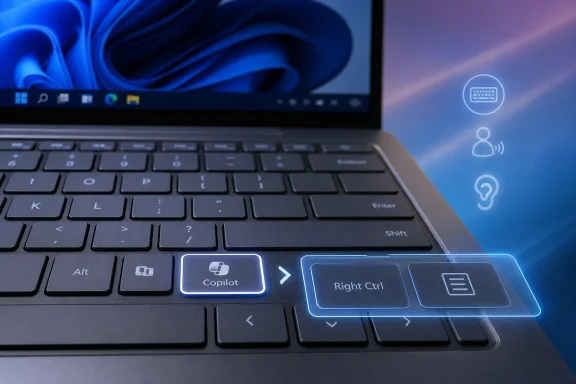
When Microsoft announced the Copilot key in January 2024, it framed the move as the first major change to the Windows PC keyboard in nearly three decades. That was not subtle product messaging. The company wanted the key to signal that the “AI PC” had arrived before users had even signed in.
The problem was that the keyboard is not a billboard. It is the most muscle-memory-heavy part of a computer, and the right side of the spacebar is not empty real estate. On many laptops, the Copilot key displaced either the context menu key or, more controversially, the Right Ctrl key.
That distinction matters because Right Ctrl is not decorative. Power users, developers, accessibility users, virtualization users, left-handed mouse users, international keyboard users, and screen reader users may depend on that physical key for combinations that are hard or impossible to reproduce comfortably elsewhere. Microsoft treated the key as a convenient launcher; many customers experienced it as a removed input device.
The company has now acknowledged that reality in unusually plain terms. Its support guidance says some workflows depend on the key for shortcut combinations, and that the dedicated Copilot key can interfere with customers using assistive and accessibility technologies such as screen readers. For a company that often describes Windows as a platform of choice and inclusion, that is a meaningful concession.
That is not what happened for most users. Copilot’s role in Windows has shifted repeatedly, from a sidebar to an app, from a system-adjacent assistant to a web-powered service, and from a grand OS interface into a more scattered collection of AI entry points across Microsoft products. The key remained physically present even as the software target behind it kept moving.
This is the trap of burning a software bet into hardware. Windows features can be renamed, moved, disabled, reworked, or quietly deprecated. A laptop keyboard, once manufactured, sold, and shipped into a fleet, is not so forgiving.
Microsoft did not require the Copilot key for Windows certification, which gave OEMs some room. But the company’s branding and platform pressure were enough to make the key appear on prominent new machines, particularly during the Copilot+ PC push. It became a badge: buy this machine, and you are buying into the AI future.
Badges age poorly when the future arrives late, arrives unevenly, or arrives in a form users do not want summoned by a dedicated piece of plastic.
It is also not a clean undo. Microsoft’s own note says that if the Copilot key is remapped to Right Ctrl, some combinations involving physical Left Shift and Right Control may not work consistently on all keyboards. The suggested workaround is to use physical Right Shift for those shortcuts.
That caveat is telling. A remapped key is not always identical to a native key, particularly when firmware, scan codes, drivers, low-level input handling, remote desktop software, virtual machines, games, accessibility tools, and security boundaries get involved. Windows can paper over a hardware choice, but it cannot always make that choice disappear.
Still, the new setting will be enough for many users. It gives the operating system a first-party answer to a problem that had become embarrassing precisely because the community was already solving it with tools such as NoCopilotKey, AutoHotkey workarounds, PowerToys experiments, and vendor-specific hacks. When users need a small utility to make a new PC behave like the old one, the platform owner has lost control of the story.
Screen reader workflows often depend on reliable keyboard sequences. So do keyboard-only navigation habits, input methods, remote administration tools, and software used by people who cannot simply adapt by moving a hand to a different key. The more specialized the workflow, the more damaging it is when a supposedly minor key changes meaning.
Microsoft knows this. Windows has spent decades accumulating compatibility layers because enterprise and accessibility realities are unforgiving. The platform’s strength has never been purity; it has been the willingness to keep old things working long after designers would prefer to move on.
That is why the Copilot key backlash cut deeper than ordinary feature grumbling. Microsoft was not just adding a shiny new shortcut. It was letting a branding campaign override a basic Windows principle: existing inputs should not vanish without an escape hatch.
On many modern laptops, the context menu key had already become endangered. Compact layouts squeezed it out, OEMs prioritized media controls, and users who did not know what it did rarely complained. The Copilot key accelerated a trend that was already underway: replacing a general-purpose system control with a vendor-defined service launcher.
That is the wrong direction for a platform keyboard. A context menu key is boring because it belongs to the user; it does whatever the focused app says is relevant. A Copilot key belongs first to Microsoft’s product strategy, and only later, if settings permit, to the user.
The new remap option recognizes that distinction. Letting the key become the context menu key again is not nostalgia. It is a return to a more durable idea of what a keyboard key should be: a stable input primitive, not a subscription-era promotional surface.
The physical key tried to skip that proof. It assumed daily value before users had experienced daily value. That made the key feel less like convenience and more like a demand for attention.
Windows users are particularly sensitive to this because the operating system has a long history of promoting Microsoft services inside spaces users consider their own: the Start menu, taskbar, Edge prompts, widgets, search, setup flows, and account sign-in experiences. The Copilot key arrived into that context. Even users who might otherwise be curious about AI saw it as another escalation in Microsoft’s fight for default placement.
A good shortcut compresses intent. A bad shortcut manufactures it. The Copilot key too often felt like the second kind.
Hardware branding works when the feature behind it is stable and broadly desired. Wi-Fi labels, fingerprint readers, webcam shutters, and function rows all advertise capabilities users understand. A Copilot key advertises a software relationship that Microsoft itself has revised several times.
OEMs also have to think about support. If users ask why a shortcut stopped working, why Right Ctrl is missing, why accessibility software behaves differently, or why a remapped key has edge-case limitations, the laptop maker is often the first point of blame. Microsoft may own the strategy, but Dell, HP, Lenovo, Acer, Asus, Samsung, and others own the customer’s first tactile experience.
The safest future design may be less ideological. Keep the physical key if Microsoft wants a launch affordance, but make it transparently remappable from day one. Better yet, avoid replacing high-value modifier keys on compact layouts unless the user has a clear alternative.
In commercial environments, shortcut consistency matters. Training materials, help desk scripts, assistive technology accommodations, VDI sessions, privileged admin workflows, kiosk configurations, and regulated data handling all assume predictable input behavior. When a new fleet arrives with a different keyboard layout, IT has to absorb the difference whether or not anyone asked for Copilot.
The coming remap option helps, but administrators will want policy controls, deployment documentation, and predictable behavior across Windows versions and hardware models. A Settings toggle is fine for a single annoyed user. It is not, by itself, a fleet strategy.
This is where Microsoft’s AI ambitions keep colliding with Windows’ installed-base reality. Consumer excitement rewards visible change. Enterprise adoption rewards reversibility, documentation, and not breaking shortcuts that have survived since the NT era.
Instead, the company gave users a branded input with insufficient escape routes. Then, after backlash and accessibility concerns, it is adding the escape route later. That sequence is what made the move feel coercive.
Windows is at its best when it lets users bend the machine toward their habits. That is why PowerToys exists. That is why keyboard remapping matters. That is why the Control Panel refuses to die. The Copilot key ignored that culture and tried to replace it with a product launch moment.
The new setting is welcome because it restores a bit of Windows’ older bargain: Microsoft can add features, but users get to decide whether those features belong in their daily workflow.
That sprawl makes a single physical key harder to justify. Which Copilot should it open? The consumer assistant? Microsoft 365 Copilot? Windows Search? A Store app? A future agent? The more answers Microsoft has, the less obvious the key becomes.
The support document’s remap choices are therefore symbolically important. Microsoft is not merely letting users launch a different app. It is letting them restore legacy key functions that predate the AI push entirely. That is a concession to continuity over branding.
For Windows enthusiasts, this is the familiar rhythm of the platform. Microsoft pushes a bold new surface, users resist the parts that feel imposed, third-party tools fill the gap, and eventually Windows grows a setting. It is messy, slow, and often avoidable, but it is also how Windows reabsorbs its own overreach.
 Microsoft Put a Marketing Button Where Muscle Memory Used to Live
When Microsoft announced the Copilot key in January 2024, it framed the move as the first major change to the Windows PC keyboard in nearly three decades. That was not subtle product messaging. The company wanted the key to signal that the “AI PC” had arrived before users had even signed in.The problem was that the keyboard is not a billboard. It is the most muscle-memory-heavy part of a computer, and the right side of the spacebar is not empty real estate. On many laptops, the Copilot key displaced either the context menu key or, more controversially, the Right Ctrl key.
That distinction matters because Right Ctrl is not decorative. Power users, developers, accessibility users, virtualization users, left-handed mouse users, international keyboard users, and screen reader users may depend on that physical key for combinations that are hard or impossible to reproduce comfortably elsewhere. Microsoft treated the key as a convenient launcher; many customers experienced it as a removed input device.
The company has now acknowledged that reality in unusually plain terms. Its support guidance says some workflows depend on the key for shortcut combinations, and that the dedicated Copilot key can interfere with customers using assistive and accessibility technologies such as screen readers. For a company that often describes Windows as a platform of choice and inclusion, that is a meaningful concession.
The Copilot Key Was Always a Hardware Bet on a Software Story
The dedicated key made sense only if Copilot became a central, daily interaction model for Windows. If users were going to ask Copilot to configure settings, summarize documents, troubleshoot errors, manipulate files, and act across apps, then a physical launcher could be defended as the new Windows key: an affordance for a new era.That is not what happened for most users. Copilot’s role in Windows has shifted repeatedly, from a sidebar to an app, from a system-adjacent assistant to a web-powered service, and from a grand OS interface into a more scattered collection of AI entry points across Microsoft products. The key remained physically present even as the software target behind it kept moving.
This is the trap of burning a software bet into hardware. Windows features can be renamed, moved, disabled, reworked, or quietly deprecated. A laptop keyboard, once manufactured, sold, and shipped into a fleet, is not so forgiving.
Microsoft did not require the Copilot key for Windows certification, which gave OEMs some room. But the company’s branding and platform pressure were enough to make the key appear on prominent new machines, particularly during the Copilot+ PC push. It became a badge: buy this machine, and you are buying into the AI future.
Badges age poorly when the future arrives late, arrives unevenly, or arrives in a form users do not want summoned by a dedicated piece of plastic.
A Remap Option Is Not a Full Reversal, But It Is a Real Retreat
The coming Windows 11 change will add a setting under Settings > Bluetooth & devices > Keyboard, allowing affected customers to make the Copilot key behave like Right Ctrl or the context menu key. This is the right fix because it restores agency without requiring users to flash firmware, install unofficial tools, or live with a broken layout.It is also not a clean undo. Microsoft’s own note says that if the Copilot key is remapped to Right Ctrl, some combinations involving physical Left Shift and Right Control may not work consistently on all keyboards. The suggested workaround is to use physical Right Shift for those shortcuts.
That caveat is telling. A remapped key is not always identical to a native key, particularly when firmware, scan codes, drivers, low-level input handling, remote desktop software, virtual machines, games, accessibility tools, and security boundaries get involved. Windows can paper over a hardware choice, but it cannot always make that choice disappear.
Still, the new setting will be enough for many users. It gives the operating system a first-party answer to a problem that had become embarrassing precisely because the community was already solving it with tools such as NoCopilotKey, AutoHotkey workarounds, PowerToys experiments, and vendor-specific hacks. When users need a small utility to make a new PC behave like the old one, the platform owner has lost control of the story.
Accessibility Turned an Annoyance Into a Platform Problem
For many enthusiasts, the Copilot key was irritating because it symbolized Microsoft’s insistence on placing AI into every visible corner of Windows. For accessibility users, the issue was more concrete. A missing Right Ctrl or context menu key can disrupt established interaction patterns that are not easily replaced by clicking through a UI.Screen reader workflows often depend on reliable keyboard sequences. So do keyboard-only navigation habits, input methods, remote administration tools, and software used by people who cannot simply adapt by moving a hand to a different key. The more specialized the workflow, the more damaging it is when a supposedly minor key changes meaning.
Microsoft knows this. Windows has spent decades accumulating compatibility layers because enterprise and accessibility realities are unforgiving. The platform’s strength has never been purity; it has been the willingness to keep old things working long after designers would prefer to move on.
That is why the Copilot key backlash cut deeper than ordinary feature grumbling. Microsoft was not just adding a shiny new shortcut. It was letting a branding campaign override a basic Windows principle: existing inputs should not vanish without an escape hatch.
The Context Menu Key Deserved Better Than Quiet Erasure
The context menu key has never been glamorous, but it is one of those Windows affordances that quietly rewards people who learn the keyboard. It opens the right-click menu from the keyboard, helping users avoid mouse movement and supporting workflows where pointer use is inconvenient or inaccessible.On many modern laptops, the context menu key had already become endangered. Compact layouts squeezed it out, OEMs prioritized media controls, and users who did not know what it did rarely complained. The Copilot key accelerated a trend that was already underway: replacing a general-purpose system control with a vendor-defined service launcher.
That is the wrong direction for a platform keyboard. A context menu key is boring because it belongs to the user; it does whatever the focused app says is relevant. A Copilot key belongs first to Microsoft’s product strategy, and only later, if settings permit, to the user.
The new remap option recognizes that distinction. Letting the key become the context menu key again is not nostalgia. It is a return to a more durable idea of what a keyboard key should be: a stable input primitive, not a subscription-era promotional surface.
The AI PC Needed Trust More Than It Needed a Button
The irony is that Microsoft’s broader AI PC campaign did not need the Copilot key to succeed. Neural processing units, local models, better battery life under AI workloads, privacy-preserving on-device features, and meaningful app integrations are all stronger arguments than a dedicated launcher. If Copilot becomes indispensable, users will find it.The physical key tried to skip that proof. It assumed daily value before users had experienced daily value. That made the key feel less like convenience and more like a demand for attention.
Windows users are particularly sensitive to this because the operating system has a long history of promoting Microsoft services inside spaces users consider their own: the Start menu, taskbar, Edge prompts, widgets, search, setup flows, and account sign-in experiences. The Copilot key arrived into that context. Even users who might otherwise be curious about AI saw it as another escalation in Microsoft’s fight for default placement.
A good shortcut compresses intent. A bad shortcut manufactures it. The Copilot key too often felt like the second kind.
OEMs Are Left Holding the Plastic
PC makers now face a subtle product design problem. They followed Microsoft’s signal, shipped Copilot-branded keyboards, and now the operating system is adding a first-party way to make that key behave like the thing it replaced. That does not mean vendors will immediately abandon the key, but it weakens the case for treating it as a mandatory symbol of modernity.Hardware branding works when the feature behind it is stable and broadly desired. Wi-Fi labels, fingerprint readers, webcam shutters, and function rows all advertise capabilities users understand. A Copilot key advertises a software relationship that Microsoft itself has revised several times.
OEMs also have to think about support. If users ask why a shortcut stopped working, why Right Ctrl is missing, why accessibility software behaves differently, or why a remapped key has edge-case limitations, the laptop maker is often the first point of blame. Microsoft may own the strategy, but Dell, HP, Lenovo, Acer, Asus, Samsung, and others own the customer’s first tactile experience.
The safest future design may be less ideological. Keep the physical key if Microsoft wants a launch affordance, but make it transparently remappable from day one. Better yet, avoid replacing high-value modifier keys on compact layouts unless the user has a clear alternative.
Enterprise IT Sees Another Reason to Distrust AI Defaults
For administrators, the Copilot key episode is not about one key. It is about Microsoft’s willingness to ship AI-facing defaults into managed environments before the operational story is fully settled. A physical key that launches a cloud-connected assistant is exactly the kind of thing that raises governance questions.In commercial environments, shortcut consistency matters. Training materials, help desk scripts, assistive technology accommodations, VDI sessions, privileged admin workflows, kiosk configurations, and regulated data handling all assume predictable input behavior. When a new fleet arrives with a different keyboard layout, IT has to absorb the difference whether or not anyone asked for Copilot.
The coming remap option helps, but administrators will want policy controls, deployment documentation, and predictable behavior across Windows versions and hardware models. A Settings toggle is fine for a single annoyed user. It is not, by itself, a fleet strategy.
This is where Microsoft’s AI ambitions keep colliding with Windows’ installed-base reality. Consumer excitement rewards visible change. Enterprise adoption rewards reversibility, documentation, and not breaking shortcuts that have survived since the NT era.
Microsoft’s Real Admission Is That Choice Should Have Come First
It is tempting to frame this as Microsoft “admitting the Copilot key was a bad idea.” The more precise criticism is that Microsoft made the key too presumptuous. A dedicated AI key could have been acceptable if it had shipped with robust remapping, clear OEM guidance, and no displacement of critical keys.Instead, the company gave users a branded input with insufficient escape routes. Then, after backlash and accessibility concerns, it is adding the escape route later. That sequence is what made the move feel coercive.
Windows is at its best when it lets users bend the machine toward their habits. That is why PowerToys exists. That is why keyboard remapping matters. That is why the Control Panel refuses to die. The Copilot key ignored that culture and tried to replace it with a product launch moment.
The new setting is welcome because it restores a bit of Windows’ older bargain: Microsoft can add features, but users get to decide whether those features belong in their daily workflow.
The Small Key That Explains the Bigger Copilot Pullback
The Copilot key reversal lands amid a broader recalibration of Microsoft’s consumer AI posture. The company is still investing heavily in Copilot, but the dream of a single omnipresent assistant controlling the Windows experience has become messier and more modular. Copilot is now an app, a Microsoft 365 feature, an Edge presence, a developer tool, a cloud service, and a brand umbrella that means different things in different contexts.That sprawl makes a single physical key harder to justify. Which Copilot should it open? The consumer assistant? Microsoft 365 Copilot? Windows Search? A Store app? A future agent? The more answers Microsoft has, the less obvious the key becomes.
The support document’s remap choices are therefore symbolically important. Microsoft is not merely letting users launch a different app. It is letting them restore legacy key functions that predate the AI push entirely. That is a concession to continuity over branding.
For Windows enthusiasts, this is the familiar rhythm of the platform. Microsoft pushes a bold new surface, users resist the parts that feel imposed, third-party tools fill the gap, and eventually Windows grows a setting. It is messy, slow, and often avoidable, but it is also how Windows reabsorbs its own overreach.
The Copilot Key’s Lesson Is Written in the Shortcut Combos It Broke
The practical lesson is not that AI should never have a place on the keyboard. It is that Microsoft confused strategic importance with user consent. A feature can be central to the company’s roadmap and still be optional in the user’s hands.- Microsoft says a Windows 11 update later in 2026 will let users remap the Copilot key to Right Ctrl or the context menu key.
- The setting is expected to appear under Settings > Bluetooth & devices > Keyboard on affected Windows 11 PCs.
- Microsoft acknowledges that the dedicated key can break shortcut-based workflows and interfere with some assistive technology usage.
- The Right Ctrl remap may still have inconsistent behavior with some Left Shift combinations on certain keyboards.
- The change reduces the need for unofficial tools, but it does not fully erase the consequences of shipping hardware with altered key layouts.
- OEMs should treat any future AI key as user-configurable from the start rather than as a permanent replacement for established controls.
References
- Primary source: Neowin
Published: 2026-05-18T12:50:08.322449
Microsoft admits Windows 11 Copilot key was a bad idea, Right Ctrl remap option coming soon | Neowin
Windows 11 users pushed back hard against Microsoft;s Copilot obsession, and the company is now quietly reversing course. www.neowin.net
- Related coverage: windowscentral.com
New Copilot keyboard shortcuts are coming to Microsoft 365 | Windows Central
A new floating icon and Alt + C shortcut are replacing old entry points in Microsoft 365 apps.www.windowscentral.com - Official source: support.microsoft.com
Understand updates to the Copilot key on Windows devices | Microsoft Support
Understand updates to the Copilot key on Windows devicessupport.microsoft.com - Related coverage: tomsguide.com
How to remap the Copilot key on Windows 11 | Tom's Guide
Windows 11 has a Copilot key built in, but sometimes you want to move it around. Here's how to remap the Copilot key in Windows 11, using the versatile Microsoft PowerToys.www.tomsguide.com - Official source: microsoft.com
How to Remap Your Keyboard | Microsoft Windows
Find out how to remap your keyboard on a Windows 11 device. Learn why some PC users like to change their keyboard outputs to improve productivity.www.microsoft.com
- Related coverage: howtogeek.com

- Related coverage: windowsreport.com
Microsoft Will Let Windows 11 Users Remap the Copilot Key Later This Year
Microsoft will finally let Windows 11 users remap the Copilot key back to Right Ctrl or the menu key later this year. windowsreport.com
- Official source: learn.microsoft.com
How to remap the copilot key to Right Ctrl key? - Microsoft Q&A
On my new surface pro with the surface pro keyboard. I noticed that the Right Control key has been replaced with the copilot key. I use the Right Control key heavily and losing the Right Ctrl key is disruptive for my workflow. There are some PowerToys…learn.microsoft.com - Related coverage: allthings.how
How to Assign a Copilot Key on Any Windows 11 Keyboard ⌨️
Hack Your Keyboard. Learn how to map any key to launch Microsoft Copilot AI on your PC, just like the new Windows 11 keyboards with a dedicated Copilot key. ⌨️allthings.how - Related coverage: notebookcheck.net
Microsoft frees the Copilot key from AI - Notebookcheck News
Since 2024, Microsoft has almost forced laptop manufacturers to install a keyboard with a Copilot key. Until now, this key has been practically useless for users who did not want to use Microsoft's AI assistant. This is set to change later this year. www.notebookcheck.net
- Related coverage: pureinfotech.com
How to customize Copilot keyboard key action on Windows 11 - Pureinfotech
To change the Copilot key action on Windows 11, open Settings > Bluetooth & devices > Keyboard and customize Copilot key on keyboard setting. pureinfotech.com
- Related coverage: techyorker.com
How to Assign a Copilot Key on Any Windows 11 Keyboard - TechYorker
×AIChipps - Easy Way to Repair your PC Issues + AI AssistantFix My PC with AI →⚙️PC Running Slow or... techyorker.com
- Related coverage: techradar.com
Fed up with Windows 11's clunky right-click menu? Microsoft just dropped a hint that it could become more streamlined | TechRadar
Some apps are getting tidier context-sensitive options, and the hope is that this might be applied more broadlywww.techradar.com - Official source: news.microsoft.com
- Related coverage: techcrunch.com
Microsoft wants to add a Copilot key to your PC keyboard | TechCrunch
Microsoft would like 2024 to be the "year of the AI PC," and to put a point on that, the company today announced a new key for Copilot -- that is, atechcrunch.com - Official source: blogs.windows.com
Introducing a new Copilot key to kick off the year of AI-powered Windows PCs
Today, we are excited to take the next significant step forward and introduce a new Copilot key to Windows 11 PCs. In this new year, we will be ushering in a significant shift toward a more personal and intelligent computing future where AI will be sblogs.windows.com - Related coverage: techspot.com
Microsoft is adding a dedicated Copilot key to Windows keyboards | TechSpot
The Copilot key will appear on new PCs and laptops from Microsoft partners. It will, of course, be used to open Microsoft's Windows Copilot generative AI assistant...www.techspot.com - Related coverage: thefpsreview.com
Microsoft Introduces AI Copilot Key for Windows 11 PCs: "First Significant Change to the Windows PC Keyboard in Nearly Three Decades"
Microsoft has declared 2024 to be the year of the AI PC, and it's ushering in that agenda with the Copilot key, a brand-new addition to the Windows keyboard that will grant users quick access to its everyday AI companion, which was officially announced in September for Windows 11, Microsoft...www.thefpsreview.com - Related coverage: gadgets360.com
Microsoft Adds AI Copilot Key in First Change to PC Keyboard in Decades | Technology News
Microsoft is adding a button to the Windows keyboard to activate its AI Copilot service, with the first devices to sport the new key available this month. Microsoft’s hardware partners will show off Windows 11 computers with the Copilot button over the coming days at the CES technology...www.gadgets360.com - Official source: techcommunity.microsoft.com
Updates to the Copilot Key experience | Microsoft Community Hub
Discover how the new Copilot key on Windows 11 PCs enhances productivity and simplifies access to Microsoft Copilot. techcommunity.microsoft.com
- Related coverage: cnbc.com
Microsoft says a Copilot key is coming to keyboards on Windows PCs starting this month
Microsoft sees 2024 as the year of the artificial intelligence personal computer. A new key on Surface PCs and other devices might help.www.cnbc.com - Related coverage: arstechnica.com
Microsoft is adding a new key to PC keyboards for the first time since 1994 - Ars Technica
Copilot key will eventually be required in new PC keyboards, though not yet.arstechnica.com - Related coverage: axios.com
Microsoft gives AI a place on the Windows keyboard
It's the first change to the PC keyboard since the addition of the Windows button 30 years ago.www.axios.com
- Related coverage: pcgamer.com
Microsoft says it's making 'every Windows 11 PC an AI PC' with a dizzying array of Copilot upgrades, including voice activation | PC Gamer
'All with your permission and built upon the security of Windows 11.'www.pcgamer.com
