

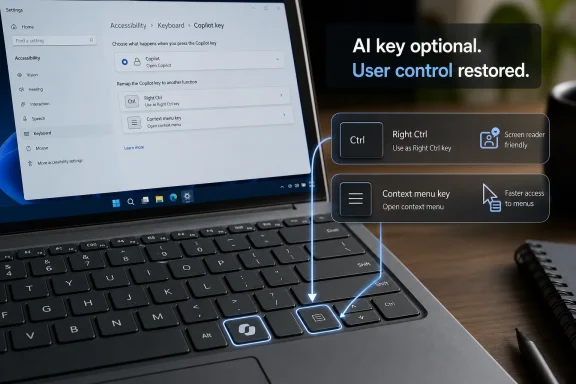
Microsoft said on May 18, 2026, that a future Windows 11 update will let owners of PCs with a dedicated Copilot key remap that key to Right Ctrl or the Context menu key through Settings later this year. The concession is small in software terms and large in symbolism. After two years of treating AI access as important enough to occupy physical keyboard real estate, Microsoft is now acknowledging that a branded shortcut can be less useful than the boring keys it displaced.
That matters because the Copilot key was never just a key. It was a hardware bet on user behavior, a marketing placard embedded in laptops, and a signal to OEMs that the next PC refresh cycle should be organized around AI. The new remapping option does not end that bet, but it does show where the first version went wrong: Microsoft optimized for exposure before it solved for habit.
When Microsoft introduced the Copilot key in January 2024, the company framed it as the first significant change to the Windows PC keyboard in nearly three decades. That comparison was deliberate. The Windows key became a physical symbol of the operating system’s place in everyday computing, and Microsoft clearly wanted Copilot to inherit some of that status.
The problem is that the Windows key earned its role by becoming a general-purpose gateway. It opened the Start menu, powered shortcuts, anchored multitasking, and eventually became part of countless Windows workflows. The Copilot key, by contrast, arrived as a dedicated path to one product experience whose usefulness varied by user, region, account type, policy setting, and personal tolerance for AI assistants.
That distinction is crucial. A keyboard is not the same kind of surface as a taskbar icon or promotional prompt. It is a field of muscle memory. Users do not merely look at keys; they build physical reflexes around them over years, sometimes decades, and those reflexes become part of how they think at the machine.
Microsoft’s support note now says the Copilot key sometimes replaced Right Ctrl or the Context menu key on select devices. That wording is careful, but the underlying admission is blunt enough: customers who relied on those keys for shortcuts or assistive technologies “experienced some challenges” when using the affected devices. In corporate prose, that is as close as a company gets to saying, we broke somebody’s workflow.
Right Ctrl matters in multilingual typing, terminal workflows, accessibility tools, remote desktop sessions, virtualization, gaming, and applications that distinguish left and right modifiers. It also matters to users who learned keyboard patterns on full-size layouts and expect symmetry from Ctrl, Shift, and Alt. The physical location of a key can be as important as the label printed on it.
The Context menu key is similarly easy to undervalue until it disappears. For mouse-first users, right-clicking is second nature. For keyboard-first users, screen reader users, and anyone navigating dense enterprise software without moving between keyboard and pointer, the Context menu key can be a quiet productivity tool.
Microsoft’s note specifically calls out assistive technologies such as screen readers. That is not incidental. Accessibility is often where seemingly minor interface changes reveal their real cost, because users who rely on consistent keyboard access are more exposed to layout churn than users who can casually route around it with a touchpad.
The Copilot key’s placement therefore created an avoidable conflict. Microsoft was not just adding a shortcut; it was asking some users to surrender existing functionality for a feature they might not have requested, might not be allowed to use at work, and might not find useful even when available.
It also standardizes a mess that should have been standardized from the start. Some PC makers already offered their own ways to change the Copilot key’s behavior. Enthusiasts found unofficial tools and workarounds. Windows itself previously experimented with limited remapping options, including launching approved apps, but that did not solve the basic problem for users who wanted the missing key back.
Still, the timing is the tell. The Copilot key began appearing on new Windows 11 devices in 2024, including the first wave of Copilot+ PCs. The native ability to restore Right Ctrl or the Context menu key is now being promised for later in 2026. That means a design choice made in the opening act of the AI PC campaign is receiving a proper Windows-level off-ramp only after users, reviewers, and accessibility-minded customers had time to complain.
Microsoft also notes a limitation: if the Copilot key is remapped to Right Ctrl, some combinations using physical Left Shift plus Right Ctrl might not work consistently on all keyboards. The suggested workaround is to use physical Right Shift for those shortcuts. That caveat is small but revealing, because it suggests the Copilot key may not be electrically or firmware-wise identical to the traditional key it is pretending to become.
That is the difference between restoration and emulation. A Settings toggle can make a key more useful, but it cannot fully undo the decision to ship hardware whose layout was designed around a marketing priority. For buyers who care deeply about key behavior, the eventual Windows option will be welcome; for Microsoft, it is also evidence that the company moved the keyboard faster than the platform beneath it.
That churn matters because a dedicated hardware key implies permanence. It says this function deserves to sit beside Ctrl, Alt, Shift, and the Windows key. But Copilot’s role in Windows has been anything but settled, and Microsoft has continued adjusting how deeply AI features should be integrated into the shell.
The company’s broader Windows AI strategy has also been complicated by user trust. Recall, Copilot+ PC exclusivity, cloud-connected assistants, and AI branding across everyday apps have all trained users to ask a pragmatic question: is this feature making the PC better, or is it making Microsoft’s roadmap more visible? The Copilot key landed squarely in that suspicion zone.
For some users, a physical AI key is convenient. If Copilot is part of your daily workflow, a single-button launcher is no more offensive than a media key or calculator shortcut. The issue is not that Microsoft provided a fast path to Copilot; it is that the company allowed that fast path to replace established functionality without a clean, universal opt-out at launch.
That distinction should matter to Windows enthusiasts as much as it matters to IT departments. Power users are not opposed to new capabilities. They are opposed to new capabilities that arrive by taking away old affordances, especially when the old affordances are predictable and the new ones are still evolving.
That is why the Copilot key generated more irritation than an unwanted app icon. You can unpin a taskbar button in seconds. You cannot unprint a keyboard, and you cannot assume an employer-issued laptop will come with vendor software that lets you cleanly remap every questionable key.
The Windows ecosystem has lived with vendor-specific keyboard compromises for years: Fn key swaps, half-height arrow keys, missing Insert keys, odd Print Screen behavior, and power buttons placed where Delete used to be. The Copilot key joined that history, but with a sharper edge because it represented Microsoft’s AI agenda rather than a space-saving industrial design decision.
For enterprise buyers, this creates a familiar problem. Fleet hardware decisions are made at scale, but keyboard pain is felt individually. A procurement team may see the Copilot key as a minor difference between laptop generations; a developer, accessibility user, help desk technician, or finance worker may see it as a recurring interruption hundreds of times a week.
The forthcoming Settings control will help administrators if it can be managed reliably and documented clearly. But Microsoft has not yet provided the full deployment story in the public support note. IT pros will want to know whether the setting is exposed through policy, registry configuration, provisioning packages, Intune settings, or some other management channel.
Until those details are clear, the fix is a consumer-visible promise rather than a complete enterprise answer. A toggle in Settings is welcome. A manageable, auditable, supportable configuration path is what turns that toggle into a serious fleet remedy.
Keyboard consistency is foundational to accessibility. Users who depend on non-visual navigation often build exact sequences of keystrokes to move through applications, invoke context menus, manage focus, and operate tools efficiently. When a physical key disappears or changes behavior, the disruption is not cosmetic.
This is where Microsoft’s language feels both helpful and late. The company has spent years positioning itself as a leader in accessibility, and Windows contains extensive keyboard navigation support because the platform must serve everyone from gamers to government agencies to users with disabilities. A hardware change that interfered with assistive workflows should have been treated as a launch-blocking issue, not a post-launch support article.
To be fair, keyboard layouts vary, and OEMs have long made tradeoffs. Microsoft’s note says implementations differ by manufacturer, firmware configuration, and hardware design. But that variation strengthens the argument for a native, universal control, not against it.
If Microsoft wants the Windows keyboard to absorb new AI affordances, accessibility cannot be an afterthought. The company needs to design the escape hatch alongside the marquee feature. Otherwise, the users most dependent on predictable interaction patterns become the first casualties of every new platform campaign.
But forced discovery often backfires when the feature is not yet essential. A toolbar button can be ignored. A notification can be dismissed. A keyboard key that sits under your right hand asks for attention every time you mistype, reach for a modifier, or see a branded glyph where a familiar key used to be.
This is why the admission matters beyond Copilot. Windows 11 has repeatedly tested the patience of users who feel the operating system is too eager to steer them: toward Edge, toward Microsoft accounts, toward OneDrive, toward widgets, toward AI. Each nudge may have a product rationale, but together they contribute to the sense that the PC is becoming less personal.
The PC’s enduring value is that it can be bent to the user’s workflow. That is why Windows enthusiasts tolerate registry edits, Group Policy spelunking, PowerToys experiments, and obscure settings panels. They are not merely trying to remove annoyances; they are asserting that general-purpose computing means the machine should adapt to the user, not the other way around.
A remappable Copilot key is therefore the right philosophical move. It turns a mandate back into an option. It says the hardware can advertise Microsoft’s preferred future without permanently erasing the user’s preferred present.
Visibility, however, is not the same as value. The best platform features become ambient because they solve problems repeatedly and quietly. Search, clipboard history, window snapping, virtual desktops, passkeys, and better update controls matter because they intersect with real behavior.
Copilot’s Windows story has been more uneven. Some users find it useful as a general assistant, writing aid, or shortcut to web-backed answers. Others see it as slower than direct search, less integrated than promised, or too bound up with cloud services and account requirements to trust as a core OS tool.
That unevenness made the dedicated key feel premature. Microsoft treated Copilot as if it had already become a utility on the level of Start, when many users still saw it as an experiment, a web app, or a promotional layer. The keyboard does not forgive that kind of overreach.
The coming remap option does not mean AI on Windows has failed. It means Microsoft is learning, perhaps reluctantly, that AI features must compete for user loyalty like every other feature. If Copilot becomes genuinely useful, people will invoke it voluntarily. If it does not, a dedicated key will not save it.
Microsoft wanted the Copilot key to symbolize the AI PC. Users turned it into a symbol of vendor overreach. The remapping option is Microsoft’s attempt to keep the symbol without forcing the sacrifice.
That compromise is not inherently bad. Hardware vendors put dedicated keys on laptops all the time, and many users appreciate quick access to microphones, cameras, brightness controls, and productivity tools. The difference is that those keys usually do not replace a standard modifier with decades of expected behavior.
The better model is additive or configurable by default. If Microsoft wants a Copilot key, it should be a convenience layer, not a tradeoff. If an OEM cannot add it without removing Right Ctrl or the Context menu key, the user should be asked early and plainly how the key should behave.
This is especially true because the Windows audience is not monolithic. The same operating system runs on gaming rigs, school laptops, secure enterprise endpoints, assistive workstations, developer machines, kiosks, and home PCs shared by families. A single AI-first hardware assumption was always going to collide with that diversity.
The concrete lessons are not complicated:
Microsoft’s Copilot key retreat is not a catastrophe for the AI PC, but it is a warning about how the AI PC should be built from here. The company can put Copilot one keypress away, but it cannot make that key valuable by decree; the next version of Windows AI will succeed only if it earns a place in users’ workflows before asking for a permanent place under their fingers.
That matters because the Copilot key was never just a key. It was a hardware bet on user behavior, a marketing placard embedded in laptops, and a signal to OEMs that the next PC refresh cycle should be organized around AI. The new remapping option does not end that bet, but it does show where the first version went wrong: Microsoft optimized for exposure before it solved for habit.
 Microsoft Put Its AI Ambition Where Muscle Memory Used to Live
When Microsoft introduced the Copilot key in January 2024, the company framed it as the first significant change to the Windows PC keyboard in nearly three decades. That comparison was deliberate. The Windows key became a physical symbol of the operating system’s place in everyday computing, and Microsoft clearly wanted Copilot to inherit some of that status.The problem is that the Windows key earned its role by becoming a general-purpose gateway. It opened the Start menu, powered shortcuts, anchored multitasking, and eventually became part of countless Windows workflows. The Copilot key, by contrast, arrived as a dedicated path to one product experience whose usefulness varied by user, region, account type, policy setting, and personal tolerance for AI assistants.
That distinction is crucial. A keyboard is not the same kind of surface as a taskbar icon or promotional prompt. It is a field of muscle memory. Users do not merely look at keys; they build physical reflexes around them over years, sometimes decades, and those reflexes become part of how they think at the machine.
Microsoft’s support note now says the Copilot key sometimes replaced Right Ctrl or the Context menu key on select devices. That wording is careful, but the underlying admission is blunt enough: customers who relied on those keys for shortcuts or assistive technologies “experienced some challenges” when using the affected devices. In corporate prose, that is as close as a company gets to saying, we broke somebody’s workflow.
The Right Ctrl Key Was Not Empty Space
It is tempting to dismiss Right Ctrl as a niche casualty. Many laptop users barely touch it, and some compact keyboards have treated the right side of the modifier cluster as negotiable territory for years. But the fact that a key is invisible to one user is exactly why replacing it can be so disruptive to another.Right Ctrl matters in multilingual typing, terminal workflows, accessibility tools, remote desktop sessions, virtualization, gaming, and applications that distinguish left and right modifiers. It also matters to users who learned keyboard patterns on full-size layouts and expect symmetry from Ctrl, Shift, and Alt. The physical location of a key can be as important as the label printed on it.
The Context menu key is similarly easy to undervalue until it disappears. For mouse-first users, right-clicking is second nature. For keyboard-first users, screen reader users, and anyone navigating dense enterprise software without moving between keyboard and pointer, the Context menu key can be a quiet productivity tool.
Microsoft’s note specifically calls out assistive technologies such as screen readers. That is not incidental. Accessibility is often where seemingly minor interface changes reveal their real cost, because users who rely on consistent keyboard access are more exposed to layout churn than users who can casually route around it with a touchpad.
The Copilot key’s placement therefore created an avoidable conflict. Microsoft was not just adding a shortcut; it was asking some users to surrender existing functionality for a feature they might not have requested, might not be allowed to use at work, and might not find useful even when available.
The Fix Is Sensible, but It Arrives After the Hardware Shipped
The promised remedy is straightforward. Once the Windows 11 update arrives later this year, users should be able to go to Settings, then Bluetooth & devices, then Keyboard, and choose whether the Copilot key behaves like Right Ctrl or the Context menu key. That is the right place for the control to live, and native Settings support is preferable to hunting through OEM utilities or third-party remappers.It also standardizes a mess that should have been standardized from the start. Some PC makers already offered their own ways to change the Copilot key’s behavior. Enthusiasts found unofficial tools and workarounds. Windows itself previously experimented with limited remapping options, including launching approved apps, but that did not solve the basic problem for users who wanted the missing key back.
Still, the timing is the tell. The Copilot key began appearing on new Windows 11 devices in 2024, including the first wave of Copilot+ PCs. The native ability to restore Right Ctrl or the Context menu key is now being promised for later in 2026. That means a design choice made in the opening act of the AI PC campaign is receiving a proper Windows-level off-ramp only after users, reviewers, and accessibility-minded customers had time to complain.
Microsoft also notes a limitation: if the Copilot key is remapped to Right Ctrl, some combinations using physical Left Shift plus Right Ctrl might not work consistently on all keyboards. The suggested workaround is to use physical Right Shift for those shortcuts. That caveat is small but revealing, because it suggests the Copilot key may not be electrically or firmware-wise identical to the traditional key it is pretending to become.
That is the difference between restoration and emulation. A Settings toggle can make a key more useful, but it cannot fully undo the decision to ship hardware whose layout was designed around a marketing priority. For buyers who care deeply about key behavior, the eventual Windows option will be welcome; for Microsoft, it is also evidence that the company moved the keyboard faster than the platform beneath it.
Copilot’s Keyboard Problem Is Really a Product-Fit Problem
The Copilot key would have been easier to defend if Copilot in Windows had become indispensable. It has not. Copilot has changed form repeatedly, moved between operating system surface and app-like experience, and become entangled with broader complaints about AI clutter in Windows 11.That churn matters because a dedicated hardware key implies permanence. It says this function deserves to sit beside Ctrl, Alt, Shift, and the Windows key. But Copilot’s role in Windows has been anything but settled, and Microsoft has continued adjusting how deeply AI features should be integrated into the shell.
The company’s broader Windows AI strategy has also been complicated by user trust. Recall, Copilot+ PC exclusivity, cloud-connected assistants, and AI branding across everyday apps have all trained users to ask a pragmatic question: is this feature making the PC better, or is it making Microsoft’s roadmap more visible? The Copilot key landed squarely in that suspicion zone.
For some users, a physical AI key is convenient. If Copilot is part of your daily workflow, a single-button launcher is no more offensive than a media key or calculator shortcut. The issue is not that Microsoft provided a fast path to Copilot; it is that the company allowed that fast path to replace established functionality without a clean, universal opt-out at launch.
That distinction should matter to Windows enthusiasts as much as it matters to IT departments. Power users are not opposed to new capabilities. They are opposed to new capabilities that arrive by taking away old affordances, especially when the old affordances are predictable and the new ones are still evolving.
OEMs Followed the Signal, and Users Paid the Switching Cost
Microsoft does not manufacture most Windows PCs, but it sets the weather. When Redmond says AI PCs are the next category and introduces a Copilot key as part of that push, OEMs respond. Laptop layouts change, marketing pages update, certification expectations emerge, and suddenly a software strategy becomes a hardware fact.That is why the Copilot key generated more irritation than an unwanted app icon. You can unpin a taskbar button in seconds. You cannot unprint a keyboard, and you cannot assume an employer-issued laptop will come with vendor software that lets you cleanly remap every questionable key.
The Windows ecosystem has lived with vendor-specific keyboard compromises for years: Fn key swaps, half-height arrow keys, missing Insert keys, odd Print Screen behavior, and power buttons placed where Delete used to be. The Copilot key joined that history, but with a sharper edge because it represented Microsoft’s AI agenda rather than a space-saving industrial design decision.
For enterprise buyers, this creates a familiar problem. Fleet hardware decisions are made at scale, but keyboard pain is felt individually. A procurement team may see the Copilot key as a minor difference between laptop generations; a developer, accessibility user, help desk technician, or finance worker may see it as a recurring interruption hundreds of times a week.
The forthcoming Settings control will help administrators if it can be managed reliably and documented clearly. But Microsoft has not yet provided the full deployment story in the public support note. IT pros will want to know whether the setting is exposed through policy, registry configuration, provisioning packages, Intune settings, or some other management channel.
Until those details are clear, the fix is a consumer-visible promise rather than a complete enterprise answer. A toggle in Settings is welcome. A manageable, auditable, supportable configuration path is what turns that toggle into a serious fleet remedy.
Accessibility Was the Warning Light Microsoft Should Have Seen Earlier
The most important line in Microsoft’s support note is not the one about remapping. It is the acknowledgement that screen reader and assistive technology users were among those affected. That takes the Copilot key debate out of the realm of mere annoyance and into the more serious question of inclusive design.Keyboard consistency is foundational to accessibility. Users who depend on non-visual navigation often build exact sequences of keystrokes to move through applications, invoke context menus, manage focus, and operate tools efficiently. When a physical key disappears or changes behavior, the disruption is not cosmetic.
This is where Microsoft’s language feels both helpful and late. The company has spent years positioning itself as a leader in accessibility, and Windows contains extensive keyboard navigation support because the platform must serve everyone from gamers to government agencies to users with disabilities. A hardware change that interfered with assistive workflows should have been treated as a launch-blocking issue, not a post-launch support article.
To be fair, keyboard layouts vary, and OEMs have long made tradeoffs. Microsoft’s note says implementations differ by manufacturer, firmware configuration, and hardware design. But that variation strengthens the argument for a native, universal control, not against it.
If Microsoft wants the Windows keyboard to absorb new AI affordances, accessibility cannot be an afterthought. The company needs to design the escape hatch alongside the marquee feature. Otherwise, the users most dependent on predictable interaction patterns become the first casualties of every new platform campaign.
The Copilot Key Becomes a Case Study in Forced Discovery
Software companies love discovery. If users do not know a feature exists, the feature might as well not exist; if a company has invested billions in AI, it wants the assistant one tap away. The Copilot key was discovery made physical.But forced discovery often backfires when the feature is not yet essential. A toolbar button can be ignored. A notification can be dismissed. A keyboard key that sits under your right hand asks for attention every time you mistype, reach for a modifier, or see a branded glyph where a familiar key used to be.
This is why the admission matters beyond Copilot. Windows 11 has repeatedly tested the patience of users who feel the operating system is too eager to steer them: toward Edge, toward Microsoft accounts, toward OneDrive, toward widgets, toward AI. Each nudge may have a product rationale, but together they contribute to the sense that the PC is becoming less personal.
The PC’s enduring value is that it can be bent to the user’s workflow. That is why Windows enthusiasts tolerate registry edits, Group Policy spelunking, PowerToys experiments, and obscure settings panels. They are not merely trying to remove annoyances; they are asserting that general-purpose computing means the machine should adapt to the user, not the other way around.
A remappable Copilot key is therefore the right philosophical move. It turns a mandate back into an option. It says the hardware can advertise Microsoft’s preferred future without permanently erasing the user’s preferred present.
Microsoft’s AI PC Push Needed Less Theater and More Utility
The AI PC era has been sold with a familiar mix of silicon requirements, marketing labels, and promise-heavy demos. Copilot+ PCs brought neural processing units, local AI features, and a new badge meant to separate modern Windows hardware from the old fleet. The Copilot key fit neatly into that campaign because it made the AI PC visible even when the screen was off.Visibility, however, is not the same as value. The best platform features become ambient because they solve problems repeatedly and quietly. Search, clipboard history, window snapping, virtual desktops, passkeys, and better update controls matter because they intersect with real behavior.
Copilot’s Windows story has been more uneven. Some users find it useful as a general assistant, writing aid, or shortcut to web-backed answers. Others see it as slower than direct search, less integrated than promised, or too bound up with cloud services and account requirements to trust as a core OS tool.
That unevenness made the dedicated key feel premature. Microsoft treated Copilot as if it had already become a utility on the level of Start, when many users still saw it as an experiment, a web app, or a promotional layer. The keyboard does not forgive that kind of overreach.
The coming remap option does not mean AI on Windows has failed. It means Microsoft is learning, perhaps reluctantly, that AI features must compete for user loyalty like every other feature. If Copilot becomes genuinely useful, people will invoke it voluntarily. If it does not, a dedicated key will not save it.
The Small Toggle That Says More Than Microsoft Intended
There is a reason this story resonated across Windows-focused sites today. On paper, it is a minor settings change scheduled for an unspecified Windows 11 update later this year. In practice, it compresses two years of Windows anxiety into one keycap.Microsoft wanted the Copilot key to symbolize the AI PC. Users turned it into a symbol of vendor overreach. The remapping option is Microsoft’s attempt to keep the symbol without forcing the sacrifice.
That compromise is not inherently bad. Hardware vendors put dedicated keys on laptops all the time, and many users appreciate quick access to microphones, cameras, brightness controls, and productivity tools. The difference is that those keys usually do not replace a standard modifier with decades of expected behavior.
The better model is additive or configurable by default. If Microsoft wants a Copilot key, it should be a convenience layer, not a tradeoff. If an OEM cannot add it without removing Right Ctrl or the Context menu key, the user should be asked early and plainly how the key should behave.
This is especially true because the Windows audience is not monolithic. The same operating system runs on gaming rigs, school laptops, secure enterprise endpoints, assistive workstations, developer machines, kiosks, and home PCs shared by families. A single AI-first hardware assumption was always going to collide with that diversity.
The Keyboard Revolt Leaves Microsoft a Clearer Map
Microsoft’s course correction gives users a practical win, but it also gives the company a better design rule for the next phase of Windows AI. The operating system can promote new tools without demoting old ones. That sounds obvious, yet the Copilot key shows how easily platform owners forget it when strategy becomes urgent.The concrete lessons are not complicated:
- Windows 11 users with a dedicated Copilot key are expected to receive a native remapping option later in 2026.
- The promised setting will allow the Copilot key to act as either Right Ctrl or the Context menu key.
- The option is slated to appear under Settings, Bluetooth & devices, and Keyboard.
- Microsoft has acknowledged that replacing those keys caused workflow problems for people who rely on shortcuts and assistive technologies.
- Remapping the key to Right Ctrl may not perfectly reproduce every shortcut combination on every keyboard.
- Enterprise administrators should wait for management details before assuming the setting will be easy to deploy across fleets.
Microsoft’s Copilot key retreat is not a catastrophe for the AI PC, but it is a warning about how the AI PC should be built from here. The company can put Copilot one keypress away, but it cannot make that key valuable by decree; the next version of Windows AI will succeed only if it earns a place in users’ workflows before asking for a permanent place under their fingers.
References
- Primary source: Neowin
Published: Mon, 18 May 2026 12:16:00 GMT
Microsoft admits Windows 11 Copilot key was a bad idea, Right Ctrl remap option coming soon - Neowin
Windows 11 users pushed back hard against Microsoft;s Copilot obsession, and the company is now quietly reversing course. www.neowin.net
- Independent coverage: Tom's Guide
Published: Mon, 18 May 2026 12:27:36 GMT
Microsoft admits Windows users 'experienced some challenges' with the forced CoPilot key — now it's finally doing something about it | Tom's Guide
Microsoft has acknowledged the dedicated Copilot key on Windows hasn't been universally loved, and a future Windows 11 update will allow users to remap it.www.tomsguide.com - Official source: support.microsoft.com
Understand updates to the Copilot key on Windows devices | Microsoft Support
Understand updates to the Copilot key on Windows devicessupport.microsoft.com - Related coverage: windowscentral.com
Microsoft admits Windows 11's dedicated Copilot key breaks certain workflows: Confirms plans to let users restore "Right Ctrl" or "Context menu" key later this year | Windows Central
Windows 11's special Copilot Key has not been the popular hit that Microsoft was hoping it would be, and has now confirmed plans to let users remap the button back to its old functionality.www.windowscentral.com - Related coverage: techspot.com
Microsoft's Copilot key remapping option comes with a frustrating limitation | TechSpot
With the latest Windows 11 Insider Preview build (22635.4225 for beta testers), Microsoft has added the ability to reprogram what the Copilot button launches. The new option...www.techspot.com - Related coverage: tomshardware.com
Windows 11 PCs to come with a Copilot key as Microsoft pushes forward with AI | Tom's Hardware
It will be the first new standard Windows keyboard key since 1994.www.tomshardware.com
- Related coverage: notebookcheck.net
Microsoft frees the Copilot key from AI - Notebookcheck News
Since 2024, Microsoft has almost forced laptop manufacturers to install a keyboard with a Copilot key. Until now, this key has been practically useless for users who did not want to use Microsoft's AI assistant. This is set to change later this year. www.notebookcheck.net
- Related coverage: techradar.com
Fed up with Copilot in Windows 11? Microsoft pushing a new keyboard shortcut for the AI isn’t likely to help, and it could mess with your desktop mojo | TechRadar
Shortcut hijack is likely to frustrate some peoplewww.techradar.com - Related coverage: howtogeek.com
- Official source: news.microsoft.com
- Related coverage: fe5e0932bbdbee188a67-ade54de1bba9a4fe61c120942a09245b.ssl.cf1.rackcdn.com
Slide 1: Transitioning from Windows 10: A Strategic Guide
PDF documentfe5e0932bbdbee188a67-ade54de1bba9a4fe61c120942a09245b.ssl.cf1.rackcdn.com
- Official source: blogs.windows.com
Introducing a new Copilot key to kick off the year of AI-powered Windows PCs
Today, we are excited to take the next significant step forward and introduce a new Copilot key to Windows 11 PCs. In this new year, we will be ushering in a significant shift toward a more personal and intelligent computing future where AI will be sblogs.windows.com - Related coverage: techcrunch.com
Microsoft wants to add a Copilot key to your PC keyboard | TechCrunch
Microsoft would like 2024 to be the "year of the AI PC," and to put a point on that, the company today announced a new key for Copilot -- that is, atechcrunch.com - Related coverage: gadgets360.com
Microsoft Adds AI Copilot Key in First Change to PC Keyboard in Decades | Technology News
Microsoft is adding a button to the Windows keyboard to activate its AI Copilot service, with the first devices to sport the new key available this month. Microsoft’s hardware partners will show off Windows 11 computers with the Copilot button over the coming days at the CES technology...www.gadgets360.com - Related coverage: cnbc.com
Microsoft says a Copilot key is coming to keyboards on Windows PCs starting this month
Microsoft sees 2024 as the year of the artificial intelligence personal computer. A new key on Surface PCs and other devices might help.www.cnbc.com - Related coverage: arstechnica.com
Microsoft is adding a new key to PC keyboards for the first time since 1994 - Ars Technica
Copilot key will eventually be required in new PC keyboards, though not yet.arstechnica.com - Related coverage: thefpsreview.com
Microsoft Introduces AI Copilot Key for Windows 11 PCs: "First Significant Change to the Windows PC Keyboard in Nearly Three Decades"
Microsoft has declared 2024 to be the year of the AI PC, and it's ushering in that agenda with the Copilot key, a brand-new addition to the Windows keyboard that will grant users quick access to its everyday AI companion, which was officially announced in September for Windows 11, Microsoft...www.thefpsreview.com - Related coverage: pcgamer.com
Microsoft is adding a new button to PC keyboards for the first time in almost 30 years (and it's for AI)
The new Copilot key will be seen at CES and will start to roll out later this month.www.pcgamer.com
- Related coverage: geekwire.com
Windows 11 devices will get new 'Copilot' AI key — biggest change to keyboards in nearly 30 years – GeekWire
The new Copilot key, to the right of the Alt key on a Windows 11 keyboard. (Microsoft image via YouTube) AI is coming to the PC keyboard. Microsoft andwww.geekwire.com - Related coverage: venturebeat.com
Microsoft adds Copilot key to Windows 11 | VentureBeat
Microsoft said the introduction of the Copilot AI key "marks the first significant change to the Windows PC keyboard in nearly three decades."venturebeat.com - Related coverage: axios.com
Microsoft gives AI a place on the Windows keyboard
It's the first change to the PC keyboard since the addition of the Windows button 30 years ago.www.axios.com

