

Microsoft says a Windows 11 update arriving later in 2026 will let users remap the dedicated Copilot key on newer PCs to behave as either Right Ctrl or the Context Menu key. Until that lands, a small third-party utility called NoCopilotKey is filling the gap for users who want the missing right-side Control key back now. The story is not just about one annoying keyboard button. It is about what happens when Microsoft’s AI ambitions collide with decades of muscle memory, accessibility expectations, and the quiet tyranny of hardware layout.
The Copilot key was never merely a shortcut. Microsoft introduced it as a physical declaration that AI had become part of the Windows experience, the kind of branding move that normally lives in taskbars, setup screens, and subscription prompts rather than on the keyboard itself. The company described the arrival of the key as the most significant change to the Windows keyboard in decades, and that framing was telling: this was not an optional app icon, but a hardware-level bet.
The problem is that keyboards are among the least forgiving places to run a product campaign. Users can ignore a widget, unpin an icon, or remove a startup app. But a physical key sits under the hand every day, in the same place where another key used to live, ready to interrupt a shortcut sequence that may have been practiced for years.
On some laptops, the Copilot key displaced the Context Menu key. On others, it effectively took the territory that many users expected to be Right Ctrl. That distinction matters because the people who care about these keys are often the same people Microsoft can least afford to irritate: developers, admins, accessibility users, keyboard-first power users, and anyone whose workflows depend on fast chorded shortcuts.
Microsoft’s upcoming change is an admission that the original rollout was too rigid. Giving users a supported way to restore Right Ctrl or the menu key is the right direction. But it also arrives after months of users discovering that the key was less flexible than a normal remappable key and more like a vendor-controlled signal routed through Windows’ AI-era priorities.
That distinction matters. A regular-user install can handle ordinary desktop use, while the admin installation is intended to cover elevated scenarios as well. For many users, the very existence of that choice is already more practical than Microsoft’s current state of limbo: the tool does one thing, explains the trade-off plainly, and stays out of the way.
NoCopilotKey reportedly runs as a background process and uses less than 1MB of memory in Neowin’s testing. That is important not because 1MB is impressive in 2026, but because trust is the central issue with any utility that hooks keyboard input. A remapper that feels heavy, invasive, or mysterious would simply replace one annoyance with another.
The developer’s approach relies on a low-level keyboard hook rather than a conventional Registry remap. That makes sense given the odd nature of the Copilot key, which is not always exposed to Windows as a simple, traditional scancode that utilities can cleanly translate. The key has often behaved more like a shortcut sequence tied to Windows’ Copilot plumbing than a normal key waiting to be reassigned.
Right Ctrl is useful for one-handed shortcuts, remote desktop workflows, terminal habits, text editing patterns, gaming configurations, accessibility arrangements, and left-handed mouse setups. It also matters in virtual machines and remote sessions, where the difference between host and guest input can become painfully specific. For a subset of users, losing Right Ctrl is not cosmetic; it is a workflow regression built into the hardware.
The Context Menu key has a similar problem. It may look obsolete to anyone who right-clicks everything, but it remains valuable for keyboard-only navigation and accessibility. Removing it in favor of an AI assistant changes the ergonomics of Windows for people who already had efficient, non-pointer-based ways to work.
Microsoft’s coming remap option implicitly acknowledges that point. The company is not merely adding a personalization feature; it is restoring a contract. The Windows keyboard has always been a shared space between vendor defaults and user control, and the Copilot key tilted that balance too far toward vendor intent.
Users have reported that the Copilot key can appear as a combination such as Windows + Shift + F23 rather than a clean standalone input. That makes it harder to turn into Right Ctrl in a way that every app, game, elevated prompt, virtual machine, or remote session will interpret correctly. Mapping a shortcut to a key is not always equivalent to having the missing key back.
That subtle distinction is why utilities like NoCopilotKey have attracted attention. The goal is not simply to launch something else when the Copilot key is pressed. The goal is to make the key behave as though the keyboard vendor had never removed Right Ctrl in the first place.
Microsoft’s own future fix appears to be constrained by the same complexity. The company has warned that when the Copilot key is remapped to Right Ctrl, some combinations involving the physical Left Shift key and Right Ctrl may not work consistently on all keyboards. That is a remarkable caveat, because it tells us the official fix may still be emulating old behavior rather than restoring it perfectly.
But the warning about Left Shift plus Right Ctrl combinations undercuts the neatness of the fix. Microsoft’s guidance says that if users run into inconsistent behavior with shortcuts using physical Left Shift and the remapped Right Ctrl, they should use the physical Right Shift key instead. That is a workaround, not a restoration.
For a casual user, this may never matter. For a power user, it is the kind of detail that determines whether a remap is trustworthy. Keyboard shortcuts work because they are predictable under pressure; once a user has to remember which Shift key pairs reliably with a synthetic Right Ctrl, the design has already leaked.
Neowin’s testing on a GEEKOM X14 Pro did not reproduce the issue with Right Ctrl + Left Shift + Tab in Chrome, which is encouraging. But one successful test on one machine cannot prove universal compatibility across the messy world of laptop firmware, OEM keyboard matrices, language layouts, accessibility tools, and remote-control software. This is precisely why Microsoft’s caveat deserves attention rather than dismissal.
Still, any low-level keyboard hook deserves scrutiny. A utility that intercepts key events sits close to sensitive input by design, and users should treat it with the same caution they would apply to AutoHotkey scripts, macro tools, or vendor keyboard utilities. The fact that NoCopilotKey is lightweight and open-source helps, but it does not remove the need for basic hygiene.
That means downloading it only from the project’s official release page, checking that the repository and release history look legitimate, and understanding that running it as administrator expands what it can affect. Users in managed environments should be especially careful. A sysadmin may be sympathetic to the missing Right Ctrl key and still unwilling to bless an unofficial keyboard hook across a fleet.
This is where Microsoft has an advantage that third-party utilities cannot match. An official OS-level setting can be deployed, documented, supported, and audited in ways that a community tool cannot. The irony is that Microsoft’s delay created the opening for the very workaround ecosystem that enterprises generally prefer to avoid.
Even if Copilot is disabled or not licensed in a particular environment, the key still exists. Its behavior may fall back to search or another assigned function, but the hardware remains branded around a capability that organizations may not have adopted. That mismatch between physical design and administrative policy is awkward.
The Right Ctrl issue adds another layer because it affects standardization. IT departments prefer predictable keyboard behavior across devices, especially when supporting remote workers, developers, help desks, and training labs. If one laptop model has a Copilot key where another has Right Ctrl, support documentation becomes less universal and shortcuts become harder to teach.
Microsoft’s upcoming remapping option should help, especially if it can be controlled consistently through policy or provisioning. But until the details are fully shipped and tested, organizations will be wary of relying on it. The difference between a Settings toggle and a fleet-manageable configuration is not trivial.
The trouble is that inevitability is not the same as usefulness. A dedicated key only feels justified if users build habits around it. If they instead search for ways to disable it, remap it, or joke about it, the hardware becomes a symbol of overreach.
This is not the first time Microsoft has used Windows to steer behavior. The company has pushed Edge, Microsoft accounts, OneDrive, Teams, widgets, Store apps, and various cloud-connected services into prominent places. Sometimes those bets age well; sometimes users spend years learning how to turn them off.
The keyboard, however, is a different class of surface. It is physical, durable, and not easily patched by changing copy in a setup screen. A laptop bought today may be used for five or six years, long after Microsoft has renamed, redesigned, bundled, unbundled, or repositioned Copilot again. Hardware keys are commitments, and AI branding is moving faster than hardware replacement cycles.
That would align with how real Windows users behave. The platform’s strength has always been its sprawl: gamers, accountants, sysadmins, students, engineers, writers, accessibility users, and enterprise fleets all bending the same OS toward different needs. A hard-coded AI key makes Windows feel narrower than it is.
Microsoft has already moved partway in that direction by allowing customization of what the Copilot key launches in some contexts. The upcoming Right Ctrl and Context Menu options go further because they acknowledge the key may need to stop being an AI key entirely. That is the crucial concession.
But the company should not stop there. If Windows is going to reserve physical keyboard real estate for a modern programmable key, it should expose that key cleanly and predictably. Users should not need to understand F23, synthetic shortcuts, low-level hooks, or inconsistent modifier behavior to reclaim a normal keyboard layout.
But “reasonable” is not the same as universally advisable. Users who handle sensitive data, work on managed PCs, or operate under strict IT policy should wait for Microsoft’s supported implementation or ask their administrators before installing a keyboard hook. The annoyance is real, but so is the security model.
Users who are comfortable with third-party tools should also test the combinations they actually use. It is not enough to press the key in Notepad and see a cursor shortcut work. Test browsers, terminals, remote desktops, virtual machines, games, accessibility software, and elevated windows if those are part of your workflow.
The same advice will apply when Microsoft’s official update arrives. A Settings option that says “Right Ctrl” should be treated as the start of validation, not the end. If Microsoft’s own note about Left Shift combinations survives into release, users should verify their important shortcuts before assuming the hardware has been fully redeemed.
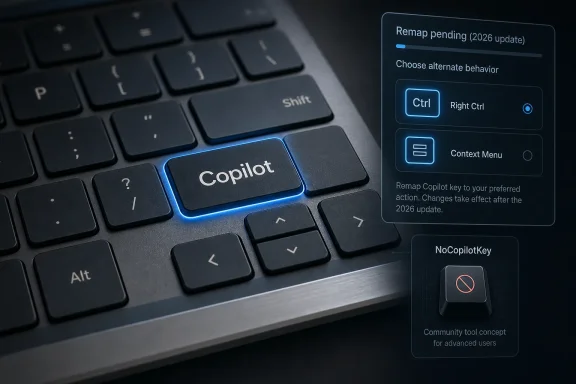 Microsoft Turned a Keyboard Key Into a Product Strategy
The Copilot key was never merely a shortcut. Microsoft introduced it as a physical declaration that AI had become part of the Windows experience, the kind of branding move that normally lives in taskbars, setup screens, and subscription prompts rather than on the keyboard itself. The company described the arrival of the key as the most significant change to the Windows keyboard in decades, and that framing was telling: this was not an optional app icon, but a hardware-level bet.The problem is that keyboards are among the least forgiving places to run a product campaign. Users can ignore a widget, unpin an icon, or remove a startup app. But a physical key sits under the hand every day, in the same place where another key used to live, ready to interrupt a shortcut sequence that may have been practiced for years.
On some laptops, the Copilot key displaced the Context Menu key. On others, it effectively took the territory that many users expected to be Right Ctrl. That distinction matters because the people who care about these keys are often the same people Microsoft can least afford to irritate: developers, admins, accessibility users, keyboard-first power users, and anyone whose workflows depend on fast chorded shortcuts.
Microsoft’s upcoming change is an admission that the original rollout was too rigid. Giving users a supported way to restore Right Ctrl or the menu key is the right direction. But it also arrives after months of users discovering that the key was less flexible than a normal remappable key and more like a vendor-controlled signal routed through Windows’ AI-era priorities.
NoCopilotKey Exists Because the Official Fix Is Late
Neowin’s guide points users toward NoCopilotKey, a lightweight utility hosted on GitHub that converts the Copilot key back into Right Ctrl behavior without waiting for Microsoft’s promised Windows update. The setup is deliberately simple: download the release, extract it, run the installer, grant permission, and choose whether to install it for the current user or with administrative scope.That distinction matters. A regular-user install can handle ordinary desktop use, while the admin installation is intended to cover elevated scenarios as well. For many users, the very existence of that choice is already more practical than Microsoft’s current state of limbo: the tool does one thing, explains the trade-off plainly, and stays out of the way.
NoCopilotKey reportedly runs as a background process and uses less than 1MB of memory in Neowin’s testing. That is important not because 1MB is impressive in 2026, but because trust is the central issue with any utility that hooks keyboard input. A remapper that feels heavy, invasive, or mysterious would simply replace one annoyance with another.
The developer’s approach relies on a low-level keyboard hook rather than a conventional Registry remap. That makes sense given the odd nature of the Copilot key, which is not always exposed to Windows as a simple, traditional scancode that utilities can cleanly translate. The key has often behaved more like a shortcut sequence tied to Windows’ Copilot plumbing than a normal key waiting to be reassigned.
The Right Ctrl Fight Is Really About Muscle Memory
It is tempting to dismiss the Right Ctrl complaint as niche. Many users rarely touch the right-side Control key, and laptop layouts have been compromising full-size keyboard conventions for years. But this is exactly where Microsoft misread the room: the value of a key is not measured by how often the average user presses it, but by how irreplaceable it is to the users who rely on it.Right Ctrl is useful for one-handed shortcuts, remote desktop workflows, terminal habits, text editing patterns, gaming configurations, accessibility arrangements, and left-handed mouse setups. It also matters in virtual machines and remote sessions, where the difference between host and guest input can become painfully specific. For a subset of users, losing Right Ctrl is not cosmetic; it is a workflow regression built into the hardware.
The Context Menu key has a similar problem. It may look obsolete to anyone who right-clicks everything, but it remains valuable for keyboard-only navigation and accessibility. Removing it in favor of an AI assistant changes the ergonomics of Windows for people who already had efficient, non-pointer-based ways to work.
Microsoft’s coming remap option implicitly acknowledges that point. The company is not merely adding a personalization feature; it is restoring a contract. The Windows keyboard has always been a shared space between vendor defaults and user control, and the Copilot key tilted that balance too far toward vendor intent.
PowerToys Could Not Fully Paper Over the Design
For years, Microsoft PowerToys has been the sanctioned answer to many Windows power-user irritations. Keyboard Manager can remap keys and shortcuts, and for ordinary keys it remains a sensible first stop. But the Copilot key has been awkward because it has not always behaved like an ordinary key.Users have reported that the Copilot key can appear as a combination such as Windows + Shift + F23 rather than a clean standalone input. That makes it harder to turn into Right Ctrl in a way that every app, game, elevated prompt, virtual machine, or remote session will interpret correctly. Mapping a shortcut to a key is not always equivalent to having the missing key back.
That subtle distinction is why utilities like NoCopilotKey have attracted attention. The goal is not simply to launch something else when the Copilot key is pressed. The goal is to make the key behave as though the keyboard vendor had never removed Right Ctrl in the first place.
Microsoft’s own future fix appears to be constrained by the same complexity. The company has warned that when the Copilot key is remapped to Right Ctrl, some combinations involving the physical Left Shift key and Right Ctrl may not work consistently on all keyboards. That is a remarkable caveat, because it tells us the official fix may still be emulating old behavior rather than restoring it perfectly.
The Upcoming Fix Sounds Useful, But Not Absolute
Microsoft’s planned Windows 11 update will reportedly allow the Copilot key to be remapped to either Right Ctrl or the Context Menu key. That is the sensible baseline that probably should have existed before the key shipped broadly. A dedicated AI key is easier to accept when the operating system treats it as an assignable key rather than a one-way advertisement.But the warning about Left Shift plus Right Ctrl combinations undercuts the neatness of the fix. Microsoft’s guidance says that if users run into inconsistent behavior with shortcuts using physical Left Shift and the remapped Right Ctrl, they should use the physical Right Shift key instead. That is a workaround, not a restoration.
For a casual user, this may never matter. For a power user, it is the kind of detail that determines whether a remap is trustworthy. Keyboard shortcuts work because they are predictable under pressure; once a user has to remember which Shift key pairs reliably with a synthetic Right Ctrl, the design has already leaked.
Neowin’s testing on a GEEKOM X14 Pro did not reproduce the issue with Right Ctrl + Left Shift + Tab in Chrome, which is encouraging. But one successful test on one machine cannot prove universal compatibility across the messy world of laptop firmware, OEM keyboard matrices, language layouts, accessibility tools, and remote-control software. This is precisely why Microsoft’s caveat deserves attention rather than dismissal.
A Tiny Utility Carries a Big Trust Burden
NoCopilotKey’s appeal is obvious: it is small, focused, and available now. It does not try to become a keyboard suite. It does not add layers of customization. It simply gives back the right-side Control behavior that many users believe should never have been taken away.Still, any low-level keyboard hook deserves scrutiny. A utility that intercepts key events sits close to sensitive input by design, and users should treat it with the same caution they would apply to AutoHotkey scripts, macro tools, or vendor keyboard utilities. The fact that NoCopilotKey is lightweight and open-source helps, but it does not remove the need for basic hygiene.
That means downloading it only from the project’s official release page, checking that the repository and release history look legitimate, and understanding that running it as administrator expands what it can affect. Users in managed environments should be especially careful. A sysadmin may be sympathetic to the missing Right Ctrl key and still unwilling to bless an unofficial keyboard hook across a fleet.
This is where Microsoft has an advantage that third-party utilities cannot match. An official OS-level setting can be deployed, documented, supported, and audited in ways that a community tool cannot. The irony is that Microsoft’s delay created the opening for the very workaround ecosystem that enterprises generally prefer to avoid.
Enterprise IT Sees a Small Key and a Familiar Governance Problem
For home users, the Copilot key is a personal irritation. For organizations, it is another example of Microsoft changing the Windows surface area in ways that may not align with policy, training, or workflow. A physical AI key can raise questions that go beyond convenience: what app does it launch, what account context does it use, what data boundaries apply, and what happens when users press it during support sessions or shared-device use?Even if Copilot is disabled or not licensed in a particular environment, the key still exists. Its behavior may fall back to search or another assigned function, but the hardware remains branded around a capability that organizations may not have adopted. That mismatch between physical design and administrative policy is awkward.
The Right Ctrl issue adds another layer because it affects standardization. IT departments prefer predictable keyboard behavior across devices, especially when supporting remote workers, developers, help desks, and training labs. If one laptop model has a Copilot key where another has Right Ctrl, support documentation becomes less universal and shortcuts become harder to teach.
Microsoft’s upcoming remapping option should help, especially if it can be controlled consistently through policy or provisioning. But until the details are fully shipped and tested, organizations will be wary of relying on it. The difference between a Settings toggle and a fleet-manageable configuration is not trivial.
The Copilot Key Shows the Risk of AI-First Hardware
Microsoft’s larger strategy is easy to understand. The company wants Copilot to feel native, immediate, and inevitable. Putting a key on the keyboard is one of the strongest signals it can send to OEMs, developers, and customers that AI is not an add-on but a layer of the PC experience.The trouble is that inevitability is not the same as usefulness. A dedicated key only feels justified if users build habits around it. If they instead search for ways to disable it, remap it, or joke about it, the hardware becomes a symbol of overreach.
This is not the first time Microsoft has used Windows to steer behavior. The company has pushed Edge, Microsoft accounts, OneDrive, Teams, widgets, Store apps, and various cloud-connected services into prominent places. Sometimes those bets age well; sometimes users spend years learning how to turn them off.
The keyboard, however, is a different class of surface. It is physical, durable, and not easily patched by changing copy in a setup screen. A laptop bought today may be used for five or six years, long after Microsoft has renamed, redesigned, bundled, unbundled, or repositioned Copilot again. Hardware keys are commitments, and AI branding is moving faster than hardware replacement cycles.
The Better Version of the Copilot Key Is User-Owned
There is a version of this story where the Copilot key is not controversial. In that version, Microsoft and OEMs treat it as a user-programmable assistant key from day one. Press it to open Copilot if you want. Remap it to Right Ctrl, Context Menu, Search, a terminal, a password manager, a macro, a company help desk, or nothing at all if you do not.That would align with how real Windows users behave. The platform’s strength has always been its sprawl: gamers, accountants, sysadmins, students, engineers, writers, accessibility users, and enterprise fleets all bending the same OS toward different needs. A hard-coded AI key makes Windows feel narrower than it is.
Microsoft has already moved partway in that direction by allowing customization of what the Copilot key launches in some contexts. The upcoming Right Ctrl and Context Menu options go further because they acknowledge the key may need to stop being an AI key entirely. That is the crucial concession.
But the company should not stop there. If Windows is going to reserve physical keyboard real estate for a modern programmable key, it should expose that key cleanly and predictably. Users should not need to understand F23, synthetic shortcuts, low-level hooks, or inconsistent modifier behavior to reclaim a normal keyboard layout.
The Practical Path for Annoyed Users Is Clear but Imperfect
For users who are irritated today, NoCopilotKey is a reasonable stopgap if they understand the trade-offs. It appears designed for exactly the pain point at hand, and early reports suggest it is lightweight enough to disappear into the background. That is the best kind of utility: one that solves a narrow problem without trying to become a lifestyle.But “reasonable” is not the same as universally advisable. Users who handle sensitive data, work on managed PCs, or operate under strict IT policy should wait for Microsoft’s supported implementation or ask their administrators before installing a keyboard hook. The annoyance is real, but so is the security model.
Users who are comfortable with third-party tools should also test the combinations they actually use. It is not enough to press the key in Notepad and see a cursor shortcut work. Test browsers, terminals, remote desktops, virtual machines, games, accessibility software, and elevated windows if those are part of your workflow.
The same advice will apply when Microsoft’s official update arrives. A Settings option that says “Right Ctrl” should be treated as the start of validation, not the end. If Microsoft’s own note about Left Shift combinations survives into release, users should verify their important shortcuts before assuming the hardware has been fully redeemed.
The Copilot Key’s Retreat Leaves Users With a Few Hard Truths
The fight over this key is small in physical size but large in what it reveals about Windows in the AI era. Microsoft can push new experiences aggressively, but the closer those experiences get to muscle memory and hardware, the more resistance they will meet.- Microsoft’s upcoming Windows 11 update is expected to let users remap the Copilot key to Right Ctrl or the Context Menu key later in 2026.
- NoCopilotKey offers an immediate third-party workaround by running a small background process that turns the Copilot key into Right Ctrl behavior.
- Microsoft’s own warning suggests the official Right Ctrl remap may not be perfect for every keyboard shortcut, especially some combinations involving physical Left Shift.
- PowerToys and ordinary remapping approaches may not fully solve the problem because the Copilot key can behave like a special shortcut rather than a normal key.
- Enterprise users should treat unofficial keyboard hooks cautiously, especially on managed devices or systems handling sensitive work.
- The cleanest long-term answer is for Microsoft to make the key fully user-owned rather than merely AI-branded.
References
- Primary source: Neowin
Published: Mon, 18 May 2026 13:16:00 GMT
Here is how to remap the Copilot key in Windows 11, without Microsoft's upcoming "fix" - Neowin
Before Microsoft rolls out its own fix, a tiny utility lets Windows 11 users restore Right Ctrl behavior to the Copilot key, we explain how. www.neowin.net
- Official source: support.microsoft.com
Understand updates to the Copilot key on Windows devices | Microsoft Support
Understand updates to the Copilot key on Windows devicessupport.microsoft.com - Related coverage: windowsforum.com
Windows 11 2026 Update: Remap the Copilot Key to Right Ctrl or Context Menu | Windows Forum
Microsoft has confirmed that a Windows 11 update arriving later in 2026 will let users remap the dedicated Copilot key on newer PCs so it behaves as either...windowsforum.com - Related coverage: tomsguide.com
How to remap the Copilot key on Windows 11 | Tom's Guide
Windows 11 has a Copilot key built in, but sometimes you want to move it around. Here's how to remap the Copilot key in Windows 11, using the versatile Microsoft PowerToys.www.tomsguide.com - Related coverage: windowscentral.com
NoCopilotKey fights Microsoft’s controversial keyboard change | Windows Central
Hate the Copilot dedicated button in Windows 11? A developer just gave you Ctrl again.www.windowscentral.com - Official source: learn.microsoft.com
Remap the Copilot key to Ctrl in Windows 11? - Microsoft Q&A
Is there a way to remap the key that normally opens the awful Copilot feature (the one next to Alt Gr on the keyboard)? I'm left handed, so I use my right hand to press Ctrl and plus/minus keys on keypad to zoom in and out in Photoshop and other…learn.microsoft.com
- Related coverage: windowslatest.com
Windows 11 24H2 update will let you replace Copilot key with a context menu shortcut
Windows 11 might let you remap the Copilot key in future updates. This may help Microsoft avoid complaints from unsatisfied Copilot users. www.windowslatest.com
- Official source: answers.microsoft.com
Reprogram Copilot key - Microsoft Q&A
On my new Windows 11 computer, the right Ctrl button has been converted to a button that opens Copilot. I would like to reassign the button but to being a Ctrl button. There are a lot of posts out there about how the Copilot button is really a…answers.microsoft.com - Related coverage: tweaktown.com
Hate the dedicated Copilot key on your Windows 11 laptop? Tiny new tool can change it back to right Ctrl
Reverting the Copilot key to right CTRL should be an option provided by Microsoft - or indeed remapping it to something else - but it isn't. www.tweaktown.com
- Related coverage: tomshardware.com
How to Add a Dedicated Copilot Key to any Windows 11 or 10 PC, No New Keyboard Required | Tom's Hardware
With a little effort, you can turn any key into the copilot key.www.tomshardware.com - Official source: github.com
Can't remap CoPilot key to Ctrl(right) · Issue #36355 · microsoft/PowerToys · GitHub
Microsoft PowerToys version 0.86.0 Installation method Microsoft Store Running as admin No Area(s) with issue? Keyboard Manager Steps to reproduce I have an HP Elitebook 840 G11. It has a CoPilot key that I am trying to remap to Right-Ct... github.com
- Related coverage: bmccprodstroac.blob.core.windows.net
- Related coverage: techxplore.com
