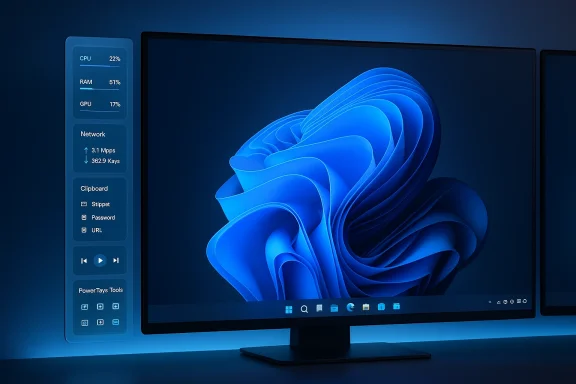
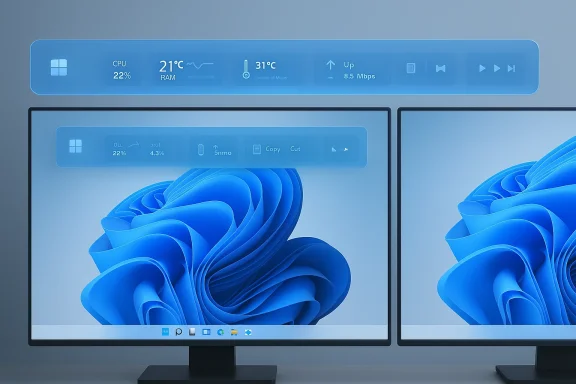
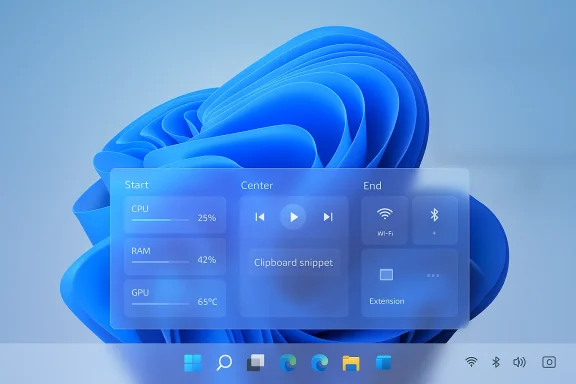
Microsoft’s PowerToys team is quietly prototyping a persistent, Linux‑style menu bar for Windows 11 — a configurable “dock” attached to the new PowerToys Command Palette that can live along any screen edge and host glanceable system info, media controls, and pinned Command Palette extensions. This optional UI surface is currently a proof‑of‑concept under discussion and testing on GitHub; if it moves forward it could reshape how power users and Linux converts think about the Windows desktop by putting persistent, extensible status and control elements where macOS and many Linux desktops already do.
PowerToys has evolved from a grab‑bag of power‑user utilities into a modern, extensible toolkit that Microsoft maintains openly. Over recent releases the team replaced PowerToys Run with a richer, extensible Command Palette (CmdPal) that accepts plug‑in extensions, shell commands, and fast actions — a successor to classic quick‑launch tools and reminiscent of macOS Spotlight or Alfred. Microsoft’s documentation and recent release notes make Command Palette an official, supported module within PowerToys and describe it as the primary vehicle for the new experimentation.
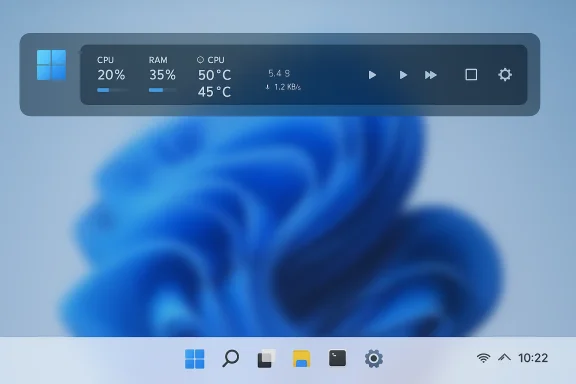
What’s new: the PowerToys team is experimenting with a Command Palette Dock — essentially a lightweight, persistent menu bar or “dock” that can be pinned to the top, bottom, left, or right of the screen and which surfaces selected Command Palette extensions without opening the palette itself. The dock is described as configurable into three regions (start, center, end), themable (background, styling, theme behavior), and intended to host both informational widgets (CPU/RAM, temperatures) and actions (app shortcuts, media controls). The feature is still early and optional; Microsoft is soliciting feedback on GitHub and running a dedicated branch for testing.
However, the surface area of risk is not trivial. Multi‑monitor quirks, elevation handling, accessibility, and performance are all non‑trivial concerns that will determine whether the feature is embraced or ignored. Microsoft’s path forward should prioritize accessibility and least‑privilege security, invest time in multi‑monitor polish, and ensure the dock is an enhancement rather than a duplication that creates UI clutter.
If Microsoft gets the tradeoffs right, this could be one of PowerToys’ more consequential UX experiments — a configurable, extensible top bar that feels native to the desktop without demanding system‑level redesign. If they get it wrong, it will remain a niche tweak that power users compile themselves while the majority of Windows users never see a reason to enable it. Either way, the idea shows PowerToys continuing to push Windows customization in a thoughtful, community‑oriented way.
Expect to see iterations, community feedback cycles, and careful attention to accessibility and security before the dock — if it ships — becomes a mainstream PowerToys feature. For now, the proposal is worth following: it could be a small change with outsized productivity benefits for the right users.
Source: Windows Central Microsoft explores bringing Linux-like menu bar to Windows 11 via PowerToys
 Background / Overview
PowerToys has evolved from a grab‑bag of power‑user utilities into a modern, extensible toolkit that Microsoft maintains openly. Over recent releases the team replaced PowerToys Run with a richer, extensible Command Palette (CmdPal) that accepts plug‑in extensions, shell commands, and fast actions — a successor to classic quick‑launch tools and reminiscent of macOS Spotlight or Alfred. Microsoft’s documentation and recent release notes make Command Palette an official, supported module within PowerToys and describe it as the primary vehicle for the new experimentation. What’s new: the PowerToys team is experimenting with a Command Palette Dock — essentially a lightweight, persistent menu bar or “dock” that can be pinned to the top, bottom, left, or right of the screen and which surfaces selected Command Palette extensions without opening the palette itself. The dock is described as configurable into three regions (start, center, end), themable (background, styling, theme behavior), and intended to host both informational widgets (CPU/RAM, temperatures) and actions (app shortcuts, media controls). The feature is still early and optional; Microsoft is soliciting feedback on GitHub and running a dedicated branch for testing.
Why this matters now
The UX gap PowerToys aims to fill
Windows 11’s Taskbar and System Tray provide persistent access to core status and controls, but many users — especially those who have migrated from macOS or Linux — miss a top menu bar or a compact, highly customizable status strip. The PowerToys dock would give users a middle ground: a lightweight, user‑controlled bar that surfaces only the things they care about, while avoiding wholesale shell replacement. That approach plays to PowerToys’ strengths: opt‑in, modular customization for power users rather than a forced system change.Extensibility and continuity with Command Palette
Because the dock is described as an extension of Command Palette, existing CmdPal extensions should work without code changes — an attractive property that lowers friction for both extension authors and users. That means the same extension ecosystem that powers quick launcher behavior could now feed persistent UI elements, turning ephemeral commands into always‑visible controls. Microsoft’s Command Palette documentation and recent release notes show the project’s push for extension‑first design, and the dock is a natural next step.Deep dive: What the prototype promises
Positioning and layout
- The dock can be pinned to any screen edge — top, bottom, left, or right — to suit different workflows and monitor setups.
- Items can be pinned to three logical regions: start, center, and end, which mirrors familiar tri‑region status bars used on macOS and many Linux DEs.
- Visual appearance is customizable: background style, blur/opacity, and theme behavior are expected configuration options.
What you can pin to the dock
- Live telemetry and system info: CPU usage, RAM, temperatures, network throughput.
- Media controls: play/pause, skip, volume.
- Shortcuts and commands: pinned CmdPal extensions (for quick app launch or scripted actions).
- Potentially more: custom extensions can deliver real‑time content using the Command Palette extension model.
User interaction model
- The dock is persistent but optional — users enable it in Command Palette settings, pin it to an edge, and add or remove items.
- Items should be interactive (click to open or invoke) and may update in real time if extension items implement change notifications. Microsoft’s extension model explicitly supports live updates for list items, so the dock could display dynamic data without polling hacks.
Cross‑checking the claims: what’s verified and what is still tentative
Verified by Microsoft documentation and release notes:- PowerToys includes Command Palette as a supported, extensible module and uses the extension model to power custom items and live updates. The CmdPal hotkey and extension mechanics are documented.
- Windows Central’s coverage and community chatter (Reddit, forums) confirm that the PowerToys team is prototyping a “Command Palette Dock,” that it supports multiple screen edges, and that a test branch exists for adventurous developers. Community posts surface early screenshots and brief feature summaries that align with Microsoft’s stated extension model.
- There is no official release or merge commit in the mainline PowerToys release branch at the time of reporting; the feature remains experimental and may change substantially before shipping. Implementation details (exact API contracts, multi‑monitor behavior, auto‑hide rules) are not finalized publicly. Any claims about release timing or final UX should be treated as provisional.
Strengths: why the dock could be a win for Windows power users
- Low friction customization: Because the dock leverages existing Command Palette extensions, users and extension authors gain functionality without needing to rewrite code. This continuity reduces friction and speeds adoption.
- Glanceable telemetry: A top menu bar optimized for glanceability helps monitoring tasks (e.g., VRAM or CPU thermals) without constantly opening separate tools or overlay widgets. That’s particularly useful for creators, developers, and system tuners.
- Opt‑in model: PowerToys’ modular design means this change would be optional and per‑user; power users can enable advanced UI surfaces, while mainstream users are unaffected. This respects Windows’ existing UX while offering advanced configurability.
- Potential to reduce context switches: Pinning quick actions (e.g., mute/unmute, app shortcuts, clipboard snippets) to the dock could reduce mouse and context switching overhead for repetitive workflows.
Risks, tradeoffs, and compatibility concerns
1) Interaction with Taskbar and Shell
Windows 11’s taskbar has its own set of design constraints and internal behaviors. Adding a persistent dock — particularly at the top of the screen — risks visual and functional clashes with:- Legacy apps that assume a full‑height workspace from the top.
- Apps that use full‑screen or exclusive modes (games, video players) and expect the top edge to be free.
- The existing Taskbar and notification area workflows; two persistent bars may confuse users or duplicate functionality.
2) Multi‑monitor complexity
Multi‑monitor setups raise important questions:- Does the dock appear on all monitors or only the primary?
- Can users independently configure docks per display?
- How does the dock behave when monitors have different DPIs, orientations, or scaling settings?
3) Accessibility and discoverability
Top bars and docks can be friendly for sighted power users, but they must be accessible:- Keyboard navigation, screen‑reader semantics, and high‑contrast modes must be first‑class citizens.
- Users who rely on keyboard‑only navigation should be able to reach and manipulate dock items without a mouse; Command Palette’s hotkey model helps here, but the dock itself must expose standard accessibility hooks.
4) Security and privilege concerns
Because Command Palette can invoke commands, the dock could surface actions that run programs or scripts. That raises security considerations:- How are privileged actions handled when PowerToys or an extension require elevated permissions?
- Will pinned items in the dock be allowed to run as admin, or will elevation be gated by a secure user flow?
- Could a malicious extension trick users into invoking dangerous actions from a persistent surface?
5) Performance and telemetry
A persistent dock that updates live telemetry (CPU, network) must be efficient. Poorly implemented widgets could:- Cause CPU spikes, especially on low‑power devices.
- Interact badly with power/performance profiles or throttling.
- Increase background resource usage for users who expect an efficient desktop.
How to try it now (for tinkerers) — and safety tips
- Install or update PowerToys to the latest stable release and enable Command Palette (CmdPal). The documented hotkey is Win + Alt + Space by default.
- The dock is an experimental feature in a dedicated test branch according to reporting; developers can compile a specialized branch from the PowerToys GitHub to try the prototype. This requires building PowerToys from source and accepting the usual risks of developer builds (instability, no official support).
- If you opt into a branch build: test in a non‑critical environment (secondary machine or VM), create a system restore point, and avoid using it on production or corporate devices. Experimental builds often include bugs and permission quirks.
- Experimental branches may run with different privilege levels; do not run untrusted extensions.
- Back up your PowerToys settings folder if you want to revert easily.
- Monitor CPU, battery, and system logs during testing for regressions.
What extension authors should prepare for
- Design items that implement change notifications efficiently: the Command Palette extension model already supports live updates for list items, which the dock can reuse to avoid polling. Authors should follow those patterns for efficient telemetry or status indicators.
- Consider both click and keyboard activation semantics: dock items should be reachable via keyboard, and invoking an action should follow least‑privilege principles.
- Think about adaptive layouts: docks on small screens or high‑DPI monitors may require condensed visuals or alternate glyphs.
- Test for elevation handling: if an action requires admin, implement safe prompts rather than silent elevation.
Policy and enterprise implications
For IT administrators and enterprise deployments, a few control points matter:- Group Policy or MDM controls should be available to enable/disable experimental PowerToys features in managed environments. PowerToys configuration already exposes settings in JSON under %USERPROFILE% and integrators often use replacement policies; enterprises will want a supported toggle.
- Security review of popular CmdPal extensions should be encouraged if docks can surface actions on locked corporate devices.
- If Microsoft makes the dock a stable feature, it should ship with clear enterprise documentation about safe deployment and compatibility with corporate shell customizations.
Recommendations for Microsoft (engineering + UX)
- Ship the dock behind an opt‑in flag and expose clear telemetry/performance thresholds for pinned widgets. Power users might enable dozens of items; build safeguards.
- Provide per‑display configuration and sensible defaults for multi‑monitor users, including the ability to restrict the dock to a single monitor or per‑monitor instances.
- Enforce permission gating and elevation workflows for actions surfaced in the dock — including secure confirmation UI and clear visual cues for privileged actions.
- Publish extension guidance and an accessibility checklist for dock authors so the ecosystem builds inclusive experiences from day one.
- Offer enterprise management controls and explicit documentation for deploying or disabling the feature at scale.
A realistic timeline and what to expect
Because the dock is an early proof of concept, timelines are uncertain. Historically, PowerToys features follow a path:- Prototype and community feedback (experimental branch and GitHub discussion).
- Iteration based on feedback, stability and accessibility fixes.
- Merge into the mainline and release in a future PowerToys version — often within weeks to a few months if community reception is positive and engineering costs are modest.
Final analysis: practical value vs. UX risk
The PowerToys Command Palette Dock is a practical, low‑risk way for Microsoft to experiment with a Linux/macOS‑style menu bar without forcing a platform‑wide UI change. Its strengths lie in modularity, reuse of CmdPal extensions, and an opt‑in philosophy that matches PowerToys’ ethos. For users who crave glanceable telemetry and fast access to custom actions, the dock delivers real promise.However, the surface area of risk is not trivial. Multi‑monitor quirks, elevation handling, accessibility, and performance are all non‑trivial concerns that will determine whether the feature is embraced or ignored. Microsoft’s path forward should prioritize accessibility and least‑privilege security, invest time in multi‑monitor polish, and ensure the dock is an enhancement rather than a duplication that creates UI clutter.
If Microsoft gets the tradeoffs right, this could be one of PowerToys’ more consequential UX experiments — a configurable, extensible top bar that feels native to the desktop without demanding system‑level redesign. If they get it wrong, it will remain a niche tweak that power users compile themselves while the majority of Windows users never see a reason to enable it. Either way, the idea shows PowerToys continuing to push Windows customization in a thoughtful, community‑oriented way.
Conclusion
A Linux‑style, Command Palette‑driven dock for Windows 11 is an appealing experiment that neatly leverages PowerToys’ extensibility model. It packages glanceable telemetry, persistent controls, and pinned Command Palette extensions into a single, user‑controlled surface — and it represents a pragmatic route for Microsoft to test desktop paradigms that many power users have long requested. For those who like tinkering, the prototype branch offers a way to try the concept now; for the broader audience, the experiment highlights how incremental, opt‑in UX surfaces can evolve Windows without breaking what already works.Expect to see iterations, community feedback cycles, and careful attention to accessibility and security before the dock — if it ships — becomes a mainstream PowerToys feature. For now, the proposal is worth following: it could be a small change with outsized productivity benefits for the right users.
Source: Windows Central Microsoft explores bringing Linux-like menu bar to Windows 11 via PowerToys