

Microsoft released four Windows 11 Insider Preview builds on May 8, 2026, spanning Beta, Experimental, Experimental 26H1, and Experimental Future Platforms channels, while continuing its phased Windows Insider Program channel transition and adding new precision touchpad controls plus a K–12 Pro Education upgrade path. The builds themselves are not the whole story. Microsoft is using this release to normalize a more fragmented, platform-aware Insider pipeline, where the channel name matters less than the build family underneath it. For testers and IT admins, the practical lesson is simple: the Windows Insider Program is becoming less of a ladder and more of a map.
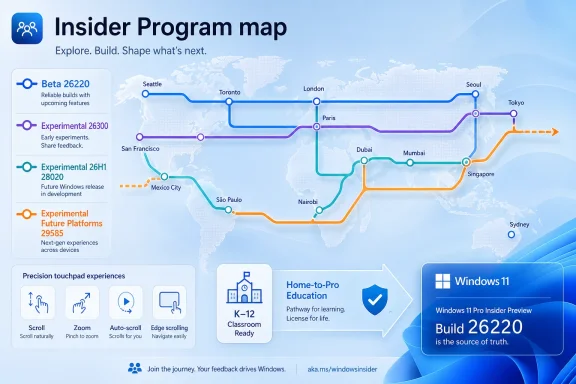
The headline numbers are straightforward enough. Beta receives Build 26220.8370, Experimental receives Build 26300.8376, Experimental 26H1 receives Build 28020.2075, and Experimental Future Platforms receives Build 29585.1000. But the announcement is framed around transition as much as shipment.
Microsoft says it is still expanding the rollout of its new Windows Insider Program changes to already-announced channels. It has not yet begun moving Insiders in the Canary 29500 Series Channel or the Beta Channel to the new experience, though it expects that to happen in the coming weeks. That caveat matters because it means some Insiders are already reading release notes through the new taxonomy while still living inside the old one.
This is the kind of Microsoft transition that looks bureaucratic until it breaks someone’s assumptions. For years, many Windows enthusiasts treated Canary, Dev, Beta, and Release Preview as a rough gradient of risk. Canary was wild, Dev was early, Beta was safer, Release Preview was nearly shipping. That mental model was never perfect, but it was usable.
The new structure is more explicit about build families and product intent. There is a Beta channel tied to the 26220 series, an Experimental channel tied to the 26300 series, an Experimental 26H1 lane tied to the 28020 series, and an Experimental Future Platforms lane tied to the 29585 series. The point is not merely to rename Dev and Canary. The point is to separate feature experimentation, servicing mechanics, silicon/platform work, and future platform development more cleanly than the old labels allowed.
This is a familiar Insider Program tension. Microsoft wants the Beta Channel to be useful for more conservative validation, but the channel has often become a place where feature exposure, enablement packages, and staggered rollouts blur the boundary between “previewing a near-term update” and “being used for broad feature experimentation.” The May 8 note reads like an attempt to pull Beta back toward predictability.
For admins with test rings, the recommendation is more operational than philosophical. If a lab machine is in Beta because it currently exposes a feature your team is validating, you should not assume the new Beta mapping will keep that feature in place. If continuity is the goal, Microsoft is effectively saying the safer short-term move may be to follow the old Dev lineage into Experimental rather than stay with the Beta label.
That is counterintuitive only if you think channel names are static promises. Microsoft’s warning suggests the opposite: during this transition, build lineage is the promise. The watermark in the lower-right corner of the desktop may tell you more than the channel label in Settings.
That split reflects where Windows is now. The operating system is no longer tested as a single stream of “next Windows.” It is tested as multiple overlapping streams: one for the next annual feature baseline, one for enablement and controlled rollout behavior, one for platform support, and one for future architecture work that may not map cleanly to any consumer-facing release.
Windows 11 version 25H2 is already part of that structure. The 26200 baseline underpins 25H2, while enablement packages can increment visible build numbers into 26220 for Beta and 26300 for Experimental. Separately, Windows 11 version 26H1 is described by Microsoft as not being a feature update for 25H2, but as a platform-focused release supporting specific silicon. That alone should make old channel shorthand feel inadequate.
The 29500 series is the most future-facing of the bunch. Microsoft is not promising that everything in that lane becomes a feature update on a predictable schedule. In fact, the value of such a lane is that Microsoft can work on future platform foundations without pretending every visible change is destined for mainstream Windows users in a tidy six-month or annual cadence.
Precision touchpads were supposed to solve one of the classic Windows laptop problems: every OEM had its own driver panel, gesture behavior, acceleration curve, and rough edge. Microsoft’s Settings app has steadily absorbed more of that surface area. The May 8 changes go further by exposing tuning knobs that users previously associated with app-specific behavior, third-party drivers, or hidden system assumptions.
Automatic scrolling is the most interesting addition. Microsoft describes it as scrolling that continues indefinitely without lifting your fingers, activated either by moving fingers near the edge of the touchpad while scrolling or by holding them still and pressing harder, where hardware supports it. This is a very desktop-oriented feature in a mobile-PC wrapper: it is aimed at long documents, long feeds, long spreadsheets, and the modern reality that much Windows work is endless vertical navigation.
Accelerated scrolling has a similar rationale. Repeated scrolling increases speed, allowing users to traverse long documents more quickly. That sounds minor until you consider how often laptop users move through dense Teams histories, browser pages, PDFs, code files, Excel sheets, and admin consoles. Microsoft is trying to reduce the friction that makes users reach for a mouse.
Single-finger scrolling from the left or right side of the touchpad is more specialized. It recalls older touchpad edge behaviors from the pre-precision era, but brought back under a modern Settings-controlled model. Some users will love it; others will turn it off immediately. The important bit is that Microsoft is making the behavior explicit rather than leaving it to OEM folklore.
That caveat is a reminder that modern Windows is not one UI stack. It is Win32, XAML, WinUI, web content, packaged apps, unpackaged apps, and frameworks layered across different eras of Microsoft developer strategy. A gesture that feels like a system-level behavior still has to travel through application frameworks that may handle input differently.
For developers, this is the part to watch. If your app is WinUI 3-based and gesture fidelity matters, the system update alone may not be enough. The relevant Windows App SDK support will determine whether your UI behaves consistently with the rest of the system.
For users, this means early inconsistency is not necessarily a bug in the touchpad hardware. One app may respond cleanly while another lags behind because its framework path is not yet complete. That is the price of modernizing Windows without breaking the enormous application ecosystem that makes Windows valuable in the first place.
That is not a flashy Windows feature, but it may matter more than the touchpad work for real deployments. K–12 purchasing is price-sensitive, fragmented, and often constrained by procurement rules that make the “right” SKU harder to buy at scale. If schools can acquire cheaper or more readily available Home devices and then move them into Pro Education management, Microsoft removes a practical barrier to Windows adoption in classrooms.
The management angle is the key. Windows 11 Home is not the edition most IT teams want to manage across student fleets. Pro Education is designed for school environments, policy control, identity integration, and administrative oversight. The upgrade path is therefore less about generosity and more about reducing SKU mismatch.
This also speaks to Microsoft’s competitive reality. Chromebooks became entrenched in education not merely because they were inexpensive, but because they were easy to procure, enroll, reset, and manage. Windows has historically had stronger application compatibility, but that advantage can be neutralized if device acquisition and management are messy. A Home-to-Pro-Education path is Microsoft trying to smooth the first mile.
For the last several years, Windows development has been tied closely to Copilot+ PCs, NPUs, Arm hardware, and new platform security requirements. A platform-focused release gives Microsoft a way to support specific silicon without pretending every change belongs in the general consumer feature story. It is a cleaner technical explanation, but it also creates a messaging challenge.
Users understand versions when they map to visible features. They understand “the 2024 Update” or “the 2025 Update” better than they understand a platform enablement release for specific silicon. Admins, however, often prefer the latter honesty. If 26H1 exists to support hardware foundations, say so, document it, and keep it separate from the feature hype cycle.
The 28020 series also shows why the Insider Program needs more explicit lanes. Platform support work may need broad testing, but not necessarily by the same people validating desktop UX changes or enterprise policy updates. If Microsoft can keep those worlds distinct, the Insider Program becomes more useful. If it cannot, the new channel names will simply become another layer of confusion.
Canary has always tempted users into over-reading build numbers. A new series arrives, people infer the next Windows version, and then Microsoft spends months insisting that not every Canary feature ships. The new “Future Platforms” label is an attempt to bake that warning directly into the channel identity. It says: this is not merely early; it may be structurally disconnected from near-term releases.
That is healthy if users believe it. A future-platforms lane gives Microsoft room to test kernel, driver, hardware, security, and shell assumptions before they are ready for feature branding. But it only works if the company resists the urge to sprinkle consumer-facing experiments into the same lane without explaining their destiny.
For WindowsForum readers, the practical advice is to treat the 29500 series as a research lab, not a daily-driver preview. It may be fascinating. It may also be wrong for anyone who needs continuity, predictable rollback, or stable app compatibility. Curiosity is a good reason to install it on spare hardware; dependency is not.
That shift is overdue. Windows development has grown too complex for a single ladder. An early feature for the shell, a platform update for new silicon, a staged enablement package, and a future kernel experiment are all “preview” work, but they do not carry the same kind of risk. They also do not interest the same audience.
The problem is that intent tiers require users to read. They require admins to track build numbers. They require Microsoft to keep release notes consistent and to explain when a feature is tied to a channel, a build family, a region, a hardware capability, a controlled rollout, or a Microsoft account type. That is more accurate, but it is also more demanding.
Microsoft’s May 8 post tries to soften the transition by saying all Insiders can find release notes for their device based on the new channel system even if they have not moved yet. That is sensible during migration. It also underlines how awkward the middle period will be: users may be in one visible channel, reading notes under another naming scheme, and running a build whose number carries the real meaning.
For IT pros, this is where documentation hygiene matters. If you maintain Insider test devices, inventory them by build number, channel, device class, and purpose. Do not merely write “Beta laptop” or “Canary desktop” in a spreadsheet and assume that will be meaningful three months from now. The May 8 transition is exactly the scenario where casual labels become misleading.
The same principle applies to bug reporting. “This broke in Experimental” is less useful than “this broke on 26300.8376 on this hardware with this app version.” Microsoft’s increasingly parallel release structure makes precise reporting more important. It also makes community troubleshooting more complicated, because two people in “Experimental” may not be testing the same kind of Windows work if the naming transition is incomplete.
Windows enthusiasts tend to enjoy build archaeology. Admins tend to tolerate it only when necessary. Microsoft is now making it necessary for both groups.
The touchpad feature illustrates this. A user may install the Experimental build and expect uniform behavior across all apps. Microsoft’s WinUI 3 caveat means that expectation is too simple. Some applications may need Windows App SDK updates before the feature is fully realized.
The Beta continuity warning illustrates it even more sharply. A user may stay in Beta because Beta sounds safer, only to discover that the new Beta experience is not the best path for keeping currently exposed features. Microsoft is saying this in advance, but the people most likely to be surprised are also the people least likely to read every transitional blog post.
This is where Microsoft has to be disciplined. If the new Insider Program is going to work, release notes must be brutally clear about build families, feature gates, enablement packages, hardware dependencies, and migration timing. The more complex the map becomes, the more expensive vague language gets.
That could make the Insider Program more interesting. The old Dev Channel sometimes felt like a grab bag: a shell feature here, an app update there, a platform change underneath, and a controlled rollout that half the audience could not reproduce. Splitting the streams should make patterns easier to see.
It also gives Windows watchers a better way to separate signal from noise. A touchpad settings improvement in Experimental has a plausible path to mainstream Windows. A platform change in the 29500 series may be more foundational and less immediately visible. A 26H1 build may be about hardware support rather than a consumer feature wave.
The catch is that Microsoft’s execution has to match the theory. If features hop across lanes without explanation, or if names change faster than users can track them, the program will feel more opaque rather than less. May 8 is a decent step, but it is still a step inside a messy migration.
The obvious benefit is flexibility. Districts can consider a broader set of devices without being trapped by the consumer edition that shipped on the box. That matters when supply chains, discounts, and local purchasing rules make ideal configurations hard to find.
The less obvious benefit is standardization. A district that receives a mix of Home devices from different purchasing sources can bring them into a more manageable edition rather than treating them as exceptions. Exceptions are where school IT time goes to die.
Microsoft still has to prove the workflow is as seamless as advertised. Licensing improvements often sound simple in a blog post and become more complicated when identity, enrollment, OEM images, and policy baselines enter the room. But the direction is right: reduce SKU friction, then let management tools do their job.
Source: Microsoft - Windows Insiders Blog Announcing new builds for 8 May 2026
 Microsoft’s May 8 Flight Is Really About the New Map
The headline numbers are straightforward enough. Beta receives Build 26220.8370, Experimental receives Build 26300.8376, Experimental 26H1 receives Build 28020.2075, and Experimental Future Platforms receives Build 29585.1000. But the announcement is framed around transition as much as shipment.Microsoft says it is still expanding the rollout of its new Windows Insider Program changes to already-announced channels. It has not yet begun moving Insiders in the Canary 29500 Series Channel or the Beta Channel to the new experience, though it expects that to happen in the coming weeks. That caveat matters because it means some Insiders are already reading release notes through the new taxonomy while still living inside the old one.
This is the kind of Microsoft transition that looks bureaucratic until it breaks someone’s assumptions. For years, many Windows enthusiasts treated Canary, Dev, Beta, and Release Preview as a rough gradient of risk. Canary was wild, Dev was early, Beta was safer, Release Preview was nearly shipping. That mental model was never perfect, but it was usable.
The new structure is more explicit about build families and product intent. There is a Beta channel tied to the 26220 series, an Experimental channel tied to the 26300 series, an Experimental 26H1 lane tied to the 28020 series, and an Experimental Future Platforms lane tied to the 29585 series. The point is not merely to rename Dev and Canary. The point is to separate feature experimentation, servicing mechanics, silicon/platform work, and future platform development more cleanly than the old labels allowed.
The Beta Warning Is the Small Print That Matters
Microsoft again tells Beta Channel users who want “best continuity of all existing features” to consider moving to Dev before taking the new Beta experience. That sentence is doing a lot of work. It implies that the new Beta experience may not preserve every feature currently visible to every Beta tester, or at least that Microsoft does not want users to assume it will.This is a familiar Insider Program tension. Microsoft wants the Beta Channel to be useful for more conservative validation, but the channel has often become a place where feature exposure, enablement packages, and staggered rollouts blur the boundary between “previewing a near-term update” and “being used for broad feature experimentation.” The May 8 note reads like an attempt to pull Beta back toward predictability.
For admins with test rings, the recommendation is more operational than philosophical. If a lab machine is in Beta because it currently exposes a feature your team is validating, you should not assume the new Beta mapping will keep that feature in place. If continuity is the goal, Microsoft is effectively saying the safer short-term move may be to follow the old Dev lineage into Experimental rather than stay with the Beta label.
That is counterintuitive only if you think channel names are static promises. Microsoft’s warning suggests the opposite: during this transition, build lineage is the promise. The watermark in the lower-right corner of the desktop may tell you more than the channel label in Settings.
Four Builds, Four Audiences, One Insider Program
The May 8 release divides neatly into four tracks. Build 26220.8370 is the Beta build, including the current Beta Channel. Build 26300.8376 is the Experimental build, including the former Dev Channel. Build 28020.2075 is Experimental 26H1, including the former Canary 28000 series. Build 29585.1000 is Experimental Future Platforms, including the Canary 29500 series.That split reflects where Windows is now. The operating system is no longer tested as a single stream of “next Windows.” It is tested as multiple overlapping streams: one for the next annual feature baseline, one for enablement and controlled rollout behavior, one for platform support, and one for future architecture work that may not map cleanly to any consumer-facing release.
Windows 11 version 25H2 is already part of that structure. The 26200 baseline underpins 25H2, while enablement packages can increment visible build numbers into 26220 for Beta and 26300 for Experimental. Separately, Windows 11 version 26H1 is described by Microsoft as not being a feature update for 25H2, but as a platform-focused release supporting specific silicon. That alone should make old channel shorthand feel inadequate.
The 29500 series is the most future-facing of the bunch. Microsoft is not promising that everything in that lane becomes a feature update on a predictable schedule. In fact, the value of such a lane is that Microsoft can work on future platform foundations without pretending every visible change is destined for mainstream Windows users in a tidy six-month or annual cadence.
Touchpad Controls Are the Consumer Feature With Enterprise Implications
The most visible new feature in the May 8 announcement is a set of precision touchpad gesture controls in Settings. Microsoft is adding controls for scroll and zoom speed, automatic scrolling, accelerated scrolling, and single-finger scrolling from the left or right edge of the touchpad. On paper, this is a quality-of-life update. In practice, it is part of a long, slow campaign to make Windows laptops feel less dependent on vendor utilities and more consistent out of the box.Precision touchpads were supposed to solve one of the classic Windows laptop problems: every OEM had its own driver panel, gesture behavior, acceleration curve, and rough edge. Microsoft’s Settings app has steadily absorbed more of that surface area. The May 8 changes go further by exposing tuning knobs that users previously associated with app-specific behavior, third-party drivers, or hidden system assumptions.
Automatic scrolling is the most interesting addition. Microsoft describes it as scrolling that continues indefinitely without lifting your fingers, activated either by moving fingers near the edge of the touchpad while scrolling or by holding them still and pressing harder, where hardware supports it. This is a very desktop-oriented feature in a mobile-PC wrapper: it is aimed at long documents, long feeds, long spreadsheets, and the modern reality that much Windows work is endless vertical navigation.
Accelerated scrolling has a similar rationale. Repeated scrolling increases speed, allowing users to traverse long documents more quickly. That sounds minor until you consider how often laptop users move through dense Teams histories, browser pages, PDFs, code files, Excel sheets, and admin consoles. Microsoft is trying to reduce the friction that makes users reach for a mouse.
Single-finger scrolling from the left or right side of the touchpad is more specialized. It recalls older touchpad edge behaviors from the pre-precision era, but brought back under a modern Settings-controlled model. Some users will love it; others will turn it off immediately. The important bit is that Microsoft is making the behavior explicit rather than leaving it to OEM folklore.
WinUI 3 Remains the Compatibility Asterisk
Microsoft’s touchpad note includes a telling exception: the new gesture functionality should be widely available across applications, but WinUI 3-based interfaces require newer Windows App SDK versions for complete functionality. Microsoft says it is bringing the necessary changes to Windows App SDK versions 1.8 and 2.0.That caveat is a reminder that modern Windows is not one UI stack. It is Win32, XAML, WinUI, web content, packaged apps, unpackaged apps, and frameworks layered across different eras of Microsoft developer strategy. A gesture that feels like a system-level behavior still has to travel through application frameworks that may handle input differently.
For developers, this is the part to watch. If your app is WinUI 3-based and gesture fidelity matters, the system update alone may not be enough. The relevant Windows App SDK support will determine whether your UI behaves consistently with the rest of the system.
For users, this means early inconsistency is not necessarily a bug in the touchpad hardware. One app may respond cleanly while another lags behind because its framework path is not yet complete. That is the price of modernizing Windows without breaking the enormous application ecosystem that makes Windows valuable in the first place.
The Education Upgrade Path Is a Procurement Story Disguised as a Feature
The second notable feature is licensing rather than interface polish. Windows Insiders in K–12 education environments can now test a free upgrade path from Windows 11 Home to Windows 11 Pro Education. Microsoft says this allows schools to buy Windows 11 Home devices, upgrade them to Windows 11 Pro Education at no additional cost, and bring those devices under school management.That is not a flashy Windows feature, but it may matter more than the touchpad work for real deployments. K–12 purchasing is price-sensitive, fragmented, and often constrained by procurement rules that make the “right” SKU harder to buy at scale. If schools can acquire cheaper or more readily available Home devices and then move them into Pro Education management, Microsoft removes a practical barrier to Windows adoption in classrooms.
The management angle is the key. Windows 11 Home is not the edition most IT teams want to manage across student fleets. Pro Education is designed for school environments, policy control, identity integration, and administrative oversight. The upgrade path is therefore less about generosity and more about reducing SKU mismatch.
This also speaks to Microsoft’s competitive reality. Chromebooks became entrenched in education not merely because they were inexpensive, but because they were easy to procure, enroll, reset, and manage. Windows has historically had stronger application compatibility, but that advantage can be neutralized if device acquisition and management are messy. A Home-to-Pro-Education path is Microsoft trying to smooth the first mile.
The 26H1 Lane Shows Windows Is Following Silicon Again
The Experimental 26H1 build deserves special attention because Microsoft has already characterized 26H1 as a platform release rather than a traditional feature update. That framing is unusual but revealing. It suggests Windows is once again being shaped by hardware transitions that cannot wait for the conventional feature-marketing calendar.For the last several years, Windows development has been tied closely to Copilot+ PCs, NPUs, Arm hardware, and new platform security requirements. A platform-focused release gives Microsoft a way to support specific silicon without pretending every change belongs in the general consumer feature story. It is a cleaner technical explanation, but it also creates a messaging challenge.
Users understand versions when they map to visible features. They understand “the 2024 Update” or “the 2025 Update” better than they understand a platform enablement release for specific silicon. Admins, however, often prefer the latter honesty. If 26H1 exists to support hardware foundations, say so, document it, and keep it separate from the feature hype cycle.
The 28020 series also shows why the Insider Program needs more explicit lanes. Platform support work may need broad testing, but not necessarily by the same people validating desktop UX changes or enterprise policy updates. If Microsoft can keep those worlds distinct, the Insider Program becomes more useful. If it cannot, the new channel names will simply become another layer of confusion.
Future Platforms Is Where Curiosity Should Not Be Mistaken for Stability
The 29585.1000 build lands in Experimental Future Platforms, including the Canary 29500 series. This is where enthusiasts will naturally look for clues about the long-term direction of Windows. It is also where they should be most cautious about interpretation.Canary has always tempted users into over-reading build numbers. A new series arrives, people infer the next Windows version, and then Microsoft spends months insisting that not every Canary feature ships. The new “Future Platforms” label is an attempt to bake that warning directly into the channel identity. It says: this is not merely early; it may be structurally disconnected from near-term releases.
That is healthy if users believe it. A future-platforms lane gives Microsoft room to test kernel, driver, hardware, security, and shell assumptions before they are ready for feature branding. But it only works if the company resists the urge to sprinkle consumer-facing experiments into the same lane without explaining their destiny.
For WindowsForum readers, the practical advice is to treat the 29500 series as a research lab, not a daily-driver preview. It may be fascinating. It may also be wrong for anyone who needs continuity, predictable rollback, or stable app compatibility. Curiosity is a good reason to install it on spare hardware; dependency is not.
The Insider Program Is Moving From Risk Tiers to Intent Tiers
The old Insider model was easy to explain because it looked like a risk ladder. Canary was highest risk, Dev was high, Beta was moderate, Release Preview was low. The new model is harder because it is trying to express intent. Beta is not just “less risky Dev.” Experimental is not just “renamed Dev.” Future Platforms is not just “Canary with a scarier name.”That shift is overdue. Windows development has grown too complex for a single ladder. An early feature for the shell, a platform update for new silicon, a staged enablement package, and a future kernel experiment are all “preview” work, but they do not carry the same kind of risk. They also do not interest the same audience.
The problem is that intent tiers require users to read. They require admins to track build numbers. They require Microsoft to keep release notes consistent and to explain when a feature is tied to a channel, a build family, a region, a hardware capability, a controlled rollout, or a Microsoft account type. That is more accurate, but it is also more demanding.
Microsoft’s May 8 post tries to soften the transition by saying all Insiders can find release notes for their device based on the new channel system even if they have not moved yet. That is sensible during migration. It also underlines how awkward the middle period will be: users may be in one visible channel, reading notes under another naming scheme, and running a build whose number carries the real meaning.
Build Numbers Are Becoming the Admin’s Source of Truth
Microsoft reminds users that they can find their build number in the watermark at the bottom-right corner of the desktop. That sounds like a throwaway line, but during this transition it is essential. The build number is the anchor when channel names shift underneath users.For IT pros, this is where documentation hygiene matters. If you maintain Insider test devices, inventory them by build number, channel, device class, and purpose. Do not merely write “Beta laptop” or “Canary desktop” in a spreadsheet and assume that will be meaningful three months from now. The May 8 transition is exactly the scenario where casual labels become misleading.
The same principle applies to bug reporting. “This broke in Experimental” is less useful than “this broke on 26300.8376 on this hardware with this app version.” Microsoft’s increasingly parallel release structure makes precise reporting more important. It also makes community troubleshooting more complicated, because two people in “Experimental” may not be testing the same kind of Windows work if the naming transition is incomplete.
Windows enthusiasts tend to enjoy build archaeology. Admins tend to tolerate it only when necessary. Microsoft is now making it necessary for both groups.
The Real Risk Is Not Instability, but Ambiguity
Preview builds are supposed to be unstable. That is the bargain. The bigger risk in the current Insider transition is ambiguity: ambiguity about what channel a device is effectively in, what feature set should be expected, and whether a change is a bug, a staged rollout, a missing framework update, or a deliberate channel reset.The touchpad feature illustrates this. A user may install the Experimental build and expect uniform behavior across all apps. Microsoft’s WinUI 3 caveat means that expectation is too simple. Some applications may need Windows App SDK updates before the feature is fully realized.
The Beta continuity warning illustrates it even more sharply. A user may stay in Beta because Beta sounds safer, only to discover that the new Beta experience is not the best path for keeping currently exposed features. Microsoft is saying this in advance, but the people most likely to be surprised are also the people least likely to read every transitional blog post.
This is where Microsoft has to be disciplined. If the new Insider Program is going to work, release notes must be brutally clear about build families, feature gates, enablement packages, hardware dependencies, and migration timing. The more complex the map becomes, the more expensive vague language gets.
For Enthusiasts, the Fun Is Back in the Details
There is a charitable reading of the new structure: Microsoft is giving serious testers more meaningful choices. If you care about near-term feature validation, one lane may make sense. If you care about platform work for future hardware, another does. If you want safer previews, Beta remains available, but with a clearer warning that its role is changing.That could make the Insider Program more interesting. The old Dev Channel sometimes felt like a grab bag: a shell feature here, an app update there, a platform change underneath, and a controlled rollout that half the audience could not reproduce. Splitting the streams should make patterns easier to see.
It also gives Windows watchers a better way to separate signal from noise. A touchpad settings improvement in Experimental has a plausible path to mainstream Windows. A platform change in the 29500 series may be more foundational and less immediately visible. A 26H1 build may be about hardware support rather than a consumer feature wave.
The catch is that Microsoft’s execution has to match the theory. If features hop across lanes without explanation, or if names change faster than users can track them, the program will feel more opaque rather than less. May 8 is a decent step, but it is still a step inside a messy migration.
Schools Get the Most Practical Win This Week
For all the channel complexity, the K–12 licensing change may be the most immediately practical piece of the announcement. Schools do not buy operating systems the way enthusiasts install ISOs. They buy whatever devices fit budget, availability, support contracts, and procurement windows. If a Windows 11 Home device can become a managed Windows 11 Pro Education device at no additional cost, that can change the purchasing conversation.The obvious benefit is flexibility. Districts can consider a broader set of devices without being trapped by the consumer edition that shipped on the box. That matters when supply chains, discounts, and local purchasing rules make ideal configurations hard to find.
The less obvious benefit is standardization. A district that receives a mix of Home devices from different purchasing sources can bring them into a more manageable edition rather than treating them as exceptions. Exceptions are where school IT time goes to die.
Microsoft still has to prove the workflow is as seamless as advertised. Licensing improvements often sound simple in a blog post and become more complicated when identity, enrollment, OEM images, and policy baselines enter the room. But the direction is right: reduce SKU friction, then let management tools do their job.
The May 8 Builds Reward the People Who Track the Fine Print
This release is not a blockbuster in the old sense. There is no single consumer feature that will dominate screenshots for a week. Instead, the May 8 builds reward testers who understand that the Windows Insider Program is being rebuilt while it is still flying.- Microsoft released Build 26220.8370 for Beta, Build 26300.8376 for Experimental, Build 28020.2075 for Experimental 26H1, and Build 29585.1000 for Experimental Future Platforms.
- The Canary 29500 Series Channel and Beta Channel have not yet been moved to the new Windows Insider Program experience, but Microsoft says that transition is expected in the coming weeks.
- Beta Channel users who want the best continuity of existing features should seriously consider Microsoft’s recommendation to move to Dev before taking the new Beta experience.
- Precision touchpad users in Experimental gain new controls for scroll and zoom speed, automatic scrolling, accelerated scrolling, and optional single-finger scrolling.
- WinUI 3 app behavior may lag until the relevant Windows App SDK updates arrive, so inconsistent gesture behavior should not automatically be blamed on touchpad hardware.
- K–12 education environments get a preview of a no-cost path from Windows 11 Home to Windows 11 Pro Education, which could simplify procurement and school device management.
Source: Microsoft - Windows Insiders Blog Announcing new builds for 8 May 2026
