

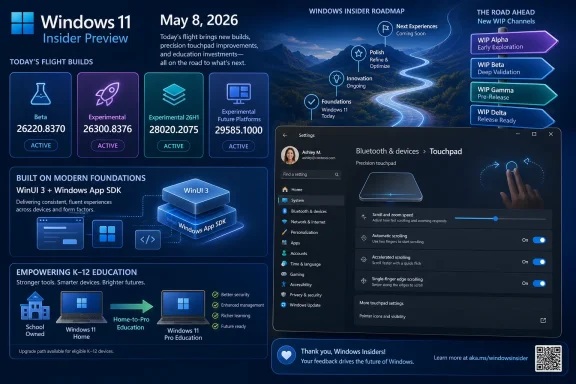
Microsoft released four Windows 11 Insider Preview builds on May 8, 2026: Beta build 26220.8370, Experimental build 26300.8376, Experimental 26H1 build 28020.2075, and Experimental Future Platforms build 29585.1000, while continuing its staged rollout of the redesigned Windows Insider Program channel experience.
The builds themselves are only half the story. Microsoft is using this week’s flight to reinforce a more consequential shift: the Insider Program is being reorganized around new channel labels and build families, and Insiders are being asked to make sense of builds by where Microsoft wants them to go, not merely where their machines currently sit. For enthusiasts, that is a paperwork annoyance. For admins, developers, and education IT teams, it is the kind of naming change that can quietly alter risk assumptions.
The May 8 flight lands during Microsoft’s transition from the familiar Insider channel structure toward a revised WIP experience. The company says it is expanding the rollout of those changes to channels already announced, while explicitly noting that Canary 29500 Series and Beta Channel Insiders have not yet been moved to the new experience. That caveat matters because the build list now speaks in both old and new dialects at once.
Beta Insiders are pointed to Build 26220.8370. Former Dev Channel users are effectively pointed toward the Experimental lane with Build 26300.8376. Former Canary 28000-series users are directed to Experimental 26H1 Build 28020.2075, while Canary 29500-series machines are associated with Experimental Future Platforms Build 29585.1000.
This is not just a branding exercise. Windows Insider builds have always carried a certain ambiguity: some are near-production previews, some are feature staging areas, and some are platform plumbing that ordinary users should not mistake for a consumer roadmap. The new labels appear designed to make that distinction more obvious, but the transitional period inevitably produces friction.
Microsoft’s line that all Insiders can find release notes based on the new channel system, even if they have not moved yet, is doing a lot of work. It tells users that the documentation has already crossed the bridge before every enrolled PC has done the same. In practice, the release-note taxonomy is now leading the migration.
The Beta Channel has historically occupied an awkward but useful middle ground. It is riskier than Release Preview but less chaotic than Canary or Dev, which made it attractive to power users who wanted new Windows features without constantly living on shifting sand. Microsoft’s new guidance suggests the future Beta experience may be more selective, more production-aligned, or at least less continuous with the feature set some testers currently have.
That creates a practical choice. Users who value continuity should move before the transition catches up with them. Users who want to stay in Beta should treat the next few weeks as a period of possible feature churn, not just another cumulative preview.
For managed environments, this is more than a personal preference. If an IT department has pilot devices enrolled in Beta because that channel historically exposed a useful slice of upcoming functionality, it should re-check whether that assumption still holds. The name may remain familiar, but the intent behind the channel is changing.
That three-way split is important. Microsoft is not merely saying “here are unstable builds.” It is separating near-term feature experimentation, silicon/platform enablement work, and future-platform development into distinct release-note lanes. That should help people who read build numbers like weather charts, but it may also reduce the casual readability of Insider releases for everyone else.
The 26H1 label is especially notable because Microsoft has already framed Windows 11 version 26H1 as a platform-focused release rather than a broad consumer feature update. The build family exists for specific underlying platform changes, particularly around hardware support. That means the presence of “26H1” in an Insider build name should not automatically be read as a signal that Microsoft is preparing a conventional annual feature update for every PC.
The Future Platforms lane is even more abstract. A 29500-series build is not a promise about what will appear in the next retail Windows release. It is a place where Microsoft can work on platform futures without implying a direct line to a consumer upgrade package. That distinction is healthy, but only if Insiders internalize it.
Scroll and zoom speed controls address a long-standing problem in Windows laptop ergonomics: the same gesture can feel too slow on one machine and too twitchy on another. Windows has supported precision touchpads for years, but the subjective feel of touch input still depends on hardware, drivers, app frameworks, and user preference. Moving more of that into Settings gives users a direct way to tune behavior rather than hunting for vendor utilities or accepting defaults.
Automatic scrolling is more ambitious. Microsoft says scrolling can continue indefinitely without lifting fingers, activated either by bringing fingers near the edge of the touchpad while scrolling or by holding them still and pressing harder, with the latter requiring hardware support. That sounds simple, but it is exactly the kind of feature that needs careful tuning because accidental activation can become a productivity tax.
Accelerated scrolling is similarly pragmatic. Anyone who has tried to traverse a long document, spreadsheet, source file, or web page with repeated two-finger swipes understands the appeal. The challenge is making acceleration feel intentional instead of unpredictable.
Single-finger scrolling from the touchpad edge is the most retro-flavored of the set. It recalls older touchpad behavior that many users either loved or disabled immediately. Bringing it back as an option rather than a default is the right posture: input behavior should be personal, not ideological.
This is the familiar Windows modernization problem in miniature. Microsoft wants Windows to feel coherent across legacy desktop apps, modern app frameworks, Settings surfaces, and increasingly web-adjacent experiences. But the platform is not a single pane of glass; it is layers of API history, app frameworks, compatibility promises, and UI stacks that move at different speeds.
For developers, the message is straightforward: if your WinUI 3 app depends on precision input behavior, framework versioning matters. New OS-level gestures may not automatically express themselves correctly inside every modern Windows app until the relevant App SDK support arrives. That is not shocking, but it is a reminder that “Windows feature” and “app experience” are not always synchronized.
For users, it means the same gesture might not feel identical everywhere at first. Microsoft’s note is a preemptive explanation for that inconsistency. Better to state the limitation now than let Insiders assume the touchpad feature is broken when it is really waiting on framework plumbing.
That could matter a lot in the real world. K–12 procurement is often driven by price, availability, and timing rather than the clean product segmentation vendors would prefer. If schools can buy more affordable Home devices and convert them into a manageably licensed education edition, the barrier between retail hardware and managed classroom deployment becomes less rigid.
The important phrase is “bring devices under school management.” Windows 11 Home is not built for the same administrative scenarios as Pro Education. Schools need policy control, identity integration, device management, and a security baseline that can survive student use. A free upgrade path is therefore not just a licensing perk; it is a path from consumer hardware into an institutional operating model.
There are still details administrators will need to inspect in the release notes and licensing flow. Preview availability does not mean a district should immediately revise procurement policy. But the direction is notable: Microsoft is acknowledging that education hardware acquisition is messy, and it is trying to reduce the penalty for buying the “wrong” Windows edition at the starting line.
That is a lot of parallel Windows. For ordinary users, the retail version number is still the thing that matters. For Insiders, the build number is the product. For developers, both matter, because APIs, SDK behavior, app compatibility, and UI framework support may hinge on exactly which branch a machine is running.
This is why Microsoft’s watermark reminder is more than a throwaway line. The build number on the lower-right corner of the desktop is the only reliable shorthand for where a test PC actually lives. Channel labels, old names, new names, and feature rollouts may blur during the transition, but the build number remains the truth.
The downside is cognitive overhead. Windows enthusiasts can decode 26220 versus 26300 versus 28020 versus 29585. Most people cannot, and they should not have to. Microsoft’s new WIP structure may eventually reduce that confusion, but during the migration it arguably makes the Insider Program look more complex than ever.
That is good product hygiene. The old Insider Program often encouraged overinterpretation. A feature appearing in Dev or Canary could trigger weeks of speculation about release timing, even when Microsoft had not committed to shipping it. By renaming and segmenting the channels, Microsoft is trying to attach more context to every build.
But labels cannot fully solve expectation management. Insiders are, by nature, people who read tea leaves. If a future-platform build changes a system component, someone will treat it as a clue. If an Experimental build gains a UI feature, someone will assume it is coming to stable Windows in months.
Microsoft’s task is therefore not just to rename channels. It has to keep explaining the boundary between testing, staging, and shipping. The May 8 post is a step in that direction, but the coming weeks — especially the movement of Beta and Canary 29500-series users into the new WIP experience — will be the real test.
Source: Microsoft - Windows Insiders Blog Announcing new builds for 8 May 2026
The builds themselves are only half the story. Microsoft is using this week’s flight to reinforce a more consequential shift: the Insider Program is being reorganized around new channel labels and build families, and Insiders are being asked to make sense of builds by where Microsoft wants them to go, not merely where their machines currently sit. For enthusiasts, that is a paperwork annoyance. For admins, developers, and education IT teams, it is the kind of naming change that can quietly alter risk assumptions.
 Microsoft Ships Builds, But the Real Product Is the New Map
The May 8 flight lands during Microsoft’s transition from the familiar Insider channel structure toward a revised WIP experience. The company says it is expanding the rollout of those changes to channels already announced, while explicitly noting that Canary 29500 Series and Beta Channel Insiders have not yet been moved to the new experience. That caveat matters because the build list now speaks in both old and new dialects at once.Beta Insiders are pointed to Build 26220.8370. Former Dev Channel users are effectively pointed toward the Experimental lane with Build 26300.8376. Former Canary 28000-series users are directed to Experimental 26H1 Build 28020.2075, while Canary 29500-series machines are associated with Experimental Future Platforms Build 29585.1000.
This is not just a branding exercise. Windows Insider builds have always carried a certain ambiguity: some are near-production previews, some are feature staging areas, and some are platform plumbing that ordinary users should not mistake for a consumer roadmap. The new labels appear designed to make that distinction more obvious, but the transitional period inevitably produces friction.
Microsoft’s line that all Insiders can find release notes based on the new channel system, even if they have not moved yet, is doing a lot of work. It tells users that the documentation has already crossed the bridge before every enrolled PC has done the same. In practice, the release-note taxonomy is now leading the migration.
Beta Users Get the Clearest Warning
The most pointed guidance in Microsoft’s post is aimed at Beta Channel users. If they want “best continuity of all existing features,” Microsoft says they should consider moving to the Dev Channel before taking the new Beta experience. In ordinary Insider-speak, that sounds like a routine channel suggestion. In operational terms, it is a warning that the Beta Channel is about to stop meaning what some long-time testers think it means.The Beta Channel has historically occupied an awkward but useful middle ground. It is riskier than Release Preview but less chaotic than Canary or Dev, which made it attractive to power users who wanted new Windows features without constantly living on shifting sand. Microsoft’s new guidance suggests the future Beta experience may be more selective, more production-aligned, or at least less continuous with the feature set some testers currently have.
That creates a practical choice. Users who value continuity should move before the transition catches up with them. Users who want to stay in Beta should treat the next few weeks as a period of possible feature churn, not just another cumulative preview.
For managed environments, this is more than a personal preference. If an IT department has pilot devices enrolled in Beta because that channel historically exposed a useful slice of upcoming functionality, it should re-check whether that assumption still holds. The name may remain familiar, but the intent behind the channel is changing.
Experimental Becomes the New Center of Gravity
The Experimental label is doing the job that “Dev” and parts of “Canary” used to do, but with more explicit segmentation. Build 26300.8376 represents the Experimental lane including the former Dev Channel. Build 28020.2075 belongs to Experimental 26H1, including the former Canary 28000 series. Build 29585.1000 sits in Experimental Future Platforms, which includes Canary 29500-series devices.That three-way split is important. Microsoft is not merely saying “here are unstable builds.” It is separating near-term feature experimentation, silicon/platform enablement work, and future-platform development into distinct release-note lanes. That should help people who read build numbers like weather charts, but it may also reduce the casual readability of Insider releases for everyone else.
The 26H1 label is especially notable because Microsoft has already framed Windows 11 version 26H1 as a platform-focused release rather than a broad consumer feature update. The build family exists for specific underlying platform changes, particularly around hardware support. That means the presence of “26H1” in an Insider build name should not automatically be read as a signal that Microsoft is preparing a conventional annual feature update for every PC.
The Future Platforms lane is even more abstract. A 29500-series build is not a promise about what will appear in the next retail Windows release. It is a place where Microsoft can work on platform futures without implying a direct line to a consumer upgrade package. That distinction is healthy, but only if Insiders internalize it.
The Touchpad Changes Are Small, Tactile, and Surprisingly Revealing
The week’s most user-visible feature is a set of new precision touchpad gesture controls in Settings, currently in the Experimental channel. Microsoft is adding controls for scroll and zoom speed, automatic scrolling, accelerated scrolling, and single-finger scrolling from the left or right side of the touchpad. These are not headline-grabbing AI features, but they are the kind of interaction changes that make a PC feel either polished or maddening.Scroll and zoom speed controls address a long-standing problem in Windows laptop ergonomics: the same gesture can feel too slow on one machine and too twitchy on another. Windows has supported precision touchpads for years, but the subjective feel of touch input still depends on hardware, drivers, app frameworks, and user preference. Moving more of that into Settings gives users a direct way to tune behavior rather than hunting for vendor utilities or accepting defaults.
Automatic scrolling is more ambitious. Microsoft says scrolling can continue indefinitely without lifting fingers, activated either by bringing fingers near the edge of the touchpad while scrolling or by holding them still and pressing harder, with the latter requiring hardware support. That sounds simple, but it is exactly the kind of feature that needs careful tuning because accidental activation can become a productivity tax.
Accelerated scrolling is similarly pragmatic. Anyone who has tried to traverse a long document, spreadsheet, source file, or web page with repeated two-finger swipes understands the appeal. The challenge is making acceleration feel intentional instead of unpredictable.
Single-finger scrolling from the touchpad edge is the most retro-flavored of the set. It recalls older touchpad behavior that many users either loved or disabled immediately. Bringing it back as an option rather than a default is the right posture: input behavior should be personal, not ideological.
WinUI 3 Remains the Tax on Windows Modernization
Microsoft’s caveat about WinUI 3 is easy to skip, but it may be the most technically interesting sentence in the feature note. The new touchpad functionality should be widely available across applications, the company says, except that WinUI 3-based UI requires newer Windows App SDK versions for complete functionality. Microsoft says it is working to bring the necessary changes to Windows App SDK versions 1.8 and 2.0.This is the familiar Windows modernization problem in miniature. Microsoft wants Windows to feel coherent across legacy desktop apps, modern app frameworks, Settings surfaces, and increasingly web-adjacent experiences. But the platform is not a single pane of glass; it is layers of API history, app frameworks, compatibility promises, and UI stacks that move at different speeds.
For developers, the message is straightforward: if your WinUI 3 app depends on precision input behavior, framework versioning matters. New OS-level gestures may not automatically express themselves correctly inside every modern Windows app until the relevant App SDK support arrives. That is not shocking, but it is a reminder that “Windows feature” and “app experience” are not always synchronized.
For users, it means the same gesture might not feel identical everywhere at first. Microsoft’s note is a preemptive explanation for that inconsistency. Better to state the limitation now than let Insiders assume the touchpad feature is broken when it is really waiting on framework plumbing.
Education Licensing Gets the Quietest But Most Practical Change
The other notable feature is not a gesture or UI flourish. Microsoft is previewing a free upgrade path from Windows 11 Home to Windows 11 Pro Education for K–12 education environments, available in Experimental and Beta. The purpose is bluntly practical: schools can procure Windows 11 Home devices, upgrade them to Pro Education at no additional cost, and bring those devices under school management.That could matter a lot in the real world. K–12 procurement is often driven by price, availability, and timing rather than the clean product segmentation vendors would prefer. If schools can buy more affordable Home devices and convert them into a manageably licensed education edition, the barrier between retail hardware and managed classroom deployment becomes less rigid.
The important phrase is “bring devices under school management.” Windows 11 Home is not built for the same administrative scenarios as Pro Education. Schools need policy control, identity integration, device management, and a security baseline that can survive student use. A free upgrade path is therefore not just a licensing perk; it is a path from consumer hardware into an institutional operating model.
There are still details administrators will need to inspect in the release notes and licensing flow. Preview availability does not mean a district should immediately revise procurement policy. But the direction is notable: Microsoft is acknowledging that education hardware acquisition is messy, and it is trying to reduce the penalty for buying the “wrong” Windows edition at the starting line.
The Build Numbers Tell a Story About Windows as a Service
The May 8 lineup also shows how complicated Windows servicing has become. The 26220 and 26300 builds sit on the Windows 11 version 25H2 development track, using enablement-package style numbering to distinguish Beta and Experimental lanes. The 28020 build sits in the 26H1 experimental platform branch. The 29585 build points to future-platform work.That is a lot of parallel Windows. For ordinary users, the retail version number is still the thing that matters. For Insiders, the build number is the product. For developers, both matter, because APIs, SDK behavior, app compatibility, and UI framework support may hinge on exactly which branch a machine is running.
This is why Microsoft’s watermark reminder is more than a throwaway line. The build number on the lower-right corner of the desktop is the only reliable shorthand for where a test PC actually lives. Channel labels, old names, new names, and feature rollouts may blur during the transition, but the build number remains the truth.
The downside is cognitive overhead. Windows enthusiasts can decode 26220 versus 26300 versus 28020 versus 29585. Most people cannot, and they should not have to. Microsoft’s new WIP structure may eventually reduce that confusion, but during the migration it arguably makes the Insider Program look more complex than ever.
Microsoft Is Separating Roadmaps From Experiments
The deeper logic behind this reorganization appears to be separation. Microsoft wants a place for near-term Windows 11 work, a place for platform-specific work, and a place for future-platform work. That separation lets the company test aggressively without implying that every experimental change is destined for the next general availability release.That is good product hygiene. The old Insider Program often encouraged overinterpretation. A feature appearing in Dev or Canary could trigger weeks of speculation about release timing, even when Microsoft had not committed to shipping it. By renaming and segmenting the channels, Microsoft is trying to attach more context to every build.
But labels cannot fully solve expectation management. Insiders are, by nature, people who read tea leaves. If a future-platform build changes a system component, someone will treat it as a clue. If an Experimental build gains a UI feature, someone will assume it is coming to stable Windows in months.
Microsoft’s task is therefore not just to rename channels. It has to keep explaining the boundary between testing, staging, and shipping. The May 8 post is a step in that direction, but the coming weeks — especially the movement of Beta and Canary 29500-series users into the new WIP experience — will be the real test.
The Practical Read Before the Channel Shuffle Hits
The May 8 flight is not a blockbuster release, but it is a useful checkpoint for anyone running Insider machines with a purpose. The touchpad controls are worth testing on real hardware, the education licensing path is worth watching for managed schools, and the channel migration deserves more attention than a normal build bump.- Beta Channel users who care about retaining their current feature continuity should evaluate Microsoft’s recommendation to move to Dev before the new Beta experience arrives.
- Dev Channel users should start thinking of their lane as Experimental, because the release notes and build identity are already being organized that way.
- Canary 28000-series testers are effectively in the Experimental 26H1 world, which Microsoft has framed as platform-focused rather than a broad feature-update preview.
- Canary 29500-series testers should treat Experimental Future Platforms as a long-range development branch, not a consumer roadmap.
- Developers using WinUI 3 should watch Windows App SDK 1.8 and 2.0 support, because the new touchpad behaviors may depend on framework updates for full fidelity.
- K–12 IT admins should track the Home-to-Pro Education upgrade preview, but should wait for licensing and management details before changing procurement assumptions.
Source: Microsoft - Windows Insiders Blog Announcing new builds for 8 May 2026
