

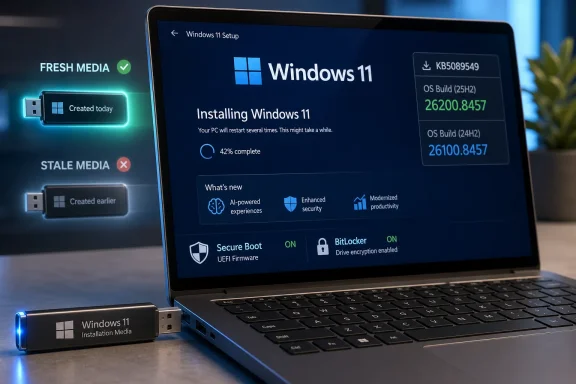
Microsoft’s official Windows 11 Media Creation Tool is now serving installation media that includes the May 12, 2026 cumulative update KB5089549, bringing clean USB installs for Windows 11 version 25H2 to build 26200.8457 and version 24H2 to build 26100.8457. That sounds like housekeeping, but it matters because Microsoft is quietly narrowing the gap between a “fresh” install and a fully patched machine. The install stick is no longer just a recovery convenience; it is part of the servicing pipeline. For Windows users and administrators, the real story is not that another KB exists, but that Microsoft is treating bootable media as a moving target.
For years, the ritual of reinstalling Windows had a predictable second act: finish setup, watch the desktop appear, then surrender the machine to Windows Update. A “clean” install often meant a clean image plus a backlog of cumulative updates, Defender definitions, driver refreshes, and setup-time fixes. The Media Creation Tool update does not eliminate that process, but it does shorten the runway.
KB5089549 is the May 2026 Patch Tuesday cumulative update for Windows 11 25H2 and 24H2. On 25H2, it advances systems to OS build 26200.8457; on 24H2, it advances them to 26100.8457. Microsoft’s support documentation describes it as a security update with quality improvements, including fixes and changes that were previously staged through April’s cumulative and preview releases.
That distinction matters because the phrase “latest ISO” can be slippery. The Media Creation Tool itself may retain an older-looking version number while the content it pulls from Microsoft’s servers changes underneath it. Reports from Deskmodder and other Windows watchers indicate that the tool remains version 10.0.26100.7019, even as it now delivers newer Windows 11 media.
That is classic modern Windows servicing: the wrapper is less important than the payload. Microsoft does not need to make a public spectacle of a new executable every month if the server-side manifest can point the tool toward fresher installation files. For ordinary users, the result is simpler than the mechanism. Download the official tool today, and the USB installer it creates should be more current than the one it produced weeks ago.
The Media Creation Tool is best understood as a bootstrapper. It fetches the installation payload, validates choices like language and architecture, and builds USB or ISO media from Microsoft’s current release channel. If the tool’s own binary does not change, that does not necessarily mean the install media behind it has stayed frozen.
Still, Microsoft does itself no favors by making this opaque. A user who downloads the tool, checks the file properties, and sees the same version as last month has little obvious confirmation that the resulting media includes KB5089549. The build number inside the completed media is the more meaningful signal, but that is not exactly friendly to casual users or busy help desk staff.
This is where Windows’ servicing model collides with human expectations. Microsoft wants Windows to behave like a continuously updated service, but many users still treat installation media like a discrete product. When the product label does not change, people reasonably assume the contents did not either.
For IT professionals, the lesson is simple: verify the image, not just the tool. The presence of build 26200.8457 for Windows 11 25H2 or 26100.8457 for 24H2 is the concrete sign that the May 2026 cumulative update is baked into the install path. The executable version alone is not enough evidence.
KB5089549 is not merely a bundle of minor fixes. Microsoft’s May 2026 Patch Tuesday cycle addressed a large set of security issues across the Windows ecosystem, and the Windows 11 cumulative update also folds in servicing stack improvements and previous quality work. The servicing stack component is particularly important because it is the machinery that installs future updates.
The update also carries Secure Boot-related changes that deserve attention. Microsoft has been preparing Windows devices for Secure Boot certificate expirations beginning in June 2026, and KB5089549 adds broader targeting data for devices eligible to receive new certificates. On eligible systems, it also adds a SecureBoot folder under the Windows directory with example scripts intended for organizations managing certificate status and rollout.
That sounds niche until it is your fleet that fails to boot cleanly. Secure Boot is one of those Windows features that most users never think about until recovery keys, firmware settings, and bootloaders suddenly become dinner-table vocabulary. By embedding the latest update into installation media, Microsoft is making it more likely that newly built systems start life closer to the certificate transition path it wants.
There is also a fix for a nasty class of boot-related failures. Microsoft says KB5089549 addresses an issue where some devices could enter BitLocker recovery after boot file updates on systems with certain TPM validation settings, including invalid PCR7 configurations. For administrators, that is the kind of bug that turns a routine patch cycle into a morning of recovery-key retrieval.
That is why the Media Creation Tool refresh is more than a convenience for enthusiasts who like building fresh USB sticks. It is a small but telling example of Microsoft moving more of the Windows lifecycle into managed, continuously updated channels. The ISO is no longer a static artifact in the same way a Windows 7 DVD was. It is closer to a snapshot of the current servicing state.
For home users, that means fewer updates after setup and fewer chances for the first boot experience to be derailed by a massive cumulative update. For repair shops and power users, it means the USB drive in the drawer ages quickly. A flash drive created in March may still install Windows, but it may not install the Windows Microsoft wants you to be running in May.
For enterprises, the implications are more nuanced. Many organizations do not rely on the consumer Media Creation Tool at all; they use deployment shares, Configuration Manager, Intune, Autopilot, custom images, provisioning packages, or offline servicing workflows. But the same principle applies. Installation media has to be treated as a maintained asset, not a one-time download.
Microsoft’s own KB documentation includes instructions for adding the update to mounted installation media using DISM or PowerShell. That is a quiet admission that official USB creation is only one lane. The bigger servicing story is that Windows images, whether consumer-built or enterprise-maintained, need to track monthly cumulative updates with more discipline than they once did.
That mismatch is not unusual. Patch Tuesday problems often begin as isolated reports in forums, Reddit threads, and admin communities before they either fade away or become recognized known issues. A handful of failed installs does not prove a bad cumulative update. It proves that Windows is running on a staggering variety of hardware, firmware, drivers, security products, and previously patched states.
The risk calculus changes depending on who you are. A home user with a recent laptop, good backups, and no unusual configuration is probably better served by installing the update through Windows Update and letting the normal servicing process do its job. A sysadmin responsible for hundreds of machines with BitLocker, VPN clients, endpoint security agents, and custom networking stacks should stage the rollout like any other Patch Tuesday.
The Media Creation Tool angle does not eliminate these concerns. If KB5089549 has an installation problem on a particular class of machine, refreshed media could carry that problem into a clean install or repair scenario. Conversely, if the issue is caused by a messy prior update state, a clean install using updated media may be the cleaner path.
This is the frustrating truth of Windows patching in 2026: the same cumulative update can be both the fix and the suspected culprit. KB5089549 includes fixes for earlier problems, including boot and BitLocker recovery behavior, while also attracting scattered reports of new trouble. The right response is neither blind trust nor reflexive avoidance. It is validation.
The Media Creation Tool has reportedly had its own rough patch around the transition period after Windows 11 25H2 became the current release. That timing was awkward. Microsoft has been urging Windows 10 users toward Windows 11, yet the official media utility is often one of the first tools a user reaches for when attempting that move.
According to the reporting around this refresh, Windows 11 media creation problems have been fixed in the current tool behavior, and Windows 10-related tool issues have also been addressed, even though the latest ESU Windows 10 patch is not delivered through the Windows 10 Media Creation Tool in the same way. That distinction is important. The tool may work again, but Windows 10’s servicing future remains more constrained.
For Windows 10 users, the bigger decision is no longer whether a USB stick can be created. It is whether the machine belongs on an extended-support path, an LTSC path, an unsupported path, or a Windows 11 migration path. The Media Creation Tool can help with the mechanics, but it cannot answer the lifecycle question.
That is why Microsoft’s install media strategy now doubles as migration pressure. The Windows 11 download page presents the current release as Windows 11 25H2, and the tooling is increasingly optimized around getting users onto that branch. Windows 10 remains present, but it no longer feels like the center of gravity.
This shared servicing approach has benefits. It lets Microsoft deliver the same security fixes, many of the same quality improvements, and the same servicing stack work across both releases. It also reduces the burden on app developers and administrators who might otherwise face a sharper compatibility break between annual Windows releases.
But it also makes Windows versioning harder for normal people to parse. If 25H2 and 24H2 receive the same cumulative update on the same day, and many features arrive through enablement or controlled rollout mechanisms, the difference between “new Windows version” and “same platform, different switch position” becomes blurry.
The Media Creation Tool adds another layer to that blur. A user may download the official tool, see a 26100-era executable version, create Windows 11 25H2 media, and end up with build 26200.8457 after the latest cumulative payload is applied. All of that can be technically correct and still feel unnecessarily convoluted.
Microsoft’s defenders would argue that this is the price of reducing big-bang upgrades. They have a point. Smaller enablement transitions and shared servicing baselines are better than the old era of disruptive feature upgrades. But Microsoft still needs to communicate the model more clearly, especially when the official tool’s visible versioning lags behind the media it creates.
Still, Patch Tuesday is not a feature drop in disguise. The primary reason to install KB5089549 is that it is a security update. The performance work is welcome, but it should not be the headline reason an organization approves a cumulative update. Security baseline, servicing stack reliability, boot fixes, and compatibility validation are the serious considerations.
For gamers and enthusiasts, the calculus is more emotional. A cumulative update that promises smoother behavior is tempting, especially if it also rolls in File Explorer fixes, networking reliability improvements, and platform-level polish. But the same audience is often quick to notice regressions in frame pacing, driver behavior, or device connectivity.
That tension is why refreshed installation media has a special appeal. A clean install using up-to-date media can feel like a reset button for a system that has accumulated upgrade cruft. Sometimes that feeling is placebo. Sometimes it is real, especially when old drivers, failed updates, and misconfigured services have piled up.
But the clean install should not be romanticized. It is still disruptive. It still requires backups, app reinstalls, license checks, driver readiness, and time. The fact that Microsoft’s USB installer is now fresher makes the process better; it does not make it trivial.
A responsible Windows 11 deployment still starts with testing. That means validating KB5089549 on representative hardware, checking BitLocker recovery behavior, confirming VPN and Wi-Fi reliability, watching endpoint protection logs, and ensuring that business-critical apps survive the update. It also means verifying Secure Boot certificate readiness before June 2026 turns from a future date into an operational deadline.
The better use of the new media is as a reference point. It tells admins what Microsoft considers current for clean installs in the public channel. If your internal image is still several cumulative updates behind, the gap is now easier to spot and harder to justify.
Offline servicing remains the more appropriate path for many organizations. Microsoft’s update package can be injected into mounted images, and Dynamic Update packages can be aligned with the same monthly cycle where available. That approach gives IT teams repeatability, documentation, and control.
The MCT-created USB stick is useful for break-fix, lab work, small offices, and enthusiast installs. In larger environments, it is a reminder that the baseline has moved. The operational question is whether your deployment process moved with it.
Malware does not wait politely while a rebuilt PC catches up. A newly installed system with old definitions, missing cumulative fixes, and default browser exposure is not as vulnerable as an abandoned machine, but it is not ideal either. Every bit of currency in the install image reduces the initial risk window.
This is especially relevant for repair scenarios. A user rebuilding a compromised PC may create installation media from another machine, boot the target system, wipe the drive, and reconnect during setup. The cleaner and more current the media, the fewer assumptions the user has to make about what happens next.
That said, Defender freshness should not be oversold. After setup, the first jobs remain the same: connect to a trusted network, let Windows Update complete, verify Defender status, install OEM or vendor drivers if needed, and restore data only after the system is stable. The refreshed media gives users a better starting line, not a finished race.
For most users, the safest Windows installer is the one created today from Microsoft’s official tool. It is more likely to contain the latest cumulative update, current setup fixes, and current security assumptions. That is the argument Microsoft is making through behavior, even when it does not spell it out in a banner.
But moving targets create audit problems. Enthusiasts like knowing exactly what they downloaded. Administrators need reproducibility. Journalists and support communities need to describe what a tool does at a given time without implying it will do the same thing forever.
The answer is not to avoid the official tool. The answer is to document the build it creates. If a USB installer matters for support, disaster recovery, or fleet deployment, label it with the Windows version, OS build, creation date, architecture, and source. “Windows 11 USB” is no longer enough.
That sounds pedantic until a machine fails in the field and someone reaches for a mystery flash drive. In the modern Windows world, stale media is not just old. It may be missing boot fixes, certificate preparation, servicing stack improvements, and security updates that Microsoft now expects to be present.
Source: Neowin Windows 11 KB5089549 can now be downloaded for USB installs using official Microsoft tool
 Microsoft Moves the Fresh Install Closer to Patch Tuesday
For years, the ritual of reinstalling Windows had a predictable second act: finish setup, watch the desktop appear, then surrender the machine to Windows Update. A “clean” install often meant a clean image plus a backlog of cumulative updates, Defender definitions, driver refreshes, and setup-time fixes. The Media Creation Tool update does not eliminate that process, but it does shorten the runway.KB5089549 is the May 2026 Patch Tuesday cumulative update for Windows 11 25H2 and 24H2. On 25H2, it advances systems to OS build 26200.8457; on 24H2, it advances them to 26100.8457. Microsoft’s support documentation describes it as a security update with quality improvements, including fixes and changes that were previously staged through April’s cumulative and preview releases.
That distinction matters because the phrase “latest ISO” can be slippery. The Media Creation Tool itself may retain an older-looking version number while the content it pulls from Microsoft’s servers changes underneath it. Reports from Deskmodder and other Windows watchers indicate that the tool remains version 10.0.26100.7019, even as it now delivers newer Windows 11 media.
That is classic modern Windows servicing: the wrapper is less important than the payload. Microsoft does not need to make a public spectacle of a new executable every month if the server-side manifest can point the tool toward fresher installation files. For ordinary users, the result is simpler than the mechanism. Download the official tool today, and the USB installer it creates should be more current than the one it produced weeks ago.
The Tool Version Is a Red Herring, but Not an Irrelevant One
The unchanged Media Creation Tool version has already led some users to wonder whether anything has really changed. That confusion is understandable. In the old Windows world, version numbers were landmarks; in the current one, they are often only partial clues.The Media Creation Tool is best understood as a bootstrapper. It fetches the installation payload, validates choices like language and architecture, and builds USB or ISO media from Microsoft’s current release channel. If the tool’s own binary does not change, that does not necessarily mean the install media behind it has stayed frozen.
Still, Microsoft does itself no favors by making this opaque. A user who downloads the tool, checks the file properties, and sees the same version as last month has little obvious confirmation that the resulting media includes KB5089549. The build number inside the completed media is the more meaningful signal, but that is not exactly friendly to casual users or busy help desk staff.
This is where Windows’ servicing model collides with human expectations. Microsoft wants Windows to behave like a continuously updated service, but many users still treat installation media like a discrete product. When the product label does not change, people reasonably assume the contents did not either.
For IT professionals, the lesson is simple: verify the image, not just the tool. The presence of build 26200.8457 for Windows 11 25H2 or 26100.8457 for 24H2 is the concrete sign that the May 2026 cumulative update is baked into the install path. The executable version alone is not enough evidence.
A Clean Install Is Now a Security Decision
The practical benefit of refreshed installation media is not cosmetic. It reduces the time a newly installed PC spends in the awkward state between “Windows is installed” and “Windows is fully protected.” That gap is smaller than it used to be, but it still exists, especially on machines being rebuilt after malware, storage failure, or years of neglected updates.KB5089549 is not merely a bundle of minor fixes. Microsoft’s May 2026 Patch Tuesday cycle addressed a large set of security issues across the Windows ecosystem, and the Windows 11 cumulative update also folds in servicing stack improvements and previous quality work. The servicing stack component is particularly important because it is the machinery that installs future updates.
The update also carries Secure Boot-related changes that deserve attention. Microsoft has been preparing Windows devices for Secure Boot certificate expirations beginning in June 2026, and KB5089549 adds broader targeting data for devices eligible to receive new certificates. On eligible systems, it also adds a SecureBoot folder under the Windows directory with example scripts intended for organizations managing certificate status and rollout.
That sounds niche until it is your fleet that fails to boot cleanly. Secure Boot is one of those Windows features that most users never think about until recovery keys, firmware settings, and bootloaders suddenly become dinner-table vocabulary. By embedding the latest update into installation media, Microsoft is making it more likely that newly built systems start life closer to the certificate transition path it wants.
There is also a fix for a nasty class of boot-related failures. Microsoft says KB5089549 addresses an issue where some devices could enter BitLocker recovery after boot file updates on systems with certain TPM validation settings, including invalid PCR7 configurations. For administrators, that is the kind of bug that turns a routine patch cycle into a morning of recovery-key retrieval.
The USB Stick Has Become Part of the Servicing Stack
The old mental model of installation media was simple: it installed the operating system. The modern model is more complicated. Installation media now participates in setup reliability, security baseline enforcement, inbox app currency, Defender readiness, and in some cases hardware enablement.That is why the Media Creation Tool refresh is more than a convenience for enthusiasts who like building fresh USB sticks. It is a small but telling example of Microsoft moving more of the Windows lifecycle into managed, continuously updated channels. The ISO is no longer a static artifact in the same way a Windows 7 DVD was. It is closer to a snapshot of the current servicing state.
For home users, that means fewer updates after setup and fewer chances for the first boot experience to be derailed by a massive cumulative update. For repair shops and power users, it means the USB drive in the drawer ages quickly. A flash drive created in March may still install Windows, but it may not install the Windows Microsoft wants you to be running in May.
For enterprises, the implications are more nuanced. Many organizations do not rely on the consumer Media Creation Tool at all; they use deployment shares, Configuration Manager, Intune, Autopilot, custom images, provisioning packages, or offline servicing workflows. But the same principle applies. Installation media has to be treated as a maintained asset, not a one-time download.
Microsoft’s own KB documentation includes instructions for adding the update to mounted installation media using DISM or PowerShell. That is a quiet admission that official USB creation is only one lane. The bigger servicing story is that Windows images, whether consumer-built or enterprise-maintained, need to track monthly cumulative updates with more discipline than they once did.
The Reported Bugs Are Real Enough to Watch, Not Widespread Enough to Panic
The early noise around KB5089549 has been mixed. Some users report smooth installations through Windows Update, while scattered complaints describe installation failures and network-related trouble. Microsoft’s official known-issues section for the update currently says the company is not aware of any issues with the release.That mismatch is not unusual. Patch Tuesday problems often begin as isolated reports in forums, Reddit threads, and admin communities before they either fade away or become recognized known issues. A handful of failed installs does not prove a bad cumulative update. It proves that Windows is running on a staggering variety of hardware, firmware, drivers, security products, and previously patched states.
The risk calculus changes depending on who you are. A home user with a recent laptop, good backups, and no unusual configuration is probably better served by installing the update through Windows Update and letting the normal servicing process do its job. A sysadmin responsible for hundreds of machines with BitLocker, VPN clients, endpoint security agents, and custom networking stacks should stage the rollout like any other Patch Tuesday.
The Media Creation Tool angle does not eliminate these concerns. If KB5089549 has an installation problem on a particular class of machine, refreshed media could carry that problem into a clean install or repair scenario. Conversely, if the issue is caused by a messy prior update state, a clean install using updated media may be the cleaner path.
This is the frustrating truth of Windows patching in 2026: the same cumulative update can be both the fix and the suspected culprit. KB5089549 includes fixes for earlier problems, including boot and BitLocker recovery behavior, while also attracting scattered reports of new trouble. The right response is neither blind trust nor reflexive avoidance. It is validation.
Windows 10 Is Now the Ghost in the Media Creation Machine
The Windows 10 side of this story is messier because Windows 10 has crossed the psychological line from mainstream platform to supported-afterlife platform. Microsoft released KB5087544 for Windows 10 as part of the same Patch Tuesday cycle, but Windows 10’s position is now shaped by Extended Security Updates, LTSC channels, and the practical reality that many machines still run it.The Media Creation Tool has reportedly had its own rough patch around the transition period after Windows 11 25H2 became the current release. That timing was awkward. Microsoft has been urging Windows 10 users toward Windows 11, yet the official media utility is often one of the first tools a user reaches for when attempting that move.
According to the reporting around this refresh, Windows 11 media creation problems have been fixed in the current tool behavior, and Windows 10-related tool issues have also been addressed, even though the latest ESU Windows 10 patch is not delivered through the Windows 10 Media Creation Tool in the same way. That distinction is important. The tool may work again, but Windows 10’s servicing future remains more constrained.
For Windows 10 users, the bigger decision is no longer whether a USB stick can be created. It is whether the machine belongs on an extended-support path, an LTSC path, an unsupported path, or a Windows 11 migration path. The Media Creation Tool can help with the mechanics, but it cannot answer the lifecycle question.
That is why Microsoft’s install media strategy now doubles as migration pressure. The Windows 11 download page presents the current release as Windows 11 25H2, and the tooling is increasingly optimized around getting users onto that branch. Windows 10 remains present, but it no longer feels like the center of gravity.
25H2 and 24H2 Share More Than Microsoft’s Branding
Windows 11 version 25H2 can look deceptively dramatic because the version number changed. Under the hood, however, 25H2 and 24H2 remain closely aligned, and KB5089549 servicing both versions at once reinforces that reality. Microsoft’s build pairing — 26200.8457 for 25H2 and 26100.8457 for 24H2 — tells the story.This shared servicing approach has benefits. It lets Microsoft deliver the same security fixes, many of the same quality improvements, and the same servicing stack work across both releases. It also reduces the burden on app developers and administrators who might otherwise face a sharper compatibility break between annual Windows releases.
But it also makes Windows versioning harder for normal people to parse. If 25H2 and 24H2 receive the same cumulative update on the same day, and many features arrive through enablement or controlled rollout mechanisms, the difference between “new Windows version” and “same platform, different switch position” becomes blurry.
The Media Creation Tool adds another layer to that blur. A user may download the official tool, see a 26100-era executable version, create Windows 11 25H2 media, and end up with build 26200.8457 after the latest cumulative payload is applied. All of that can be technically correct and still feel unnecessarily convoluted.
Microsoft’s defenders would argue that this is the price of reducing big-bang upgrades. They have a point. Smaller enablement transitions and shared servicing baselines are better than the old era of disruptive feature upgrades. But Microsoft still needs to communicate the model more clearly, especially when the official tool’s visible versioning lags behind the media it creates.
Performance Improvements Are the Carrot, Security Remains the Stick
The user-facing case for KB5089549 is not limited to security. Microsoft and Windows-focused outlets have pointed to performance improvements, with additional gains reportedly planned for later releases. That matters because Windows 11’s performance reputation has been uneven, particularly on older supported hardware and systems that have lived through several upgrade cycles.Still, Patch Tuesday is not a feature drop in disguise. The primary reason to install KB5089549 is that it is a security update. The performance work is welcome, but it should not be the headline reason an organization approves a cumulative update. Security baseline, servicing stack reliability, boot fixes, and compatibility validation are the serious considerations.
For gamers and enthusiasts, the calculus is more emotional. A cumulative update that promises smoother behavior is tempting, especially if it also rolls in File Explorer fixes, networking reliability improvements, and platform-level polish. But the same audience is often quick to notice regressions in frame pacing, driver behavior, or device connectivity.
That tension is why refreshed installation media has a special appeal. A clean install using up-to-date media can feel like a reset button for a system that has accumulated upgrade cruft. Sometimes that feeling is placebo. Sometimes it is real, especially when old drivers, failed updates, and misconfigured services have piled up.
But the clean install should not be romanticized. It is still disruptive. It still requires backups, app reinstalls, license checks, driver readiness, and time. The fact that Microsoft’s USB installer is now fresher makes the process better; it does not make it trivial.
Administrators Should Treat the New Media as a Baseline, Not a Miracle
For IT departments, the biggest mistake would be assuming that Microsoft’s updated Media Creation Tool replaces image management. It does not. It provides a current consumer-facing path to installation media, but enterprise deployment requires more control than the MCT is designed to offer.A responsible Windows 11 deployment still starts with testing. That means validating KB5089549 on representative hardware, checking BitLocker recovery behavior, confirming VPN and Wi-Fi reliability, watching endpoint protection logs, and ensuring that business-critical apps survive the update. It also means verifying Secure Boot certificate readiness before June 2026 turns from a future date into an operational deadline.
The better use of the new media is as a reference point. It tells admins what Microsoft considers current for clean installs in the public channel. If your internal image is still several cumulative updates behind, the gap is now easier to spot and harder to justify.
Offline servicing remains the more appropriate path for many organizations. Microsoft’s update package can be injected into mounted images, and Dynamic Update packages can be aligned with the same monthly cycle where available. That approach gives IT teams repeatability, documentation, and control.
The MCT-created USB stick is useful for break-fix, lab work, small offices, and enthusiast installs. In larger environments, it is a reminder that the baseline has moved. The operational question is whether your deployment process moved with it.
The Defender Definition Detail Is Small but Sensible
One overlooked benefit of freshly created Microsoft installation media is that it may include newer Microsoft Defender components available at the time of media creation. That is not a substitute for post-install security updates, but it is a sensible improvement for machines that will touch the network immediately after setup.Malware does not wait politely while a rebuilt PC catches up. A newly installed system with old definitions, missing cumulative fixes, and default browser exposure is not as vulnerable as an abandoned machine, but it is not ideal either. Every bit of currency in the install image reduces the initial risk window.
This is especially relevant for repair scenarios. A user rebuilding a compromised PC may create installation media from another machine, boot the target system, wipe the drive, and reconnect during setup. The cleaner and more current the media, the fewer assumptions the user has to make about what happens next.
That said, Defender freshness should not be oversold. After setup, the first jobs remain the same: connect to a trusted network, let Windows Update complete, verify Defender status, install OEM or vendor drivers if needed, and restore data only after the system is stable. The refreshed media gives users a better starting line, not a finished race.
The Real Shift Is Trusting Microsoft’s Moving Target
The broader trend is clear: Microsoft wants users to trust the official download channel more than any saved copy, mirror, archive, or third-party workaround. That is good security practice. It is also an assertion of control.For most users, the safest Windows installer is the one created today from Microsoft’s official tool. It is more likely to contain the latest cumulative update, current setup fixes, and current security assumptions. That is the argument Microsoft is making through behavior, even when it does not spell it out in a banner.
But moving targets create audit problems. Enthusiasts like knowing exactly what they downloaded. Administrators need reproducibility. Journalists and support communities need to describe what a tool does at a given time without implying it will do the same thing forever.
The answer is not to avoid the official tool. The answer is to document the build it creates. If a USB installer matters for support, disaster recovery, or fleet deployment, label it with the Windows version, OS build, creation date, architecture, and source. “Windows 11 USB” is no longer enough.
That sounds pedantic until a machine fails in the field and someone reaches for a mystery flash drive. In the modern Windows world, stale media is not just old. It may be missing boot fixes, certificate preparation, servicing stack improvements, and security updates that Microsoft now expects to be present.
The May 2026 USB Installer Draws a New Line in the Sand
The practical message from this Media Creation Tool refresh is narrow but important. Users who need Windows 11 installation media should recreate it rather than assume an older USB stick is still good enough. Administrators should treat KB5089549 as both a cumulative update and a signal about Microsoft’s current install baseline.- A newly created Windows 11 USB installer from Microsoft’s official tool should now include KB5089549 for Windows 11 25H2 and 24H2.
- Windows 11 version 25H2 media updated through this path should land on build 26200.8457, while 24H2 should land on build 26100.8457.
- The Media Creation Tool executable version may still appear as 10.0.26100.7019, so the generated Windows build is the better verification point.
- KB5089549 includes security fixes, servicing stack improvements, Secure Boot certificate preparation, and a fix for some BitLocker recovery scenarios after boot file updates.
- Scattered reports of installation or networking issues justify staged testing, but Microsoft’s official documentation currently lists no known issues for the update.
- Older USB installers should be considered stale for serious recovery or deployment work unless their build and patch level have been verified.
Source: Neowin Windows 11 KB5089549 can now be downloaded for USB installs using official Microsoft tool
