

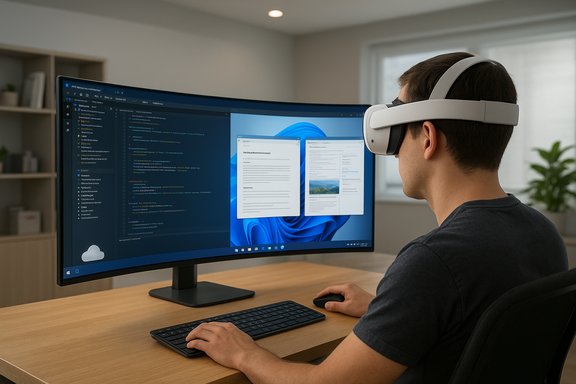
Microsoft and Meta have moved the desktop into mixed reality: Windows 11's new Mixed Reality Link and the updated Meta Horizon OS now let Quest 3 and Quest 3S owners stream full, high‑resolution Windows desktops — including multi‑monitor and an ultrawide immersive mode — into their headsets, creating a portable, panoramic workspace that blurs the line between physical monitors and virtual real estate.
Microsoft began exploring a tighter Windows-to-headset workflow with preview builds and developer tests in late 2024. That work formalized into Mixed Reality Link, a Windows 11 app that pairs a PC with a supported Meta headset and streams the desktop, either local or a Windows 365 Cloud PC, into the headset. Public preview testing started in December 2024 and Microsoft moved the technology toward general availability during coordinated updates with Meta in 2025. Meta's Horizon OS has been evolving in parallel. Recent Horizon OS releases (the v81 family in particular) added home environment improvements, passthrough and window pinning features, and system-level display controls such as resize and rescale, all of which make projecting and arranging virtual monitors more flexible and workspace‑friendly inside a Quest headset. Those Horizon OS updates are the platform-level enabler that turns a streamed Windows desktop into something closer to a productive mixed‑reality workspace.
The arrival of a full Windows desktop inside a Quest headset reframes the question of where desktops live: not on desks, but in the mixed space between devices, networks, and thoughtfully designed user experiences. The technology is real and usable today for many scenarios, but measured pilots and sensible ergonomics are essential to turning novelty into productivity.
Source: TechSpot Windows Remote Desktop goes immersive as Meta Quest 3 adds mixed-reality workspaces
 Background
Microsoft began exploring a tighter Windows-to-headset workflow with preview builds and developer tests in late 2024. That work formalized into Mixed Reality Link, a Windows 11 app that pairs a PC with a supported Meta headset and streams the desktop, either local or a Windows 365 Cloud PC, into the headset. Public preview testing started in December 2024 and Microsoft moved the technology toward general availability during coordinated updates with Meta in 2025. Meta's Horizon OS has been evolving in parallel. Recent Horizon OS releases (the v81 family in particular) added home environment improvements, passthrough and window pinning features, and system-level display controls such as resize and rescale, all of which make projecting and arranging virtual monitors more flexible and workspace‑friendly inside a Quest headset. Those Horizon OS updates are the platform-level enabler that turns a streamed Windows desktop into something closer to a productive mixed‑reality workspace. What Microsoft and Meta are shipping now
Key user‑facing features
- Mixed Reality Link (Windows 11 app): Installs on a Windows 11 PC (22H2 or later) and establishes the paired streaming link to a Quest 3/3S headset. It supports streaming a local desktop or Windows 365 Cloud PCs.
- Multi‑monitor streaming: The system can present multiple virtual monitors at once inside the headset, giving a panoramic desktop experience without physical displays.
- Ultrawide immersive mode: An optional continuous, curved display that wraps around the user's field of view and simulates a very wide monitor (similar in concept to Apple's Vision Pro spatial displays). This mode was tested in preview builds and is now part of the public rollout.
- Workspace customization tools: New Meta features let users resize and rescale windows, pin apps into fixed locations in MR/VR Home or passthrough, and run more concurrent windows (Meta increased the concurrent app limit in v81).
- Quick Full Passthrough: A one‑gesture quick check (double‑tap or Quest 3S action button) to instantly see the physical world while maintaining the virtual workspace context.
How it works — setup, requirements, and pairing
Quick setup steps
- Ensure your PC runs Windows 11 (22H2 or newer) and has the minimum hardware and network setup recommended by Microsoft.
- Install Mixed Reality Link from the Microsoft Store on your Windows 11 PC.
- On the Quest 3/3S, install the Windows App (the Quest store Windows App) and ensure Horizon OS is updated to the version that supports pairing (v72+ was needed for previews; v81 expanded availability).
- Use the headset pairing UI (look at your keyboard and tap "Pair" or scan a QR) and accept the connection to begin streaming. Interaction methods include headset controllers, hand tracking, and passthrough view for keyboard/mouse awareness.
Minimum and recommended PC requirements (high level)
Microsoft's guidance includes generational GPU and CPU thresholds (for example, Intel integrated graphics from 8th‑gen Core and recent discrete NVIDIA/AMD models), contemporary Wi‑Fi (5 GHz or 6 GHz recommended), and certain open network ports (for low‑latency streaming). A gigabit LAN to the PC or strong 5/6 GHz Wi‑Fi is recommended for crisp, low‑artifact rendering. These requirements are intentional: streaming readable text and windows requires reliable bandwidth and low latency.The ultrawide mode: what it is and why it matters
The ultrawide immersive mode converts multiple virtual displays into a continuous, curved surface that occupies much of the user’s horizontal field of view. The effect is to reproduce the multi‑monitor workflow (side‑by‑side code, reference, and communication windows) without physical screens. This approach mirrors what high‑end spatial displays are attempting — a large, private desktop that can be carried anywhere. Why this is significant:- It reduces desk clutter and physical hardware costs for traveling professionals or compact workspaces.
- It allows fast context switching across multiple high‑resolution windows without alt‑tabbing.
- It creates opportunities for designers, video editors, and developers to maintain workspace layouts across locations.
Performance, compatibility, and real‑world behavior
Network and graphics are the gating factors
Streaming readable desktop text is hostile to packet loss and latency. Microsoft’s documentation highlights the need for 5 GHz/6 GHz connections, robust signal strength (90% recommended for best quality), and open ports where network equipment or firewalls might otherwise block the Mixed Reality Link connection. Users on weaker Wi‑Fi or congested networks see blockiness, stuttering, and delays.Platform compatibility and edge cases
- Windows on x86 (Intel/AMD) is explicitly supported; recent updates also extended support to Windows on Arm (Snapdragon X series) in some builds, broadening device compatibility. However, not every Windows PC will provide the same quality: older integrated GPUs remain borderline for demanding ultrawide rendering.
- The rollout is staged and regionally varied. Many new features were previewed and then expanded during the Horizon OS v81 rollout; some users received features earlier or later depending on experimental toggles and staged distribution. That means access and quality can differ by user and by device.
User reports and troubleshooting
Early adopters in community forums experienced a range of issues: pairing hiccups, error codes during streaming (e.g., -5001 family errors), and driver compatibility troubles. Microsoft and Meta provide troubleshooting guidance — check Wi‑Fi band, disable interfering firewall rules, and ensure the PC is awake and unlocked when reconnecting. These are practical steps but the diversity of home networks and managed corporate environments means some users will need more advanced network configuration.Security, privacy, and enterprise considerations
Security posture
- The streaming link is designed for private network use and Microsoft recommends same‑SSID connections or ensuring the headset and PC are on the same subnet. Open inbound ports are documented; in managed networks, firewall and proxy settings can block the connection. These networking surfaces create predictable administrative concerns for IT teams that must be assessed before enabling in an enterprise environment.
Data exposure and physical security
Using a headset as a private display has benefits — a user’s screen is shielded from shoulder‑surfing — but it also raises new vectors:- Passthrough toggles mean the headset can show physical surroundings; improper configuration could leak background information during meetings if camera passthrough is routed into shared content.
- Pairing procedures, if left unchecked on open networks, could expose PCs to unauthorized pairing attempts; administrators should apply standard endpoint policies and require device management controls where appropriate.
Enterprise readiness
Microsoft’s focus on Windows 365 Cloud PCs inside the Mixed Reality Link vision signals enterprise intent: streamed Cloud PCs can centralize data and policy control while enabling immersive workspaces at the endpoint. For IT buyers this is attractive — central management, consistent images, and policy compliance — but readiness depends on network design, endpoint compliance tools, and user training. Rapid pilot projects will help validate whether the productivity gains outweigh deployment complexity.Real productivity benefits (and where the hype meets reality)
Genuine advantages
- Space efficiency: Replace multiple physical monitors with a single headset and a configurable virtual desktop.
- Portability: A consistent workspace that follows you between offices, hotel rooms, and home workspaces.
- Context preservation: Persistent window layouts and pinning can reduce cognitive cost of re‑arranging apps.
Practical limitations
- Visual fidelity vs. comfort: Readable text at typical desktop font sizes demands high pixel density and low latency; current headset displays and home Wi‑Fi setups sometimes fall short, causing eye strain over long periods.
- Ergonomics: Headsets change posture and neck load dynamics versus looking at a physical monitor bank. Long sessions will require deliberate ergonomics planning and possibly frequent breaks.
- Input fidelity: While passthrough and keyboard visualization help, some workflows (e.g., precision CAD, 3D sculpting) still work best with physical monitors and calibrated color pipelines.
How Mixed Reality Link stacks up against alternatives
Apple Vision Pro and the ultrawide concept
Apple’s Vision Pro popularized a high‑resolution spatial approach to desktop productivity with a strong emphasis on display fidelity and system‑level spatial UX. Meta and Microsoft are taking a software‑first, cross‑platform approach: leveraging a wide install base of PC users and Quest hardware to get similar ultrawide workflows into hands sooner and more affordably. Expect differences in pixel density, color fidelity, and OS‑level integration: Vision Pro remains a different class of hardware‑software tightly controlled by Apple, while the Meta + Windows path is more modular and network‑dependent.Virtual Desktop and other third‑party apps
Third‑party apps such as Virtual Desktop have long offered PC streaming into headsets with a community of power users. Microsoft’s Mixed Reality Link differs by being an official Windows 11 integration with explicit Windows 365 support and OS-level collaboration promises. The tradeoff is that the first‑party solution may offer smoother integration for Windows features, while third‑party tools often focus on performance and feature experimentation. Users will pick the tool that best balances fidelity, security, and convenience for their workflows.Risks, unknowns, and what to watch
- Staged rollouts and feature fragmentation: New Horizon OS features are frequently staged; some users receive changes earlier via experimental channels while others wait. This creates a fragmented experience and inconsistent documentation. Treat public announcements as broad availability markers rather than guarantees of immediate access for every user.
- Network and home environment variance: The experience is highly dependent on Wi‑Fi spectrum, router quality, and local interference. Corporate WLANs and home mesh setups will need tuning for consistently good quality streaming.
- Hardware lifecycle and support: Quest 2 and older hardware are not part of this initial wave; Microsoft and Meta’s support matrix can leave legacy owners behind. Enterprises must consider lifecycle timelines when procuring devices.
- Health and ergonomics: Long‑term effects of intensive mixed‑reality desktop work (eye strain, posture) require study and conservative adoption plans; current guidance suggests regular breaks and ergonomic assessments. This is a non‑trivial adoption cost for knowledge workers. Flagged as a practical risk rather than a hypothetical one.
Practical recommendations for users and IT teams
- For individual power users:
- Start with a short pilot: test one to two hour sessions to validate readability and comfort.
- Use a wired or high‑quality 5/6 GHz Wi‑Fi connection and prioritize a reduced number of background devices on the same channel.
- Tune Mixed Reality Link settings to balance resolution vs. refresh rate; monitor GPU and CPU load.
- For IT and procurement teams:
- Pilot with a small user group and instrument network telemetry to measure bandwidth and latency impacts.
- Verify corporate WLAN SSID/subnet topology and firewall rules to allow the required ports and streaming traffic.
- Consider Windows 365 Cloud PCs to centralize policy and simplify device endpoint management for mixed‑reality use cases.
Final analysis — is this ready for everyday work?
The combined Microsoft + Meta push brings genuine capability to the mixed‑reality workspace: official Windows 11 integration, multi‑monitor streaming, Cloud PC support, and the ultrawide immersive display all add up to a practical productivity story rather than a mere demo. For many users — particularly mobile professionals, developers who need many reference windows, and enterprises seeking a centrally managed virtual desktop experience — the value proposition is clear. At the same time, the experience is not yet a plug‑and‑play replacement for a high‑quality multi‑monitor physical setup. The practical barriers—Wi‑Fi quality, host GPU capability, staged rollouts, and ergonomics concerns—mean that adoption should be pragmatic: run pilots, set realistic expectations, and use these toolchains where the portability and private workspace benefits outweigh the current tradeoffs in fidelity and comfort. Mixed Reality Link marks a meaningful step toward mainstream mixed‑reality productivity by marrying Windows 11's ecosystem with Meta’s rapidly maturing headset platform. The biggest winners will be teams and individuals who invest in the necessary network and device hygiene up front — and who treat headsets as a complementary, flexible workspace, not an immediate wholesale replacement for carefully calibrated physical monitors.The arrival of a full Windows desktop inside a Quest headset reframes the question of where desktops live: not on desks, but in the mixed space between devices, networks, and thoughtfully designed user experiences. The technology is real and usable today for many scenarios, but measured pilots and sensible ergonomics are essential to turning novelty into productivity.
Source: TechSpot Windows Remote Desktop goes immersive as Meta Quest 3 adds mixed-reality workspaces
