

Microsoft's Mixed Reality Link has left preview and entered general availability for Meta Quest headsets, turning Quest 3 and Quest 3S into capable, portable Windows workstations that can host multiple high‑resolution virtual monitors and connect to local Windows 11 PCs or managed Windows 365 Cloud PCs.
Microsoft first introduced Mixed Reality Link as a public preview in December 2024, aiming to stream a Windows desktop into mixed‑reality headsets and test reliability, latency, and display scaling with the community. That testing run has now transitioned to a full general availability release on October 30, 2025, timed to coincide with Meta’s Horizon OS v81 rollout that removed the feature’s “experimental” requirement on Quest devices. The GA launch is more than a marketing milestone; it signals that Microsoft considers the experience stable enough for everyday use and enterprise pilots. The official Windows Experience Blog frames the update as bringing the “full power of Windows 11 and Windows 365 to mixed reality headsets,” explicitly naming the Meta Quest 3 and Quest 3S as supported hardware.
What’s driving excitement:
Mixed Reality Link is less a finished revolution than the opening chapter of a broader productivity experiment: it proves that widely available consumer headsets can host legitimate Windows workflows, and it forces vendors, IT admins, and users to reckon with what productive, wearable computing looks like when the desk melts away.
Mixed Reality Link’s GA release marks the moment when headset productivity moves beyond developer demos into everyday pilots; IT teams should evaluate the feature now with an emphasis on Windows 365 guardrails, realistic ergonomics testing, and rigorous network validation before announcing any broad adoption plans.
Source: Glass Almanac Mixed Reality Link Reveals Multi-Monitor Support in 2025: Why It Matters Now
 Background
Microsoft first introduced Mixed Reality Link as a public preview in December 2024, aiming to stream a Windows desktop into mixed‑reality headsets and test reliability, latency, and display scaling with the community. That testing run has now transitioned to a full general availability release on October 30, 2025, timed to coincide with Meta’s Horizon OS v81 rollout that removed the feature’s “experimental” requirement on Quest devices. The GA launch is more than a marketing milestone; it signals that Microsoft considers the experience stable enough for everyday use and enterprise pilots. The official Windows Experience Blog frames the update as bringing the “full power of Windows 11 and Windows 365 to mixed reality headsets,” explicitly naming the Meta Quest 3 and Quest 3S as supported hardware. What Mixed Reality Link delivers today
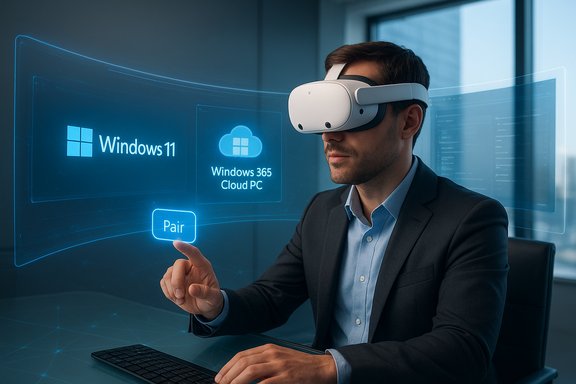
Mixed Reality Link now offers a set of capabilities focused on making a headset feel like a conventional multi‑monitor desktop — but in 3D space. The key features shipped at GA include:- Seamless pairing between a Meta Quest 3/3S and a Windows 11 PC or a Windows 365 Cloud PC for managed sessions.
- Multiple high‑resolution virtual monitors and an immersive ultrawide curved display mode that wraps a virtual screen around the user’s field of view.
- Choice between full immersion and passthrough modes so users can either isolate themselves in a virtual workspace or see their real environment (keyboard/desk) for hybrid workflows.
- Improved connection reliability, higher resolution virtual displays, and usability improvements refined during the public preview.
Why timing matters: Horizon OS v81 enabled broad rollout
Microsoft’s decision to push Mixed Reality Link to GA on October 30, 2025 was strategic: Meta’s Horizon OS v81 includes OS‑level changes that made the Windows app easier to deliver to ordinary Quest users without toggling experimental features. The v81 update also introduced improvements to window management, rescaling, passthrough controls, and the Horizon home environment — changes that materially improved the user experience for a productivity‑first scenario. The combination of a platform update (Horizon OS v81) plus Microsoft's app stabilization means the rollout is not just for early adopters or developers: ordinary Quest owners will see the Mixed Reality Link option appear as part of their system experience. That lowers adoption friction and opens the door to rapid experimentation by freelancers, remote workers, and IT pilots.Technical requirements and network considerations
Microsoft published minimum and recommended requirements for Mixed Reality Link that IT teams and prosumers should validate before running pilot programs. Key technical constraints include:- Windows host: Windows 11, version 22H2 or later is required.
- Graphics: Supported GPUs include recent Intel integrated GPUs (8th gen and later with UHD 620 or higher), AMD integrated and discrete options starting from Ryzen 3000 APUs / Radeon RX 5000 series, and NVIDIA GTX 900 series or newer in Microsoft’s published guidance. Arm devices (Snapdragon X series) are listed for compatibility scenarios, too.
- Network: Gigabit LAN support on the router/switch is recommended; Wi‑Fi 5 (802.11ac) is minimum with Wi‑Fi 6/802.11ax recommended for best results; 5GHz is required (6GHz preferable). Microsoft also lists specific ports (8264 TCP, 8265 TCP, 8266 UDP) that may need firewall exceptions.
- Bluetooth: Low‑energy Bluetooth (BLE) is recommended for peripheral pairing and some UI interactions.
Verified feature details and where reporting diverges
Several specific product claims are prominent in early coverage — and a few details currently show variance across outlets and user reports. These are the key, verified claims and the areas that still require cautious reading:- General availability date: Microsoft’s Windows Experience Blog and the public announcement place GA on October 30, 2025.
- Supported headsets: Meta Quest 3 and Quest 3S are explicitly supported at GA.
- Multiple high‑resolution monitors and an ultrawide display mode are shipped at GA; early reporting documents the ultrawide mode as a recent addition that curves around the user’s field of view.
- App concurrency limits reported in the wild vary: some outlets and Meta release notes reference the ability to open many windows (reports cite "up to 12 apps" in one writeup), while other testing notes and publications report lower practical limits (for example, some reviewers observed six active windows at launch). Because UI multitasking limits are tied to firmware and staged server‑side feature flags, expect variance in reported limits across sources and regions. Treat any specific "max apps" number as provisional until vendors finalize public limits.
Early reactions: excitement versus pragmatic skepticism
Initial industry coverage and community responses show a split between enthusiasm for a portable ultrawide desktop and healthy reservations about real‑world ergonomics and session duration.What’s driving excitement:
- The idea of having a truly portable ultrawide — one that curves around your field of view and is not constrained by physical desk real estate — is attractive to developers, designers, and multitaskers. Early hands‑on coverage highlights the novelty of placing an IDE, browser, and meeting window in separate spatial positions.
- Comfort and ergonomics: extended headset sessions amplify questions about weight, heat, and neck strain. Ergonomics experts warn that VR headsets were designed for intermittent use and not yet optimized for eight‑hour workdays. Community threads and early testers consistently mention battery life and the need to periodically break sessions.
- Security and data leakage: connecting unmanaged consumer headsets to corporate endpoints raises concerns about sensitive data leaving controlled networks. Microsoft suggests Windows 365 Cloud PC as a mitigation path (keep data inside managed cloud sessions), but many enterprises will require policy design and endpoint management before greenlighting local pairing.
Security, compliance, and the Windows 365 mitigation
The most immediate enterprise concern is the attack surface introduced when consumer hardware pairs to corporate Windows machines:- Data exfiltration risk: unmanaged headsets that connect to an endpoint over Wi‑Fi introduce possible vectors for screen capture, shoulder surfing, or unintended recording.
- Endpoint control: allowing a headset to pair to a local, domain‑joined PC exposes IT teams to management challenges around authentication, auditing, and peripheral control. Microsoft’s recommended mitigation is to favor Windows 365 Cloud PC sessions when a trusted, managed environment is required; Cloud PC keeps corporate data on Microsoft’s managed cloud instance rather than on the user’s local disk.
- Restrict Mixed Reality Link to managed devices via Group Policy or endpoint management tooling.
- Require Windows 365 Cloud PC for regulated workloads and block local pairing for sensitive systems.
- Implement network segmentation and firewall rules that prevent unmanaged subnets from reaching corporate resources.
- Ensure logging and auditing for cloud sessions and require MFA for any Windows 365 access.
A practical IT and developer test plan
For IT teams and developers preparing to evaluate Mixed Reality Link, the following ordered checklist will surface the most important operational and UX questions:- Baseline environment prep
- Confirm Windows 11 host is 22H2 or later and the GPU and network meet Microsoft’s minimums. Validate firewall ports (8264 TCP, 8265 TCP, 8266 UDP) and that Quest and PC are discoverable on the same subnet.
- Installation and pairing validation
- Install Mixed Reality Link on Windows, update the Quest to Horizon OS v81, and run the pairing flow (look at keyboard → tap Pair). Confirm pair resilience across reboots and network changes.
- Latency and fidelity tests (local vs Cloud PC)
- Measure round‑trip input latency for text/keyboard, mouse/pointer, and video playback locally and via Windows 365 Cloud PC. Log packet loss, jitter, and perceived frame drops during a sustained 30‑minute session.
- Multi‑app layout and display scaling
- Open real workloads (IDE, browser, conferencing app, productivity suite) across virtual monitors and in ultrawide mode. Evaluate font legibility, color fidelity, and the mental cost of switching attention between windows.
- Peripheral and input coverage
- Validate Bluetooth and USB keyboard/mouse behavior, hotkeys (Alt+Tab equivalents), and passthrough activation. Ensure assistive technologies remain functional for accessibility testing.
- Security and policy enforcement
- Pilot Windows 365 sessions with conditional access and DLP policies. Confirm that local drives remain inaccessible (if required) and that logging captures session activity.
- User acceptance and ergonomics trial
- Run longitudinal user tests (2–4 weeks) with a sample group using the headset for intermittent productivity sessions. Capture discomfort reports, battery behavior, and subjective productivity metrics.
Use cases that make sense today
Mixed Reality Link is not a plug‑and‑play replacement for a seated multi‑monitor desk yet, but it opens several practical scenarios where the headset provides distinct advantages:- Travel‑ready productivity: a consultant on a train or in a hotel can set up a private multi‑monitor environment without multiple physical displays. Cloud PC pairing reduces data risks.
- Deep focus sessions: the headset’s ability to block out distractions with an immersive private workspace is useful for concentration‑first tasks (coding sprints, writing, spreadsheet modeling).
- Design and layout workflows: an ultrawide curved virtual monitor can approximate very large canvases for editing or layout work without physical ultrawide hardware. Early hands‑on reporting highlights the novelty of a wraparound canvas.
Limitations, unanswered questions, and practical risks
Despite the promise, there are clear limitations and unresolved areas:- Comfort and ergonomics: extended use remains a concern. Headset weight, thermal comfort, and neck strain are nontrivial for full‑day use. Early reviewers explicitly call out these issues.
- Battery life: Quest 3 / 3S battery constraints suggest mobile, untethered sessions will be limited unless a hot‑swap or tethered power solution is used. This dampens the notion of all‑day headset computing.
- App compatibility and accessibility: not all Windows apps behave well in virtualized multi‑monitor spaces; apps with tightly specified UI scaling may show visual anomalies. Accessibility support for assistive technologies requires testing and may lag.
- Feature gating and rollout variance: reported app limits (e.g., “open up to 12 apps” versus lower observed limits) indicate staged feature flags; enterprises must validate behavior in their region and firmware configuration.
The bigger picture: what this release signals for AR/VR productivity
Mixed Reality Link’s GA on widely sold consumer headsets is a watershed because it pushes immersive productivity into the mainstream smartphone‑level ecosystem. For years, immersive productivity was confined to pricey spatial computers or developer kits. By enabling multi‑monitor Windows 11 and Windows 365 on mass‑market Quest devices, Microsoft and Meta are effectively testing an alternate endpoint model:- Cloud‑first computing becomes more viable: Windows 365 sessions are a direct way for enterprises to let users enjoy immersive productivity without local machine exposure.
- UI and app design incentives will shift: desktop apps that assume single static displays may be redesigned to be layout‑aware in mixed reality, enabling better docks, floating tools, and persistent ancillary panels.
- A new form factor for “second screen” thinking: rather than buying ultrawide monitors, some users may choose a headset + Cloud PC combo for portability and privacy — at least until lighter AR glasses with longer battery arrive.
Final assessment and practical verdict
Mixed Reality Link’s general availability on Meta Quest 3 and Quest 3S is a meaningful step: it converts a preview experiment into a usable product path for mobile immersive productivity, backed by Windows 365 as an enterprise control plane. The release is technically credible — Microsoft’s documentation lists concrete requirements and Meta’s Horizon OS v81 provides the platform capabilities necessary for better multiwindow handling. Notable strengths:- Low friction for end users to pair and start a multi‑monitor session.
- Integration with Windows 365 provides a practical enterprise mitigation for data leakage.
- New ultrawide and rescaling options move the productivity experience closer to spatial computers at a fraction of the device cost.
- Ergonomics and session durability for prolonged, day‑long work remain unproven.
- Staged rollouts and feature flags mean behavior (app limits, window concurrency) can differ by device, region, and firmware. Validate locally.
- Enterprise security requires deliberate policy work; unmanaged local pairing introduces risk and many organizations may restrict use to Windows 365 Cloud PC only.
Mixed Reality Link is less a finished revolution than the opening chapter of a broader productivity experiment: it proves that widely available consumer headsets can host legitimate Windows workflows, and it forces vendors, IT admins, and users to reckon with what productive, wearable computing looks like when the desk melts away.
Mixed Reality Link’s GA release marks the moment when headset productivity moves beyond developer demos into everyday pilots; IT teams should evaluate the feature now with an emphasis on Windows 365 guardrails, realistic ergonomics testing, and rigorous network validation before announcing any broad adoption plans.
Source: Glass Almanac Mixed Reality Link Reveals Multi-Monitor Support in 2025: Why It Matters Now
