

Microsoft is quietly preparing one of the most welcome reversals in Windows 11’s shell story: the return of a movable taskbar that can sit at the top or sides of the display, not just the bottom. That sounds small on paper, but it addresses one of the most persistent complaints about Windows 11’s desktop experience — the sense that Microsoft traded away flexibility in exchange for visual consistency. The timing matters because this appears to be surfacing after years of user frustration, widespread third-party workarounds, and a steady drumbeat of criticism that Windows 11’s taskbar felt less like a mature desktop control and more like a locked-down compromise. WindowsForum’s own coverage has framed the change as part of a broader 2026 reset for Windows 11, with Microsoft increasingly willing to restore long-requested controls rather than simply layering on new features. Windows 11 launched in October 2021, Microsoft made a deliberate bet: the company would modernize the desktop by simplifying it. That meant centered icons, a revised Start experience, and a taskbar that looked cleaner but offered fewer configuration options than the one in Windows 10. For casual users, that change was easy to miss or even welcome. For power users, it was immediately obvious that the platform had become more opinionated and less adaptable.
The taskbar was the f that shift because it is not decorative chrome. It is where users launch apps, switch windows, watch system state, and manage daily workflow. In earlier versions of Windows, the taskbar could be moved to any edge of the screen, resized, and shaped around monitor geometry or habit. Windows 11 took that away, and the backlash never really died down.
Microsoft’s reasoning was understandable was not. The Windows 11 shell was influenced by Windows 10X ideas, which favored a calmer, more consistent interface and assumed a future that would be more constrained, more touch-friendly, and less dependent on highly customized desktop behavior. That heritage explains why the taskbar initially arrived cleaner but thinner in capability. In effect, Windows 11 treated flexibility as baggage, and many users treated that as a regression.
The criticism was especially strong among users with ultrawide r rigs, portrait displays, and specialized workflows. For those users, taskbar position is not a cosmetic preference. It changes eye movement, mouse travel, usable screen real estate, and the rhythm of multitasking. A bottom-locked taskbar can feel fine on a laptop; on a large or vertically oriented setup, it can feel unnecessarily rigid.
That is why the current leak matters so much. It is not simply a UI tweak. It is a siy be re-evaluating the trade-offs it made at launch and deciding that a modern Windows desktop has to be more flexible, not less. The reported return of movable placement fits a larger pattern in 2026 coverage: more control, fewer surprises, and a renewed emphasis on usability over aesthetic purity.
The leaked video, as described in the current reporting, appears to show a Microsoft developer demonstrating internal taskbar placement controls through a debug menu. Those controls include the classic bottom position, plus top, left, and right placements, with the taskbar snapping into place after selection. That is the key point: Microsoft is not just experimenting with icon alignment anymore; it is testing the physical location of the taskbar itself.
The demo also suggests that the user interface reacts intelligently to the new position. App icons adapt immediately, which is exactly what you would expect from a shell-level implementation rather than a crude hack layered on top of Explorer. In other words, this looks like a native feature path, not a third-party overlay or registry trick. That matters because Windows users have spent years relying on tools such as Start11 and ExplorerPatcher to restore lost behavior.
One of the more interesting details is the reported disappearance of the search bar when the taskbar is moved to the left or right edge. That is not a bug so much as a clue about design constraints. A horizontal search box makes sense on a bottom or top bar, but on a vertical strip it would consume precious space and awkwardly reshape the layout. Microsoft may be balancing feature parity with visual sanity, which is exactly the sort of compromise that makes sense during testing.
This distinction matters for two reasons. First, it reduces the risk of over-reading a test build and assuming the ship version will match pixel-for-pixel. Second, it hints that Microsoft may want the feature to feel intentional and polished, not like a buried experiment. Users have been burned before by features that appeared in previews and later changed shape, so caution is warranted. Prototype is not the same as promise.
For power users, the issue is fundamentally about control. Windows has long sold itself as the configurable desktop, not a fixed appliance interface. When Microsoft removed taskbar mobility in Windows 11, it signaled that a cleaner default mattered more than an adaptable workflow. Restoring movement would be a rare admission that the old Windows philosophy still has value.
For everyday consumers, the value is subtler but real. Some people simply prefer a top-aligned taskbar because it keeps focus closer to the top of documents and browser windows. Others like the sides because they want a little more vertical room for content. Even if many users never touch the setting, the existence of the option makes the OS feel less prescriptive and more respectful.
This is where the feature becomes larger than the leak itself. Microsoft is not just giving back a missing setting; it is acknowledging that one-size-fits-all desktop design has limits. That message matters in a product that is now expected to support business users, creators, gamers, students, and accessibility-conscious users all at once.
This is important because Microsoft’s problem with Windows 11 has never been a lack of polish in isolation. The problem has been that some polished choices felt less useful than what they replaced. A tidy interface that makes daily work harder is not a compelling upgrade, especially for people who live in Windows all day. Restoring control is therefore not nostalgia; it is damage control and product strategy rolled into one.
There is a competitive dimension here too. Windows does not compete only with macOS or Linux in a vacuum; it competes against user expectations shaped by years of muscle memory, corporate deployment habits, and hardware diversity. If Microsoft wants Windows 11 to feel credible as a modern desktop platform, it needs to show that modern does not automatically mean locked down.
That also explains why Microsoft may be deliberately cautious. A feature that has become symbolic acquires risk that ordinary shell settings do not. If the implementation is awkward, the backlash will be much louder than the applause. Microsoft appears to know this and is therefore treating the rollout as a measured reset rather than a flashy reveal. Slow is better than sloppy in this case.
This is also a reminder that restoring a feature does not mean copying the old behavior exactly. Windows 11 has different visual rules, different animation models, and different assumptions about modern UI density. Microsoft may therefore revive the old concept while reworking the presentation to match the current shell language.
The trade-off will matter to users. Some will prefer a compact vertical bar and are likely to accept the icon-only search access. Others will dislike losing the visible search field and may see that as another example of Microsoft taking away as it gives back. The final design will have to decide whether it is optimizing for consistency or convenience.
That is why this leak should be read as a design conversation rather than a final answer. Microsoft is experimenting with what a flexible taskbar looks like in a modern UI. The disappearance of the search field is not necessarily a flaw; it may be the first sign that the company is tailoring the experience to edge-mounted layouts instead of force-fitting old assumptions into new spaces.
Enterprises also tend to care about predictability. If Microsoft brings back movement through a well-documented Settings control rather than a hidden registry tweak, admins get a cleaner support story. That is better than relying on unsupported shell hacks that can break after feature updates and create unnecessary help desk noise.
For consumers, the impact is more emotional but no less real. Many home users see Windows 11’s taskbar restrictions as a symbol of a broader trend toward reduced agency. Giving people back a familiar control says that Microsoft is at least listening, even if it took years to do so. That matters in a market where perception can be as important as engineering.
That is why the rumored change could resonate far beyond enthusiast communities. Once a taskbar behaves the right way on multi-monitor systems, it improves the day-to-day feel of the entire platform. The effect is cumulative rather than dramatic, which is exactly what makes it valuable.
The leak also comes at a moment when Microsoft is trying to present Windows 11 as a product that is getting sharper, not heavier. A movable taskbar fits that narrative because it is not flashy. It is practical, familiar, and visibly user-driven. In a year when many software companies are racing to prove how much AI they can stuff into a platform, Microsoft may be discovering that basic control still sells trust better than novelty.
It is also possible that the implementation changes before release. The leaked demo may show a rough interface that gets replaced by a cleaner control path in Settings, or the feature may gain additional safeguards for snapping, auto-hide, or dual-display layouts. Nothing in a test build is final, and that is especially true for a shell component as central as the taskbar.
This change also creates room for broader shell improvements. If the taskbar can be moved again, then resize controls, adaptive density, and better multi-monitor behavior become more plausible next steps. Microsoft could turn one reversal into a larger story about a more flexible desktop platform.
There is also the risk of inconsistency. Microsoft has a long history of allowing a feature to return in one form while stripping away something else around it. Users may accept a new taskbar position only if the surrounding shell behavior remains coherent. If not, the feature could become another example of Windows 11 giving with one hand and taking with the other.
It will also be worth watching how Microsoft communicates the feature. If the company frames it as a direct response to user feedback, that will reinforce the idea that Windows 11 is becoming more responsive to the community. If it downplays the change as a minor convenience, it may miss an opportunity to rebuild goodwill with the same users who have complained about the taskbar since launch.
Source: PCWorld Windows 11 dev accidentally leaks video of the new movable taskbar
The taskbar was the f that shift because it is not decorative chrome. It is where users launch apps, switch windows, watch system state, and manage daily workflow. In earlier versions of Windows, the taskbar could be moved to any edge of the screen, resized, and shaped around monitor geometry or habit. Windows 11 took that away, and the backlash never really died down.
Microsoft’s reasoning was understandable was not. The Windows 11 shell was influenced by Windows 10X ideas, which favored a calmer, more consistent interface and assumed a future that would be more constrained, more touch-friendly, and less dependent on highly customized desktop behavior. That heritage explains why the taskbar initially arrived cleaner but thinner in capability. In effect, Windows 11 treated flexibility as baggage, and many users treated that as a regression.
The criticism was especially strong among users with ultrawide r rigs, portrait displays, and specialized workflows. For those users, taskbar position is not a cosmetic preference. It changes eye movement, mouse travel, usable screen real estate, and the rhythm of multitasking. A bottom-locked taskbar can feel fine on a laptop; on a large or vertically oriented setup, it can feel unnecessarily rigid.
That is why the current leak matters so much. It is not simply a UI tweak. It is a siy be re-evaluating the trade-offs it made at launch and deciding that a modern Windows desktop has to be more flexible, not less. The reported return of movable placement fits a larger pattern in 2026 coverage: more control, fewer surprises, and a renewed emphasis on usability over aesthetic purity.
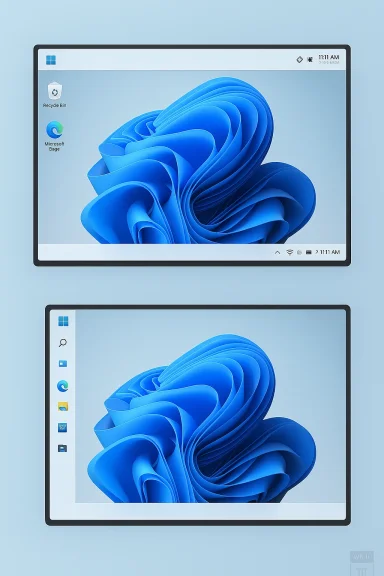 What the Leak Actually Shows
The leaked video, as described in the current reporting, appears to show a Microsoft developer demonstrating internal taskbar placement controls through a debug menu. Those controls include the classic bottom position, plus top, left, and right placements, with the taskbar snapping into place after selection. That is the key point: Microsoft is not just experimenting with icon alignment anymore; it is testing the physical location of the taskbar itself.The demo also suggests that the user interface reacts intelligently to the new position. App icons adapt immediately, which is exactly what you would expect from a shell-level implementation rather than a crude hack layered on top of Explorer. In other words, this looks like a native feature path, not a third-party overlay or registry trick. That matters because Windows users have spent years relying on tools such as Start11 and ExplorerPatcher to restore lost behavior.
One of the more interesting details is the reported disappearance of the search bar when the taskbar is moved to the left or right edge. That is not a bug so much as a clue about design constraints. A horizontal search box makes sense on a bottom or top bar, but on a vertical strip it would consume precious space and awkwardly reshape the layout. Microsoft may be balancing feature parity with visual sanity, which is exactly the sort of compromise that makes sense during testing.
Debug menu versus finished product
The leaked method likely will not be how regular users access the feature. The reports strongly suggest the debug menu was present only for internal testing, and the fobably expose the setting through Windows Settings or the taskbar personalization area. That is important because it separates implementation from product design: what developers use to validate the feature is often not what customers will see.This distinction matters for two reasons. First, it reduces the risk of over-reading a test build and assuming the ship version will match pixel-for-pixel. Second, it hints that Microsoft may want the feature to feel intentional and polished, not like a buried experiment. Users have been burned before by features that appeared in previews and later changed shape, so caution is warranted. Prototype is not the same as promise.
- The taskbar can reportedly move to the top, left, or right edges.
- App icons adjust automatically to the new layout.
- The search bar may disappear on vertical edges.
- The internal toggle appears to be a testing mechanism, not the likely final UI.
- The final release is expected to surface through Settings rather than a debug menu.
Why This Feature Matters More Than It Seems
A movable taskbar is one of those features that sounds trivial until you actually use it. Once you start working with a vertical monitor, a wide 32:9 display, or a multi-screen setup, the placement of the shell changes how much of the desktop feels usable. Microsoft is not merely changing where icons sit; it is changing how the operating system maps itself onto a user’s working space.For power users, the issue is fundamentally about control. Windows has long sold itself as the configurable desktop, not a fixed appliance interface. When Microsoft removed taskbar mobility in Windows 11, it signaled that a cleaner default mattered more than an adaptable workflow. Restoring movement would be a rare admission that the old Windows philosophy still has value.
For everyday consumers, the value is subtler but real. Some people simply prefer a top-aligned taskbar because it keeps focus closer to the top of documents and browser windows. Others like the sides because they want a little more vertical room for content. Even if many users never touch the setting, the existence of the option makes the OS feel less prescriptive and more respectful.
Accessibility and ergonomics
There is also an accessibility angle. Users who rely on specific spatial habits often build extremely efficient routines around edge placement. Moving the taskbar may improve reachability for some and reduce strain for others. A desktop operating system should not force every user into one visual arrangement when different bodies, postures, and display setupt needs.This is where the feature becomes larger than the leak itself. Microsoft is not just giving back a missing setting; it is acknowledging that one-size-fits-all desktop design has limits. That message matters in a product that is now expected to support business users, creators, gamers, students, and accessibility-conscious users all at once.
- Better fit for ultrawide and portrait displays.
- More comfusers who prefer top-edge navigation.
- Less dependence on third-party shell utilities.
- Improved ergonomics for some accessibility scenarios.
- Stronger alignment with the long-standing Windows promise of customization.
Microsoft’s Broader Windows 11 Reset
The movable taskbar is not arriving in isolation. Recent Windows covet is quietly rethinking several shell choices that users found too restrictive. The taskbar is the headline, but the company is also reportedly revisiting related behaviors such as resizing, icon density, and richer taskbar calendar functionality. That broader cluster of changes suggests a real shift in product philosophy.This is important because Microsoft’s problem with Windows 11 has never been a lack of polish in isolation. The problem has been that some polished choices felt less useful than what they replaced. A tidy interface that makes daily work harder is not a compelling upgrade, especially for people who live in Windows all day. Restoring control is therefore not nostalgia; it is damage control and product strategy rolled into one.
There is a competitive dimension here too. Windows does not compete only with macOS or Linux in a vacuum; it competes against user expectations shaped by years of muscle memory, corporate deployment habits, and hardware diversity. If Microsoft wants Windows 11 to feel credible as a modern desktop platform, it needs to show that modern does not automatically mean locked down.
The role of Insider testing
Microsoft’s Insider program is central to this story because the taskbar is full of edge cases. Auto-hide behavior, DPI scaling, multi-monitor transitions, drag-and-drop behavior, and touch input all become more complicated when the bar can move. Testing these combinations internally is not optional; it is the only way to avoid shipping a “restored” feature that breaks the very users asking for it.That also explains why Microsoft may be deliberately cautious. A feature that has become symbolic acquires risk that ordinary shell settings do not. If the implementation is awkward, the backlash will be much louder than the applause. Microsoft appears to know this and is therefore treating the rollout as a measured reset rather than a flashy reveal. Slow is better than sloppy in this case.
- Taskbar placement may be part of a broader shell refinement push.
- Microsoft seems to be prioritizing usability after years of criticism.
- Internal testing can catch monitor, scaling, and touch regressions.
- The company may be using this as a trust-building move with power users.
- The change fits a larger 2026 theme of restoring control.
The Search Bar Trade-Off
One of the most revealing details in the leak is the reported disappearance of the search bar when the taskbar is docked on the left or right. That is a practical design choice, and it tells us Microsoft is likely thinking in terms of usable geometry rather than feature absolutism. Vertical taskbars are narrow by nature; a full search box would be wasteful and visually clumsy.This is also a reminder that restoring a feature does not mean copying the old behavior exactly. Windows 11 has different visual rules, different animation models, and different assumptions about modern UI density. Microsoft may therefore revive the old concept while reworking the presentation to match the current shell language.
The trade-off will matter to users. Some will prefer a compact vertical bar and are likely to accept the icon-only search access. Others will dislike losing the visible search field and may see that as another example of Microsoft taking away as it gives back. The final design will have to decide whether it is optimizing for consistency or convenience.
e outcomes
The practical outcome will depend heavily on how Microsoft arranges the surrounding shell elements. If the Start menu, search entry point, and taskbar behavior all remain coherent, users may barely miss the search box. If the surrounding interactions feel fragmented, the vertical modes could seem like compromises rather than complete solutions.That is why this leak should be read as a design conversation rather than a final answer. Microsoft is experimenting with what a flexible taskbar looks like in a modern UI. The disappearance of the search field is not necessarily a flaw; it may be the first sign that the company is tailoring the experience to edge-mounted layouts instead of force-fitting old assumptions into new spaces.
- Vertical placement likely favors compactness over full search UI.
- The final design may shift based on user feedback.
- Search access may rely more heavily on the magnifying glass icon.
- Microsoft is likely balancing clarity against space efficiency.
- The behavior could evolve before release.
Enterprise Versus Consumer Impact
For enterprise IT, taskbar mobility is not just a nice-to-have. A lot of organizations have standardized on workflows that depend on specific monitor setups, remote desktop configurations, and specialized business applications. Restoring the ability to move the taskbar reduces friction for power users without imposing meaningful administrative cost, which is exactly the sort of quality-of-life improvement that IT departments quietly appreciate.Enterprises also tend to care about predictability. If Microsoft brings back movement through a well-documented Settings control rather than a hidden registry tweak, admins get a cleaner support story. That is better than relying on unsupported shell hacks that can break after feature updates and create unnecessary help desk noise.
For consumers, the impact is more emotional but no less real. Many home users see Windows 11’s taskbar restrictions as a symbol of a broader trend toward reduced agency. Giving people back a familiar control says that Microsoft is at least listening, even if it took years to do so. That matters in a market where perception can be as important as engineering.
Multi-monitor and specialty setups
The biggest winners may be users with unusual display arrangements. A vertical taskbar can be genuinely useful on a portrait monitor, while top placement can feel more natural on setups where the lower portion of the screen is already crowded with content or docked panels. These are not fringe use cases anymore; they are normal in development, design, and content-heavy workflows.That is why the rumored change could resonate far beyond enthusiast communities. Once a taskbar behaves the right way on multi-monitor systems, it improves the day-to-day feel of the entire platform. The effect is cumulative rather than dramatic, which is exactly what makes it valuable.
- Helps standardize enterprise desktop setups.
- Reduces reliance on unsupported customization tools.
- Improves fit for multi-monitor and portrait workflows.
- Supports more predictable remote and hybrid work environments.
- Makes Windows 11 feel less like a compromise in managed fleets.
Why the Timing Matters
The timing of the leak is part of what gives the story momentum. Windows coverage this year has increasingly suggested that Microsoft is trying to answer long-running UI complaints with concrete shell changes instead of vague promises. That makes a leaked developer video feel less like random noise and more like a sign of where the product is headinlain why the story has generated so much attention. A taskbar change is one of the few Windows features that can still unify casual users, power users, and enterprise admins in shared annoyance or relief. In a world of AI features, cloud services, and layered app integrations, sometimes the most meaningful update is the one that simply lets you use your desktop the way you already wanted.The leak also comes at a moment when Microsoft is trying to present Windows 11 as a product that is getting sharper, not heavier. A movable taskbar fits that narrative because it is not flashy. It is practical, familiar, and visibly user-driven. In a year when many software companies are racing to prove how much AI they can stuff into a platform, Microsoft may be discovering that basic control still sells trust better than novelty.
What the leak suggests about rollout strategy
If Microsoft does ship this feature, it will almost certainly do so in stages. Insider validation first, broader preview later, then a general release once the shell behaves correctly across hardware classes. That is the prudent path, and the company has every reason to be careful because taskbar behavior touches too many core Windows interactions to move fast and break things.It is also possible that the implementation changes before release. The leaked demo may show a rough interface that gets replaced by a cleaner control path in Settings, or the feature may gain additional safeguards for snapping, auto-hide, or dual-display layouts. Nothing in a test build is final, and that is especially true for a shell component as central as the taskbar.
- Expect Insider-first validation.
- Expect the final control surface to be in Settings.
- Expect refinements to vertical taskbar behavior.
- Expect edge-case fixes for multi-monitor systems.
- Expect the visuals to evolve before general release.
Strengths and Opportunities
The strongest argument for this feature is simple: it restores a widely loved Windows behavior without asking users to sacrifice modern polish. That makes it a rare change that is both symbolic and practical. It also gives Microsoft a chance to demonstrate that Windows 11 can evolve in response to criticism rather than merely defend its defaults.This change also creates room for broader shell improvements. If the taskbar can be moved again, then resize controls, adaptive density, and better multi-monitor behavior become more plausible next steps. Microsoft could turn one reversal into a larger story about a more flexible desktop platform.
- Restores a classic Windows customization option.
- Reduces friction for power users.
- Improves the fit for specialized monitor setups.
- Strengthens Microsoft’s credibility with frustrated users.
- Opens the door to taskbar resizing and related refinements.
- Helps Windows 11 feel more like a mature desktop OS.
Risks and Concerns
The biggest risk is that Microsoft ships a feature that looks restored but feels incomplete. If vertical placement is clumsy, if search access becomes awkward, or if edge cases break, users will judge the comeback harshly. A half-finished revival would do more damage than no revival at all.There is also the risk of inconsistency. Microsoft has a long history of allowing a feature to return in one form while stripping away something else around it. Users may accept a new taskbar position only if the surrounding shell behavior remains coherent. If not, the feature could become another example of Windows 11 giving with one hand and taking with the other.
- Search could become less convenient on vertical bars.
- The UI may behave differently across hardware and DPI setups.
- Microsoft could change or delay the feature before release.
- Unsupported customization tools may still outpace native controls.
- Users may see the feature as late rather than new.
- Enterprise admins may need documentation and training updates.
Looking Ahead
The most important thing to watch is whether Microsoft treats this as a one-off correction or the start of a broader design philosophy shift. If taskbar mobility ships alongside resizing and other shell improvements, Windows 11 could begin to feel less like a curated experience and more like a true desktop platform again. That would be a meaningful change in tone, not just in appearance.It will also be worth watching how Microsoft communicates the feature. If the company frames it as a direct response to user feedback, that will reinforce the idea that Windows 11 is becoming more responsive to the community. If it downplays the change as a minor convenience, it may miss an opportunity to rebuild goodwill with the same users who have complained about the taskbar since launch.
Key things to watch
- Whether the feature appears first in Insider builds.
- Whether Microsoft exposes it in Settings or only elsewhere.
- Whether taskbar resizing arrives at the same time.
- Whether the search field remains visible on any edge position.
- Whether the final implementation supports multiple monitors cleanly.
- Whether Microsoft positions this as part of a broader Windows 11 reset.
Source: PCWorld Windows 11 dev accidentally leaks video of the new movable taskbar
