

Microsoft is preparing to bring a long-requested kind of control to Windows 11: a native Feature Flags page that would let Insiders and enthusiasts manually turn experimental OS capabilities on or off instead of waiting for Microsoft’s staggered rollout system to decide when those features appear. That matters because Windows has increasingly moved to Controlled Feature Rollout as its default delivery model, which is safer for Microsoft but often frustrating for users who want to test new ideas immediately. The new page, currently hidden in build 26300.8155, looks designed to make Windows behave a little more like Chrome’s flags system, while also acknowledging the risks that come with bypassing Microsoft’s careful rollout gates.
For years, Windows Insiders have lived inside a tension that defines modern Microsoft software: they sign up to test early, but they still often receive features slowly and unevenly. Microsoft’s current rollout model is built around Controlled Feature Rollout and related experiment infrastructure, meaning a feature can exist in a build without being turned on for every eligible device. That approach reduces blast radius, helps isolate regressions, and gives Microsoft data before a broad launch, but it also means that being in an Insider channel does not always feel like true access. Microsoft’s own Edge documentation explains the same philosophy in browser form, where experimental and feature-flagged capabilities can be enabled or disabled independently of a feature’s public default state.
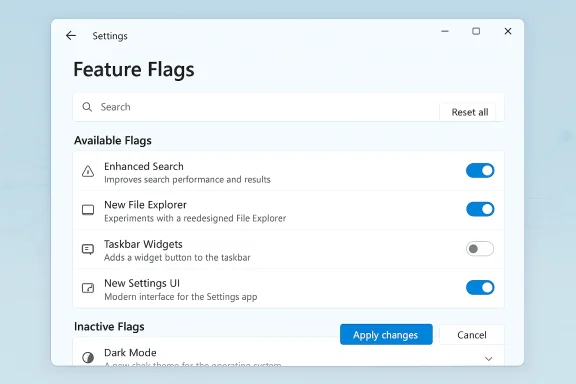
That is why the reported Windows 11 Feature Flags page is such an interesting shift. If the screenshots and descriptions are accurate, the page would give users a visible list of available flags, a search box, and controls for resetting or applying changes, along with a separate area for inactive flags that have either finished rolling out or are no longer present on the device. In other words, Microsoft appears to be moving from an opaque “wait and hope” model toward a more explicit “choose, test, and report” model. The warning that toggling these options could affect performance or stability is not just boilerplate; it is a reminder that Microsoft still expects this to be used by people who understand the consequences.
This is also a notable cultural reversal. A few years ago, Microsoft experimented with an Experimental Features style option in Insider settings, but that never matured into a lasting public mechanism. Instead, the company standardized on staged rollout and hidden experimentation, which made tools like ViVeTool popular among power users who wanted to force-enable features from recent builds. The new Feature Flags page, if it ships widely, could make that workaround era feel outdated overnight. It would be Microsoft admitting that the community’s hunger for control is real, even if the company still wants to retain the ability to protect the platform from widespread instability.
There is also an unmistakable user-experience argument here. The Windows Insider Program is supposed to reward curiosity, feedback, and tolerance for rough edges, yet the gradual rollout model often leaves even the most eager testers staring at empty checklists and waiting for an invisible server-side switch. Giving users a way to manually toggle features would restore some of the original spirit of Insider participation. It would also reduce the gap between Microsoft’s stated desire for feedback and the practical reality of who actually gets to touch the new code first.
The same logic is visible in Microsoft’s browser and cloud ecosystems. Edge has long used experiment flags and controlled rollout mechanisms, and Azure App Configuration even formalizes feature flags as a software delivery practice. The underlying pattern is simple: ship the code, gate the experience, then widen access only when the evidence supports it. Windows is merely the most visible and controversial place where that pattern is now colliding with power-user expectations.
The practical effect is that Windows Insiders have often become feature detectives instead of feature testers. They scan build artifacts, search for IDs, and trade hidden switches across forums because the platform does not always let them use the new capabilities in a direct, supported way. A native Feature Flags page would not remove the appeal of discovery, but it would make the process more transparent and less dependent on community reverse engineering.
A searchable list also suggests Microsoft expects a large enough flag inventory to require navigation help. That is telling. It implies the company is not thinking about one or two playful test switches, but about a broader internal rollout surface that could eventually cover multiple Windows subsystems. If so, the page could become a central control point for experimentation across the OS, not just a single preview gimmick. That would be a meaningful evolution of how Microsoft exposes unfinished work.
At the same time, the warning is also an invitation. It says, in effect, if you want to live at the edge, you are allowed to do so—but you own the outcome. That is a very Insider-friendly philosophy, and it is one that may finally align Windows more closely with the mindset of its most technical users. The platform needs both groups: people who want reliability and people willing to absorb risk in exchange for early access.
It also creates a shared vocabulary across Microsoft products. Edge has flags, Azure has feature flags, and Windows would join that family with a native UI. That consistency matters because it lets Microsoft describe experimentation the same way across consumer, enterprise, and developer ecosystems. The result is a more coherent narrative: features are no longer simply “on” or “off,” but staged, measured, and governed.
So while the analogy is useful, it is also incomplete. Windows Feature Flags would need stricter guardrails, clearer labeling, and likely more careful scope control than a browser implementation. That distinction is crucial because Microsoft’s credibility depends on not turning the desktop OS into a playground where every experimental change is one click away from breaking the user’s environment.
Windows 11’s current model is more flexible but also more confusing. A build can be technically newer and still feel feature-poor compared with a slightly older one on another PC. That undermines one of the core emotional rewards of being an Insider: the sense that you are seeing the future before everyone else.
This matters especially for secondary PCs and virtual machines, where many enthusiasts prefer to absorb instability in exchange for early access. Those users are not asking Microsoft to abandon caution. They are asking for a way to move faster when they personally accept the risk. That is a reasonable request, and one Microsoft now appears to be acknowledging.
The good news is that Microsoft already has a playbook for this. Edge’s policy model shows that feature overrides can be constrained, disabled, or limited to command-line use depending on the environment. That suggests Windows could adopt a similar pattern, letting enthusiasts toggle flags while keeping managed devices on a tighter leash.
Still, enterprise resistance should not obscure the value of controlled experimentation. Organizations often pilot features before general deployment, and a structured flag system could eventually help with internal validation as well. If Microsoft designs it carefully, the same mechanism that empowers hobbyists could also become a more transparent way for IT teams to stage features in lab environments.
That is especially relevant for less technical Insiders who joined for early features but not for deep debugging. Microsoft will have to communicate clearly that a visible toggle does not mean finished, recommended, or even well-localized. A feature can be present and still be quite unstable, and the warning language will need to reinforce that every time.
In practical terms, the feature could revive the sense that Windows Insiders are active participants rather than passive recipients. That is not a trivial emotional shift. The Insider community functions best when its members believe they can actually influence the product, and a native flags page would be a strong signal that Microsoft still values that relationship.
That matters because the company has spent years trying to convince users that Windows development can be both fast and safe. A visible flags page allows Microsoft to say, in effect, that speed and safety can coexist if the user opts into risk knowingly. It is a much more nuanced pitch than simply pushing everything through the same slow pipeline.
That does not mean Microsoft is copying Chrome or Edge wholesale. It means the company is borrowing a proven mechanism and adapting it for a much more complex operating system. The real question is whether Windows can expose that control without turning the system into a support nightmare. The answer will depend on how carefully Microsoft scopes the feature and how much policy control it gives administrators.
There is also a community benefit. Windows enthusiasts love feeling close to the product pipeline, and a visible flags interface is a powerful signal that their curiosity matters. That kind of goodwill should not be underestimated, especially when Windows still relies on power users, bloggers, admins, and troubleshooters to amplify what is new.
The second major concern is reproducibility. If one Insider has a flag enabled and another does not, then support threads, bug reports, and community analysis become harder to standardize. That is a manageable problem for veterans, but it could overwhelm newer testers who do not realize how much their configuration has changed.
The real test will be how Microsoft balances visibility with restraint. If the company exposes only a handful of safe-ish flags, some enthusiasts will be disappointed. If it exposes too much too quickly, support and stability problems could follow. The sweet spot is probably a measured rollout with clear policy controls, precise labels, and a way to reset everything cleanly when users need to back out.
For Windows enthusiasts, that could be the difference between feeling locked out and feeling invited in. For Microsoft, it could be a subtle but important way to turn frustration into participation without giving up the safeguards that made CFR necessary in the first place. If the company gets the execution right, this may become one of those small Settings additions that ends up changing the way power users think about Windows 11 altogether.
Source: Windows Latest Microsoft confirms Windows 11 is getting Chrome-like feature flags to bypass gradual rollouts
 Overview
For years, Windows Insiders have lived inside a tension that defines modern Microsoft software: they sign up to test early, but they still often receive features slowly and unevenly. Microsoft’s current rollout model is built around Controlled Feature Rollout and related experiment infrastructure, meaning a feature can exist in a build without being turned on for every eligible device. That approach reduces blast radius, helps isolate regressions, and gives Microsoft data before a broad launch, but it also means that being in an Insider channel does not always feel like true access. Microsoft’s own Edge documentation explains the same philosophy in browser form, where experimental and feature-flagged capabilities can be enabled or disabled independently of a feature’s public default state.That is why the reported Windows 11 Feature Flags page is such an interesting shift. If the screenshots and descriptions are accurate, the page would give users a visible list of available flags, a search box, and controls for resetting or applying changes, along with a separate area for inactive flags that have either finished rolling out or are no longer present on the device. In other words, Microsoft appears to be moving from an opaque “wait and hope” model toward a more explicit “choose, test, and report” model. The warning that toggling these options could affect performance or stability is not just boilerplate; it is a reminder that Microsoft still expects this to be used by people who understand the consequences.
This is also a notable cultural reversal. A few years ago, Microsoft experimented with an Experimental Features style option in Insider settings, but that never matured into a lasting public mechanism. Instead, the company standardized on staged rollout and hidden experimentation, which made tools like ViVeTool popular among power users who wanted to force-enable features from recent builds. The new Feature Flags page, if it ships widely, could make that workaround era feel outdated overnight. It would be Microsoft admitting that the community’s hunger for control is real, even if the company still wants to retain the ability to protect the platform from widespread instability.
There is also an unmistakable user-experience argument here. The Windows Insider Program is supposed to reward curiosity, feedback, and tolerance for rough edges, yet the gradual rollout model often leaves even the most eager testers staring at empty checklists and waiting for an invisible server-side switch. Giving users a way to manually toggle features would restore some of the original spirit of Insider participation. It would also reduce the gap between Microsoft’s stated desire for feedback and the practical reality of who actually gets to touch the new code first.
Why Microsoft’s rollout model matters
Microsoft’s shift to CFR changed Windows testing more than many casual observers realize. Under older ring-based Insider models, the public channels had clearer expectations: Fast got the newest stuff first, Slow followed after stabilization, and Release Preview served as a near-final staging area. That structure was imperfect, but it gave testers a more intuitive sense of where they stood. With CFR, Microsoft can ship one build while selectively enabling pieces of it, so two PCs on the same channel can experience different feature sets.The upside of staged delivery
From Microsoft’s point of view, this is rational engineering. A feature that is risky, region-specific, hardware-sensitive, or prone to regressions can be held back from broad exposure while telemetry accumulates. That lowers the odds of an embarrassing platform-wide failure, and it gives Microsoft more confidence before pushing something into a general release. This is especially important in Windows 11, where the company has had to balance aggressive feature velocity with the expectation that a desktop OS must remain stable for millions of enterprises and consumers.The same logic is visible in Microsoft’s browser and cloud ecosystems. Edge has long used experiment flags and controlled rollout mechanisms, and Azure App Configuration even formalizes feature flags as a software delivery practice. The underlying pattern is simple: ship the code, gate the experience, then widen access only when the evidence supports it. Windows is merely the most visible and controversial place where that pattern is now colliding with power-user expectations.
The downside for enthusiasts
For testers, however, CFR can feel like a trap. You join an Insider channel specifically to evaluate changes, then discover that the feature everyone is talking about is still switched off on your machine. At that point, the system rewards patience more than curiosity, which is a poor fit for a community made up partly of hobbyists, IT pros, and people who simply enjoy seeing what is coming next. That frustration is precisely what third-party tools like ViVeTool have been exploiting for years.The practical effect is that Windows Insiders have often become feature detectives instead of feature testers. They scan build artifacts, search for IDs, and trade hidden switches across forums because the platform does not always let them use the new capabilities in a direct, supported way. A native Feature Flags page would not remove the appeal of discovery, but it would make the process more transparent and less dependent on community reverse engineering.
What the new Feature Flags page appears to do
The leaked interface description suggests a page inside Windows Settings that would list active flags, inactive flags, and a search box for finding specific options. In the screenshots described by Windows watchers, there are also buttons to reset all flags and apply changes, which implies Microsoft is treating this as a real configuration surface rather than a hidden developer toy. That design choice matters because a feature presented inside Settings feels official, discoverable, and support-adjacent even if it is still experimental.Search, state, and separation
The most important part of the interface may not be the toggles themselves, but the separation between Available Flags and Inactive Flags. If Microsoft implements this cleanly, it could help users understand whether a feature is dormant because it is not yet enabled, already fully rolled out, or no longer present on the device. That would be much better than the current situation, where enthusiasts often have to infer state from build notes, hidden identifiers, or outside tools.A searchable list also suggests Microsoft expects a large enough flag inventory to require navigation help. That is telling. It implies the company is not thinking about one or two playful test switches, but about a broader internal rollout surface that could eventually cover multiple Windows subsystems. If so, the page could become a central control point for experimentation across the OS, not just a single preview gimmick. That would be a meaningful evolution of how Microsoft exposes unfinished work.
Safety warnings are not decorative
The warning that these changes may affect performance or stability is doing more than covering legal territory. Microsoft is signaling that feature toggles can alter the behavior of core OS logic, not just surface-level UI decorations. That means the company still sees experimentation as something that can meaningfully break things, which is why it has spent so many years on staged rollouts and telemetry-driven confidence building.At the same time, the warning is also an invitation. It says, in effect, if you want to live at the edge, you are allowed to do so—but you own the outcome. That is a very Insider-friendly philosophy, and it is one that may finally align Windows more closely with the mindset of its most technical users. The platform needs both groups: people who want reliability and people willing to absorb risk in exchange for early access.
Why this feels like a Chrome-style move
The comparison to Chrome is not accidental. Browser flags have long been the canonical place where power users go to bypass default behavior and test unfinished work. Chrome’s flags page became part of the browser’s identity, and Microsoft Edge borrowed heavily from that broader experimentation culture through its own flags and controlled rollout framework. Bringing the same model into Windows Settings would be a clear acknowledgement that the operating system can benefit from the same kind of transparent experimentation.Familiarity for power users
Power users understand flags. They know that experimental switches are temporary, that defaults can change, and that enabling one feature may interact with another in surprising ways. Because of that, a Windows Feature Flags page would feel immediately legible to a huge chunk of the Insider audience. It is easier to explain than obscure build IDs and far less intimidating than editing internal configuration through unofficial utilities.It also creates a shared vocabulary across Microsoft products. Edge has flags, Azure has feature flags, and Windows would join that family with a native UI. That consistency matters because it lets Microsoft describe experimentation the same way across consumer, enterprise, and developer ecosystems. The result is a more coherent narrative: features are no longer simply “on” or “off,” but staged, measured, and governed.
But Windows is not a browser
Still, Windows is not Edge. The operating system touches drivers, shell behavior, accessibility, update servicing, and enterprise policy in ways that a browser toggle often does not. A bad experiment in a browser tab is annoying; a bad experiment in the shell or update stack can destabilize a machine in much more consequential ways. That makes the stakes much higher than a typical browser flags page.So while the analogy is useful, it is also incomplete. Windows Feature Flags would need stricter guardrails, clearer labeling, and likely more careful scope control than a browser implementation. That distinction is crucial because Microsoft’s credibility depends on not turning the desktop OS into a playground where every experimental change is one click away from breaking the user’s environment.
Insider channels, then and now
The Windows Insider Program has changed dramatically since its launch in 2014. In the early days, the public channels had a simple progression, and testers could infer a rough maturity level from where a build appeared. That simplicity is gone. Today’s Insider setup uses Canary, Dev, Beta, and Release Preview channels, and feature exposure within each can still vary because of CFR.The old ring model was easier to reason about
The former Fast, Slow, and Release Preview rings were not perfect, but they matched user expectations better. If you wanted the bleeding edge, you went Fast. If you wanted something closer to stable, you chose Slow. That mental model was easy to explain to ordinary enthusiasts, even if the engineering behind it was imperfect or occasionally misleading.Windows 11’s current model is more flexible but also more confusing. A build can be technically newer and still feel feature-poor compared with a slightly older one on another PC. That undermines one of the core emotional rewards of being an Insider: the sense that you are seeing the future before everyone else.
Feature Flags could restore some agency
A native Feature Flags page would not bring back the old ring model, but it could restore a piece of the agency that got lost when CFR became dominant. If users can manually enable features already present in a build, then the channel itself becomes a true testing environment again. That is a subtle but important shift in power from Microsoft’s rollout algorithm back toward the people who opted into experimentation.This matters especially for secondary PCs and virtual machines, where many enthusiasts prefer to absorb instability in exchange for early access. Those users are not asking Microsoft to abandon caution. They are asking for a way to move faster when they personally accept the risk. That is a reasonable request, and one Microsoft now appears to be acknowledging.
Enterprise implications
Enterprise customers will likely read this development very differently from hobbyists. To an IT administrator, a settings page full of feature flags sounds like a governance challenge waiting to happen, not a community perk. Every new control surface creates policy questions, support burden, and the risk that users will expose themselves to instability or compliance issues. Microsoft knows this, which is why it already documents ways to limit feature-flag overrides in Edge through policy.Governance versus experimentation
In managed environments, the goal is usually predictability, not novelty. Organizations want consistent behavior across fleets, clear change windows, and a way to avoid accidental exposure to unfinished code. A Windows Feature Flags page would therefore need strong enterprise boundaries, possibly through Group Policy, MDM, or channel-level restrictions. Otherwise, the same feature that delights power users could become an administrative headache.The good news is that Microsoft already has a playbook for this. Edge’s policy model shows that feature overrides can be constrained, disabled, or limited to command-line use depending on the environment. That suggests Windows could adopt a similar pattern, letting enthusiasts toggle flags while keeping managed devices on a tighter leash.
Support and servicing concerns
There is also a supportability issue. If users can turn experimental features on and off freely, then troubleshooting becomes more complicated because the machine’s state may differ from the expected configuration for that build. Microsoft support teams, OEMs, and enterprise admins would need a clear way to identify whether a system has been altered through flags. Without that, every bug report risks becoming a detective story.Still, enterprise resistance should not obscure the value of controlled experimentation. Organizations often pilot features before general deployment, and a structured flag system could eventually help with internal validation as well. If Microsoft designs it carefully, the same mechanism that empowers hobbyists could also become a more transparent way for IT teams to stage features in lab environments.
Consumer impact
For consumers, the story is simpler and more exciting. A native Feature Flags page lowers the barrier between curiosity and action, which means more people will try features they would otherwise never see. That can make Windows feel more dynamic and more responsive to feedback, especially for users who enjoy following Insider chatter and testing new UI ideas as soon as they land.More access, more responsibility
The consumer upside is obvious: fewer hidden IDs, fewer external utilities, and less waiting for a server-side enablement that may take weeks or months to arrive. But the responsibility also shifts toward the user, who must now understand that a flag is not a promise of polish. Once a switch exists in Settings, some people will assume it is safe, and that could create confusion if the feature is still rough around the edges.That is especially relevant for less technical Insiders who joined for early features but not for deep debugging. Microsoft will have to communicate clearly that a visible toggle does not mean finished, recommended, or even well-localized. A feature can be present and still be quite unstable, and the warning language will need to reinforce that every time.
The enthusiast win is real
For enthusiasts, though, this is a genuine win. It removes the friction that has surrounded CFR for years and lets testers validate features on their own schedule. It also makes coverage and comparison easier for creators, bloggers, and forum members who want to document what Windows 11 is doing without waiting for Microsoft’s rollout lottery to favor a specific machine.In practical terms, the feature could revive the sense that Windows Insiders are active participants rather than passive recipients. That is not a trivial emotional shift. The Insider community functions best when its members believe they can actually influence the product, and a native flags page would be a strong signal that Microsoft still values that relationship.
Why Microsoft might be doing this now
Timing matters here. Windows 11 has been receiving a stream of changes in 2026, and Microsoft appears to be under pressure to make those changes more visible, more testable, and less arbitrary in how they appear on user devices. Recent Insider and release-channel patterns have made it obvious that Microsoft wants both broader experimentation and better control over how that experimentation is surfaced. A Feature Flags page is a natural answer to that tension.Feedback from the Insider community
Microsoft executives and Windows leads have also signaled that they are listening more carefully to feedback about rollout control. The reported comments from Marcus Ash about sharing more on WIP settings soon fit neatly with that message, suggesting this is not just a hidden engineering experiment but part of a broader Insider UX rethink. Even without a formal blog post, the direction is clear enough: Microsoft wants to make the testing experience feel more intentional.That matters because the company has spent years trying to convince users that Windows development can be both fast and safe. A visible flags page allows Microsoft to say, in effect, that speed and safety can coexist if the user opts into risk knowingly. It is a much more nuanced pitch than simply pushing everything through the same slow pipeline.
Competitive pressure is part of the story
There is also a competitive subtext. Microsoft has spent years watching Google and the broader Chromium ecosystem normalize experimental toggles, controlled rollouts, and feature gating. Bringing similar behavior directly into Windows makes the platform feel more modern and more aligned with the way software is built elsewhere in the industry. In that sense, Microsoft is not just responding to Windows Insiders; it is responding to the software industry’s broader delivery culture.That does not mean Microsoft is copying Chrome or Edge wholesale. It means the company is borrowing a proven mechanism and adapting it for a much more complex operating system. The real question is whether Windows can expose that control without turning the system into a support nightmare. The answer will depend on how carefully Microsoft scopes the feature and how much policy control it gives administrators.
Strengths and Opportunities
Microsoft’s proposed Feature Flags page has several obvious advantages, both practical and strategic. It could reduce community dependence on third-party tools, make testing more transparent, and revive some of the original excitement around the Insider Program. It could also help Microsoft gather better feedback from users who actually want to exercise experimental code instead of merely waiting for it to appear.- More transparency for experimental Windows 11 features.
- Less dependence on unofficial tools like ViVeTool.
- Faster feedback loops from users who actively want to test.
- Better alignment between Insider expectations and actual access.
- Cleaner education around what a feature toggle does and does not mean.
- Potential policy integration for enterprise environments.
- Stronger engagement from enthusiasts who want to report bugs early.
- A more modern Windows identity built around staged experimentation.
A better deal for testers
The most obvious opportunity is that Microsoft can finally meet testers halfway. Instead of forcing users to wait for a feature to be granted by the rollout system, the company can let them opt in knowingly and document their experience. That should produce richer feedback on edge cases, localizations, regressions, and UI behavior.There is also a community benefit. Windows enthusiasts love feeling close to the product pipeline, and a visible flags interface is a powerful signal that their curiosity matters. That kind of goodwill should not be underestimated, especially when Windows still relies on power users, bloggers, admins, and troubleshooters to amplify what is new.
Risks and Concerns
A native flags page is not risk-free, and Microsoft’s own warning language makes that clear. Giving users direct control over unfinished features can create instability, support confusion, and inconsistent device states. It can also tempt less technical users to enable switches they do not fully understand, especially if the UI makes the behavior look more finished than it really is.- System instability if users enable incompatible combinations.
- Support complexity when every device can have a different flag state.
- User confusion if a visible toggle is mistaken for a finished feature.
- Enterprise policy conflicts unless administrators can restrict access.
- Regression risk if users disable or re-enable the wrong flag.
- Fragmented reporting because bug reports will be harder to reproduce.
- Potential overexposure of features that Microsoft intended to keep gated.
- Security and compliance concerns in managed environments.
The most dangerous risk is false confidence
The largest danger may be psychological. Users often assume that anything presented in Settings is at least semi-stable, but in this case the page could still expose code that is actively in flux. That mismatch between appearance and maturity is a classic source of bad outcomes in software. A feature that looks official can still be deeply experimental.The second major concern is reproducibility. If one Insider has a flag enabled and another does not, then support threads, bug reports, and community analysis become harder to standardize. That is a manageable problem for veterans, but it could overwhelm newer testers who do not realize how much their configuration has changed.
Looking Ahead
If Microsoft follows through, the next few weeks should clarify whether Feature Flags is a narrow Insider convenience or the start of a broader experimentation layer for Windows 11. The most likely outcome is a staged debut in a future Insider build, with Microsoft controlling scope and maybe even limiting which features are exposed at first. If so, the page will be less of a free-for-all and more of a guided experiment.The real test will be how Microsoft balances visibility with restraint. If the company exposes only a handful of safe-ish flags, some enthusiasts will be disappointed. If it exposes too much too quickly, support and stability problems could follow. The sweet spot is probably a measured rollout with clear policy controls, precise labels, and a way to reset everything cleanly when users need to back out.
What to watch for next
- Whether Microsoft announces the feature in an Insider blog post.
- Whether the page appears first in Dev, Beta, or Canary.
- Whether administrators can disable it through policy.
- Whether all experimental features are listed or only a curated subset.
- Whether the feature expands beyond Windows Insider settings into broader Windows servicing.
For Windows enthusiasts, that could be the difference between feeling locked out and feeling invited in. For Microsoft, it could be a subtle but important way to turn frustration into participation without giving up the safeguards that made CFR necessary in the first place. If the company gets the execution right, this may become one of those small Settings additions that ends up changing the way power users think about Windows 11 altogether.
Source: Windows Latest Microsoft confirms Windows 11 is getting Chrome-like feature flags to bypass gradual rollouts
