

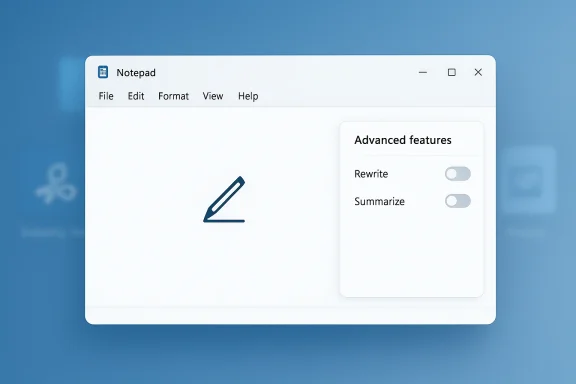
Microsoft’s latest Windows 11 Insider changes are less of a retreat from AI than a retreat from the Copilot brand plastered across everyday apps. In Notepad, the prominent Copilot button has been replaced by a more neutral writing icon, and the settings label has shifted from “AI features” to “Advanced features” while keeping the same underlying capabilities available to users. That is a meaningful cosmetic change, but it is not the AI rollback some Windows fans hoped for. Microsoft’s own recent Windows Insider messaging makes clear that the company is trying to be more intentional about where Copilot shows up, not eliminate it from Windows altogether.
The reaction to these tweaks says as much about Windows users as it does about Microsoft. Many users do not object to AI as a concept; they object to unwanted AI being inserted into core system apps in ways that feel intrusive, cluttered, or difficult to disable. The latest Notepad update lands squarely in that tension, because it preserves the features while toning down the branding that has become a lightning rod for criticism.
Microsoft’s own public language is important here. In its March 2026 Windows quality post, the company said it would be more intentional about how and where Copilot integrates across Windows and that it was reducing “unnecessary Copilot entry points,” starting with apps including Snipping Tool, Photos, Widgets, and Notepad. That is not the same as saying Copilot is being removed. It is a statement about presentation, placement, and perceived usefulness.
At the same time, the underlying technical story matters just as much as the branding story. Microsoft’s support documentation still describes Notepad’s AI tools as Rewrite, Summarize, and Write, powered by GPT and available to Windows Insiders on Canary and Dev channels, with the option to turn them off in settings. In other words, the software is still doing what it did before; it is just doing it with less Copilot marketing attached.
That distinction explains why the backlash has been so split. Some Windows watchers see a genuine concession from Microsoft, while others see a branding exercise that changes nothing substantive for people who never wanted AI in Notepad to begin with. Both readings have merit, and both reveal why Windows 11’s AI strategy remains one of the most polarizing aspects of the platform’s current evolution.
The Notepad experiment is especially revealing because Notepad occupies a symbolic place in Windows culture. It is one of the most basic and trusted apps in the operating system, which means any change to its behavior is noticed quickly and interpreted emotionally. When Microsoft attached Copilot-branded writing assistance to Notepad, it turned a minimalist utility into a showcase for the company’s AI ambitions. That made it a perfect target for criticism once the mood around Copilot soured.
Microsoft’s earlier rollout also made the current shift seem more dramatic than it is. In 2025, the company was still expanding Copilot visibility across Windows, including in app surfaces like Photos and broader Windows Insider updates. By early 2026, however, Microsoft’s public tone had changed: it began promising more restraint, more focus, and fewer redundant entry points. That change in messaging set up expectations that some users read as a near-removal of Copilot, even though Microsoft never used that language.
The app also highlights a crucial consumer-versus-enterprise divide. Enthusiast users tend to care about visual clutter, control, and the feeling of being nudged. Enterprise teams care about consistency, discoverability, supportability, and whether new features can be disabled or explained cleanly to staff. Microsoft’s shift from “AI features” to “Advanced features” may be subtle, but subtlety is often exactly what IT departments prefer when rolling out changes at scale.
The strongest complaint from users is not that Microsoft is shipping AI features; it is that those features often arrive with too much visual and rhetorical force. A small pen icon that says “Writing tools” is easier to process than a bright Copilot call-to-action in a utility app. The former suggests a feature set; the latter suggests an agenda. That difference may sound cosmetic, but in product design, cosmetics often shape trust.
The important part is the gap between label and function. Microsoft has not removed the capability; it has removed the branding emphasis. For users who objected to the appearance of Copilot itself, that will feel like a dodge. For users who mainly wanted the interface to be less loud, it will feel like progress. Both reactions are reasonable, which is why the update has generated such divergent interpretations.
This is where user expectations and corporate language collide. Windows fans who are tired of AI everywhere hear “reducing Copilot entry points” and infer that they will see fewer AI surfaces overall. Microsoft, meanwhile, seems to mean that it wants fewer redundant buttons, fewer noisy prompts, and more contextually appropriate placements. Those are not identical goals, and the mismatch is the source of much of the current disappointment.
There is also a strategic reason to preserve AI capabilities even while toning down the brand. Microsoft cannot simply exit the AI race without ceding mindshare to competitors across operating systems, browsers, and productivity suites. The company may be trying to separate the idea of Copilot from the broader presence of AI, so the brand can recede even if the functionality keeps growing.
The more emotional criticism goes further, arguing that Microsoft has crossed a line from helpful integration into AI slop. That phrase captures a broader sentiment: people do not merely dislike one feature, they dislike the feeling that the operating system is being reshaped around a business trend rather than user intent. The Notepad rename does little to address that core frustration because it leaves the underlying strategy intact.
Consumers also react differently depending on whether features feel optional or imposed. Microsoft’s documentation says Notepad’s AI tools can be switched off, which is important, but users are often less concerned with technical opt-out than with first impressions. A feature that is easy to disable can still feel intrusive if it arrives as a prominent default.
Enterprises also tend to prefer features that are discoverable without being loud. A generic label can be a strength in a corporate environment because it makes the software feel less like a consumer campaign and more like a tool. That does not eliminate privacy, licensing, or compliance questions, but it does make the feature more palatable to administrators who need to explain it to nontechnical staff.
There is also a pragmatic side to the rename. If Microsoft is going to keep AI in Windows apps, then reducing the Copilot label may lower the perception that every utility is being turned into a marketing surface. That could make administrators more willing to tolerate incremental AI rollouts, especially if the features remain optional and limited to specific contexts.
By backing away from the Copilot label in some places, Microsoft may be trying to distinguish between AI as infrastructure and AI as marketing. That is a savvy move if the goal is to make features feel native rather than bolted on. But it also risks sounding evasive if users believe the company is simply hiding the same thing behind a friendlier name.
This matters because the next phase of AI competition is likely to be less about raw model capability and more about product integration. If Microsoft can make AI feel like a background utility instead of a top-level campaign, it may preserve the benefits of the technology while reducing user hostility. That would not solve every complaint, but it could become the model other platform vendors follow.
That is why the current reaction is so harsh even though the actual technical change is modest. Microsoft is not removing the AI, and it is not exactly hiding it either. It is trying to reframe it. For a user base that has become sensitized to intrusive monetization, rebranding can look suspiciously like a refusal to listen.
That tension will probably persist because different Windows audiences want different things. Power users want control and minimalism. Mainstream consumers want convenience, but only if it feels genuine. Enterprises want manageability. Microsoft is trying to satisfy all three, and that is why every small UI change becomes a referendum on the company’s broader strategy.
Microsoft also has a communication problem to solve. The company will need to explain more clearly what “intentional” means in practice, especially for users who took the earlier messaging as a promise of a quieter Windows. Clearer opt-in flows, sharper labels, and more obvious controls would go a long way toward reducing the sense that AI is being smuggled into the OS by stealth.
Source: Neowin Microsoft isn't removing Copilot from Windows 11, it's just renaming it
 Overview
The reaction to these tweaks says as much about Windows users as it does about Microsoft. Many users do not object to AI as a concept; they object to unwanted AI being inserted into core system apps in ways that feel intrusive, cluttered, or difficult to disable. The latest Notepad update lands squarely in that tension, because it preserves the features while toning down the branding that has become a lightning rod for criticism.Microsoft’s own public language is important here. In its March 2026 Windows quality post, the company said it would be more intentional about how and where Copilot integrates across Windows and that it was reducing “unnecessary Copilot entry points,” starting with apps including Snipping Tool, Photos, Widgets, and Notepad. That is not the same as saying Copilot is being removed. It is a statement about presentation, placement, and perceived usefulness.
At the same time, the underlying technical story matters just as much as the branding story. Microsoft’s support documentation still describes Notepad’s AI tools as Rewrite, Summarize, and Write, powered by GPT and available to Windows Insiders on Canary and Dev channels, with the option to turn them off in settings. In other words, the software is still doing what it did before; it is just doing it with less Copilot marketing attached.
That distinction explains why the backlash has been so split. Some Windows watchers see a genuine concession from Microsoft, while others see a branding exercise that changes nothing substantive for people who never wanted AI in Notepad to begin with. Both readings have merit, and both reveal why Windows 11’s AI strategy remains one of the most polarizing aspects of the platform’s current evolution.
Background
Windows 11’s AI push did not begin with Notepad, and it certainly did not begin with the current backlash. Over the last couple of years, Microsoft has steadily threaded Copilot through the Windows shell, bundled apps, and web-connected experiences, often framing it as a productivity boost and a natural extension of the modern PC. That approach created a familiar problem for platform companies: when every feature gets a branded AI badge, the brand stops feeling helpful and starts feeling omnipresent.The Notepad experiment is especially revealing because Notepad occupies a symbolic place in Windows culture. It is one of the most basic and trusted apps in the operating system, which means any change to its behavior is noticed quickly and interpreted emotionally. When Microsoft attached Copilot-branded writing assistance to Notepad, it turned a minimalist utility into a showcase for the company’s AI ambitions. That made it a perfect target for criticism once the mood around Copilot soured.
Microsoft’s earlier rollout also made the current shift seem more dramatic than it is. In 2025, the company was still expanding Copilot visibility across Windows, including in app surfaces like Photos and broader Windows Insider updates. By early 2026, however, Microsoft’s public tone had changed: it began promising more restraint, more focus, and fewer redundant entry points. That change in messaging set up expectations that some users read as a near-removal of Copilot, even though Microsoft never used that language.
Why Notepad matters
Notepad is not just another app. It is a bellwether for how Microsoft wants people to think about Windows as a whole. When a core utility gets an AI layer, the question is no longer whether AI exists in Windows, but whether users can trust Microsoft to place it carefully and label it honestly. In that sense, Notepad is a test of taste as much as engineering.The app also highlights a crucial consumer-versus-enterprise divide. Enthusiast users tend to care about visual clutter, control, and the feeling of being nudged. Enterprise teams care about consistency, discoverability, supportability, and whether new features can be disabled or explained cleanly to staff. Microsoft’s shift from “AI features” to “Advanced features” may be subtle, but subtlety is often exactly what IT departments prefer when rolling out changes at scale.
The branding problem
Microsoft has an AI branding problem, and Windows 11 has become the most visible expression of it. The word Copilot was meant to evoke assistance and partnership, but in practice it often reads like a sales banner pasted onto features that users would have understood perfectly well without it. That mismatch is why the new Notepad label feels meaningful even though the underlying function has not changed.The strongest complaint from users is not that Microsoft is shipping AI features; it is that those features often arrive with too much visual and rhetorical force. A small pen icon that says “Writing tools” is easier to process than a bright Copilot call-to-action in a utility app. The former suggests a feature set; the latter suggests an agenda. That difference may sound cosmetic, but in product design, cosmetics often shape trust.
What changed in Notepad
In the Insider build, the Copilot toolbar button is gone. In its place is a pen-style icon that opens the same AI writing assistance options, including rewrite, summarize, tone adjustments, formatting, and generation. Microsoft also renamed the settings area from AI features to Advanced features, and users can still disable the AI-powered tools there.The important part is the gap between label and function. Microsoft has not removed the capability; it has removed the branding emphasis. For users who objected to the appearance of Copilot itself, that will feel like a dodge. For users who mainly wanted the interface to be less loud, it will feel like progress. Both reactions are reasonable, which is why the update has generated such divergent interpretations.
- The button is renamed, not deleted.
- The AI functions remain present.
- The settings category is less confrontational.
- The ability to disable the tools still exists.
- The overall experience is less branded and more generic.
Microsoft’s actual promise
A lot of the confusion stems from how Microsoft framed its recent Windows roadmap. The company did not promise to purge AI from Windows 11, and it did not claim that Copilot would disappear from the operating system. It said it would be more careful, more useful, and more selective in how it integrates AI. That is a narrower and more defensible promise, but it is also easier for frustrated users to misread as a broader retreat.This is where user expectations and corporate language collide. Windows fans who are tired of AI everywhere hear “reducing Copilot entry points” and infer that they will see fewer AI surfaces overall. Microsoft, meanwhile, seems to mean that it wants fewer redundant buttons, fewer noisy prompts, and more contextually appropriate placements. Those are not identical goals, and the mismatch is the source of much of the current disappointment.
The official wording matters
Microsoft’s phrasing about being more intentional is doing a lot of work. It lets the company preserve its AI strategy while acknowledging that the old presentation was too blunt. That is classic platform management: keep the capability, reduce the friction, and hope the audience notices the restraint more than the continuity.There is also a strategic reason to preserve AI capabilities even while toning down the brand. Microsoft cannot simply exit the AI race without ceding mindshare to competitors across operating systems, browsers, and productivity suites. The company may be trying to separate the idea of Copilot from the broader presence of AI, so the brand can recede even if the functionality keeps growing.
Consumer reaction
Consumer backlash has been predictable but still instructive. Many users want Windows 11 to feel lighter, more predictable, and less promotional, and they see Copilot buttons in core apps as the opposite of that goal. If the average user is already skeptical of AI-generated output, then filling the interface with AI labels only deepens the impression that Microsoft is pushing a feature they did not ask for.The more emotional criticism goes further, arguing that Microsoft has crossed a line from helpful integration into AI slop. That phrase captures a broader sentiment: people do not merely dislike one feature, they dislike the feeling that the operating system is being reshaped around a business trend rather than user intent. The Notepad rename does little to address that core frustration because it leaves the underlying strategy intact.
Why “just renaming it” still matters
Even so, naming is not trivial. In a mature operating system, labels help define what users believe an app is for. Calling something “Writing tools” signals a concrete utility, while calling it Copilot signals a brand relationship and a broader AI agenda. That distinction may not satisfy critics, but it is still a real design decision with real psychological effects.Consumers also react differently depending on whether features feel optional or imposed. Microsoft’s documentation says Notepad’s AI tools can be switched off, which is important, but users are often less concerned with technical opt-out than with first impressions. A feature that is easy to disable can still feel intrusive if it arrives as a prominent default.
- Users want less clutter.
- Users want clearer control.
- Users want opt-in behavior, not surprise expansion.
- Users are willing to accept AI when it is useful and quiet.
- Users dislike AI when it feels advertised inside the OS.
Enterprise implications
For enterprise IT, the story is more nuanced and arguably more favorable to Microsoft. Businesses rarely judge features solely by their branding; they care about policy control, support burden, and whether end users can be kept on a stable path. Renaming AI Features to Advanced features may seem minor, but subtle UI changes can reduce help-desk confusion and make documentation easier to write.Enterprises also tend to prefer features that are discoverable without being loud. A generic label can be a strength in a corporate environment because it makes the software feel less like a consumer campaign and more like a tool. That does not eliminate privacy, licensing, or compliance questions, but it does make the feature more palatable to administrators who need to explain it to nontechnical staff.
The support angle
Microsoft’s support documentation is especially relevant for business adoption. It clearly identifies the AI functions, their availability in Insider channels, and the option to disable them. That kind of transparency matters because enterprise teams need to know not just what a feature does, but whether they can control it, document it, and support it without creating an internal training mess.There is also a pragmatic side to the rename. If Microsoft is going to keep AI in Windows apps, then reducing the Copilot label may lower the perception that every utility is being turned into a marketing surface. That could make administrators more willing to tolerate incremental AI rollouts, especially if the features remain optional and limited to specific contexts.
Competitive context
Microsoft’s challenge is not unique, but it is unusually visible because Windows is such a central operating platform. Competitors across the software industry are racing to add generative AI to productivity tools, assistants, and operating systems, and that creates pressure to show progress. Yet the market is also teaching a second lesson: there is a growing difference between shipping AI and persuading users to like the way it is shipped.By backing away from the Copilot label in some places, Microsoft may be trying to distinguish between AI as infrastructure and AI as marketing. That is a savvy move if the goal is to make features feel native rather than bolted on. But it also risks sounding evasive if users believe the company is simply hiding the same thing behind a friendlier name.
What rivals may learn
Rivals should watch the Notepad episode closely. The lesson is that users may accept useful AI functions more readily when those functions are quiet, contextual, and easy to dismiss. They are far less forgiving when a company appears to be branding every inch of the interface.This matters because the next phase of AI competition is likely to be less about raw model capability and more about product integration. If Microsoft can make AI feel like a background utility instead of a top-level campaign, it may preserve the benefits of the technology while reducing user hostility. That would not solve every complaint, but it could become the model other platform vendors follow.
- Brand fatigue is now a competitive risk.
- Quiet integration may outperform loud promotion.
- Opt-out design is becoming part of product reputation.
- Utility-first AI is easier to defend than banner-style AI.
- User trust may matter as much as model quality.
The Windows 11 trust problem
Trust is the real issue underneath all of this. Windows users have long tolerated changes they disliked because Windows remained the default platform for work and a huge amount of personal computing. But that tolerance is not infinite, and AI features introduced in a heavy-handed way can feel like one more example of Microsoft assuming consent where it has not been given.That is why the current reaction is so harsh even though the actual technical change is modest. Microsoft is not removing the AI, and it is not exactly hiding it either. It is trying to reframe it. For a user base that has become sensitized to intrusive monetization, rebranding can look suspiciously like a refusal to listen.
Why the middle ground is hard
Microsoft is stuck in a classic platform dilemma. If it removes AI too aggressively, it risks appearing behind the curve in a market that increasingly expects machine assistance. If it pushes too hard, it alienates users who want a calmer, more predictable desktop. The middle path — less branding, same features — is rational, but it may also be the least emotionally satisfying option.That tension will probably persist because different Windows audiences want different things. Power users want control and minimalism. Mainstream consumers want convenience, but only if it feels genuine. Enterprises want manageability. Microsoft is trying to satisfy all three, and that is why every small UI change becomes a referendum on the company’s broader strategy.
Strengths and Opportunities
Microsoft’s current approach has a few genuine advantages if the company executes it carefully. The biggest opportunity is that it can reduce backlash without abandoning the AI investments it has already made across Windows and Microsoft 365. If the company keeps the capabilities but makes them less noisy, it may find a product-market fit that feels more sustainable than the current Copilot-first branding strategy.- Lower visual clutter in core apps.
- Better user trust through more neutral labels.
- Easier enterprise adoption with simpler documentation.
- Preserved AI functionality without a full rollback.
- More flexible branding across different Windows surfaces.
- Potentially fewer complaints about forced promotion.
- Room to refine how AI appears in future builds.
Risks and Concerns
The biggest risk is that Microsoft will interpret reduced backlash to branding as approval for the underlying AI strategy, when in fact many users may still dislike the feature placement itself. A softer icon does not automatically solve issues around relevance, discoverability, privacy perception, or the feeling that Windows is becoming cluttered with smart assistants. If the company mistakes cosmetic relief for substantive acceptance, the next wave of complaints could be even sharper.- Branding changes may not fix the core user objection.
- Users may see the rename as superficial.
- AI fatigue could grow if the company keeps pushing similar changes elsewhere.
- Support and documentation may become inconsistent across builds.
- Enterprise trust could suffer if promises are perceived as ambiguous.
- Consumer frustration may continue if AI remains default-present.
- Future features may be judged more harshly because of this episode.
Looking Ahead
The next few Insider builds will tell us whether Notepad is an isolated branding adjustment or the start of a broader Windows 11 tone shift. If Microsoft extends the same pattern to other apps like Photos, Snipping Tool, and Widgets, it will reinforce the idea that the company is dialing down the marketing layer while preserving the AI substrate. If it stops at a few visible apps, users are likely to conclude that the company is simply smoothing the rough edges of a rollout it has no intention of meaningfully reversing.Microsoft also has a communication problem to solve. The company will need to explain more clearly what “intentional” means in practice, especially for users who took the earlier messaging as a promise of a quieter Windows. Clearer opt-in flows, sharper labels, and more obvious controls would go a long way toward reducing the sense that AI is being smuggled into the OS by stealth.
What to watch next
- Whether Snipping Tool and Photos receive similar de-branding.
- Whether Microsoft changes Start menu or taskbar AI surfaces.
- Whether Insider feedback shows reduced hostility after the rename.
- Whether Microsoft adds clearer first-run prompts or opt-in choices.
- Whether future updates keep AI tools as utilities rather than promotions.
Source: Neowin Microsoft isn't removing Copilot from Windows 11, it's just renaming it
