

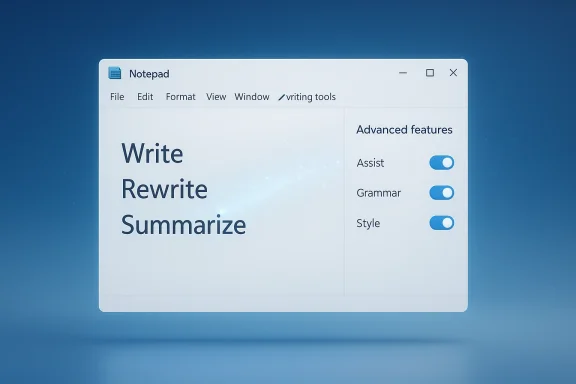
Microsoft is quietly shifting Windows 11’s AI story from branding-first to utility-first, and Notepad is the clearest sign yet. In the latest Insider preview, the familiar Copilot menu has been relabeled “writing tools,” the Copilot badge has been swapped for a pen icon, and AI-related settings have been moved under a more neutral “Advanced features” heading. The underlying functions are still there, but the visual emphasis is changing in a way that suggests Microsoft wants the AI to feel less like a billboard and more like a background capability. Microsoft’s own Insider and Learn documentation still describes Notepad AI as Copilot-powered and gives admins policy controls to disable those features, which makes the branding change especially telling: this is not a feature removal so much as a presentation reset. (blogs.windows.com)
Microsoft has spent the last two years turning Windows 11 into the primary showcase for Copilot. The company pushed AI into the taskbar, inbox apps, first-run experiences, and Microsoft 365, presenting it as a new layer of productivity for both consumers and enterprises. But Windows users are famously sensitive to interface clutter, and a desktop operating system is not a disposable mobile app that can be deleted if the design gets annoying. When AI begins appearing in places that used to be simple and fast, it stops feeling like a feature and starts feeling like an agenda.
Notepad became one of the most interesting testing grounds for that strategy. Once the purest example of Windows minimalism, it has gradually accumulated modern conveniences such as tabs, autosave-style behavior, formatting, spellcheck, and now AI-assisted writing tools. Microsoft’s January 2026 Insider release for Notepad version 11.2512.10.0 even described Write, Rewrite, and Summarize as AI text features that could stream results faster, while requiring a Microsoft account sign-in. That made Notepad a hybrid product: part old-school utility, part AI showcase. (blogs.windows.com)
The latest branding change is therefore bigger than it looks. When Microsoft renames Copilot controls to generic “writing tools,” it is acknowledging that not every useful capability needs a prominent AI label. The shift also fits a larger pattern across Windows Insider updates: the company appears to be reducing unnecessary Copilot entry points in apps like Notepad, Snipping Tool, Photos, and Widgets, while preserving the underlying functionality. In other words, the brand is being de-emphasized, but the product strategy remains intact. (blogs.windows.com)
That matters for both consumers and IT departments. Consumers tend to notice the noise; enterprises tend to notice the governance burden. Microsoft’s Learn documentation still provides policy and registry controls for disabling AI features in Notepad, which shows that the company expects organizations to manage these capabilities carefully rather than simply embrace them everywhere. The current redesign looks like a user-facing complement to that admin logic: if businesses want AI to be optional and controlled, Microsoft’s consumer UI may need to look more like a tool and less like a campaign. (support.microsoft.com)
The settings pane follows the same pattern. Instead of presenting the controls as AI settings, Microsoft now groups them under Advanced features, which reduces the sense that Notepad is trying to upsell AI at every turn. For a longstanding Windows utility, that matters because the app’s identity is still anchored in simplicity. A heavier label can make a lightweight feature feel like it requires more commitment than users are willing to give.
That distinction is the heart of the story. Microsoft is not retreating from AI in Notepad. It is reframing AI so it feels less intrusive and more context-aware. In the current Windows climate, that may be the more politically and commercially durable move.
This is why the rename to writing tools is more than cosmetic. It suggests Microsoft has recognized a basic usability principle: the best interface is often the one that communicates the job without announcing the vendor’s ambition. When a simple app becomes a brand billboard, users notice the mismatch immediately.
The company’s January Notepad update already hinted at this tension. It expanded formatting and AI writing support, but it also introduced a more discoverable feature set and faster streaming results. Microsoft was trying to make the app richer without making it heavier. The new branding shift is the next logical step in that balancing act. (blogs.windows.com)
That is likely the strategic sweet spot Microsoft is chasing. It wants users to think of AI as embedded assistance rather than a separate brand layer. If that works, Copilot becomes a capability, not just a logo.
The more Microsoft can make AI feel optional and task-specific, the easier it becomes for organizations to standardize Windows deployments. Enterprises do not want hidden magic. They want features they can explain, document, and disable if needed. The new branding language is a small step in that direction.
The interesting question is whether the rest of Windows 11 follows this pattern more explicitly. If Microsoft keeps reducing visible AI branding while expanding the management framework, it may be trying to make Copilot enterprise-safe by default. That would be a meaningful evolution from the earlier “put AI everywhere” phase.
There is also a psychological benefit to neutral naming. “Writing tools” sounds like part of the app, not a foreign object pasted onto it. That may sound minor, but user perception often turns on tiny cues. A pen icon, a calmer label, and a less dramatic settings category all make the feature feel more native.
That shift is important because Windows cannot sustain perpetual novelty without exhausting its users. A desktop operating system has to earn trust through predictability as much as it earns attention through new capabilities. Microsoft seems to have realized that the company’s AI story lands better when it is less forceful and more embedded.
That makes the current release worth watching even if the code changes are small. A pen icon might not look like much, but it can say a great deal about where Microsoft thinks the product should head next.
If successful, this could help Microsoft avoid the trap of making Copilot feel overexposed. Users often embrace useful tools more readily when they do not feel marketed to at every step. In that sense, less Copilot branding may actually improve Copilot adoption over time.
Microsoft’s challenge is to keep the AI features useful while making the interface feel calmer. That is easier said than done, especially when the company is trying to sell Windows 11 as both a modern operating system and an AI platform. The more Microsoft can keep those goals in balance, the more credible the platform becomes.
Source: ProPakistani Microsoft Starts Removing Copilot Brand From Several Windows Apps
 Background
Microsoft has spent the last two years turning Windows 11 into the primary showcase for Copilot. The company pushed AI into the taskbar, inbox apps, first-run experiences, and Microsoft 365, presenting it as a new layer of productivity for both consumers and enterprises. But Windows users are famously sensitive to interface clutter, and a desktop operating system is not a disposable mobile app that can be deleted if the design gets annoying. When AI begins appearing in places that used to be simple and fast, it stops feeling like a feature and starts feeling like an agenda.Notepad became one of the most interesting testing grounds for that strategy. Once the purest example of Windows minimalism, it has gradually accumulated modern conveniences such as tabs, autosave-style behavior, formatting, spellcheck, and now AI-assisted writing tools. Microsoft’s January 2026 Insider release for Notepad version 11.2512.10.0 even described Write, Rewrite, and Summarize as AI text features that could stream results faster, while requiring a Microsoft account sign-in. That made Notepad a hybrid product: part old-school utility, part AI showcase. (blogs.windows.com)
The latest branding change is therefore bigger than it looks. When Microsoft renames Copilot controls to generic “writing tools,” it is acknowledging that not every useful capability needs a prominent AI label. The shift also fits a larger pattern across Windows Insider updates: the company appears to be reducing unnecessary Copilot entry points in apps like Notepad, Snipping Tool, Photos, and Widgets, while preserving the underlying functionality. In other words, the brand is being de-emphasized, but the product strategy remains intact. (blogs.windows.com)
That matters for both consumers and IT departments. Consumers tend to notice the noise; enterprises tend to notice the governance burden. Microsoft’s Learn documentation still provides policy and registry controls for disabling AI features in Notepad, which shows that the company expects organizations to manage these capabilities carefully rather than simply embrace them everywhere. The current redesign looks like a user-facing complement to that admin logic: if businesses want AI to be optional and controlled, Microsoft’s consumer UI may need to look more like a tool and less like a campaign. (support.microsoft.com)
What Microsoft Changed in Notepad
The headline change is simple: the Copilot menu in Notepad preview builds has been renamed writing tools. That label is more descriptive and less brand-forward, which is exactly what makes it noteworthy. The feature set underneath is still the same, but the user no longer sees an app constantly announcing Microsoft’s AI umbrella brand every time they open a text utility.The new visual language
Microsoft also reportedly swapped the Copilot icon for a pen icon, which reinforces the idea that the feature belongs to writing assistance rather than a general-purpose assistant. That is a subtle shift, but subtle shifts are often where product strategy becomes visible. A pen communicates a task; Copilot communicates a platform. The difference is not semantic trivia, because users experience the interface before they experience the feature.The settings pane follows the same pattern. Instead of presenting the controls as AI settings, Microsoft now groups them under Advanced features, which reduces the sense that Notepad is trying to upsell AI at every turn. For a longstanding Windows utility, that matters because the app’s identity is still anchored in simplicity. A heavier label can make a lightweight feature feel like it requires more commitment than users are willing to give.
What did not change
What has not changed is just as important. The AI capabilities themselves remain available, and users can still disable them in settings if they do not want them. Microsoft’s Learn page for managing Notepad AI features confirms that these tools are controlled by policy and can be turned off on managed devices. That means the current UI update is not about removing functionality; it is about making the feature easier to ignore unless needed. (support.microsoft.com)That distinction is the heart of the story. Microsoft is not retreating from AI in Notepad. It is reframing AI so it feels less intrusive and more context-aware. In the current Windows climate, that may be the more politically and commercially durable move.
Why Notepad Matters So Much
Notepad is not just another inbox app. It is one of the most symbolically loaded pieces of Windows software because it has always stood for speed, clarity, and almost stubborn plainness. When Microsoft changes Notepad, it is never just adjusting an app; it is negotiating with the emotional memory of the platform itself.The utility-test problem
Users open Notepad when they want to type something quickly, not because they want a guided AI experience. That makes the app the perfect stress test for Microsoft’s broader AI philosophy. If Copilot branding feels too loud here, it likely feels too loud in other lightweight workflows as well. If it can be made to feel natural here, Microsoft can argue that it has found a better balance across the shell.This is why the rename to writing tools is more than cosmetic. It suggests Microsoft has recognized a basic usability principle: the best interface is often the one that communicates the job without announcing the vendor’s ambition. When a simple app becomes a brand billboard, users notice the mismatch immediately.
Minimalism as a competitive advantage
There is also a broader market lesson. Microsoft’s competitors in productivity software are not all fighting with the same design constraints. The Windows desktop must serve casual users, power users, enterprises, students, and developers at once. That means the company cannot afford to make every inbox app feel like a demo of the latest AI stack.- Notepad succeeds when it feels immediate.
- Notepad loses trust when it feels promotional.
- Writing tools sounds quieter than Copilot.
- The pen icon reinforces task-based design.
- Advanced features sounds less disruptive than AI features.
- Optional AI is easier to tolerate than mandatory branding.
The Broader Copilot Rebranding Trend
The Notepad change does not appear in isolation. It fits into a wider pattern in which Microsoft is making Copilot less visually dominant across Windows 11 inbox experiences. Recent Insider-facing reporting has described the company as reducing unnecessary Copilot entry points in apps like Snipping Tool, Photos, Widgets, and Notepad. That is not a withdrawal from AI; it is a selective narrowing of where Microsoft thinks AI belongs. (blogs.windows.com)From everywhere to where it fits
That shift matters because “Copilot everywhere” was always easier to pitch than it was to live with. A feature can be technically useful and still be badly placed. Snipping Tool should capture quickly and get out of the way. Notepad should remain a fast scratchpad. Widgets should be glanceable, not chatty. When Microsoft places a strong AI brand into those spaces, it risks turning convenience into friction.The company’s January Notepad update already hinted at this tension. It expanded formatting and AI writing support, but it also introduced a more discoverable feature set and faster streaming results. Microsoft was trying to make the app richer without making it heavier. The new branding shift is the next logical step in that balancing act. (blogs.windows.com)
Why branding discipline matters
Branding discipline is especially important in AI because users are already inundated with competing narratives about what AI should do. A product that shouts “Copilot” in every corner risks sounding less like a helpful companion and more like a marketing platform. By contrast, “writing tools” implies a narrow, obvious use case.That is likely the strategic sweet spot Microsoft is chasing. It wants users to think of AI as embedded assistance rather than a separate brand layer. If that works, Copilot becomes a capability, not just a logo.
Enterprise Implications
For enterprise customers, the change is as much about governance as it is about UX. IT admins tend to care less about whether an app says Copilot and more about whether the feature is manageable, predictable, and easy to restrict. Microsoft’s documentation already reflects that reality by providing policy controls for Notepad AI features, including ADMX templates and registry settings for disabling them. (support.microsoft.com)Control is the real product
That means the UI change may help Microsoft in enterprise conversations by reducing perceived risk. If end users see “writing tools” instead of a prominent Copilot badge, there may be less confusion about whether an AI feature is required, enabled by default, or somehow connected to a broader account or compliance issue. In regulated environments, clarity matters just as much as capability.The more Microsoft can make AI feel optional and task-specific, the easier it becomes for organizations to standardize Windows deployments. Enterprises do not want hidden magic. They want features they can explain, document, and disable if needed. The new branding language is a small step in that direction.
A sign of policy-first design
Microsoft’s own policy documentation is a reminder that the company is already thinking in those terms. The AI features in Notepad can be controlled through policy, which indicates a product model built around permission and management rather than pure consumer delight. That is a classic Microsoft move: consumer branding on the surface, administrative control underneath. (support.microsoft.com)The interesting question is whether the rest of Windows 11 follows this pattern more explicitly. If Microsoft keeps reducing visible AI branding while expanding the management framework, it may be trying to make Copilot enterprise-safe by default. That would be a meaningful evolution from the earlier “put AI everywhere” phase.
Consumer Impact and Reaction
For regular Windows users, the practical effect is modest but real. The actual features stay in place, but the interface feels less crowded and less self-consciously AI-forward. That can improve trust, especially among users who were never opposed to the tools themselves but disliked the way they were advertised.Less pressure, more usefulness
Many users are perfectly happy to try AI if it appears in a relevant context. What they dislike is being nudged by a big branded button in an app they just wanted to open for ten seconds. That is the emotional difference between assistance and interruption. Microsoft’s rebranding seems designed to reduce the second feeling without sacrificing the first.There is also a psychological benefit to neutral naming. “Writing tools” sounds like part of the app, not a foreign object pasted onto it. That may sound minor, but user perception often turns on tiny cues. A pen icon, a calmer label, and a less dramatic settings category all make the feature feel more native.
The enthusiast response
Windows enthusiasts are likely to read the change as a partial victory. They have spent years arguing that Windows 11 sometimes feels too busy, too opinionated, and too eager to turn every feature into an ecosystem prompt. Scaling back Copilot branding in Notepad will probably be taken as evidence that Microsoft is listening, even if only selectively.- The change lowers visual clutter.
- It preserves the underlying AI functionality.
- It gives users a clearer sense of choice.
- It makes the app feel less promotional.
- It may reduce resistance to future AI features.
- It suggests Microsoft is willing to course-correct.
How This Fits Microsoft’s Bigger Windows 11 Reset
The Notepad move arrives amid a broader effort to make Windows 11 feel less abrasive and more deliberate. Microsoft has been testing a range of changes in Insider builds that focus on reducing friction, improving clarity, and giving users more control. Seen through that lens, the Copilot rename is part of a larger recalibration rather than a standalone tweak. (blogs.windows.com)A quieter platform strategy
The deeper story is that Microsoft appears to be moving from showcase mode to platform mode. Showcase mode is where every update has a headline-grabbing AI feature and every app looks eager to demonstrate the future. Platform mode is where features are integrated more selectively, with more attention to context and less pressure to make every surface feel revolutionary.That shift is important because Windows cannot sustain perpetual novelty without exhausting its users. A desktop operating system has to earn trust through predictability as much as it earns attention through new capabilities. Microsoft seems to have realized that the company’s AI story lands better when it is less forceful and more embedded.
Why Notepad is a useful signal
Notepad is a particularly good signal because it sits at the intersection of old and new Windows. It has historical legitimacy, extremely broad recognition, and enough modern features now to serve as a preview of Microsoft’s future direction. When the company changes the label on a tool this iconic, it is usually testing how far it can go in redefining the platform’s tone.That makes the current release worth watching even if the code changes are small. A pen icon might not look like much, but it can say a great deal about where Microsoft thinks the product should head next.
What This Means for the Copilot Brand
Copilot is still central to Microsoft’s AI strategy, but this change suggests the company may be separating the brand from every individual interaction. That is a subtle but potentially important evolution. A strong product brand can help customers understand the ecosystem, but too much brand repetition can weaken the feeling of utility.Branding versus presence
There is a difference between being available and being constantly visible. Microsoft appears to be experimenting with the idea that Copilot can remain present in the system without being loudly labeled in every app. That is a more mature branding posture than the one Windows 11 initially adopted.If successful, this could help Microsoft avoid the trap of making Copilot feel overexposed. Users often embrace useful tools more readily when they do not feel marketed to at every step. In that sense, less Copilot branding may actually improve Copilot adoption over time.
A possible template for other apps
If Notepad is the template, other Windows and Microsoft apps may follow suit. A more neutral naming scheme could appear in places where AI is clearly functional but not central to the user’s intent. That could eventually normalize AI features as quiet helpers rather than identity markers.- Less overt branding can improve trust.
- Neutral naming can reduce user fatigue.
- Contextual labels make features feel more native.
- Visual restraint can help Copilot seem less intrusive.
- App-specific language may outperform platform-wide branding.
Strengths and Opportunities
Microsoft’s move has several advantages, especially if the company follows through consistently across the rest of Windows 11. It keeps the AI features alive while reducing friction, and it gives Microsoft a chance to reposition Copilot as a practical layer rather than a marketing slogan.- It preserves the underlying AI functionality while reducing visual noise.
- It makes Notepad feel more aligned with its utility-first identity.
- It lowers the sense that Microsoft is forcing Copilot into every workflow.
- It may improve enterprise acceptance by making the feature feel easier to govern.
- It creates a cleaner, more context-specific user experience.
- It could reduce backlash from enthusiasts who dislike branded clutter.
- It gives Microsoft room to expand AI features without overusing the Copilot name.
Risks and Concerns
The danger is that this becomes a cosmetic correction without a broader philosophy behind it. If Microsoft simply renames the buttons while continuing to flood other parts of Windows with distracting prompts, users will see through it quickly. The company has to prove that it understands the difference between reducing branding and reducing clutter.- The change could be dismissed as a surface-level rebrand.
- Users may still resent the broader AI push if it remains too visible elsewhere.
- Enterprises may want stronger controls than the UI alone provides.
- Microsoft risks sending mixed signals about how central Copilot really is.
- Some users may interpret the shift as an admission that earlier design choices were wrong.
- If future updates reintroduce noise, goodwill from this change will evaporate.
- A neutral label may confuse users if the feature set keeps changing.
Looking Ahead
The next Insider updates will show whether Notepad’s new terminology is part of a systematic shift or just a single-app experiment. If the company continues reducing unnecessary Copilot branding across Windows 11, it will confirm that Microsoft is taking feedback seriously and adjusting the tone of the platform. If not, the current change will look like an isolated cleanup.Microsoft’s challenge is to keep the AI features useful while making the interface feel calmer. That is easier said than done, especially when the company is trying to sell Windows 11 as both a modern operating system and an AI platform. The more Microsoft can keep those goals in balance, the more credible the platform becomes.
- Watch for similar renames in Snipping Tool, Photos, and Widgets.
- Watch whether Notepad’s AI controls remain under Advanced features in later builds.
- Watch for more explicit policy controls in Microsoft documentation.
- Watch whether the Copilot brand becomes less prominent in other inbox apps.
- Watch user feedback from Windows Insiders for signs of broader acceptance or pushback.
Source: ProPakistani Microsoft Starts Removing Copilot Brand From Several Windows Apps
