

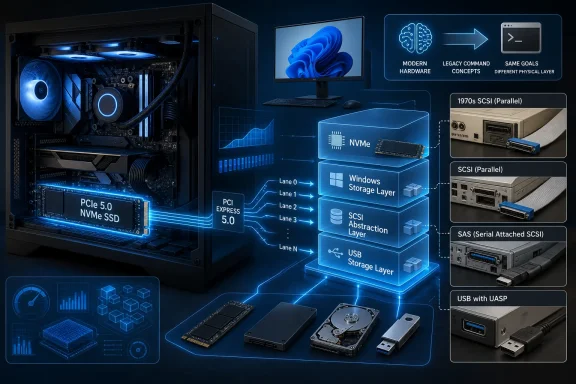
A modern Windows 11 PC can drive a PCIe 5.0 NVMe SSD through native NVMe controller commands while still presenting that disk through a SCSI-shaped operating-system stack, preserving an architecture whose roots reach back to Shugart’s 1979 SASI interface and the SCSI standardization work of 1981. That does not mean a new SSD is physically communicating over a 40-year-old parallel cable. It means the command vocabulary and abstractions of SCSI became so useful that Windows, USB storage, and enterprise systems kept them long after the original connector disappeared. The engineering triumph is also becoming a performance question: compatibility layers that were nearly free on slower drives can become measurable when modern flash pushes millions of operations through them.
How-To Geek’s central observation is easy to verify in Windows: a high-end NVMe SSD may appear as a “SCSI Disk Device,” external USB SSDs commonly use USB Attached SCSI, and even SATA storage is presented to higher layers of the operating system through SCSI-oriented conventions. The surprising part is not that Windows contains old code. Every mature operating system does; the surprise is that SCSI became an architectural language rather than remaining a particular plug on the back of a workstation.
That distinction matters. An NVMe drive installed in a PCI Express slot is not secretly limited to the 5MB/s transfer rate associated with SCSI’s birth, nor is Windows pushing its data across the wide ribbon cables remembered from old servers and Macintosh systems. The NVMe controller communicates using NVMe commands, PCI Express carries the traffic, and the SSD’s flash controller handles the media.
The legacy survives above and around that hardware path. Windows’ storage architecture historically expects disk-class devices, requests, status information, and management operations in forms shaped by SCSI. Microsoft’s own StorNVMe documentation explicitly describes SCSI translation support and maps familiar SCSI operations to NVMe equivalents: reads become NVMe reads, cache synchronization becomes a flush, inquiry operations become identify requests, and unmap operations become dataset-management commands.
That is less like towing a sports car with a horse and more like using a long-established shipping manifest at an automated port. The containers, cranes, ships, and tracking systems have changed radically, but retaining a common description of what is being moved makes the whole system easier to operate.
The provocative headline therefore contains two different stories. One is about the extraordinary longevity of a good abstraction. The other is about the moment when that abstraction’s translation costs become visible enough that Microsoft has begun changing the Windows disk layer for newer NVMe devices.
SASI was introduced in 1979. Its significance was not merely electrical; it established a command-oriented relationship in which a host could ask a device to perform storage operations through a defined interface rather than understanding every internal mechanical detail of the drive.
In 1981, Shugart and NCR Corporation jointly presented the interface to the American National Standards Institute. The resulting standard became the Small Computer System Interface, usually pronounced “scuzzy,” and began with a maximum transfer rate of 5MB/s.
That number looks microscopic beside a modern NVMe specification sheet, but speed alone does not explain why a technology survives. Storage interfaces succeed when they create stable contracts among operating systems, host adapters, device makers, applications, and management tools. SCSI’s contract proved more durable than its original wiring.
During its hardware heyday, SCSI appeared on systems including the 1986 Mac Plus, as well as machines from the Amiga and Atari families. It was less common as a built-in interface on mainstream PCs, although PC users could encounter it through early CD-ROM drives and add-in SCSI cards.
The old reputation of SCSI came partly from that era. It could be fast, expandable, and sophisticated, but it could also involve device IDs, terminators, expensive adapters, thick cables, and configuration rules that seemed hostile beside simpler consumer interfaces. For many users, “SCSI” became shorthand for an intimidating connector associated with professional workstations and servers.
That memory now obscures the more important legacy. The visible SCSI bus was only one implementation of a larger idea, and the standards work eventually separated those two things.
Late 1970s — Shugart develops the Shugart Associates System Interface as a peripheral interface aimed primarily at storage.
1979 — SASI is introduced.
1981 — Shugart and NCR Corporation present the interface to ANSI, where it is standardized as SCSI.
1986 — The Mac Plus becomes one of the early Macintosh models equipped with SCSI ports.
2003 — Ultra-640 arrives as the final parallel SCSI standard, supporting transfer rates of up to 640MB/s.
T10, the standards committee responsible for the SCSI family, describes an architecture made of command sets, protocols, and interconnects rather than one monolithic cable specification. Historical T10 proposals for the SCSI-3 Architecture Model explicitly framed the work as a unifying architecture needed because SCSI command sets were being carried across multiple transport protocols.
This was the pivot that made SCSI difficult to kill. A physical connector ages quickly because signaling speeds, pin counts, cable lengths, manufacturing costs, and device sizes change. A command model can survive if it continues to express useful operations and if operating systems have invested heavily in supporting it.
The original parallel interface still evolved aggressively. Newer revisions used low-voltage differential signaling, and the final parallel standard, Ultra-640, reached up to 640MB/s when it was released in 2003. But those speeds pushed the signaling technology toward its practical limits.
Parallel SCSI’s demise was therefore not the demise of SCSI. Its serial successor, Serial Attached SCSI, retained the command heritage while moving to a more scalable physical design. Meanwhile, other transports adopted SCSI commands because they needed a mature way to describe storage operations.
The resulting family is easier to understand when its layers are separated:
The table exposes why saying that an NVMe SSD “uses SCSI” can be both correct and misleading. SCSI may identify the command-facing abstraction seen by parts of Windows, while PCI Express and NVMe define what is happening at the controller and transport level. Those are different layers of the same I/O path.
SCSI survived by ceasing to mean one cable. Once the standards family became modular, transports could come and go without forcing operating systems and storage software to discard every higher-level assumption built around disk devices.
Newer PCIe SSDs increasingly favor interfaces such as U.2 and U.3 rather than SAS. Flash storage benefits from direct PCI Express connectivity and the parallelism of NVMe, making it natural for the highest-performing enterprise SSDs to move away from a storage interface designed around an earlier generation of devices.
Hard drives complicate any declaration that SAS is obsolete. Data centers continue to use enormous numbers of disks because capacity economics remain different from performance economics. A hard drive does not become useless merely because an NVMe SSD can answer a request faster; for many workloads, the relevant question is how much durable capacity can be deployed, replaced, monitored, and operated within a budget.
SAS consequently occupies an unglamorous but durable role. It is no longer the automatic answer for every high-performance enterprise device, but it remains deeply aligned with the requirements of server hard-drive fleets and established storage infrastructure.
This is the first lesson of SCSI’s longevity: storage technologies rarely disappear everywhere at once. They retreat into the parts of the market where their operational advantages still outweigh the benefits of a cleaner or faster replacement.
The second lesson is that enterprise continuity can influence consumer architecture indirectly. Windows must support a vast range of storage devices, controllers, management applications, diagnostic conventions, and deployment environments. Reusing a mature model across those environments lowers compatibility risk, even if it leaves traces that look anachronistic in Device Manager.
Starting with USB 3.0, SCSI became the backbone of the USB Attached SCSI Protocol, or UASP. It was developed to replace the aging Bulk-Only Transport protocol associated in the source material with USB 2.0, whose sequential behavior could not make efficient use of the bandwidth and concurrency offered by newer USB storage.
BOT essentially moves storage work in a more serialized fashion. UASP allows multiple commands to be in flight, supports command queuing and out-of-order execution, and can reduce latency and CPU overhead while increasing effective throughput.
Microsoft’s USB documentation makes the design goal explicit. Its UAS driver processes multiple commands in parallel and reduces protocol overhead, while the older USB mass-storage path uses BOT. Windows has included native UASP support since Windows 8, loading the UAS path when the device, enclosure, controller, and connection support it.
This is why the enclosure matters as much as the SSD installed inside it. A fast SATA or NVMe drive placed behind a weak USB bridge can be constrained by the bridge’s protocol implementation, firmware, thermal behavior, or fallback to BOT. The label on the SSD does not describe the entire path between NAND flash and an application.
How-To Geek tested two very different external devices on Windows 11: a SATA-based Samsung 850 Evo in an Orico USB 3.0 enclosure and a Samsung 980 Pro NVMe drive in a Delock USB 3.2 Gen 2x2 enclosure. Both reportedly used UAS to communicate with the PC.
That result demonstrates the value of a transport-neutral storage language. One enclosure contained a SATA SSD and the other an NVMe SSD, yet the host could communicate with both through a USB storage protocol based on SCSI commands. USB did not need applications to understand the internal protocol of every drive installed behind every bridge chip.
It also explains why SCSI is visible on systems whose owners have never touched a traditional SCSI adapter. On a PC manufactured in the early 2010s or later with USB 3.0 support, a compatible external hard drive or SSD will ordinarily have the hardware and operating-system support needed for UASP. The user sees USB; the storage stack sees a disciplined command protocol traveling over it.
The fallback behavior remains important. Microsoft notes that Windows can use BOT when UAS hardware streams or a device’s implementation cause compatibility problems. That is sensible engineering, but it means two outwardly similar enclosures can perform differently even when connected to the same port with the same SSD model.
For IT departments, “USB 3” is therefore not a sufficient storage specification. Cable capability, port mode, enclosure controller, firmware, UAS support, fallback behavior, and workload all influence the result. SCSI’s role is not the bottleneck by definition; in UASP, it is part of the mechanism that lets USB storage escape an older bottleneck.
Microsoft’s StorNVMe documentation leaves little room for doubt about the translation layer. It publishes a detailed mapping between SCSI commands and their NVMe equivalents, covering ordinary I/O as well as identification, security, cache management, firmware, capacity, and deallocation operations.
A SCSI read request can become an NVMe read. SCSI inquiry information can be satisfied through NVMe identify data. A synchronize-cache request maps to an NVMe flush, while SCSI unmap maps to NVMe dataset management.
That does not make NVMe support fake.
Microsoft’s storage documentation shows why this architecture exists. Windows has long used port, miniport, and class-driver relationships that normalize different storage technologies for higher-level components. Its ATA port architecture, for example, historically shielded higher drivers from ATA-specific differences by organizing results in SCSI-compatible forms.
Uniformity is valuable because filesystems, volume managers, backup products, security software, monitoring agents, firmware tools, and management applications should not each need an entirely separate implementation for every controller protocol. A common storage contract reduces duplication and gives Microsoft a stable place to enforce behavior.
The cost is translation. Every layer that reshapes a request, maps status, allocates structures, serializes work, or preserves older semantics can add instructions and latency. On a hard drive measured in milliseconds, small software delays disappear beneath mechanical seek time. On an extremely fast SSD answering operations in a fraction of that time, host-side overhead takes a larger share of the budget.
This is why the issue has become more visible with PCIe 5.0 SSDs. The source material identifies that generation as capable of experiencing measurable performance drops from the SCSI translation layer. The claim is not that every application is being devastated; it is that storage hardware has become fast enough to expose inefficiencies that previous generations could hide.
A translation layer can be almost invisible during a large sequential copy while becoming measurable in high-operation-count tests. That difference helps explain why users can see dramatic benchmark discussions without noticing an equally dramatic improvement in boot time, game loading, or ordinary desktop responsiveness.
Once storage is fast enough, bottlenecks move. The filesystem, memory manager, filter drivers, application behavior, CPU scheduling, power management, encryption, antivirus scanning, and the SSD’s own firmware can all become limiting factors. Removing one translation step does not guarantee that an application will suddenly absorb the drive’s full theoretical performance.
This nuance has been easy to lose in follow-up coverage. PC Gamer and other outlets have highlighted reports of substantial benchmark improvements from exposing Windows 11 to a server-oriented NVMe disk path, especially in random workloads. But benchmark gains from an unsupported configuration do not establish that the same change is safe, durable, or beneficial across consumer systems.
They also do not prove that SCSI is intrinsically slow. UASP uses SCSI commands specifically to improve USB storage performance over BOT. SAS has sustained enterprise storage for decades. The important variable is not the age of a command name but how many translations and compatibility obligations sit in the hot path.
A mature interface can be old and efficient. A new interface can be badly implemented. The performance question must be asked at the level of a particular operating-system path, driver combination, device, firmware, and workload—not settled by counting the years since an acronym was standardized.
The legacy becomes a problem only when compatibility work consumes a meaningful part of the I/O budget. PCIe 5.0 storage makes that condition more plausible, which is why Microsoft’s newer disk-layer work deserves attention even if most users should not alter anything today.
Microsoft has created a newer disk-layer driver,
The change does not erase SCSI from Windows in one stroke. The controller driver—
That is an evolutionary design, not a clean-room replacement. Microsoft can improve the path closest to high-performance NVMe devices while preserving the compatibility assumptions relied upon by the rest of Windows and its software ecosystem.
Windows Server 2025 is a logical place to enable that work first. Server environments are more likely to run storage-heavy workloads where additional IOPS, queue scalability, and lower latency can translate into measurable operational value. They also tend to be tested and deployed through more controlled hardware, driver, backup, and change-management processes than consumer PCs.
Windows 11 presents a much wider compatibility surface. OEM recovery environments, third-party encryption, disk imaging, backup tools, endpoint security, storage filters, vendor utilities, dual-boot configurations, and unusual firmware combinations can all depend on details that a benchmark-focused experiment overlooks.
The mere presence of
Unofficial guides that treat an internal switch as a free performance upgrade invert the risk calculation. They assume the default is old because Microsoft forgot about it, when the more plausible explanation is that Microsoft is moving cautiously because the disk layer is one of the worst possible places to discover an untested compatibility problem.
A graphics-driver failure can produce a black screen and a rollback. A boot-storage failure can make the operating system inaccessible, complicate recovery, disrupt backup identity, or expose assumptions in tools that previously recognized the disk through another device path. The performance opportunity is real, but so is the blast radius.
Microsoft’s own firmware-update documentation uses SCSI-style identifiers for NVMe disks managed through its in-box driver. That detail is especially revealing because it shows the naming is not merely a cosmetic accident in one management screen; SCSI-shaped identification is part of how Windows can describe and target devices within established storage infrastructure.
The right diagnostic questions are therefore more specific. Is the NVMe controller using the intended controller driver? Is the SSD connected through the expected PCI Express path? Is firmware current and approved by the system or drive vendor? Does measured performance fit the platform’s capabilities and the drive’s thermal state?
For external storage, the equivalent question is whether Windows loaded the UAS path or fell back to BOT. A device shown as SCSI or UAS may actually be operating through the faster, more capable protocol. Trying to make the word “SCSI” disappear could mean replacing a good path with a worse one.
Names in Device Manager are implementation clues, not complete performance diagnoses. The same principle applies to SATA devices represented through SCSI-like layers: the operating system’s internal classification does not rewrite the drive’s physical interface.
This is where the “secretly running on old technology” framing reaches its limit. The label reveals ancestry, but ancestry is not destiny. A modern NVMe SSD can be correctly identified by its controller, communicate using native NVMe operations, and still expose a SCSI-compatible identity to other Windows components.
A replacement architecture cannot be judged only by whether it produces a higher result in a storage benchmark. It must survive sleep and resume, power loss, firmware updates, hot removal where applicable, crash-dump creation, recovery boot, encryption transitions, virtualized environments, multipath scenarios, and years of third-party software assumptions.
SCSI’s common model helped Windows avoid fragmenting those functions across unrelated device families. That compatibility dividend is difficult to quantify because it appears mostly as failures that do not happen and software that continues working after hardware changes.
The drawback is architectural inertia. Once thousands of components depend on a common contract, improving the contract can require adapters, transitional drivers, feature gates, compatibility testing, and parallel code paths. The elegance of the original abstraction becomes the weight of the ecosystem built upon it.
Microsoft’s gradual approach with
For administrators, that means the absence of a rapid Windows 11 rollout should not automatically be interpreted as neglect. It may instead indicate that the performance case has moved faster than the compatibility case.
Linux can expose NVMe through a more directly NVMe-oriented block path without presenting the same Windows disk-layer translation model. That can reduce certain overhead and align more naturally with NVMe’s queue-based design.
Yet Linux still uses UASP for compatible USB storage devices. Plug an SSD into a suitable USB enclosure, and SCSI commands again become part of the communication path because UASP is the relevant storage protocol over USB.
This reinforces the larger argument: SCSI’s continued presence is not unique evidence of Windows being antiquated. The standards family remains useful wherever a mature, transportable storage-command model solves a real interoperability problem.
The Windows-specific issue is narrower. It concerns how far a compatibility-oriented SCSI abstraction should extend into the path of an internal NVMe device whose native protocol was designed for highly parallel solid-state storage.
That debate will intensify as drives become faster and software overhead accounts for more of total latency. It will not end with every SCSI-derived component being deleted, because external USB storage, SAS infrastructure, and numerous management conventions still benefit from the model.
Users with PCIe 5.0 SSDs have the strongest reason to watch Microsoft’s storage work, but even they should distinguish measurable benchmark overhead from a defect requiring an unsupported tweak. A high-end drive can lose some potential performance in one class of workload while remaining far faster than the application needs.
External-storage buyers should arguably pay more attention to UASP today. An enclosure that correctly supports UAS, paired with a suitable port and cable, can materially improve command handling compared with BOT. That is a practical consequence users can encounter without touching an internal Windows feature.
Enterprise administrators should watch how Microsoft expands the newer NVMe disk layer beyond Windows Server 2025. The key questions will concern compatibility guarantees, supported upgrade paths, observability, recovery behavior, and interactions with storage filters—not merely the best benchmark result.
Hardware vendors also have a role. Controller drivers and firmware can determine which path Windows uses and how well advanced commands are implemented. A supposedly cleaner software stack cannot compensate for every enclosure bug, thermal limit, firmware defect, or platform bottleneck.
The likely future is another period of coexistence. Windows can introduce more NVMe-native behavior for suitable devices while retaining SCSI-based conventions where they continue to simplify compatibility. That would follow SCSI’s own history: new transports arrive, the architecture is divided into cleaner layers, and the useful portions survive.
 The “40-Year-Old Tech” Claim Is True, but Not in the Way It Sounds
How-To Geek’s central observation is easy to verify in Windows: a high-end NVMe SSD may appear as a “SCSI Disk Device,” external USB SSDs commonly use USB Attached SCSI, and even SATA storage is presented to higher layers of the operating system through SCSI-oriented conventions. The surprising part is not that Windows contains old code. Every mature operating system does; the surprise is that SCSI became an architectural language rather than remaining a particular plug on the back of a workstation.That distinction matters. An NVMe drive installed in a PCI Express slot is not secretly limited to the 5MB/s transfer rate associated with SCSI’s birth, nor is Windows pushing its data across the wide ribbon cables remembered from old servers and Macintosh systems. The NVMe controller communicates using NVMe commands, PCI Express carries the traffic, and the SSD’s flash controller handles the media.
The legacy survives above and around that hardware path. Windows’ storage architecture historically expects disk-class devices, requests, status information, and management operations in forms shaped by SCSI. Microsoft’s own StorNVMe documentation explicitly describes SCSI translation support and maps familiar SCSI operations to NVMe equivalents: reads become NVMe reads, cache synchronization becomes a flush, inquiry operations become identify requests, and unmap operations become dataset-management commands.
That is less like towing a sports car with a horse and more like using a long-established shipping manifest at an automated port. The containers, cranes, ships, and tracking systems have changed radically, but retaining a common description of what is being moved makes the whole system easier to operate.
The provocative headline therefore contains two different stories. One is about the extraordinary longevity of a good abstraction. The other is about the moment when that abstraction’s translation costs become visible enough that Microsoft has begun changing the Windows disk layer for newer NVMe devices.
SASI Solved a Compatibility Problem Before the PC Industry Had a Common Answer
SCSI began in the late 1970s at Shugart Associates, the computer peripheral manufacturer best known for introducing the 5.25-inch floppy disk in 1976. The company developed the Shugart Associates System Interface, or SASI, as a way to connect peripheral devices—especially storage—to computers without designing an entirely different relationship for every drive and host.SASI was introduced in 1979. Its significance was not merely electrical; it established a command-oriented relationship in which a host could ask a device to perform storage operations through a defined interface rather than understanding every internal mechanical detail of the drive.
In 1981, Shugart and NCR Corporation jointly presented the interface to the American National Standards Institute. The resulting standard became the Small Computer System Interface, usually pronounced “scuzzy,” and began with a maximum transfer rate of 5MB/s.
That number looks microscopic beside a modern NVMe specification sheet, but speed alone does not explain why a technology survives. Storage interfaces succeed when they create stable contracts among operating systems, host adapters, device makers, applications, and management tools. SCSI’s contract proved more durable than its original wiring.
During its hardware heyday, SCSI appeared on systems including the 1986 Mac Plus, as well as machines from the Amiga and Atari families. It was less common as a built-in interface on mainstream PCs, although PC users could encounter it through early CD-ROM drives and add-in SCSI cards.
The old reputation of SCSI came partly from that era. It could be fast, expandable, and sophisticated, but it could also involve device IDs, terminators, expensive adapters, thick cables, and configuration rules that seemed hostile beside simpler consumer interfaces. For many users, “SCSI” became shorthand for an intimidating connector associated with professional workstations and servers.
That memory now obscures the more important legacy. The visible SCSI bus was only one implementation of a larger idea, and the standards work eventually separated those two things.
Timeline
1976 — Shugart Associates introduces the 5.25-inch floppy disk.Late 1970s — Shugart develops the Shugart Associates System Interface as a peripheral interface aimed primarily at storage.
1979 — SASI is introduced.
1981 — Shugart and NCR Corporation present the interface to ANSI, where it is standardized as SCSI.
1986 — The Mac Plus becomes one of the early Macintosh models equipped with SCSI ports.
2003 — Ultra-640 arrives as the final parallel SCSI standard, supporting transfer rates of up to 640MB/s.
SCSI-3 Turned a Storage Bus Into a Portable Command Language
The decisive change came with SCSI-3, which separated the physical layer from the software layer. Once SCSI commands were no longer inseparable from a particular parallel bus, they could travel across other transports, including Ethernet and later USB.T10, the standards committee responsible for the SCSI family, describes an architecture made of command sets, protocols, and interconnects rather than one monolithic cable specification. Historical T10 proposals for the SCSI-3 Architecture Model explicitly framed the work as a unifying architecture needed because SCSI command sets were being carried across multiple transport protocols.
This was the pivot that made SCSI difficult to kill. A physical connector ages quickly because signaling speeds, pin counts, cable lengths, manufacturing costs, and device sizes change. A command model can survive if it continues to express useful operations and if operating systems have invested heavily in supporting it.
The original parallel interface still evolved aggressively. Newer revisions used low-voltage differential signaling, and the final parallel standard, Ultra-640, reached up to 640MB/s when it was released in 2003. But those speeds pushed the signaling technology toward its practical limits.
Parallel SCSI’s demise was therefore not the demise of SCSI. Its serial successor, Serial Attached SCSI, retained the command heritage while moving to a more scalable physical design. Meanwhile, other transports adopted SCSI commands because they needed a mature way to describe storage operations.
The resulting family is easier to understand when its layers are separated:
| Technology or path | Transport or connection | Command model | Where it remains relevant | Practical meaning |
|---|---|---|---|---|
| Parallel SCSI | Parallel SCSI bus | SCSI | Legacy computers and storage hardware | The original physical interface, ending with Ultra-640 |
| SAS | Serial Attached SCSI | SCSI | Enterprise hard drives and SSDs | Serial successor built for server storage |
| USB BOT | USB, associated with USB 2.0 | Sequential bulk-only storage transport | Older or fallback USB storage paths | Broad compatibility, but limited command concurrency |
| UASP/UAS | USB 3.0 and newer-capable storage paths | SCSI commands over USB | Modern external hard drives and SSDs | Queuing, parallel processing, lower overhead |
| Windows NVMe path | PCI Express with an NVMe controller | Native NVMe commands behind a SCSI-oriented disk interface | Internal NVMe SSDs on Windows | Fast native hardware with translation at operating-system boundaries |
SCSI survived by ceasing to mean one cable. Once the standards family became modular, transports could come and go without forcing operating systems and storage software to discard every higher-level assumption built around disk devices.
SAS Preserved SCSI Where Reliability Matters More Than Fashion
Serial Attached SCSI became the go-to interface for enterprise hard drives and later enterprise SSDs. In servers and data centers, that persistence is not mysterious: SAS belongs to an ecosystem designed around predictable device behavior, large drive populations, storage enclosures, controllers, and operational tooling.Newer PCIe SSDs increasingly favor interfaces such as U.2 and U.3 rather than SAS. Flash storage benefits from direct PCI Express connectivity and the parallelism of NVMe, making it natural for the highest-performing enterprise SSDs to move away from a storage interface designed around an earlier generation of devices.
Hard drives complicate any declaration that SAS is obsolete. Data centers continue to use enormous numbers of disks because capacity economics remain different from performance economics. A hard drive does not become useless merely because an NVMe SSD can answer a request faster; for many workloads, the relevant question is how much durable capacity can be deployed, replaced, monitored, and operated within a budget.
SAS consequently occupies an unglamorous but durable role. It is no longer the automatic answer for every high-performance enterprise device, but it remains deeply aligned with the requirements of server hard-drive fleets and established storage infrastructure.
This is the first lesson of SCSI’s longevity: storage technologies rarely disappear everywhere at once. They retreat into the parts of the market where their operational advantages still outweigh the benefits of a cleaner or faster replacement.
The second lesson is that enterprise continuity can influence consumer architecture indirectly. Windows must support a vast range of storage devices, controllers, management applications, diagnostic conventions, and deployment environments. Reusing a mature model across those environments lowers compatibility risk, even if it leaves traces that look anachronistic in Device Manager.
USB 3.0 Gave SCSI a Second Life on Consumer Desks
For most Windows users, SCSI’s clearest modern role is not inside a server rack. It is in the external drive plugged into a USB port.Starting with USB 3.0, SCSI became the backbone of the USB Attached SCSI Protocol, or UASP. It was developed to replace the aging Bulk-Only Transport protocol associated in the source material with USB 2.0, whose sequential behavior could not make efficient use of the bandwidth and concurrency offered by newer USB storage.
BOT essentially moves storage work in a more serialized fashion. UASP allows multiple commands to be in flight, supports command queuing and out-of-order execution, and can reduce latency and CPU overhead while increasing effective throughput.
Microsoft’s USB documentation makes the design goal explicit. Its UAS driver processes multiple commands in parallel and reduces protocol overhead, while the older USB mass-storage path uses BOT. Windows has included native UASP support since Windows 8, loading the UAS path when the device, enclosure, controller, and connection support it.
This is why the enclosure matters as much as the SSD installed inside it. A fast SATA or NVMe drive placed behind a weak USB bridge can be constrained by the bridge’s protocol implementation, firmware, thermal behavior, or fallback to BOT. The label on the SSD does not describe the entire path between NAND flash and an application.
How-To Geek tested two very different external devices on Windows 11: a SATA-based Samsung 850 Evo in an Orico USB 3.0 enclosure and a Samsung 980 Pro NVMe drive in a Delock USB 3.2 Gen 2x2 enclosure. Both reportedly used UAS to communicate with the PC.
That result demonstrates the value of a transport-neutral storage language. One enclosure contained a SATA SSD and the other an NVMe SSD, yet the host could communicate with both through a USB storage protocol based on SCSI commands. USB did not need applications to understand the internal protocol of every drive installed behind every bridge chip.
It also explains why SCSI is visible on systems whose owners have never touched a traditional SCSI adapter. On a PC manufactured in the early 2010s or later with USB 3.0 support, a compatible external hard drive or SSD will ordinarily have the hardware and operating-system support needed for UASP. The user sees USB; the storage stack sees a disciplined command protocol traveling over it.
The fallback behavior remains important. Microsoft notes that Windows can use BOT when UAS hardware streams or a device’s implementation cause compatibility problems. That is sensible engineering, but it means two outwardly similar enclosures can perform differently even when connected to the same port with the same SSD model.
For IT departments, “USB 3” is therefore not a sufficient storage specification. Cable capability, port mode, enclosure controller, firmware, UAS support, fallback behavior, and workload all influence the result. SCSI’s role is not the bottleneck by definition; in UASP, it is part of the mechanism that lets USB storage escape an older bottleneck.
Windows Uses SCSI as a Common Denominator for Disks
The more contentious part of the story begins with internal NVMe storage. Windows uses the system-suppliedstornvme.sys controller driver to access NVMe devices, and that driver communicates with the SSD using NVMe commands. Yet it also participates in a Windows storage stack whose disk-facing conventions have long been SCSI-oriented.Microsoft’s StorNVMe documentation leaves little room for doubt about the translation layer. It publishes a detailed mapping between SCSI commands and their NVMe equivalents, covering ordinary I/O as well as identification, security, cache management, firmware, capacity, and deallocation operations.
A SCSI read request can become an NVMe read. SCSI inquiry information can be satisfied through NVMe identify data. A synchronize-cache request maps to an NVMe flush, while SCSI unmap maps to NVMe dataset management.
That does not make NVMe support fake.
stornvme.sys is an NVMe controller driver, understands NVMe features, and issues native commands to the hardware. The legacy exists in how Windows represents and routes storage operations across layers, not in an imaginary conversion of PCI Express electrical signaling into parallel SCSI.Microsoft’s storage documentation shows why this architecture exists. Windows has long used port, miniport, and class-driver relationships that normalize different storage technologies for higher-level components. Its ATA port architecture, for example, historically shielded higher drivers from ATA-specific differences by organizing results in SCSI-compatible forms.
Uniformity is valuable because filesystems, volume managers, backup products, security software, monitoring agents, firmware tools, and management applications should not each need an entirely separate implementation for every controller protocol. A common storage contract reduces duplication and gives Microsoft a stable place to enforce behavior.
The cost is translation. Every layer that reshapes a request, maps status, allocates structures, serializes work, or preserves older semantics can add instructions and latency. On a hard drive measured in milliseconds, small software delays disappear beneath mechanical seek time. On an extremely fast SSD answering operations in a fraction of that time, host-side overhead takes a larger share of the budget.
This is why the issue has become more visible with PCIe 5.0 SSDs. The source material identifies that generation as capable of experiencing measurable performance drops from the SCSI translation layer. The claim is not that every application is being devastated; it is that storage hardware has become fast enough to expose inefficiencies that previous generations could hide.
The Faster the SSD, the More the Operating System Matters
Sequential benchmark numbers dominate consumer SSD marketing, but they are not the only measure affected by storage-stack design. Many real workloads consist of small, scattered operations, metadata updates, queue transitions, synchronization points, and bursts in which latency and CPU cost matter as much as headline bandwidth.A translation layer can be almost invisible during a large sequential copy while becoming measurable in high-operation-count tests. That difference helps explain why users can see dramatic benchmark discussions without noticing an equally dramatic improvement in boot time, game loading, or ordinary desktop responsiveness.
Once storage is fast enough, bottlenecks move. The filesystem, memory manager, filter drivers, application behavior, CPU scheduling, power management, encryption, antivirus scanning, and the SSD’s own firmware can all become limiting factors. Removing one translation step does not guarantee that an application will suddenly absorb the drive’s full theoretical performance.
This nuance has been easy to lose in follow-up coverage. PC Gamer and other outlets have highlighted reports of substantial benchmark improvements from exposing Windows 11 to a server-oriented NVMe disk path, especially in random workloads. But benchmark gains from an unsupported configuration do not establish that the same change is safe, durable, or beneficial across consumer systems.
They also do not prove that SCSI is intrinsically slow. UASP uses SCSI commands specifically to improve USB storage performance over BOT. SAS has sustained enterprise storage for decades. The important variable is not the age of a command name but how many translations and compatibility obligations sit in the hot path.
A mature interface can be old and efficient. A new interface can be badly implemented. The performance question must be asked at the level of a particular operating-system path, driver combination, device, firmware, and workload—not settled by counting the years since an acronym was standardized.
The legacy becomes a problem only when compatibility work consumes a meaningful part of the I/O budget. PCIe 5.0 storage makes that condition more plausible, which is why Microsoft’s newer disk-layer work deserves attention even if most users should not alter anything today.
nvmedisk.sys Shows Microsoft Knows the Old Boundary Is Tightening
Microsoft has created a newer disk-layer driver, nvmedisk.sys, to replace the existing disk.sys layer for the relevant NVMe path. According to the source material, it is currently enabled in Windows Server 2025 and is present but disabled in Windows 11.The change does not erase SCSI from Windows in one stroke. The controller driver—
stornvme.sys, or the cited Samsung driver secnvme.sys on applicable systems—still translates most NVMe commands into the forms expected by the surrounding stack. The newer disk layer removes some translations, supports multiple queues, and introduces latency optimizations.That is an evolutionary design, not a clean-room replacement. Microsoft can improve the path closest to high-performance NVMe devices while preserving the compatibility assumptions relied upon by the rest of Windows and its software ecosystem.
Windows Server 2025 is a logical place to enable that work first. Server environments are more likely to run storage-heavy workloads where additional IOPS, queue scalability, and lower latency can translate into measurable operational value. They also tend to be tested and deployed through more controlled hardware, driver, backup, and change-management processes than consumer PCs.
Windows 11 presents a much wider compatibility surface. OEM recovery environments, third-party encryption, disk imaging, backup tools, endpoint security, storage filters, vendor utilities, dual-boot configurations, and unusual firmware combinations can all depend on details that a benchmark-focused experiment overlooks.
The mere presence of
nvmedisk.sys in Windows 11 should therefore not be read as an invitation to force-enable it. A disabled component can be included for engineering validation, shared code, future deployment, or limited scenarios without being supported as a general consumer feature.Unofficial guides that treat an internal switch as a free performance upgrade invert the risk calculation. They assume the default is old because Microsoft forgot about it, when the more plausible explanation is that Microsoft is moving cautiously because the disk layer is one of the worst possible places to discover an untested compatibility problem.
A graphics-driver failure can produce a black screen and a rollback. A boot-storage failure can make the operating system inaccessible, complicate recovery, disrupt backup identity, or expose assumptions in tools that previously recognized the disk through another device path. The performance opportunity is real, but so is the blast radius.
Device Manager Is Reporting an Abstraction, Not Misidentifying Your Hardware
Users who see “SCSI” beside an NVMe model in Device Manager often conclude that Windows has installed the wrong driver. In most cases, the label is evidence of the storage stack’s abstraction, not proof that the SSD has fallen back to a slower physical mode.Microsoft’s own firmware-update documentation uses SCSI-style identifiers for NVMe disks managed through its in-box driver. That detail is especially revealing because it shows the naming is not merely a cosmetic accident in one management screen; SCSI-shaped identification is part of how Windows can describe and target devices within established storage infrastructure.
The right diagnostic questions are therefore more specific. Is the NVMe controller using the intended controller driver? Is the SSD connected through the expected PCI Express path? Is firmware current and approved by the system or drive vendor? Does measured performance fit the platform’s capabilities and the drive’s thermal state?
For external storage, the equivalent question is whether Windows loaded the UAS path or fell back to BOT. A device shown as SCSI or UAS may actually be operating through the faster, more capable protocol. Trying to make the word “SCSI” disappear could mean replacing a good path with a worse one.
Names in Device Manager are implementation clues, not complete performance diagnoses. The same principle applies to SATA devices represented through SCSI-like layers: the operating system’s internal classification does not rewrite the drive’s physical interface.
This is where the “secretly running on old technology” framing reaches its limit. The label reveals ancestry, but ancestry is not destiny. A modern NVMe SSD can be correctly identified by its controller, communicate using native NVMe operations, and still expose a SCSI-compatible identity to other Windows components.
Compatibility Is the Feature Microsoft Cannot Benchmark Away
The Windows storage stack has accumulated decades of dependencies because it sits beneath nearly everything users care about. The operating system boots from it; BitLocker protects data through it; backup products inspect it; recovery tools reconstruct it; monitoring software queries it; and security products filter traffic passing through it.A replacement architecture cannot be judged only by whether it produces a higher result in a storage benchmark. It must survive sleep and resume, power loss, firmware updates, hot removal where applicable, crash-dump creation, recovery boot, encryption transitions, virtualized environments, multipath scenarios, and years of third-party software assumptions.
SCSI’s common model helped Windows avoid fragmenting those functions across unrelated device families. That compatibility dividend is difficult to quantify because it appears mostly as failures that do not happen and software that continues working after hardware changes.
The drawback is architectural inertia. Once thousands of components depend on a common contract, improving the contract can require adapters, transitional drivers, feature gates, compatibility testing, and parallel code paths. The elegance of the original abstraction becomes the weight of the ecosystem built upon it.
Microsoft’s gradual approach with
nvmedisk.sys reflects that trade-off. The company is not simply replacing an obsolete driver with a faster one; it is renegotiating the boundary between a modern protocol and an operating system designed to make many storage protocols look alike.For administrators, that means the absence of a rapid Windows 11 rollout should not automatically be interpreted as neglect. It may instead indicate that the performance case has moved faster than the compatibility case.
Action checklist for admins
- Inventory which systems use
stornvme.sys, vendor controller drivers such assecnvme.sys, and the existingdisk.syslayer before comparing results. - Establish workload-specific baselines rather than relying only on peak sequential transfer numbers.
- For external drives, confirm whether Windows is using UAS or has fallen back to BOT, especially when two nominally similar enclosures perform differently.
- Validate SSD and enclosure firmware through approved vendor channels before attributing unexplained performance to the Windows translation layer.
- Do not force-enable
nvmedisk.syson Windows 11 production systems while Microsoft leaves it disabled there. - Test backup, recovery, encryption, monitoring, and boot behavior before approving any future storage-stack transition at scale.
Linux Avoids One Translation but Cannot Escape SCSI’s Reach
The source material contrasts Windows with Linux by noting that Linux has native NVMe support. That distinction is useful, but it should not be simplified into “Linux is modern, Windows is SCSI.”Linux can expose NVMe through a more directly NVMe-oriented block path without presenting the same Windows disk-layer translation model. That can reduce certain overhead and align more naturally with NVMe’s queue-based design.
Yet Linux still uses UASP for compatible USB storage devices. Plug an SSD into a suitable USB enclosure, and SCSI commands again become part of the communication path because UASP is the relevant storage protocol over USB.
This reinforces the larger argument: SCSI’s continued presence is not unique evidence of Windows being antiquated. The standards family remains useful wherever a mature, transportable storage-command model solves a real interoperability problem.
The Windows-specific issue is narrower. It concerns how far a compatibility-oriented SCSI abstraction should extend into the path of an internal NVMe device whose native protocol was designed for highly parallel solid-state storage.
That debate will intensify as drives become faster and software overhead accounts for more of total latency. It will not end with every SCSI-derived component being deleted, because external USB storage, SAS infrastructure, and numerous management conventions still benefit from the model.
What Windows Users Should Actually Expect to Change
Most Windows 11 users should expect no immediate action. Their NVMe SSD is still an NVMe SSD, their data is still traveling over PCI Express, and the presence of a SCSI device label does not mean the drive is operating at 1981 speeds.Users with PCIe 5.0 SSDs have the strongest reason to watch Microsoft’s storage work, but even they should distinguish measurable benchmark overhead from a defect requiring an unsupported tweak. A high-end drive can lose some potential performance in one class of workload while remaining far faster than the application needs.
External-storage buyers should arguably pay more attention to UASP today. An enclosure that correctly supports UAS, paired with a suitable port and cable, can materially improve command handling compared with BOT. That is a practical consequence users can encounter without touching an internal Windows feature.
Enterprise administrators should watch how Microsoft expands the newer NVMe disk layer beyond Windows Server 2025. The key questions will concern compatibility guarantees, supported upgrade paths, observability, recovery behavior, and interactions with storage filters—not merely the best benchmark result.
Hardware vendors also have a role. Controller drivers and firmware can determine which path Windows uses and how well advanced commands are implemented. A supposedly cleaner software stack cannot compensate for every enclosure bug, thermal limit, firmware defect, or platform bottleneck.
The likely future is another period of coexistence. Windows can introduce more NVMe-native behavior for suitable devices while retaining SCSI-based conventions where they continue to simplify compatibility. That would follow SCSI’s own history: new transports arrive, the architecture is divided into cleaner layers, and the useful portions survive.
The Details Worth Remembering When the Acronyms Fade
The important conclusion is not that every SSD is secretly ancient. It is that modern storage is layered, and a technology can disappear as a connector while surviving as a command model, driver contract, or compatibility boundary.- SCSI began as SASI in the late 1970s, was introduced in 1979, and was standardized in 1981.
- SCSI-3 separated the physical and software layers, allowing SCSI commands to move across transports such as Ethernet and USB.
- Parallel SCSI ended with Ultra-640 in 2003, but SAS continued the SCSI family in enterprise storage.
- UASP uses SCSI commands to improve USB storage over BOT through concurrency, queuing, and lower protocol overhead.
- Windows’
stornvme.systalks to NVMe hardware with NVMe commands while participating in a SCSI-oriented storage architecture. nvmedisk.syspoints toward a leaner NVMe disk path, but it is enabled in Windows Server 2025 and remains disabled in Windows 11.
References
- Primary source: How-To Geek
Published: 2026-07-10T17:10:09.308743
Your ultra-fast NVMe SSD is secretly running on 40-year-old tech
The ancient storage tech your modern Windows PC can't live without www.howtogeek.com
- Official source: learn.microsoft.com
NVMe Features Supported by StorNVMe - Windows drivers | Microsoft Learn
Overview of NVMe features supported by StorNVMelearn.microsoft.com - Related coverage: t10.org
- Related coverage: tech.yahoo.com
5 hidden Windows settings that are secretly slowing down your SSD
SSD slowdowns aren’t always age, often it’s firmware, cache, TRIM, or free space. Here’s the checklist I use to keep things running smoothly.tech.yahoo.com - Related coverage: pureinfotech.com
How to speed up NVMe SSD performance on Windows 11 with a hidden tweak - Pureinfotech
Enable a hidden Windows 11 NVMe registry tweak inspired by Server 2025 and potentially boost SSD speed, latency, and responsiveness. pureinfotech.com
- Related coverage: thailand.intel.com
- Related coverage: linuxjournal.com
- Related coverage: pcgamer.com
This neat Windows registry trick boosts NVMe SSD performance up to 80% but it's only officially available for enterprise users | PC Gamer
Random IOPS could increase by up to 80% for servers, says Microsoft.www.pcgamer.com