

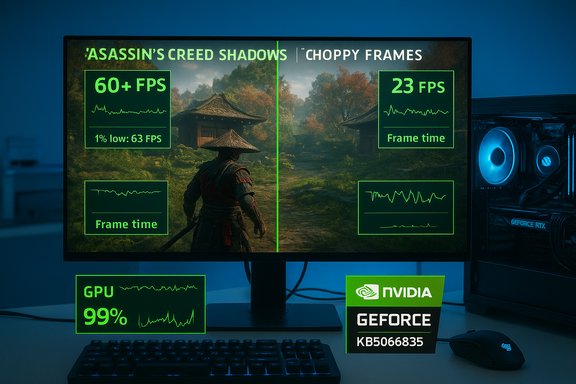
The October Windows 11 cumulative update shipped as KB5066835 created a rare but serious cross‑vendor performance regression in some modern games—most visibly in Assassin’s Creed: Shadows—where frame rates and frame‑pacing collapsed on a subset of NVIDIA‑powered systems, and NVIDIA’s emergency GeForce Hotfix Driver 581.94 restored performance for many affected users even though Microsoft did not publicly document gaming regressions tied to that update at the time of the fix.
Microsoft released the October 14, 2025 cumulative update for Windows 11 (tracked as KB5066835), a combined servicing package that included the latest servicing stack update (SSU) alongside the latest cumulative update (LCU). The package targeted Windows 11 servicing branches and updated OS builds to numbers in the 26100–26200 family. Microsoft’s public KB documented a variety of security and reliability fixes but did not list a gaming performance regression in its published “known issues” for the update at the same time independent reporting and community telemetry began surfacing gameplay slowdowns. Within days and weeks of deployment, multiple communities—forum threads, bench tests, and editorial labs—reported consistent symptoms after KB5066835 was applied on many machines: large drops in average FPS, worse 1%/0.1% lows, micro‑stutter and, in isolated cases, in‑game freezes or black screens. The pattern was not universal; affected systems were a subset of configurations that shared a specific intersection of Windows build, NVIDIA driver families, firmware settings and game engines.
NVIDIA responded with a narrowly scoped hotfix driver—GeForce Hotfix Display Driver 581.94, released November 19, 2025—which the vendor explicitly described as addressing “Lower performance may be observed in some games after updating to Windows 11 October 2025 KB5066835.” That hotfix restored performance in many of the reproducible test cases and user reports. Independent outlets re‑tested and confirmed recovery in at least several high‑profile examples.
Plausible explanations include:
For affected gamers:
Source: Windows Latest Gamers confirm frame drops after Windows 11 update that Microsoft won’t acknowledge, but Nvidia has fixed it
 Background / Overview
Microsoft released the October 14, 2025 cumulative update for Windows 11 (tracked as KB5066835), a combined servicing package that included the latest servicing stack update (SSU) alongside the latest cumulative update (LCU). The package targeted Windows 11 servicing branches and updated OS builds to numbers in the 26100–26200 family. Microsoft’s public KB documented a variety of security and reliability fixes but did not list a gaming performance regression in its published “known issues” for the update at the same time independent reporting and community telemetry began surfacing gameplay slowdowns. Within days and weeks of deployment, multiple communities—forum threads, bench tests, and editorial labs—reported consistent symptoms after KB5066835 was applied on many machines: large drops in average FPS, worse 1%/0.1% lows, micro‑stutter and, in isolated cases, in‑game freezes or black screens. The pattern was not universal; affected systems were a subset of configurations that shared a specific intersection of Windows build, NVIDIA driver families, firmware settings and game engines.NVIDIA responded with a narrowly scoped hotfix driver—GeForce Hotfix Display Driver 581.94, released November 19, 2025—which the vendor explicitly described as addressing “Lower performance may be observed in some games after updating to Windows 11 October 2025 KB5066835.” That hotfix restored performance in many of the reproducible test cases and user reports. Independent outlets re‑tested and confirmed recovery in at least several high‑profile examples.
What players and labs observed
Assassin’s Creed: Shadows — the canary
Digital Foundry’s lab work—amplified by editorial coverage—made the issue impossible to ignore. In controlled benchmarks using a high‑end testbed (Ryzen 7 9800X3D + GeForce RTX 5090), a consistent test point in Assassin’s Creed: Shadows reportedly dropped from about 72 FPS to roughly 34 FPS after KB5066835 was installed—roughly a 50% decline in that scene—then returned to prior levels after applying NVIDIA’s hotfix. Multiple publications reproduced screenshots and video captures showing the before/after effect. Those figures are not an isolated anecdote: other community benchmarks and end‑user reports recorded drops in the 33–50% range in worst‑case scenes, and some multiplayer titles such as Counter‑Strike 2 showed measurable degradations in low‑percentile frame‑time metrics in community tests. The heterogeneity of the failures—different severity across games and systems—points to an interaction effect rather than a simple broken API or hardware fault.Symptoms players reported
- Lower average FPS and degraded 1%/0.1% lows
- Increased micro‑stutter and uneven frame pacing
- Reduced GPU power draw despite high reported utilization readings
- Some reports of intermittent crashes or freezes during gameplay
NVIDIA’s response: hotfix 581.94
On November 19, 2025 NVIDIA published the GeForce Hotfix Display Driver version 581.94, a narrow mitigation built on Game Ready Driver 581.80. NVIDIA’s public support entry states the single fix line clearly: “Lower performance may be observed in some games after updating to Windows 11 October 2025 KB5066835.” The hotfix is distributed as an optional manual download and is intended as a rapid, limited‑scope remedy; NVIDIA indicated the change set was small and the fix would be folded into a subsequent fully validated Game Ready driver. Independent test benches and user reports following the hotfix installation showed that performance returned to expected levels in many affected configurations—often restoring the larger frame‑rate losses noted in AC Shadows and improving low‑percentile metrics in other titles. Outcomes, however, were not perfectly uniform; some systems showed little change or required a driver clean install (DDU) to fully recover. Editorial testing recommends using a clean install when applying the hotfix and capturing objective metrics (frame‑time graphs, 1%/0.1% lows) before and after any change.Microsoft’s public stance and update lifecycle realities
Microsoft acknowledged multiple regressions tied to the October servicing wave—WinRE USB input problems, HTTP.sys/IIS issues for localhost development, and BitLocker recovery prompts among them—and published Known Issue Rollback (KIR) guidance and out‑of‑band patches for several of those problems. However, gaming performance was not listed as an explicit known issue in the core KB entries for KB5066835 or in the Windows Release Health listings at the time many third‑party mitigations were circulated. That lack of an explicit Microsoft entry for the gaming regression left affected users looking to device vendors and driver makers for a quicker mitigation. A critical operational detail complicates recovery for many users: Microsoft’s bundling of the Servicing Stack Update (SSU) with the Latest Cumulative Update (LCU) means that standard uninstallation semantics change. When SSU and LCU are combined in a single package, routine uninstall via the Settings → Windows Update → Uninstall updates UI or wusa.exe may not remove the SSU component; Microsoft documents that the SSU portion is persistent and that advanced DISM-based package removal may be required to remove the LCU component in some cases. That makes a straightforward rollback less reliable for non‑expert users and enterprises. Important nuance: it is frequently stated in community posts that you “cannot uninstall updates after 7–14 days,” but that phrasing mixes multiple Windows behaviors and is imprecise. Windows feature update rollbacks (major version feature upgrades) historically have a default rollback window (commonly 10 days) after which the Windows.old image is purged; this is configurable for feature updates. Quality updates (monthly cumulatives) and combined SSU+LCU packages follow different rules and may require DISM package removal or image restore to revert. Because public vendor documentation and user experiences vary by update type and system configuration, claims about a fixed “7–14 day” period for all updates are not uniformly verifiable and should be treated cautiously. For KB5066835, the practical reality is this: uninstalling the problematic LCU is possible in many situations, but it may not fully restore pre‑update SafeOS or WinRE contents, and it can be technically complex for average users.Technical hypotheses on the root cause (what we know and what remains speculative)
The public record so far contains a clear timeline and symptom set, but no detailed post‑mortem describing the precise kernel, scheduler, or driver change that produced the regression has been released by Microsoft or NVIDIA. That leaves room for careful hypothesis rather than definitive attribution.Plausible explanations include:
- Timing and scheduler semantics: small changes in OS scheduling, interrupt handling, or present/buffer submission timing can starve the GPU feed pipeline or disrupt frame‑pacing, producing lower effective throughput even when GPU utilization meters remain high. The heterogeneity by title supports a timing‑sensitive interaction.
- Power‑management or boost behavior: reports showed lower measured power draw on affected systems despite high utilization readings. If the OS/driver interaction caused GPUs to remain in sub‑optimal performance states or prevented sustained high‑power boost windows, raw FPS would suffer even while utilization looks high.
- Driver/OS API interplay: a Windows change could have altered a surface or composition path used by certain engines (DirectX present modes, Desktop Window Manager interaction, or driver‑level heuristics) and exposed a regression only on particular driver branches or GPU microarchitectures.
- Anti‑cheat/overlay interactions: many modern titles include anti‑cheat software or overlays (Discord, Steam) that hook into early presentation paths; small OS changes can amplify interaction bugs, creating per‑title variability.
Practical checklist: how affected gamers should proceed
If you suspect your PC was affected by the KB5066835 regression, follow these pragmatic, risk‑aware steps.- Confirm your Windows build:
- Settings → System → About and check the OS build (expect builds around 26100.6899 / 26200.6899 if KB5066835 is installed).
- Capture objective baselines:
- Run an in‑game benchmark or use a repeatable scene to record average FPS, 1%/0.1% lows and frame‑time graphs before making changes.
- Try NVIDIA’s hotfix (if you have an NVIDIA GPU and are affected):
- Download GeForce Hotfix 581.94 (manual hotfix download) and perform a Clean Install from the driver installer (Custom → Clean Install). Reboot and re‑bench. Many users saw recovery after this step.
- If hotfix installation alone does not help:
- Use DDU (Display Driver Uninstaller) to fully remove current drivers, then reinstall 581.94 and re‑test. Several community troubleshooters recommend DDU followed by a clean hotfix install to remove lingering driver state.
- If you prefer not to test beta/hotfix drivers:
- Wait for NVIDIA to fold the hotfix changes into the next official Game Ready (WHQL) driver; in the meantime, test conservative workarounds such as disabling Re‑Sizeable BAR in BIOS (some users reported partial relief) or staging updates in a controlled pilot ring.
- Enterprise mitigation:
- Use Microsoft’s Known Issue Rollback (KIR) or follow Microsoft’s guidance for KIR and Group Policy deployment for managed fleets when appropriate; consult Windows Release Health and your support channels for up‑to‑date KIR options.
- If considering uninstalling the Windows update:
- Be aware that KB5066835 is a combined SSU+LCU package in many distributions; uninstall semantics differ and may require DISM /Remove‑Package or an image restore. This is non‑trivial and may not fully restore prior SafeOS images—back up before attempting.
Risks and trade‑offs
- Installing hotfix drivers carries a reliability trade‑off. Hotfix releases are intentionally small and fast; they receive abbreviated QA relative to full WHQL Game Ready driver releases. For competitive or production systems where absolute stability is paramount, stage the hotfix in a pilot first.
- Rolling back security updates for the sake of gaming performance exposes machines to security risk. If you uninstall an LCU or delay a security rollup, weigh the operational impact of the regression versus the increased exposure and consider network isolation or compensating controls as temporary measures.
- For non‑technical users, DISM or image rollbacks are risky. Seek vendor or IT support rather than attempting advanced package removal without experience. Microsoft’s published guidance is explicit that combined SSU+LCU packaging complicates uninstalls.
Broader implications: why this matters for the Windows ecosystem
This incident highlights systemic tensions in modern platform maintenance:- The PC graphics stack is an ecosystem forged from multiple vendors: game engines, GPU drivers, operating systems and middleware. A small change in one layer can ripple into user‑facing breakage in other layers.
- Vendor responsiveness helped: NVIDIA issued a hotfix quickly, demonstrating a pragmatic route to reduce user pain. That reactive model is valuable, but it’s also tactical—durable fixes require coordinated vendor post‑mortems and integration into standard release channels.
- Update packaging choices by OS vendors (e.g., bundling SSU with LCU) simplify delivery but complicate rollback and recovery options for administrators and power users. The result is an increased premium on pre‑deployment testing and better cross‑vendor validation practices.
- Transparency and communication matter: whether Microsoft should have flagged gaming performance as a known issue in the KB is debatable, but the practical effect was that players looked to NVIDIA for a quicker fix. Moving forward, clearer cross‑vendor coordination and public post‑mortems would reduce user confusion and accelerate correct remediation.
Conclusions and final recommendations
The facts are straightforward and verifiable: KB5066835 correlated in time with measurable gaming performance regressions on a subset of Windows 11 PCs; NVIDIA produced GeForce Hotfix 581.94 on November 19, 2025 with the explicit note that it addresses lower performance in some games observed after that Windows update; independent tests have reproduced significant losses in specific scenarios (notably Assassin’s Creed: Shadows) and have shown recovery after the hotfix. What remains incomplete is a public, line‑by‑line technical post‑mortem that proves which kernel/driver/hardware interaction produced the regression. Until vendors publish that forensic breakdown, treat root‑cause narratives as hypotheses and rely on objective telemetry and staged mitigations to manage risk.For affected gamers:
- Back up settings and capture benchmarks now.
- Install NVIDIA’s hotfix 581.94 using a clean install if you rely on NVIDIA hardware and need immediate relief.
- Validate updates in a pilot ring and prefer staged rollouts.
- Be cautious about uninstalling combined SSU+LCU packages—use Microsoft’s documented DISM workflows and enterprise KIR channels when appropriate.
- Cross‑vendor pre‑deployment testing that includes heavy GPU workloads and common anti‑cheat/overlay combinations must become standard practice for high‑impact servicing waves. Rapid mitigation is good; durable transparency and joint post‑mortems are better.
Source: Windows Latest Gamers confirm frame drops after Windows 11 update that Microsoft won’t acknowledge, but Nvidia has fixed it
